
GetNotes Tools
yorukot/superfile
Tool นี้คืออะไร
superfile เป็นเครื่องมือจัดการไฟล์แบบเทอร์มินัลที่ช่วยให้การดำเนินการทั่วไปง่ายขึ้น เหมาะสำหรับนักพัฒนาที่ต้องการจัดการไฟล์บน macOS, Linux และ Windows ด้วยคุณสมบัติปลั๊กอินและธีมที่ปรับแต่งได้
ข้อมูลโปรเจกต์
ดาว
21.7K
Forks
710
License
MIT
อัปเดต GitHub ล่าสุด
28 ก.ค. 2569
เพิ่มใน GetNotes
30 ก.ค. 2569
Repository
yorukot/superfile
แปลและเรียบเรียงโดย AI
เนื้อหาฉบับภาษาไทย
ใช้อ่านเพื่อทำความเข้าใจเบื้องต้น โปรดตรวจสอบรายละเอียดสำคัญกับเอกสารต้นฉบับด้านล่าง







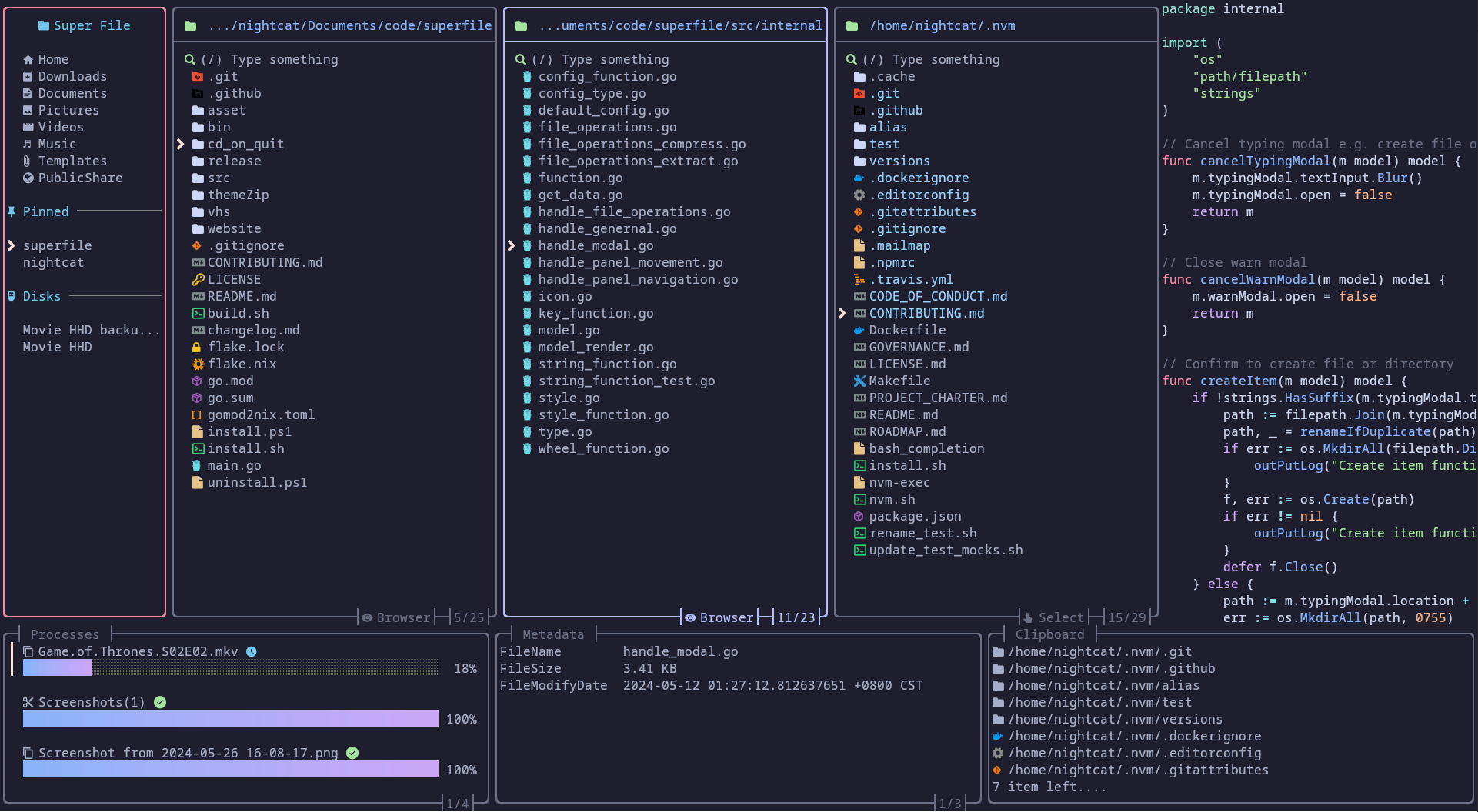
ตัวอย่างการใช้งาน
| ดำเนินการทั่วไป |
|---|
 |
สารบัญ
- ตัวอย่างการใช้งาน
- สารบัญ
- การติดตั้ง- [macOS และ Linux](#macos-and-linux) - [Windows](#windows) - [Powershell](#powershell) - [Winget](#winget) - [Scoop](#scoop) - [วิธีการติดตั้งเพิ่มเติม](#more-installation-methods)
- การสร้าง- [สำหรับ macOS/Linux](#for-macoslinux) - [สำหรับ Windows](#for-windows)
- เริ่มต้น superfile
- ระบบที่รองรับ
- บทช่วยสอน
- ปลั๊กอิน
- ธีม
- ปุ่มลัด
- ข้อควรทราบ
- การแก้ไขปัญหา
- การถอนการติดตั้ง- [macOS และ Linux](#macos-and-linux-1) - [Windows](#windows)
- การมีส่วนร่วม
- ขอขอบคุณ- [การสนับสนุน](#support) - [ผู้ดูแลหลัก](#core-maintainer) - [ผู้ร่วมให้ข้อมูล](#contributors) - [สนับสนุนโดย](#powered-by) - [ประวัติ Star](#star-history)
- ༼ つ ◕_◕ ༽つ โปรดแชร์
การติดตั้ง
macOS และ Linux
bash -c "$(curl -sLo- https://superfile.dev/install.sh)"หากคุณต้องการตรวจสอบสคริปต์ โปรดดูที่ : install.sh
Windows
Powershell
powershell -ExecutionPolicy Bypass -Command "Invoke-Expression ((New-Object System.Net.WebClient).DownloadString('https://superfile.dev/install.ps1'))"หากคุณต้องการตรวจสอบสคริปต์ โปรดดูที่ : install.ps1
Winget
winget install --id yorukot.superfileScoop
scoop install superfileวิธีการติดตั้งเพิ่มเติม
การสร้าง
คุณสามารถสร้างซอร์สโค้ดได้ด้วยตัวเองโดยทำตามขั้นตอนเหล่านี้:
ข้อกำหนด
ขั้นตอนการสร้าง
โคลน repository นี้โดยใช้คำสั่งต่อไปนี้:
git clone https://github.com/yorukot/superfile.git --depth=1เข้าสู่ไดเรกทอรีที่ดาวน์โหลดมา:
cd superfileสำหรับ macOS/Linux
รันไฟล์ build.sh:
./build.shเพิ่มไฟล์ไบนารีลงใน $PATH ของคุณ เช่น ใน /usr/local/bin:
sudo mv ./bin/spf /usr/local/binสำหรับ Windows
go build -o bin/spf.exeแก้ไข System Environment Variables และเพิ่มไดเรกทอรี bin ของ superfile repo ลงใน PATH ของคุณ
เริ่มต้น superfile
spfระบบที่รองรับ
- [x] Linux
- [x] macOS
- [x] Windows (ยังไม่รองรับเต็มรูปแบบ)
บทช่วยสอน
หลังจากที่คุณติดตั้ง superfile แล้ว คุณสามารถไปที่ นี่ เพื่อทำความเข้าใจวิธีการใช้งาน superfile โดยสังเขป!
ปลั๊กอิน
ธีม
ปุ่มลัด
หากคุณเป็นผู้ใช้ vim/nvim โปรดเปลี่ยนการตั้งค่าปุ่มลัดเริ่มต้นของคุณเป็นเวอร์ชัน vim!
ข้อควรทราบ
เรามีฟังก์ชันอัปเดตอัตโนมัติ ซึ่งจะดึงเวอร์ชันล่าสุดของ superfile จาก GitHub (หากการตรวจสอบเวอร์ชันครั้งล่าสุดน้อยกว่า 24 ชั่วโมง) และแสดงข้อความแจ้งเตือนผู้ใช้ หากมีเวอร์ชันใหม่กว่าพร้อมใช้งาน
คุณสามารถปิดฟังก์ชันนี้ได้โดยตั้งค่า auto_check_update เป็น false ในการตั้งค่า superfile คลิกเพื่อดู wiki การตั้งค่า
การแก้ไขปัญหา
คลิกเพื่อดูวิธีแก้ไขปัญหาทั่วไป
การถอนการติดตั้ง
macOS และ Linux
bash -c "$(curl -sLo- https://superfile.dev/uninstall.sh)"หากคุณต้องการตรวจสอบสคริปต์ โปรดดูที่ : uninstall.sh
Windows
หากต้องการถอนการติดตั้ง superfile บน Windows ให้ใช้สคริปต์ powershell นี้
powershell -ExecutionPolicy Bypass -Command "Invoke-Expression ((New-Object System.Net.WebClient).DownloadString('https://superfile.dev/uninstall.ps1'))"การมีส่วนร่วม
หากคุณต้องการมีส่วนร่วม โปรดปฏิบัติตาม คู่มือการมีส่วนร่วม
ขอขอบคุณ
การสนับสนุน
- การกด Star บน GitHub repository ของฉันจะเป็นกำลังใจที่ดี 🌟
- คุณสามารถซื้อกาแฟให้ฉันได้ 💖
ผู้ดูแลหลัก
เรายินดีต้อนรับทุกคนที่ต้องการเป็นผู้ดูแลหลัก โปรดติดต่อเราได้เลย!
- @yorukot - ผู้เขียนและผู้ดูแลดั้งเดิม
- @lazysegtree - ผู้ดูแลหลัก
ผู้ร่วมให้ข้อมูล
ขอขอบคุณผู้ร่วมให้ข้อมูลทุกท่านที่ทำให้โปรเจกต์นี้ดียิ่งขึ้น!
สนับสนุนโดย

ขอขอบคุณทีม JetBrains ที่มอบไลเซนส์โอเพนซอร์สเพื่อสนับสนุนการบำรุงรักษา superfile
ประวัติ Star
ขอขอบคุณสำหรับทุก Star! Star ของคุณคือแรงจูงใจให้ฉันอัปเดตต่อไป!
༼ つ ◕_◕ ༽つ โปรดแชร์
เอกสารโปรเจกต์
อ่านเอกสารต้นฉบับ
README วิธีติดตั้ง วิธีใช้งาน และข้อกำหนดจาก repository ต้นฉบับ

Demo
| Perform common operations |
|---|
|
Content
- Demo
- Content
- Installation- [macOS and Linux](#macos-and-linux) - [Windows](#windows) - [Powershell](#powershell) - [Winget](#winget) - [Scoop](#scoop) - [More installation methods](#more-installation-methods)
- Build- [For macOS/Linux](#for-macoslinux) - [For Windows](#for-windows)
- Start superfile
- Supported Systems
- Tutorial
- Plugins
- Themes
- Hotkeys
- Notes
- Troubleshooting
- Uninstalling- [macOS and Linux](#macos-and-linux-1) - [Windows](#windows)
- Contributing
- Thanks- [Support](#support) - [Core maintainer](#core-maintainer) - [Contributors](#contributors) - [Powered by](#powered-by) - [Star History](#star-history)
- ༼ つ ◕_◕ ༽つ Please share.
Installation
macOS and Linux
bash -c "$(curl -sLo- https://superfile.dev/install.sh)"If you want to inspect the script, see : install.sh
Windows
Powershell
powershell -ExecutionPolicy Bypass -Command "Invoke-Expression ((New-Object System.Net.WebClient).DownloadString('https://superfile.dev/install.ps1'))"If you want to inspect the script, see : install.ps1
Winget
winget install --id yorukot.superfileScoop
scoop install superfileMore installation methods
Click me to check on how to install
Build
You can build the source code yourself by using these steps:
Requirements
Build Steps
Clone this repository using the following command:
git clone https://github.com/yorukot/superfile.git --depth=1Enter the downloaded directory:
cd superfileFor macOS/Linux
Run the build.sh file:
./build.shAdd the binary file to your $PATH, e.g., in /usr/local/bin:
sudo mv ./bin/spf /usr/local/binFor Windows
go build -o bin/spf.exeEdit System Environment Variables and add superfile repo's bin directory to your PATH
Start superfile
spfSupported Systems
- [x] Linux
- [x] macOS
- [x] Windows (Not fully supported yet)
Tutorial
After you install superfile, you can go here to briefly understand how to use superfile!
Plugins
Themes
Hotkeys
If you are vim/nvim user please change your default hotkeys config to vim version!
Click me to see the hotkey wiki
Notes
We have an auto update functionality, that fetches superfile's latest released version from github (if last timestamp of last version check was less than 24 hours) and prints a prompt to user, if there is a newer version available.
You can turn this off, by setting auto_check_update to false in superfile config. Click me to see the config wiki
Troubleshooting
Click me to see common problem fix
Uninstalling
macOS and Linux
bash -c "$(curl -sLo- https://superfile.dev/uninstall.sh)"If you want to inspect the script, see : uninstall.sh
Windows
To uninstall superfile on Windows, use this powershell script.
powershell -ExecutionPolicy Bypass -Command "Invoke-Expression ((New-Object System.Net.WebClient).DownloadString('https://superfile.dev/uninstall.ps1'))"Contributing
If you want to contribute please follow the contribution guide
Thanks
Support
- a Star on my GitHub repository would be nice 🌟
- You can buy a coffee for me 💖
Core maintainer
We welcome anyone who wants to become a core maintainer. Feel free to reach out!
- @yorukot - Original author and maintainer
- @lazysegtree - Core maintainer
Contributors
Thanks to all the contributors for making this project even greater!
Powered by
Thanks to JetBrains team for providing open-source licenses to support the maintenance of superfile.
Star History
THANKS FOR All OF YOUR STARS! Your stars are my motivation to keep updating!