
GetNotes Tools
usebruno/bruno
Tool นี้คืออะไร
Bruno เป็นไคลเอนต์ API แบบโอเพนซอร์สที่ทันสมัย ซึ่งช่วยให้นักพัฒนาสามารถสำรวจและทดสอบ API ได้อย่างมีประสิทธิภาพ โดยเก็บคอลเลกชัน API ในรูปแบบไฟล์ข้อความธรรมดาบนระบบไฟล์ ทำให้สามารถทำงานร่วมกันผ่าน Git และเน้นความเป็นส่วนตัวของข้อมูลด้วยการทำงานแบบออฟไลน์เท่านั้น
ข้อมูลโปรเจกต์
ดาว
46.9K
Forks
2.9K
License
MIT
อัปเดต GitHub ล่าสุด
11 ก.ย. 2569
เพิ่มใน GetNotes
14 ก.ค. 2569
Repository
usebruno/bruno
รูปแบบ
เหมาะกับงาน
เหมาะกับอาชีพ
Ecosystem
JavaScript
แปลและเรียบเรียงโดย AI
เนื้อหาฉบับภาษาไทย
ใช้อ่านเพื่อทำความเข้าใจเบื้องต้น โปรดตรวจสอบรายละเอียดสำคัญกับเอกสารต้นฉบับด้านล่าง
Bruno - IDE โอเพนซอร์สสำหรับการสำรวจและทดสอบ API






ภาษาอังกฤษ | Українська | Русский | Türkçe | Deutsch | Français | Português (BR) | 한국어 | বাংলা | Español | Italiano | Română | Polski | 简体中文 | 正體中文 | العربية | 日本語 | ქართული | Nederlands | فارسی
Bruno เป็นไคลเอนต์ API ที่ใหม่และล้ำสมัย มีเป้าหมายที่จะปฏิวัติสถานะปัจจุบันที่ Postman และเครื่องมือที่คล้ายกันเป็นตัวแทน
Bruno จัดเก็บคอลเลกชันของคุณโดยตรงในโฟลเดอร์บนระบบไฟล์ของคุณ เราใช้ภาษา Markup แบบข้อความธรรมดาที่เรียกว่า Bru เพื่อบันทึกข้อมูลเกี่ยวกับคำขอ API
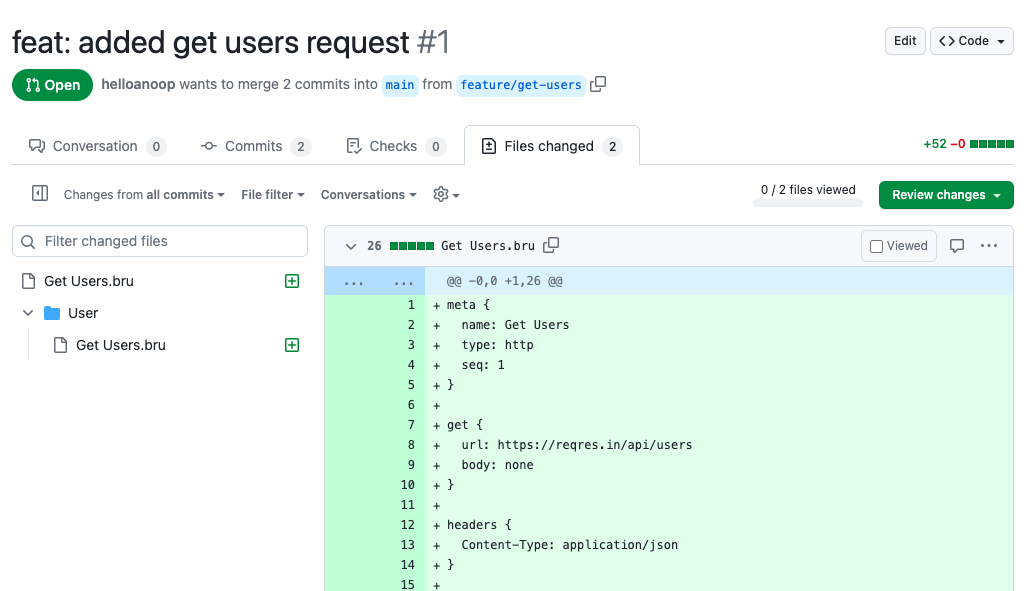
คุณสามารถใช้ Git หรือระบบควบคุมเวอร์ชันใดก็ได้ที่คุณเลือกเพื่อทำงานร่วมกันบนคอลเลกชัน API ของคุณ
Bruno ทำงานแบบออฟไลน์เท่านั้น ไม่มีแผนที่จะเพิ่มการซิงค์บนคลาวด์ให้กับ Bruno เลย เราให้ความสำคัญกับความเป็นส่วนตัวของข้อมูลของคุณและเชื่อว่าข้อมูลควรอยู่บนอุปกรณ์ของคุณ อ่านวิสัยทัศน์ระยะยาวของเรา ที่นี่
📢 ชมการบรรยายล่าสุดของเราที่งาน India FOSS 3.0 Conference ที่นี่
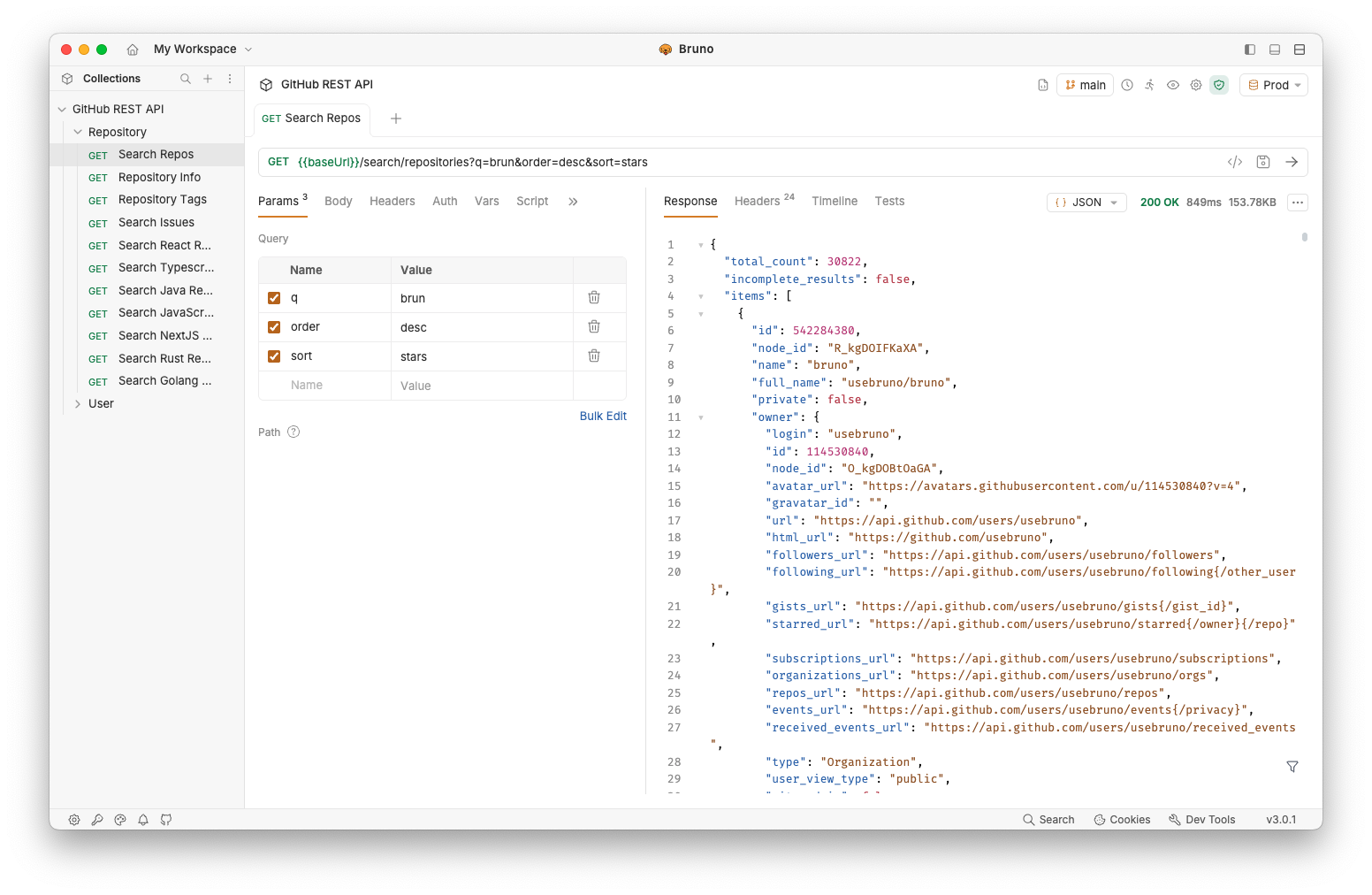
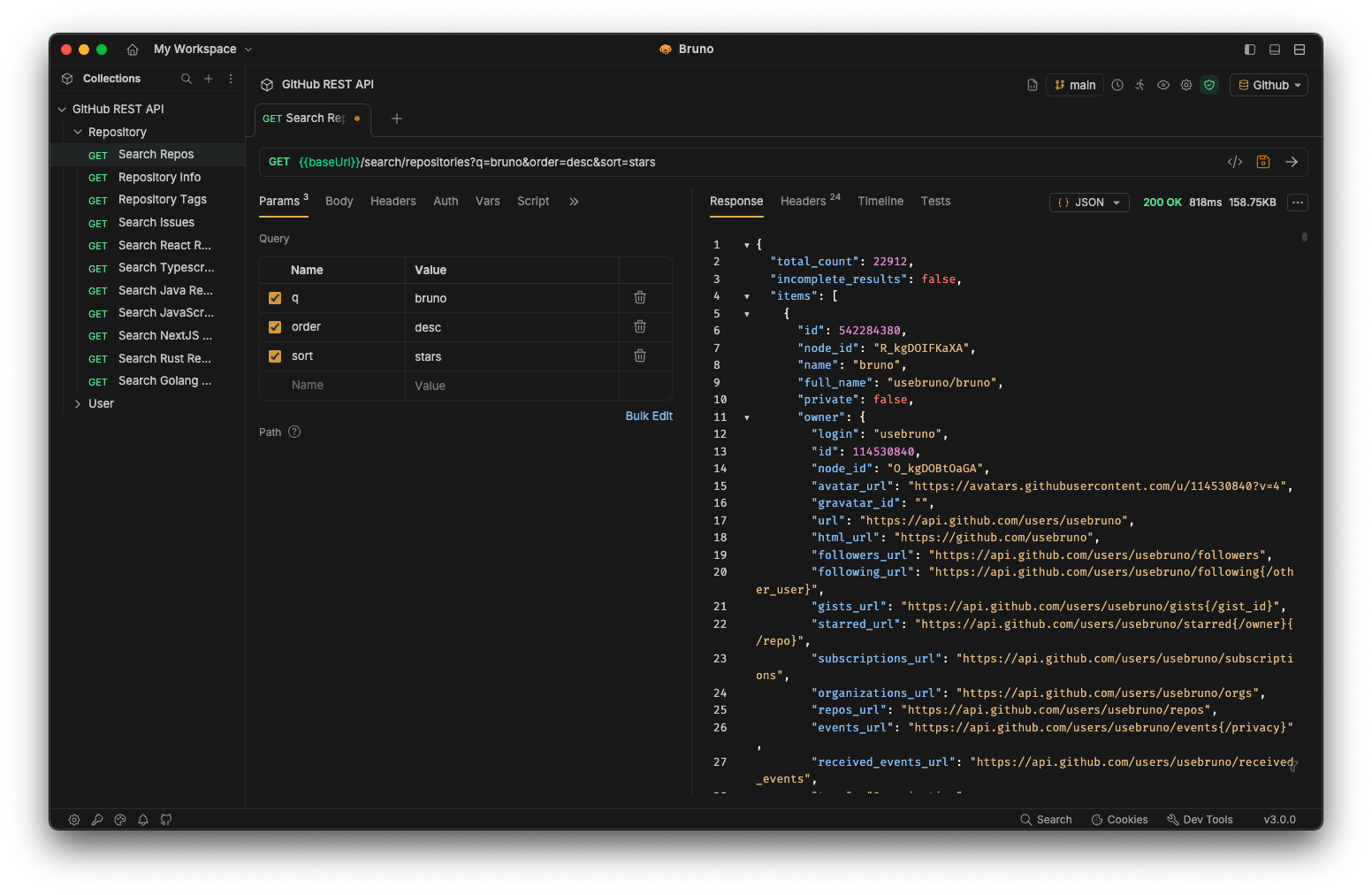
เวอร์ชันเชิงพาณิชย์ ✨
ฟีเจอร์ส่วนใหญ่ของเราเป็นแบบฟรีและโอเพนซอร์ส เรามุ่งมั่นที่จะสร้างสมดุลที่กลมกลืนระหว่าง หลักการโอเพนซอร์สและความยั่งยืน
คุณสามารถสำรวจ เวอร์ชันที่ต้องชำระเงิน ของเราเพื่อดูว่ามีฟีเจอร์เพิ่มเติมที่คุณหรือทีมของคุณอาจเห็นว่ามีประโยชน์หรือไม่!
สารบัญ
- การติดตั้ง
- Bruno CLI
- เรียกใช้ด้วย Docker
- คุณสมบัติ- [ทำงานได้หลายแพลตฟอร์ม 🖥️](#run-across-multiple-platforms-%EF%B8%8F) - [ทำงานร่วมกันผ่าน Git 👩💻🧑💻](#collaborate-via-git-%E2%80%8D%E2%80%8D)
- ลิงก์สำคัญ 📌
- ผลงาน 🎥
- แบ่งปันคำรับรอง 📣
- การเผยแพร่ไปยัง Package Manager ใหม่
- ติดต่อเรา 🌐
- เครื่องหมายการค้า
- ร่วมสนับสนุน 👩💻🧑💻
- ผู้เขียน
- ใบอนุญาต 📄
การติดตั้ง
Bruno มีให้ดาวน์โหลดเป็นไบนารี บนเว็บไซต์ของเรา สำหรับ Mac, Windows และ Linux
คุณยังสามารถติดตั้ง Bruno ผ่าน package manager เช่น Homebrew, Chocolatey, Scoop, Snap, Flatpak และ Apt ได้อีกด้วย
# On Mac via Homebrew
brew install bruno

# On Windows via Chocolatey
choco install bruno

# On Windows via Scoop
scoop bucket add extras
scoop install bruno

# On Windows via winget
winget install Bruno.Bruno

# On Linux via Snap
snap install bruno

# On Linux via Flatpak
flatpak install com.usebruno.Bruno

# On Arch Linux via AUR
yay -S bruno

# On Linux via Apt
sudo mkdir -p /etc/apt/keyrings
sudo apt update && sudo apt install gpg curl
curl -fsSL "https://keyserver.ubuntu.com/pks/lookup?op=get&search=0x9FA6017ECABE0266" \
  | gpg --dearmor \
  | sudo tee /etc/apt/keyrings/bruno.gpg > /dev/null
sudo chmod 644 /etc/apt/keyrings/bruno.gpg
echo "deb [arch=amd64 signed-by=/etc/apt/keyrings/bruno.gpg] http://debian.usebruno.com/ bruno stable" \
  | sudo tee /etc/apt/sources.list.d/bruno.list
sudo apt update && sudo apt install bruno
Bruno CLI
Bruno CLI ช่วยให้คุณสามารถเรียกใช้คอลเลกชัน API ของคุณจากบรรทัดคำสั่ง ซึ่งเหมาะสำหรับการทดสอบอัตโนมัติและ CI/CD pipelines ติดตั้งจาก npm โดยใช้ package manager ที่คุณเลือก:
npm install -g @usebruno/cliไปยังไดเรกทอรีที่มีคอลเลกชันของคุณแล้วเรียกใช้:
# Run every request in the collection
bru run

# Run a single request
bru run request.bru

# Run a folder against a specific environment
bru run folder --env Local
สำหรับข้อมูลอ้างอิงคำสั่งฉบับเต็ม โปรดดู เอกสารประกอบ Bruno CLI
เรียกใช้ด้วย Docker
อิมเมจ Docker อย่างเป็นทางการสำหรับ Bruno CLI ช่วยให้คุณสามารถเรียกใช้คอลเลกชัน API ใน CI/CD pipelines และในเครื่องได้โดยไม่ต้องติดตั้ง Node.js หรือ npm บนโฮสต์ อิมเมจจะถูกเผยแพร่ไปยังทั้ง Docker Hub และ GitHub Container Registry ในทุกการเผยแพร่ CLI โดยมีเวอร์ชัน alpine และ debian สำหรับ linux/amd64 และ linux/arm64
# Pull from Docker Hub
docker pull usebruno/cli:latest

# Or pull from the GitHub Container Registry
docker pull ghcr.io/usebruno/cli:latest

# Run a collection by mounting the current directory
docker run -v $(pwd):/bruno usebruno/cli run
สำหรับเวอร์ชันต่างๆ, ตารางแท็ก, ไฟล์สภาพแวดล้อม และตัวอย่าง CI (GitHub Actions, GitLab CI, Jenkins) โปรดดู เอกสารประกอบ Bruno CLI Docker ฉบับเต็ม
คุณสมบัติ
ทำงานได้หลายแพลตฟอร์ม 🖥️
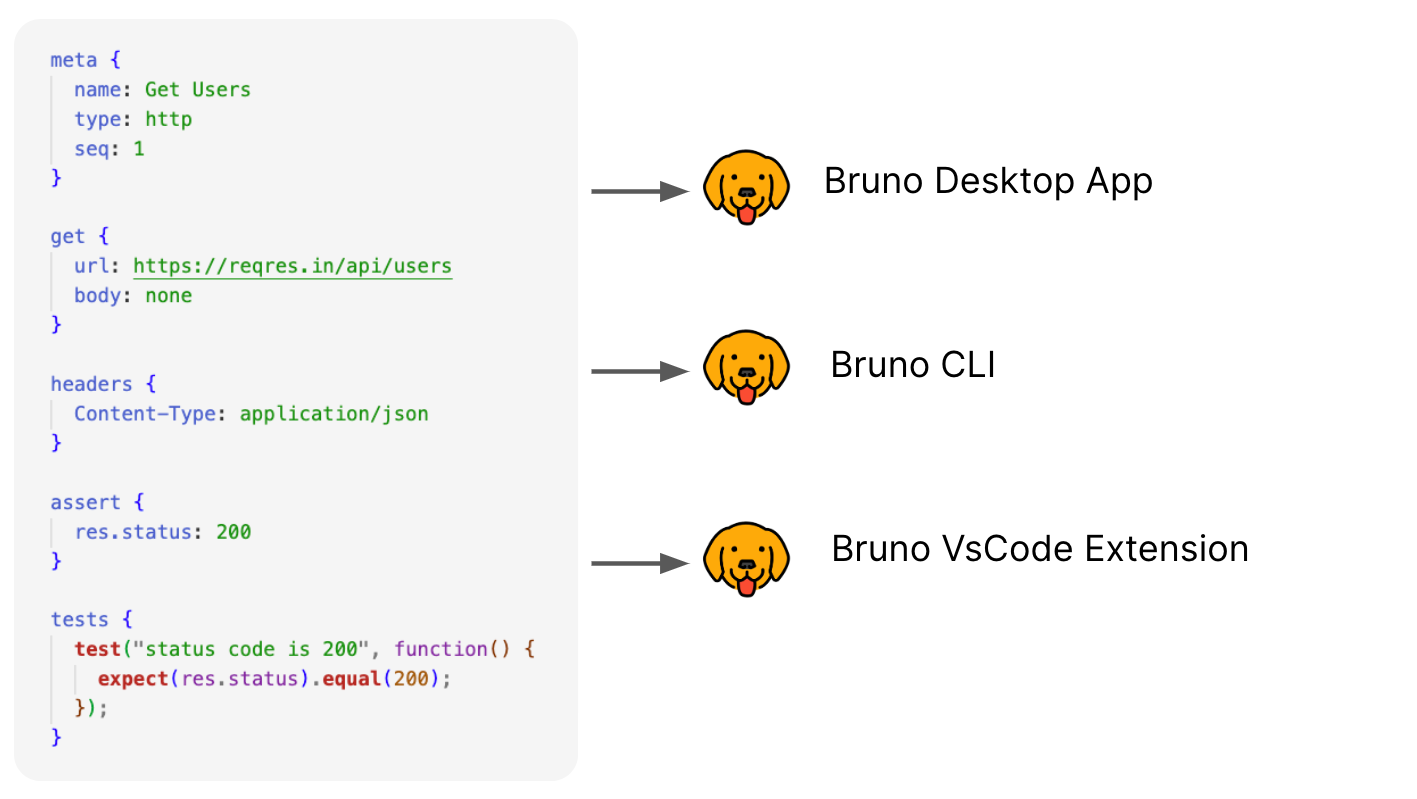
ทำงานร่วมกันผ่าน Git 👩💻🧑💻
หรือระบบควบคุมเวอร์ชันใดก็ได้ที่คุณเลือก
ลิงก์สำคัญ 📌
ผลงาน 🎥
แบ่งปันคำรับรอง 📣
หาก Bruno ได้ช่วยคุณในการทำงานและทีมของคุณ โปรดอย่าลืมแบ่งปัน คำรับรองของคุณในการสนทนาบน GitHub ของเรา
การเผยแพร่ไปยัง Package Manager ใหม่
โปรดดู ที่นี่ สำหรับข้อมูลเพิ่มเติม
ติดต่อเรา 🌐
𝕏 (Twitter) เว็บไซต์ Discord LinkedIn
เครื่องหมายการค้า
ชื่อ
Bruno เป็นเครื่องหมายการค้าที่ถือครองโดย Anoop M D
โลโก้
โลโก้มาจาก OpenMoji ใบอนุญาต: CC BY-SA 4.0
ร่วมสนับสนุน 👩💻🧑💻
เรายินดีที่คุณต้องการปรับปรุง Bruno โปรดดู คู่มือการร่วมสนับสนุน
แม้ว่าคุณจะไม่สามารถร่วมสนับสนุนผ่านโค้ดได้ โปรดอย่าลังเลที่จะแจ้งข้อบกพร่องและคำขอคุณสมบัติที่จำเป็นต้องนำไปใช้เพื่อแก้ไขกรณีการใช้งานของคุณ
ผู้เขียน
License 📄
เอกสารโปรเจกต์
อ่านเอกสารต้นฉบับ
README วิธีติดตั้ง วิธีใช้งาน และข้อกำหนดจาก repository ต้นฉบับ

Bruno - Opensource IDE for exploring and testing APIs.
English | Українська | Русский | Türkçe | Deutsch | Français | Português (BR) | 한국어 | বাংলা | Español | Italiano | Română | Polski | 简体中文 | 正體中文 | العربية | 日本語 | ქართული | Nederlands | فارسی
Bruno is a new and innovative API client, aimed at revolutionizing the status quo represented by Postman and similar tools out there.
Bruno stores your collections directly in a folder on your filesystem. We use a plain text markup language, Bru, to save information about API requests.
You can use Git or any version control of your choice to collaborate over your API collections.
Bruno is offline-only. There are no plans to add cloud-sync to Bruno, ever. We value your data privacy and believe it should stay on your device. Read our long-term vision here
📢 Watch our recent talk at India FOSS 3.0 Conference here
Commercial Versions ✨
Majority of our features are free and open source. We strive to strike a harmonious balance between open-source principles and sustainability
You can explore our paid versions to see if there are additional features that you or your team may find useful!
Table of Contents
- Installation
- Bruno CLI
- Run with Docker
- Features- [Run across multiple platforms 🖥️](#run-across-multiple-platforms-%EF%B8%8F) - [Collaborate via Git 👩💻🧑💻](#collaborate-via-git-%E2%80%8D%E2%80%8D)
- Important Links 📌
- Showcase 🎥
- Share Testimonials 📣
- Publishing to New Package Managers
- Stay in touch 🌐
- Trademark
- Contribute 👩💻🧑💻
- Authors
- License 📄
Installation
Bruno is available as binary download on our website for Mac, Windows and Linux.
You can also install Bruno via package managers like Homebrew, Chocolatey, Scoop, Snap, Flatpak and Apt.
# On Mac via Homebrew
brew install bruno

# On Windows via Chocolatey
choco install bruno

# On Windows via Scoop
scoop bucket add extras
scoop install bruno

# On Windows via winget
winget install Bruno.Bruno

# On Linux via Snap
snap install bruno

# On Linux via Flatpak
flatpak install com.usebruno.Bruno

# On Arch Linux via AUR
yay -S bruno

# On Linux via Apt
sudo mkdir -p /etc/apt/keyrings
sudo apt update && sudo apt install gpg curl
curl -fsSL "https://keyserver.ubuntu.com/pks/lookup?op=get&search=0x9FA6017ECABE0266" \
  | gpg --dearmor \
  | sudo tee /etc/apt/keyrings/bruno.gpg > /dev/null
sudo chmod 644 /etc/apt/keyrings/bruno.gpg
echo "deb [arch=amd64 signed-by=/etc/apt/keyrings/bruno.gpg] http://debian.usebruno.com/ bruno stable" \
  | sudo tee /etc/apt/sources.list.d/bruno.list
sudo apt update && sudo apt install bruno
Bruno CLI
The Bruno CLI lets you run your API collections from the command line, which is ideal for automated testing and CI/CD pipelines. Install it from npm using the package manager of your choice:
npm install -g @usebruno/cliNavigate to the directory containing your collection and run it:
# Run every request in the collection
bru run

# Run a single request
bru run request.bru

# Run a folder against a specific environment
bru run folder --env Local
For the full command reference, see the Bruno CLI documentation.
Run with Docker
Official Docker images for the Bruno CLI let you run API collections in CI/CD pipelines and locally without installing Node.js or npm on the host. Images are published to both Docker Hub and the GitHub Container Registry on every CLI release, with alpine and debian variants for linux/amd64 and linux/arm64.
# Pull from Docker Hub
docker pull usebruno/cli:latest

# Or pull from the GitHub Container Registry
docker pull ghcr.io/usebruno/cli:latest

# Run a collection by mounting the current directory
docker run -v $(pwd):/bruno usebruno/cli run
For variants, tag matrix, environment files, and CI examples (GitHub Actions, GitLab CI, Jenkins), see the full Bruno CLI Docker documentation.
Features
Run across multiple platforms 🖥️
Collaborate via Git 👩💻🧑💻
Or any version control system of your choice
Important Links 📌
Showcase 🎥
Share Testimonials 📣
If Bruno has helped you at work and your teams, please don't forget to share your testimonials on our GitHub discussion
Publishing to New Package Managers
Please see here for more information.
Stay in touch 🌐
𝕏 (Twitter) Website Discord LinkedIn
Trademark
Name
Bruno is a trademark held by Anoop M D
Logo
The logo is sourced from OpenMoji. License: CC BY-SA 4.0
Contribute 👩💻🧑💻
I am happy that you are looking to improve bruno. Please check out the contributing guide
Even if you are not able to make contributions via code, please don't hesitate to file bugs and feature requests that needs to be implemented to solve your use case.