
GetNotes Tools
tt-a1i/archify
Tool นี้คืออะไร
Archify เป็นเครื่องมือ Node.js ที่ช่วยให้นักพัฒนาและสถาปนิกระบบสามารถแปลงโค้ดเบสหรือคำอธิบายระบบให้เป็นแผนผังระบบแบบโต้ตอบที่สวยงามได้โดยตรงในแชท เหมาะสำหรับผู้ที่ต้องการสร้าง, ตรวจสอบ, และนำเสนอการเปลี่ยนแปลงสถาปัตยกรรมระบบได้อย่างมีประสิทธิภาพและเข้าใจง่าย
ข้อมูลโปรเจกต์
ดาว
64.3K
Forks
4.3K
License
MIT
อัปเดต GitHub ล่าสุด
16 ก.ย. 2569
เพิ่มใน GetNotes
16 ก.ย. 2569
Repository
tt-a1i/archify
เหมาะกับงาน
เหมาะกับอาชีพ
Ecosystem
JavaScript
แปลและเรียบเรียงโดย AI
เนื้อหาฉบับภาษาไทย
ใช้อ่านเพื่อทำความเข้าใจเบื้องต้น โปรดตรวจสอบรายละเอียดสำคัญกับเอกสารต้นฉบับด้านล่าง
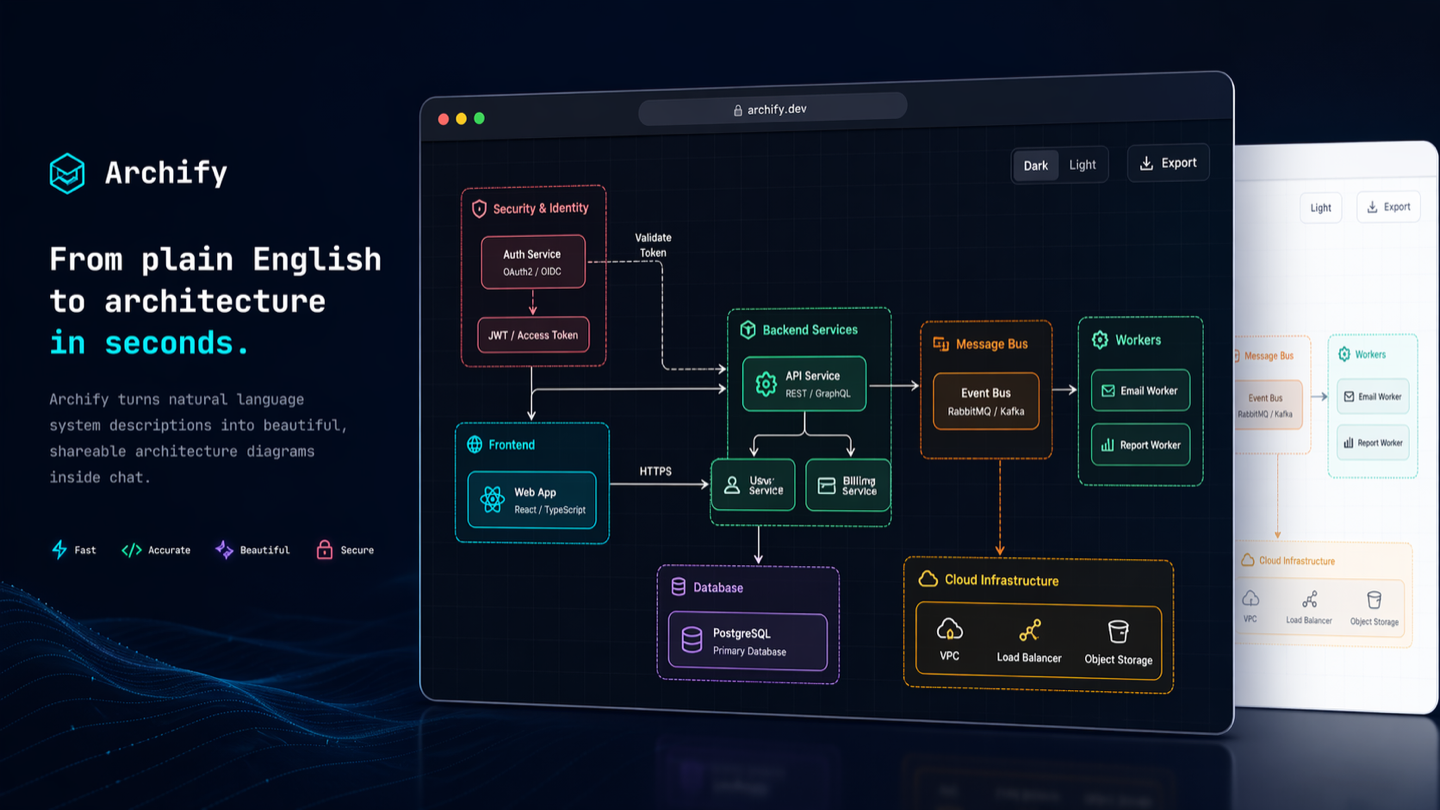
Archify
เปลี่ยนโค้ดเบสหรือคำอธิบายระบบให้เป็นแผนผังระบบแบบโต้ตอบที่สวยงาม — โดยตรงในแชท
Archify คือระบบเรนเดอร์และตรวจสอบ Node.js สำหรับ Cursor, Claude Code, Codex CLI และ OpenCode เอเจนต์จะสร้าง Typed JSON IR; Archify จะคอมไพล์เป็น HTML/SVG อย่างแม่นยำ
- เปิดและนำเสนอ — แผนภาพห้าประเภท, สี่พรีเซ็ต, ธีมมืด/สว่าง, แบรนด์มาร์กในตัว และการเคลื่อนไหวที่จำกัด
- ตรวจสอบการเปลี่ยนแปลงสถาปัตยกรรมก่อนการรวมโค้ด — เปรียบเทียบสแนปช็อตที่ผ่านการตรวจสอบสองรายการเป็น Before / Delta / After พร้อมข้อเท็จจริงที่เพิ่ม, ลบ, เปลี่ยนแปลง, ย้าย และเปลี่ยนเส้นทางอย่างแม่นยำ
- ทุกการโต้ตอบยังคงมีพื้นฐาน — ค้นหาโหนด, เลือกเปิดแหล่งที่มาที่ผ่านการตรวจสอบการแก้ไข, ติดตามการเข้าถึงที่เขียนขึ้นต้นน้ำ/ปลายน้ำและเส้นทางที่แน่นอน, เปรียบเทียบบทบาท และเล่นเรื่องราวที่แนะนำโดยไม่ต้องสร้างโทโพโลยี
- ไฟล์เดียว, พร้อมเชื่อถือและแบ่งปัน — Typed JSON IR และการตรวจสอบที่แม่นยำจะสร้าง HTML ที่รวมอยู่ในตัวเอง พร้อมด้วย PNG, SVG, WebM และการ์ดแชร์ขนาด 1200×630



เวอร์ชันการพัฒนาปัจจุบัน: v2.17.0-dev.1 ดู Changelog
หน้าโปรเจกต์ · คู่มือสถานการณ์ · Proof Lab
npx skills add tt-a1i/archify -gใช้ Cursor อยู่ใช่ไหม? เปิด agent-aware quick start สำหรับคำสั่ง global และ project ที่แน่นอน
ไม่จำเป็นต้องมี Repository: อธิบายระบบในแชทของเอเจนต์ใดก็ได้
❤️ ผู้สนับสนุน


ต้องการสนับสนุน Archify ใช่ไหม? ติดต่อเราทางอีเมล
ดู Archify ในการทำงาน
สิ่งเหล่านี้คืออาร์ติแฟกต์ Archify ที่สร้างขึ้น ไม่ใช่ภาพจำลองผลิตภัณฑ์ คลิกที่เฟรมเพื่อเปิดสถานะที่ใช้งานได้จริงและสามารถแชร์ได้
| เรื่องราวแนะนำ | การตรวจสอบเส้นทาง | เลนส์เชิงความหมาย |
|---|---|---|
 |  |  |
| เล่นบทที่กำหนดชื่อบทเดียว | ตรวจสอบเส้นทางที่เขียนขึ้นโดยตรงที่สั้นที่สุด | เปรียบเทียบการรับส่งข้อมูลจริงระหว่างบทบาทเชิงความหมาย |
Proof Lab มีสถานการณ์ที่ตรวจสอบแล้วทั้ง 11 รายการ, แหล่งที่มา JSON, มุมมองที่กำหนดชื่อ และใบเสร็จการตรวจสอบ
Repository จริง, แมปจากแหล่งที่มา

Archify ได้ติดตาม mco-org/mco ที่ 9f1a1cf และสร้างแผนที่ที่ตรวจสอบแล้วนี้ เปิดเลย ↗ · ติดตามการเข้าถึง ↗ · แหล่งที่มาแบบ Typed
ตัวอย่าง
แผนภาพเดียวกัน, สองธีม, คลิกเดียวเพื่อสลับ:
| มืด | สว่าง |
|---|---|
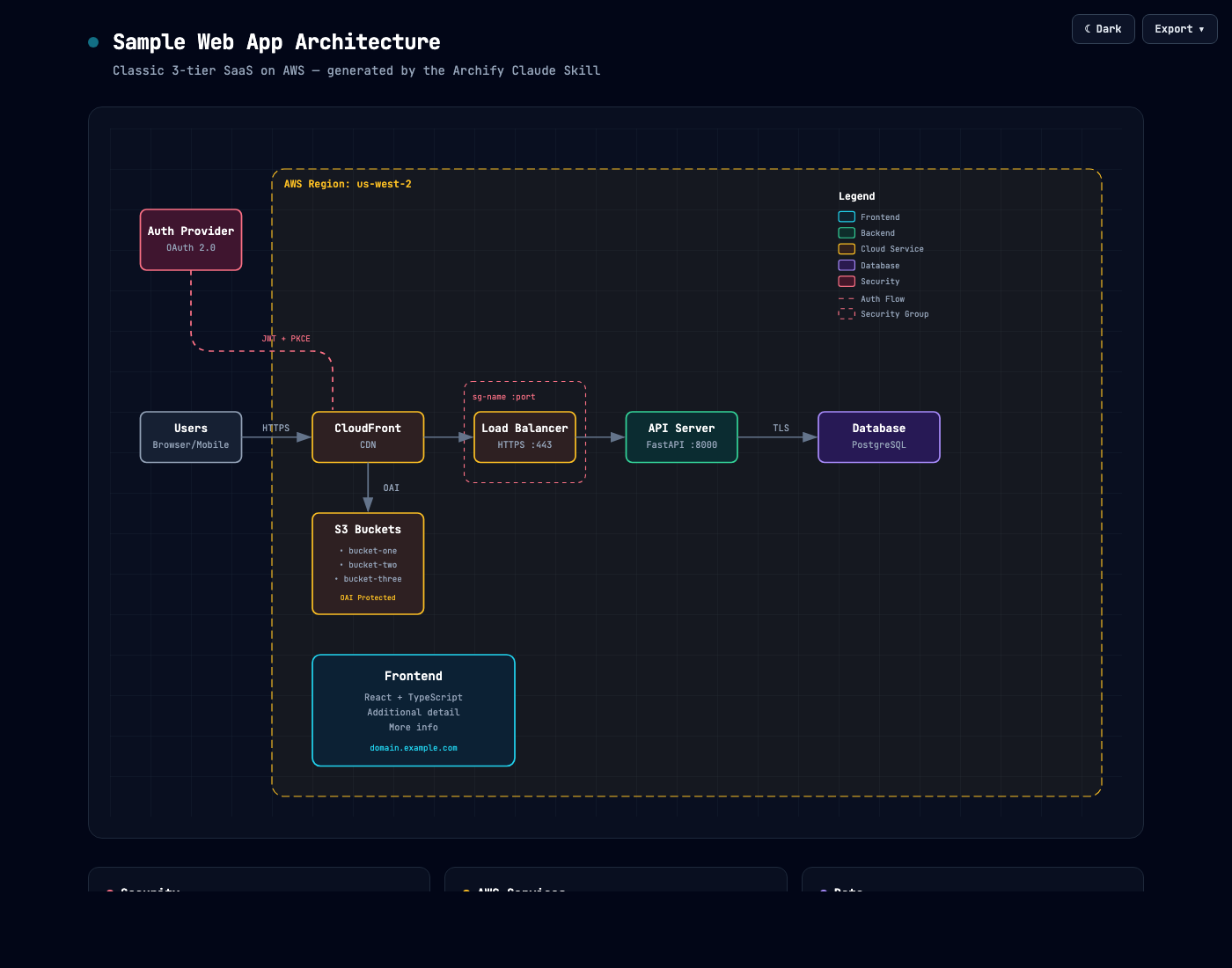 | 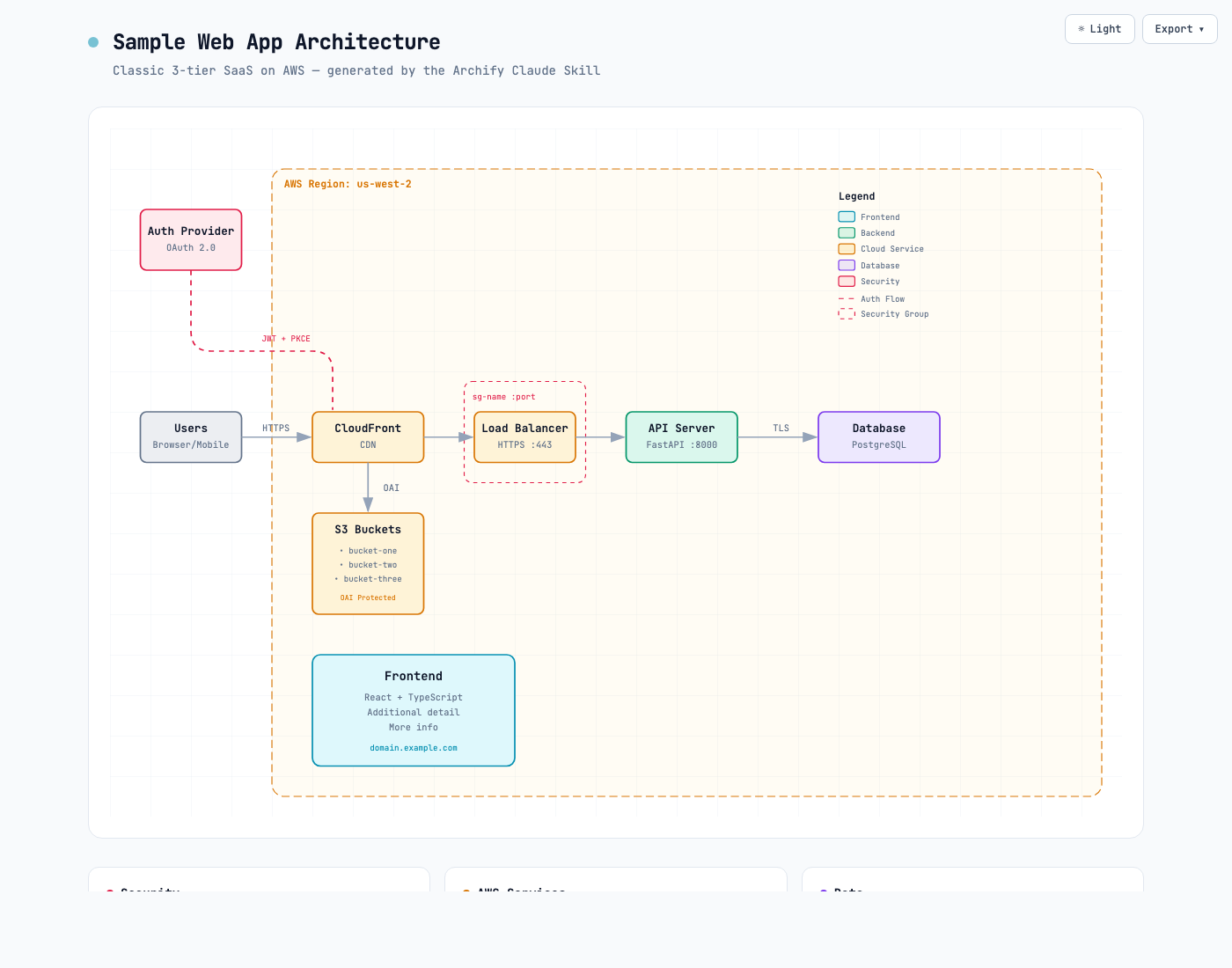 |
เมนู Export จะคัดลอก PNG ไปยังคลิปบอร์ดและดาวน์โหลดรูปแบบคงที่หรือแบบเคลื่อนไหว:
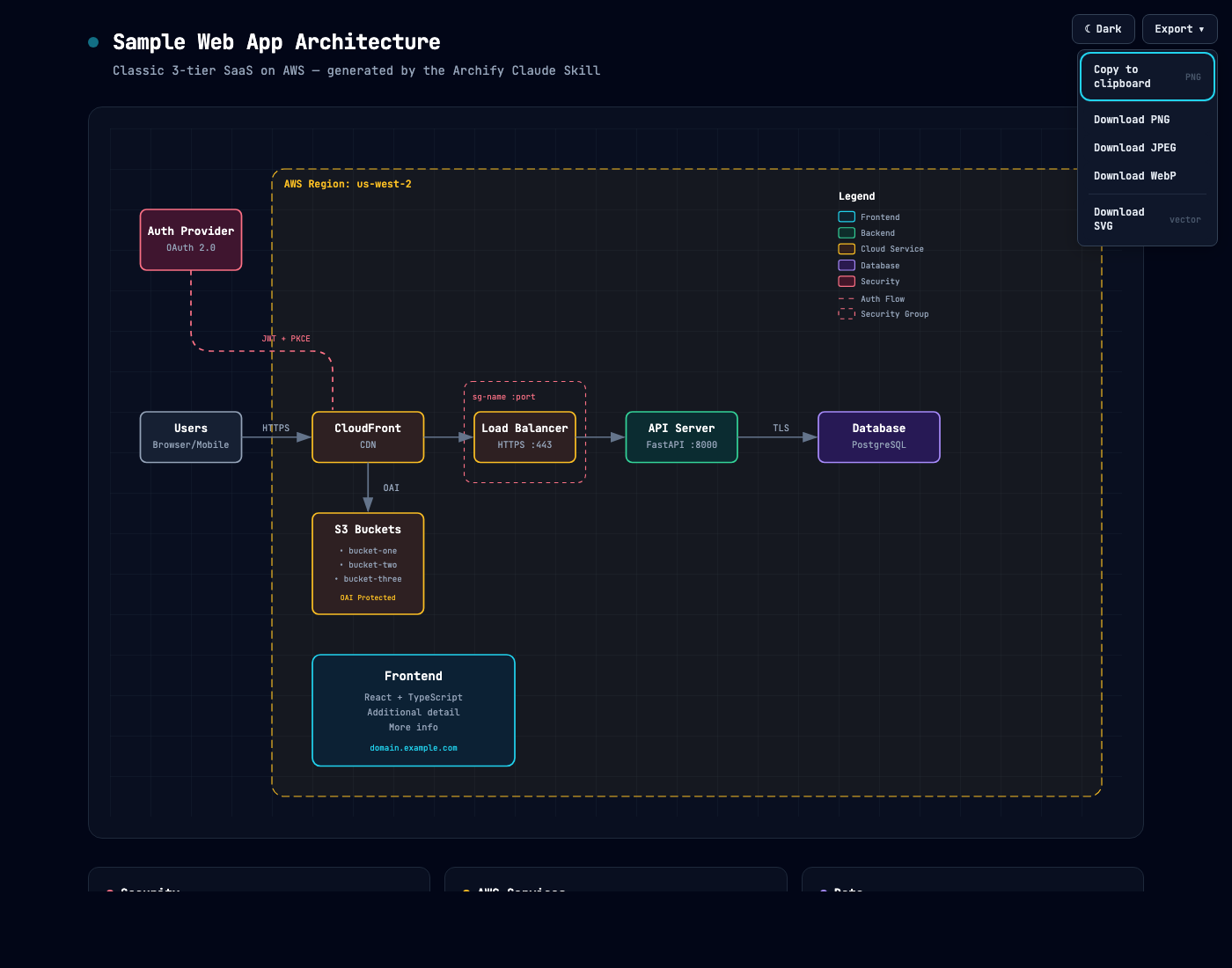
ใช้ Copy Share Card เมื่อคุณต้องการภาพขนาด 1200×630 ที่เป็นมาตรฐานสำหรับ README, การเผยแพร่ หรือโพสต์โซเชียล
หลังจากติดตามเส้นทางแล้ว Export → Route Share Card จะดาวน์โหลดเส้นทางที่เขียนขึ้นนั้นเป็น PNG ขนาด 1200×630 โดยยังคงแผนภาพทั้งหมดไว้เพื่อเป็นบริบท
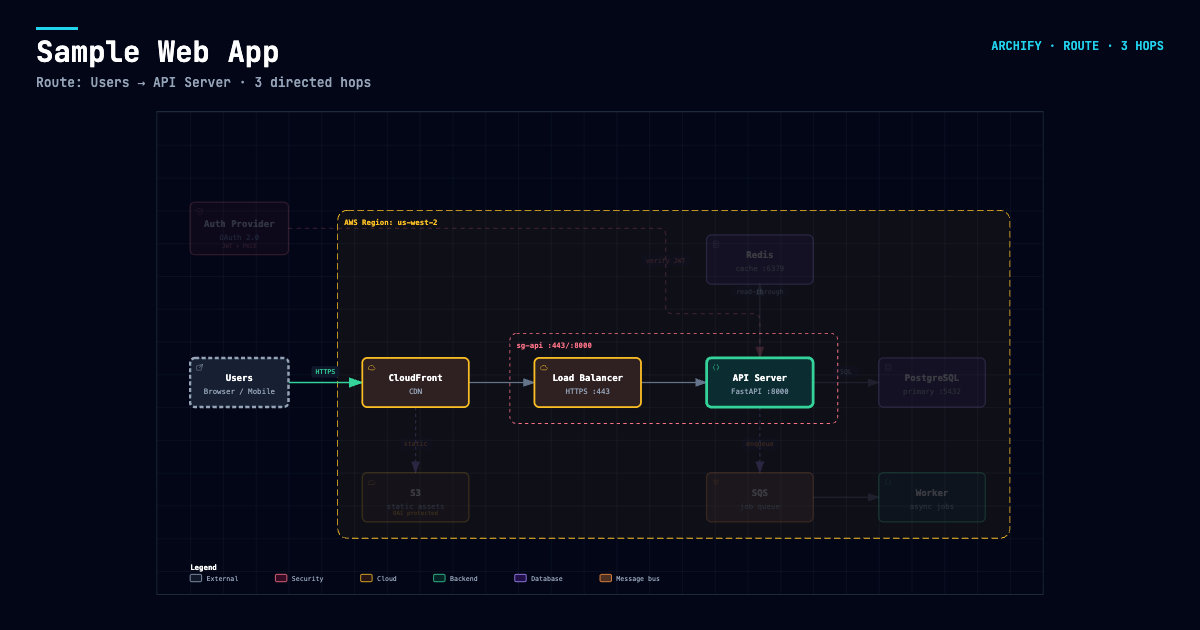
หลังจากติดตามการเข้าถึง Upstream หรือ Downstream ที่เขียนขึ้นแล้ว Export → Reach Share Card จะจับภาพการอ่านที่แน่นอนนั้นโดยไม่กล่าวอ้างถึงผลกระทบในขณะรันไทม์

เปิด examples/web-app.html ในเครื่องเพื่อลองใช้โปรแกรมดูแบบสมบูรณ์
เริ่มต้นอย่างรวดเร็ว
1. ติดตั้ง
npx skills add tt-a1i/archify -gสำหรับการติดตั้ง Cursor แบบชัดเจนและไม่โต้ตอบ:
npx -y skills add tt-a1i/archify --skill archify --agent cursor --global --copy --yesหากต้องการลองโดยไม่ต้องติดตั้ง:
npx skills use tt-a1i/archify@archify --agent codexDSH community opt-in: dsh plugin --profile web add @tt-a1i/archify-dsh@0.1.0
ตัวสลับเอเจนต์ ครอบคลุม cursor, codex, claude-code และ opencode สำหรับการติดตั้ง ZIP ด้วยตนเองของ Raven ให้แตกไฟล์ archify.zip ไปยัง ~/.raven/workspace/skills; ซึ่งจะสร้าง ~/.raven/workspace/skills/archify Raven ไม่ใช่เป้าหมายของตัวสลับ
Archify อาจ GET manifest ที่เสถียรแบบตายตัวเพียงเพื่อแสดงการแจ้งเตือนเสริม; จะไม่มีการดาวน์โหลดหรือติดตั้งการอัปเดต การตรวจสอบที่สำเร็จจะรอประมาณ 72 ชั่วโมง (±20%); การใช้งานที่ใช้งานอยู่จะลองใหม่เมื่อเกิดข้อผิดพลาดหลังจาก 6 ชั่วโมง จากนั้น 24 ชั่วโมง เซิร์ฟเวอร์จะเห็นข้อมูลเมตา HTTP ปกติ (IP และเวลา) แต่ไม่ได้รับเวอร์ชัน, เอเจนต์, ข้อมูลโปรเจกต์, พรอมต์, ID บัญชี/อุปกรณ์ หรือ ETag คุณเป็นผู้ตัดสินใจว่าจะอัปเดตเมื่อใดและอย่างไร ตั้งค่า ARCHIFY_UPDATE_CHECK_DISABLED=1 เพื่อปิดการเชื่อมต่อเครือข่ายและการเขียนสถานะการแจ้งเตือน
2. เริ่มต้นจากคำอธิบาย — ไม่ต้องมี Repository
Use Archify to draw: Browser -> API -> Redis cache -> PostgreSQL fallback.สำหรับหลักฐานจาก Source ให้เปิด repository และถาม:
Analyze this repository, then use archify to create a high-level runtime architecture diagram.
Show 8–12 core components, one primary path, external dependencies, and trust boundaries.
Put supporting detail in cards instead of adding more edges.
3. ปรับแต่งในแชท
ดำเนินการต่อด้วยคำขอที่เน้นเฉพาะเจาะจง เช่น add Redis, move auth to the left หรือ highlight the rollback path Archify จะเก็บ source ที่พิมพ์ไว้สำหรับการปรับปรุงแบบเจาะจง
เลือกไดอะแกรมที่เหมาะสม
| ประเภท | เหมาะที่สุดสำหรับ | สิ่งที่ควรรวมใน Prompt ของคุณ |
|---|---|---|
| Architecture | ส่วนประกอบ, บริการ, ที่เก็บข้อมูล, ขอบเขต | ขอบเขต, ส่วนประกอบหลัก, เส้นทางหลัก |
| Workflow | CI/CD, การอนุมัติ, การเรียกใช้เครื่องมือ, Runbook | ผู้เข้าร่วม, ลำดับ, สาขา, ข้อยกเว้น |
| Sequence | การเรียก API, การสำรองแคช, การยืนยันตัวตน, การติดตามแบบอะซิงโครนัส | ผู้เรียก, ผู้ถูกเรียก, การส่งคืน, เวลา |
| Data Flow | Pipeline, Lineage, PII, ผู้บริโภค | Source, การแปลง, ที่เก็บข้อมูล, ขอบเขต |
| Lifecycle | สถานะ, การลองใหม่, การรอ, ผลลัพธ์สุดท้าย | สถานะ, เหตุการณ์, เส้นทางการลองใหม่และการยกเลิก |
โปรไฟล์ deployment-ownership ที่เป็นทางเลือกของ Architecture จะล้มเหลวเมื่อเจ้าของที่ระบุ, ตำแหน่งภูมิภาค, ขอบเขตฐานข้อมูลส่วนตัว หรือการข้ามที่ระบุชื่อหายไป; มันไม่เคยเป็นโดยนัยและไม่ได้ตรวจสอบโครงสร้างพื้นฐานที่ใช้งานจริง ดู checked deployment proof
สำหรับการออกแบบหรือการตรวจสอบ PR, Architecture Delta จะเปรียบเทียบสแนปช็อต Before / Delta / After ที่ผ่านการตรวจสอบแล้วพร้อมใบเสร็จจากเครื่อง เลือกการเปลี่ยนแปลงที่ระบุหรือเล่น Review แบบจำกัด, ดูได้อย่างเดียว; มันไม่สรุปผลกระทบ, ความเสี่ยง หรือความปลอดภัยในการรวมโค้ด
node archify/bin/archify.mjs compare architecture base.json head.json architecture-delta.html --json

ไม่แน่ใจว่าอันไหนเหมาะสม? ใช้ interactive scenario guide หรือสอบถาม CLI ที่ไม่มี dependency:
node archify/bin/archify.mjs guide "Show an API request with Redis cache miss"
node archify/bin/archify.mjs guide "Map Kafka topics, consumer groups, replay, and DLQ" --json
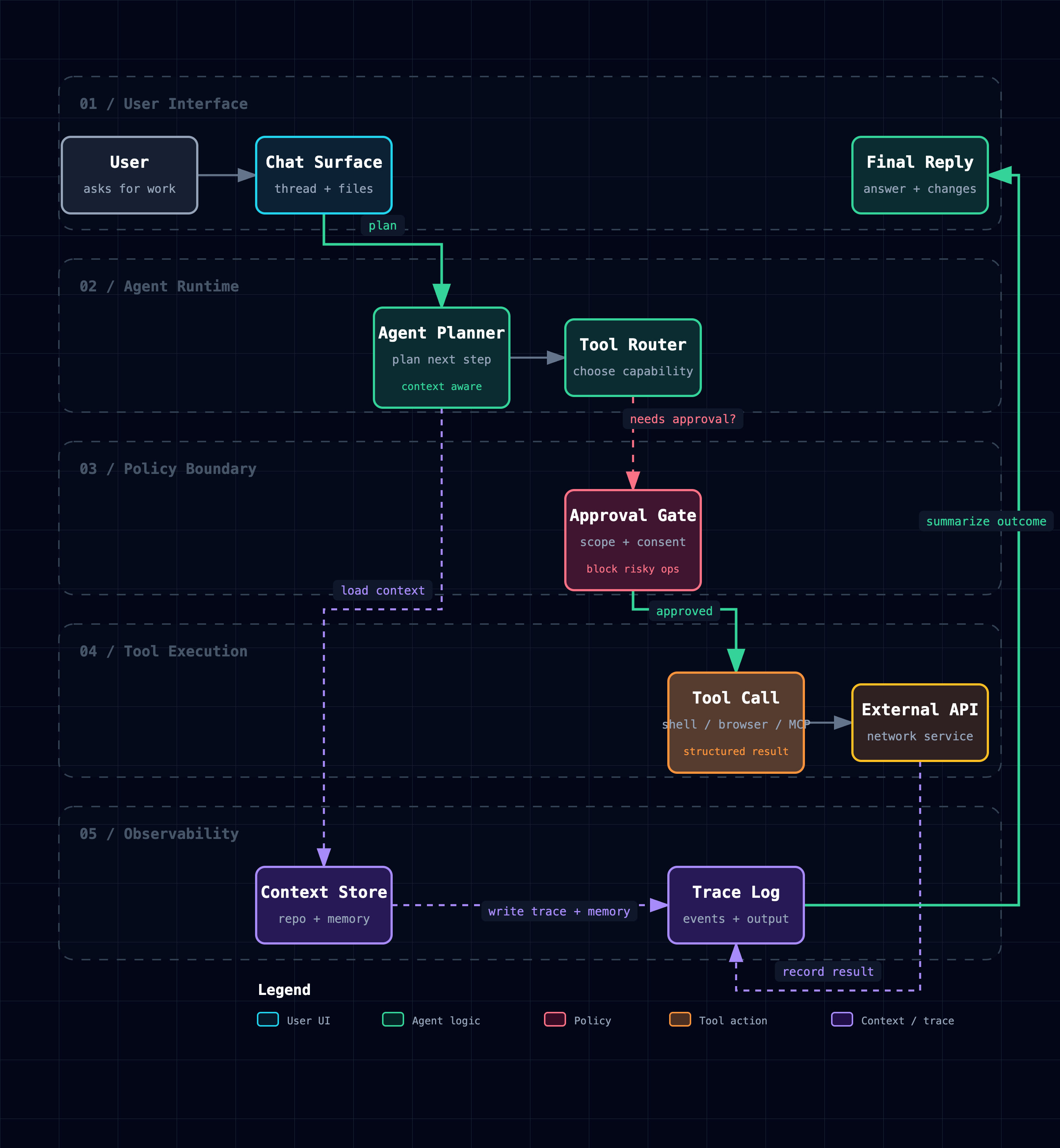
Workflow ทำให้เส้นทางปกติชัดเจนในแต่ละเลน:
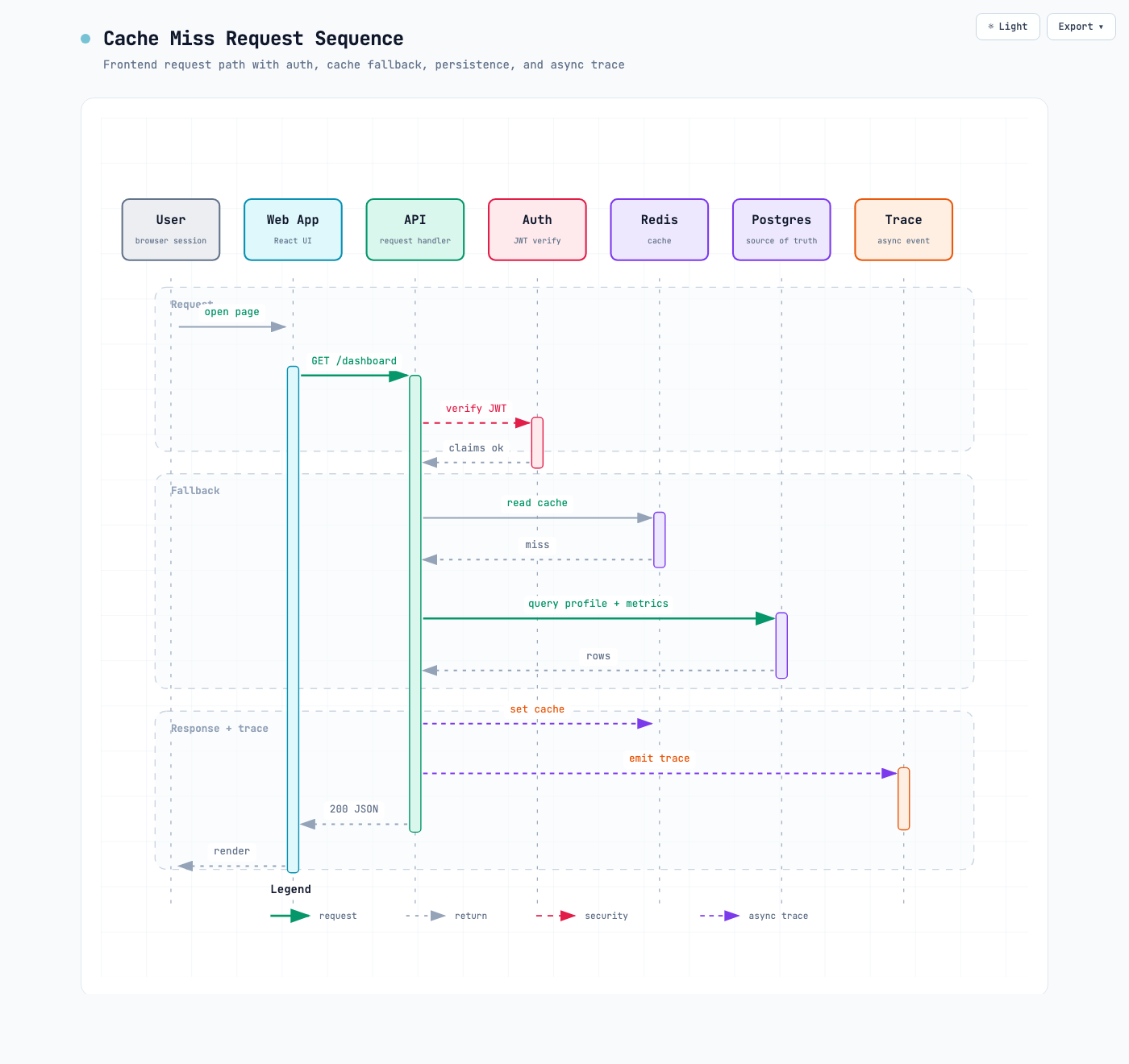
Sequence อธิบายการโต้ตอบหนึ่งครั้งในช่วงเวลาหนึ่ง:
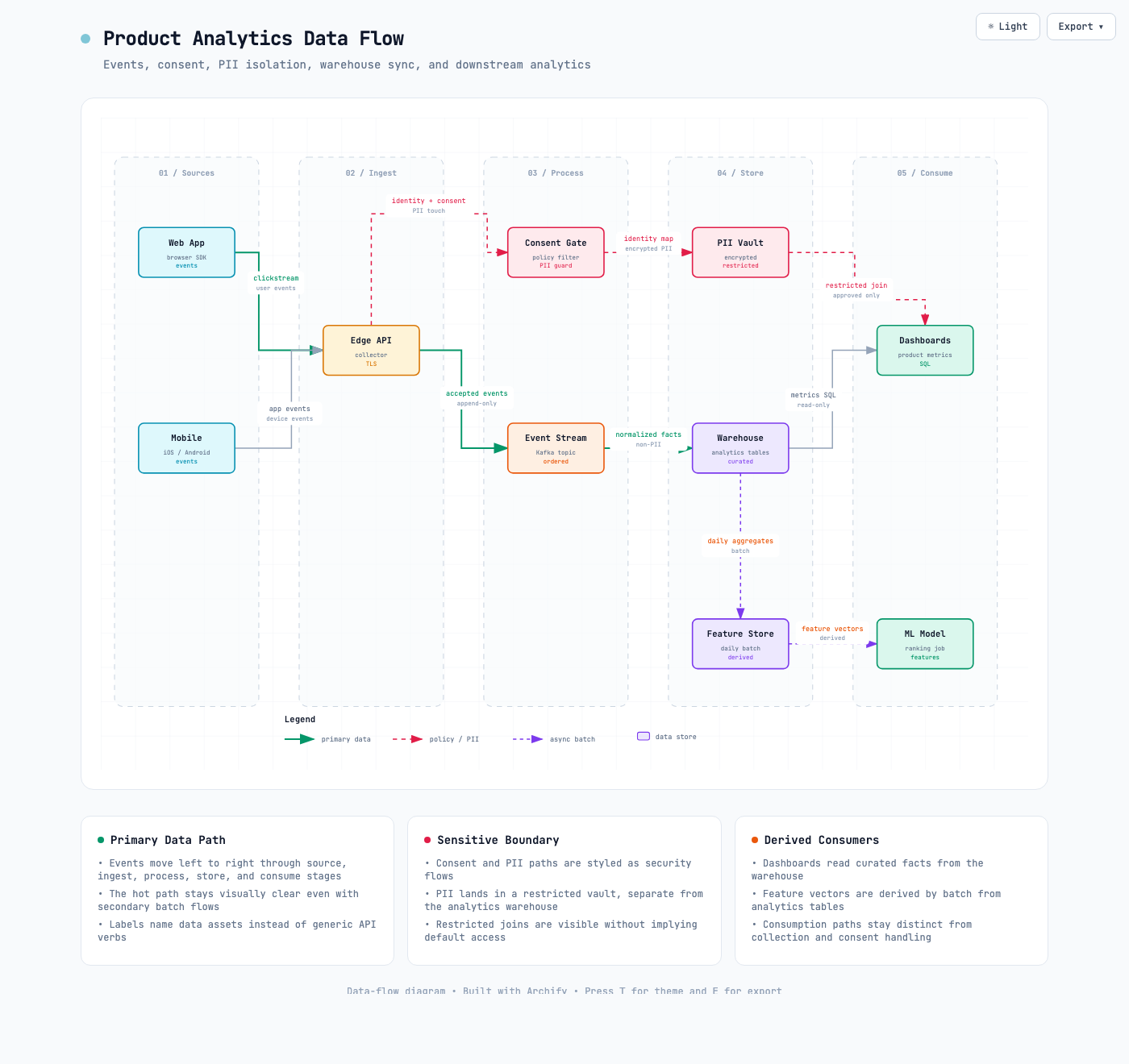
Data Flow ทำให้การเคลื่อนไหวและขอบเขตความละเอียดอ่อนชัดเจน:
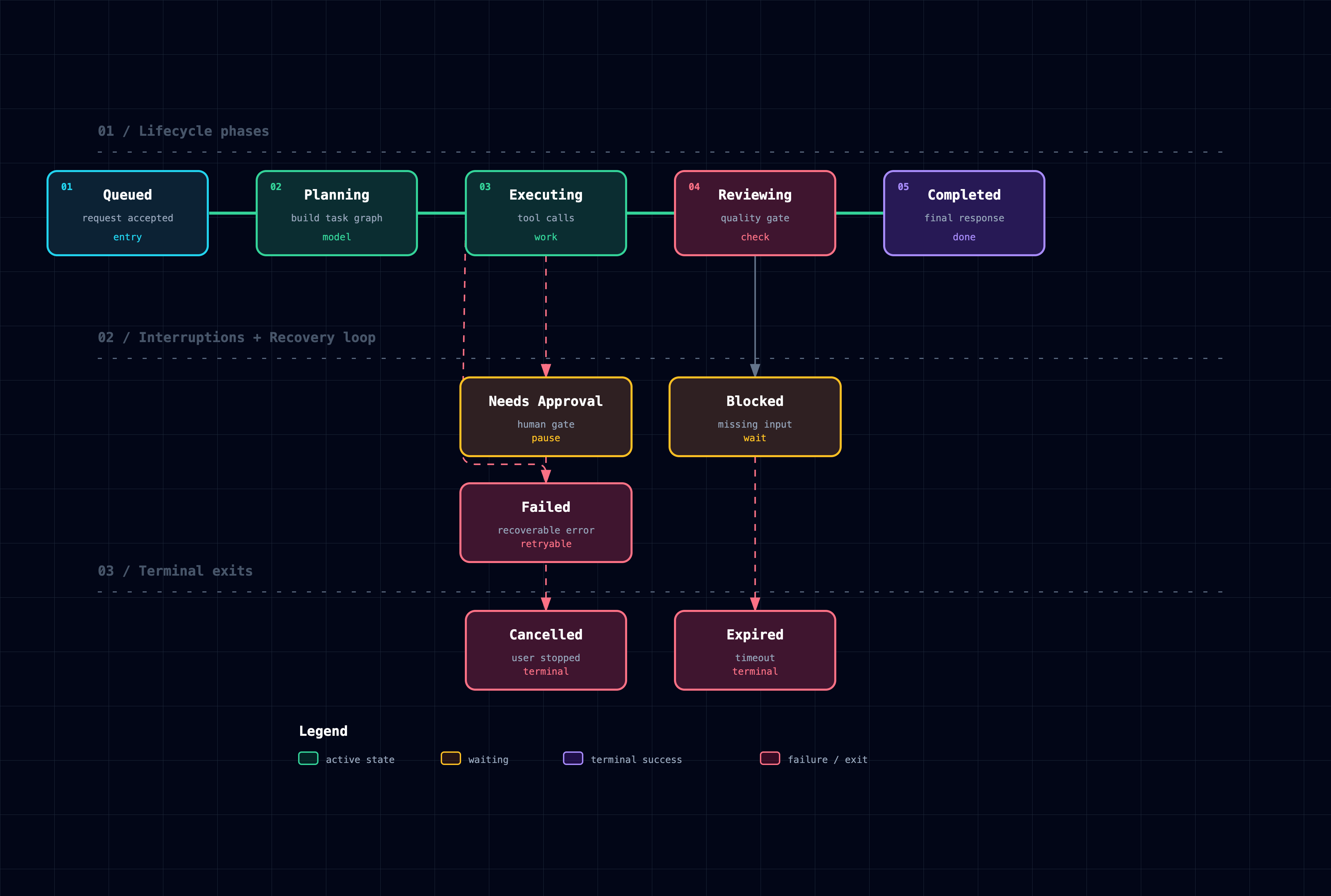
Lifecycle แยกความคืบหน้า, การรอ, การลองใหม่ และผลลัพธ์สุดท้าย:
ตัวอย่าง Architecture: web-app · Archify pipeline · grid placement · desktop agent
ทำไมต้อง Archify
- การตัดสินใจจัดวางแทนการจัดวางอัตโนมัติแบบทั่วไป — Agent จะเลือกโครงสร้างลำดับชั้น, ระยะห่าง, เส้นทาง และการเน้น; จุดสิ้นสุดอัตโนมัติที่ใช้ร่วมกันจะกระจายอย่างเป็นระเบียบแทนที่จะซ้อนลูกศรบนจุดกึ่งกลางเดียว
- Typed JSON IR — ทุกโหมดที่รองรับ Renderer มี Schema และ Source ที่สามารถสร้างซ้ำได้
- การตรวจสอบแบบ Atomic ก่อนการส่งมอบ — การตรวจสอบ Schema, การจัดวาง, HTML/SVG, เส้นทาง และการเคลียร์ Label-to-route ทั้งหมดต้องผ่านก่อนที่ Artifact ที่แสดงจะมาแทนที่ Output ที่ดีที่สุดที่ทราบล่าสุด
- ความล้มเหลวมาพร้อมกับใบเสร็จการซ่อมแซม —
validate --jsonและdeliver --jsonจะส่งคืนรหัสกฎที่เสถียร, Subject ที่แน่นอน, หลักฐานที่วัดได้ และการควบคุมการซ่อมแซมที่รองรับเท่านั้น แทนที่จะเป็น Node stack หรือการคาดเดาการลองใหม่ที่ไม่มีโครงสร้าง - Last-good live preview — ลูปเดสก์ท็อปที่เป็นทางเลือกจะเฝ้าดูไฟล์ JSON หนึ่งไฟล์, รีเฟรชเฉพาะหลังจากที่ Candidate ล่าสุดผ่านทุกเกต และแสดงไดอะแกรมที่ตรวจสอบแล้วก่อนหน้าเมื่อการบันทึกไม่สมบูรณ์หรือไม่ถูกต้อง
- การโต้ตอบที่แท้จริง — การโฟกัส, การเข้าถึง Upstream/Downstream, เส้นทางที่แน่นอน, การเปรียบเทียบบทบาท และเรื่องราวจะใช้ Node และความสัมพันธ์ที่ระบุไว้ซ้ำ แทนที่จะสร้าง Topology หรืออ้างสิทธิ์ผลกระทบใน Runtime
- หลักฐานจาก Source, เฉพาะเมื่อร้องขอ — Node Architecture ที่มีหลักฐานจะทำเครื่องหมายตัวเองว่า
SRC nและเปิดไฟล์และช่วงบรรทัดที่ตรวจสอบโดย Git ซึ่งปักหมุดไว้ที่ Commit สาธารณะหนึ่งรายการ; Artifact ทั่วไปจะยังคงไม่มี Source - พกพาได้โดยค่าเริ่มต้น — ผลลัพธ์คือไฟล์ HTML หนึ่งไฟล์; การส่งออกยังคงเป็นไดอะแกรมเต็มรูปแบบและไม่มีสถานะ Viewer ชั่วคราว
Archify ไม่ใช่โปรแกรมแก้ไขภาพวาดทั่วไปหรือธีม Mermaid มันเปลี่ยนความตั้งใจทางเทคนิคให้เป็น Artifact สำหรับการสื่อสาร
วิธีการทำงาน
| ขั้นตอน | สิ่งที่เกิดขึ้น |
|---|---|
| Generate | Agent สร้าง Typed JSON IR จากคำอธิบายของคุณ |
| Validate | ตัวตรวจสอบและกฎการจัดวางที่รวมมาจะตรวจสอบ Source; ความล้มเหลวจะระบุการซ่อมแซมภายในที่แน่นอนในรูปแบบ JSON ที่เครื่องอ่านได้ |
| Preview (ทางเลือก) | เซสชันเดสก์ท็อปแบบ Loopback เท่านั้นจะเฝ้าดู Source หนึ่งรายการและโหลดเฉพาะ Revision ที่ตรวจสอบแล้วใหม่; ความล้มเหลวจะเก็บ Artifact ที่ดีที่สุดล่าสุดไว้ |
| Deliver | Candidate ในไดเรกทอรีเดียวกันจะถูก Render และตรวจสอบ; เฉพาะ Artifact ที่ผ่านเท่านั้นที่จะแทนที่ Target แบบ Atomic จากนั้น --open ที่เป็นทางเลือกจะเปิดไฟล์นั้น |
| Iterate | Agent จะอัปเดต Source ในขณะที่โครงสร้างที่ไม่เกี่ยวข้องยังคงเสถียร |
คำสั่ง Repository ที่มีประโยชน์:
cd archify
node bin/archify.mjs doctor
node bin/archify.mjs demo /tmp/archify-demo
node bin/archify.mjs guide "Show CI/CD checks, approval, deploy, and rollback"
node bin/archify.mjs validate workflow examples/agent-tool-call.workflow.json --quality showcase --json
node bin/archify.mjs preview workflow examples/agent-tool-call.workflow.json /tmp/workflow.html --quality showcase
node bin/archify.mjs deliver workflow examples/agent-tool-call.workflow.json /tmp/workflow.html --quality showcase --open --json
preview เป็นโหมดเดสก์ท็อปแบบ Loopback เท่านั้นที่ชัดเจน: มันจะเฝ้าดูไฟล์ JSON หนึ่งไฟล์บนพอร์ต 127.0.0.1 แบบสุ่ม, เก็บ Output ที่ตรวจสอบแล้วล่าสุดไว้แม้จะเกิดความล้มเหลว, หยุดด้วย Ctrl-C และไม่เพิ่ม Runtime ของ HTML ที่สร้างขึ้น ใช้ --no-open สำหรับการทดสอบหรือการเปิด URL ด้วยตนเอง
deliver --open เป็นการส่งมอบแบบครั้งเดียวหลังจาก Commit ที่เลือกใช้ได้ ความล้มเหลวของ Opener จะรักษาความสำเร็จไว้; JSON ยังคงอยู่บน stdout และเส้นทางสำรองแบบ Absolute จะไปที่ stderr
เมื่อเกิดความล้มเหลว, validate --json และ deliver --json จะส่งออกออบเจกต์ JSON หนึ่งรายการ ใช้เฉพาะ supportedFixes ของ Subject ใน diagnostics[] ภายในสองรอบการแก้ไขของ Skill; การตรวจสอบด้วยสายตายังคงแยกต่างหาก
การตั้งค่า:
{
  "meta": {
    "locale": "en",
    "animation": "trace",
    "visual_preset": "signal-flow"
  }
}
meta.locale=en|zh-CN จะแปลชื่อหน้า, Legend, สถานะ/ข้อผิดพลาด, a11y, HTML/SVG lang — ไม่ใช่เนื้อหาที่ระบุไว้ มิฉะนั้นให้ละเว้น; รักษาสำเนาภาษาที่ร้องขอ; เปิดเผยภาษาอังกฤษสำรอง Static จะละเว้น animation; classic เป็นค่าเริ่มต้น
สำรวจและแบ่งปัน Output
| การกระทำ | การควบคุม |
|---|---|
| เปิด Diagram Guide ที่เป็นข้อเท็จจริง | ? |
| ค้นหาและโฟกัส Node เชิงความหมาย | / |
| ติดตามการเข้าถึง Upstream/Downstream ที่ระบุ | โฟกัส Node → Upstream / Downstream |
| ตรวจสอบเส้นทางที่มีทิศทางและตรวจสอบการเดินทาง | R หรือ PATH |
| เปรียบเทียบบทบาทเชิงความหมายหนึ่งหรือสองบทบาท | L หรือ LENS |
| เปิดเรดาร์ภาพรวมแบบสด | M หรือ MAP |
| เล่นเรื่องราวที่มีคำแนะนำ / เปลี่ยนบท | P / [ ] |
| เข้าสู่ Presentation Stage | F |
เลือกสไตล์ภาพ (S วนรอบ) / สลับธีม / เปิด Export | S / T / E |
| ซูมหรือรีเซ็ต | + / - / 0 |
ลิงก์ที่เสถียรสามารถกู้คืน #focus=<id>, #focus=<id>&reach=upstream|downstream, #relation=<id>, #route=<source>~<target>, #lens=<kind>~<kind> และ #view=<view-id> การเคลื่อนไหวที่ขับเคลื่อนโดยผู้อ่านมีจำกัด, เคารพ prefers-reduced-motion และไม่เคยเข้าสู่การส่งออก Canonical
สัญญาการสร้างและ Viewer ที่สมบูรณ์อยู่ใน archify/SKILL.md
ตัวเลือกการติดตั้ง
| พื้นผิว | ตำแหน่งหรือวิธีการติดตั้ง | ความสามารถ |
|---|---|---|
| Raven | ZIP ด้วยตนเองไปยัง ~/.raven/workspace/skills → ~/.raven/workspace/skills/archify | Renderer เต็มรูปแบบ + Workflow การตรวจสอบ |
| Claude Code | ~/.claude/skills/ หรือ .claude/skills/ | Renderer เต็มรูปแบบ + Workflow การตรวจสอบ |
| Codex CLI | ~/.agents/skills/ หรือ .agents/skills/ | Renderer เต็มรูปแบบ + Workflow การตรวจสอบ |
| opencode | ~/.config/opencode/skills/, .opencode/skills/ หรือ .agents/skills/ | Renderer เต็มรูปแบบ + Workflow การตรวจสอบ |
| Claude.ai | อัปโหลด archify.zip ภายใต้ Settings → Capabilities → Skills | ขึ้นอยู่กับการเข้าถึง Node.js ใน Sandbox |
| Project Knowledge | อัปโหลด archify.zip ไปยังโปรเจกต์ | การสำรอง Architecture ที่ขับเคลื่อนด้วย Prompt |
| DeepSeek Harness | เลือกใช้: dsh plugin --profile web add @tt-a1i/archify-dsh@0.1.0. เรียกใช้: Use the archify skill to map this repository's runtime architecture. ลบ: dsh plugin --profile web remove @tt-a1i/archify-dsh. | การรวมชุมชนสำหรับ Developer-preview @deepseek-ai/dsh@0.1.0-rc.6; Node ^22.19.0 || >=24.0.0; ไม่ใช่ผลิตภัณฑ์ DeepSeek อย่างเป็นทางการ ไม่มี Telemetry ไฟล์ Shell ต้องการเส้นทาง Workspace ที่แน่นอน ไม่ใช่ Web Produced Files รายละเอียด. |
การอ้างอิงและขอบเขต
- การอ้างอิง Schema · ทักษะ · ตัวอย่าง · ตำรา Agent
- บันทึกการเปลี่ยนแปลง
- แผนงาน
- ห้องปฏิบัติการพิสูจน์ที่สร้างขึ้น
การแยกวิเคราะห์ Mermaid อัตโนมัติ, การจัดวางอัตโนมัติแบบทั่วไป, การแชร์แบบโฮสต์ และการแก้ไขแบบ WYSIWYG อยู่นอกขอบเขตปัจจุบันโดยเจตนา
ใบอนุญาต
MIT — ใช้งาน แก้ไข และเผยแพร่ได้ฟรี
การมีส่วนร่วม
ยินดีรับ Issues, pull requests และไดอะแกรมจากโลกจริง เริ่มต้นด้วย คู่มือการมีส่วนร่วม, ใช้แบบฟอร์มรายงานข้อผิดพลาดที่สามารถทำซ้ำได้สำหรับความล้มเหลว หรือส่งไดอะแกรมที่ผ่านการตรวจสอบแล้วผ่าน แบบฟอร์มแสดงผลงานของชุมชน · LINUX DO
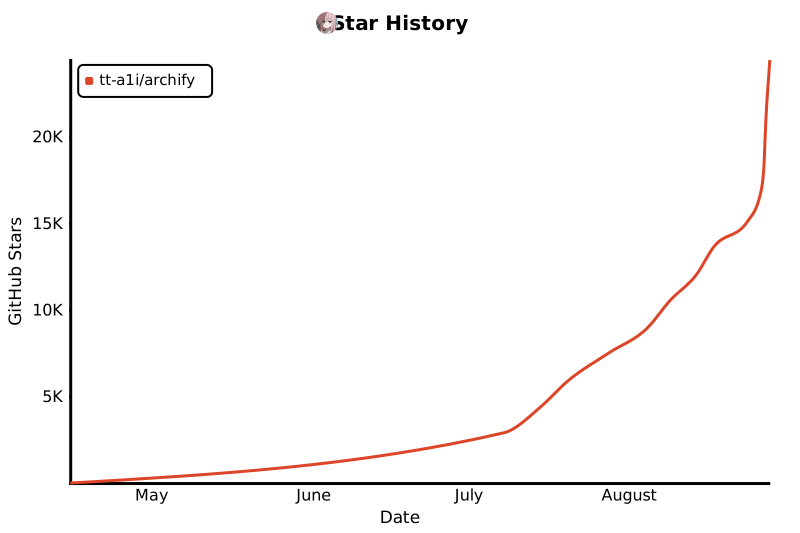
ประวัติ Star
เอกสารโปรเจกต์
อ่านเอกสารต้นฉบับ
README วิธีติดตั้ง วิธีใช้งาน และข้อกำหนดจาก repository ต้นฉบับ
Archify
Turn a codebase or system description into a polished, interactive system map — directly in chat.
Archify is a Node.js rendering and validation system for Cursor, Claude Code, Codex CLI, and OpenCode. Agents produce typed JSON IR; Archify deterministically compiles it into HTML/SVG.
- Open it and present — five diagram types, four presets, dark/light themes, built-in brand marks, and finite motion
- Review architecture changes before merge — compare two validated snapshots as Before / Delta / After, with exact added, removed, changed, moved, and rerouted facts
- Every interaction stays grounded — search nodes, optionally open revision-verified source, trace upstream/downstream authored reach and exact routes, compare roles, and play guided stories without inventing topology
- One file, ready to trust and share — typed JSON IR and deterministic checks produce self-contained HTML plus PNG, SVG, WebM, and 1200×630 share cards
Current development version: v2.17.0-dev.1. See Changelog.
Project page · Scenario guide · Proof Lab
npx skills add tt-a1i/archify -gUsing Cursor? Open the agent-aware quick start for exact global and project commands.
No repository is required: describe the system in any agent chat.
❤️ Sponsors
Want to sponsor Archify? Contact us by email.
See Archify in action
These are generated Archify artifacts, not product mockups. Click a frame to open its live, shareable state.
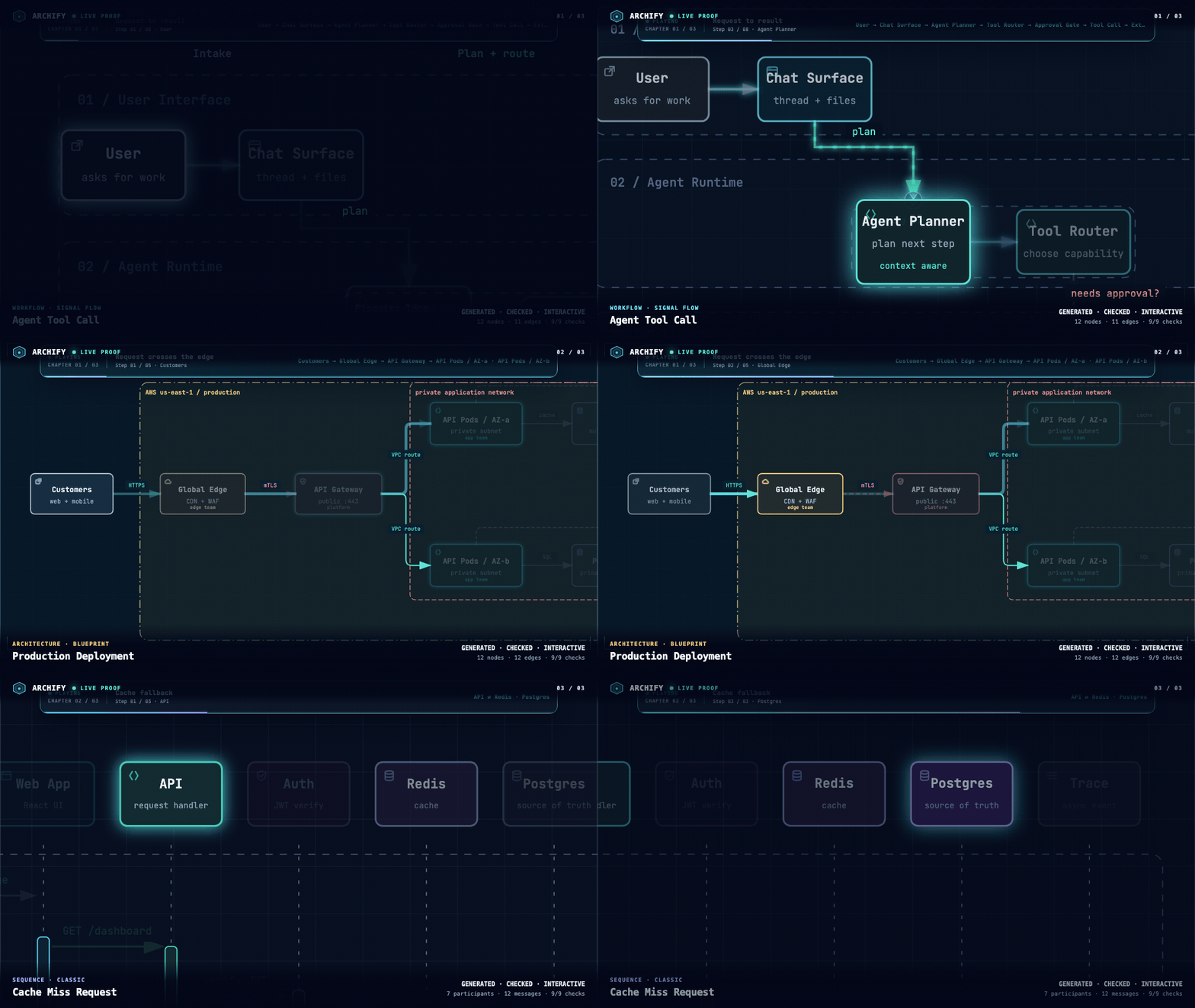
| Guided story | Route probe | Semantic lens |
|---|---|---|
| | |
| Play one finite named chapter. | Inspect the shortest authored directed path. | Compare real traffic between semantic roles. |
The Proof Lab contains all 11 checked-in scenarios, their JSON sources, named views, and validation receipts.
A real repository, mapped from source
Archify traced mco-org/mco at 9f1a1cf and produced this checked map. Open it ↗ · trace reach ↗ · typed source
Preview
Same diagram, two themes, one click to switch:
| Dark | Light |
|---|---|
| |
The Export menu copies PNG to the clipboard and downloads static or motion formats:
Use Copy Share Card when you want a canonical 1200×630 image for a README, release, or social post.
After tracing a route, Export → Route Share Card downloads that authored path as a 1200×630 PNG with the full diagram retained for context.
After tracing authored Upstream or Downstream reach, Export → Reach Share Card captures that exact reading without claiming runtime impact.
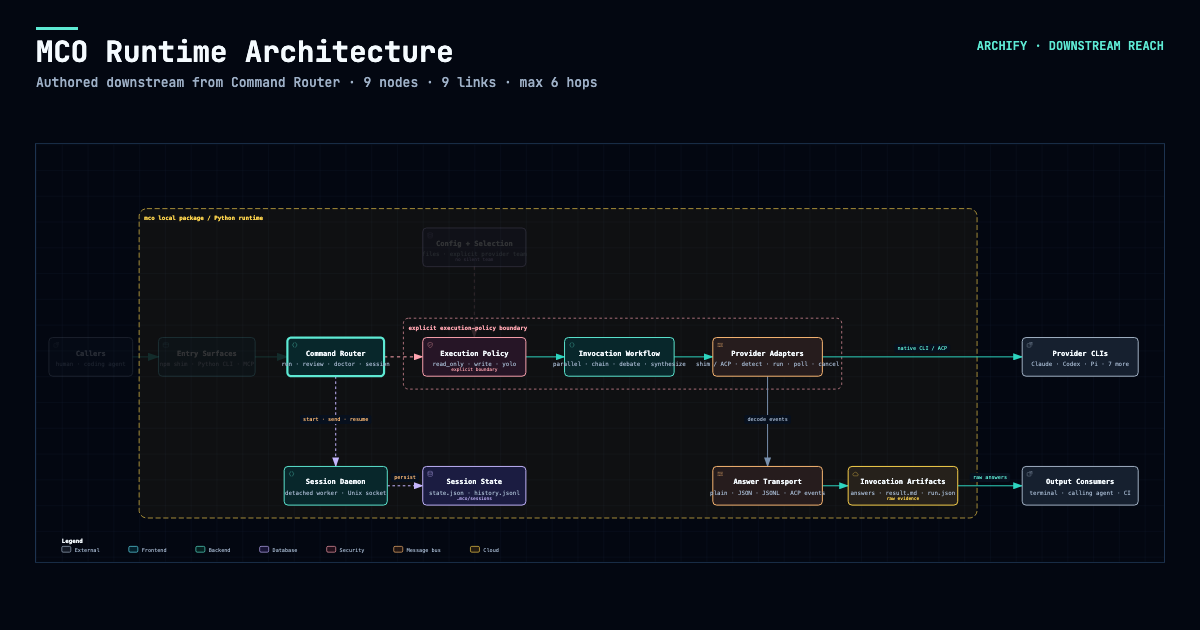
Open examples/web-app.html locally to try the complete viewer.
Quick start
1. Install
npx skills add tt-a1i/archify -gFor an explicit, non-interactive Cursor install:
npx -y skills add tt-a1i/archify --skill archify --agent cursor --global --copy --yesTo try without installing:
npx skills use tt-a1i/archify@archify --agent codexDSH community opt-in: dsh plugin --profile web add @tt-a1i/archify-dsh@0.1.0
The agent switcher covers cursor, codex, claude-code, and opencode. For Raven's manual ZIP install, extract archify.zip into ~/.raven/workspace/skills; it yields ~/.raven/workspace/skills/archify. Raven is not a switcher target.
Archify may GET the fixed stable manifest solely to show an optional reminder; it never downloads or installs updates. Successful checks wait about 72 hours (±20%); active use retries failures after 6, then 24 hours. The server sees normal HTTP metadata (IP and time), but receives no version, Agent, project data, prompts, account/device ID, or ETag. You decide whether and when to update. Set ARCHIFY_UPDATE_CHECK_DISABLED=1 to disable networking and reminder-state writes.
2. Start from a description — no repository required
Use Archify to draw: Browser -> API -> Redis cache -> PostgreSQL fallback.For source evidence, open a repository and ask:
Analyze this repository, then use archify to create a high-level runtime architecture diagram.
Show 8–12 core components, one primary path, external dependencies, and trust boundaries.
Put supporting detail in cards instead of adding more edges.
3. Refine in chat
Continue with focused requests such as add Redis, move auth to the left, or highlight the rollback path. Archify keeps the typed source available for targeted iteration.
Choose the right diagram
| Type | Best for | Include in your prompt |
|---|---|---|
| Architecture | Components, services, storage, boundaries | Scope, core components, primary path |
| Workflow | CI/CD, approvals, tool calls, runbooks | Participants, order, branches, exceptions |
| Sequence | API calls, cache fallback, auth, async traces | Callers, callees, returns, timing |
| Data Flow | Pipelines, lineage, PII, consumers | Sources, transforms, stores, boundaries |
| Lifecycle | States, retries, waits, terminal outcomes | States, events, retry and cancellation paths |
Architecture's optional deployment-ownership profile fails closed when authored owners, region placement, private database scope, or named crossings are missing; it is never implicit and does not inspect live infrastructure. See the checked deployment proof.
For design or PR review, Architecture Delta compares validated Before / Delta / After snapshots with a machine receipt. Select an authored change or play one finite, viewer-only Review; it infers no impact, risk, or merge safety.
node archify/bin/archify.mjs compare architecture base.json head.json architecture-delta.html --json
Not sure which one fits? Use the interactive scenario guide, or ask the zero-dependency CLI:
node archify/bin/archify.mjs guide "Show an API request with Redis cache miss"
node archify/bin/archify.mjs guide "Map Kafka topics, consumer groups, replay, and DLQ" --json
Workflow keeps the happy path clear across lanes:
Sequence explains one interaction over time:
Data Flow makes movement and sensitivity boundaries explicit:
Lifecycle separates progress, waits, retries, and terminal outcomes:
Architecture examples: web-app · Archify pipeline · grid placement · desktop agent
Why Archify
- Layout judgment over generic auto-layout — the agent chooses hierarchy, spacing, routes, and emphasis; shared automatic endpoints spread deterministically instead of piling arrows on one midpoint.
- Typed JSON IR — every renderer-backed mode has a schema and reproducible source.
- Atomic validation before delivery — schema, layout, HTML/SVG, route, and label-to-route clearance checks must all pass before a showcase artifact replaces the last known good output.
- Failures come with a repair receipt —
validate --jsonanddeliver --jsonreturn stable rule codes, the exact subject, measured evidence, and only supported repair controls instead of a Node stack or an unstructured retry guess. - Last-good live preview — an optional desktop loop watches one JSON file, refreshes only after the latest candidate passes every gate, and keeps the previous verified diagram visible when a save is incomplete or invalid.
- Truthful interaction — focus, upstream/downstream reach, exact routes, role comparison, and stories reuse authored nodes and relationships instead of inventing topology or claiming runtime impact.
- Source evidence, only when requested — Evidence-backed Architecture nodes mark themselves
SRC nand open Git-verified files and line ranges pinned to one public commit; ordinary artifacts stay source-free. - Portable by default — the result is one HTML file; exports remain full-diagram and free of temporary viewer state.
Archify is not a general-purpose drawing editor or a Mermaid theme. It turns technical intent into a communication artifact.
How it works
| Step | What happens |
|---|---|
| Generate | The agent creates typed JSON IR from your description. |
| Validate | Bundled validators and layout rules check the source; failures identify the exact local repair in machine-readable JSON. |
| Preview (optional) | A loopback-only desktop session watches one source and reloads only verified revisions; failures keep the last-good artifact. |
| Deliver | A same-directory candidate is rendered and checked; only a passing artifact atomically replaces the target, then optional --open launches that exact file. |
| Iterate | The agent updates the source while unrelated structure stays stable. |
Useful repository commands:
cd archify
node bin/archify.mjs doctor
node bin/archify.mjs demo /tmp/archify-demo
node bin/archify.mjs guide "Show CI/CD checks, approval, deploy, and rollback"
node bin/archify.mjs validate workflow examples/agent-tool-call.workflow.json --quality showcase --json
node bin/archify.mjs preview workflow examples/agent-tool-call.workflow.json /tmp/workflow.html --quality showcase
node bin/archify.mjs deliver workflow examples/agent-tool-call.workflow.json /tmp/workflow.html --quality showcase --open --json
preview is an explicit loopback-only desktop mode: it watches one JSON file on a random 127.0.0.1 port, keeps the last verified output through failures, stops with Ctrl-C, and adds no generated-HTML runtime. Use --no-open for tests or manual URL opening.
deliver --open is an opt-in one-shot handoff after commit. Opener failure preserves success; JSON remains on stdout and the absolute fallback path goes to stderr.
On failure, validate --json and deliver --json emit one JSON object. Apply only each diagnostics[] subject's supportedFixes, within the Skill's two correction rounds; visual review remains separate.
Settings:
{
  "meta": {
    "locale": "en",
    "animation": "trace",
    "visual_preset": "signal-flow"
  }
}
meta.locale=en|zh-CN localizes page title, Legend, states/errors, a11y, HTML/SVG lang—never authored content. Otherwise omit; preserve requested-language copy; disclose English fallback. Static omits animation; classic defaults.
Explore and share the output
| Action | Control |
|---|---|
| Open the factual Diagram Guide | ? |
| Find and focus a semantic node | / |
| Trace upstream/downstream authored reach | Focus a node → Upstream / Downstream |
| Probe a directed route and inspect its journey | R or PATH |
| Compare one or two semantic roles | L or LENS |
| Open the live overview radar | M or MAP |
| Play a guided story / change chapter | P / [ ] |
| Enter Presentation Stage | F |
Choose visual style (S cycles) / toggle theme / open Export | S / T / E |
| Zoom or reset | + / - / 0 |
Stable links can restore #focus=<id>, #focus=<id>&reach=upstream|downstream, #relation=<id>, #route=<source>~<target>, #lens=<kind>~<kind>, and #view=<view-id>. Reader-driven motion is finite, respects prefers-reduced-motion, and never enters canonical exports.
The complete generation and viewer contract lives in archify/SKILL.md.
Installation options
| Surface | Install location or method | Capability |
|---|---|---|
| Raven | Manual ZIP into ~/.raven/workspace/skills → ~/.raven/workspace/skills/archify | Full renderer + validation workflow |
| Claude Code | ~/.claude/skills/ or .claude/skills/ | Full renderer + validation workflow |
| Codex CLI | ~/.agents/skills/ or .agents/skills/ | Full renderer + validation workflow |
| opencode | ~/.config/opencode/skills/, .opencode/skills/, or .agents/skills/ | Full renderer + validation workflow |
| Claude.ai | Upload archify.zip under Settings → Capabilities → Skills | Depends on Node.js access in the sandbox |
| Project Knowledge | Upload archify.zip to the project | Prompt-driven architecture fallback |
| DeepSeek Harness | Opt-in: dsh plugin --profile web add @tt-a1i/archify-dsh@0.1.0. Invoke: Use the archify skill to map this repository's runtime architecture. Remove: dsh plugin --profile web remove @tt-a1i/archify-dsh. | Community integration for developer-preview @deepseek-ai/dsh@0.1.0-rc.6; Node ^22.19.0 || >=24.0.0; not an official DeepSeek product. No telemetry. Shell files need exact workspace paths, not Web Produced Files. Details. |
Reference and scope
Automatic Mermaid parsing, general-purpose auto-layout, hosted sharing, and WYSIWYG editing are intentionally outside the current scope.
License
MIT — free to use, modify, and distribute.
Contributing
Issues, pull requests, and real-world diagrams are welcome. Start with the contribution guide, use the reproducible bug form for failures, or submit a validated diagram through the community showcase form. · LINUX DO
Star History