
GetNotes Tools
tirth8205/code-review-graph
Tool นี้คืออะไร
`code-review-graph` เป็นเครื่องมือที่ช่วยให้ AI ตรวจสอบโค้ดได้อย่างมีประสิทธิภาพมากขึ้น โดยสร้างแผนผังโครงสร้างของโค้ดและติดตามการเปลี่ยนแปลง เพื่อให้ AI ได้รับบริบทที่แม่นยำและลดการใช้โทเค็นที่ไม่จำเป็น เหมาะสำหรับนักพัฒนาที่ใช้ AI ในการรีวิวโค้ดในโปรเจกต์ขนาดใหญ่หรือ monorepo
ข้อมูลโปรเจกต์
ดาว
19.8K
Forks
2.1K
License
MIT
อัปเดต GitHub ล่าสุด
18 ก.ค. 2569
เพิ่มใน GetNotes
18 ก.ค. 2569
Repository
tirth8205/code-review-graph
รูปแบบ
เหมาะกับงาน
เหมาะกับอาชีพ
Ecosystem
Python
แปลและเรียบเรียงโดย AI
เนื้อหาฉบับภาษาไทย
ใช้อ่านเพื่อทำความเข้าใจเบื้องต้น โปรดตรวจสอบรายละเอียดสำคัญกับเอกสารต้นฉบับด้านล่าง
code-review-graph
หยุดเผาผลาญโทเค็น เริ่มรีวิวอย่างชาญฉลาดขึ้น
English | 简体中文 | 日本語 | 한국어 | हिन्दी






การใช้งาน · คำสั่ง · คำถามที่พบบ่อย · การแก้ไขปัญหา · GitHub Action · การทำซ้ำเกณฑ์มาตรฐาน · แผนงาน
เครื่องมือ AI สำหรับการเขียนโค้ดอาจต้องอ่านโค้ดส่วนใหญ่ใน codebase ของคุณซ้ำไปซ้ำมาในงานรีวิว code-review-graph แก้ปัญหานั้นได้ โดยจะสร้างแผนผังโครงสร้างของโค้ดของคุณด้วย Tree-sitter ติดตามการเปลี่ยนแปลงทีละน้อย และให้บริบทที่แม่นยำแก่ผู้ช่วย AI ของคุณผ่าน MCP เพื่อให้อ่านเฉพาะส่วนที่สำคัญเท่านั้น
เริ่มต้นอย่างรวดเร็ว
pip install code-review-graph                     # or: pipx install code-review-graph
code-review-graph install          # auto-detects and configures all supported platforms
code-review-graph build            # parse your codebase
คำสั่งเดียวก็ตั้งค่าทุกอย่างได้ install จะตรวจจับเครื่องมือ AI สำหรับการเขียนโค้ดที่คุณมี เขียนการกำหนดค่า MCP ที่ถูกต้องสำหรับแต่ละเครื่องมือ ติดตั้ง hooks/skills ที่เป็น native ของแพลตฟอร์มที่รองรับ และแทรกคำแนะนำที่เข้าใจกราฟลงในกฎของแพลตฟอร์มของคุณ โดยจะตรวจจับโดยอัตโนมัติว่าคุณติดตั้งผ่าน uvx หรือ pip/pipx และสร้างการกำหนดค่าที่ถูกต้อง รีสตาร์ท editor/tool ของคุณหลังจากติดตั้ง
หากต้องการกำหนดเป้าหมายแพลตฟอร์มเฉพาะ:
code-review-graph install --platform codex       # configure only Codex
code-review-graph install --platform cursor      # configure only Cursor
code-review-graph install --platform claude-code  # configure only Claude Code
code-review-graph install --platform gemini-cli   # configure only Gemini CLI
code-review-graph install --platform kiro         # configure only Kiro
code-review-graph install --platform copilot      # configure only GitHub Copilot (VS Code)
code-review-graph install --platform copilot-cli  # configure only GitHub Copilot CLI
code-review-graph install --platform codebuddy    # configure only CodeBuddy Code
ต้องใช้ Python 3.10+ เพื่อประสบการณ์ที่ดีที่สุด ให้ติดตั้ง uv (การกำหนดค่า MCP จะใช้ uvx หากมี มิฉะนั้นจะกลับไปใช้คำสั่ง code-review-graph โดยตรง)
หากต้องการลบ CRG ออกจากโปรเจกต์ Git หรือ SVN ให้ใช้คำสั่ง uninstall ที่สมมาตรจากที่ใดก็ได้ภายใน working tree ของโปรเจกต์ เป้าหมายจะถูกปรับให้เป็น working tree root และไดเรกทอรีที่ไม่ใช่ repository จะถูกปฏิเสธ โดยจะลบเฉพาะไฟล์และรายการที่ CRG เป็นเจ้าของเท่านั้น เซิร์ฟเวอร์ MCP, hooks, skills และคอมเมนต์ JSONC ที่ไม่เกี่ยวข้องจะยังคงอยู่ การเปลี่ยนแปลงการกำหนดค่าที่ใช้ร่วมกันจะใช้การแทนที่แบบ atomic ดังนั้นหากการเขียนล้มเหลว ไฟล์ต้นฉบับจะยังคงอยู่
code-review-graph uninstall --dry-run    # preview every action; write nothing
code-review-graph uninstall              # preview, ask for confirmation, then apply
code-review-graph uninstall --yes        # apply without prompting
code-review-graph uninstall --all-repos  # also clean every registered repository
code-review-graph uninstall --keep-data  # remove integrations but keep graph databases
code-review-graph uninstall --keep-user-configs --repo .  # clean this project only
จากนั้นเปิดโปรเจกต์ของคุณและถามผู้ช่วย AI ของคุณ:
Build the code review graph for this projectการสร้างครั้งแรกใช้เวลาประมาณ 10 วินาทีสำหรับโปรเจกต์ที่มี 500 ไฟล์ หลังจากนั้น โหมด watch และ hooks ที่รองรับสามารถอัปเดตกราฟได้โดยอัตโนมัติ
วิธีการทำงาน
repository ของคุณจะถูกแยกวิเคราะห์เป็น AST ด้วย Tree-sitter จัดเก็บเป็นกราฟของโหนด (ฟังก์ชัน, คลาส, การนำเข้า) และเอดจ์ (การเรียก, การสืบทอด, การครอบคลุมการทดสอบ) จากนั้นจะถูกสอบถามในเวลาที่รีวิวเพื่อคำนวณชุดไฟล์ขั้นต่ำที่ผู้ช่วย AI ของคุณจำเป็นต้องอ่าน
การวิเคราะห์ Blast-radius
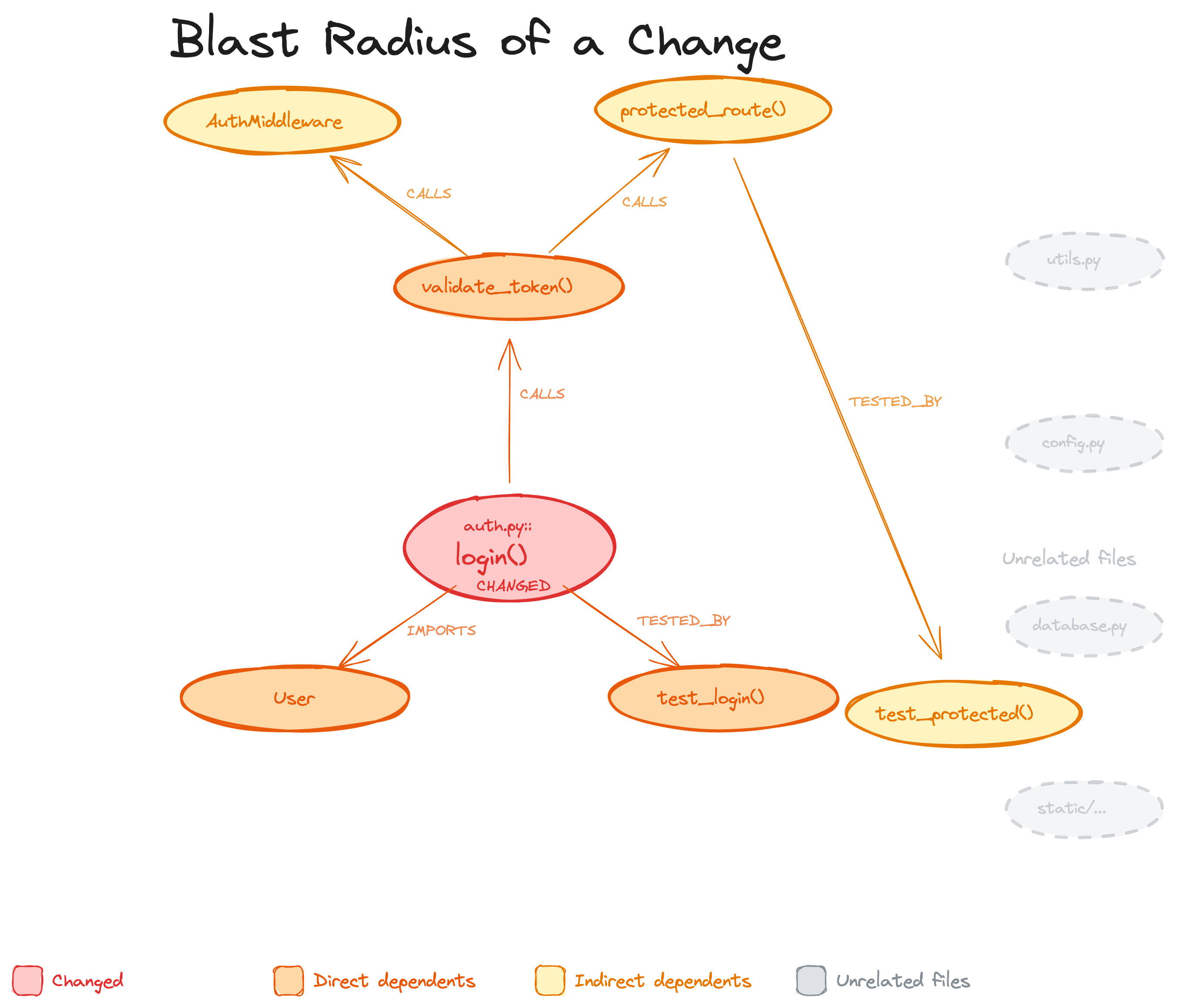
เมื่อไฟล์มีการเปลี่ยนแปลง กราฟจะติดตามผู้เรียก, ผู้พึ่งพา และการทดสอบทั้งหมดที่อาจได้รับผลกระทบ นี่คือ "blast radius" ของการเปลี่ยนแปลง AI ของคุณจะอ่านเฉพาะไฟล์เหล่านี้แทนที่จะสแกนทั้งโปรเจกต์
การอัปเดตแบบเพิ่มขึ้นในเวลา < 2 วินาที
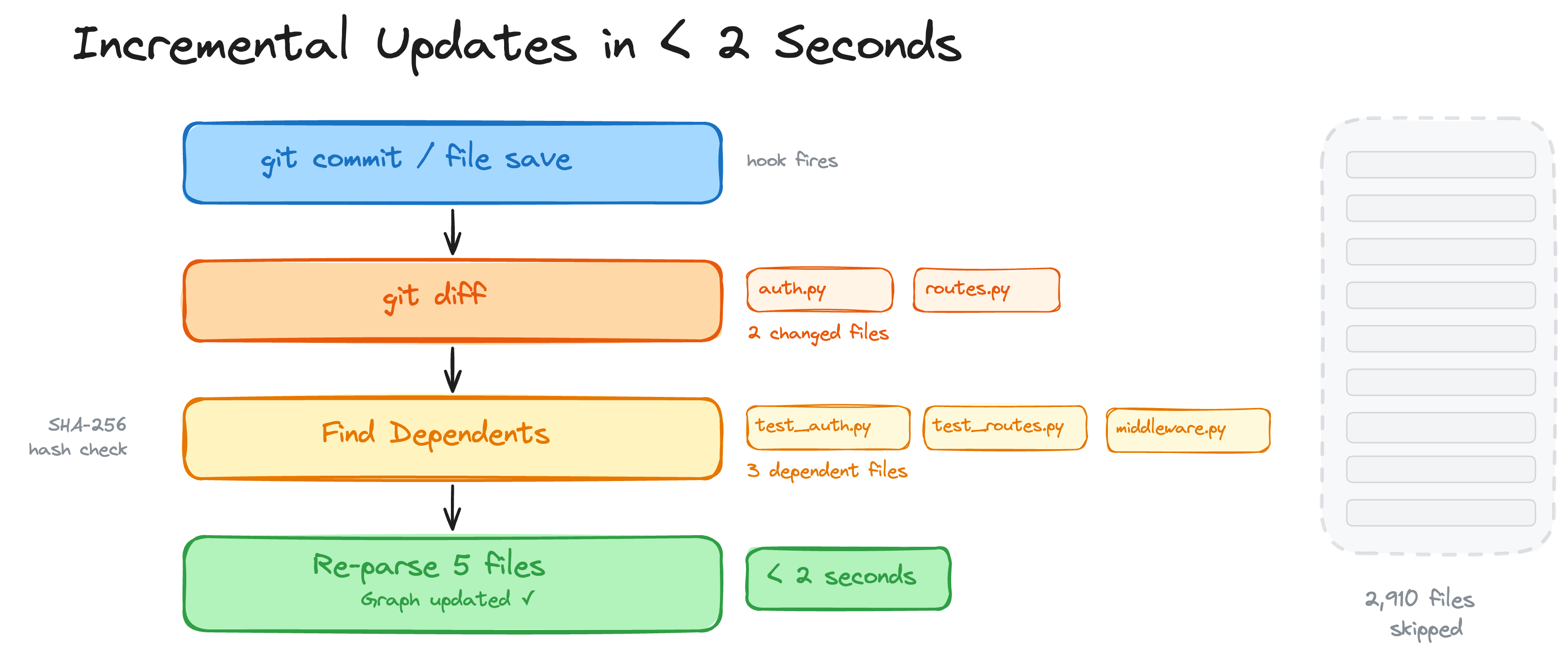
เมื่อเปิดใช้งาน hooks หรือโหมด watch การบันทึกไฟล์และ commit hooks ที่รองรับจะกระตุ้นการอัปเดตแบบเพิ่มขึ้น กราฟจะเปรียบเทียบไฟล์ที่เปลี่ยนแปลง ค้นหาผู้พึ่งพาผ่านการตรวจสอบแฮช SHA-256 และแยกวิเคราะห์เฉพาะส่วนที่เปลี่ยนแปลงเท่านั้น โปรเจกต์ที่มี 2,900 ไฟล์จะถูกจัดทำดัชนีใหม่ในเวลาไม่ถึง 2 วินาที
ปัญหา monorepo ได้รับการแก้ไขแล้ว
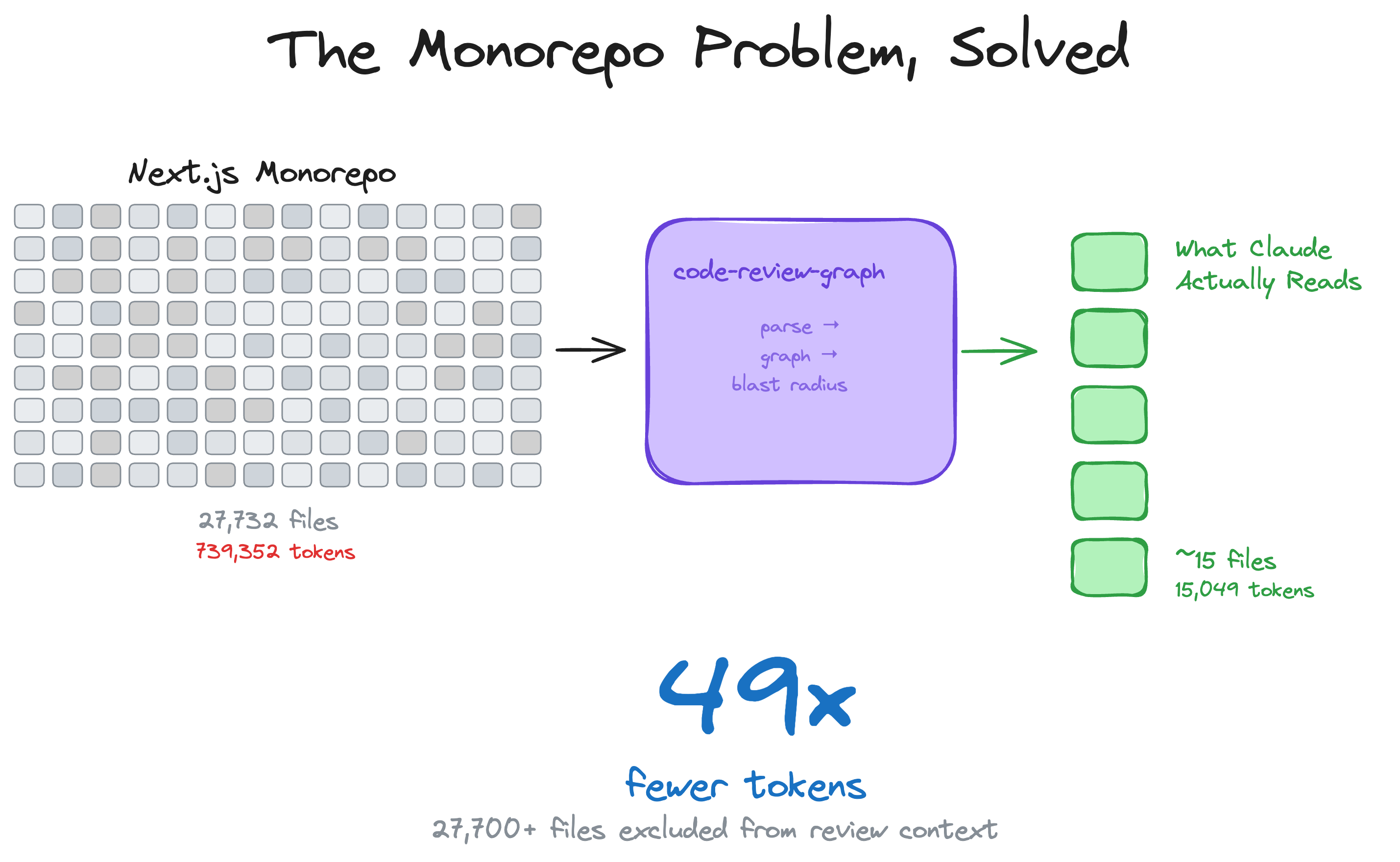
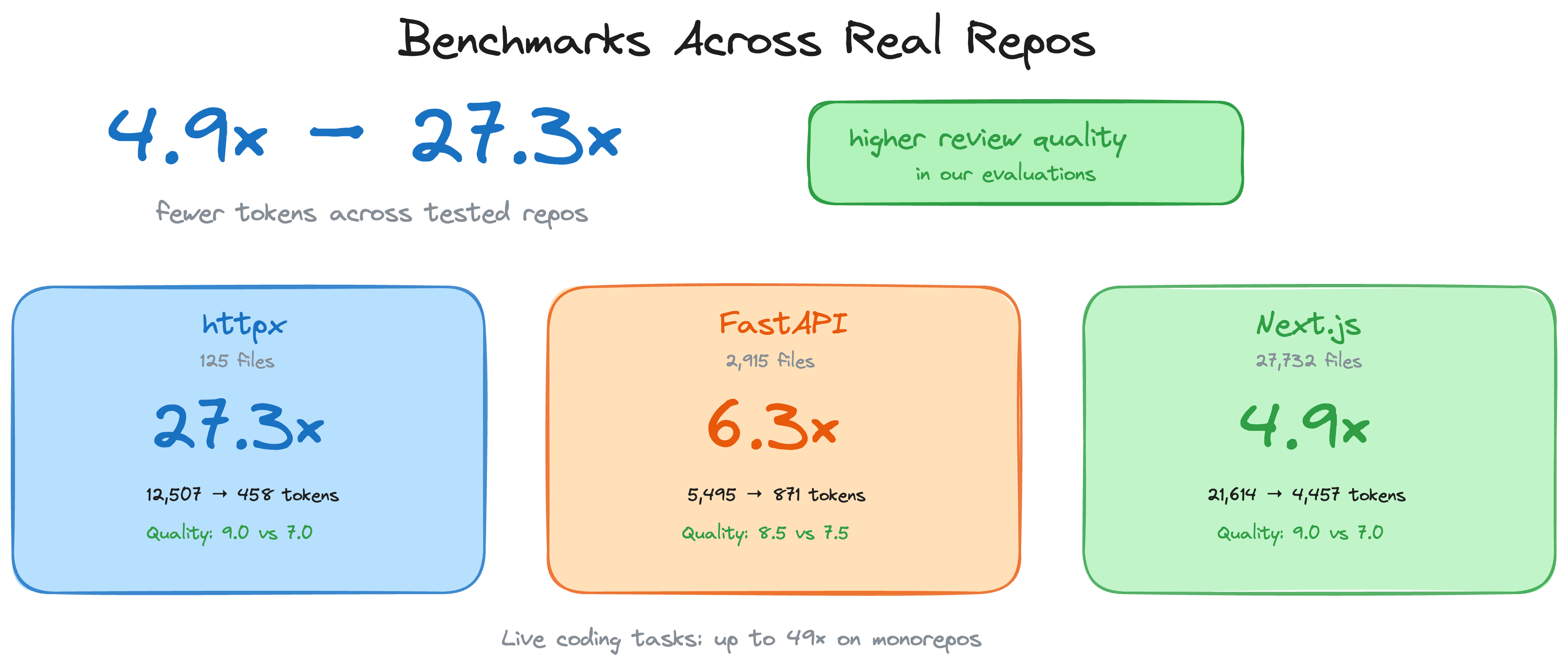
monorepo ขนาดใหญ่คือจุดที่การสิ้นเปลืองโทเค็นเจ็บปวดที่สุด กราฟจะตัดผ่านความยุ่งเหยิง — ไฟล์กว่า 27,700 ไฟล์ถูกยกเว้นจากบริบทการรีวิว มีเพียงประมาณ 15 ไฟล์เท่านั้นที่ถูกอ่านจริง
การรองรับภาษาที่หลากหลาย + Jupyter notebooks
การรองรับ Parser ครอบคลุมฟังก์ชัน, คลาส, การนำเข้า, call sites, การสืบทอด และการตรวจจับการทดสอบทั่วทั้งพื้นผิว parser ปัจจุบัน โดยใช้ Tree-sitter เมื่อมี และ fallbacks ที่กำหนดเป้าหมายเมื่อจำเป็น การรองรับปัจจุบันรวมถึง Python, JavaScript/TypeScript/TSX, Go, Rust, Java, C/C++, C#, VB.NET, Ruby, Kotlin, Swift, PHP, Scala, Solidity, Dart, R, Perl, Lua/Luau, Objective-C, shell scripts, Elixir, Zig, PowerShell, Julia, ReScript, GDScript, Nix, Verilog/SystemVerilog, SQL, โครงสร้าง Terraform/OpenTofu (.tf; ไฟล์ .hcl ทั่วไปจะถูกรู้จักเป็นโหนดไฟล์), Ansible playbooks/roles/tasks, Vue/Svelte SFCs, ไฟล์ Astro ที่แยกวิเคราะห์ผ่าน TypeScript parser, Jupyter/Databricks notebooks (.ipynb) และไฟล์ Perl XS (.xs) Generic YAML ไม่ถือว่าเป็นซอร์สโค้ด
โปรเจกต์ PHP ยังได้รับการแก้ไข Composer PSR-4 ที่จำกัด repository, การอ้างอิง Blade template และเอดจ์เชิงความหมายของ Laravel Route/Eloquent เมื่อซอร์สโค้ดมีการนำเข้าเฟรมเวิร์กที่ชัดเจน, การสืบทอดโมเดล และหลักฐาน receiver
เพิ่มภาษาของคุณเอง (ไม่ต้อง Fork)
หาก repo ของคุณใช้ภาษาที่ตัวแยกวิเคราะห์ยังไม่รองรับ คุณสามารถวางไฟล์ languages.toml ลงใน .code-review-graph/ เพื่อแมปนามสกุลไฟล์เข้ากับไวยากรณ์ใดๆ ที่รวมอยู่ใน tree_sitter_language_pack รวมถึงประเภทโหนด tree-sitter สำหรับฟังก์ชัน, คลาส, การนำเข้า และการเรียก:
[languages.erlang]
extensions = [".erl"]
grammar = "erlang"
function_node_types = ["function_clause"]
class_node_types = ["record_decl"]
import_node_types = ["import_attribute"]
call_node_types = ["call"]
ตัวเดิน tree-sitter ทั่วไปจะจัดการการดึงข้อมูลจากตรงนั้น — ไม่มีการเปลี่ยนแปลงโค้ด และภาษาในตัวไม่สามารถถูกเขียนทับได้ ดู docs/CUSTOM_LANGUAGES.md สำหรับการอ้างอิง Schema, กฎการตรวจสอบ และตัวอย่างการทำงานแบบครบวงจร
การรีวิว PR ที่มีการให้คะแนนความเสี่ยงใน CI (GitHub Action)
การวิเคราะห์เดียวกันนี้ทำงานเป็น GitHub Action แบบคอมโพสิต — และยังคงเป็นแบบ local-first: กราฟความรู้ถูกสร้างและสอบถามทั้งหมดบน CI runner ของคุณ โดยไม่มีการส่งซอร์สโค้ดไปยังบริการภายนอกใดๆ ในแต่ละ pull request แอคชันจะโพสต์คอมเมนต์แบบ sticky เพียงหนึ่งเดียวพร้อมฟังก์ชันที่ให้คะแนนความเสี่ยง, โฟลว์การทำงานที่ได้รับผลกระทบ และช่องว่างในการทดสอบ ซึ่งจะอัปเดตในตำแหน่งเดิมทุกครั้งที่ push อินพุต fail-on-risk ที่เป็นทางเลือกจะเปลี่ยนการรีวิวให้เป็นเกตการรวม (merge gate)
# .github/workflows/code-review-graph.yml
on:
  pull_request:

permissions:
  contents: read
  pull-requests: write

jobs:
  review:
    runs-on: ubuntu-latest
    steps:
      - uses: actions/checkout@v7
      - uses: tirth8205/code-review-graph@v2.3.6
        with:
          github-token: ${{ secrets.GITHUB_TOKEN }}
ดู docs/GITHUB_ACTION.md สำหรับอินพุต, ระดับความเสี่ยง และรายละเอียดการแคช หรือเวิร์กโฟลว์ dogfood ที่ repo นี้รันบนตัวเองใน .github/workflows/pr-review.yml
เกณฑ์มาตรฐาน
ตัวเลขสำคัญ: การลดโทเค็นต่อคำถามโดยเฉลี่ยใน 6 repos อยู่ที่ประมาณ 82 เท่า (เทียบกับฐานข้อมูลทั้งหมดกับการสอบถามกราฟ) 528 เท่าที่ถูกอ้างถึงบ่อยครั้งคือค่าสูงสุด — repo ที่ดีที่สุดเพียงหนึ่งเดียว (fastapi) — ไม่ใช่ผลลัพธ์ทั่วไป
ตัวเลขทั้งหมดมาจากการรันการประเมินอัตโนมัติกับ 6 repositories โอเพนซอร์สจริง (รวม 13 คอมมิต) ทุกการกำหนดค่าจะตรึง SHA อัปสตรีม, ตัวตรวจจับชุมชน Leiden ทำงานด้วย seed ที่กำหนด และการฝังข้อมูลเป็นแบบกำหนดได้บน CPU — ดังนั้นการรันสองครั้งบนเครื่องที่ต่างกันจะให้ตัวเลขที่เหมือนกัน สูตรการทำซ้ำทั้งหมดพร้อมเอาต์พุตที่คาดหวังอยู่ใน docs/REPRODUCING.md การรันแบบรายงานเท่านั้นรายสัปดาห์บนการกำหนดค่าที่เล็กที่สุดสองรายการอยู่ใน .github/workflows/eval.yml
สำหรับคำถามทั่วไปของเอเจนต์ ("การยืนยันตัวตนทำงานอย่างไร", "จุดเริ่มต้นหลักคืออะไร", เป็นต้น) กราฟจะส่งคืนผลการค้นหาที่ตรงเป้าหมายประมาณ 2,000–3,500 โทเค็น + ขอบของเพื่อนบ้าน แทนที่จะบังคับให้เอเจนต์อ่านไฟล์ต้นฉบับทุกไฟล์ ตารางด้านล่างเป็นค่าเฉลี่ยจาก 5 คำถามตัวอย่างที่กำหนดไว้ใน code_review_graph/token_benchmark.py
| Repo | Snapshot SHA | naive_corpus_tokens | avg graph_tokens | Reduction |
|---|---|---|---|---|
| fastapi | 0227991a | 951,071 | 2,169 | 528.4x |
| code-review-graph | 84bde354 | 208,821 | 2,495 | 93.0x |
| gin | 5c00df8a | 166,868 | 1,990 | 91.8x |
| flask | a29f88ce | 125,022 | 1,986 | 71.4x |
| express | b4ab7d65 | 135,955 | 3,465 | 40.6x |
| httpx | b55d4635 | 89,492 | 2,438 | 38.0x |
การลดโทเค็นต่อคำถามโดยเฉลี่ยใน 6 repos: ~82 เท่า ช่วงคือ 38x – 528x โดยที่ 528x คือกรณีที่ดีที่สุด (fastapi ซึ่งเป็น corpus ที่ใหญ่ที่สุด) ไม่ใช่ตัวเลขหลัก
ฐานข้อมูลทั้งหมดข้างต้นเป็นขอบเขตบนที่ไม่มีเอเจนต์จริงจ่าย: เอเจนต์ที่มีความสามารถจะค้นหาตัวระบุและอ่านเฉพาะไฟล์ที่ตรงกันที่สุด เกณฑ์มาตรฐานการประเมิน agent_baseline วัดฐานข้อมูลที่สมจริงนั้น — การค้นหา grep แบบ pure-python ทั่วทั้ง corpus, ไฟล์ 3 อันดับแรกตามจำนวนการจับคู่, นับโทเค็นและเปรียบเทียบกับต้นทุนการสอบถามกราฟ (evaluate/results/<repo>_agent_baseline_*.csv)
เกณฑ์มาตรฐาน eval/benchmarks/token_efficiency.py อย่างเป็นทางการวัดสถานการณ์ที่แตกต่างกัน — JSON get_review_context() แบบเต็มเทียบกับเนื้อหาไฟล์ที่เปลี่ยนแปลงของคอมมิต — และรายงานอัตราส่วนที่ต่ำกว่า 1 สำหรับคอมมิตขนาดเล็ก เนื่องจากผลตอบรับของบริบทการรีวิวมีขอบรัศมีผลกระทบพร้อมกับส่วนย่อยของซอร์สโค้ดที่เกินกว่า diff ไฟล์เดียวเล็กๆ นั่นไม่ใช่ข้อผิดพลาด; เกณฑ์มาตรฐานทั้งสองตอบคำถามที่แตกต่างกัน ดู docs/REPRODUCING.md สำหรับระเบียบวิธีวิจัยฉบับเต็ม
ตั้งแต่ v2.3.4 เครื่องมือรีวิวและผลกระทบจะแนบการประมาณค่า context_savings ที่กระชับ เพื่อให้ไคลเอนต์ MCP สามารถเห็นบริบทโดยประมาณที่บันทึกไว้ต่อการเรียก ใน v2.3.5 CLI จะแสดงสิ่งนี้เป็นแผง Token Savings ที่มีกรอบสี่เหลี่ยมที่แสดงด้านบน (ดู "แผง Token Savings" ในส่วนการใช้งาน) และเพิ่ม --verify เพื่อตรวจสอบกับ tokenizer cl100k_base ของ OpenAI ข้อมูลการปรับเทียบใน docs/REPRODUCING.md แสดงให้เห็นว่าการประมาณค่าอยู่ภายใน ~1% ของโทเค็น GPT-4 จริงโดยรวมในไฟล์ตัวอย่าง 222 ไฟล์
การวิเคราะห์รัศมีผลกระทบกู้คืนทุกไฟล์ใน ground truth ในคอมมิตการประเมินทั้ง 13 รายการ — แต่ให้อ่านว่าเป็นขอบเขตบน ไม่ใช่ "recall 100%": ในโหมดนี้ ground truth (ไฟล์ที่เปลี่ยนแปลง + ไฟล์ที่มีขอบการเรียก/การนำเข้าเข้าสู่ไฟล์เหล่านั้น) ได้มาจากกราฟเดียวกันกับที่ตัวทำนายใช้ ดังนั้นจึงเป็นแบบวงกลมโดยโครงสร้าง การทำนายเกินที่เห็นได้ในคอลัมน์ precision เป็นการแลกเปลี่ยนที่จงใจ: การแจ้งเตือนไฟล์มากเกินไปดีกว่าการพลาดการพึ่งพาที่เสียหาย
| Repo | Commits | Avg F1 | Avg Precision | Recall (graph-derived upper bound) |
|---|---|---|---|---|
| httpx | 2 | 0.864 | 0.786 | 1.0 |
| fastapi | 2 | 0.834 | 0.750 | 1.0 |
| code-review-graph | 2 | 0.734 | 0.584 | 1.0 |
| express | 2 | 0.667 | 0.500 | 1.0 |
| flask | 2 | 0.628 | 0.481 | 1.0 |
| gin | 3 | 0.609 | 0.439 | 1.0 |
| Average | 13 | 0.714 | 0.578 | 1.000 |
เกณฑ์มาตรฐานยังรัน โหมด co-change ที่ซื่อสัตย์: ตัวทำนายจะถูกตั้งค่าเริ่มต้นด้วยไฟล์ที่เปลี่ยนแปลงเพียงไฟล์เดียวและให้คะแนนเทียบกับไฟล์ อื่นๆ ที่ผู้เขียนได้แก้ไขจริงในคอมมิตเดียวกัน — หลักฐานที่เป็นอิสระจากประวัติ Git ไม่ใช่จากกราฟ ทั้งสองโหมดจะปรากฏเคียงข้างกันในไฟล์ CSV ผลลัพธ์ (คอลัมน์ ground_truth_mode) ตัวเลข co-change จะถูกเพิ่มไปยังสถิติที่เป็นทางการเมื่อถูกบันทึกโดย eval runner; เราจะไม่อ้างอิงตัวเลขเหล่านั้นก่อนที่จะทำการวัด
| Repo | Files | Nodes | Edges | Flow Detection | Search Latency |
|---|---|---|---|---|---|
| express | 141 | 1,910 | 17,553 | 106ms | 0.7ms |
| fastapi | 1,122 | 6,285 | 27,117 | 128ms | 1.5ms |
| flask | 83 | 1,446 | 7,974 | 95ms | 0.7ms |
| gin | 99 | 1,286 | 16,762 | 111ms | 0.5ms |
| httpx | 60 | 1,253 | 7,896 | 96ms | 0.4ms |
ข้อจำกัดและจุดอ่อนที่ทราบ
- "Recall 1.0" ของผลกระทบได้มาจากกราฟและเป็นแบบวงกลม: ground truth ทางประวัติศาสตร์มาจากขอบกราฟเดียวกันกับที่ตัวทำนายใช้ ดังนั้นจึงเป็นขอบเขตบนโดยโครงสร้าง โหมด co-change ที่ซื่อสัตย์ (ให้คะแนนเทียบกับไฟล์ที่ถูกเปลี่ยนแปลงร่วมกันจริงในคอมมิตเดียวกัน) ถูกวัดควบคู่กันไป; คาดว่าตัวเลขเหล่านั้นจะต่ำกว่าอย่างมาก
- การเปลี่ยนแปลงไฟล์เดียวขนาดเล็ก: บริบทของกราฟสามารถเกินกว่าการอ่านไฟล์แบบธรรมดาสำหรับการแก้ไขเล็กน้อย (ดูผลลัพธ์ของ express ด้านบน) ค่าใช้จ่ายเพิ่มเติมคือข้อมูลเมตาเชิงโครงสร้างที่ช่วยให้สามารถวิเคราะห์หลายไฟล์ได้
- คุณภาพการค้นหา (MRR 0.35): การค้นหาด้วยคีย์เวิร์ดพบผลลัพธ์ที่ถูกต้องใน 4 อันดับแรกสำหรับคำค้นส่วนใหญ่ แต่การจัดอันดับยังต้องปรับปรุง คำค้นของ express คืนค่า 0 ผลลัพธ์เนื่องจากการตั้งชื่อรูปแบบโมดูล
- การตรวจจับโฟลว์ (recall 33%): รูปแบบการเข้าใช้งานของเฟรมเวิร์กและแบบทั่วไปแข็งแกร่งที่สุดสำหรับ Python และ PHP/Laravel การตรวจจับโฟลว์ของ JavaScript และ Go ยังต้องปรับปรุง
- การแลกเปลี่ยนระหว่าง Precision กับ Recall: การวิเคราะห์ผลกระทบถูกออกแบบมาให้ระมัดระวังโดยเจตนา มันจะแจ้งเตือนไฟล์ที่ อาจ ได้รับผลกระทบ ซึ่งหมายถึงการมี false positives บางส่วนในกราฟการพึ่งพาขนาดใหญ่
คุณสมบัติ
| คุณสมบัติ | รายละเอียด |
|---|---|
| การอัปเดตแบบเพิ่มหน่วย | แยกวิเคราะห์เฉพาะไฟล์ที่เปลี่ยนแปลง การอัปเดตครั้งต่อไปจะเสร็จสิ้นภายใน 2 วินาที |
| รองรับภาษาและโน้ตบุ๊กหลากหลาย | Python, JavaScript/TypeScript/TSX, Go, Rust, Java, C/C++, C#, VB.NET, Ruby, Kotlin, Swift, PHP, Scala, Solidity, Dart, R, Perl, Lua/Luau, Objective-C, shell scripts, Elixir, Zig, PowerShell, Julia, ReScript, GDScript, Nix, Verilog/SystemVerilog, SQL, โครงสร้าง Terraform/OpenTofu (.tf; ไฟล์ .hcl ทั่วไปเป็นแบบไฟล์เท่านั้น), Ansible playbooks/roles/tasks, Vue/Svelte SFCs, ไฟล์ Astro ที่แยกวิเคราะห์ผ่าน TypeScript parser, Jupyter/Databricks (.ipynb), และ Perl XS (.xs) |
| การแยกวิเคราะห์ PHP ที่รับรู้เฟรมเวิร์ก | การนำเข้า Composer PSR-4 ที่จำกัดตาม Repository, การอ้างอิงเทมเพลต Blade, และขอบ Laravel Route-to-controller และ Eloquent relationship ที่มีหลักฐานยืนยัน |
| การวิเคราะห์รัศมีผลกระทบ | แสดงฟังก์ชัน, คลาส และไฟล์ที่น่าจะได้รับผลกระทบจากการเปลี่ยนแปลง |
| Auto-update hooks | Hooks และ watch mode สามารถอัปเดตกราฟเมื่อบันทึกไฟล์และ commit hooks ที่รองรับ |
| การค้นหาเชิงความหมาย | การฝังเวกเตอร์เสริมผ่าน sentence-transformers, Google Gemini, MiniMax, หรือปลายทางที่เข้ากันได้กับ OpenAI (OpenAI จริง, Azure, new-api, LiteLLM, vLLM, LocalAI) |
| การแสดงผลแบบโต้ตอบ | กราฟ D3.js แบบ force-directed พร้อมการค้นหา, สลับตำนานชุมชน และโหนดที่ปรับขนาดตามดีกรี |
| การตรวจจับ Hub & Bridge | ค้นหาโหนดที่มีการเชื่อมต่อมากที่สุดและจุดคอขวดทางสถาปัตยกรรมผ่าน betweenness centrality |
| การให้คะแนนความประหลาดใจ | ตรวจจับการเชื่อมโยงที่ไม่คาดคิด: ข้ามชุมชน, ข้ามภาษา, ขอบจากส่วนปลายไปยังศูนย์กลาง |
| การวิเคราะห์ช่องว่างความรู้ | ระบุโหนดที่แยกตัว, จุดร้อนที่ไม่ได้ทดสอบ, ชุมชนที่บาง และจุดอ่อนเชิงโครงสร้าง |
| คำถามแนะนำ | คำถามรีวิวที่สร้างขึ้นอัตโนมัติจากการวิเคราะห์กราฟ (bridges, hubs, surprises) |
| ความเชื่อมั่นของขอบ | การให้คะแนนความเชื่อมั่นสามระดับ (EXTRACTED/INFERRED/AMBIGUOUS) พร้อมคะแนนทศนิยมบนขอบ |
| การสำรวจกราฟ | การสำรวจ BFS/DFS แบบอิสระจากโหนดใดๆ ด้วยความลึกและงบประมาณโทเค็นที่กำหนดค่าได้ |
| รูปแบบการส่งออก | GraphML (Gephi/yEd), Neo4j Cypher, Obsidian vault พร้อม wikilinks, กราฟ SVG แบบคงที่ |
| Graph diff | เปรียบเทียบสแนปช็อตกราฟเมื่อเวลาผ่านไป: โหนด/ขอบใหม่/ที่ถูกลบ, การเปลี่ยนแปลงชุมชน |
| การวัดประสิทธิภาพโทเค็น | วัดโทเค็น corpus เต็มรูปแบบแบบ naive เทียบกับโทเค็นการสอบถามกราฟด้วยอัตราส่วนต่อคำถาม |
| การประมาณการประหยัดบริบท | เมตาเดตา context_savings ที่กระชับบนเอาต์พุตการรีวิว MCP/CLI ที่เกี่ยวข้อง โดยระบุว่าเป็นค่าประมาณและเก็บไว้ในสามฟิลด์เล็กๆ |
| Memory loop | เก็บผลลัพธ์ Q&A เป็น markdown เพื่อนำกลับมาใช้ใหม่ เพื่อให้กราฟเติบโตจากการสอบถาม |
| การแยกชุมชนอัตโนมัติ | ชุมชนที่มีขนาดใหญ่เกินไป (>25% ของกราฟ) จะถูกแยกซ้ำๆ ผ่าน Leiden |
| โฟลว์การทำงาน | ติดตามสายการเรียกจากจุดเริ่มต้น จัดเรียงตามความสำคัญถ่วงน้ำหนัก |
| การตรวจจับชุมชน | จัดกลุ่มโค้ดที่เกี่ยวข้องผ่านอัลกอริทึม Leiden พร้อมการปรับขนาดความละเอียดสำหรับกราฟขนาดใหญ่ |
| ภาพรวมสถาปัตยกรรม | แผนที่สถาปัตยกรรมที่สร้างขึ้นอัตโนมัติพร้อมคำเตือนการเชื่อมโยง |
| การรีวิวที่ให้คะแนนความเสี่ยง | detect_changes แมป diffs ไปยังฟังก์ชัน, โฟลว์ และช่องว่างการทดสอบที่ได้รับผลกระทบ |
| ภาษาที่กำหนดเอง | เพิ่มภาษาใหม่ผ่าน .code-review-graph/languages.toml — ไม่ต้อง fork หรือเปลี่ยนแปลงโค้ด |
| GitHub Action | คอมเมนต์รีวิว PR ที่ให้คะแนนความเสี่ยงแบบ sticky ใน CI พร้อมเกตการรวม fail-on-risk ที่เป็นทางเลือก |
| เครื่องมือ Refactoring | ดูตัวอย่างการเปลี่ยนชื่อ, การตรวจจับโค้ดที่ไม่ได้ใช้งานที่รับรู้เฟรมเวิร์ก, คำแนะนำที่ขับเคลื่อนโดยชุมชน |
| การสร้าง Wiki | สร้าง markdown wiki อัตโนมัติจากโครงสร้างชุมชน |
| Multi-repo registry | ลงทะเบียนหลาย repo, ค้นหาข้ามทั้งหมด |
| Multi-repo daemon | crg-daemon ตรวจสอบหลาย repo เป็น child processes พร้อมการตรวจสอบสุขภาพและการรีสตาร์ทอัตโนมัติ |
| MCP prompts | 5 เทมเพลตเวิร์กโฟลว์: review, architecture, debug, onboard, pre-merge |
| การค้นหาข้อความเต็ม | การค้นหาแบบไฮบริดที่ขับเคลื่อนโดย FTS5 ซึ่งรวมการค้นหาด้วยคีย์เวิร์ดและความคล้ายคลึงของเวกเตอร์ |
| ที่เก็บข้อมูลในเครื่อง | ไฟล์ SQLite ใน .code-review-graph/ การจัดเก็บกราฟหลักไม่จำเป็นต้องมีฐานข้อมูลภายนอกหรือบริการคลาวด์ |
| Watch mode | การอัปเดตกราฟอย่างต่อเนื่องในขณะที่คุณทำงาน |
การใช้งาน
| คำสั่ง | คำอธิบาย |
|---|---|
/code-review-graph:build-graph | สร้างหรือสร้างกราฟโค้ดใหม่ |
/code-review-graph:review-delta | ตรวจสอบการเปลี่ยนแปลงตั้งแต่คอมมิตล่าสุด |
/code-review-graph:review-pr | ตรวจสอบ PR แบบเต็มพร้อมการวิเคราะห์ขอบเขตผลกระทบ |
code-review-graph install          # ตรวจจับและกำหนดค่าแพลตฟอร์มทั้งหมดโดยอัตโนมัติ
code-review-graph install --platform <name>  # กำหนดเป้าหมายแพลตฟอร์มที่เฉพาะเจาะจง
code-review-graph uninstall --dry-run  # ดูตัวอย่างการลบอาร์ติแฟกต์ที่ติดตั้งอย่างปลอดภัย
code-review-graph build            # แยกวิเคราะห์โค้ดเบสทั้งหมด
code-review-graph update           # อัปเดตแบบเพิ่มหน่วย (เฉพาะไฟล์ที่เปลี่ยนแปลง)
code-review-graph status           # สถิติกราฟ
code-review-graph watch            # อัปเดตอัตโนมัติเมื่อไฟล์เปลี่ยนแปลง
code-review-graph visualize        # สร้างกราฟ HTML แบบโต้ตอบ
code-review-graph visualize --format json      # ส่งออกข้อมูลกราฟภายในเป็น JSON
code-review-graph visualize --format graphml   # ส่งออกเป็น GraphML
code-review-graph visualize --format svg       # ส่งออกเป็น SVG
code-review-graph visualize --format obsidian  # ส่งออกเป็น Obsidian vault
code-review-graph visualize --format cypher    # ส่งออกเป็น Neo4j Cypher
code-review-graph wiki             # สร้าง markdown wiki จากคอมมูนิตี้
code-review-graph detect-changes --brief         # แผงความเสี่ยง + การประหยัดโทเค็น (อ่านอย่างเดียว)
code-review-graph update --brief                 # รีเฟรชกราฟ + แผงเดียวกัน
code-review-graph detect-changes --brief --verify  # ตรวจสอบข้ามกับ tiktoken
code-review-graph register <path>  # ลงทะเบียน repo ใน multi-repo registry
code-review-graph unregister <id>  # ลบ repo ออกจาก registry
code-review-graph repos            # แสดงรายการ repositories ที่ลงทะเบียน
code-review-graph daemon start     # เริ่ม daemon สำหรับ multi-repo watch
code-review-graph daemon stop      # หยุด daemon
code-review-graph daemon status    # แสดงสถานะ daemon และ repos
code-review-graph eval             # รันการประเมินประสิทธิภาพ
code-review-graph serve            # เริ่มต้น MCP server
การส่งออก JSON จะยังคงอยู่ในไดเรกทอรีข้อมูลกราฟภายใน ซึ่ง Git จะละเว้นโดยค่าเริ่มต้น ไฟล์เหล่านี้อาจมีพาธแบบสัมบูรณ์และเมตาดาต้าโครงสร้างโค้ด ดังนั้นโปรดตรวจสอบและทำความสะอาดไฟล์ที่ส่งออกก่อนที่จะเผยแพร่ภายนอกเครื่องของคุณ
ทั้งสองคำสั่งจะแสดงแผงขนาดกะทัดรัดเดียวกันที่แสดงจำนวนโทเค็นที่กราฟช่วยคุณประหยัดได้เมื่อเทียบกับการส่งไฟล์ที่เปลี่ยนแปลงไปยังเอเจนต์โดยตรง ทั้งสองคำสั่งแตกต่างกันใน สิ่งเดียว: กราฟจะถูกรีเฟรชก่อนหรือไม่
┌─────────────────────── Token Savings ────────────────────────┐
│ Full context would be:     12,921 tokens                     │
│ Graph context used:           762 tokens                     │
│ Saved:                     12,159 tokens (~94%)              │
│ Breakdown: Functions 244 · Tests 191 · Risk 244 · Other 83   │
└──────────────────────────────────────────────────────────────┘| คำสั่ง | สิ่งที่ทำ | เมื่อไหร่ที่ควรใช้ |
|---|---|---|
detect-changes --brief | อ่านอย่างเดียว ดูการเปลี่ยนแปลงปัจจุบันของคุณ, สอบถามกราฟ ที่มีอยู่, แสดงแผง ~1 วินาที | ส่วนใหญ่แล้ว — hooks (หรือ crg-daemon) จะรักษากราฟให้สดใหม่อยู่เบื้องหลัง ดังนั้นแค่นี้ก็เพียงพอแล้ว |
update --brief | แยกวิเคราะห์ไฟล์ที่เปลี่ยนแปลงของคุณลงในกราฟก่อน จากนั้นแสดงแผงเดียวกัน ~5 วินาที | หลังจากการ rebase, ชุดการเปลี่ยนแปลงขนาดใหญ่ หรือเมื่อใดก็ตามที่คุณสงสัยว่ากราฟไม่เป็นปัจจุบัน |
ทั้งสองคำสั่งจะจบลงด้วย แผงเดียวกัน เนื่องจากทั้งสองเรียกใช้ขั้นตอน analyze_changes() เดียวกันในตอนท้าย ความแตกต่างคือตัวกราฟเองได้รับการรีเฟรชก่อนที่จะทำการวิเคราะห์นั้นหรือไม่
เพิ่ม --verify ในคำสั่งใดก็ได้เพื่อตรวจสอบตัวเลขที่แสดงกับ tokenizer cl100k_base ของ OpenAI (ตระกูล GPT-4) ต้องใช้ pip install tiktoken ค่าประมาณจะอยู่ภายใน ~1% ของโทเค็นจริงในการเปลี่ยนแปลงทั่วไป — ดู docs/REPRODUCING.md สำหรับข้อมูลการปรับเทียบ
เมตาดาต้า context_savings เดียวกันนี้ยังแนบโดยอัตโนมัติกับการตอบกลับ JSON ของเครื่องมือ MCP get_impact_radius, get_review_context, detect_changes และ get_architecture_overview ดังนั้นเอเจนต์ AI จึงสามารถแสดงการประหยัดให้มนุษย์เห็นในการแชทได้โดยไม่ต้องมีการแจ้งเตือนเพิ่มเติม
หากเอดิเตอร์ของคุณไม่รองรับ hooks (เช่น Cursor, OpenCode) หรือคุณเพียงต้องการให้กราฟของคุณอัปเดตอยู่เบื้องหลังโดยไม่ต้องมีการรวมเข้ากับเอดิเตอร์ใดๆ daemon นี้เหมาะสำหรับคุณ มันจะเฝ้าดู repo ของคุณเพื่อตรวจจับการเปลี่ยนแปลงไฟล์และสร้างกราฟใหม่โดยอัตโนมัติ — ไม่จำเป็นต้องใช้คำสั่ง build หรือ update ด้วยตนเอง
daemon รวมอยู่ใน code-review-graph แล้ว — ไม่ต้องติดตั้งแยกต่างหาก
การตั้งค่าอย่างรวดเร็ว:
# 1. ลงทะเบียน repo ที่คุณต้องการเฝ้าดู
crg-daemon add ~/project-a --alias proj-a
crg-daemon add ~/project-b

# 2. เริ่ม daemon (ทำงานอยู่เบื้องหลัง)
crg-daemon start

# 3. แค่นั้นเอง — กราฟจะอัปเดตโดยอัตโนมัติ
crg-daemon status                 # ตรวจสอบสถานะ daemon และ watcher ของแต่ละ repo
crg-daemon logs --repo proj-a -f  # ดู log สำหรับ repo ที่เฉพาะเจาะจง
crg-daemon stop                   # หยุด daemon และกระบวนการ watcher ทั้งหมด
นอกจากนี้ยังมีให้ใช้งานในรูปแบบ code-review-graph daemon start|stop|status|...
ภายใต้เบื้องหลัง crg-daemon add จะเขียนลงในไฟล์คอนฟิก TOML ที่ ~/.code-review-graph/watch.toml คุณยังสามารถแก้ไขไฟล์นี้ได้โดยตรง:
[[repos]]
path = "/home/user/project-a"
alias = "proj-a"

[[repos]]
path = "/home/user/project-b"
alias = "project-b"
daemon จะตรวจสอบไฟล์คอนฟิกนี้เพื่อหาการเปลี่ยนแปลงและเริ่ม/หยุดกระบวนการ watcher โดยอัตโนมัติเมื่อมีการเพิ่มหรือลบ repo การตรวจสอบสุขภาพทุก 30 วินาทีจะรีสตาร์ท watcher ที่หยุดทำงาน ไม่จำเป็นต้องมี dependency ภายนอก
ดู docs/COMMANDS.md สำหรับการอ้างอิงคอนฟิกแบบเต็มและตัวเลือกทั้งหมดที่มี
ผู้ช่วย AI ของคุณจะใช้สิ่งเหล่านี้โดยอัตโนมัติเมื่อสร้างกราฟแล้ว
| เครื่องมือ | คำอธิบาย |
|---|---|
build_or_update_graph_tool | สร้างหรืออัปเดตกราฟแบบเพิ่มหน่วย |
run_postprocess_tool | รันการตรวจจับ flow, การตรวจจับ community และการทำดัชนี FTS ซ้ำ |
get_minimal_context_tool | บริบทที่กะทัดรัดเป็นพิเศษ (~100 โทเค็น) — เรียกใช้สิ่งนี้ก่อน |
get_impact_radius_tool | ขอบเขตผลกระทบของไฟล์ที่เปลี่ยนแปลง |
get_review_context_tool | บริบทการรีวิวที่ปรับให้เหมาะสมกับโทเค็นพร้อมสรุปโครงสร้าง |
query_graph_tool | การสอบถามผู้เรียก, ผู้ถูกเรียก, การทดสอบ, การนำเข้า, การสืบทอด |
traverse_graph_tool | การสำรวจ BFS/DFS จากโหนดใดๆ ด้วยงบประมาณโทเค็น |
semantic_search_nodes_tool | ค้นหาเอนทิตีโค้ดตามชื่อหรือความหมาย |
embed_graph_tool | คำนวณ vector embeddings สำหรับการค้นหาเชิงความหมาย |
list_graph_stats_tool | ขนาดและสถานะของกราฟ |
get_docs_section_tool | ดึงส่วนเอกสาร |
find_large_functions_tool | ค้นหาฟังก์ชัน/คลาสที่เกินเกณฑ์จำนวนบรรทัด |
list_flows_tool | แสดงรายการ execution flows ที่เรียงตามความสำคัญ |
get_flow_tool | รับรายละเอียดของ execution flow เดียว |
get_affected_flows_tool | ค้นหา flows ที่ได้รับผลกระทบจากไฟล์ที่เปลี่ยนแปลง |
list_communities_tool | แสดงรายการ code communities ที่ตรวจพบ |
get_community_tool | รับรายละเอียดของ community เดียว |
get_architecture_overview_tool | ภาพรวมสถาปัตยกรรมจากโครงสร้าง community |
detect_changes_tool | การวิเคราะห์ผลกระทบการเปลี่ยนแปลงที่ให้คะแนนความเสี่ยงสำหรับการรีวิวโค้ด |
get_hub_nodes_tool | ค้นหาโหนดที่มีการเชื่อมต่อมากที่สุด (จุดร้อนทางสถาปัตยกรรม) |
get_bridge_nodes_tool | ค้นหาจุดคอขวดผ่าน betweenness centrality |
get_knowledge_gaps_tool | ระบุจุดอ่อนเชิงโครงสร้างและจุดร้อนที่ยังไม่ได้ทดสอบ |
get_surprising_connections_tool | ตรวจจับการเชื่อมโยงข้าม community ที่ไม่คาดคิด |
get_suggested_questions_tool | คำถามรีวิวที่สร้างขึ้นโดยอัตโนมัติจากการวิเคราะห์ |
refactor_tool | ดูตัวอย่างการเปลี่ยนชื่อ, การตรวจจับโค้ดที่ไม่ได้ใช้, คำแนะนำ |
apply_refactor_tool | ใช้การ refactoring ที่เคยดูตัวอย่างไว้ก่อนหน้านี้ |
generate_wiki_tool | สร้าง markdown wiki จาก communities |
get_wiki_page_tool | ดึงหน้า wiki ที่เฉพาะเจาะจง |
list_repos_tool | แสดงรายการ repositories ที่ลงทะเบียน |
cross_repo_search_tool | ค้นหาข้าม repositories ที่ลงทะเบียนทั้งหมด |
MCP Prompts (5 เทมเพลตเวิร์กโฟลว์):
review_changes, architecture_map, debug_issue, onboard_developer, pre_merge_check
หากต้องการยกเว้นพาธจากการทำดัชนี ให้สร้างไฟล์ .code-review-graphignore ใน root ของ repository ของคุณ:
generated/**
*.generated.ts
vendor/**
node_modules/**
หมายเหตุ: ใน git repos เฉพาะไฟล์ที่ถูกติดตามเท่านั้นที่จะถูกทำดัชนี (git ls-files) ดังนั้นไฟล์ที่ถูก gitignore จะถูกข้ามโดยอัตโนมัติ ใช้ .code-review-graphignore เพื่อยกเว้นไฟล์ที่ถูกติดตามหรือเมื่อ git ไม่พร้อมใช้งาน
กลุ่มการพึ่งพาเสริม:
pip install "code-review-graph[embeddings]"          # การฝังเวกเตอร์ในเครื่อง (sentence-transformers)
pip install "code-review-graph[google-embeddings]"   # การฝัง Google Gemini
pip install "code-review-graph[communities]"         # การตรวจจับชุมชน (igraph)
pip install "code-review-graph[enrichment]"          # การเสริมการแก้ไขการเรียกใช้ Python (Jedi)
pip install "code-review-graph[eval]"                # เกณฑ์การประเมิน (matplotlib)
pip install "code-review-graph[wiki]"                # การสร้าง Wiki ด้วยสรุป LLM (ollama)
pip install "code-review-graph[all]"                 # การพึ่งพาเสริมทั้งหมด
ตัวแปรสภาพแวดล้อม
| ตัวแปร | คำอธิบาย | ค่าเริ่มต้น |
|---|---|---|
CRG_GIT_TIMEOUT | ระยะเวลาหมดเวลาเป็นวินาทีสำหรับการดำเนินการ Git | 30 |
CRG_DATA_DIR | ไดเรกทอรีสำหรับแทนที่ฐานข้อมูลกราฟและสิ่งประดิษฐ์กราฟที่สร้างขึ้น | - |
CRG_EMBEDDING_MODEL | โมเดลเริ่มต้นสำหรับการฝังเวกเตอร์ | all-MiniLM-L6-v2 |
CRG_ACCEPT_CLOUD_EMBEDDINGS | ระงับคำเตือนการส่งออกข้อมูลการฝังบนคลาวด์ |
เอกสารโปรเจกต์
อ่านเอกสารต้นฉบับ
README วิธีติดตั้ง วิธีใช้งาน และข้อกำหนดจาก repository ต้นฉบับ

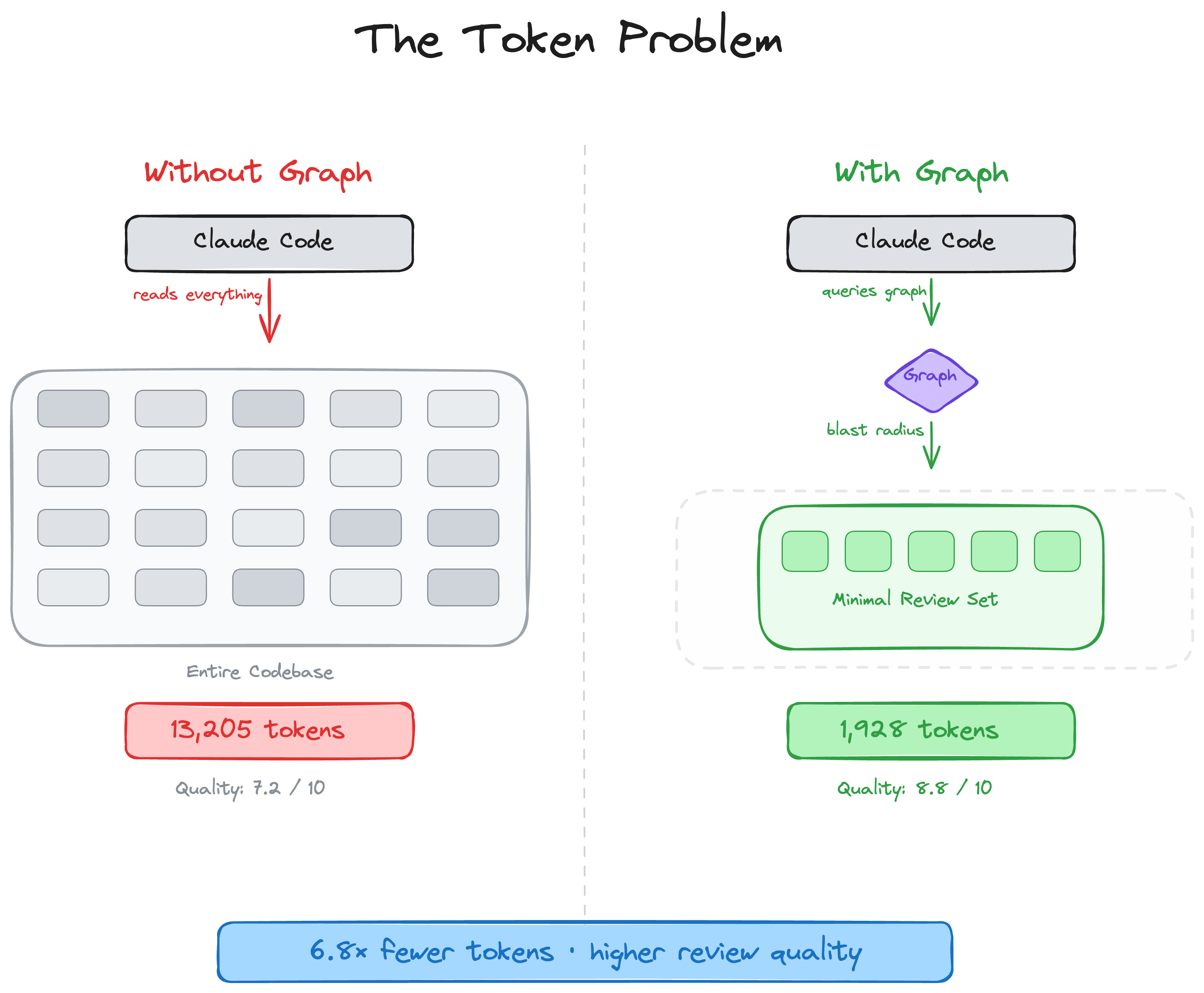
AI coding tools can end up re-reading large parts of your codebase on review tasks. code-review-graph fixes that. It builds a structural map of your code with Tree-sitter, tracks changes incrementally, and gives your AI assistant precise context via MCP so it reads only what matters.
Quick Start
pip install code-review-graph                     # or: pipx install code-review-graph
code-review-graph install          # auto-detects and configures all supported platforms
code-review-graph build            # parse your codebase
One command sets up everything. install detects which AI coding tools you have, writes the correct MCP configuration for each one, installs platform-native hooks/skills where supported, and injects graph-aware instructions into your platform rules. It auto-detects whether you installed via uvx or pip/pipx and generates the right config. Restart your editor/tool after installing.
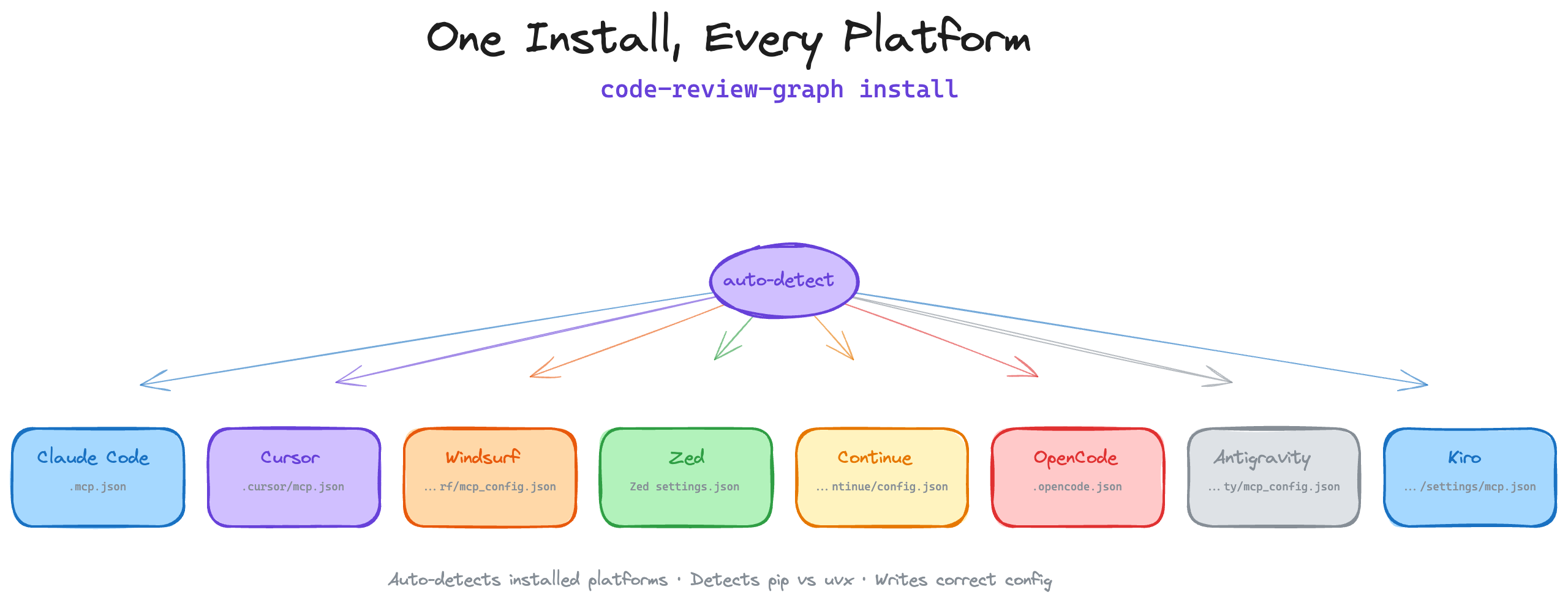
To target a specific platform:
code-review-graph install --platform codex       # configure only Codex
code-review-graph install --platform cursor      # configure only Cursor
code-review-graph install --platform claude-code  # configure only Claude Code
code-review-graph install --platform gemini-cli   # configure only Gemini CLI
code-review-graph install --platform antigravity   # configure only Antigravity
code-review-graph install --platform windsurf     # configure only Windsurf
code-review-graph install --platform zed          # configure only Zed
code-review-graph install --platform continue     # configure only Continue
code-review-graph install --platform opencode     # configure only OpenCode
code-review-graph install --platform qwen         # configure only Qwen
code-review-graph install --platform qoder        # configure only Qoder
code-review-graph install --platform kiro         # configure only Kiro
code-review-graph install --platform copilot      # configure only GitHub Copilot (VS Code)
code-review-graph install --platform copilot-cli  # configure only GitHub Copilot CLI
code-review-graph install --platform codebuddy    # configure only CodeBuddy Code
code-review-graph install --platform hermes       # configure only Hermes Agent
Requires Python 3.10+. For the best experience, install uv (the MCP config will use uvx if available, otherwise falls back to the code-review-graph command directly).
To remove CRG from a Git or SVN project, use the symmetric uninstall command from anywhere inside its working tree. The target is normalized to the working tree root, and non-repository directories are refused. It removes only CRG-owned files and entries; unrelated MCP servers, hooks, skills, and JSONC comments remain untouched. Shared configuration changes use atomic replacement so a failed write leaves the original file intact.
code-review-graph uninstall --dry-run    # preview every action; write nothing
code-review-graph uninstall              # preview, ask for confirmation, then apply
code-review-graph uninstall --yes        # apply without prompting
code-review-graph uninstall --all-repos  # also clean every registered repository
code-review-graph uninstall --keep-data  # remove integrations but keep graph databases
code-review-graph uninstall --keep-user-configs --repo .  # clean this project only
Then open your project and ask your AI assistant:
Build the code review graph for this projectThe initial build takes ~10 seconds for a 500-file project. After that, watch mode and supported hooks can keep the graph updated automatically.
How It Works
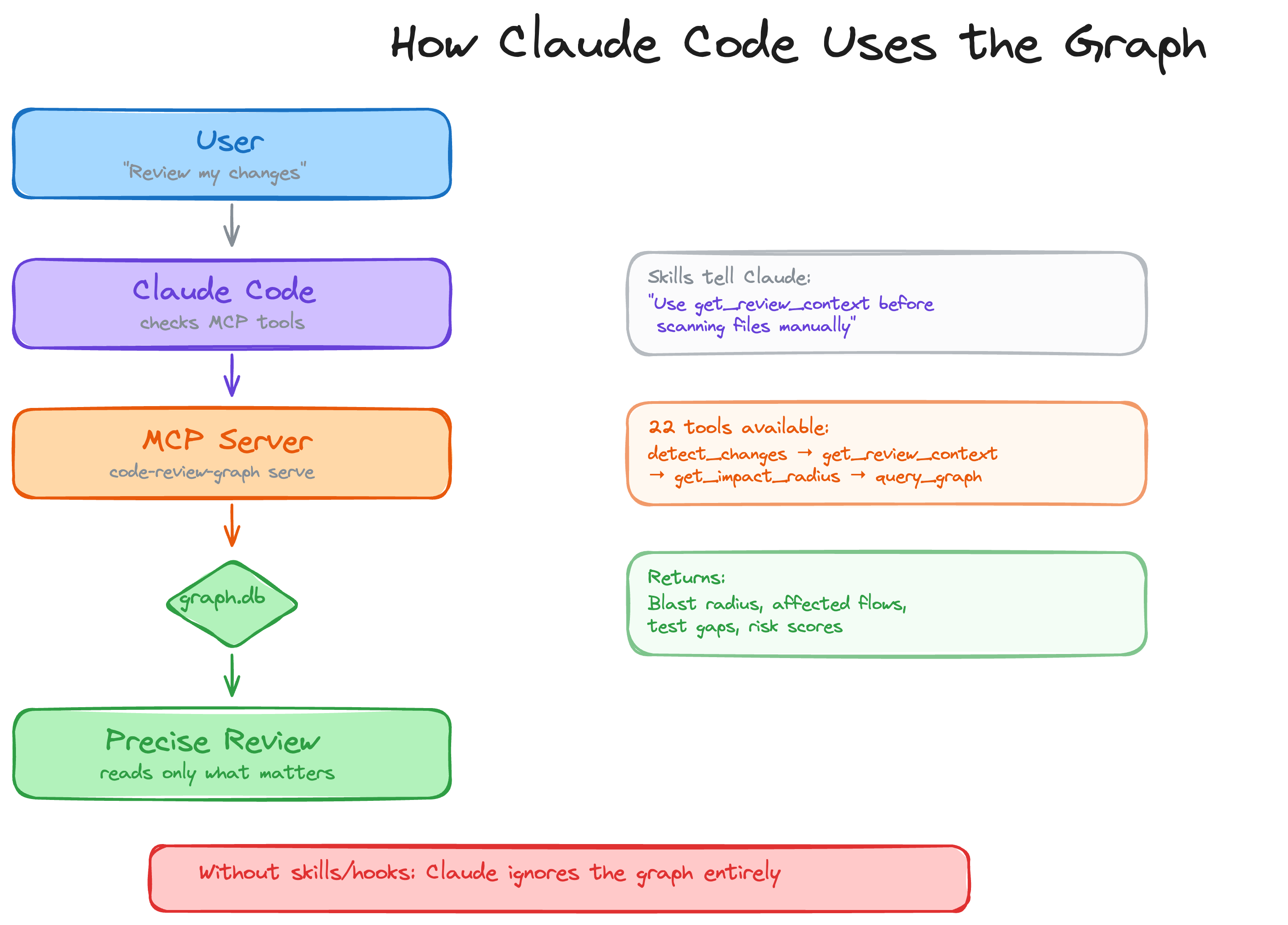
Your repository is parsed into an AST with Tree-sitter, stored as a graph of nodes (functions, classes, imports) and edges (calls, inheritance, test coverage), then queried at review time to compute the minimal set of files your AI assistant needs to read.
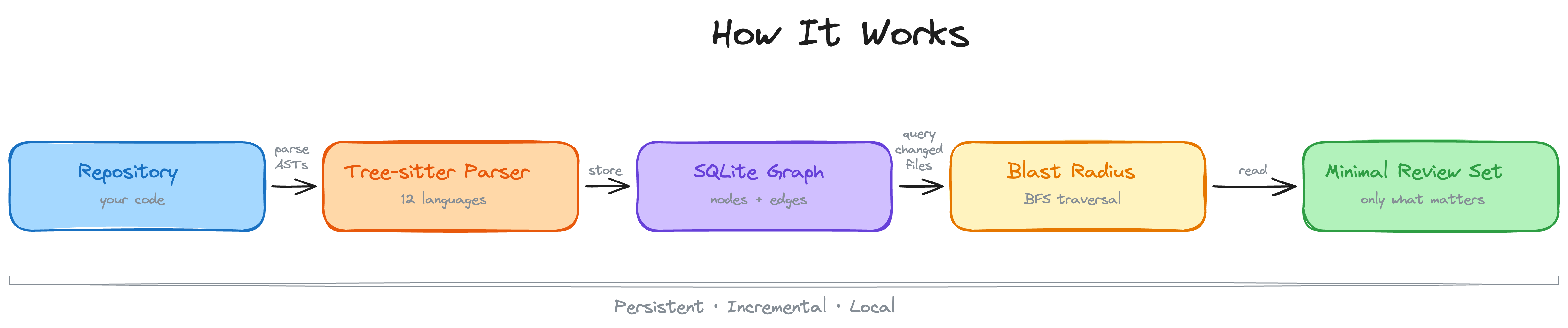
Blast-radius analysis
When a file changes, the graph traces every caller, dependent, and test that could be affected. This is the "blast radius" of the change. Your AI reads only these files instead of scanning the whole project.
Incremental updates in seconds
When hooks or watch mode are enabled, file saves and supported commit hooks trigger incremental updates. The graph diffs changed files, finds their dependents through the graph's own import and call edges, and re-parses only the files whose SHA-256 hash actually changed. On a ~3,000-file project (django) a two-file edit re-indexes in about 2.5 seconds on the path the hooks use, of which ~1.4 s is process start-up; a no-op update costs only that start-up. See Incremental update latency for the full measurement.
Whole codebase or targeted answer?
The bigger the repository, the more token waste hurts. Instead of feeding a whole corpus to the model, the graph returns an answer-shaped slice of it: on this repository, 208,821 source tokens become ~3,190 tokens per question.
Broad language coverage + Jupyter notebooks
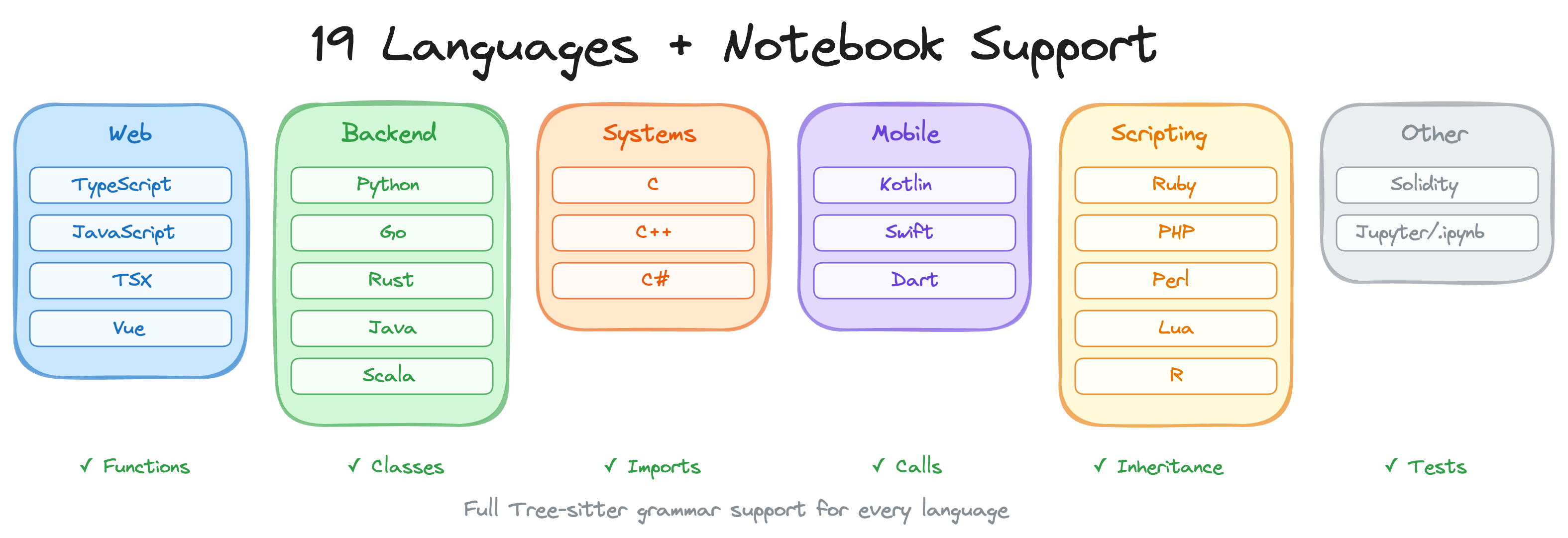
Parser support covers functions, classes, imports, call sites, inheritance, and test detection across the current parser surface, using Tree-sitter where available and targeted fallbacks where needed. Current support includes Python, JavaScript/TypeScript/TSX, Go, Rust, Java, C/C++, C#, VB.NET, Ruby, Kotlin, Swift, PHP, Scala, Solidity, Dart, R, Perl, Lua/Luau, Objective-C, shell scripts, Elixir, Zig, PowerShell, Julia, ReScript, GDScript, Nix, Verilog/SystemVerilog, SQL, Terraform/OpenTofu structure (.tf; generic .hcl files are recognized as file nodes), Ansible playbooks/roles/tasks, Vue/Svelte SFCs, Astro files parsed through the TypeScript parser, Jupyter/Databricks notebooks (.ipynb), and Perl XS files (.xs). Generic YAML is not treated as source code.
PHP projects additionally get repository-bounded Composer PSR-4 resolution, Blade template references, and Laravel Route/Eloquent semantic edges when the source includes explicit framework imports, model inheritance, and receiver evidence.
Add your own language (no fork needed)
If your repo uses a language the parser does not cover yet, drop a languages.toml into .code-review-graph/ mapping file extensions to any grammar bundled in tree_sitter_language_pack, plus the tree-sitter node types for functions, classes, imports, and calls:
[languages.erlang]
extensions = [".erl"]
grammar = "erlang"
function_node_types = ["function_clause"]
class_node_types = ["record_decl"]
import_node_types = ["import_attribute"]
call_node_types = ["call"]
The generic tree-sitter walker handles extraction from there — no code changes, and built-in languages can never be overridden. See docs/CUSTOM_LANGUAGES.md for the schema reference, validation rules, and a worked end-to-end example.
Risk-scored PR reviews in CI (GitHub Action)
The same analysis runs as a composite GitHub Action — and it stays local-first: the knowledge graph is built and queried entirely on your CI runner, with no source code sent to any external service. On each pull request the action posts a single sticky comment with risk-scored functions, affected execution flows, and test gaps, updated in place on every push. An optional fail-on-risk input turns the review into a merge gate.
# .github/workflows/code-review-graph.yml
on:
  pull_request:

permissions:
  contents: read
  pull-requests: write

jobs:
  review:
    runs-on: ubuntu-latest
    steps:
      - uses: actions/checkout@v7
      - uses: tirth8205/code-review-graph@v2.3.6
        with:
          github-token: ${{ secrets.GITHUB_TOKEN }}
See docs/GITHUB_ACTION.md for inputs, risk levels, and caching details, or the dogfood workflow this repo runs on itself in .github/workflows/pr-review.yml.
Benchmarks
Headline number: the median per-question token reduction across the 6 repos is ~65x (whole-corpus baseline vs graph query). The 376x maximum is a single best-case repo (fastapi, the largest corpus) — not the typical result.
All numbers come from the automated evaluation runner against 6 real open-source repositories (13 commits total). Every config pins an upstream SHA, the Leiden community detector runs with a fixed seed, and embeddings are deterministic on CPU — so two runs on different machines produce identical numbers. The full reproduction recipe with expected outputs is in docs/REPRODUCING.md. A weekly report-only run on the two smallest configs lives in .github/workflows/eval.yml.
For a typical agent question ("how does authentication work", "what is the main entry point", etc.), the graph returns ~2,000–3,500 tokens of targeted search hits + neighbor edges instead of forcing the agent to read every source file. The table below averages over the 5 sample questions defined in code_review_graph/token_benchmark.py.
| Repo | Snapshot SHA | naive_corpus_tokens | avg graph_tokens | Reduction |
|---|---|---|---|---|
| fastapi | 22381558 | 948,793 | 2,653 | 375.6x |
| flask | a29f88ce | 143,594 | 2,196 | 71.0x |
| code-review-graph | 84bde354 | 208,821 | 3,190 | 68.1x |
| gin | 5c00df8a | 166,868 | 2,766 | 61.9x |
| httpx | b55d4635 | 142,356 | 2,661 | 60.6x |
| express | b4ab7d65 | 136,052 | 3,936 | 36.0x |
Median per-question reduction across the 6 repos: ~65x. The range is 36x – 376x, where 376x is the best case (fastapi, the largest corpus), not the headline.
Re-captured 2026-08-02 from clean clones at the pinned SHAs (crg 2.3.7, local all-MiniLM-L6-v2 embeddings). These numbers are lower than the 2026-05-25 capture they replace: the graph response grew as node embedding text became richer, so avg graph_tokens rose across every repo. fastapi is now measured at its current pin 22381558 rather than the retired 0227991a.
The whole-corpus baseline above is an upper bound no real agent pays: a competent agent greps for identifiers and reads only the best-matching files. The agent_baseline eval benchmark measures that realistic baseline — a pure-python grep over the corpus, top-3 files by match count, token-counted and compared to the graph query cost (evaluate/results/<repo>_agent_baseline_*.csv).
The formal eval/benchmarks/token_efficiency.py benchmark measures a different scenario — full get_review_context() JSON versus just the changed-file content of a commit — and reports ratios below 1 for small commits, because the review-context response carries impact-radius edges plus source snippets that exceed a tiny single-file diff. That is not a bug; the two benchmarks answer different questions. See docs/REPRODUCING.md for the full methodology.
Since v2.3.4, review and impact tools attach a compact context_savings estimate so MCP clients can see the approximate context saved per call. In v2.3.5 the CLI surfaces this as the boxed Token Savings panel shown above (see "Token Savings panel" in the Usage section) and adds --verify to cross-check against OpenAI's cl100k_base tokenizer. Calibration data in docs/REPRODUCING.md shows the estimate is within ~1% of real GPT-4 tokens in aggregate across 222 sample files.
Blast-radius analysis recovers every file in the ground truth on all 13 evaluation commits — but read that as an upper bound, not as "100% recall": in this mode the ground truth (changed files + files with call/import edges into them) is derived from the same graph the predictor traverses, so it is circular by construction. The over-prediction visible in the precision column is a deliberate trade-off: better to flag too many files than miss a broken dependency.
| Repo | Commits | Avg F1 | Avg Precision | Recall (graph-derived upper bound) |
|---|---|---|---|---|
| httpx | 2 | 0.863 | 0.785 | 1.0 |
| code-review-graph | 2 | 0.734 | 0.584 | 1.0 |
| fastapi | 2 | 0.697 | 0.539 | 1.0 |
| express | 2 | 0.667 | 0.500 | 1.0 |
| flask | 2 | 0.633 | 0.485 | 1.0 |
| gin | 3 | 0.609 | 0.439 | 1.0 |
| Average | 13 | 0.693 | 0.546 | 1.000 |
The benchmark also runs an honest co-change mode: the predictor is seeded with a single changed file and graded against the other files the author actually touched in the same commit — independent-ish evidence from git history, not from the graph. Both modes appear side by side in the result CSVs (ground_truth_mode column). As of the 2026-08-02 capture that mode returns predicted_files = 0 on every graded commit, so it is not yet a usable measurement and no co-change number is quoted here — the harness needs fixing before the mode says anything about accuracy.
| Repo | Files | Nodes | Edges | Flow Detection | Search Latency |
|---|---|---|---|---|---|
| express | 141 | 1,910 | 17,553 | 106ms | 0.7ms |
| fastapi | 1,122 | 6,285 | 27,117 | 128ms | 1.5ms |
| flask | 83 | 1,446 | 7,974 | 95ms | 0.7ms |
| gin | 99 | 1,286 | 16,762 | 111ms | 0.5ms |
| httpx | 60 | 1,253 | 7,896 | 96ms | 0.4ms |
Limitations and known weaknesses
- Impact "recall 1.0" is graph-derived and circular: the historical ground truth comes from the same graph edges the predictor walks, so it is an upper bound by construction. The honest co-change mode (grade against files actually co-changed in the same commit) is measured alongside it; expect those numbers to be substantially lower.
- Small single-file changes: Graph context can exceed naive file reads for trivial edits (see express results above). The overhead is the structural metadata that enables multi-file analysis.
- Search quality (MRR 0.35): Keyword search finds the right result in the top-4 for most queries, but ranking needs improvement. Express queries return 0 hits due to module-pattern naming.
- Flow detection (33% recall): Framework and conventional entry patterns are strongest for Python and PHP/Laravel. JavaScript and Go flow detection needs work.
- Precision vs recall trade-off: Impact analysis is deliberately conservative. It flags files that might be affected, which means some false positives in large dependency graphs.
Features
| Feature | Details |
|---|---|
| Incremental updates | Re-parses only the files whose hash changed. On a ~3,000-file repo a two-file edit takes ~2.5s on the hook path (measured). |
| Broad language + notebook support | Python, JavaScript/TypeScript/TSX, Go, Rust, Java, C/C++, C#, VB.NET, Ruby, Kotlin, Swift, PHP, Scala, Solidity, Dart, R, Perl, Lua/Luau, Objective-C, shell scripts, Elixir, Zig, PowerShell, Julia, ReScript, GDScript, Nix, Verilog/SystemVerilog, SQL, Terraform/OpenTofu structure (.tf; generic .hcl files are file-only), Ansible playbooks/roles/tasks, Vue/Svelte SFCs, Astro files parsed through the TypeScript parser, Jupyter/Databricks (.ipynb), and Perl XS (.xs) |
| Framework-aware PHP parsing | Repository-bounded Composer PSR-4 imports, Blade template references, and evidence-gated Laravel Route-to-controller and Eloquent relationship edges |
| Blast-radius analysis | Shows which functions, classes, and files are likely affected by a change |
| Auto-update hooks | Hooks and watch mode can update the graph on file saves and supported commit hooks |
| Semantic search | Optional vector embeddings via sentence-transformers, Google Gemini, MiniMax, Voyage AI, or any OpenAI-compatible endpoint (real OpenAI, Azure, new-api, LiteLLM, vLLM, LocalAI) |
| Interactive visualisation | D3.js force-directed graph with search, community legend toggles, and degree-scaled nodes |
| Hub & bridge detection | Find most-connected nodes and architectural chokepoints via betweenness centrality |
| Surprise scoring | Detect unexpected coupling: cross-community, cross-language, peripheral-to-hub edges |
| Knowledge gap analysis | Identify isolated nodes, untested hotspots, thin communities, and structural weaknesses |
| Suggested questions | Auto-generated review questions from graph analysis (bridges, hubs, surprises) |
| Edge confidence | Three-tier confidence scoring (EXTRACTED/INFERRED/AMBIGUOUS) with float scores on edges |
| Graph traversal | Free-form BFS/DFS exploration from any node with configurable depth and token budget |
| Export formats | GraphML (Gephi/yEd), Neo4j Cypher, Obsidian vault with wikilinks, SVG static graph |
| Graph diff | Compare graph snapshots over time: new/removed nodes, edges, community changes |
| Token benchmarking | Measure naive full-corpus tokens vs graph query tokens with per-question ratios |
| Estimated context savings | Compact context_savings metadata on relevant MCP/CLI review outputs, labelled as estimated and kept to three small fields |
| Memory loop | Persist Q&A results as markdown for re-ingestion, so the graph grows from queries |
| Community auto-split | Oversized communities (>25% of graph) are recursively split via Leiden |
| Execution flows | Trace call chains from entry points, sorted by weighted criticality |
| Community detection | Cluster related code via Leiden algorithm with resolution scaling for large graphs |
| Architecture overview | Auto-generated architecture map with coupling warnings |
| Risk-scored reviews | detect_changes maps diffs to affected functions, flows, and test gaps |
| Custom languages | Add new languages via .code-review-graph/languages.toml — no fork or code changes needed |
| GitHub Action | Sticky risk-scored PR review comments in CI, with an optional fail-on-risk merge gate |
| Refactoring tools | Rename preview, framework-aware dead code detection, community-driven suggestions |
| Wiki generation | Auto-generate markdown wiki from community structure |
| Multi-repo registry | Register multiple repos, search across all of them |
| Multi-repo daemon | crg-daemon watches multiple repos as child processes, with health checks and auto-restart |
| MCP prompts | 5 workflow templates: review, architecture, debug, onboard, pre-merge |
| Full-text search | FTS5-powered hybrid search combining keyword and vector similarity |
| Local storage | SQLite file in .code-review-graph/. Core graph storage needs no external database or cloud service. |
| Watch mode | Continuous graph updates as you work |
Usage
| Command | Description |
|---|---|
/code-review-graph:build-graph | Build or rebuild the code graph |
/code-review-graph:review-delta | Review changes since last commit |
/code-review-graph:review-pr | Full PR review with blast-radius analysis |
code-review-graph install          # Auto-detect and configure all platforms
code-review-graph install --platform <name>  # Target a specific platform
code-review-graph uninstall --dry-run  # Preview safe removal of installed artifacts
code-review-graph build            # Parse entire codebase
code-review-graph update           # Incremental update (changed files only)
code-review-graph status           # Graph statistics
code-review-graph watch            # Auto-update on file changes
code-review-graph visualize        # Generate interactive HTML graph
code-review-graph visualize --format json      # Export local graph data as JSON
code-review-graph visualize --format graphml   # Export as GraphML
code-review-graph visualize --format svg       # Export as SVG
code-review-graph visualize --format obsidian  # Export as Obsidian vault
code-review-graph visualize --format cypher    # Export as Neo4j Cypher
code-review-graph wiki             # Generate markdown wiki from communities
code-review-graph detect-changes --brief         # Risk panel + token savings (read-only)
code-review-graph update --brief                 # Refresh graph + same panel
code-review-graph detect-changes --brief --verify  # Cross-check vs tiktoken
code-review-graph register <path>  # Register repo in multi-repo registry
code-review-graph unregister <id>  # Remove repo from registry
code-review-graph repos            # List registered repositories
code-review-graph daemon start     # Start multi-repo watch daemon
code-review-graph daemon stop      # Stop the daemon
code-review-graph daemon status    # Show daemon status and repos
code-review-graph eval             # Run evaluation benchmarks
code-review-graph serve            # Start MCP server
JSON exports stay inside the local graph data directory, which Git ignores by default. They can contain absolute paths and code-structure metadata, so inspect and sanitize an export before publishing it outside your machine.
Both commands print the same compact panel showing how many tokens the graph saved you compared to handing the changed files to an agent raw. They differ in one thing: whether the graph gets refreshed first.
┌─────────────────────── Token Savings ────────────────────────┐
│ Full context would be:     12,921 tokens                     │
│ Graph context used:           762 tokens                     │
│ Saved:                     12,159 tokens (~94%)              │
│ Breakdown: Functions 244 · Tests 191 · Risk 244 · Other 83   │
└──────────────────────────────────────────────────────────────┘| Command | What it does | When to use |
|---|---|---|
detect-changes --brief | Read-only. Looks at your current changes, queries the existing graph, prints the panel. ~1 sec. | Most of the time — the hooks (or crg-daemon) keep the graph fresh in the background, so this is enough. |
update --brief | Re-parses your changed files into the graph first, then prints the same panel. ~5 sec. | After a rebase, a large change set, or any time you suspect the graph is stale. |
Both end with the same panel because both call the same analyze_changes() step at the end. The difference is whether the graph itself got refreshed before that analysis ran.
Add --verify to either command to cross-check the displayed numbers against OpenAI's cl100k_base tokenizer (the GPT-4 family). Requires pip install tiktoken. The estimate stays within ~1% of real tokens on a typical change set — see docs/REPRODUCING.md for the calibration data.
The same context_savings metadata is also attached automatically to the JSON responses of get_impact_radius, get_review_context, detect_changes, and get_architecture_overview MCP tools, so AI agents can surface the savings to humans in chat without any extra prompting.
If your editor doesn't support hooks (e.g. Cursor, OpenCode), or you just want your
graph to stay fresh in the background without any editor integration, the daemon is
for you. It watches your repos for file changes and automatically rebuilds the graph
— no manual build or update commands needed.
The daemon is included with code-review-graph — no separate install required.
Quick setup:
# 1. Register the repos you want to watch
crg-daemon add ~/project-a --alias proj-a
crg-daemon add ~/project-b

# 2. Start the daemon (runs in the background)
crg-daemon start

# 3. That's it — graphs stay up to date automatically
crg-daemon status                 # check daemon and per-repo watcher status
crg-daemon logs --repo proj-a -f  # tail logs for a specific repo
crg-daemon stop                   # stop daemon and all watcher processes
Also available as code-review-graph daemon start|stop|status|....
Under the hood, crg-daemon add writes to a TOML config file at
~/.code-review-graph/watch.toml. You can also edit this file directly:
[[repos]]
path = "/home/user/project-a"
alias = "proj-a"

[[repos]]
path = "/home/user/project-b"
alias = "project-b"
The daemon monitors this config file for changes and automatically starts/stops watcher processes as repos are added or removed. Health checks every 30 seconds restart dead watchers. No external dependencies required.
See docs/COMMANDS.md for the full config reference and all available options.
Your AI assistant uses these automatically once the graph is built.
| Tool | Description |
|---|---|
build_or_update_graph_tool | Build or incrementally update the graph |
run_postprocess_tool | Re-run flow detection, community detection, and FTS indexing |
get_minimal_context_tool | Ultra-compact context (~100 tokens) — call this first |
get_impact_radius_tool | Blast radius of changed files |
get_review_context_tool | Token-optimised review context with structural summary |
query_graph_tool | Callers, callees, tests, imports, inheritance queries |
traverse_graph_tool | BFS/DFS traversal from any node with token budget |
semantic_search_nodes_tool | Search code entities by name or meaning |
embed_graph_tool | Compute vector embeddings for semantic search |
list_graph_stats_tool | Graph size and health |
get_docs_section_tool | Retrieve documentation sections |
find_large_functions_tool | Find functions/classes exceeding a line-count threshold |
list_flows_tool | List execution flows sorted by criticality |
get_flow_tool | Get details of a single execution flow |
get_affected_flows_tool | Find flows affected by changed files |
list_communities_tool | List detected code communities |
get_community_tool | Get details of a single community |
get_architecture_overview_tool | Architecture overview from community structure |
detect_changes_tool | Risk-scored change impact analysis for code review |
get_hub_nodes_tool | Find most-connected nodes (architectural hotspots) |
get_bridge_nodes_tool | Find chokepoints via betweenness centrality |
get_knowledge_gaps_tool | Identify structural weaknesses and untested hotspots |
get_surprising_connections_tool | Detect unexpected cross-community coupling |
get_suggested_questions_tool | Auto-generated review questions from analysis |
refactor_tool | Rename preview, dead code detection, suggestions |
apply_refactor_tool | Apply a previously previewed refactoring |
generate_wiki_tool | Generate markdown wiki from communities |
get_wiki_page_tool | Retrieve a specific wiki page |
list_repos_tool | List registered repositories |
cross_repo_search_tool | Search across all registered repositories |
MCP Prompts (5 workflow templates):
review_changes, architecture_map, debug_issue, onboard_developer, pre_merge_check
To exclude paths from indexing, create a .code-review-graphignore file in your repository root:
generated/**
*.generated.ts
vendor/**
node_modules/**
Note: in git repos, only tracked files are indexed (git ls-files), so gitignored files are skipped automatically. Use .code-review-graphignore to exclude tracked files or when git isn't available.
Optional dependency groups:
pip install "code-review-graph[embeddings]"          # Local vector embeddings (sentence-transformers)
pip install "code-review-graph[google-embeddings]"   # Google Gemini embeddings
pip install "code-review-graph[communities]"         # Community detection (igraph)
pip install "code-review-graph[enrichment]"          # Python call-resolution enrichment (Jedi)
pip install "code-review-graph[eval]"                # Evaluation benchmarks (matplotlib)
pip install "code-review-graph[wiki]"                # Wiki generation with LLM summaries (ollama)
pip install "code-review-graph[all]"                 # All optional dependencies
Environment Variables
| Variable | Description | Default |
|---|---|---|
CRG_GIT_TIMEOUT | Timeout in seconds for Git operations | 30 |
CRG_DATA_DIR | Override directory for graph databases and generated graph artefacts | - |
CRG_EMBEDDING_MODEL | Default model for vector embeddings | all-MiniLM-L6-v2 |
CRG_ACCEPT_CLOUD_EMBEDDINGS | Suppress the cloud embedding egress warning after explicit acknowledgement | - |
CRG_ALLOW_REMOTE_CODE | Allow HuggingFace models that require trust_remote_code=True | 0 |
CRG_MAX_IMPACT_NODES | Maximum nodes to include in impact analysis | 500 |
CRG_MAX_IMPACT_DEPTH | Search depth for blast-radius analysis | 2 |
CRG_MAX_BFS_DEPTH | Maximum depth for graph traversal | 15 |
CRG_MAX_CHANGED_FUNCS | Maximum changed functions analysed in one change report | 500 |
CRG_MAX_TRANSITIVE_FRONTIER | Maximum frontier size for transitive caller/callee expansion | 50 |
CRG_TOOL_TIMEOUT | Optional timeout in seconds for bounded MCP tools (0 disables timeout) | 0 |
CRG_RECURSE_SUBMODULES | Include git submodules in file collection when set to 1, true, or yes | - |
CRG_TOOLS | Comma-separated allowlist of MCP tools to expose when serving | - |
GOOGLE_API_KEY | API key for Google Gemini embeddings | - |
MINIMAX_API_KEY | API key for MiniMax embeddings | - |
VOYAGE_API_KEY | API key for Voyage embeddings | - |
CRG_VOYAGE_MODEL | Model name for Voyage embeddings | voyage-code-3 |
CRG_VOYAGE_OUTPUT_DIMENSION | Output dimension for Voyage embeddings | 1024 |
CRG_VOYAGE_OUTPUT_DTYPE | Output dtype for Voyage embeddings | float |
CRG_VOYAGE_BASE_URL | Voyage embeddings endpoint | https://api.voyageai.com/v1 |
CRG_VOYAGE_BATCH_SIZE | Batch size for Voyage embedding requests | 100 |
CRG_VOYAGE_MIN_INTERVAL_SEC | Minimum delay between Voyage requests | 0 |
CRG_OPENAI_BASE_URL | OpenAI-compatible embeddings endpoint | - |
CRG_OPENAI_API_KEY | API key for OpenAI-compatible embeddings | - |
CRG_OPENAI_MODEL | Model name for OpenAI-compatible embeddings | - |
CRG_OPENAI_DIMENSION | Pin embedding dimension (v3 models support reduction) | - |
NO_COLOR | If set, disables ANSI colors in terminal | - |
CRG_SERIAL_PARSE | If 1, disables parallel parsing (use for debugging) | - |
OpenAI-compatible embeddings (real OpenAI, Azure, or any self-hosted gateway like
new-api / LiteLLM / vLLM / LocalAI / Ollama in openai mode) need no extra install —
just set the environment variables and pass provider="openai" to embed_graph:
export CRG_OPENAI_BASE_URL=http://127.0.0.1:3000/v1     # or https://api.openai.com/v1
export CRG_OPENAI_API_KEY=sk-...
export CRG_OPENAI_MODEL=text-embedding-3-small          # whatever your gateway serves
# optional:
export CRG_OPENAI_DIMENSION=1536                        # pin dim (v3 models support reduction)
export CRG_OPENAI_BATCH_SIZE=100                        # lower for gateways with tight limits
                                                        # (e.g. Qwen text-embedding-v4 caps at 10)
The cloud-egress warning is auto-skipped when the base URL points to localhost
(127.0.0.1, localhost, 0.0.0.0, ::1).
Voyage embeddings need no extra install. Set VOYAGE_API_KEY and pass
provider="voyage" to embed_graph; the default model is voyage-code-3:
export VOYAGE_API_KEY=pa-...
export CRG_ACCEPT_CLOUD_EMBEDDINGS=1
code-review-graph embed --provider voyage --model voyage-code-3
Model selection tip. Avoid -preview / -beta / -exp model IDs
(e.g. google/gemini-embedding-2-preview) for anything you plan to keep
long-term — preview models can change weights (different dimension → full
re-embed required) or be deprecated without notice. Prefer stable GA
releases such as text-embedding-3-small / text-embedding-3-large (OpenAI),
Qwen/Qwen3-Embedding-8B (via self-hosted vLLM / LocalAI), or
gemini-embedding-001 (via the native Gemini provider, which requires
GOOGLE_API_KEY instead of the OpenAI-compatible path).
code-review-graph embeds identifiers, signatures, structural context, and a
bounded first-paragraph docstring/doc-comment summary. It does not transmit
function bodies. Graphs created before documentation extraction was added
need one full code-review-graph build before re-embedding so every file is
reparsed. Routine builds never refresh embeddings by default. To refresh an
existing index after a build, explicitly pass both --embedding-provider
and --embedding-model; cloud choices may transmit this source-derived text
and incur API cost.
Tool Filtering
CRG exposes 30 MCP tools by default. In token-constrained environments, you can
limit the server to a subset of tools using --tools or the CRG_TOOLS
environment variable:
# Via CLI flag
code-review-graph serve --tools query_graph_tool,semantic_search_nodes_tool,detect_changes_tool

# Via environment variable
CRG_TOOLS=query_graph_tool,semantic_search_nodes_tool code-review-graph serve
The CLI flag takes precedence over the environment variable. When neither is set, all tools are available. This is especially useful for MCP client configurations:
{
  "mcpServers": {
    "code-review-graph": {
      "command": "code-review-graph",
      "args": ["serve", "--tools", "query_graph_tool,semantic_search_nodes_tool,detect_changes_tool,get_review_context_tool"]
    }
  }
}
FAQ & how it compares
Short, honest answers in docs/FAQ.md:
- vs LSP / language servers — one persistent cross-language graph instead of per-language daemons; LSP stays more precise per symbol.
- vs RAG / embeddings — structural edges parsed from the AST, not similarity chunks; embeddings are optional and only assist search.
- vs grep / agentic search — grep wins on one-hop lookups; the graph wins on multi-hop questions (impact radius, callers-of-callers, tests-for, affected flows).
- vs Serena, codegraph, claude-context, repomix — factual comparison table.
- When NOT to use it — small repos, trivial single-file diffs, one-off questions.
- Does it phone home? — no; zero telemetry, cloud embeddings are opt-in.
- How do I verify it is working? —
status,detect-changes --brief,/mcp.
Troubleshooting
pip / pipx cannot download hatchling (or Errno 9 / Bad file descriptor to PyPI)
Installing from a source tree (for example pipx install .) needs build dependencies from PyPI (for example hatchling). If you see Could not find a version that satisfies the requirement hatchling after connection warnings, the Python/pip in that terminal may not be able to open an HTTPS client to pypi.org (sometimes seen in an integrated editor terminal; less often system-wide with VPN, firewall, or proxy).
Options:
- 1Run the same command from **macOS Terminal.app** (or iTerm) instead of the IDE’s terminal, then retry `pipx install .` or `pipx install "git+https://..."` .
- 2Use **[uv](https://docs.astral.sh/uv/)** to install the CLI from a checkout (uses different download machinery than `pip` in many cases): cd /path/to/code-review-graph uv tool install . --force
- 3For **development in a clone** without a global install, use `uv sync` and `uv run code-review-graph …` (or activate `.venv` after `uv sync`).
Diagnose (optional): python3 scripts/diagnose_pypi_connectivity.py — if it prints FAILED, the issue is environment/network, not a wrong package name in this repo.
Windows Configuration Issues (Invalid JSON / Connection Closed)
If you are using Windows and encounter Invalid JSON: EOF while parsing or MCP error -32000: Connection closed when connecting via Claude Code, do not use the cmd /c wrapper in your config.
Ensure fastmcp is updated to at least 3.2.4+. Then, configure your ~/.claude.json to execute the .exe directly and pass the UTF-8 environment variable via the config:
"code-review-graph": {
  "command": "C:\\path\\to\\your\\venv\\Scripts\\code-review-graph.exe",
  "args": ["serve", "--repo", "C:\\path\\to\\your\\project"],
  "env": { "PYTHONUTF8": "1" }
}
Contributing
git clone https://github.com/tirth8205/code-review-graph.git
cd code-review-graph
python3 -m venv .venv && source .venv/bin/activate
pip install -e ".[dev]"
pytest
Edit code_review_graph/parser.py and add your extension to EXTENSION_TO_LANGUAGE along with node type mappings in _CLASS_TYPES, _FUNCTION_TYPES, _IMPORT_TYPES, and _CALL_TYPES. Include a test fixture and open a PR.
Licence
MIT. See LICENSE.