
GetNotes Tools
ShareX/ShareX
Tool นี้คืออะไร
ShareX เป็นเครื่องมือฟรีและโอเพนซอร์สสำหรับ Windows ที่ช่วยในการจับภาพหน้าจอ บันทึกวิดีโอ แชร์ไฟล์ และเพิ่มประสิทธิภาพการทำงาน เหมาะสำหรับนักพัฒนา ดีไซเนอร์ และผู้ใช้ทั่วไปที่ต้องการการจับภาพที่รวดเร็ว การแก้ไขภาพที่ทรงพลัง และการแชร์อัตโนมัติพร้อมเวิร์กโฟลว์ที่ปรับแต่งได้
ข้อมูลโปรเจกต์
ดาว
39.5K
Forks
3.9K
License
GPL-3.0
อัปเดต GitHub ล่าสุด
12 ก.ย. 2569
เพิ่มใน GetNotes
14 ก.ค. 2569
Repository
ShareX/ShareX
แปลและเรียบเรียงโดย AI
เนื้อหาฉบับภาษาไทย
ใช้อ่านเพื่อทำความเข้าใจเบื้องต้น โปรดตรวจสอบรายละเอียดสำคัญกับเอกสารต้นฉบับด้านล่าง







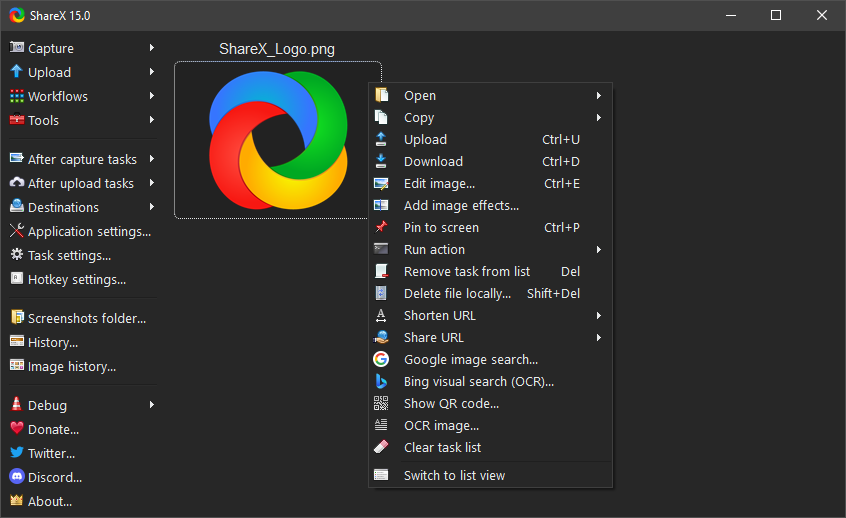
ShareX - เครื่องมือจับภาพหน้าจอ บันทึกภาพหน้าจอ แชร์ไฟล์ และเพิ่มประสิทธิภาพการทำงานฟรี
ShareX เป็นเครื่องมือจับภาพหน้าจอ บันทึกหน้าจอ แชร์ไฟล์ และแอปพลิเคชันเพิ่มประสิทธิภาพการทำงานฟรีและโอเพนซอร์สสำหรับ Windows ได้รับการออกแบบมาสำหรับผู้ใช้ที่ต้องการการจับภาพหน้าจอที่รวดเร็ว การแก้ไขภาพหน้าจอที่ทรงพลัง การแชร์อัตโนมัติ ปลายทางการอัปโหลดที่กำหนดเอง และยูทิลิตี้ที่ใช้งานได้จริงในแอปพลิเคชันเดสก์ท็อปขนาดเล็กเพียงตัวเดียว
ด้วย ShareX คุณสามารถจับภาพพื้นที่ใดก็ได้บนหน้าจอของคุณ บันทึกวิดีโอหรือ GIF ใส่คำอธิบายประกอบภาพหน้าจอ อัปโหลดไฟล์ คัดลอกลิงก์ที่แชร์ได้ แยกข้อความด้วย OCR สแกนโค้ด QR เลือกสี และเรียกใช้เวิร์กโฟลว์ที่กำหนดเองจากปุ่มลัด ShareX สร้างขึ้นเพื่อความเร็วและการควบคุม: จับภาพหน้าจอ แก้ไข บันทึก คัดลอก อัปโหลด หรือส่งผ่านชุดงานของคุณเองโดยใช้การทำงานด้วยมือน้อยที่สุด
ทำไมต้อง ShareX?
ShareX รวมคุณสมบัติการจับภาพหน้าจอ การบันทึกหน้าจอ การแก้ไขรูปภาพ การอัปโหลดไฟล์ และการทำงานอัตโนมัติ ซึ่งมักจะแยกอยู่ในหลายแอปพลิเคชัน เป็นฟรีทั้งหมด โอเพนซอร์ส มีน้ำหนักเบา เน้นความเป็นส่วนตัว และไม่มีโฆษณา ไม่จำเป็นต้องมีบัญชีเพื่อใช้ ShareX
ShareX มีประโยชน์อย่างยิ่งสำหรับนักพัฒนา นักออกแบบ ทีมสนับสนุน ผู้สร้างเนื้อหา นักเขียนด้านเทคนิค ผู้ทดสอบ QA และผู้ใช้ขั้นสูงที่สร้างภาพหน้าจอ บันทึกคลิปสั้นๆ แชร์ไฟล์ หรือจัดทำเอกสารเวิร์กโฟลว์บ่อยๆ สามารถใช้เป็นแอปจับภาพหน้าจอแบบง่ายๆ ได้ แต่ยังรองรับเวิร์กโฟลว์ขั้นสูงสำหรับผู้ใช้ที่ต้องการการควบคุมที่แม่นยำเกี่ยวกับวิธีการจับภาพ งานหลังการจับภาพ ปลายทางการอัปโหลด และปุ่มลัด
คุณสมบัติการจับภาพหน้าจอและการบันทึกหน้าจอ
ShareX รองรับวิธีการจับภาพหน้าจอหลายวิธี:
- จับภาพเต็มหน้าจอ
- จับภาพหน้าต่างที่ใช้งานอยู่
- จับภาพจอภาพที่ใช้งานอยู่
- จับภาพเฉพาะส่วน
- จับภาพหน้าจอแบบเลื่อน
- จับภาพส่วนสุดท้าย
- จับภาพส่วนที่กำหนดเอง
- บันทึกหน้าจอ
- บันทึกหน้าจอเป็น GIF
- จับภาพอัตโนมัติ
หลังจากจับภาพหน้าจอหรือบันทึก ShareX สามารถคัดลอกผลลัพธ์ไปยังคลิปบอร์ดโดยอัตโนมัติ บันทึกลงในไฟล์ เปิดในโปรแกรมแก้ไขรูปภาพ อัปโหลด พิมพ์ แสดงใน Windows Explorer เรียกใช้การดำเนินการ สแกนโค้ด QR หรือรู้จำข้อความด้วย OCR งานหลังการจับภาพเหล่านี้ทำให้ ShareX เป็นเครื่องมือเวิร์กโฟลว์การจับภาพหน้าจอที่ยืดหยุ่น แทนที่จะเป็นเพียงยูทิลิตี้การตัดภาพพื้นฐาน
การจับภาพเฉพาะส่วนและการใส่คำอธิบายประกอบ
การจับภาพเฉพาะส่วนของ ShareX มีเครื่องมือสำหรับเลือกสิ่งที่คุณต้องการจับภาพอย่างแม่นยำ และทำเครื่องหมายก่อนบันทึก คัดลอก หรืออัปโหลด คุณสามารถวาดสี่เหลี่ยม วงรี เส้นอิสระ ลูกศร ข้อความ ลูกโป่งคำพูด ตัวเลขขั้นตอน ไฮไลต์ เอฟเฟกต์เบลอ พิกเซล การขยาย และเอฟเฟกต์สปอตไลต์
เครื่องมือคำอธิบายประกอบเหล่านี้ช่วยสร้างภาพหน้าจอที่ชัดเจนสำหรับรายงานข้อผิดพลาด เอกสารประกอบ บทช่วยสอน การตอบกลับฝ่ายสนับสนุน คำขอพูล และบันทึกการเผยแพร่ ข้อมูลที่ละเอียดอ่อนสามารถซ่อนได้ด้วยเครื่องมือเบลอ พิกเซล หรือยางลบอัจฉริยะก่อนที่จะแชร์ภาพหน้าจอ
โปรแกรมแก้ไขรูปภาพในตัว
โปรแกรมแก้ไขรูปภาพของ ShareX ช่วยให้คุณสามารถครอบตัด ใส่คำอธิบายประกอบ แก้ไข ไฮไลต์ และเตรียมภาพหน้าจอหลังการจับภาพ มีเครื่องมือแก้ไขทั่วไป เช่น รูปร่าง ลูกศร ข้อความ การวาดอิสระ การแทรกรูปภาพ การแทรกเคอร์เซอร์ เบลอ พิกเซล ขยาย สปอตไลต์ ครอบตัด ตัดออก การแก้ไขพื้นหลัง และเอฟเฟกต์รูปภาพ
เนื่องจากโปรแกรมแก้ไขเป็นส่วนหนึ่งของเวิร์กโฟลว์การจับภาพ คุณจึงสามารถจับภาพหน้าจอ ทำเครื่องหมายพื้นที่สำคัญ ซ่อนรายละเอียดส่วนตัว จากนั้นคัดลอก บันทึก หรืออัปโหลดรูปภาพที่แก้ไขแล้วโดยไม่ต้องสลับไปมาระหว่างแอปพลิเคชันแยกกัน
การแชร์ไฟล์และการอัปโหลดอัตโนมัติ
ShareX สามารถอัปโหลดรูปภาพ ข้อความ ไฟล์ โฟลเดอร์ เนื้อหาคลิปบอร์ด และ URL ไปยังปลายทางต่างๆ มากมาย หลังจากอัปโหลดแล้ว สามารถคัดลอก URL ไปยังคลิปบอร์ด เปิด URL ย่อ URL แสดงโค้ด QR หรือเรียกใช้งานอื่นๆ ที่กำหนดค่าไว้โดยอัตโนมัติ
ผู้ใช้ขั้นสูงสามารถสร้างตัวอัปโหลดแบบกำหนดเองสำหรับบริการที่ไม่ได้มีมาให้ในตัว ShareX ยังมีคู่มือสำหรับปลายทางต่างๆ เช่น Amazon S3, Google Cloud Storage และ Cloudflare R2 ทำให้เหมาะสำหรับการแชร์ภาพหน้าจอส่วนตัวและเวิร์กโฟลว์ของทีมที่ต้องอัปโหลดไฟล์ไปยังที่เก็บข้อมูลที่ควบคุมได้
เครื่องมือเพิ่มประสิทธิภาพการทำงาน
ShareX มียูทิลิตี้มากมายที่สนับสนุนการทำงานบนเดสก์ท็อปในชีวิตประจำวัน:
- เครื่องมือเลือกสี
- เครื่องมือเลือกสีจากหน้าจอ
- ไม้บรรทัด
- ปักหมุดบนหน้าจอ
- โปรแกรมแก้ไขรูปภาพ
- ปรับแต่งรูปภาพ
- เอฟเฟกต์รูปภาพ
- โปรแกรมดูรูปภาพ
- ลบพื้นหลัง
- เปรียบเทียบรูปภาพ
- รวมรูปภาพ
- แยกรูปภาพ
- สร้างภาพขนาดย่อ
- แปลงวิดีโอ
- สร้างภาพขนาดย่อจากวิดีโอ
- วิเคราะห์รูปภาพ
- OCR สำหรับการรู้จำข้อความในรูปภาพ
- โค้ด QR
- ตรวจสอบแฮช
- โปรแกรมดูเมตาดาต้า
- สร้างดัชนีไดเรกทอรี
- โปรแกรมดูคลิปบอร์ด
- หน้าต่างไร้ขอบ
- ตรวจสอบหน้าต่าง
- ทดสอบจอภาพ
เครื่องมือเหล่านี้ทำให้ ShareX มีประโยชน์มากกว่าแค่การจับภาพหน้าจอ สามารถช่วยตรวจสอบรูปภาพ เตรียมสินทรัพย์ แยกข้อมูล ตรวจสอบไฟล์ และเร่งงานที่ทำซ้ำๆ
เวิร์กโฟลว์ที่กำหนดเองและปุ่มลัด
ShareX สร้างขึ้นจากเวิร์กโฟลว์ที่กำหนดค่าได้ คุณสามารถกำหนดปุ่มลัดให้กับวิธีการจับภาพ เลือกสิ่งที่เกิดขึ้นหลังการจับภาพ ตัดสินใจว่าจะเกิดอะไรขึ้นหลังการอัปโหลด และสร้างการดำเนินการที่เรียกใช้เครื่องมือหรือสคริปต์ภายนอก สิ่งนี้ทำให้สามารถสร้างเวิร์กโฟลว์ เช่น จับภาพเฉพาะส่วน ใส่คำอธิบายประกอบรูปภาพ บันทึกในเครื่อง อัปโหลดไปยังปลายทาง ย่อ URL และคัดลอกลิงก์สุดท้ายไปยังคลิปบอร์ด
ระบบเวิร์กโฟลว์เป็นหนึ่งในเหตุผลหลักที่ ShareX เป็นที่นิยมในหมู่ผู้ใช้ขั้นสูง งานง่ายๆ ยังคงง่าย ในขณะที่ผู้ใช้ขั้นสูงสามารถทำให้กระบวนการจับภาพหน้าจอ บันทึกหน้าจอ และแชร์ไฟล์ที่มีรายละเอียดเป็นไปโดยอัตโนมัติ
ดาวน์โหลด ShareX
ShareX มีให้ดาวน์โหลดจากเว็บไซต์ทางการ, GitHub releases, Microsoft Store และ Steam คุณสามารถติดตั้งเวอร์ชันติดตั้งปกติ ใช้เวอร์ชันพกพา หรือลองใช้ Dev builds หากคุณต้องการการเปลี่ยนแปลงล่าสุดก่อนการเผยแพร่เวอร์ชันเสถียร
สำหรับการดาวน์โหลดที่ปลอดภัยที่สุด โปรดใช้ลิงก์ทางการด้านล่าง
ลิงก์
- เว็บไซต์ทางการ: https://getsharex.com
- ดาวน์โหลด: https://getsharex.com/downloads
- GitHub: https://github.com/ShareX/ShareX
- บันทึกการเปลี่ยนแปลง: https://getsharex.com/changelog
- ภาพหน้าจอ: https://getsharex.com/screenshots
- นโยบายความเป็นส่วนตัว: https://getsharex.com/privacy-policy
- บริจาค: https://getsharex.com/donate
- X: https://x.com/ShareX
- Discord: https://discord.gg/ShareX
- Reddit: https://www.reddit.com/r/sharex
- หน้า Steam: https://store.steampowered.com/app/400040/ShareX/
- หน้า Microsoft Store: https://apps.microsoft.com/detail/9nblggh4z1sp
- โปรเจกต์ที่เกี่ยวข้องกับ ShareX บน GitHub: https://github.com/topics/sharex
เอกสาร
- เอฟเฟกต์รูปภาพ: https://getsharex.com/image-effects
- การดำเนินการ: https://getsharex.com/actions
- Dev builds: https://getsharex.com/docs/dev-builds
- การผูกคีย์: https://getsharex.com/docs/keybinds
- การจับภาพเฉพาะส่วน: https://getsharex.com/docs/region-capture
- โปรแกรมแก้ไขรูปภาพ: https://getsharex.com/docs/image-editor
- การลบพื้นหลัง: https://getsharex.com/docs/background-remover
- การปักหมุดบนหน้าจอ: https://getsharex.com/docs/pin-to-screen
- การจับภาพหน้าจอแบบเลื่อน: https://getsharex.com/docs/scrolling-screenshot
- อาร์กิวเมนต์บรรทัดคำสั่ง: https://getsharex.com/docs/command-line-arguments
- การแปล: https://getsharex.com/docs/translation
- OCR: https://getsharex.com/docs/ocr
- ตัวอัปโหลดแบบกำหนดเอง: https://getsharex.com/docs/custom-uploader
- คู่มือ Amazon S3: https://getsharex.com/docs/amazon-s3
- คู่มือ Google Cloud Storage: https://getsharex.com/docs/google-cloud-storage
- คู่มือ Cloudflare R2: https://getsharex.com/docs/cloudflare-r2
- สินทรัพย์แบรนด์: https://getsharex.com/brand-assets
ประวัติ Star
เอกสารโปรเจกต์
อ่านเอกสารต้นฉบับ
README วิธีติดตั้ง วิธีใช้งาน และข้อกำหนดจาก repository ต้นฉบับ
ShareX - Free Screen Capture, Screenshot, File Sharing and Productivity Tool
ShareX is a free and open source screenshot tool, screen recorder, file sharing tool and productivity application for Windows. It is designed for users who need fast screen capture, powerful screenshot editing, automated sharing, custom upload destinations and practical utilities in one lightweight desktop app.
With ShareX, you can capture any area of your screen, record video or GIFs, annotate screenshots, upload files, copy shareable links, extract text with OCR, scan QR codes, pick colors and run custom workflows from hotkeys. ShareX is built for speed and control: capture a screenshot, edit it, save it, copy it, upload it or pass it through your own task chain with minimal manual work.
Why ShareX?
ShareX combines screen capture, screen recording, image editing, file uploading and automation features that are often split across multiple applications. It is completely free, open source, lightweight, privacy focused and has no advertisements. No account is required to use ShareX.
ShareX is especially useful for developers, designers, support teams, content creators, technical writers, QA testers and power users who frequently create screenshots, record short clips, share files or document workflows. It can be used as a simple screenshot app, but it also supports advanced workflows for users who want precise control over capture methods, after-capture tasks, upload destinations and hotkeys.
Screenshot and Screen Recording Features
ShareX supports many ways to capture your screen:
- Fullscreen capture
- Active window capture
- Active monitor capture
- Region capture
- Scrolling screenshot capture
- Last region capture
- Custom region capture
- Screen recording
- GIF screen recording
- Auto capture
After capturing a screenshot or recording, ShareX can automatically copy the result to the clipboard, save it to a file, open it in the image editor, upload it, print it, show it in Windows Explorer, run an action, scan a QR code or recognize text with OCR. These after-capture tasks make ShareX a flexible screenshot workflow tool instead of only a basic snipping utility.
Region Capture and Annotation
ShareX region capture includes tools for selecting exactly what you want to capture and marking it before saving, copying or uploading. You can draw rectangles, ellipses, freehand lines, arrows, text, speech balloons, step numbers, highlights, blur effects, pixelation, magnification and spotlight effects.
These annotation tools help create clear screenshots for bug reports, documentation, tutorials, support replies, pull requests and release notes. Sensitive information can be hidden with blur, pixelate or smart eraser tools before a screenshot is shared.
Built-in Image Editor
The ShareX image editor lets you crop, annotate, redact, highlight and prepare screenshots after capture. It includes common editing tools such as shapes, arrows, text, freehand drawing, image insertion, cursor insertion, blur, pixelate, magnify, spotlight, crop, cut out, background editing and image effects.
Because the editor is part of the capture workflow, you can take a screenshot, mark the important area, hide private details and then copy, save or upload the edited image without switching between separate apps.
File Sharing and Upload Automation
ShareX can upload images, text, files, folders, clipboard content and URLs to many different destinations. After uploading, it can automatically copy the URL to the clipboard, open the URL, shorten the URL, show a QR code or run other configured tasks.
Advanced users can create custom uploaders for services that are not built in. ShareX also provides guides for destinations such as Amazon S3, Google Cloud Storage and Cloudflare R2, making it suitable for both personal screenshot sharing and team workflows where files need to be uploaded to controlled storage.
Productivity Tools
ShareX includes many utilities that support everyday desktop work:
- Color picker
- Screen color picker
- Ruler
- Pin to screen
- Image editor
- Image beautifier
- Image effects
- Image viewer
- Background remover
- Image comparer
- Image combiner
- Image splitter
- Image thumbnailer
- Video converter
- Video thumbnailer
- Analyze image
- OCR for recognizing text in images
- QR code
- Hash checker
- Metadata viewer
- Directory indexer
- Clipboard viewer
- Borderless window
- Inspect window
- Monitor test
These tools make ShareX useful beyond screenshots. It can help inspect images, prepare assets, extract information, verify files and speed up repetitive tasks.
Custom Workflows and Hotkeys
ShareX is built around configurable workflows. You can assign hotkeys to capture methods, choose what happens after capture, decide what happens after upload and create actions that run external tools or scripts. This makes it possible to build a workflow such as capture region, annotate image, save locally, upload to a destination, shorten the URL and copy the final link to the clipboard.
The workflow system is one of the main reasons ShareX is popular with power users. Simple tasks can stay simple, while advanced users can automate detailed screenshot, screen recording and file sharing processes.
Download ShareX
ShareX is available from the official website, GitHub releases, Microsoft Store and Steam. You can install the regular setup version, use a portable version or try development builds if you want the newest changes before a stable release.
For the safest download options, use the official links below.
Links
- Official website: https://getsharex.com
- Downloads: https://getsharex.com/downloads
- GitHub: https://github.com/ShareX/ShareX
- Changelog: https://getsharex.com/changelog
- Screenshots: https://getsharex.com/screenshots
- Privacy policy: https://getsharex.com/privacy-policy
- Donate: https://getsharex.com/donate
- X: https://x.com/ShareX
- Discord: https://discord.gg/ShareX
- Reddit: https://www.reddit.com/r/sharex
- Steam page: https://store.steampowered.com/app/400040/ShareX/
- Microsoft Store page: https://apps.microsoft.com/detail/9nblggh4z1sp
- ShareX related projects on GitHub: https://github.com/topics/sharex
Documents
- Image effects: https://getsharex.com/image-effects
- Actions: https://getsharex.com/actions
- Dev builds: https://getsharex.com/docs/dev-builds
- Keybinds: https://getsharex.com/docs/keybinds
- Region capture: https://getsharex.com/docs/region-capture
- Image editor: https://getsharex.com/docs/image-editor
- Background remover: https://getsharex.com/docs/background-remover
- Pin to screen: https://getsharex.com/docs/pin-to-screen
- Scrolling screenshot: https://getsharex.com/docs/scrolling-screenshot
- Command line arguments: https://getsharex.com/docs/command-line-arguments
- Translation: https://getsharex.com/docs/translation
- OCR: https://getsharex.com/docs/ocr
- Custom uploader: https://getsharex.com/docs/custom-uploader
- Amazon S3 guide: https://getsharex.com/docs/amazon-s3
- Google Cloud Storage guide: https://getsharex.com/docs/google-cloud-storage
- Cloudflare R2 guide: https://getsharex.com/docs/cloudflare-r2
- Brand assets: https://getsharex.com/brand-assets