
GetNotes Tools
santifer/career-ops
Tool นี้คืออะไร
Career-Ops เป็นระบบค้นหางานแบบ Multi-Agent ที่เปลี่ยน AI coding CLI ให้เป็นศูนย์บัญชาการหางาน ช่วยผู้สมัครงานประเมินข้อเสนอ, สร้าง CV ที่ปรับแต่งเฉพาะงาน, สแกนพอร์ทัลงาน และติดตามทุกอย่างอย่างมีประสิทธิภาพ เพื่อเพิ่มโอกาสในการได้งานที่ใช่
ข้อมูลโปรเจกต์
ดาว
71.3K
Forks
13.4K
License
MIT
อัปเดต GitHub ล่าสุด
12 ก.ย. 2569
เพิ่มใน GetNotes
14 ก.ค. 2569
Repository
santifer/career-ops
รูปแบบ
เหมาะกับงาน
เหมาะกับอาชีพ
Ecosystem
JavaScript
แปลและเรียบเรียงโดย AI
เนื้อหาฉบับภาษาไทย
ใช้อ่านเพื่อทำความเข้าใจเบื้องต้น โปรดตรวจสอบรายละเอียดสำคัญกับเอกสารต้นฉบับด้านล่าง
Career-Ops
English | Deutsch | Español | Français | Português (Brasil) | 한국어 | 日本語 | 简体中文 | 繁體中文 | Українська | Русский | Polski | Dansk | العربية | हिन्दी













Career-Ops คืออะไร
Career-Ops (career-ops.org หรือที่รู้จักกันในชื่อ careerops) เปลี่ยน AI coding CLI ใด ๆ ให้เป็นศูนย์บัญชาการค้นหางานเต็มรูปแบบ แทนที่จะติดตามการสมัครงานด้วยตนเองในสเปรดชีต คุณจะได้รับไปป์ไลน์ที่ขับเคลื่อนด้วย AI ซึ่ง:
- ประเมินข้อเสนอ ด้วยระบบการให้คะแนนแบบมีโครงสร้าง A-F (10 มิติที่มีน้ำหนัก)
- สร้าง PDF ที่ปรับแต่งเฉพาะ -- CV ที่ปรับให้เหมาะสมกับ ATS ซึ่งปรับแต่งตามรายละเอียดงานแต่ละตำแหน่ง
- สแกนพอร์ทัล โดยอัตโนมัติ (Greenhouse, Ashby, Lever, หน้าบริษัท)
- ประมวลผลเป็นชุด -- ประเมินข้อเสนอ 10+ รายการพร้อมกันด้วย sub-agents
- ติดตามทุกสิ่ง ในแหล่งข้อมูลเดียวที่เชื่อถือได้ พร้อมการตรวจสอบความสมบูรณ์
- วิจัยบริษัทและค้นหาบุคคลที่เหมาะสมในการติดต่อ -- การสมัครงานทำให้คุณอยู่ในคิว; การวิจัยทำให้คุณได้พูดคุย
สำคัญ: นี่ไม่ใช่เครื่องมือแบบ "หว่านแห" Career-ops เป็นตัวกรอง -- ช่วยให้คุณค้นหาข้อเสนอเพียงไม่กี่รายการที่คุ้มค่ากับเวลาของคุณจากหลายร้อยรายการ ระบบแนะนำอย่างยิ่งว่าไม่ควรสมัครงานใด ๆ ที่ได้คะแนนต่ำกว่า 4.0/5 เวลาของคุณมีค่า เช่นเดียวกับเวลาของ Recruiter ตรวจสอบทุกครั้งก่อนส่ง
Career-ops เป็นแบบ Agentic: ไม่ว่าคุณจะเลือก AI coding CLI ใด ระบบจะนำทางหน้าอาชีพด้วย Playwright, ประเมินความเหมาะสมโดยการใช้เหตุผลเกี่ยวกับ CV ของคุณเทียบกับรายละเอียดงาน (ไม่ใช่การจับคู่คีย์เวิร์ด) และปรับเรซูเม่ของคุณตามประกาศแต่ละรายการ
โปรดทราบ: การประเมินครั้งแรกอาจจะยังไม่ดีนัก ระบบยังไม่รู้จักคุณ ป้อนบริบทให้มัน -- CV ของคุณ, เรื่องราวอาชีพของคุณ, จุดแข็งของคุณ, ความชอบของคุณ, สิ่งที่คุณถนัด, สิ่งที่คุณต้องการหลีกเลี่ยง ยิ่งคุณดูแลมันมากเท่าไหร่ มันก็จะยิ่งดีขึ้นเท่านั้น ลองนึกภาพเหมือนกับการปฐมนิเทศ Recruiter คนใหม่: สัปดาห์แรกพวกเขาต้องเรียนรู้เกี่ยวกับคุณ จากนั้นพวกเขาก็จะกลายเป็นคนที่มีค่าอย่างยิ่ง
สร้างโดยผู้ที่ใช้มันเพื่อประเมินข้อเสนองานกว่า 740+ รายการ, สร้าง CV ที่ปรับแต่งเฉพาะกว่า 100+ ฉบับ และได้งานในตำแหน่ง Head of Applied AI อ่านกรณีศึกษาฉบับเต็ม
คุณสมบัติ
| คุณสมบัติ | คำอธิบาย |
|---|---|
| ไปป์ไลน์อัตโนมัติ | วาง URL แล้วรับการประเมินฉบับเต็ม + PDF + รายการติดตาม |
| การประเมิน 6 บล็อก | สรุปบทบาท, การจับคู่ CV, กลยุทธ์ระดับ, การวิจัยค่าตอบแทน, การปรับแต่งเฉพาะบุคคล, การเตรียมตัวสัมภาษณ์ (STAR+R) -- พร้อมการตรวจสอบความถูกต้องของประกาศ Block G ที่จะแจ้งเตือนการหลอกลวงและงานปลอม |
| คลังเรื่องราวการสัมภาษณ์ | รวบรวมเรื่องราว STAR+Reflection จากการประเมินต่าง ๆ -- 5-10 เรื่องราวหลักที่ตอบคำถามเชิงพฤติกรรมได้ทุกข้อ |
| สคริปต์การเจรจา | กรอบการเจรจาเงินเดือน, การโต้แย้งส่วนลดตามภูมิภาค, การใช้ประโยชน์จากข้อเสนอคู่แข่ง |
| การสร้าง ATS PDF | CV ที่ใส่คีย์เวิร์ดพร้อมการออกแบบ Space Grotesk + DM Sans |
| เครื่องมือสร้างจดหมายปะหน้า | จดหมายปะหน้าที่อิงจากการวิจัยพร้อมการสะท้อนคีย์เวิร์ด, พร้อมท์มุมมองแบบโต้ตอบสี่แบบ (ทำไม/ปัญหา/แนวทาง/น้ำเสียง), ประตูอนุมัติร่างในแชท, และ PDF ขนาด A4 ผ่านไปป์ไลน์ HTML + Playwright เดียวกันกับ CV ร่างอัตโนมัติในการประเมินทุกครั้ง; สร้างและทำให้สมบูรณ์ตามต้องการผ่าน /career-ops cover |
| ร่างอีเมลสมัครงาน | อีเมลสมัครงานอย่างเป็นทางการสำหรับ Recruiter/การแนะนำ/การสมัครแบบ Cold จากรายงานหรือ JD ที่วางไว้ พร้อมหัวเรื่อง, รายการตรวจสอบไฟล์แนบ, จุดที่เหมาะสมที่อิงจากแหล่งที่มา, และบล็อกติดต่อที่ขับเคลื่อนด้วยโปรไฟล์ ร่างเท่านั้น -- career-ops จะไม่ส่ง, ยื่น, หรือคลิกสิ่งใด ๆ |
| เครื่องสแกนพอร์ทัล | บริษัทกว่า 45+ แห่งที่กำหนดค่าไว้ล่วงหน้า (Anthropic, OpenAI, ElevenLabs, Retool, n8n...) + การสืบค้นแบบกำหนดเองทั่วทั้ง Ashby, Greenhouse, Lever, Wellfound |
| การประมวลผลเป็นชุด | การประเมินแบบขนานด้วย headless CLI workers (claude -p / opencode run) |
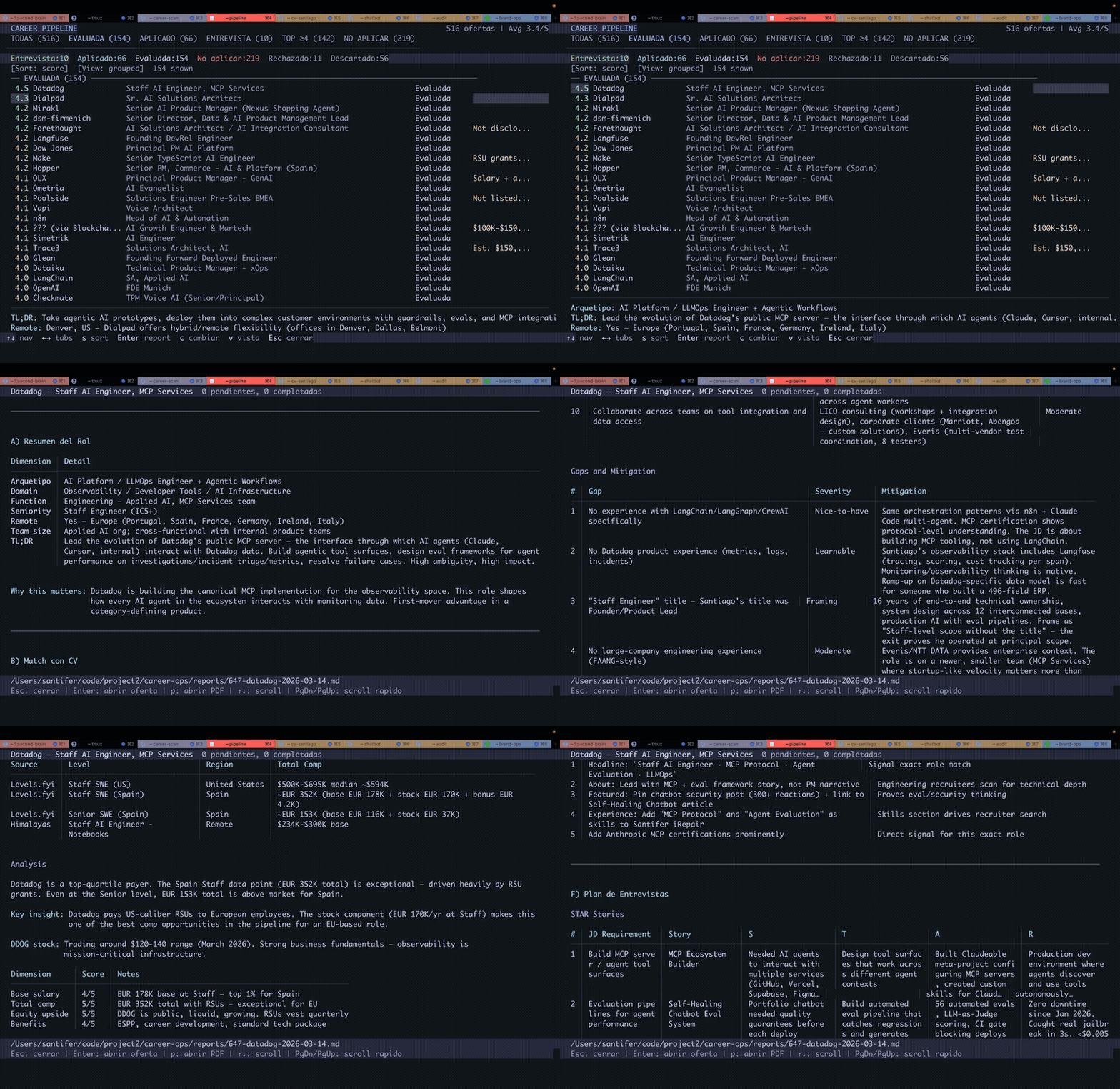
| แดชบอร์ด TUI | Terminal UI สำหรับเรียกดู, กรอง, และจัดเรียงไปป์ไลน์ของคุณ |
| Human-in-the-Loop | AI ประเมินและแนะนำ คุณตัดสินใจและดำเนินการ ระบบไม่เคยส่งใบสมัคร -- คุณมีสิทธิ์ตัดสินใจขั้นสุดท้ายเสมอ |
| ความสมบูรณ์ของไปป์ไลน์ | การรวมอัตโนมัติ, การลบข้อมูลซ้ำ, การปรับสถานะให้เป็นมาตรฐาน, การตรวจสอบสุขภาพ |
| นอกเหนือจาก CV | การวิจัยบริษัท (deep) เผยกลยุทธ์ AI, การเคลื่อนไหวล่าสุด, วัฒนธรรมวิศวกรรม, และมุมมองที่โปรไฟล์ของคุณควรใช้ การค้นหาผู้ติดต่อ (contacto) ระบุผู้จัดการฝ่ายจ้างงาน, Recruiter, หรือเพื่อนร่วมทีมที่ควรติดต่อ และร่างข้อความ LinkedIn ที่มีความยาวไม่เกิน 300 ตัวอักษรที่ปรับให้เข้ากับประเภทผู้ติดต่อแต่ละคน ร่างอีเมลสมัครงานอย่างเป็นทางการ (email) เปลี่ยนรายงานที่ประเมินแล้วหรือ JD ที่วางไว้ให้เป็นหัวเรื่อง, เนื้อหา, และรายการตรวจสอบไฟล์แนบ โดยไม่ส่ง, ยื่น, หรือคลิกสิ่งใด ๆ การสมัครงานทำให้คุณอยู่ในคิว; การวิจัยทำให้คุณได้พูดคุย |
เริ่มต้นใช้งานอย่างรวดเร็ว
วิธีที่เร็วที่สุด — คำสั่งเดียว:
npx @santifer/career-ops init💡 npx มาพร้อมกับ Node.js — มันจะรันตัวติดตั้งเพียงครั้งเดียว โดยไม่ต้องติดตั้งอะไรทั่วโลก ยังไม่มี Node ใช่ไหม? ติดตั้งก่อน (ถ้าคุณใช้ Claude Code / Gemini / Codex CLI อยู่แล้ว คุณก็มีมันอยู่แล้ว)
คำสั่งนี้จะโคลนรีลีสล่าสุดลงใน ./career-ops และติดตั้ง dependencies จากนั้น:
cd career-ops
claude # หรือ codex / qwen / opencode / agy / grok — เปิด AI CLI ของคุณที่นี่
เมื่อเปิดใช้งานครั้งแรก career-ops จะแนะนำคุณตลอดการตั้งค่า — CV, โปรไฟล์ และบทบาทเป้าหมายของคุณ — เพียงแค่สนทนา ไม่ต้องแก้ไขด้วยตนเอง
git clone https://github.com/santifer/career-ops.git
cd career-ops && npm install
npx playwright install chromium # จำเป็นสำหรับการสร้าง PDF เท่านั้น

# 2. ตรวจสอบการตั้งค่า
npm run doctor # ตรวจสอบข้อกำหนดเบื้องต้นทั้งหมด

# 3. กำหนดค่า
cp config/profile.example.yml config/profile.yml # แก้ไขด้วยรายละเอียดของคุณ
cp templates/portals.example.yml portals.yml # ปรับแต่งบริษัท

# 4. เพิ่ม CV ของคุณ
# สร้าง cv.md ใน root ของโปรเจกต์ด้วย CV ของคุณในรูปแบบ markdown

# 5. เปิด AI CLI ของคุณในไดเรกทอรีนี้
claude # หรือ codex / opencode / qwen / agy / grok

# จากนั้นขอให้ CLI ของคุณปรับระบบให้เข้ากับคุณ:
# "เปลี่ยน archetypes เป็นบทบาทวิศวกรรมแบ็กเอนด์"
# "แปลโหมดเป็นภาษาอังกฤษ"
# "เพิ่ม 5 บริษัทเหล่านี้ลงใน portals.yml"
# "อัปเดตโปรไฟล์ของฉันด้วย CV ที่ฉันกำลังวาง"

# 6. เริ่มใช้งาน
# วาง URL ของงานหรือข้อความ JD เพื่อเรียกใช้ auto-pipeline
# หาก CLI ของคุณรองรับ slash commands ให้ใช้ /career-ops (หรือชื่อเรียกเฉพาะของ CLI)
# ใน Codex ให้ขอโหมดเดียวกันในภาษาธรรมดา เช่น:
# "Run the career-ops scan mode"
# "Run the career-ops pipeline mode for data/pipeline.md"
# "Run the career-ops pdf mode for the latest evaluated role"
# "Run the career-ops tracker mode and summarize the current statuses"
ระบบถูกออกแบบมาให้ AI coding CLI ของคุณสามารถปรับแต่งได้เอง โหมด, archetypes, น้ำหนักการให้คะแนน, สคริปต์การเจรจา -- เพียงแค่ขอให้มันเปลี่ยน มันอ่านไฟล์เดียวกันกับที่มันใช้ ดังนั้นมันจึงรู้ว่าต้องแก้ไขอะไร
ดู docs/SETUP.md สำหรับคู่มือการตั้งค่าฉบับเต็ม, docs/RUNNING_ON_A_BUDGET.md สำหรับคำแนะนำในการรัน career-ops อย่างประหยัดโดยใช้โมเดลที่กำหนดเองหรือโมเดลในเครื่อง, docs/APPLY_AUTOFILL.md สำหรับรายละเอียดเกี่ยวกับขั้นตอนการกรอก ATS อัตโนมัติ และ docs/FAQ.md สำหรับคำตอบของคำถามการตั้งค่าที่พบบ่อย
การรวม Antigravity CLI
Career-ops รองรับ Antigravity CLI โดยกำเนิด เช่นเดียวกับที่รองรับ Claude Code และ OpenCode คำสั่ง slash commands ทั้งหมดมีให้ใช้งานผ่านจุดเข้าใช้งานทักษะที่ใช้ร่วมกัน โดยใช้ตรรกะการประเมิน modes/*.md เดียวกัน
Google ได้เปลี่ยนการเข้าถึง Gemini CLI สำหรับผู้บริโภคไปเป็น Antigravity CLI แล้ว GEMINI.md ตอนนี้เป็น no-op compatibility guard เพื่อไม่ให้ Antigravity ทำซ้ำคำแนะนำโปรเจกต์ทั้งหมดเมื่ออ่านทั้ง AGENTS.md และ GEMINI.md
Antigravity CLI แบบเนทีฟ
# 1. รันในไดเรกทอรี career-ops
cd career-ops
agy

# 2. ใช้คำสั่ง /career-ops แบบรวมพร้อม subcommands:
/career-ops "Senior AI Engineer at Anthropic..."
/career-ops pipeline
/career-ops scan
/career-ops pdf
/career-ops tracker
ทักษะถูกกำหนดโดยใช้มาตรฐานเปิดใน .agents/skills/career-ops/SKILL.md และถูกเชื่อมโยง/อ้างอิงสำหรับ CLI ที่รองรับแต่ละตัว (เช่น .claude/, .qwen/, .antigravitycli/, .grok/)
การรวม Codex
Career-ops รองรับ Codex ผ่านเราเตอร์ที่ใช้ร่วมกัน แต่โมเดลการเรียกใช้งานแตกต่างจาก CLI ที่ลงทะเบียน slash commands โดยอัตโนมัติ สำหรับคู่มือฉบับเต็ม โปรดดู docs/CODEX.md
Codex แบบโต้ตอบ
cd career-ops
codex
Slash commands ไม่รับประกันใน Codex หาก /career-ops ไม่พร้อมใช้งาน ให้ขอให้ Codex รันโหมดโดยตรงในภาษาธรรมดา:
Evaluate this JD with career-ops auto-pipeline: https://company.com/jobs/123
Run the career-ops scan mode and summarize new matches.
Run the career-ops pipeline mode for data/pipeline.md.
Run the career-ops pdf mode for the latest evaluated role.
Run the career-ops tracker mode and summarize the current statuses.
Codex แบบ One-shot (codex exec)
codex exec "Evaluate this JD with career-ops auto-pipeline: https://company.com/jobs/123"
codex exec "Run career-ops scan mode in this repo and summarize new matches."
codex exec "Run career-ops pipeline mode for data/pipeline.md."
codex exec "Run career-ops pdf mode for the latest evaluated role."
codex exec "Run career-ops tracker mode and summarize the current statuses."
การรวม Grok Build CLI
Career-ops รองรับ Grok Build CLI โดยกำเนิด เช่นเดียวกับที่รองรับ Claude Code และ OpenCode AGENTS.md จะถูกโหลดโดยอัตโนมัติเป็นกฎของโปรเจกต์ และคำสั่ง slash commands ทั้งหมดมีให้ใช้งานผ่านจุดเข้าใช้งานทักษะที่ใช้ร่วมกัน
Grok Build CLI แบบเนทีฟ
# 1. รันในไดเรกทอรี career-ops
cd career-ops
grok

# 2. ใช้คำสั่ง /career-ops แบบรวมพร้อม subcommands:
/career-ops "Senior AI Engineer at Anthropic..."
/career-ops pipeline
/career-ops scan
/career-ops pdf
/career-ops tracker
สำหรับ headless batch workers ให้ใช้ grok -p "prompt" (เพิ่ม --yolo เพื่ออนุมัติการดำเนินการเครื่องมือโดยอัตโนมัติ)
สคริปต์ Gemini API แบบ Standalone (ไม่ต้องติดตั้ง CLI)
# 1. รับ API key ฟรีที่ https://aistudio.google.com/apikey
cp .env.example .env
# แก้ไข .env, ตั้งค่า GEMINI_API_KEY=your_key_here

# 2. ติดตั้ง dependencies
npm install

# 3. ประเมินรายละเอียดงาน
node gemini-eval.mjs "We are looking for a Senior AI Engineer..."
node gemini-eval.mjs --file ./jds/my-job.txt
node agent-inbox.mjs add "..." # จัดคิวคำขอสำหรับเซสชันถัดไป
npm run gemini:eval -- "JD text here"
Free tier: ทั้งสองตัวเลือกทำงานได้โดยไม่ต้องมีการเรียกเก็บเงิน Native CLI ใช้ Google OAuth; สคริปต์ API ใช้ gemini-2.5-flash (15 RPM, 1M tokens/วัน ฟรี)
การใช้งาน
Career-ops ใช้เราเตอร์คำสั่งที่ใช้ร่วมกัน ใน CLI ที่ลงทะเบียน slash commands จะมีลักษณะดังนี้:
/career-ops                → แสดงคำสั่งที่มีทั้งหมด
/career-ops {วาง JD}       → Full auto-pipeline (ประเมิน + PDF + tracker)
/career-ops scan           → สแกนพอร์ทัลเพื่อหาข้อเสนอใหม่
/career-ops pdf            → สร้าง CV ที่ปรับให้เหมาะสมกับ ATS
/career-ops cover          → ตัวสร้างจดหมายปะหน้า (วาง JD หรือ /career-ops cover {slug})
/career-ops email          → ร่างอีเมลสมัครงานอย่างเป็นทางการ (ร่างเท่านั้น; ไม่เคยส่ง, ยื่น หรือคลิก)
/career-ops batch          → ประเมินข้อเสนอหลายรายการพร้อมกัน
/career-ops tracker        → ดูสถานะการสมัคร
/career-ops apply          → กรอกแบบฟอร์มใบสมัครด้วย AI
/career-ops pipeline       → ประมวลผล URL ที่รอดำเนินการ
/career-ops contacto       → ค้นหาผู้จัดการการจ้างงาน / ผู้สรรหา / เพื่อนร่วมงาน + ร่างข้อความ LinkedIn ≤300 ตัวอักษรต่อประเภทผู้ติดต่อ
/career-ops deep           → สร้างพรอมต์การวิจัยแบบมีโครงสร้าง 6 แกน (กลยุทธ์ AI, การเคลื่อนไหวล่าสุด, วัฒนธรรม, ความท้าทาย, คู่แข่ง, มุมมองผู้สมัคร)
/career-ops training       → ประเมินหลักสูตร/ใบรับรอง
/career-ops project        → ประเมินโปรเจกต์ในพอร์ตโฟลิโอ
หรือเพียงแค่วาง URL ของงานหรือคำอธิบายโดยตรง -- career-ops จะตรวจจับและรัน pipeline เต็มรูปแบบโดยอัตโนมัติ
ใน Codex, slash commands ไม่รับประกัน ใช้ชื่อโหมดเดียวกันในพรอมต์แทน หรือเรียกใช้จาก codex exec
วิธีการทำงาน
คุณวาง URL ของงานหรือคำอธิบาย
        │
        ▼
┌──────────────────┐
│  การตรวจจับ      │  จำแนก: LLMOps / Agentic / PM / SA / FDE / Transformation
│  Archetype       │
└────────┬─────────┘
         │
┌────────▼─────────┐
│  การประเมิน A-F  │  การจับคู่, ช่องว่าง, การวิจัยค่าตอบแทน, เรื่องราว STAR
│  (อ่าน cv.md)    │
└────────┬─────────┘
         │
    ┌────┼────┐
    ▼    ▼    ▼
 รายงาน  PDF  ตัวติดตาม
  .md   .pdf   .tsv
พอร์ทัลที่กำหนดค่าไว้ล่วงหน้า
เครื่องสแกนมาพร้อมกับ 45+ บริษัท ที่พร้อมให้สแกน และ 19 คำค้นหา ทั่วกระดานประกาศงานหลัก คัดลอก templates/portals.example.yml ไปยัง portals.yml และเพิ่มของคุณเอง:
AI Labs: Anthropic, OpenAI, Mistral, Cohere, LangChain, Pinecone Voice AI: ElevenLabs, PolyAI, Parloa, Hume AI, Deepgram, Vapi, Bland AI AI Platforms: Retool, Airtable, Vercel, Temporal, Glean, Arize AI Contact Center: Ada, LivePerson, Sierra, Decagon, Talkdesk, Genesys Enterprise: Salesforce, Twilio, Gong, Dialpad LLMOps: Langfuse, Weights & Biases, Lindy, Cognigy, Speechmatics Automation: n8n, Zapier, Make.com European: Factorial, Attio, Tinybird, Clarity AI, Travelperk
กระดานประกาศงานที่ค้นหา: โมดูลผู้ให้บริการ 21 รายครอบคลุม ATS API, ฟีดทั่วทั้งกระดาน, ฟีด XML/RSS, ฟีด markdown และตัวแยกวิเคราะห์ในเครื่อง ดู Supported job boards สำหรับตารางฉบับเต็ม
โดยค่าเริ่มต้น node scan.mjs (หรือที่รู้จักกันในชื่อ npm run scan) จะเชื่อถือสิ่งที่ฟีด ATS แต่ละรายการส่งกลับมา บางบริษัททิ้งประกาศที่หมดอายุไว้ใน API สาธารณะแม้ว่าตำแหน่งนั้นจะปิดไปแล้ว ดังนั้นรายการที่หมดอายุเหล่านั้นอาจรั่วไหลเข้าไปใน pipeline.md ได้ ส่ง --verify เพื่อเปิด Playwright หลังจากผ่าน API และลบประกาศที่หมดอายุก่อนที่จะเข้าสู่ pipeline:
node scan.mjs --verify # zero-token discovery + Playwright liveness checkการตรวจสอบจะทำงานตามลำดับและดำเนินการกับข้อเสนอใหม่เท่านั้น (หลังจากลบรายการซ้ำ) ดังนั้นค่าใช้จ่ายจึงยังคงอยู่ในขอบเขตที่จำกัด
แดชบอร์ด TUI
แดชบอร์ดเทอร์มินัลในตัวช่วยให้คุณสามารถเรียกดู pipeline ของคุณได้ด้วยภาพ:
npm run serve:dashboard   # launch the TUI
npm run build:dashboard   # optional: build the standalone binary
คุณสมบัติ: 6 แท็บตัวกรอง, 4 โหมดการจัดเรียง, มุมมองแบบจัดกลุ่ม/แบบแบน, การแสดงตัวอย่างแบบโหลดเมื่อต้องการ, การเปลี่ยนสถานะแบบอินไลน์
นอกจากนี้ยังมี UI เว็บแบบทดลอง (อัลฟ่า, เลือกเข้าร่วม — จะไม่มีอะไรทำงานจนกว่าคุณจะเริ่ม): ดู web/README.md
โครงสร้างโปรเจกต์
career-ops/
├── AGENTS.md                    # คำแนะนำเอเจนต์ที่เป็นมาตรฐาน (สำหรับ CLI ทั้งหมด)
├── CLAUDE.md                    # ตัวห่อ Claude Code (นำเข้า AGENTS.md)
├── CODEX.md                     # ตัวห่อ Codex (นำเข้า AGENTS.md)
├── OPENCODE.md                  # ตัวห่อ OpenCode (นำเข้า AGENTS.md)
├── GEMINI.md                    # ตัวป้องกัน no-op แบบเก่าเพื่อหลีกเลี่ยงบริบทซ้ำซ้อนของ Antigravity
├── cv.md                        # CV ของคุณ (สร้างไฟล์นี้)
├── article-digest.md            # จุดแข็งของคุณ (ไม่บังคับ)
├── config/
│   └── profile.example.yml      # เทมเพลตสำหรับโปรไฟล์ของคุณ
├── modes/                       # โหมดทักษะ
│   ├── _shared.md               # บริบทที่ใช้ร่วมกัน (ปรับแต่งได้)
│   ├── oferta.md                # การประเมินเดี่ยว
│   ├── pdf.md                   # การสร้าง PDF
│   ├── cover.md                 # การสร้างจดหมายปะหน้า
│   ├── email.md                 # ร่างอีเมลสมัครงานอย่างเป็นทางการ
│   ├── scan.md                  # เครื่องสแกนพอร์ทัล
│   ├── batch.md                 # การประมวลผลแบบแบตช์
│   └── ...
├── templates/
│   ├── cv-template.html         # เทมเพลต CV ที่ปรับให้เหมาะกับ ATS
│   ├── portals.example.yml      # เทมเพลตการกำหนดค่าเครื่องสแกน
│   └── states.yml               # สถานะที่เป็นมาตรฐาน
├── batch/
│   ├── batch-prompt.md          # พร้อมต์ของ Worker ที่ทำงานได้ด้วยตัวเอง
│   └── batch-runner.sh          # สคริปต์ Orchestrator
├── dashboard/                   # โปรแกรมดู pipeline แบบ Go TUI
├── data/                        # ข้อมูลการติดตามของคุณ (ถูก gitignore)
├── reports/                     # รายงานการประเมิน (ถูก gitignore)
├── output/                      # PDF ที่สร้างขึ้น (ถูก gitignore)
├── fonts/                       # Space Grotesk + DM Sans
├── docs/                        # การตั้งค่า, การปรับแต่ง, คู่มือการใช้งบประมาณ, สถาปัตยกรรม
└── examples/                    # ตัวอย่าง CV, รายงาน, จุดแข็ง
เทคโนโลยีที่ใช้
- Agent: CLI สำหรับการเขียนโค้ดด้วย AI พร้อมทักษะและโหมดที่ใช้ร่วมกัน (
AGENTS.md+ CLI wrapper) - PDF: Playwright/Puppeteer + เทมเพลต HTML
- จดหมายปะหน้า: เทมเพลต HTML + Playwright (PDF ขนาด A4, pipeline เดียวกันกับ CV)
- Scanner: Playwright + Greenhouse API + WebSearch
- Dashboard: Go + Bubble Tea + Lipgloss (ธีม Catppuccin Mocha)
- ข้อมูล: ตาราง Markdown + การกำหนดค่า YAML + ไฟล์แบตช์ TSV
โปรเจกต์ Open Source อื่นๆ
- cv-santiago -- เว็บไซต์พอร์ตโฟลิโอ (santifer.io) พร้อมแชทบอท AI, แดชบอร์ด LLMOps และกรณีศึกษา หากคุณต้องการพอร์ตโฟลิโอเพื่อแสดงควบคู่ไปกับการหางานของคุณ ให้ fork ไปใช้และปรับแต่งให้เป็นของคุณเอง
เกี่ยวกับผู้เขียน
ผมคือ Santiago Fernández de Valderrama Aparicio (santifer) -- หัวหน้าฝ่าย Applied AI, อดีตผู้ก่อตั้ง (สร้างและขายธุรกิจที่ยังคงดำเนินงานภายใต้ชื่อของผม) ผมสร้าง career-ops เพื่อจัดการการหางานของตัวเอง และมันได้ผล: ผมใช้มันเพื่อได้งานปัจจุบันของผม
สงสัยไหมว่า repo นี้ได้รับการดูแลอย่างไรในเวลาประมาณ 4 ชั่วโมงต่อสัปดาห์? อ่าน Agentic maintenance: how career-ops is run by a fleet of AI agents
พอร์ตโฟลิโอและโปรเจกต์โอเพนซอร์สอื่นๆ ของผม → santifer.io
Wikidata: Santiago Fernández de Valderrama Aparicio · career-ops
ข้อจำกัดความรับผิดชอบ
career-ops เป็นเครื่องมือโอเพนซอร์สแบบโลคัล ไม่ใช่บริการโฮสต์ โดยการใช้ซอฟต์แวร์นี้ คุณรับทราบว่า:
- 1คุณควบคุมข้อมูลของคุณเอง CV, ข้อมูลติดต่อ และข้อมูลส่วนตัวของคุณจะยังคงอยู่ในเครื่องของคุณ และถูกส่งโดยตรงไปยังผู้ให้บริการ AI ที่คุณเลือก (Anthropic, OpenAI, ฯลฯ) เราไม่รวบรวม จัดเก็บ หรือเข้าถึงข้อมูลใดๆ ของคุณ
- 2คุณควบคุม AI พร้อมต์เริ่มต้นจะสั่งให้ AI ไม่ส่งใบสมัครโดยอัตโนมัติ แต่โมเดล AI อาจทำงานโดยไม่คาดคิด หากคุณแก้ไขพร้อมต์หรือใช้โมเดลอื่น คุณต้องรับความเสี่ยงเอง โปรดตรวจสอบเนื้อหาที่สร้างโดย AI เพื่อความถูกต้องก่อนส่งเสมอ
- 3คุณปฏิบัติตาม ToS ของบุคคลที่สาม คุณต้องใช้เครื่องมือนี้ตามข้อกำหนดในการให้บริการของพอร์ทัลอาชีพที่คุณโต้ตอบด้วย (Greenhouse, Lever, Workday, LinkedIn, ฯลฯ) ห้ามใช้เครื่องมือนี้เพื่อสแปมนายจ้างหรือทำให้ระบบ ATS ทำงานหนักเกินไป
- 4ไม่มีการรับประกัน การประเมินเป็นเพียงคำแนะนำ ไม่ใช่ความจริง โมเดล AI อาจสร้างทักษะหรือประสบการณ์ที่ไม่เป็นจริง ผู้เขียนจะไม่รับผิดชอบต่อผลลัพธ์การจ้างงาน, การสมัครที่ถูกปฏิเสธ, การจำกัดบัญชี หรือผลกระทบอื่นๆ
ดู LEGAL_DISCLAIMER.md สำหรับรายละเอียดทั้งหมด ซอฟต์แวร์นี้จัดทำขึ้นภายใต้ MIT License "ตามสภาพ" โดยไม่มีการรับประกันใดๆ
ผู้ร่วมให้ข้อมูล
ได้งานโดยใช้ career-ops ใช่ไหม? แบ่งปันเรื่องราวของคุณ!
ใบอนุญาตและเครื่องหมายการค้า
โค้ดได้รับอนุญาตภายใต้ MIT ชื่อและแบรนด์ "career-ops" อยู่ภายใต้ นโยบายเครื่องหมายการค้า ซึ่งอนุญาตให้ใช้งานโดยชุมชน แต่สงวนไว้สำหรับการตั้งชื่อผลิตภัณฑ์เชิงพาณิชย์และการรับรอง
มาเชื่อมต่อกัน





เอกสารโปรเจกต์
อ่านเอกสารต้นฉบับ
README วิธีติดตั้ง วิธีใช้งาน และข้อกำหนดจาก repository ต้นฉบับ

English | Español | Deutsch | Français | Português (Brasil) | 한국어 | 日本語 | 简体中文 | 繁體中文 | Українська | Русский | Polski | Dansk | தமிழ் | العربية | हिन्दी | Türkçe






What Is This
career-ops (career-ops.org, also known as careerops) is an open-source AI job search that runs locally inside any AI coding CLI: it evaluates offers, tailors your CV and tracks every application, and you always have the final call. Instead of manually tracking applications in a spreadsheet, you get an AI-powered pipeline that:
- Evaluates offers into a structured report -- blocks A through H, with a global 1-5 score reached by holistic judgement across five dimensions rather than an arithmetic formula. Block B's per-requirement importance column and block G's posting-legitimacy assessment are both separate, score-neutral signals that never affect the score; block H is drafted only at 4.5 and above
- Generates tailored PDFs -- ATS-optimized CVs customized per job description
- Scans portals automatically (Greenhouse, Ashby, Lever, company pages)
- Processes in batch -- evaluate 10+ offers in parallel with sub-agents
- Tracks everything in a single source of truth with integrity checks
- Researches companies and finds the right person to contact -- applications get you in the queue; research gets you a conversation
Important: This is NOT a spray-and-pray tool. career-ops is a filter -- it helps you find the few offers worth your time out of hundreds. The system strongly recommends against applying to anything scoring below 4.0/5. Your time is valuable, and so is the recruiter's. Always review before submitting.
career-ops is agentic: whichever AI coding CLI you choose navigates career pages with Playwright, evaluates fit by reasoning about your CV vs the job description (not keyword matching), and adapts your resume per listing.
Heads up: the first evaluations won't be great. The system doesn't know you yet. Feed it context -- your CV, your career story, your proof points, your preferences, what you're good at, what you want to avoid. The more you nurture it, the better it gets. Think of it as onboarding a new recruiter: the first week they need to learn about you, then they become invaluable.
Built by someone who used it to evaluate 740+ job offers, generate 100+ tailored CVs, and land a Head of Applied AI role. Read the full case study.
The CareerOps Manifesto
career-ops is the first reference implementation of the CareerOps Manifesto. read it. if it says what you believe, sign it. your signature becomes a commit.
Features
| Feature | Description |
|---|---|
| Auto-Pipeline | Paste a URL, get a full evaluation + PDF + tracker entry |
| A-H Evaluation | Role summary, CV match (with how much each requirement matters for this posting, and whether that weight came from the JD's own wording, its structure, or an estimate — labelled per requirement, and an estimate can never be top-band), level strategy, comp research, personalization, interview prep (STAR+R) -- plus a Block G posting-legitimacy check that flags scams and ghost jobs, and a Work-Auth signal that flags an explicit no-sponsorship JD as a hard blocker |
| Interview Story Bank | Accumulates STAR+Reflection stories across evaluations -- 5-10 master stories that answer any behavioral question |
| Negotiation Scripts | Salary negotiation frameworks, geographic discount pushback, competing offer leverage |
| ATS PDF Generation | Keyword-injected CVs with Space Grotesk + DM Sans design |
| Cover Letter Generator | Research-backed cover letters with keyword mirroring, four interactive angle prompts (why/problems/approach/tone), draft-in-chat approval gate, and A4 PDF via the same HTML + Playwright pipeline as CVs. Auto-drafts on every evaluation; complete and generate on demand via /career-ops cover |
| Application Email Drafts | Formal recruiter/referral/cold application emails from a report or pasted JD, with subject line, attachment checklist, source-backed fit points, and a profile-driven contact block. Draft-only -- career-ops never sends, submits, or clicks anything. |
| Portal Scanner | 100+ companies pre-configured (Anthropic, OpenAI, ElevenLabs, Retool, n8n...) + custom queries across Ashby, Greenhouse, Lever, Wellfound |
| Funded Company Discovery | Review-first company:funded command surfaces recently funded companies and source diagnostics from structured public feeds without editing your data |
| Batch Processing | Parallel evaluation with headless CLI workers (claude -p / opencode run) |
| Dashboard TUI | Terminal UI to browse, filter, and sort your pipeline |
| Human-in-the-Loop | AI evaluates and recommends, you decide and act. The system never submits an application -- you always have the final call |
| Pipeline Integrity | Automated merge, dedup, status normalization, health checks |
| Interview Suite | Time-blocked prep plans, practice sessions with feedback, post-interview debriefs (interview/), and a company red-flag detector (interview-redflag) |
| Offer Stage | Contract reading companion -- clause walk plus a lawyer question list (offer-prep) -- and a desired/advertised/actual salary-gap analyzer (salary-gap.mjs) |
| Follow-ups & Replies | Follow-up cadence calculator and seeded reminders (followup-cadence.mjs, followup-seed.mjs); employer reply classification into tracker updates (reply-watch) |
| Pattern Analysis | Rejection patterns and per-ATS-channel advance rates (analyze-patterns.mjs), lifetime funnel stats (stats.mjs), repost/ghost-job detection (detect-reposts.mjs) |
| Plugin System | Opt-in integrations (Gmail, Notion, Apify + a community registry), disabled by default -- see docs/PLUGINS.md |
| Beyond the CV | Company research (deep) surfaces AI strategy, recent moves, engineering culture, and the angle your profile should take. Contact discovery (contacto) identifies the hiring manager, recruiter, or team peer worth reaching out to and drafts a ≤300-character LinkedIn message tuned to each contact type. Formal application email drafts (email) turn an evaluated report or pasted JD into a subject line, body, and attachment checklist without sending, submitting, or clicking anything. Applications get you in the queue; research gets you a conversation. |
Quick Start
Fastest way — one command:
npx @santifer/career-ops init💡 npx ships with Node.js — it runs the installer once,
without installing anything globally. No Node yet? Install it first.
(Already using a Claude Code / Gemini / Codex CLI? Then you already have it.)
This clones the latest release into ./career-ops and installs dependencies. Then:
cd career-ops
claude   # or codex / qwen / opencode / agy / grok — open your AI CLI here
On first launch, career-ops walks you through setup — your CV, profile and target roles — just by chatting. Nothing to edit by hand.
git clone https://github.com/career-ops-hq/career-ops.git
cd career-ops && npm install
npx playwright install chromium   # only needed for PDF generation

# 2. Check setup
npm run doctor                     # Validates all prerequisites

# 3. Configure
cp config/profile.example.yml config/profile.yml  # Edit with your details
cp templates/portals.example.yml portals.yml       # Customize companies

# 4. Add your CV
# Create cv.md in the project root with your CV in markdown

# 5. Open your AI CLI in this directory
claude   # or codex / opencode / qwen / agy / grok

# Then ask your CLI to adapt the system to you:
# "Change the archetypes to backend engineering roles"
# "Translate the modes to English"
# "Add these 5 companies to portals.yml"
# "Update my profile with this CV I'm pasting"

# 6. Start using
# Paste a job URL or JD text to trigger auto-pipeline
# If your CLI supports slash commands, use /career-ops (or its CLI-specific alias)
# In Codex, ask for the same mode in plain language, e.g.:
# "Run the career-ops scan mode"
# "Run the career-ops pipeline mode for data/pipeline.md"
# "Run the career-ops pdf mode for the latest evaluated role"
# "Run the career-ops tracker mode and summarize the current statuses"
Global install
npm i -g @santifer/career-opsThis installs the career-ops binary globally so you can run it directly instead of via npx. Unlike npx @santifer/career-ops init (which bootstraps a project directory), the global install gives you a persistent career-ops command available anywhere in your terminal.
Which one should you use?
npx @santifer/career-ops init— best for first use; creates a dedicated project folder.npm i -g @santifer/career-ops— best once you have a project folder and want to run career-ops commands directly.
The system is designed to be customized by your AI coding CLI itself. Modes, archetypes, scoring weights, negotiation scripts -- just ask it to change them. It reads the same files it uses, so it knows exactly what to edit.
See docs/SETUP.md for the full setup guide, docs/RUNNING_ON_A_BUDGET.md for instructions on running career-ops cheaply using custom or local models (and docs/FREE_TIER.md for running it at zero cost on Antigravity CLI's free tier), docs/AUTOMATION.md for scheduling recurring scans and a zero-token triage-to-shortlist recipe, docs/APPLY_AUTOFILL.md for details on the ATS auto-fill flow, docs/LINKEDIN_JOIN.md for cross-referencing a LinkedIn connections export against the companies in your funnel, and docs/FAQ.md for answers to common setup questions, including how story provenance prevents invented numbers. Design principles live in ARCHITECTURE.md; runtime flows in docs/ARCHITECTURE.md.
Antigravity CLI Integration
career-ops supports Antigravity CLI natively, the same way it supports Claude Code and OpenCode. All slash commands are available through the shared skill entrypoint, using the same modes/*.md evaluation logic.
Google has transitioned consumer Gemini CLI access to Antigravity CLI. GEMINI.md is now a no-op compatibility guard so Antigravity does not duplicate the full project instructions when it reads both AGENTS.md and GEMINI.md.
Native Antigravity CLI
# 1. Run in the career-ops directory
cd career-ops
agy

# 2. Use the unified /career-ops command with subcommands:
/career-ops "Senior AI Engineer at Anthropic..."
/career-ops pipeline
/career-ops scan
/career-ops pdf
/career-ops tracker
The skill is defined using the open standard in .agents/skills/career-ops/SKILL.md and symlinked/referenced for each supported CLI (e.g. .claude/, .cursor/, .qwen/, .antigravitycli/, .grok/).
Codex Integration
career-ops supports Codex through the same shared router, but the invocation model is different from CLIs that auto-register slash commands. For the full guide, see docs/CODEX.md.
Interactive Codex
cd career-ops
codex
Slash commands are not guaranteed in Codex. If /career-ops is unavailable, ask Codex to run the mode directly in plain language:
Evaluate this JD with career-ops auto-pipeline: https://company.com/jobs/123
Run the career-ops scan mode and summarize new matches.
Run the career-ops pipeline mode for data/pipeline.md.
Run the career-ops pdf mode for the latest evaluated role.
Run the career-ops tracker mode and summarize the current statuses.
One-shot Codex (codex exec)
codex exec "Evaluate this JD with career-ops auto-pipeline: https://company.com/jobs/123"
codex exec "Run career-ops scan mode in this repo and summarize new matches."
codex exec "Run career-ops pipeline mode for data/pipeline.md."
codex exec "Run career-ops pdf mode for the latest evaluated role."
codex exec "Run career-ops tracker mode and summarize the current statuses."
Grok Build CLI Integration
career-ops supports Grok Build CLI natively, the same way it supports Claude Code and OpenCode. AGENTS.md is auto-loaded as project rules, and all slash commands are available through the shared skill entrypoint.
Native Grok Build CLI
# 1. Run in the career-ops directory
cd career-ops
grok

# 2. Use the unified /career-ops command with subcommands:
/career-ops "Senior AI Engineer at Anthropic..."
/career-ops pipeline
/career-ops scan
/career-ops pdf
/career-ops tracker
For headless batch workers, use grok -p "prompt" (add --yolo to auto-approve tool executions).
Standalone Gemini API Script (No CLI install needed)
# 1. Get a free API key at https://aistudio.google.com/apikey
cp .env.example .env
# Edit .env, set GEMINI_API_KEY=your_key_here

# 2. Install dependencies
npm install

# 3. Evaluate a job description
node gemini-eval.mjs "We are looking for a Senior AI Engineer..."
node gemini-eval.mjs --file ./jds/my-job.txt
node agent-inbox.mjs add "..."   # queue a request for the next session
npm run gemini:eval -- "JD text here"
Free tier: Both options work without billing. Native CLI uses Google OAuth; the API script uses gemini-3.6-flash (rate limits are model- and tier-dependent; see Google AI docs for current quotas).
Usage
career-ops uses a shared command router. In CLIs that register slash commands, it looks like this:
/career-ops                → Show all available commands
/career-ops {paste a JD}   → Full auto-pipeline (evaluate + PDF + tracker)
/career-ops scan           → Scan portals for new offers
/career-ops pdf            → Generate ATS-optimized CV
/career-ops cover          → Cover letter generator (paste JD or /career-ops cover {slug})
/career-ops email          → Formal application email draft (draft-only; never sends, submits, or clicks)
/career-ops batch          → Batch evaluate multiple offers
/career-ops tracker        → View application status
/career-ops apply          → Fill application forms with AI
/career-ops outcome        → Record application outcome & archive artifacts
/career-ops pipeline       → Process pending URLs
/career-ops contacto       → Find hiring manager / recruiter / peer + draft a ≤300-char LinkedIn message per contact type
/career-ops deep           → Generate a structured 6-axis research prompt (AI strategy, recent moves, culture, challenges, competitors, candidate angle)
/career-ops training       → Evaluate a course/cert
/career-ops project        → Evaluate a portfolio project
Or just paste a job URL or description directly -- career-ops auto-detects it and runs the full pipeline.
In Codex, slash commands are not guaranteed. Use the same mode names in a prompt instead, or call them from codex exec.
How It Works
You paste a job URL or description
        │
        ▼
┌──────────────────┐
│  Archetype       │  Classifies: LLMOps / Agentic / PM / SA / FDE / Transformation
│  Detection       │
└────────┬─────────┘
         │
┌────────▼─────────┐
│  A-H Evaluation  │  Match, gaps, comp research, STAR stories, legitimacy
│  (reads cv.md)   │
└────────┬─────────┘
         │
    ┌────┼────┐
    ▼    ▼    ▼
 Report  PDF  Tracker
  .md   .pdf  entry
Pre-configured Portals
The scanner comes with 100+ companies ready to scan and 45+ search queries across major job boards. Copy templates/portals.example.yml to portals.yml and add your own:
AI Labs: Anthropic, OpenAI, Mistral, Cohere, LangChain, Pinecone Voice AI: ElevenLabs, PolyAI, Parloa, Hume AI, Deepgram, Vapi, Bland AI AI Platforms: Retool, Airtable, Vercel, Temporal, Glean, Arize AI Contact Center: Ada, LivePerson, Sierra, Decagon, Talkdesk, Genesys Enterprise: Salesforce, Twilio, Gong, Dialpad LLMOps: Langfuse, Weights & Biases, Lindy, Cognigy, Speechmatics Automation: n8n, Zapier, Make.com European: Factorial, Attio, Tinybird, Clarity AI, Travelperk
Job boards searched: 55+ provider modules cover ATS APIs, board-wide feeds, XML/RSS feeds, markdown feeds, and local parsers. See Supported job boards for the full table.
By default node scan.mjs (a.k.a. npm run scan) trusts what each ATS feed returns. Some companies leave stale postings in their public API even after the role is closed, so those expired entries can leak into pipeline.md. Pass --verify to launch Playwright after the API pass and drop expired postings before they hit the pipeline:
node scan.mjs --verify # zero-token discovery + Playwright liveness checkThe verification is sequential and only runs against new offers (after dedup), so the cost stays bounded.
Dashboard TUI
The built-in terminal dashboard lets you browse your pipeline visually:
npm run serve:dashboard   # launch the TUI
npm run build:dashboard   # optional: build the standalone binary
Features: 6 filter tabs, 4 sort modes, grouped/flat view, lazy-loaded previews, inline status changes.
There is also an experimental web UI (alpha, opt-in — nothing runs unless you start it): see web/README.md.
Project Structure
career-ops/
├── AGENTS.md                    # Canonical agent instructions (all CLIs)
├── CLAUDE.md                    # Claude Code wrapper (imports AGENTS.md)
├── CODEX.md                     # Codex wrapper (imports AGENTS.md)
├── OPENCODE.md                  # OpenCode wrapper (imports AGENTS.md)
├── GEMINI.md                    # Legacy no-op guard to avoid Antigravity duplicate context
├── cv.md                        # Your CV (create this)
├── article-digest.md            # Your proof points (optional)
├── config/
│   └── profile.example.yml      # Template for your profile
├── modes/                       # Skill modes
│   ├── _shared.md               # Shared context (customize this)
│   ├── oferta.md                # Single evaluation
│   ├── pdf.md                   # PDF generation
│   ├── cover.md                 # Cover letter generation
│   ├── email.md                 # Formal application email drafts
│   ├── scan.md                  # Portal scanner
│   ├── batch.md                 # Batch processing
│   └── ...
├── templates/
│   ├── cv-template.html         # ATS-optimized CV template
│   ├── portals.example.yml      # Scanner config template
│   └── states.yml               # Canonical statuses
├── batch/
│   ├── batch-prompt.md          # Self-contained worker prompt
│   └── batch-runner.sh          # Orchestrator script
├── dashboard/                   # Go TUI pipeline viewer
├── data/                        # Your tracking data (gitignored)
├── reports/                     # Evaluation reports (gitignored)
├── output/                      # Generated PDFs (gitignored)
├── fonts/                       # Space Grotesk + DM Sans
├── docs/                        # Setup, customization, budget guide, architecture
└── examples/                    # Sample CV, report, proof points
External Data Directory (Optional)
By default, user-layer data (such as cv.md, portals.yml, and data/ / reports/ / output/ folders) lives inside the project root folder.
To separate your personal data from the code (making it easier to switch branches, pull updates, or test multiple profiles), you can configure an external data directory using the following precedence:
- 1Environment Variables: Set the
CAREER_OPS_ROOTorCAREER_OPS_DATA_DIRenvironment variable:export CAREER_OPS_ROOT=~/my-career-data - 2Marker File: Create a
.career-ops-datafile in the repository root containing the path to your data directory. - 3Default: Defaults to the repository root.
Once resolved, all user files are resolved and written relative to that folder, while prompt files and scripts continue to resolve relative to the repository.
- Tracker Override: You can also set
CAREER_OPS_TRACKERto override the applications tracker file path directly. - Writes: All write operations (such as merges) canonically target
{DATA_ROOT}/data/applications.md.
The Go dashboard TUI, Node.js scripts, and AI agent modes all automatically respect this resolution hierarchy.
Tech Stack
- Agent: AI coding CLI with shared skills and modes (
AGENTS.md+ CLI wrapper) - PDF: Playwright + HTML template
- Cover letters: HTML template + Playwright (A4 PDF, same pipeline as CVs)
- Scanner: Playwright + Greenhouse API + WebSearch
- Dashboard: Go + Bubble Tea + Lipgloss (Catppuccin Mocha theme)
- Data: Markdown tables + YAML config + TSV batch files
Also Open Source
- cv-santiago -- The portfolio website (santifer.io) with AI chatbot, LLMOps dashboard, and case studies. If you need a portfolio to showcase alongside your job search, fork it and make it yours.
FAQ
What is career-ops? career-ops is an open-source AI job search that runs locally in your AI coding CLI (Claude Code, Codex, OpenCode and others) and leaves every decision to you. It evaluates job offers against your CV, generates ATS-tailored PDFs, finds the right person to contact, and tracks everything in one place: you always have the final call. It is the first reference implementation of the CareerOps Manifesto. More at career-ops.org.
Can I run career-ops for free, or on a cheaper / local model? Yes. career-ops is CLI-agnostic and runs on free and local models — via OpenRouter free models, Ollama, or any OpenAI-compatible endpoint — so you are not tied to a paid subscription. See docs/RUNNING_ON_A_BUDGET.md for the full setup.
I pay for Claude Pro/Max but career-ops is burning API credits. Why?
Because an ANTHROPIC_API_KEY in your environment takes precedence over your logged-in subscription: the CLI uses the key and bills per token. Run echo $ANTHROPIC_API_KEY, and if it prints anything, remove it from your shell profile, restart the terminal and run /login. Batch mode is the exception, since claude -p workers do not use the interactive login: run claude setup-token once and export the result as CLAUDE_CODE_OAUTH_TOKEN. Full walkthrough in docs/RUNNING_ON_A_BUDGET.md.
Which AI CLIs does career-ops work with? career-ops runs on any major AI coding CLI — Claude Code, Codex, Gemini / Antigravity, OpenCode, Grok, Qwen and more — through the open Agent Skill Standard, so it is never locked to a single vendor. Use the CLI you already have.
How do I install career-ops on Windows? career-ops runs on Windows. Platform-specific setup and the known sharp edges — Git Bash discovery, line endings, Task Scheduler — are in docs/WINDOWS.md. If skills fail to load with a symlink error during install, the fix is in docs/FAQ.md. Full steps are in docs/SETUP.md.
Does career-ops auto-apply to jobs for me? No. career-ops is a filter, not a spray-and-pray auto-applier. The AI evaluates, ranks and drafts; you review and decide. It never submits, sends, or clicks anything — you always have the final call. That human-in-the-loop design is the whole point.
Is career-ops free and open source? Yes. career-ops is free and open source, and for the candidate it always will be — it is the first reference implementation of the CareerOps Manifesto. Read it, and if it says what you believe, sign it.
About the Author
I'm Santiago Fernández de Valderrama Aparicio (santifer) -- Head of Applied AI, former founder (built and sold a business that still runs with my name on it). I built career-ops to manage my own job search. It worked: I used it to land my current role.
Curious how this repo is maintained in ~4 hours a week? Read Agentic maintenance: how career-ops is run by a fleet of AI agents.
My portfolio and other open source projects → santifer.io
Wikidata: Santiago Fernández de Valderrama Aparicio · career-ops.
Disclaimer
career-ops is a local, open-source tool, NOT a hosted service. By using this software, you acknowledge:
- 1You control your data. Your CV, contact info, and personal data stay on your machine and are sent directly to the AI provider you choose (Anthropic, OpenAI, etc.). We do not collect, store, or have access to any of your data.
- 2You control the AI. The default prompts instruct the AI not to auto-submit applications, but AI models can behave unpredictably. If you modify the prompts or use different models, you do so at your own risk. Always review AI-generated content for accuracy before submitting.
- 3You comply with third-party ToS. You must use this tool in accordance with the Terms of Service of the career portals you interact with (Greenhouse, Lever, Workday, LinkedIn, etc.). Do not use this tool to spam employers or overwhelm ATS systems.
- 4No guarantees. Evaluations are recommendations, not truth. AI models may hallucinate skills or experience. The authors are not liable for employment outcomes, rejected applications, account restrictions, or any other consequences.
See LEGAL_DISCLAIMER.md for full details. This software is provided under the MIT License "as is", without warranty of any kind.
Contributors
Every person who has shipped code, docs, translations or tests is listed in CONTRIBUTORS.md — including non-code contributions, which the graph above cannot show.
Got hired using career-ops? Share your story!
License & Trademark
The code is licensed under MIT. The "career-ops" name and brand are governed by the Trademark Policy, permissive for community use, reserved for commercial product naming and endorsement.
Let's Connect