
GetNotes Tools
rustfs/rustfs
Tool นี้คืออะไร
RustFS เป็นระบบจัดเก็บอ็อบเจกต์แบบกระจายประสิทธิภาพสูงที่สร้างด้วย Rust เหมาะสำหรับนักพัฒนาและองค์กรที่ต้องการโซลูชันจัดเก็บข้อมูลสำหรับ Data Lake, AI และ Big Data โดยมีความเข้ากันได้กับ S3 API และใช้ไลเซนส์ Apache 2.0 ที่ยืดหยุ่น
ข้อมูลโปรเจกต์
ดาว
30.6K
Forks
1.4K
License
Apache-2.0
อัปเดต GitHub ล่าสุด
3 ส.ค. 2569
เพิ่มใน GetNotes
17 ส.ค. 2569
Repository
rustfs/rustfs
แปลและเรียบเรียงโดย AI
เนื้อหาฉบับภาษาไทย
ใช้อ่านเพื่อทำความเข้าใจเบื้องต้น โปรดตรวจสอบรายละเอียดสำคัญกับเอกสารต้นฉบับด้านล่าง





RustFS คือระบบจัดเก็บอ็อบเจกต์แบบกระจายประสิทธิภาพสูงที่สร้างด้วย Rust ซึ่งเป็นหนึ่งในภาษาโปรแกรมที่ได้รับความนิยมมากที่สุดทั่วโลก RustFS ผสมผสานความเรียบง่ายของ MinIO เข้ากับความปลอดภัยของหน่วยความจำและประสิทธิภาพที่แท้จริงของ Rust โดยมีความเข้ากันได้กับ S3 API อย่างกว้างขวางสำหรับคุณสมบัติที่รองรับ เป็นโอเพนซอร์สโดยสมบูรณ์ และปรับให้เหมาะสมสำหรับ Data Lake, AI และเวิร์กโหลด Big Data
แตกต่างจากระบบจัดเก็บข้อมูลอื่น ๆ RustFS ได้รับการเผยแพร่ภายใต้ไลเซนส์ Apache 2.0 ที่อนุญาตให้ใช้งานได้ หลีกเลี่ยงข้อจำกัดของ AGPL ด้วย Rust เป็นรากฐาน RustFS มอบความเร็วที่เหนือกว่าและคุณสมบัติแบบกระจายที่ปลอดภัยสำหรับการจัดเก็บอ็อบเจกต์ยุคใหม่
คุณสมบัติและสถานะ
- ประสิทธิภาพสูง: สร้างด้วย Rust เพื่อให้มั่นใจถึงความเร็วสูงสุดและประสิทธิภาพการใช้ทรัพยากร
- สถาปัตยกรรมแบบกระจาย: การออกแบบที่ปรับขนาดได้และทนทานต่อข้อผิดพลาด เหมาะสำหรับการติดตั้งใช้งานขนาดใหญ่
- ความเข้ากันได้กับ S3: การผสานรวมที่ราบรื่นกับแอปพลิเคชันและเครื่องมือที่เข้ากันได้กับ S3 ทั่วไป; ความครอบคลุมปัจจุบันถูกติดตามใน S3 compatibility matrix
- OpenStack Swift API: รองรับโปรโตคอล Swift แบบเนทีฟพร้อมการยืนยันตัวตนด้วย Keystone
- การผสานรวม OpenStack Keystone: รองรับการยืนยันตัวตน OpenStack Keystone แบบเนทีฟด้วยเฮดเดอร์ X-Auth-Token
- รองรับ Data Lake: ปรับให้เหมาะสมสำหรับเวิร์กโหลด Big Data และ AI ที่มีปริมาณงานสูง
- โอเพนซอร์ส: ได้รับอนุญาตภายใต้ Apache 2.0 ส่งเสริมการมีส่วนร่วมของชุมชนและการใช้งานเชิงพาณิชย์โดยไม่มีข้อจำกัด
- ใช้งานง่าย: ออกแบบโดยคำนึงถึงความเรียบง่าย เพื่อการติดตั้งและการจัดการที่ง่ายดาย
| คุณสมบัติ | สถานะ | คุณสมบัติ | สถานะ |
|---|---|---|---|
| คุณสมบัติหลักของ S3 | ✅ พร้อมใช้งาน | การป้องกัน Bitrot | ✅ พร้อมใช้งาน |
| อัปโหลด / ดาวน์โหลด | ✅ พร้อมใช้งาน | โหมดโหนดเดี่ยว | ✅ พร้อมใช้งาน |
| การกำหนดเวอร์ชัน | ✅ พร้อมใช้งาน | การจำลอง Bucket | ✅ พร้อมใช้งาน |
| การบันทึก | ✅ พร้อมใช้งาน | การจัดการวงจรชีวิต | 🚧 อยู่ระหว่างการทดสอบ |
| การแจ้งเตือนเหตุการณ์ | ✅ พร้อมใช้งาน | โหมดกระจาย | 🚧 อยู่ระหว่างการทดสอบ |
| K8s Helm Charts | ✅ พร้อมใช้งาน | RustFS KMS | 🚧 อยู่ระหว่างการทดสอบ |
| การยืนยันตัวตนด้วย Keystone | ✅ พร้อมใช้งาน | Multi-Tenancy | ✅ พร้อมใช้งาน |
| Swift API | ✅ พร้อมใช้งาน | การดำเนินการเมตาดาต้า Swift | 🚧 บางส่วน |
ประสิทธิภาพของ RustFS เทียบกับ MinIO
สภาพแวดล้อมการทดสอบความเครียด:
| ประเภท | พารามิเตอร์ | ข้อสังเกต |
|---|---|---|
| CPU | 2 Core | Intel Xeon (Sapphire Rapids) Platinum 8475B, 2.7/3.2 GHz |
| หน่วยความจำ | 4GB | |
| เครือข่าย | 15Gbps | |
| ไดรฟ์ | 40GB x 4 | IOPS 3800 / ไดรฟ์ |
https://github.com/user-attachments/assets/2e4979b5-260c-4f2c-ac12-c87fd558072a
RustFS เทียบกับระบบจัดเก็บอ็อบเจกต์อื่น ๆ
| คุณสมบัติ | RustFS | ระบบจัดเก็บอ็อบเจกต์อื่น ๆ |
|---|---|---|
| ประสบการณ์การใช้งานคอนโซล | คอนโซลที่ทรงพลังอินเทอร์เฟซการจัดการที่ครอบคลุม | คอนโซลพื้นฐาน / จำกัดมักจะเรียบง่ายเกินไปหรือขาดคุณสมบัติที่สำคัญ |
| ภาษาและความปลอดภัย | ใช้ Rust เป็นหลักความปลอดภัยของหน่วยความจำโดยการออกแบบ | ใช้ Go หรือ C เป็นหลักมีโอกาสเกิดการหยุดชั่วคราวของ GC หน่วยความจำหรือหน่วยความจำรั่วไหล |
| อธิปไตยของข้อมูล | ไม่มี Telemetry / ปฏิบัติตามข้อกำหนดอย่างเต็มที่ป้องกันการส่งออกข้อมูลข้ามพรมแดนโดยไม่ได้รับอนุญาต ปฏิบัติตาม GDPR (EU/UK), CCPA (US) และ APPI (ญี่ปุ่น) | ความเสี่ยงที่อาจเกิดขึ้นอาจมีความเสี่ยงทางกฎหมายและ telemetry ข้อมูลที่ไม่พึงประสงค์ |
| การอนุญาต | Apache 2.0 ที่อนุญาตให้ใช้งานได้เป็นมิตรกับธุรกิจ ไม่มีข้อกำหนด "ยาพิษ" | AGPL v3 ที่จำกัดความเสี่ยงของกับดักไลเซนส์และการปนเปื้อนทรัพย์สินทางปัญญา |
| ความเข้ากันได้ | แกนหลักที่เข้ากันได้กับ S3ทำงานร่วมกับไคลเอนต์ที่เข้ากันได้กับ S3 ทั่วไป โดยมีการติดตามความครอบคลุมในตารางความเข้ากันได้ | ความเข้ากันได้ที่หลากหลายอาจขาดการรองรับผู้ให้บริการคลาวด์ในท้องถิ่นหรือ API เฉพาะ |
| Edge และ IoT | รองรับ Edge ได้ดีเหมาะสำหรับอุปกรณ์ Edge ที่ปลอดภัยและล้ำสมัย | รองรับ Edge ได้ไม่ดีมักจะหนักเกินไปสำหรับเกตเวย์ Edge |
| โปรไฟล์ความเสี่ยง | การลดความเสี่ยงขององค์กรสิทธิ์ IP ที่ชัดเจนและปลอดภัยสำหรับการใช้งานเชิงพาณิชย์ | ความเสี่ยงทางกฎหมายความคลุมเครือของทรัพย์สินทางปัญญาและข้อจำกัดการใช้งาน |
ก้าวไปข้างหน้า
กด Star RustFS บน GitHub และรับการแจ้งเตือนการเปิดตัวเวอร์ชันใหม่ทันที
เริ่มต้นใช้งานอย่างรวดเร็ว
ในการเริ่มต้นใช้งาน RustFS ให้ทำตามขั้นตอนเหล่านี้:
1. การติดตั้งในคลิกเดียว (ตัวเลือกที่ 1)
curl -O https://rustfs.com/install_rustfs.sh && bash install_rustfs.sh2. เริ่มต้นใช้งาน Docker อย่างรวดเร็ว (ตัวเลือกที่ 2)
คอนเทนเนอร์ RustFS ทำงานในฐานะผู้ใช้ที่ไม่ใช่ root ชื่อ rustfs (UID/GID 10001:10001) หากคุณ bind-mount ไดเรกทอรีโฮสต์ด้วย Docker หรือ Compose ทุกพาธที่ถูกเมาท์จะต้องสามารถเขียนได้โดยผู้ใช้นั้น มิฉะนั้นการเริ่มต้นอาจล้มเหลวเนื่องจากข้อผิดพลาด "permission denied" ซึ่งรวมถึงไดเรกทอรีข้อมูล ไดเรกทอรีบันทึก และไดเรกทอรีใบรับรอง TLS เมื่อเปิดใช้งาน RUSTFS_TLS_PATH
bash
สร้างไดเรกทอรี data และ logs
mkdir -p data logs
เปลี่ยนเจ้าของไดเรกทอรีเหล่านี้
chown -R 10001:10001 data logs
ใช้เวอร์ชันล่าสุด
docker run -d -p 9000:9000 -p 9001:9001 -v $(pwd)/data:/data -v $(pwd)/logs:/logs rustfs/rustfs:latest
ใช้เวอร์ชันที่ระบุ
docker run -d -p 9000:9000 -p 9001:9001 -v $(pwd)/data:/data -v $(pwd)/logs:/logs rustfs/rustfs:1.0.0-rc.2
หากคุณใช้ [podman](https://github.com/containers/podman) แทน docker คุณสามารถติดตั้ง RustFS ด้วยคำสั่งด้านล่าง

```bash
# สร้างไดเรกทอรี data และ logs
mkdir -p data logs

# รันคอนเทนเนอร์ (podman จะตั้งค่าความเป็นเจ้าของโฟลเดอร์โดยอัตโนมัติ)
podman run -d -p 9000:9000 -p 9001:9001 -v $(pwd)/data:/data:Z,U -v $(pwd)/logs:/logs:Z,U rustfs/rustfs:latest
หากคุณเปิดใช้งาน TLS ด้วยไดเรกทอรีใบรับรองที่เมาท์แบบ bind-mounted ให้เตรียมการเมาท์นั้นในลักษณะเดียวกัน:
mkdir -p certs
chown -R 10001:10001 certs
คุณยังสามารถใช้ Docker Compose ได้ โดยใช้ไฟล์ docker-compose-simple.yml ในไดเรกทอรีรูท:
docker compose -f docker-compose-simple.yml up -dก่อนรัน Compose ด้วย host bind mounts:
- ตรวจสอบให้แน่ใจว่าพาธโฮสต์ที่เมาท์ทุกพาธสามารถเขียนได้โดย
10001:10001 - หากคุณเปิดใช้งาน TLS ตรวจสอบให้แน่ใจว่าการเมาท์ใบรับรองสำหรับ
/opt/tlsสามารถอ่านได้โดย10001:10001ด้วย - หากการจับคู่ความเป็นเจ้าของโฮสต์ไม่สามารถทำได้ ให้รันบริการ
rustfsด้วยuser: "<host-uid>:<host-gid>"แทน docker-compose-simple.ymlมีบริการvolume-permission-helperสำหรับ named volumesdocker-compose-simple.ymlอาศัยคุณในการเตรียมพาธโฮสต์ที่เมาท์แบบ bind-mounted ล่วงหน้า
ในทำนองเดียวกัน คุณสามารถรันคำสั่งด้วย podman
podman compose -f docker-compose-simple.yml up -dเริ่มต้นใช้งานการแจ้งเตือน Webhook อย่างรวดเร็ว (Docker):
docker run -d --name rustfs -p 9000:9000 \
  -e RUSTFS_NOTIFY_ENABLE=true \
  -e RUSTFS_NOTIFY_WEBHOOK_ENABLE_PRIMARY=on \
  -e RUSTFS_NOTIFY_WEBHOOK_ENDPOINT_PRIMARY=http://<host-ip>:3020/webhook \
  -e RUSTFS_NOTIFY_WEBHOOK_QUEUE_DIR_PRIMARY=/tmp/rustfs-events \
  -e RUSTFS_OUTBOUND_ALLOW_ORIGINS=http://<host-ip>:3020 \
  rustfs/rustfs:latest
หมายเหตุ:
RUSTFS_NOTIFY_ENABLE=trueเปิดใช้งานสวิตช์โมดูลการแจ้งเตือนทั่วโลก- สำหรับ ARN
arn:rustfs:sqs::primary:webhookให้ใช้ตัวแปรสภาพแวดล้อมแบบ instance-scoped ที่มี_PRIMARY - หากละเว้นไดเรกทอรีคิว ค่าเริ่มต้นคือ
/opt/rustfs/events; ตรวจสอบให้แน่ใจว่าสามารถเขียนได้โดยผู้ใช้รันไทม์ของคอนเทนเนอร์ RUSTFS_NOTIFY_WEBHOOK_SKIP_TLS_VERIFY_PRIMARYมีค่าเริ่มต้นเป็นfalse; การเปิดใช้งานจะข้ามการตรวจสอบใบรับรอง TLS ของ webhook อนุญาตการโจมตีแบบ MITM และแสดงคำเตือนเมื่อเริ่มต้นทำงาน ควรใช้RUSTFS_NOTIFY_WEBHOOK_CLIENT_CA_PRIMARYสำหรับ CA ส่วนตัว- ตั้งแต่
1.0.0-beta.11เป็นต้นไป ปลายทาง webhook บนเครือข่ายส่วนตัวหรือเครือข่ายคอนเทนเนอร์ (ชื่อบริการDocker Compose,host.docker.internal, ที่อยู่ RFC 1918) จะ ถูกบล็อก เว้นแต่ว่าscheme://host:portต้นทางที่แน่นอนจะถูกระบุไว้ในRUSTFS_OUTBOUND_ALLOW_ORIGINS(เฉพาะต้นทางเท่านั้น ไม่มีพาธ) ดู Outbound Connection Policy
หมายเหตุ: เราขอแนะนำให้ตรวจสอบไฟล์ docker-compose.yml ก่อนรัน ไฟล์นี้กำหนดบริการหลายอย่างรวมถึง Grafana, Prometheus และ Jaeger ซึ่งมีประโยชน์สำหรับการตรวจสอบ RustFS หากคุณต้องการเริ่มต้นคอนเทนเนอร์ Redis หรือ Nginx คุณสามารถระบุโปรไฟล์ที่เกี่ยวข้องได้
3. สร้างจาก Source (ตัวเลือกที่ 3) - สำหรับผู้ใช้ขั้นสูง
สำหรับนักพัฒนาที่ต้องการสร้างอิมเมจ Docker ของ RustFS จาก source พร้อมรองรับหลายสถาปัตยกรรม:
# สร้างอิมเมจหลายสถาปัตยกรรมในเครื่อง
./docker-buildx.sh --build-arg RELEASE=latest

# สร้างและพุชไปยัง registry
./docker-buildx.sh --push

# สร้างเวอร์ชันที่ระบุ
./docker-buildx.sh --release v1.0.0 --push

# สร้างสำหรับ registry ที่กำหนดเอง
./docker-buildx.sh --registry your-registry.com --namespace yourname --push
สคริปต์ docker-buildx.sh รองรับ:
- การสร้างหลายสถาปัตยกรรม:
linux/amd64,linux/arm64 - การตรวจจับเวอร์ชันอัตโนมัติ: ใช้ git tags หรือ commit hashes
- ความยืดหยุ่นของ Registry: รองรับ Docker Hub, GitHub Container Registry และอื่นๆ
- การเพิ่มประสิทธิภาพการสร้าง: รวมถึงการแคชและการสร้างแบบขนาน
คุณยังสามารถใช้ Make targets เพื่อความสะดวก:
make docker-buildx                    # สร้างในเครื่อง
make docker-buildx-push               # สร้างและพุช
make docker-buildx-version VERSION=v1.0.0  # สร้างเวอร์ชันที่ระบุ
make help-docker                      # แสดงคำสั่งที่เกี่ยวข้องกับ Docker ทั้งหมด
ข้อควรระวัง (การคอมไพล์ข้ามแพลตฟอร์มบน macOS): macOS ยังคงค่าเริ่มต้น ulimit -n ไว้ที่ 256 ดังนั้น cargo zigbuild หรือ ./build-rustfs.sh --platform ... อาจล้มเหลวด้วย ProcessFdQuotaExceeded เมื่อกำหนดเป้าหมายเป็น Linux สคริปต์การสร้างพยายามเพิ่มขีดจำกัดโดยอัตโนมัติ แต่หากคุณยังคงเห็นคำเตือน ให้รัน ulimit -n 4096 (หรือสูงกว่า) ในเชลล์ของคุณก่อนที่จะสร้าง
4. สร้างด้วย Helm Chart (ตัวเลือกที่ 4) - Cloud Native
ทำตามคำแนะนำใน Helm Chart README เพื่อติดตั้ง RustFS บนคลัสเตอร์ Kubernetes
สำหรับการปรับจังหวะของสแกนเนอร์, งบประมาณรอบการทำงาน, จังหวะการเกิด bitrot, สถานะการเปลี่ยนผ่านวงจรชีวิต,
และการปรับแต่ง CPU ที่ไม่ได้ใช้งานของโหนดเดียวดิสก์เดียว โปรดดู
Scanner Runtime Controls สำหรับ
การตรวจสอบแรงกดดันของสแกนเนอร์ที่ทำซ้ำได้ โปรดดู
Scanner Benchmark Runbook สำหรับ
การปรับแต่ง drive timeout บนพื้นที่เก็บข้อมูลที่ช้า — รวมถึง walk stall budget ที่
ควบคุม ListObjects บน prefix ขนาดใหญ่ — โปรดดู
Drive Timeout Tuning
5. Nix Flake (ตัวเลือกที่ 5)
หากคุณมี Nix with flakes enabled:
# รันโดยตรงโดยไม่ต้องติดตั้ง
nix run github:rustfs/rustfs

# สร้างไบนารี
nix build github:rustfs/rustfs
./result/bin/rustfs --help

# หรือจาก local checkout
nix build
nix run
6. X-CMD (ตัวเลือกที่ 6)
หากคุณเป็นผู้ใช้ x-cmd:
# รันโดยตรงโดยไม่ต้องติดตั้ง
x rustfs

# ดาวน์โหลดไบนารีและติดตั้งลงในสภาพแวดล้อมส่วนกลาง
x env use rustfs
rustfs --help
การเข้าถึง RustFS
- 1เข้าถึง Console: เปิดเว็บเบราว์เซอร์ของคุณและไปที่
http://localhost:9001เพื่อเข้าถึงคอนโซล RustFS - ข้อมูลรับรองเริ่มต้น: `rustfsadmin` / `rustfsadmin` - 2สร้าง Bucket: ใช้คอนโซลเพื่อสร้าง bucket ใหม่สำหรับอ็อบเจกต์ของคุณ
- 3อัปโหลด Objects: คุณสามารถอัปโหลดไฟล์โดยตรงผ่านคอนโซล หรือใช้ S3-compatible APIs/clients เพื่อโต้ตอบกับอินสแตนซ์ RustFS ของคุณ
หมายเหตุ: หากต้องการเข้าถึงอินสแตนซ์ RustFS ผ่าน https โปรดดูที่ TLS Configuration Docs
OIDC Roles Claim (Microsoft Entra ID)
RustFS รองรับการแมป OIDC claim ที่มีค่าบทบาทเข้าสู่ authorization pipeline ที่มีอยู่
การตั้งค่า roles_claim เป็น ทางเลือก: เมื่อไม่ได้ตั้งค่าหรือว่างเปล่า เฉพาะ groups claim เท่านั้นที่มีส่วนร่วมในการอนุญาต (เช่นเดียวกับ RustFS เวอร์ชันเก่า) สำหรับ Microsoft Entra ID app roles ให้ตั้งค่า roles_claim=roles เพื่อให้ทั้งการตรวจสอบผู้ดูแลระบบคอนโซลและนโยบาย IAM ของ bucket สามารถประเมินบทบาทเหล่านั้นได้
ตัวอย่างการกำหนดค่าสภาพแวดล้อม (opt-in roles claim):
RUSTFS_IDENTITY_OPENID_ENABLE=on
RUSTFS_IDENTITY_OPENID_CONFIG_URL="https://login.microsoftonline.com/<tenant-id>/v2.0/.well-known/openid-configuration"
RUSTFS_IDENTITY_OPENID_CLIENT_ID="<client-id>"
RUSTFS_IDENTITY_OPENID_CLIENT_SECRET="<client-secret>"
RUSTFS_IDENTITY_OPENID_SCOPES="openid,profile,email"
RUSTFS_IDENTITY_OPENID_GROUPS_CLAIM="groups"
RUSTFS_IDENTITY_OPENID_ROLES_CLAIM="roles"
ตัวอย่างเงื่อนไขนโยบาย (ประเมิน app roles โดยตรงด้วย jwt:roles; เมื่อกำหนดค่า roles_claim แล้ว RustFS จะรวมค่าเหล่านั้นเข้ากับ jwt:groups เพื่อความเข้ากันได้ย้อนหลังกับนโยบายเก่า):
{
  "Version": "2012-10-17",
  "Statement": [
    {
      "Effect": "Allow",
      "Action": ["admin:*"],
      "Resource": ["arn:aws:s3:::*"],
      "Condition": {
        "ForAnyValue:StringEquals": {
          "jwt:roles": ["RustFS.ConsoleAdmin"]
        }
      }
    }
  ]
}
เอกสารประกอบ
สำหรับเอกสารประกอบโดยละเอียด รวมถึงตัวเลือกการกำหนดค่า, การอ้างอิง API และการใช้งานขั้นสูง โปรดเยี่ยมชม เอกสารประกอบ ของเรา
ขอความช่วยเหลือ
หากคุณมีคำถามหรือต้องการความช่วยเหลือ:
- ตรวจสอบ FAQ สำหรับปัญหาและวิธีแก้ไขทั่วไป
- เข้าร่วม GitHub Discussions ของเราเพื่อถามคำถามและแบ่งปันประสบการณ์ของคุณ
- เปิด issue บนหน้า GitHub Issues ของเราสำหรับรายงานข้อผิดพลาดหรือคำขอคุณสมบัติ
ลิงก์
- เอกสารประกอบ - คู่มือที่คุณควรอ่าน
- Changelog - สิ่งที่เราแก้ไขและปรับปรุง
- GitHub Discussions - ที่ที่ชุมชนอาศัยอยู่
- Discord - แชทกับชุมชน RustFS
ติดต่อ
- ข้อบกพร่อง: GitHub Issues
- ธุรกิจ: hello@rustfs.com
- ตำแหน่งงาน: jobs@rustfs.com
- การพูดคุยทั่วไป: GitHub Discussions
- การมีส่วนร่วม: CONTRIBUTING.md
ผู้มีส่วนร่วม
RustFS เป็นโปรเจกต์ที่ขับเคลื่อนโดยชุมชน และเราขอขอบคุณทุกการมีส่วนร่วม ตรวจสอบหน้า Contributors เพื่อดูบุคคลที่น่าทึ่งที่ช่วยทำให้ RustFS ดีขึ้น
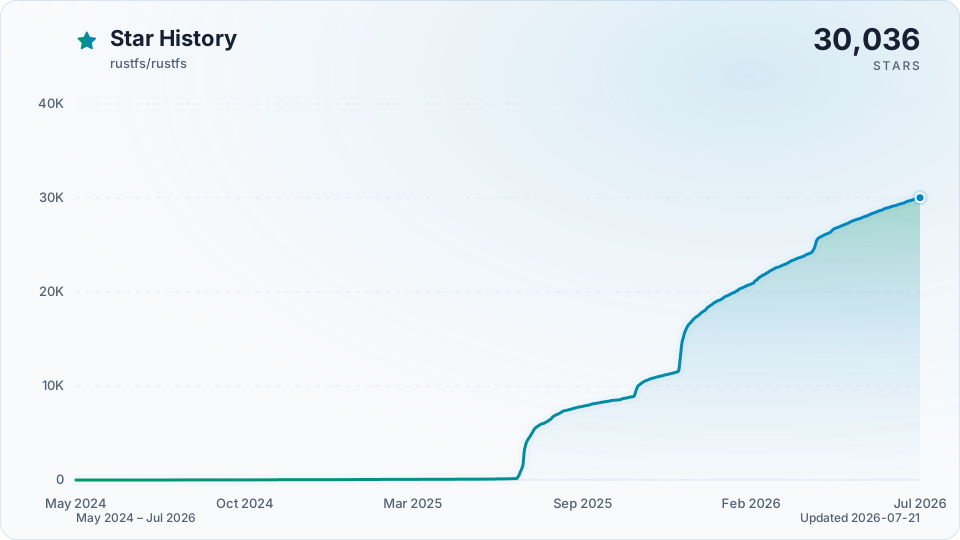
ประวัติ Star
สิทธิ์การใช้งาน
RustFS เป็นเครื่องหมายการค้าของ RustFS, Inc. เครื่องหมายการค้าอื่นๆ ทั้งหมดเป็นทรัพย์สินของเจ้าของที่เกี่ยวข้อง
เอกสารโปรเจกต์
อ่านเอกสารต้นฉบับ
README วิธีติดตั้ง วิธีใช้งาน และข้อกำหนดจาก repository ต้นฉบับ
RustFS is a high-performance, distributed object storage system built in Rust—one of the most loved programming languages worldwide. RustFS combines the simplicity of MinIO with the memory safety and raw performance of Rust. It offers broad S3 API compatibility for supported features, is completely open-source, and is optimized for data lakes, AI, and big data workloads.
Unlike other storage systems, RustFS is released under the permissible Apache 2.0 license, avoiding the restrictions of AGPL. With Rust as its foundation, RustFS delivers superior speed and secure distributed features for next-generation object storage.
Feature & Status
- High Performance: Built with Rust to ensure maximum speed and resource efficiency.
- Distributed Architecture: Scalable and fault-tolerant design suitable for large-scale deployments.
- S3 Compatibility: Seamless integration with common S3-compatible applications and tools; current coverage is tracked in the S3 compatibility matrix.
- OpenStack Swift API: Native support for Swift protocol with Keystone authentication.
- OpenStack Keystone Integration: Native support for OpenStack Keystone authentication with X-Auth-Token headers.
- Data Lake Support: Optimized for high-throughput big data and AI workloads.
- Open Source: Licensed under Apache 2.0, encouraging unrestricted community contributions and commercial usage.
- User-Friendly: Designed with simplicity in mind for easy deployment and management.
Status legend: ✅ Available — shipped and covered by CI gates; 🧪 Preview — shipped behind an opt-in flag or with a bounded compatibility claim.
| Feature | Status | Feature | Status |
|---|---|---|---|
| S3 Core Features | ✅ Available | Distributed Mode | ✅ Available |
| Upload / Download | ✅ Available | Single Node Mode | ✅ Available |
| Versioning | ✅ Available | Bitrot Protection | ✅ Available |
| Object Lock (WORM) | ✅ Available | Healing & Scanner | ✅ Available |
| Server-Side Encryption | ✅ Available | Pool Expansion / Decommission | ✅ Available |
| RustFS KMS | ✅ Available | Bucket Replication | ✅ Available |
| Lifecycle Management (ILM) | ✅ Available | Site Replication | ✅ Available |
| ILM Tiering (Remote S3) | ✅ Available | Bucket Quota | ✅ Available |
| S3 Select | ✅ Available | Event Notifications | ✅ Available |
| S3 Tables (Iceberg REST) | 🧪 Preview | Audit Logging | ✅ Available |
| IAM / Policies | ✅ Available | Logging & Observability | ✅ Available |
| OIDC / SSO | ✅ Available | Web Console | ✅ Available |
| Keystone Auth | ✅ Available | K8s Helm Charts | ✅ Available |
| Swift API | ✅ Available | FTPS / WebDAV | ✅ Available |
| Multi-Tenancy | ✅ Available | SFTP | ✅ Available |
| MinIO On-Disk Compatibility | 🧪 Preview |
Notes:
- RustFS KMS: Vault (KV2 / Transit) and AWS KMS backends are supported for production. The
LocalandStaticbackends are for development and testing only. See KMS backend security properties. - Swift API / SFTP: opt-in cargo features (
--features swift,--features sftp, orfull). FTPS and WebDAV are enabled in the default build. - S3 Tables: ships as an Iceberg REST Catalog with automated PyIceberg and DuckDB coverage; other engines and vendor profiles carry bounded claims listed in the S3 Tables support matrix.
- MinIO On-Disk Compatibility: gated behind the
rio-v2feature and not part of the default build. Objects MinIO encrypted are not readable by RustFS. See MinIO file-format interoperability.
RustFS vs MinIO Performance
Stress Test Environment:
| Type | Parameter | Remark |
|---|---|---|
| CPU | 2 Core | Intel Xeon (Sapphire Rapids) Platinum 8475B, 2.7/3.2 GHz |
| Memory | 4GB | |
| Network | 15Gbps | |
| Drive | 40GB x 4 | IOPS 3800 / Drive |
https://github.com/user-attachments/assets/2e4979b5-260c-4f2c-ac12-c87fd558072a
RustFS vs Other Object Storage
| Feature | RustFS | Other Object Storage |
|---|---|---|
| Console Experience | Powerful ConsoleComprehensive management interface. | Basic / Limited ConsoleOften overly simple or lacking critical features. |
| Language & Safety | Rust-basedMemory safety by design. | Go or C-basedPotential for memory GC pauses or leaks. |
| Data Sovereignty | No Telemetry / Full ComplianceGuards against unauthorized cross-border data egress. Compliant with GDPR (EU/UK), CCPA (US), and APPI (Japan). | Potential RiskPossible legal exposure and unwanted data telemetry. |
| Licensing | Permissive Apache 2.0Business-friendly, no "poison pill" clauses. | Restrictive AGPL v3Risk of license traps and intellectual property pollution. |
| Compatibility | S3-Compatible CoreWorks with common S3-compatible clients, with coverage tracked in the compatibility matrix. | Variable CompatibilityMay lack support for local cloud vendors or specific APIs. |
| Edge & IoT | Strong Edge SupportIdeal for secure, innovative edge devices. | Weak Edge SupportOften too heavy for edge gateways. |
| Risk Profile | Enterprise Risk MitigationClear IP rights and safe for commercial use. | Legal RisksIntellectual property ambiguity and usage restrictions. |
Staying ahead
Star RustFS on GitHub and be instantly notified of new releases.
Quickstart
Pool expansion notice:
- A single-node single-drive (SNSD) deployment is supported only as a standalone local path. It cannot expand in place or be added as a Pool. To move to a multi-drive topology, create a new deployment and migrate data through S3.
- Keep an existing multi-drive Pool's endpoints and Erasure Set width unchanged; expand by appending a new Pool. With ellipsis-based expansion, every Pool argument must contain an ellipsis expression and expand to at least two drive endpoints.
- Single-node multi-drive Pools and multi-node Pools with one drive per node are allowed, subject to valid Erasure Set geometry and EC settings; acceptance does not guarantee host-failure tolerance.
These topology rules follow MinIO, but automatic parity selection differs between the projects. See the Pool layout compatibility and regression tests before expanding a deployment.
To get started with RustFS, follow these steps:
1. One-click Installation (Option 1)
curl -O https://rustfs.com/install_rustfs.sh && bash install_rustfs.sh2. Docker Quick Start (Option 2)
The RustFS container runs as a non-root user rustfs (UID/GID 10001:10001). If you bind-mount host directories with Docker or Compose, every mounted path must be writable by that user, otherwise startup may fail with permission denied errors. This applies to data directories, log directories, and TLS certificate directories when RUSTFS_TLS_PATH is enabled.
# Create data and logs directories
mkdir -p data logs

# Change the owner of these directories
chown -R 10001:10001 data logs

# Using latest version
docker run -d -p 9000:9000 -p 9001:9001 -v $(pwd)/data:/data -v $(pwd)/logs:/logs rustfs/rustfs:latest

# Using specific version
docker run -d -p 9000:9000 -p 9001:9001 -v $(pwd)/data:/data -v $(pwd)/logs:/logs rustfs/rustfs:1.0.0
If you use podman instead of docker, you can install the RustFS with the below command
# Create data and logs directories
mkdir -p data logs

# Run the container (podman will automatically set the folders ownership)
podman run -d -p 9000:9000 -p 9001:9001 -v $(pwd)/data:/data:Z,U -v $(pwd)/logs:/logs:Z,U rustfs/rustfs:latest
If you enable TLS with a bind-mounted certificate directory, prepare that mount the same way:
mkdir -p certs
chown -R 10001:10001 certs
You can also use Docker Compose. Using the docker-compose-simple.yml file in the root directory:
docker compose -f docker-compose-simple.yml up -dBefore running Compose with host bind mounts:
- Ensure every mounted host path is writable by
10001:10001. - If you enable TLS, ensure the certificate mount for
/opt/tlsis also readable by10001:10001. - If matching host ownership is not practical, run the
rustfsservice withuser: "<host-uid>:<host-gid>"instead. docker-compose-simple.ymlincludes avolume-permission-helperservice for named volumes.docker-compose-simple.ymlrelies on you to prepare bind-mounted host paths in advance.
Similarly, you can run the command with podman
podman compose -f docker-compose-simple.yml up -dWebhook notification quick start (Docker):
docker run -d --name rustfs -p 9000:9000 \
  -e RUSTFS_NOTIFY_ENABLE=true \
  -e RUSTFS_NOTIFY_WEBHOOK_ENABLE_PRIMARY=on \
  -e RUSTFS_NOTIFY_WEBHOOK_ENDPOINT_PRIMARY=http://<host-ip>:3020/webhook \
  -e RUSTFS_NOTIFY_WEBHOOK_QUEUE_DIR_PRIMARY=/tmp/rustfs-events \
  -e RUSTFS_OUTBOUND_ALLOW_ORIGINS=http://<host-ip>:3020 \
  rustfs/rustfs:latest
Notes:
RUSTFS_NOTIFY_ENABLE=trueenables the global notify module switch.- For ARN
arn:rustfs:sqs::primary:webhook, use instance-scoped env vars with_PRIMARY. - If queue dir is omitted, the official image maps
/opt/rustfs/eventsinto the persistent/datavolume so it is writable by the runtime user and pending events survive container recreation. Overridequeue_dirwhen using another deployment layout. RUSTFS_NOTIFY_WEBHOOK_SKIP_TLS_VERIFY_PRIMARYdefaults tofalse; enabling it skips webhook TLS certificate verification, allows MITM attacks, and emits a startup warning. PreferRUSTFS_NOTIFY_WEBHOOK_CLIENT_CA_PRIMARYfor private CAs.- Since
1.0.0-beta.11, webhook endpoints on private or container networks (Docker Compose service names,host.docker.internal, RFC 1918 addresses) are blocked unless their exactscheme://host:portorigin is listed inRUSTFS_OUTBOUND_ALLOW_ORIGINS(the origin only, without the path). See Outbound Connection Policy.
NOTE: We recommend reviewing the docker-compose.yml file before running. It defines several services including Grafana, Prometheus, and Jaeger, which are helpful for RustFS observability. If you wish to start Redis or Nginx containers, you can specify the corresponding profiles.
3. Build from Source (Option 3) - Advanced Users
For developers who want to build RustFS Docker images from source with multi-architecture support:
# Build multi-architecture images locally
./docker-buildx.sh

# Build a single-platform image locally
./docker-buildx.sh -p linux/amd64

# Build and push to registry
./docker-buildx.sh --push

# Build specific version
./docker-buildx.sh --release v1.0.0 --push

# Build for custom registry
./docker-buildx.sh --registry your-registry.com --namespace yourname --push
The docker-buildx.sh script supports:
- Multi-architecture builds:
linux/amd64,linux/arm64 - Automatic version detection: Uses git tags or commit hashes
- Registry flexibility: Supports Docker Hub, GitHub Container Registry, etc.
- Build optimization: Includes caching and parallel builds
You can also use Make targets for convenience:
make docker-buildx                    # Build locally
make docker-buildx-push               # Build and push
make docker-buildx-version VERSION=v1.0.0  # Build specific version
make help-docker                      # Show all Docker-related commands
Heads-up (macOS cross-compilation): macOS keeps the default ulimit -n at 256, so cargo zigbuild or ./build-rustfs.sh --platform ... may fail with ProcessFdQuotaExceeded when targeting Linux. The build script attempts to raise the limit automatically, but if you still see the warning, run ulimit -n 4096 (or higher) in your shell before building.
4. Build with Helm Chart (Option 4) - Cloud Native
Follow the instructions in the Helm Chart README to install RustFS on a Kubernetes cluster.
For scanner pacing, cycle budgets, bitrot cadence, lifecycle transition status,
and single-node single-disk idle CPU tuning, see
Scanner Runtime Controls. For
repeatable scanner-pressure validation, see
Scanner Benchmark Runbook. For
drive timeout knobs on slow storage — including the walk stall budget that
governs ListObjects on large prefixes — see
Drive Timeout Tuning.
5. Nix Flake (Option 5)
If you have Nix with flakes enabled:
# Run directly without installing
nix run github:rustfs/rustfs

# Build the binary
nix build github:rustfs/rustfs
./result/bin/rustfs --help

# Or from a local checkout
nix build
nix run
The flake also exports a NixOS module and the RustFS rc client. Add the
module to your system and provide credentials through runtime files (for
example, sops-nix or agenix) so secrets are never stored in the Nix store:
imports = [ inputs.rustfs.nixosModules.rustfs ];

services.rustfs = {
  enable = true;
  accessKeyFile = "/run/secrets/rustfs-access-key";
  secretKeyFile = "/run/secrets/rustfs-secret-key";
  volumes = [ "/var/lib/rustfs" ];
};
Install the S3-compatible client with
nix profile install github:rustfs/rustfs#rustfs-client (the executable is named
rc), or use inputs.rustfs.packages.${pkgs.system}.rustfs-client in a system
configuration.
6. X-CMD (Option 6)
If you are an x-cmd user:
# Run directly without installing
x rustfs

# Download the binary and install it to the global environment
x env use rustfs
rustfs --help
Accessing RustFS
- 1Access the Console: Open your web browser and navigate to
http://localhost:9001to access the RustFS console. - Default credentials: `rustfsadmin` / `rustfsadmin` - 2Create a Bucket: Use the console to create a new bucket for your objects.
- 3Upload Objects: You can upload files directly through the console or use S3-compatible APIs/clients to interact with your RustFS instance.
NOTE: To access the RustFS instance via https, please refer to the TLS Configuration Docs.
OIDC Roles Claim (Microsoft Entra ID)
RustFS supports mapping an OIDC claim containing role values into the existing
authorization pipeline. The roles_claim setting is optional: when unset or
empty, only the groups claim contributes to authorization (same as older
RustFS releases). For Microsoft Entra ID app roles, set roles_claim=roles so
both console admin checks and bucket IAM policies can evaluate those roles.
Example environment configuration (opt-in roles claim):
RUSTFS_IDENTITY_OPENID_ENABLE=on
RUSTFS_IDENTITY_OPENID_CONFIG_URL="https://login.microsoftonline.com/<tenant-id>/v2.0/.well-known/openid-configuration"
RUSTFS_IDENTITY_OPENID_CLIENT_ID="<client-id>"
RUSTFS_IDENTITY_OPENID_CLIENT_SECRET="<client-secret>"
RUSTFS_IDENTITY_OPENID_SCOPES="openid,profile,email"
RUSTFS_IDENTITY_OPENID_GROUPS_CLAIM="groups"
RUSTFS_IDENTITY_OPENID_ROLES_CLAIM="roles"
Policy condition example (evaluate app roles directly with jwt:roles; when
roles_claim is configured, RustFS also merges those values into jwt:groups
for backward compatibility with older policies):
{
  "Version": "2012-10-17",
  "Statement": [
    {
      "Effect": "Allow",
      "Action": ["admin:*"],
      "Resource": ["arn:aws:s3:::*"],
      "Condition": {
        "ForAnyValue:StringEquals": {
          "jwt:roles": ["RustFS.ConsoleAdmin"]
        }
      }
    }
  ]
}
Documentation
For detailed documentation, including configuration options, API references, and advanced usage, please visit our Documentation.
Getting Help
If you have any questions or need assistance:
- Check the FAQ for common issues and solutions.
- Join our GitHub Discussions to ask questions and share your experiences.
- Open an issue on our GitHub Issues page for bug reports or feature requests.
Links
- Documentation - The manual you should read
- Changelog - What we broke and fixed
- GitHub Discussions - Where the community lives
- Discord - Chat with the RustFS community
Contact
- Bugs: GitHub Issues
- Business: hello@rustfs.com
- Jobs: jobs@rustfs.com
- General Discussion: GitHub Discussions
- Contributing: CONTRIBUTING.md
Contributors
RustFS is a community-driven project, and we appreciate all contributions. Check out the Contributors page to see the amazing people who have helped make RustFS better.
Star History
License
RustFS is a trademark of RustFS, Inc. All other trademarks are the property of their respective owners.