
GetNotes Tools
rustdesk/rustdesk
Tool นี้คืออะไร
RustDesk เป็นโซลูชันรีโมทเดสก์ท็อปแบบโอเพนซอร์สที่เขียนด้วย Rust ซึ่งทำงานได้ทันทีโดยไม่ต้องตั้งค่าใดๆ เหมาะสำหรับนักพัฒนาและผู้ใช้ที่ต้องการควบคุมข้อมูลและความปลอดภัยอย่างเต็มที่ โดยสามารถใช้เซิร์ฟเวอร์ rendezvous/relay ของตนเองได้
ข้อมูลโปรเจกต์
ดาว
119.5K
Forks
18.2K
License
AGPL-3.0
อัปเดต GitHub ล่าสุด
2 ส.ค. 2569
เพิ่มใน GetNotes
17 ส.ค. 2569
Repository
rustdesk/rustdesk
รูปแบบ
Ecosystem
Flutter · Rust
แปลและเรียบเรียงโดย AI
เนื้อหาฉบับภาษาไทย
ใช้อ่านเพื่อทำความเข้าใจเบื้องต้น โปรดตรวจสอบรายละเอียดสำคัญกับเอกสารต้นฉบับด้านล่าง
ข้อจำกัดความรับผิดชอบเกี่ยวกับการใช้งานในทางที่ผิด: ผู้พัฒนา RustDesk ไม่สนับสนุนหรือรับรองการใช้งานซอฟต์แวร์นี้ในทางที่ผิดจรรยาบรรณหรือไม่ชอบด้วยกฎหมาย การใช้งานในทางที่ผิด เช่น การเข้าถึงโดยไม่ได้รับอนุญาต การควบคุม หรือการละเมิดความเป็นส่วนตัว ถือเป็นการกระทำที่ขัดต่อแนวทางของเราอย่างเคร่งครัด ผู้เขียนจะไม่รับผิดชอบต่อการใช้งานแอปพลิเคชันในทางที่ผิดใดๆ
พูดคุยกับเรา: Discord | Twitter | Reddit | YouTube

อีกหนึ่งโซลูชันรีโมตเดสก์ท็อปที่เขียนด้วย Rust ทำงานได้ทันทีโดยไม่ต้องตั้งค่าใดๆ คุณสามารถควบคุมข้อมูลของคุณได้อย่างเต็มที่ โดยไม่ต้องกังวลเรื่องความปลอดภัย คุณสามารถใช้เซิร์ฟเวอร์ rendezvous/relay ของเรา, ตั้งค่าเซิร์ฟเวอร์ของคุณเอง หรือ เขียนเซิร์ฟเวอร์ rendezvous/relay ของคุณเอง
RustDesk ยินดีรับการมีส่วนร่วมจากทุกคน ดู CONTRIBUTING.md สำหรับความช่วยเหลือในการเริ่มต้น

การพึ่งพา (Dependencies)
เวอร์ชันเดสก์ท็อปใช้ Flutter หรือ Sciter (เลิกใช้แล้ว) สำหรับ GUI บทช่วยสอนนี้สำหรับ Sciter เท่านั้น เนื่องจากง่ายกว่าและเป็นมิตรต่อการเริ่มต้นมากกว่า ตรวจสอบ CI ของเราสำหรับการสร้างเวอร์ชัน Flutter
โปรดดาวน์โหลดไลบรารีไดนามิก Sciter ด้วยตัวคุณเอง
ขั้นตอนการสร้างแบบดิบ
- เตรียมสภาพแวดล้อมการพัฒนา Rust และสภาพแวดล้อมการสร้าง C++ ของคุณ
- ติดตั้ง [vcpkg](https://github.com/microsoft/vcpkg) และตั้งค่าตัวแปรสภาพแวดล้อม `VCPKG_ROOT` ให้ถูกต้อง - Windows: `vcpkg install libvpx:x64-windows-static libyuv:x64-windows-static opus:x64-windows-static aom:x64-windows-static` - Linux/macOS: `vcpkg install libvpx libyuv opus aom`
- รัน `cargo run`
สร้าง
วิธีการสร้างบน Linux
Ubuntu 18 (Debian 10)
sudo apt install -y zip g++ gcc git curl wget nasm yasm libgtk-3-dev clang libxcb-randr0-dev libxdo-dev \
        libxfixes-dev libxcb-shape0-dev libxcb-xfixes0-dev libasound2-dev libpulse-dev cmake make \
        libclang-dev ninja-build libgstreamer1.0-dev libgstreamer-plugins-base1.0-dev libpam0g-dev
openSUSE Tumbleweed
sudo zypper install gcc-c++ git curl wget nasm yasm gcc gtk3-devel clang libxcb-devel libXfixes-devel cmake alsa-lib-devel gstreamer-devel gstreamer-plugins-base-devel xdotool-devel pam-develFedora 28 (CentOS 8)
sudo yum -y install gcc-c++ git curl wget nasm yasm gcc gtk3-devel clang libxcb-devel libxdo-devel libXfixes-devel pulseaudio-libs-devel cmake alsa-lib-devel gstreamer1-devel gstreamer1-plugins-base-devel pam-develArch (Manjaro)
sudo pacman -Syu --needed unzip git cmake gcc curl wget yasm nasm zip make pkg-config clang gtk3 xdotool libxcb libxfixes alsa-lib pipewireติดตั้ง vcpkg
git clone https://github.com/microsoft/vcpkg
cd vcpkg
git checkout 2023.04.15
cd ..
vcpkg/bootstrap-vcpkg.sh
export VCPKG_ROOT=$HOME/vcpkg
vcpkg/vcpkg install libvpx libyuv opus aom
แก้ไข libvpx (สำหรับ Fedora)
cd vcpkg/buildtrees/libvpx/src
cd *
./configure
sed -i 's/CFLAGS+=-I/CFLAGS+=-fPIC -I/g' Makefile
sed -i 's/CXXFLAGS+=-I/CXXFLAGS+=-fPIC -I/g' Makefile
make
cp libvpx.a $HOME/vcpkg/installed/x64-linux/lib/
cd
สร้าง
curl --proto '=https' --tlsv1.2 -sSf https://sh.rustup.rs | sh
source $HOME/.cargo/env
git clone --recurse-submodules https://github.com/rustdesk/rustdesk
cd rustdesk
mkdir -p target/debug
wget https://raw.githubusercontent.com/c-smile/sciter-sdk/master/bin.lnx/x64/libsciter-gtk.so
mv libsciter-gtk.so target/debug
VCPKG_ROOT=$HOME/vcpkg cargo run
วิธีการสร้างด้วย Docker
เริ่มต้นด้วยการโคลน repository และสร้าง Docker container:
git clone https://github.com/rustdesk/rustdesk
cd rustdesk
git submodule update --init --recursive
docker build -t "rustdesk-builder" .
จากนั้น ทุกครั้งที่คุณต้องการสร้างแอปพลิเคชัน ให้รันคำสั่งต่อไปนี้:
docker run --rm -it -v $PWD:/home/user/rustdesk -v rustdesk-git-cache:/home/user/.cargo/git -v rustdesk-registry-cache:/home/user/.cargo/registry -e PUID="$(id -u)" -e PGID="$(id -g)" rustdesk-builderโปรดทราบว่าการสร้างครั้งแรกอาจใช้เวลานานกว่าก่อนที่ dependencies จะถูกแคช การสร้างครั้งถัดไปจะเร็วขึ้น นอกจากนี้ หากคุณต้องการระบุอาร์กิวเมนต์ที่แตกต่างกันสำหรับคำสั่ง build คุณสามารถทำได้ที่ท้ายคำสั่งในตำแหน่ง <OPTIONAL-ARGS> ตัวอย่างเช่น หากคุณต้องการสร้างเวอร์ชัน release ที่ได้รับการปรับแต่ง คุณจะรันคำสั่งข้างต้นตามด้วย --release ไฟล์ executable ที่ได้จะอยู่ในโฟลเดอร์ target บนระบบของคุณ และสามารถรันได้ด้วย:
target/debug/rustdeskหรือ หากคุณกำลังรันไฟล์ executable เวอร์ชัน release:
target/release/rustdeskโปรดตรวจสอบให้แน่ใจว่าคุณรันคำสั่งเหล่านี้จาก root ของ RustDesk repository มิฉะนั้นแอปพลิเคชันอาจไม่พบทรัพยากรที่จำเป็น นอกจากนี้ โปรดทราบว่าคำสั่งย่อยของ cargo อื่นๆ เช่น install หรือ run ยังไม่รองรับผ่านวิธีนี้ เนื่องจากจะติดตั้งหรือรันโปรแกรมภายในคอนเทนเนอร์แทนที่จะเป็นโฮสต์
โครงสร้างไฟล์
- libs/hbb_common: ตัวแปลงสัญญาณวิดีโอ, การกำหนดค่า, ตัวห่อหุ้ม tcp/udp, protobuf, ฟังก์ชัน fs สำหรับการถ่ายโอนไฟล์ และฟังก์ชันยูทิลิตี้อื่นๆ
- libs/scrap: การจับภาพหน้าจอ
- libs/enigo: การควบคุมคีย์บอร์ด/เมาส์เฉพาะแพลตฟอร์ม
- libs/clipboard: การใช้งานการคัดลอกและวางไฟล์สำหรับ Windows, Linux, macOS
- src/ui: UI ของ Sciter ที่ล้าสมัย (เลิกใช้แล้ว)
- src/server: บริการเสียง/คลิปบอร์ด/อินพุต/วิดีโอ และการเชื่อมต่อเครือข่าย
- src/client.rs: เริ่มการเชื่อมต่อ peer
- src/rendezvous_mediator.rs: สื่อสารกับ rustdesk-server, รอการเชื่อมต่อโดยตรงจากระยะไกล (TCP hole punching) หรือการเชื่อมต่อแบบรีเลย์
- src/platform: โค้ดเฉพาะแพลตฟอร์ม
- flutter: โค้ด Flutter สำหรับเดสก์ท็อปและมือถือ
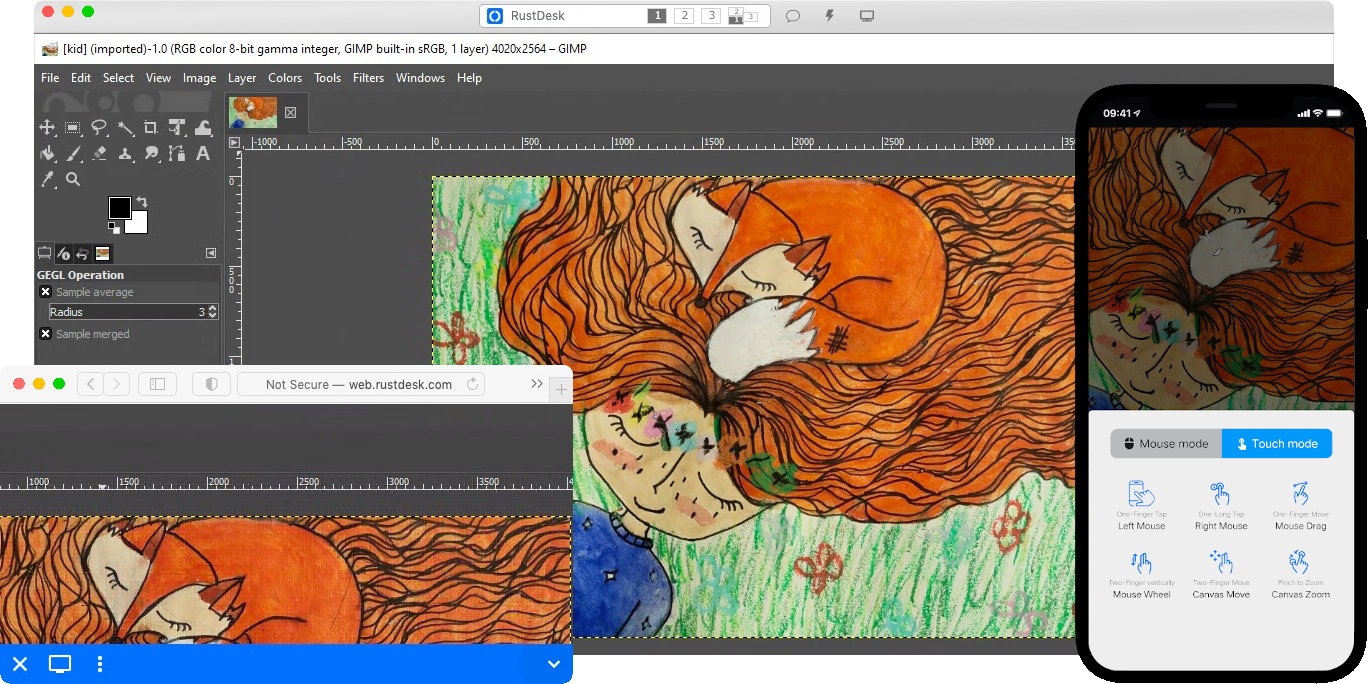
ภาพหน้าจอ
เอกสารโปรเจกต์
อ่านเอกสารต้นฉบับ
README วิธีติดตั้ง วิธีใช้งาน และข้อกำหนดจาก repository ต้นฉบับ

Misuse Disclaimer: The developers of RustDesk do not condone or support any unethical or illegal use of this software. Misuse, such as unauthorized access, control or invasion of privacy, is strictly against our guidelines. The authors are not responsible for any misuse of the application.
Chat with us: Discord | Twitter | Reddit | YouTube
Yet another remote desktop solution, written in Rust. Works out of the box with no configuration required. You have full control of your data, with no concerns about security. You can use our rendezvous/relay server, set up your own, or write your own rendezvous/relay server.
RustDesk welcomes contribution from everyone. See CONTRIBUTING.md for help getting started.
Dependencies
Desktop versions use Flutter or Sciter (deprecated) for GUI. This tutorial is for Sciter only, since it is easier and more friendly to start. Check out our CI for building the Flutter version.
Please download Sciter dynamic library yourself.
Raw Steps to build
- Prepare your Rust development env and C++ build env
- Install [vcpkg](https://github.com/microsoft/vcpkg), and set `VCPKG_ROOT` env variable correctly - Windows: vcpkg install libvpx:x64-windows-static libyuv:x64-windows-static opus:x64-windows-static aom:x64-windows-static - Linux/macOS: vcpkg install libvpx libyuv opus aom
- run `cargo run`
Build
How to Build on Linux
Ubuntu 18 (Debian 10)
sudo apt install -y zip g++ gcc git curl wget nasm yasm libgtk-3-dev clang libxcb-randr0-dev libxdo-dev \
        libxfixes-dev libxcb-shape0-dev libxcb-xfixes0-dev libasound2-dev libpulse-dev cmake make \
        libclang-dev ninja-build libgstreamer1.0-dev libgstreamer-plugins-base1.0-dev
openSUSE Tumbleweed
sudo zypper install gcc-c++ git curl wget nasm yasm gcc gtk3-devel clang libxcb-devel libXfixes-devel cmake alsa-lib-devel gstreamer-devel gstreamer-plugins-base-devel xdotool-develFedora 28 (CentOS 8)
sudo yum -y install gcc-c++ git curl wget nasm yasm gcc gtk3-devel clang libxcb-devel libxdo-devel libXfixes-devel pulseaudio-libs-devel cmake alsa-lib-devel gstreamer1-devel gstreamer1-plugins-base-develArch (Manjaro)
sudo pacman -Syu --needed unzip git cmake gcc curl wget yasm nasm zip make pkg-config clang gtk3 xdotool libxcb libxfixes alsa-lib pipewireInstall vcpkg
git clone https://github.com/microsoft/vcpkg
cd vcpkg
git checkout 2023.04.15
cd ..
vcpkg/bootstrap-vcpkg.sh
export VCPKG_ROOT=$HOME/vcpkg
vcpkg/vcpkg install libvpx libyuv opus aom
Fix libvpx (For Fedora)
cd vcpkg/buildtrees/libvpx/src
cd *
./configure
sed -i 's/CFLAGS+=-I/CFLAGS+=-fPIC -I/g' Makefile
sed -i 's/CXXFLAGS+=-I/CXXFLAGS+=-fPIC -I/g' Makefile
make
cp libvpx.a $HOME/vcpkg/installed/x64-linux/lib/
cd
Build
curl --proto '=https' --tlsv1.2 -sSf https://sh.rustup.rs | sh
source $HOME/.cargo/env
git clone --recurse-submodules https://github.com/rustdesk/rustdesk
cd rustdesk
mkdir -p target/debug
wget https://raw.githubusercontent.com/c-smile/sciter-sdk/master/bin.lnx/x64/libsciter-gtk.so
mv libsciter-gtk.so target/debug
VCPKG_ROOT=$HOME/vcpkg cargo run
How to build with Docker
Begin by cloning the repository and building the Docker container:
git clone https://github.com/rustdesk/rustdesk
cd rustdesk
git submodule update --init --recursive
docker build -t "rustdesk-builder" .
Then, each time you need to build the application, run the following command:
docker run --rm -it -v $PWD:/home/user/rustdesk -v rustdesk-git-cache:/home/user/.cargo/git -v rustdesk-registry-cache:/home/user/.cargo/registry -e PUID="$(id -u)" -e PGID="$(id -g)" rustdesk-builderNote that the first build may take longer before dependencies are cached, subsequent builds will be faster. Additionally, if you need to specify different arguments to the build command, you may do so at the end of the command in the <OPTIONAL-ARGS> position. For instance, if you wanted to build an optimized release version, you would run the command above followed by --release. The resulting executable will be available in the target folder on your system, and can be run with:
target/debug/rustdeskOr, if you're running a release executable:
target/release/rustdeskPlease ensure that you run these commands from the root of the RustDesk repository, or the application may not find the required resources. Also note that other cargo subcommands such as install or run are not currently supported via this method as they would install or run the program inside the container instead of the host.
File Structure
- libs/hbb_common: video codec, config, tcp/udp wrapper, and some other utility functions shared with the server
- libs/base: protobuf, fs functions for file transfer, keyboard and platform code used only by this app
- libs/scrap: screen capture
- libs/enigo: platform specific keyboard/mouse control
- libs/clipboard: file copy and paste implementation for Windows, Linux, macOS.
- src/ui: obsolete Sciter UI (deprecated)
- src/server: audio/clipboard/input/video services, and network connections
- src/client.rs: start a peer connection
- src/rendezvous_mediator.rs: Communicate with rustdesk-server, wait for remote direct (TCP hole punching) or relayed connection
- src/platform: platform specific code
- flutter: Flutter code for desktop and mobile