
GetNotes Tools
OpenHands
Tool นี้คืออะไร
แพลตฟอร์ม AI-driven development สำหรับมอบหมายงานซอฟต์แวร์ให้ agent ทำใน sandbox ใช้ได้ทั้ง self-hosted และ cloud
ข้อมูลโปรเจกต์
ดาว
87.6K
Forks
11.5K
License
MIT
อัปเดต GitHub ล่าสุด
12 ก.ย. 2569
เพิ่มใน GetNotes
13 ก.ค. 2569
Repository
OpenHands/OpenHands
รูปแบบ
เหมาะกับงาน
เหมาะกับอาชีพ
Ecosystem
TypeScript
แปลและเรียบเรียงโดย AI
เนื้อหาฉบับภาษาไทย
ใช้อ่านเพื่อทำความเข้าใจเบื้องต้น โปรดตรวจสอบรายละเอียดสำคัญกับเอกสารต้นฉบับด้านล่าง






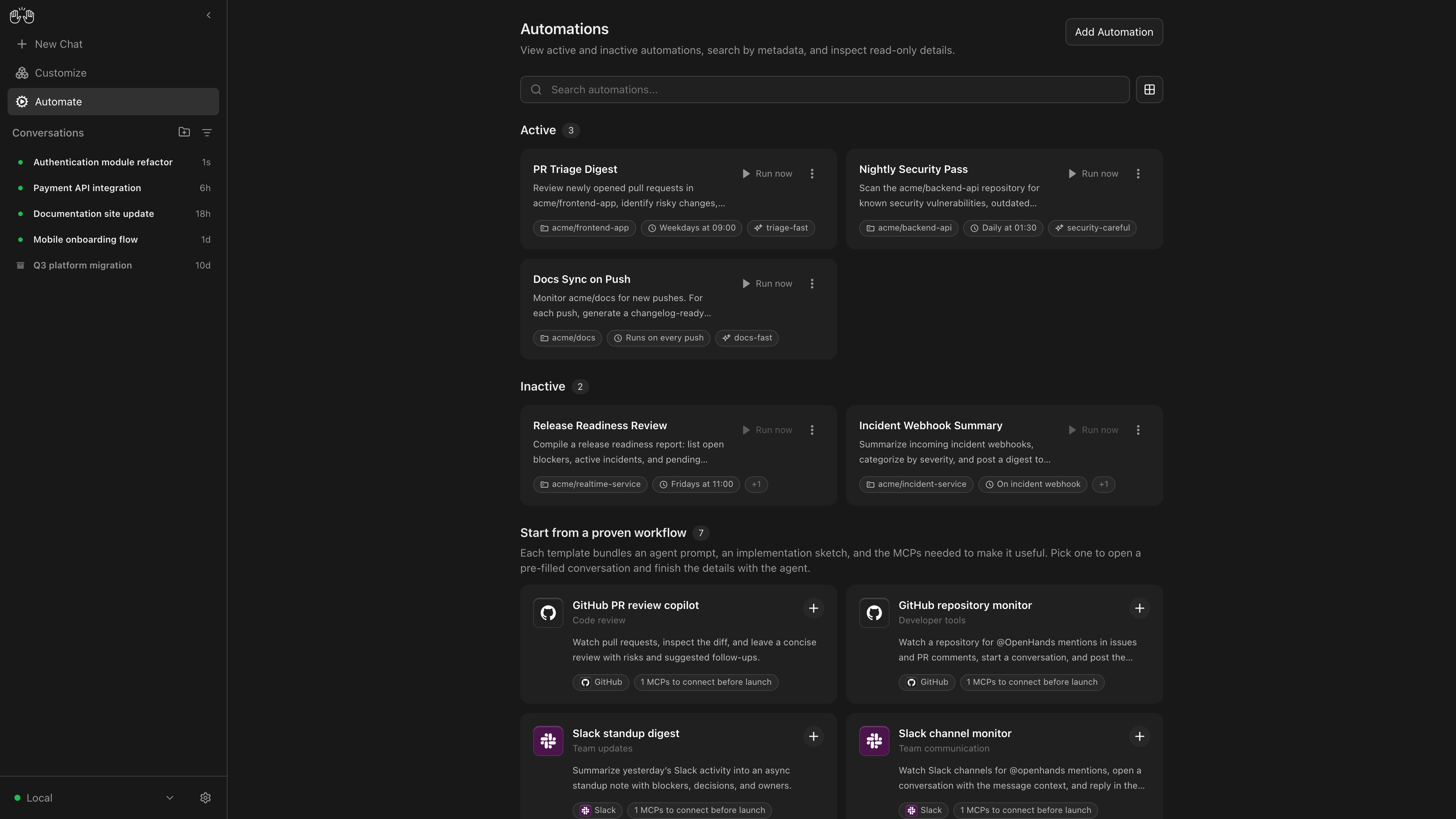
OpenHands Agent Canvas เปลี่ยนเอเจนต์โค้ดดิ้งของคุณให้เป็นทีมวิศวกรที่โฮสต์เองและทำงานตลอดเวลา เป็นศูนย์ควบคุมสำหรับนักพัฒนาเพื่อเริ่มต้นการสนทนาและทำให้งานประจำวันเป็นไปโดยอัตโนมัติ เช่น การสร้างรายงานที่เผยแพร่ไปยัง Slack หรือการแยกย่อยปัญหา GitHub ออกเป็นงานย่อยโดยอัตโนมัติ
โดยค่าเริ่มต้นจะรันบนเครื่องของคุณแบบโลคัล แต่สามารถเชื่อมต่อกับ "แบ็กเอนด์เอเจนต์" ได้หลายตัว เช่น การรันเอเจนต์ในคอนเทนเนอร์ Docker, บน VM หรือภายในโครงสร้างพื้นฐานของบริษัทของคุณ คุณสามารถเลือกที่จะรันเอเจนต์บน OpenHands Cloud หรือโครงสร้างพื้นฐานของ OpenHands Enterprise ได้
Agent Canvas รันเอเจนต์ OpenHands แบบโอเพนซอร์สได้ทันที แต่สามารถใช้เอเจนต์ของบุคคลที่สามได้ เช่น Claude Code และ Codex
| โฮสต์ด้วยตนเองในแบบของคุณ | รันเอเจนต์แบบโลคัล, ใน Docker, บน VM หรือที่ใดก็ได้ที่คุณสามารถรันแบ็กเอนด์เซิร์ฟเวอร์เอเจนต์ได้ |
| สลับระหว่างแบ็กเอนด์ต่างๆ | สลับระหว่างเอเจนต์แบบโลคัล, รีโมต และคลาวด์ โดยไม่เสียสมาธิ |
| สร้างระบบอัตโนมัติ | สร้างระบบอัตโนมัติและเวิร์กโฟลว์ที่ผสานรวมกับ Slack, GitHub, Linear และอื่นๆ รันตามกำหนดเวลาหรือตอบสนองต่อเหตุการณ์ webhook |
| ผสานรวมกับเครื่องมือที่คุณใช้ | เชื่อมต่อระบบอัตโนมัติของคุณกับบริการของบุคคลที่สาม เช่น Slack, GitHub, Notion และอื่นๆ เพื่อทำให้เวิร์กโฟลว์เป็นไปโดยอัตโนมัติ |
| นำโมเดลของคุณมาเอง | ใช้ได้กับ LLM ใดก็ได้ |
| ใช้ได้กับเอเจนต์ใดก็ได้ | ใช้กับ OpenHands, Claude Code, Codex, Gemini หรือเอเจนต์ใดๆ ที่มี Agent-Client Protocol (ACP) |
หากคุณมีคำถามหรือข้อเสนอแนะ โปรดเปิด GitHub issue หรือเข้าร่วมช่อง #proj-agent-canvas ใน Slack
โค้ดใน repo นี้กำลังจะย้าย! ดู คำถามที่พบบ่อยเกี่ยวกับการเปลี่ยนผ่าน Agent Canvas
ซอร์สโค้ดสำหรับ OpenHands Agent และ Agent Server อยู่ใน OpenHands/software-agent-sdk
ซอร์สโค้ดสำหรับ Agent Canvas อยู่ใน OpenHands/agent-canvas
เริ่มต้นใช้งานอย่างรวดเร็ว
คุณสามารถติดตั้ง OpenHands เพื่อรันเอเจนต์บนเครื่องใดก็ได้: บนแล็ปท็อปของคุณ, บนคอมพิวเตอร์เฉพาะทาง เช่น Mac Mini หรือบนเซิร์ฟเวอร์ในคลาวด์
วิธีที่ทรงพลังที่สุดในการรัน OpenHands คือบนเซิร์ฟเวอร์ในคลาวด์ ซึ่งช่วยให้เอเจนต์ของคุณทำงานต่อไปได้แม้ว่าแล็ปท็อปของคุณจะปิดอยู่ และทำให้การเรียกใช้เอเจนต์ของคุณผ่านบริการของบุคคลที่สาม เช่น Slack, GitHub และ Datadog ทำได้ง่ายขึ้น ดู คู่มือการโฮสต์ด้วยตนเอง สำหรับรายละเอียด โดยเฉพาะอย่างยิ่งในเรื่องของการเสริมความปลอดภัย
ที่น่าสนใจคือ คุณสามารถรันแบ็กเอนด์ใน สภาพแวดล้อมที่แตกต่างกันหลายแบบ และสลับไปมาระหว่างกันได้จากส่วนหน้าของ Agent Canvas เดียวกัน ตัวอย่างเช่น คุณสามารถแชร์ Agent Server กับทีมของคุณสำหรับเอเจนต์ที่ทำการรีวิวโค้ดและอัปเดตการพึ่งพา จากนั้นให้เอเจนต์ส่วนตัวของคุณรันบนแล็ปท็อปของคุณ
ตัวเลือกที่ 1: ไม่มี Sandbox
นี่เป็นการรัน agent-server โดยตรงบนเครื่องที่คุณกำลังติดตั้ง — เอเจนต์จะสามารถเข้าถึงระบบไฟล์ของคุณได้อย่างเต็มที่!
ข้อกำหนดเบื้องต้น: Node.js 22.12.x หรือใหม่กว่า, uv
npm install -g @openhands/agent-canvas
agent-canvas
คำสั่ง agent-canvas จะเริ่มต้นสแต็กโลคัลทั้งหมดโดยค่าเริ่มต้น คุณยังสามารถแยกส่วนได้เมื่อต้องการรันแต่ละส่วนแยกกัน:
agent-canvas --frontend-only  # ส่วนหน้าแบบคงที่ + ingress เท่านั้น
agent-canvas --backend-only   # เซิร์ฟเวอร์เอเจนต์ + แบ็กเอนด์ระบบอัตโนมัติ + ingress เท่านั้น
ตัวเลือกที่ 2: มี Docker Sandbox
ข้อกำหนดเบื้องต้น:
- Docker: Docker Desktop บน macOS/Windows หรือ Docker Engine/Docker Desktop บน Linux
- ไดเรกทอรีโฮสต์สำหรับ
PROJECTS_PATHที่มีโฟลเดอร์โปรเจกต์ที่คุณต้องการให้เอเจนต์เข้าถึง สร้างไดเรกทอรีนี้ก่อนเริ่มคอนเทนเนอร์
macOS / Linux:
export PROJECTS_PATH="$HOME/projects"  # directory containing your project folders
mkdir -p "$PROJECTS_PATH" "$HOME/.openhands"

docker run -it --rm \
  -p 8000:8000 \
  -v "$HOME/.openhands:/home/openhands/.openhands" \
  -v "${PROJECTS_PATH}:/projects" \
  ghcr.io/openhands/agent-canvas:1.0.0-rc.11
Windows (PowerShell / Windows Terminal): ดู README.windows.md สำหรับคำสั่งที่เทียบเท่ากัน
เอเจนต์จะสามารถเข้าถึงโปรเจกต์ใดๆ ภายใต้ PROJECTS_PATH ได้
ตัวเลือกที่ 3: จาก Source Code
นี่เป็นการรัน agent-server โดยตรงบนเครื่องที่คุณกำลังติดตั้ง — เอเจนต์จะสามารถเข้าถึงระบบไฟล์ของคุณได้อย่างเต็มที่!
ข้อกำหนดเบื้องต้น: Node.js 22.12.x หรือใหม่กว่า, npm, uv (สำหรับการรันเซิร์ฟเวอร์เอเจนต์ผ่าน uvx)
git clone https://github.com/OpenHands/agent-canvas.git
cd agent-canvas
npm install
npm run dev
เข้าถึง UI ได้ที่ http://localhost:8000 คุณสามารถเพิ่มแบ็กเอนด์เพิ่มเติมได้โดยตรงจาก UI
สถาปัตยกรรม
Agent Canvas ขับเคลื่อนโดย OpenHands Agent Server ซึ่งเป็น REST API สำหรับการรันเอเจนต์หลายตัวบนเครื่องเดียว Agent Server แต่ละตัวจะรันบนโฮสต์/พอร์ตเดียว; Agent Canvas สามารถเชื่อมต่อกับ Agent Server หลายตัวและสลับไปมาระหว่างกันได้อย่างง่ายดาย
คุณสามารถรัน Agent Server ได้ทุกที่:
- โดยตรงบนแล็ปท็อปของคุณ (โปรดระมัดระวัง!)
- บนเครื่องเฉพาะทาง เช่น Mac Mini
- บนเครื่องเสมือนในคลาวด์
- ภายใน OpenHands Cloud (บริการเชิงพาณิชย์ของเรา)
Agent Server มักจะจับคู่กับ Automation Server ซึ่งช่วยให้คุณตั้งค่าเอเจนต์ที่รันตามกำหนดเวลาหรือตอบสนองต่อเหตุการณ์ได้
เอกสารเพิ่มเติม
รายละเอียดและวิธีนำไปใช้
OpenHands Agent Canvas เป็นศูนย์ควบคุมสำหรับนักพัฒนาที่สามารถโฮสต์เองได้ เพื่อจัดการและทำให้เอเจนต์โค้ดดิ้งทำงานอัตโนมัติ ช่วยให้ทีมวิศวกรสามารถรันเอเจนต์ที่รองรับ ACP ได้หลากหลายบนแบ็กเอนด์ทั้งแบบโลคัล, รีโมต และคลาวด์ เพื่อทำงานอัตโนมัติและจัดการงานประจำวันได้อย่างมีประสิทธิภาพ
เอกสารโปรเจกต์
อ่านเอกสารต้นฉบับ
README วิธีติดตั้ง วิธีใช้งาน และข้อกำหนดจาก repository ต้นฉบับ

OpenHands Agent Canvas turns your coding agents into a self-hosted, always-on engineering team. It's a developer control center for starting conversations and automating everyday tasks — like generating reports that publish to Slack or automatically decomposing GitHub issues into tasks.
It runs locally on your machine by default, but can connect to multiple “agent backends”, e.g. running agents in Docker containers, on VMs, or within your company infrastructure. You can optionally choose to run agents on OpenHands Cloud or OpenHands Enterprise infrastructure.
Agent Canvas runs the open source OpenHands agent out-of-the-box, but can use any third-party agent like Claude Code and Codex.
| Self-host your way | Run agents locally, in Docker, on VMs, or anywhere you can run an agent server backend |
| Switch between different backends | Switch between local, remote, and cloud agents without losing focus |
| Create automations | Create automations and workflows that integrate with Slack, GitHub, Linear, and more. Run on a schedule or in response to webhook events |
| Integrate with the tools you use | Connect your automations with third-party services like Slack, GitHub, Notion, and more to automate workflows |
| Bring your own model | Use with any LLM |
| Use with any agent | Use with OpenHands, Claude Code, Codex, Gemini, or any agent with Agent-Client Protocol (ACP). |
If you have questions or feedback, please open a GitHub issue or join the #proj-agent-canvas channel in Slack.
Quickstart
You can install OpenHands to run agents on any machine: on your laptop, on a dedicated computer like a Mac Mini, or on a server in the cloud.
The most powerful way to run OpenHands is on a server in the cloud. This allows your agents to continue running even when your laptop is shut, and makes it easier to trigger your agents through third-party services like Slack, GitHub, and Datadog. See SELF_HOSTING.md for details, especially with respect to security hardening.
Notably, you can run the backend in multiple different environments, and switch between them from the same Agent Canvas frontend. E.g. you can share an Agent Server with your team for agents doing code review and dependency updates, then have your personal agents running on your laptop.
Option 1: Without a Sandbox
This runs the agent-server directly on the machine you're installing on — the agent will have full access to your filesystem!
Prerequisites: Node.js 22.12.x or later, uv
npm install -g @openhands/agent-canvas
agent-canvas
The agent-canvas command starts the full local stack by default. You can also split it when you want to run pieces separately:
agent-canvas --frontend-only  # static frontend + ingress only
agent-canvas --backend-only   # agent server + automation backend + ingress only
Option 2: With a Docker Sandbox
Prerequisites:
- Docker: Docker Desktop on macOS/Windows, or Docker Engine/Docker Desktop on Linux.
- A host directory for
PROJECTS_PATHcontaining the project folders you want the agent to access. Create it before starting the container.
macOS / Linux:
export PROJECTS_PATH="$HOME/projects"  # directory containing your project folders
mkdir -p "$PROJECTS_PATH" "$HOME/.openhands"

docker run -it --rm \
  -p 8000:8000 \
  -v "$HOME/.openhands:/home/openhands/.openhands" \
  -v "${PROJECTS_PATH}:/projects" \
  ghcr.io/openhands/agent-canvas:1.18.0 # x-release-please-version
Windows (PowerShell / Windows Terminal): See README.windows.md for the equivalent commands.
The agent will be able to access any project under PROJECTS_PATH.
Option 3: From Source
This runs the agent-server directly on the machine you're installing on — the agent will have full access to your filesystem!
Prerequisites: Node.js 22.12.x or later, npm, uv (for running the agent server via uvx)
git clone https://github.com/OpenHands/OpenHands.git
cd OpenHands
npm install
npm run dev
Access the UI at http://localhost:8000 for the npm/source launchers, or http://localhost:8000/canvas for the Docker image. You can add additional backends directly from the UI.
Architecture
Agent Canvas is powered by the OpenHands Agent Server, a REST API for running multiple agents on a single machine. Each Agent Server runs on a single host/port; the Agent Canvas can connect to multiple Agent Servers and easily flip between them.
You can run an Agent Server anywhere:
- Directly on your laptop (be careful!)
- On a dedicated machine like a Mac Mini
- On a virtual machine in the cloud
- Inside OpenHands Cloud (our commercial offering)
The Agent Server is often paired with an Automation Server, which lets you set up agents that run on a schedule or in response to events.
Repository boundaries
Agent Canvas is part of a multi-repository OpenHands system. Changes should go to the repository that owns the behavior:
| Repository | Responsibility |
|---|---|
OpenHands/OpenHands | Agent Canvas frontend, user-facing control center, backend selection, and local-stack orchestration. |
OpenHands/software-agent-sdk | Python SDK, Agent Server, agents, tools, conversations, workspaces, events, and the canonical server API. |
OpenHands/typescript-client | Browser-compatible TypeScript client for the Agent Server API. |
OpenHands/automation | Automation definitions, scheduling, webhooks, run history, and dispatching. |
The Agent Server API is implemented by the SDK and consumed through the TypeScript client by Agent Canvas. The automation service decides when work runs and dispatches conversations to the Agent Server/SDK, which decides what runs. See AGENTS.md for contributor-specific boundaries and the required custom code-review guide.