
GetNotes Tools
lyogavin/airllm
Tool นี้คืออะไร
AirLLM ช่วยลดการใช้หน่วยความจำในการอนุมานของโมเดลภาษาขนาดใหญ่ (LLM) อย่างมาก ทำให้สามารถรันโมเดล 70B บน GPU ขนาด 4GB หรือโมเดล MoE ขนาดใหญ่กว่าบน VRAM ที่จำกัดได้ โดยไม่ต้องใช้เทคนิคการลดขนาดโมเดลแบบดั้งเดิม
ข้อมูลโปรเจกต์
ดาว
35.3K
Forks
3.7K
License
Apache-2.0
อัปเดต GitHub ล่าสุด
1 ต.ค. 2569
เพิ่มใน GetNotes
17 ส.ค. 2569
Repository
lyogavin/airllm
เหมาะกับงาน
Ecosystem
Jupyter Notebook
แปลและเรียบเรียงโดย AI
เนื้อหาฉบับภาษาไทย
ใช้อ่านเพื่อทำความเข้าใจเบื้องต้น โปรดตรวจสอบรายละเอียดสำคัญกับเอกสารต้นฉบับด้านล่าง

เริ่มต้นใช้งานอย่างรวดเร็ว | การกำหนดค่า | MacOS | ตัวอย่างโน้ตบุ๊ก | คำถามที่พบบ่อย
AirLLM ช่วยลดการใช้หน่วยความจำในการอนุมานลงอย่างมาก ทำให้โมเดลภาษาขนาดใหญ่ 70B สามารถทำงานบนการ์ด GPU ขนาด 4GB เพียงใบเดียวได้ โดยไม่ต้องใช้การควอนไทซ์ (quantization), การกลั่น (distillation) หรือการตัดแต่ง (pruning) คุณยังสามารถรัน 405B Llama 3.1 บน 8GB, DeepSeek-V3 (671B) บน ~12GB และ Kimi K3 (2.8T) ซึ่งเป็นโมเดลโอเพนซอร์สที่ใหญ่ที่สุดที่เปิดตัวมาจนถึงปัจจุบัน บน น้อยกว่า 4GB ได้ เนื่องจากโมเดล MoE แบบ Sparse จะสตรีมผู้เชี่ยวชาญ (expert) ทีละคนแทนที่จะโหลดทั้งเลเยอร์










คำแนะนำ AI Agents:
- [Best AI Game Sprite Generator](https://godmodeai.co)
- [Best AI Facial Expression Editor](https://crazyfaceai.com)
- [Bloome — build & run AI agent teams in the cloud, zero setup](https://bloome.im/app?ref=G6BYnov0&utm_medium=github&utm_source=lyogavin-airllm-ivor-202606)
การอัปเดต
[2026/07] รองรับ Kimi K3 (2.8T): โมเดลโอเพนซอร์สที่ใหญ่ที่สุดทำงานบนการ์ดใบเดียวด้วย VRAM 3.72GB วัดผลแบบ end-to-end บน RTX 6000 Ada หนึ่งตัว การสตรีมแบบ per-expert จะโหลดเฉพาะผู้เชี่ยวชาญที่โทเค็นนั้นๆ ถูกส่งไป K3 มีข้อกำหนดสามประการของตัวเอง: pip install compressed-tensors flash-attn (โค้ดโมเดลกำหนดให้ใช้ flash attention โดยไม่คำนึงถึงสิ่งที่คุณร้องขอ), torch ที่สร้างด้วย CUDA 12 เนื่องจากยังไม่มี flash-attn wheel ที่สร้างไว้ล่วงหน้าสำหรับ CUDA 13 และ transformers 4.56.x เนื่องจากโค้ดระยะไกลไม่โหลดบนเวอร์ชัน 5.x
[2026/06] v3.0: รองรับโมเดล FP8 + โมเดลล่าสุด รัน DeepSeek-V3 (671B) บน ~12GB และ Qwen3-235B บน ~3GB รวมถึง Qwen3, Llama 3.x/4, DeepSeek V2/V3, Phi-4, Gemma และอื่นๆ อีกมากมาย — ทั้งหมดนี้ผ่าน AutoModel เพียงตัวเดียว
[2024/08/20] v2.11.0: รองรับ Qwen2.5
[2024/08/18] v2.10.1 รองรับการอนุมานบน CPU รองรับโมเดลที่ไม่ถูกแบ่งส่วน ขอบคุณ @NavodPeiris สำหรับผลงานที่ยอดเยี่ยม!
[2024/07/30] รองรับ Llama3.1 405B (ตัวอย่างโน้ตบุ๊ก) รองรับ 8bit/4bit quantization
[2024/04/20] AirLLM รองรับ Llama3 โดยกำเนิดแล้ว รัน Llama3 70B บน GPU 4GB เพียงตัวเดียว
[2023/12/25] v2.8.2: รองรับ MacOS ที่รันโมเดลภาษาขนาดใหญ่ 70B
[2023/12/20] v2.7: รองรับ AirLLMMixtral
[2023/12/20] v2.6: เพิ่ม AutoModel ตรวจจับประเภทโมเดลโดยอัตโนมัติ ไม่จำเป็นต้องระบุคลาสโมเดลเพื่อเริ่มต้นโมเดล
[2023/12/18] v2.5: เพิ่ม prefetching เพื่อซ้อนทับการโหลดโมเดลและการคำนวณ ปรับปรุงความเร็ว 10%
[2023/12/03] เพิ่มการรองรับ ChatGLM, QWen, Baichuan, Mistral, InternLM!
[2023/12/02] เพิ่มการรองรับ safetensors ตอนนี้รองรับ 10 อันดับแรกของโมเดลใน open llm leaderboard
[2023/12/01] airllm 2.0 รองรับการบีบอัด: เพิ่มความเร็วในการรัน 3 เท่า!
[2023/11/20] airllm เวอร์ชันเริ่มต้น!
ประวัติ Star
สารบัญ
- เริ่มต้นใช้งานอย่างรวดเร็ว
- การบีบอัดโมเดล
- การกำหนดค่า
- รันบน MacOS
- ตัวอย่างโน้ตบุ๊ก
- โมเดลที่รองรับ
- คำขอบคุณ
- คำถามที่พบบ่อย
เริ่มต้นใช้งานอย่างรวดเร็ว
1. ติดตั้งแพ็กเกจ
ขั้นแรก ติดตั้งแพ็กเกจ pip ของ airllm
pip install airllm2. การอนุมาน
จากนั้น เริ่มต้น AirLLMLlama2 โดยส่ง Hugging Face repo ID ของโมเดลที่ใช้ หรือพาธในเครื่อง และสามารถทำการอนุมานได้คล้ายกับโมเดล transformer ทั่วไป
(คุณยังสามารถระบุพาธเพื่อบันทึกโมเดลที่แบ่งเลเยอร์ผ่าน layer_shards_saving_path เมื่อเริ่มต้น AirLLMLlama2)
from airllm import AutoModel

MAX_LENGTH = 128
# just pass a hugging face repo id — works with almost any popular model:
model = AutoModel.from_pretrained("Qwen/Qwen3-32B")

# go bigger with the exact same one line:
#model = AutoModel.from_pretrained("Qwen/Qwen3-235B-A22B")     # 235B, runs in ~3GB
#model = AutoModel.from_pretrained("deepseek-ai/DeepSeek-V3")  # 671B, runs in ~12GB

# or use a model's local path...
#model = AutoModel.from_pretrained("/home/ubuntu/.cache/huggingface/hub/models--Qwen--Qwen3-32B/snapshots/...")

input_text = [
        'What is the capital of United States?',
        #'I like',
    ]

input_tokens = model.tokenizer(input_text,
    return_tensors="pt",
    return_attention_mask=False,
    truncation=True,
    max_length=MAX_LENGTH,
    padding=False)

generation_output = model.generate(
    input_tokens['input_ids'].cuda(),
    max_new_tokens=20,
    use_cache=True,
    return_dict_in_generate=True)

output = model.tokenizer.decode(generation_output.sequences[0])

print(output)
หมายเหตุ: ในระหว่างการอนุมาน โมเดลต้นฉบับจะถูกแยกส่วนและบันทึกเป็นเลเยอร์ก่อน โปรดตรวจสอบให้แน่ใจว่ามีพื้นที่ดิสก์เพียงพอในไดเรกทอรีแคชของ huggingface
การบีบอัดโมเดล - เพิ่มความเร็วในการอนุมาน 3 เท่า!
เราเพิ่งเพิ่มการบีบอัดโมเดลโดยอิงจากการบีบอัดโมเดลแบบ block-wise quantization ซึ่งสามารถ เพิ่มความเร็วในการอนุมาน ได้สูงสุดถึง 3 เท่า โดย แทบไม่มีการสูญเสียความแม่นยำเลย! (ดูการประเมินประสิทธิภาพเพิ่มเติมและเหตุผลที่เราใช้ block-wise quantization ใน เอกสารนี้)

วิธีเปิดใช้งานการบีบอัดโมเดลเพื่อเพิ่มความเร็ว:
- ขั้นตอนที่ 1 ตรวจสอบให้แน่ใจว่าคุณได้ติดตั้ง bitsandbytes โดยใช้
pip install -U bitsandbytes - ขั้นตอนที่ 2 ตรวจสอบให้แน่ใจว่า airllm เวอร์ชันใหม่กว่า 2.0.0:
pip install -U airllm - ขั้นตอนที่ 3 เมื่อเริ่มต้นโมเดล ให้ส่งอาร์กิวเมนต์ compression ('4bit' หรือ '8bit'):
model = AutoModel.from_pretrained("garage-bAInd/Platypus2-70B-instruct",
                     compression='4bit' # specify '8bit' for 8-bit block-wise quantization
                    )
ความแตกต่างระหว่างการบีบอัดโมเดลและการควอนไทซ์คืออะไร?
โดยปกติแล้ว การควอนไทซ์จำเป็นต้องควอนไทซ์ทั้งน้ำหนัก (weights) และการเปิดใช้งาน (activations) เพื่อเพิ่มความเร็วอย่างแท้จริง ซึ่งทำให้การรักษาความแม่นยำและหลีกเลี่ยงผลกระทบของค่าผิดปกติ (outliers) ในอินพุตทุกประเภททำได้ยากขึ้น
ในขณะที่กรณีของเรา คอขวดหลักอยู่ที่การโหลดดิสก์ เราเพียงแค่ต้องทำให้ขนาดการโหลดโมเดลเล็กลง ดังนั้น เราจึงควอนไทซ์เฉพาะส่วนของน้ำหนัก ซึ่งง่ายต่อการรับรองความแม่นยำ
การกำหนดค่า
เมื่อเริ่มต้นโมเดล เรารองรับการกำหนดค่าต่อไปนี้:
- compression: ตัวเลือกที่รองรับ: 4bit, 8bit สำหรับ 4-bit หรือ 8-bit block-wise quantization หรือค่าเริ่มต้น None สำหรับไม่มีการบีบอัด
- profiling_mode: ตัวเลือกที่รองรับ: True เพื่อแสดงผลการใช้เวลา หรือค่าเริ่มต้น False
- layer_shards_saving_path: พาธอื่นสำหรับบันทึกโมเดลที่ถูกแบ่งส่วน (เป็นทางเลือก)
- hf_token: สามารถระบุ Hugging Face token ได้ที่นี่ หากดาวน์โหลดโมเดลที่มีการจำกัดการเข้าถึง เช่น meta-llama/Llama-2-7b-hf
- prefetching: การ prefetching เพื่อซ้อนทับการโหลดโมเดลและการคำนวณ โดยค่าเริ่มต้นจะเปิดใช้งานอยู่ สำหรับตอนนี้ AirLLMLlama2 เท่านั้นที่รองรับสิ่งนี้
- delete_original: หากคุณมีพื้นที่ดิสก์ไม่มากนัก คุณสามารถตั้งค่า delete_original เป็น true เพื่อลบโมเดล Hugging Face ที่ดาวน์โหลดมาต้นฉบับ โดยเก็บเฉพาะโมเดลที่แปลงแล้วเพื่อประหยัดพื้นที่ดิสก์ได้ครึ่งหนึ่ง
MacOS
เพียงแค่ติดตั้ง airllm และรันโค้ดเหมือนกับบน Linux ดูเพิ่มเติมได้ใน เริ่มต้นใช้งานอย่างรวดเร็ว
- ตรวจสอบให้แน่ใจว่าคุณได้ติดตั้ง mlx และ torch แล้ว
- คุณอาจต้องติดตั้ง python native ดูเพิ่มเติม ที่นี่
- รองรับเฉพาะ Apple silicon เท่านั้น
ตัวอย่าง [python notebook] (https://github.com/lyogavin/airllm/blob/main/air_llm/examples/run_on_macos.ipynb)
ตัวอย่าง Python Notebook
ตัวอย่าง Colab อยู่ที่นี่:

ตัวอย่างโมเดลอื่น ๆ (ChatGLM, QWen, Baichuan, Mistral และอื่น ๆ):
- ChatGLM:
from airllm import AutoModel
MAX_LENGTH = 128
model = AutoModel.from_pretrained("THUDM/chatglm3-6b-base")
input_text = ['What is the capital of China?',]
input_tokens = model.tokenizer(input_text,
    return_tensors="pt",
    return_attention_mask=False,
    truncation=True,
    max_length=MAX_LENGTH,
    padding=True)
generation_output = model.generate(
    input_tokens['input_ids'].cuda(),
    max_new_tokens=5,
    use_cache= True,
    return_dict_in_generate=True)
model.tokenizer.decode(generation_output.sequences[0])- QWen:
from airllm import AutoModel
MAX_LENGTH = 128
model = AutoModel.from_pretrained("Qwen/Qwen-7B")
input_text = ['What is the capital of China?',]
input_tokens = model.tokenizer(input_text,
    return_tensors="pt",
    return_attention_mask=False,
    truncation=True,
    max_length=MAX_LENGTH)
generation_output = model.generate(
    input_tokens['input_ids'].cuda(),
    max_new_tokens=5,
    use_cache=True,
    return_dict_in_generate=True)
model.tokenizer.decode(generation_output.sequences[0])- Baichuan, InternLM, Mistral และอื่น ๆ:
from airllm import AutoModel
MAX_LENGTH = 128
model = AutoModel.from_pretrained("baichuan-inc/Baichuan2-7B-Base")
#model = AutoModel.from_pretrained("internlm/internlm-20b")
#model = AutoModel.from_pretrained("mistralai/Mistral-7B-Instruct-v0.1")
input_text = ['What is the capital of China?',]
input_tokens = model.tokenizer(input_text,
    return_tensors="pt",
    return_attention_mask=False,
    truncation=True,
    max_length=MAX_LENGTH)
generation_output = model.generate(
    input_tokens['input_ids'].cuda(),
    max_new_tokens=5,
    use_cache=True,
    return_dict_in_generate=True)
model.tokenizer.decode(generation_output.sequences[0])
หากต้องการขอการสนับสนุนโมเดลอื่น ๆ: ที่นี่
โมเดลที่รองรับ
AirLLM ใช้งานได้ทันทีกับ LLM แบบเปิดยอดนิยมแทบทุกตัว — เพียงแค่ส่ง Hugging Face ID ของโมเดลนั้นไปยัง AutoModel.from_pretrained(...) ซึ่งครอบคลุมตระกูลหลักทั้งหมด:
Llama (2 / 3 / 3.1 / 3.3 / 4) · Qwen (1 / 2 / 2.5 / 3, รวมถึง MoE และ FP8) · DeepSeek (V2 / V3 / R1) · Mistral & Mixtral · Phi · Gemma · ChatGLM · Baichuan · InternLM · Yi — และโมเดลใหม่ส่วนใหญ่ในวันที่เปิดตัว
GPU ขนาดเล็ก, โมเดลขนาดใหญ่
เคล็ดลับ: AirLLM จะเก็บ เลเยอร์เดียวบน GPU ในแต่ละครั้ง เท่านั้น ดังนั้น VRAM ที่คุณต้องการจึงขึ้นอยู่กับขนาดเลเยอร์ของโมเดล — ไม่ใช่ขนาดทั้งหมด นั่นคือวิธีที่โมเดล 671B สามารถทำงานบนการ์ดสำหรับผู้ใช้งานทั่วไปได้:
| โมเดล | ขนาด | GPU VRAM |
|---|---|---|
| Qwen3 / Mistral / Phi (≈8B) | 8B | ~1–2 GB |
| Qwen3-30B / Mixtral (MoE) | 30–47B | ~1–3 GB |
| Qwen3-235B (MoE) | 235B | ~3 GB |
| Llama 3.x 70B (full precision) | 70B | ~4 GB |
| Llama 3.1 405B | 405B | ~8 GB |
| DeepSeek-V3 | 671B | ~12 GB |
ใช้โค้ดเพียงบรรทัดเดียวสำหรับทั้งหมด — ไม่ต้องตั้งค่าพิเศษ
การรับทราบ
โค้ดส่วนใหญ่มาจากผลงานอันยอดเยี่ยมของ SimJeg ในการแข่งขัน Kaggle exam ขอขอบคุณ SimJeg เป็นอย่างสูง:
บัญชี GitHub @SimJeg, โค้ดบน Kaggle, การอภิปรายที่เกี่ยวข้อง
คำถามที่พบบ่อย
1. MetadataIncompleteBuffer
safetensors_rust.SafetensorError: Error while deserializing header: MetadataIncompleteBuffer
หากคุณพบข้อผิดพลาดนี้ สาเหตุที่เป็นไปได้มากที่สุดคือพื้นที่ดิสก์ของคุณหมด กระบวนการแยกโมเดลใช้พื้นที่ดิสก์มาก ดู ที่นี่ คุณอาจต้องเพิ่มพื้นที่ดิสก์ ล้างแคชของ huggingface .cache และรันใหม่
2. ValueError: max() arg is an empty sequence
เป็นไปได้มากว่าคุณกำลังโหลดโมเดล QWen หรือ ChatGLM ด้วยคลาส Llama2 ลองทำตามนี้:
สำหรับโมเดล QWen:
from airllm import AutoModel #<----- instead of AirLLMLlama2
AutoModel.from_pretrained(...)
สำหรับโมเดล ChatGLM:
from airllm import AutoModel #<----- instead of AirLLMLlama2
AutoModel.from_pretrained(...)
3. 401 Client Error....Repo model ... is gated.
โมเดลบางตัวเป็นโมเดลแบบ gated ซึ่งต้องใช้ Hugging Face API token คุณสามารถระบุ hf_token ได้:
model = AutoModel.from_pretrained("meta-llama/Llama-2-7b-hf", #hf_token='HF_API_TOKEN')4. ValueError: Asking to pad but the tokenizer does not have a padding token.
Tokenizer ของโมเดลบางตัวไม่มี padding token ดังนั้นคุณสามารถตั้งค่า padding token หรือเพียงแค่ปิดการตั้งค่า padding:
input_tokens = model.tokenizer(input_text,
   return_tensors="pt",
   return_attention_mask=False,
   truncation=True,
   max_length=MAX_LENGTH,
   padding=False  #<----------- ปิด padding
)
การอ้างอิง AirLLM
หากคุณพบว่า AirLLM มีประโยชน์ในการวิจัยของคุณและต้องการอ้างอิง โปรดใช้รายการ BibTex ต่อไปนี้:
@software{airllm2023,
  author = {Gavin Li},
  title = {AirLLM: scaling large language models on low-end commodity computers},
  url = {https://github.com/lyogavin/airllm/},
  version = {0.0},
  year = {2023},
}
ผู้สนับสนุน

รันทีม AI Agent บนคลาวด์ — Bloome
Bloome คือแพลตฟอร์ม IM สำหรับ AI-agent: สร้างและรันทีม AI agent บนคลาวด์โดยไม่ต้องตั้งค่าใด ๆ เพิ่มทักษะเป็น agent ในกลุ่มแชท รันได้ในคลิกเดียวจากเว็บหรือมือถือ และแชร์กับทีมของคุณ — ลองนึกภาพว่าเป็นกลุ่มแชทที่ผู้ช่วย AI ของคุณเป็นเพื่อนร่วมทีมที่คุณสามารถ @mention และมอบหมายงานให้ได้
👉 ลองใช้ Bloome
การมีส่วนร่วม
ยินดีรับการมีส่วนร่วม แนวคิด และการอภิปราย!
หากคุณพบว่ามีประโยชน์ โปรด ⭐ หรือซื้อกาแฟให้ฉัน! 🙏

เอกสารโปรเจกต์
อ่านเอกสารต้นฉบับ
README วิธีติดตั้ง วิธีใช้งาน และข้อกำหนดจาก repository ต้นฉบับ
Quickstart | Configurations | MacOS | Example notebooks | FAQ
AirLLM dramatically reduces inference memory usage, letting 70B large language models run on a single 4GB GPU card — without quantization, distillation, or pruning. You can even run Kimi K3 (2.8T) — the largest open-source model released to date — on under 4GB, Qwen3.8-Flash-Next (125B) on 6GB, and DeepSeek-V3 (671B) on ~12GB. We now also support training huge models on small VRAM: Qwen3.8-Flash-Next (125B) under 6GB.
AI Agents Recommendation:
- [Best AI Game Sprite Generator](https://godmodeai.co)
- [Best AI Facial Expression Editor](https://crazyfaceai.com)
Updates
[2026/09] Training support: stream frozen weights one layer at a time and keep adapters on the GPU. Qwen3.8-Flash-Next (125B) trains under 6GB (RTX 3060 Ti); Qwen3.8-27B trains in ~2GB at seq 512. See Training.
[2026/08] Qwen3.8-Flash-Next support: Qwen's 125B MoE flagship (Qwen4ExpForConditionalGeneration) with a ~51B n-gram embedding runs in 5.95GB of VRAM, measured end to end on one RTX 4090. The n-gram table is file-mapped on the host (a 64GB machine is enough); decoder layers stream. Needs a transformers build with in-tree qwen4_exp (pip install git+https://github.com/huggingface/transformers.git today) and ~360GB of checkpoint disk (delete_original=True reclaims the originals after the split).
[2026/08] Qwen3.8-27B support: Qwen's new dense VL (Gated DeltaNet + Gated Attention, native vision) runs in 3.33GB of VRAM, measured end to end on one RTX 3090. Needs transformers 5.8+.
[2026/07] Kimi K3 (2.8T) support: the largest open-source model runs on a single card in 3.72GB of VRAM, measured end to end on one RTX 6000 Ada. Per-expert streaming loads only the experts a token actually routes to. K3 brings three requirements of its own: pip install compressed-tensors flash-attn (its model code mandates flash attention regardless of what you request), a CUDA 12 build of torch, since no prebuilt flash-attn wheel exists for CUDA 13 yet, and transformers 4.56.x, as its remote code does not load on 5.x.
[2026/06] v3.0: FP8 model support + the latest models. Run DeepSeek-V3 (671B) on ~12GB and Qwen3-235B on ~3GB, plus Qwen3, Llama 3.x/4, DeepSeek V2/V3, Phi-4, Gemma and more — all through a single AutoModel.
[2024/08/20] v2.11.0: Support Qwen2.5
[2024/08/18] v2.10.1 Support CPU inference. Support non sharded models. Thanks @NavodPeiris for the great work!
[2024/07/30] Support Llama3.1 405B (example notebook). Support 8bit/4bit quantization.
[2024/04/20] AirLLM supports Llama3 natively already. Run Llama3 70B on 4GB single GPU.
[2023/12/25] v2.8.2: Support MacOS running 70B large language models.
[2023/12/20] v2.7: Support AirLLMMixtral.
[2023/12/20] v2.6: Added AutoModel, automatically detect model type, no need to provide model class to initialize model.
[2023/12/18] v2.5: added prefetching to overlap the model loading and compute. 10% speed improvement.
[2023/12/03] added support of ChatGLM, QWen, Baichuan, Mistral, InternLM!
[2023/12/02] added support for safetensors. Now support all top 10 models in open llm leaderboard.
[2023/12/01] airllm 2.0. Support compressions: 3x run time speed up!
[2023/11/20] airllm Initial version!
Star History
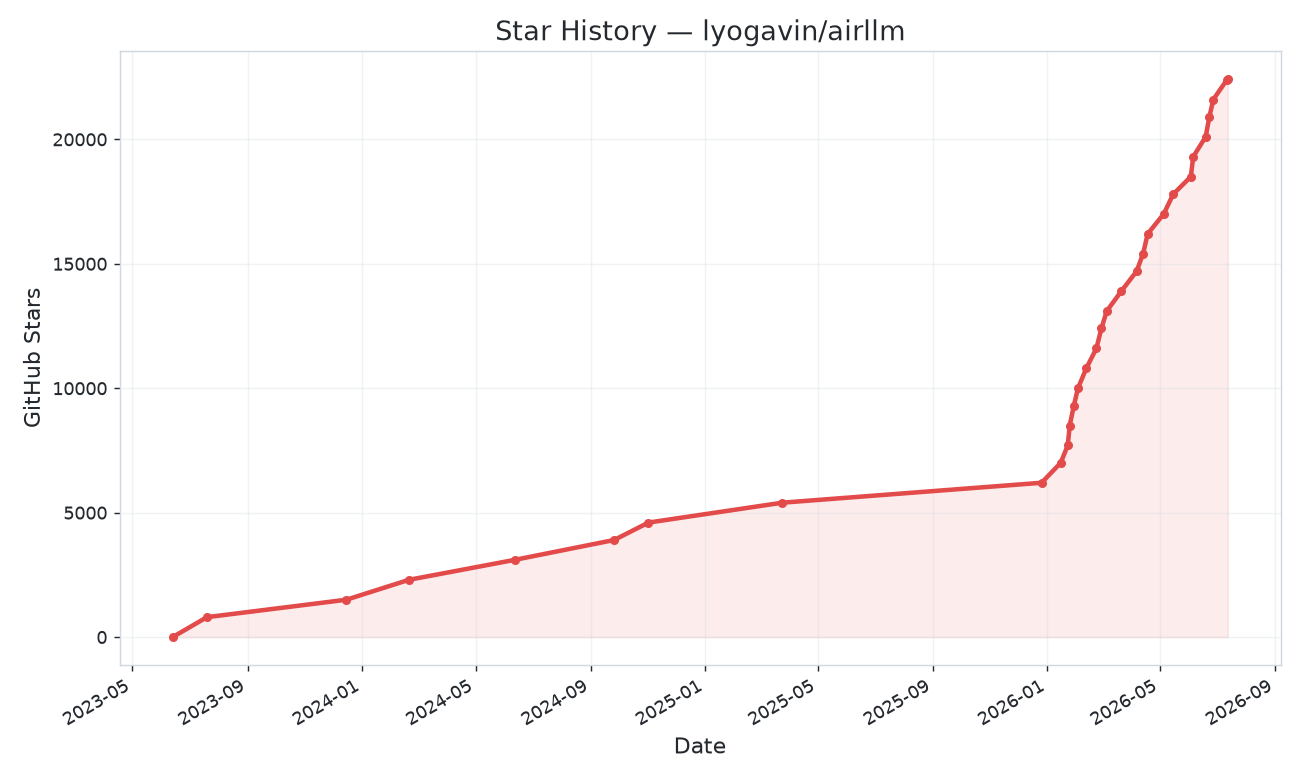
Table of Contents
- Quick start
- Model Compression
- Configurations
- Run on MacOS
- Example notebooks
- Supported Models
- Training
- Acknowledgement
- FAQ
Quickstart
1. Install package
First, install the airllm pip package.
pip install airllm2. Inference
Then, initialize AirLLMLlama2, pass in the huggingface repo ID of the model being used, or the local path, and inference can be performed similar to a regular transformer model.
(You can also specify the path to save the splitted layered model through layer_shards_saving_path when init AirLLMLlama2.
from airllm import AutoModel

MAX_LENGTH = 128
# just pass a hugging face repo id — works with almost any popular model:
model = AutoModel.from_pretrained("Qwen/Qwen3-32B")

# go bigger with the exact same one line:
#model = AutoModel.from_pretrained("Qwen/Qwen3.8-27B")          # 27B dense VL, 3.33GB
#model = AutoModel.from_pretrained("Qwen/Qwen3.8-Flash-Next")    # 125B MoE + 51B PLE, 5.95GB
#model = AutoModel.from_pretrained("Qwen/Qwen3-235B-A22B")     # 235B, runs in ~3GB
#model = AutoModel.from_pretrained("deepseek-ai/DeepSeek-V3")  # 671B, runs in ~12GB

# or use a model's local path...
#model = AutoModel.from_pretrained("/home/ubuntu/.cache/huggingface/hub/models--Qwen--Qwen3-32B/snapshots/...")

input_text = [
        'What is the capital of United States?',
        #'I like',
    ]

input_tokens = model.tokenizer(input_text,
    return_tensors="pt",
    return_attention_mask=False,
    truncation=True,
    max_length=MAX_LENGTH,
    padding=False)

generation_output = model.generate(
    input_tokens['input_ids'].cuda(),
    max_new_tokens=20,
    use_cache=True,
    return_dict_in_generate=True)

output = model.tokenizer.decode(generation_output.sequences[0])

print(output)
Note: During inference, the original model will first be decomposed and saved layer-wise. Please ensure there is sufficient disk space in the huggingface cache directory.
Model Compression - 3x Inference Speed Up!
We just added model compression based on block-wise quantization-based model compression. Which can further speed up the inference speed for up to 3x , with almost ignorable accuracy loss! (see more performance evaluation and why we use block-wise quantization in this paper)
How to enable model compression speed up:
- Step 1. make sure you have bitsandbytes installed by
pip install -U bitsandbytes - Step 2. make sure airllm verion later than 2.0.0:
pip install -U airllm - Step 3. when initialize the model, passing the argument compression ('4bit' or '8bit'):
model = AutoModel.from_pretrained("garage-bAInd/Platypus2-70B-instruct",
                     compression='4bit' # specify '8bit' for 8-bit block-wise quantization
                    )
What are the differences between model compression and quantization?
Quantization normally needs to quantize both weights and activations to really speed things up. Which makes it harder to maintain accuracy and avoid the impact of outliers in all kinds of inputs.
While in our case the bottleneck is mainly at the disk loading, we only need to make the model loading size smaller. So, we get to only quantize the weights' part, which is easier to ensure the accuracy.
Configurations
When initialize the model, we support the following configurations:
- compression: supported options: 4bit, 8bit for 4-bit or 8-bit block-wise quantization, or by default None for no compression
- profiling_mode: supported options: True to output time consumptions or by default False
- layer_shards_saving_path: optionally another path to save the splitted model
- hf_token: huggingface token can be provided here if downloading gated models like: meta-llama/Llama-2-7b-hf
- prefetching: prefetching to overlap the model loading and compute. By default, turned on. For now, only AirLLMLlama2 supports this.
- delete_original: if you don't have too much disk space, you can set delete_original to true to delete the original downloaded hugging face model, only keep the transformed one to save half of the disk space.
MacOS
Just install airllm and run the code the same as on linux. See more in Quick Start.
- make sure you installed mlx and torch
- you probably need to install python native see more here
- only Apple silicon is supported
Example [python notebook] (https://github.com/lyogavin/airllm/blob/main/air_llm/examples/run_on_macos.ipynb)
Example Python Notebook
Example colabs here:
example of other models (ChatGLM, QWen, Baichuan, Mistral, etc):
- ChatGLM:
from airllm import AutoModel
MAX_LENGTH = 128
model = AutoModel.from_pretrained("THUDM/chatglm3-6b-base")
input_text = ['What is the capital of China?',]
input_tokens = model.tokenizer(input_text,
    return_tensors="pt",
    return_attention_mask=False,
    truncation=True,
    max_length=MAX_LENGTH,
    padding=True)
generation_output = model.generate(
    input_tokens['input_ids'].cuda(),
    max_new_tokens=5,
    use_cache= True,
    return_dict_in_generate=True)
model.tokenizer.decode(generation_output.sequences[0])- QWen:
from airllm import AutoModel
MAX_LENGTH = 128
model = AutoModel.from_pretrained("Qwen/Qwen-7B")
input_text = ['What is the capital of China?',]
input_tokens = model.tokenizer(input_text,
    return_tensors="pt",
    return_attention_mask=False,
    truncation=True,
    max_length=MAX_LENGTH)
generation_output = model.generate(
    input_tokens['input_ids'].cuda(),
    max_new_tokens=5,
    use_cache=True,
    return_dict_in_generate=True)
model.tokenizer.decode(generation_output.sequences[0])- Baichuan, InternLM, Mistral, etc:
from airllm import AutoModel
MAX_LENGTH = 128
model = AutoModel.from_pretrained("baichuan-inc/Baichuan2-7B-Base")
#model = AutoModel.from_pretrained("internlm/internlm-20b")
#model = AutoModel.from_pretrained("mistralai/Mistral-7B-Instruct-v0.1")
input_text = ['What is the capital of China?',]
input_tokens = model.tokenizer(input_text,
    return_tensors="pt",
    return_attention_mask=False,
    truncation=True,
    max_length=MAX_LENGTH)
generation_output = model.generate(
    input_tokens['input_ids'].cuda(),
    max_new_tokens=5,
    use_cache=True,
    return_dict_in_generate=True)
model.tokenizer.decode(generation_output.sequences[0])
To request other model support: here
Supported Models
AirLLM works out of the box with virtually every popular open LLM — just pass its Hugging Face ID to AutoModel.from_pretrained(...). That covers all the major families:
Llama (2 / 3 / 3.1 / 3.3 / 4) · Qwen (1 / 2 / 2.5 / 3 / 3.5 / 3.8, including MoE, Flash-Next, FP8, and native VL) · DeepSeek (V2 / V3 / R1) · Mistral & Mixtral · Phi · Gemma · ChatGLM · Baichuan · InternLM · Yi · Kimi K3 — and most new models the day they're released.
Tiny GPU, huge models
The trick: AirLLM only ever keeps one layer on the GPU at a time, so the VRAM you need depends on the model's layer size — not its total size. That's how a 671B model fits on a hobbyist card:
| Model | Size | GPU VRAM |
|---|---|---|
| Qwen3 / Mistral / Phi (≈8B) | 8B | ~1–2 GB |
| Qwen3-30B / Mixtral (MoE) | 30–47B | ~1–3 GB |
| Qwen3.8-27B (dense VL) | 27B | 3.33 GB |
| Qwen3.8-Flash-Next (MoE + PLE) | ~180B | 5.95 GB |
| Qwen3-235B (MoE) | 235B | ~3 GB |
| Llama 3.x 70B (full precision) | 70B | ~4 GB |
| Llama 3.1 405B | 405B | ~8 GB |
| DeepSeek-V3 | 671B | ~12 GB |
Same one line of code for all of them — no special setup.
Training
AirLLM can fine-tune huge models on a small GPU. Frozen base weights stream from disk one decoder layer at a time; only the adapters stay resident. Qwen3.8-Flash-Next (125B) trains under 6GB; Qwen3.8-27B trains in ~2GB at seq 512.
This is not Hugging Face Trainer / bitsandbytes QLoRA. Flash-Next needs a transformers build with in-tree qwen4_exp (pip install git+https://github.com/huggingface/transformers.git today).
1. Prepare a dataset
One JSON object per line (.jsonl). The usual field is text — next-token prediction over the whole string:
{"text": "Your first training document. Can be a few sentences or a few paragraphs."}
{"text": "Your second training document."}
Instruction pairs work too. Loss is applied on the completion only:
{"prompt": "What is AirLLM?", "completion": "A library that runs and trains huge models on small VRAM."}
{"instruction": "Translate to English", "input": "bonjour", "output": "hello"}
A .txt file is also fine: one example per blank-line-separated block. A two-line starter file lives at air_llm/examples/sft_example.jsonl.
2. Run training
From the repo root, point --data at your file:
python air_llm/examples/train_qwen38_flash_next_lora.py \
  --data my_data.jsonl \
  --seq-len 512 \
  --epochs 1 \
  --save-adapter qwen38-flash-next-lora.pt
For the 27B dense model:
python air_llm/examples/train_qwen38_lora.py \
  --data my_data.jsonl \
  --seq-len 512 \
  --epochs 1 \
  --save-adapter qwen38-27b-lora.pt
--steps N stops after N examples (useful for a smoke test). Omit --data and the script overfits a built-in snippet.
Python API
from airllm import AirLLMLoRAQwen4Exp

trainer = AirLLMLoRAQwen4Exp(
    "Qwen/Qwen3.8-Flash-Next",
    max_seq_len=512,
    lora_r=16,
    delete_original=True,
)

tok = trainer.tokenizer
if tok.pad_token_id is None:
    tok.pad_token = tok.eos_token

encoded = tok(
    "Your training text here.",
    return_tensors="pt",
    truncation=True,
    max_length=512,
)
loss = trainer.train_step(
    encoded["input_ids"].cuda(),
    attention_mask=encoded.get("attention_mask"),
)
print(loss)
trainer.save_adapter("qwen38-flash-next-lora.pt")
AirLLMLoRA is the same API for Qwen/Qwen3.8-27B.
Acknowledgement
A lot of the code are based on SimJeg's great work in the Kaggle exam competition. Big shoutout to SimJeg:
GitHub account @SimJeg, the code on Kaggle, the associated discussion.
FAQ
1. MetadataIncompleteBuffer
safetensors_rust.SafetensorError: Error while deserializing header: MetadataIncompleteBuffer
If you run into this error, most possible cause is you run out of disk space. The process of splitting model is very disk-consuming. See this. You may need to extend your disk space, clear huggingface .cache and rerun.
2. ValueError: max() arg is an empty sequence
Most likely you are loading QWen or ChatGLM model with Llama2 class. Try the following:
For QWen model:
from airllm import AutoModel #<----- instead of AirLLMLlama2
AutoModel.from_pretrained(...)
For ChatGLM model:
from airllm import AutoModel #<----- instead of AirLLMLlama2
AutoModel.from_pretrained(...)
3. 401 Client Error....Repo model ... is gated.
Some models are gated models, needs huggingface api token. You can provide hf_token:
model = AutoModel.from_pretrained("meta-llama/Llama-2-7b-hf", #hf_token='HF_API_TOKEN')4. ValueError: Asking to pad but the tokenizer does not have a padding token.
Some model's tokenizer doesn't have padding token, so you can set a padding token or simply turn the padding config off:
input_tokens = model.tokenizer(input_text,
   return_tensors="pt",
   return_attention_mask=False,
   truncation=True,
   max_length=MAX_LENGTH,
   padding=False  #<-----------   turn off padding
)
Citing AirLLM
If you find AirLLM useful in your research and wish to cite it, please use the following BibTex entry:
@software{airllm2023,
  author = {Gavin Li},
  title = {AirLLM: scaling large language models on low-end commodity computers},
  url = {https://github.com/lyogavin/airllm/},
  version = {0.0},
  year = {2023},
}
Contribution
Welcomed contributions, ideas and discussions!
If you find it useful, please ⭐ or buy me a coffee! 🙏