GetNotes Tools
lissy93/dashy
Tool นี้คืออะไร
Dashy เป็นแดชบอร์ดที่ปรับแต่งได้สูงสำหรับผู้ที่โฮสต์ด้วยตนเอง เหมาะสำหรับใช้เป็นหน้าแรกของ homelab เพื่อจัดระเบียบและตรวจสอบแอปพลิเคชันและบริการต่างๆ ด้วยคุณสมบัติมากมาย เช่น การตรวจสอบสถานะแบบเรียลไทม์ วิดเจ็ต และการปรับแต่งที่ครอบคลุม
ข้อมูลโปรเจกต์
ดาว
26.4K
Forks
1.9K
License
MIT
อัปเดต GitHub ล่าสุด
3 ก.ย. 2569
เพิ่มใน GetNotes
14 ก.ค. 2569
Repository
lissy93/dashy
รูปแบบ
เหมาะกับงาน
เหมาะกับอาชีพ
Ecosystem
Node.js · Vue
แปลและเรียบเรียงโดย AI
เนื้อหาฉบับภาษาไทย
ใช้อ่านเพื่อทำความเข้าใจเบื้องต้น โปรดตรวจสอบรายละเอียดสำคัญกับเอกสารต้นฉบับด้านล่าง
Dashy
แดชบอร์ดที่ปรับแต่งได้มากที่สุดสำหรับผู้ที่โฮสต์ด้วยตนเอง Dashy คือหน้าแรกสำหรับ homelab ของคุณ

ตัวอย่างจากผู้ใช้ | Live Demo | เริ่มต้นใช้งาน | เอกสารประกอบ | GitHub


- **เริ่มต้นใช้งาน**- [🌈 คุณสมบัติ](#features-) - [⚡ เดโม](#demo-) - [🚀 เริ่มต้นใช้งาน](#getting-started-) - [🔧 การกำหนดค่า](#configuring-)
- **ภาพรวมคุณสมบัติ**- [🎨 การปรับแต่งธีม](#theming-) - [🧸 ไอคอน](#icons-) - [🚦 ตัวบ่งชี้สถานะ](#status-indicators-) - [📊 วิดเจ็ต](#widgets-) - [🔐 การยืนยันตัวตน](#authentication-) - [👓 มุมมองทางเลือก](#alternate-views-) - [🖱️ วิธีการเปิด](#opening-methods-) - [🔎 การค้นหาและทางลัด](#searching-and-shortcuts-) - [⚙️ ตัวแก้ไขการกำหนดค่า](#config-editor-) - [☁ การสำรองข้อมูลและซิงค์บนคลาวด์](#cloud-backup--sync-) - [🌎 การสลับภาษา](#language-switching-) - [📃 การรองรับหลายหน้า](#multi-page-support-)
- **ชุมชน**- [📊 ข้อกำหนดของระบบ](#system-requirements-) - [🙋♀️ การสนับสนุน](#support-) - [💖 การสนับสนุน Dashy](#supporting-dashy-) - [🏆 ผู้สนับสนุน](#credits-) - [🧱 การพัฒนา](#developing-) - [📘 เอกสารประกอบ](#documentation-) - [🛣️ แผนงาน](#roadmap-) - [🙌 ทางเลือกอื่น](#alternatives-) - [📜 ใบอนุญาต](#license-)
คุณสมบัติ 🌈
- 📃 รองรับหลายหน้า
- 🚦 การตรวจสอบสถานะแบบเรียลไทม์สำหรับแต่ละแอป/ลิงก์/โฮสต์ของคุณ
- 📊 ใช้วิดเจ็ตเพื่อแสดงข้อมูลและเนื้อหาแบบไดนามิกจากบริการที่โฮสต์ด้วยตนเอง
- 🔎 ค้นหาได้ทันทีด้วยชื่อ โดเมน หรือแท็ก + ปุ่มลัดและทางลัดคีย์บอร์ดที่ปรับแต่งได้
- 🎨 มีธีมสีในตัวมากมาย พร้อมตัวแก้ไขสี UI และรองรับ CSS แบบกำหนดเอง
- 🧸 ตัวเลือกไอคอนมากมาย - Font-Awesome, ไอคอน homelab, การดึง Favicon อัตโนมัติ, รูปภาพ, อีโมจิ ฯลฯ
- 💂 การยืนยันตัวตนเสริมพร้อมการเข้าถึงหลายผู้ใช้ สิทธิ์ที่กำหนดค่าได้ และรองรับ SSO
- 🌎 รองรับหลายภาษา พร้อมภาษาที่แปลโดยมนุษย์มากกว่า 10 ภาษา และกำลังจะมีเพิ่มขึ้น
- ☁ คุณสมบัติสำรองและกู้คืนข้อมูลบนคลาวด์แบบเข้ารหัส ฟรี และอยู่นอกสถานที่ (เสริม)
- 💼 มุมมองพื้นที่ทำงาน สำหรับการสลับระหว่างหลายแอปพร้อมกันได้อย่างง่ายดาย
- 🛩️ มุมมองแบบเรียบง่าย สำหรับใช้เป็น Startpage ของเบราว์เซอร์ที่โหลดเร็ว
- 🖱️ เลือกวิธีการเปิดแอป: แท็บใหม่, แท็บเดิม, คลิปบอร์ด, ป๊อปอัปโมดอล หรือเปิดในมุมมองพื้นที่ทำงาน
- 📏 เค้าโครง, ขนาด, ข้อความ, การมองเห็นส่วนประกอบ, ลำดับการจัดเรียง, พฤติกรรม ฯลฯ ที่ปรับแต่งได้
- 🖼️ ตัวเลือกสำหรับภาพพื้นหลังแบบเต็มหน้าจอ, ลิงก์แถบนำทางแบบกำหนดเอง, ส่วนท้าย HTML, ชื่อเรื่อง ฯลฯ
- 🚀 ตั้งค่าได้ง่ายด้วย Docker หรือบน bare metal หรือด้วยการปรับใช้บนคลาวด์แบบ 1-Click
- ⚙️ การกำหนดค่าแบบไฟล์ YAML เดียวที่ง่ายดาย และตัวเลือกในการกำหนดค่าแอปผ่าน UI
- ✨ อยู่ระหว่างการพัฒนาอย่างต่อเนื่องพร้อมการปรับปรุงและคุณสมบัติใหม่ๆ ที่เพิ่มเข้ามาเป็นประจำ
- 🤏 ขนาดบันเดิลเล็ก, UI ที่ตอบสนองเต็มที่ และ PWA สำหรับการเข้าถึงแบบออฟไลน์ขั้นพื้นฐาน
- 🆓 ฟรี 100% และโอเพนซอร์ส
- 🔐 เน้นความเป็นส่วนตัวอย่างมาก
- 🌈 และอีกมากมาย...
เดโม ⚡
อินสแตนซ์สด: Demo (Live Demo) ┆ Dev Preview (Dev Preview)
ภาพหน้าจอ: ตรวจสอบ Showcase เพื่อดูตัวอย่างแดชบอร์ดจากชุมชน
ลองด้วยตัวเอง: docker run -p 8080:8080 lissy93/dashy

เริ่มต้นใช้งาน 🚀
สำหรับคำแนะนำการตั้งค่าฉบับเต็ม โปรดดูที่: Deployment
การปรับใช้จาก Docker Hub 🐳
คุณจะต้องติดตั้ง Docker บนระบบของคุณ
docker run -p 4000:8080 lissy93/dashyหรือ
docker run -d \
  -p 4000:8080 \
  -v /path/to/your/user-data:/app/user-data \
  --name my-dashboard \
  --restart=always \
  lissy93/dashy:latest
หากต้องการใช้กับ compose โปรดดูตัวอย่าง docker-compose.yml ของเรา
ไดเรกทอรี /app/user-data ที่เมาท์ ต้อง มี conf.yml อย่างน้อยหนึ่งไฟล์
นอกจากนี้ยังสามารถเก็บไฟล์การกำหนดค่ารอง, ไอคอนรายการ, ฟอนต์, CSS แบบกำหนดเอง หรือสิ่งอื่นใดที่คุณต้องการให้ถูกเสิร์ฟจาก web root
Dashy ถูกแจกจ่ายทั้งบน DockerHub (lissy93/dashy) และ GHCR (ghcr.io/lissy93/dashy)
คุณสามารถใช้ :latest หรือระบุเวอร์ชันเฉพาะ (เช่น 4.0.0)
รูปภาพทั้งหมดเป็นแบบ multi-arch (ทำงานบน amd64, arm64 และ arm/v7)
เมื่อคุณรัน Dashy ได้แล้ว โปรดดู เอกสารประกอบ สำหรับการอ้างอิงการกำหนดค่าและคู่มือการใช้งาน
การปรับใช้จาก Source 🔨
คุณจะต้องติดตั้ง Node (20+) รวมถึง git และเปิดใช้งาน yarn
- โคลน Repo:
git clone https://github.com/Lissy93/dashy.gitและcd dashy - การกำหนดค่า: กรอกการตั้งค่าของคุณใน
./user-data/conf.yml - ติดตั้ง dependencies:
yarn - สร้าง:
yarn build - รัน:
yarn start
ดูเอกสารประกอบ: รายการคำสั่งทั้งหมดของ Dashy
การปรับใช้บนคลาวด์ ☁️
Dashy รองรับการปรับใช้แบบ 1-Click บนแพลตฟอร์มคลาวด์ยอดนิยมหลายแห่ง หากต้องการสร้างอินสแตนซ์ใหม่ เพียงคลิกลิงก์ด้านล่าง:
 ปรับใช้บน Netlify
 ปรับใช้บน Vercel
 ปรับใช้บน Render
 ปรับใช้บน Railway
 ปรับใช้บน GCP
 ปรับใช้บน PWD
 ปรับใช้บน Easypanel
 ปรับใช้บน EdgeOne
สำหรับการปรับใช้บนคลาวด์แบบ 1-click เพิ่มเติม โปรดดู Cloud Deployment
การกำหนดค่า 🔧
สำหรับเอกสารประกอบการกำหนดค่าฉบับเต็ม โปรดดูที่: Configuring
Dashy ได้รับการกำหนดค่าผ่านไฟล์ YAML ซึ่งอยู่ที่ ./user-data/conf.yml นอกจากนี้ คุณสามารถดูรายการตัวเลือกทั้งหมดที่มีอยู่ใน Configuring Docs การกำหนดค่าสามารถแก้ไขและบันทึกได้โดยตรงผ่าน UI
การปรับแต่งธีม 🎨
สำหรับเอกสารประกอบการปรับแต่งธีมฉบับเต็ม โปรดดูที่: Theming
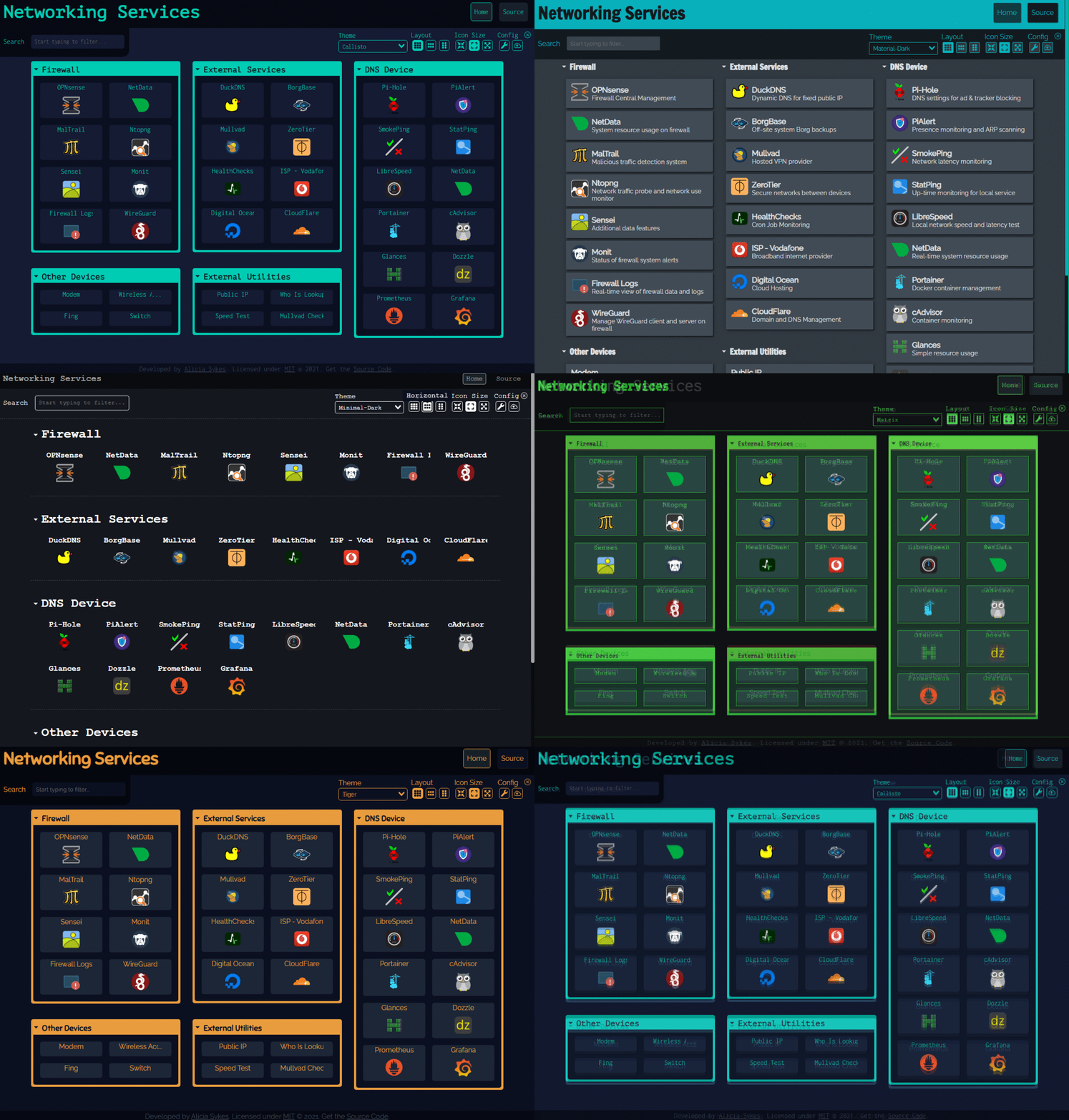
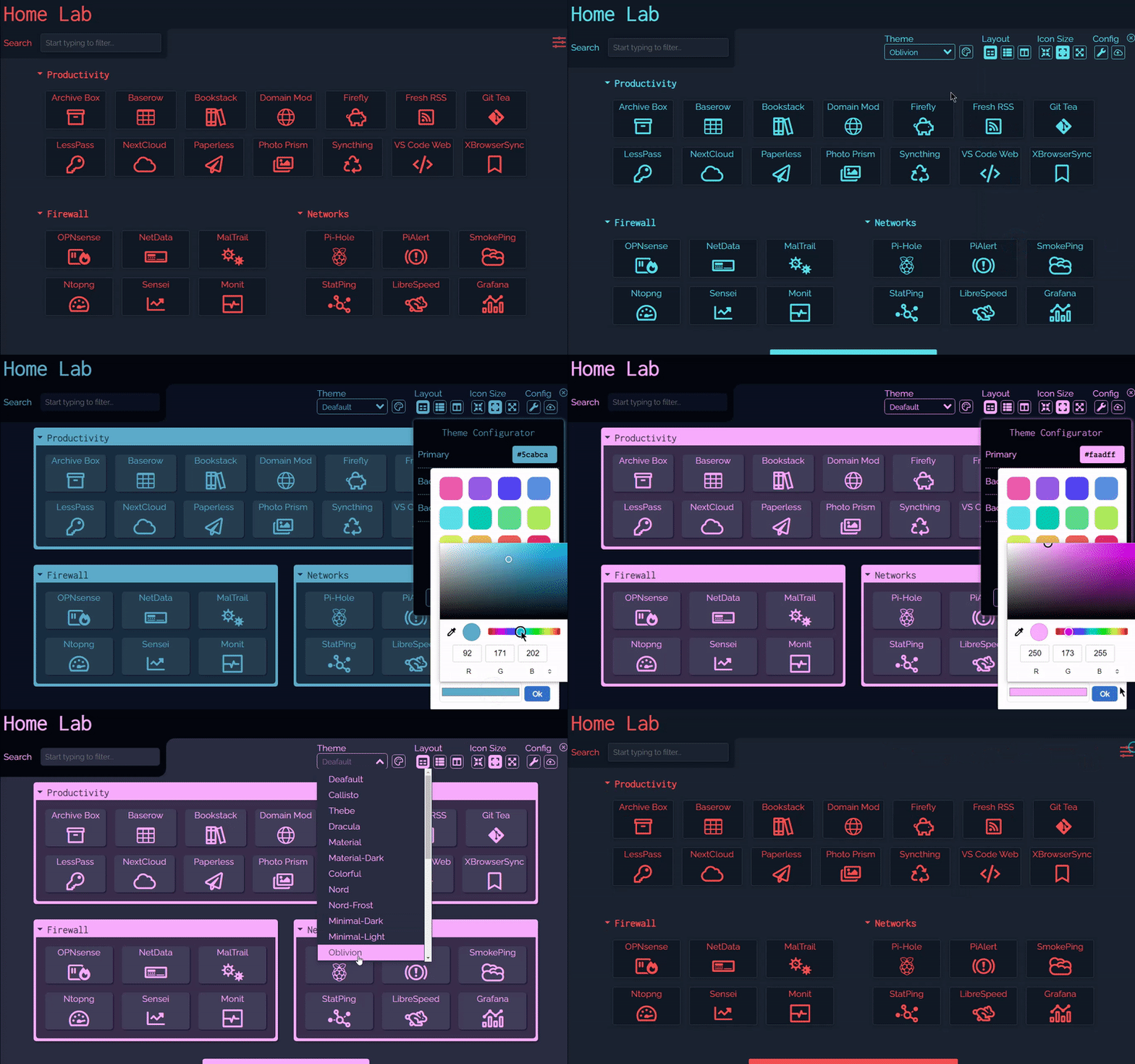
Dashy มาพร้อมกับธีมในตัวหลายแบบ ซึ่งคุณสามารถดูตัวอย่าง, นำไปใช้ และแก้ไขได้ผ่าน UI ด้วยตัวกำหนดค่าธีมและการรองรับ CSS แบบกำหนดเอง ทุกอย่างพร้อมที่จะช่วยให้คุณพัฒนาแดชบอร์ดที่มีรูปลักษณ์เฉพาะตัวได้อย่างรวดเร็ว
ไอคอน 🧸
สำหรับเอกสารประกอบไอคอนฉบับเต็ม โปรดดูที่: Icons
ทั้งส่วนและรายการสามารถมีไอคอนที่เกี่ยวข้องได้ โดยกำหนดภายใต้แอตทริบิวต์ icon ด้วยชุดไอคอนที่รองรับหลายแบบ คุณจะสามารถค้นหารูปย่อที่สมบูรณ์แบบสำหรับแอปหรือบริการใดๆ ก็ได้
ประเภทไอคอนที่รองรับมีดังนี้:
- Favicon - ดึงไอคอนของแอปจาก Favicon หรือโลโก้โดยอัตโนมัติ
- Icon Packs - ใช้ไอคอนใดก็ได้จาก font-awesome, simple-icons, selfh.st/icons หรือ material icons
- Emoji - อีโมจิที่ถูกต้องใดๆ ก็สามารถใช้เป็นไอคอนได้
- Generative - รูปภาพที่สร้างขึ้นเองโดยไม่ซ้ำใคร เพื่อระบุบริการได้อย่างง่ายดาย
- URL - ส่ง URL ของรูปภาพที่ถูกต้องใดๆ เพื่อให้ถูกดึงและแสดงผล
- Local - จัดเก็บรูปภาพที่กำหนดเองไว้ในเครื่องและอ้างอิงด้วยชื่อไฟล์
- Homelab Icons - ใช้ dashboard-icons สำหรับโลโก้ของบริการที่โฮสต์เองทั่วไป

ตัวบ่งชี้สถานะ 🚦
สำหรับเอกสารประกอบการตรวจสอบสถานะฉบับเต็ม โปรดดูที่: Status Indicators
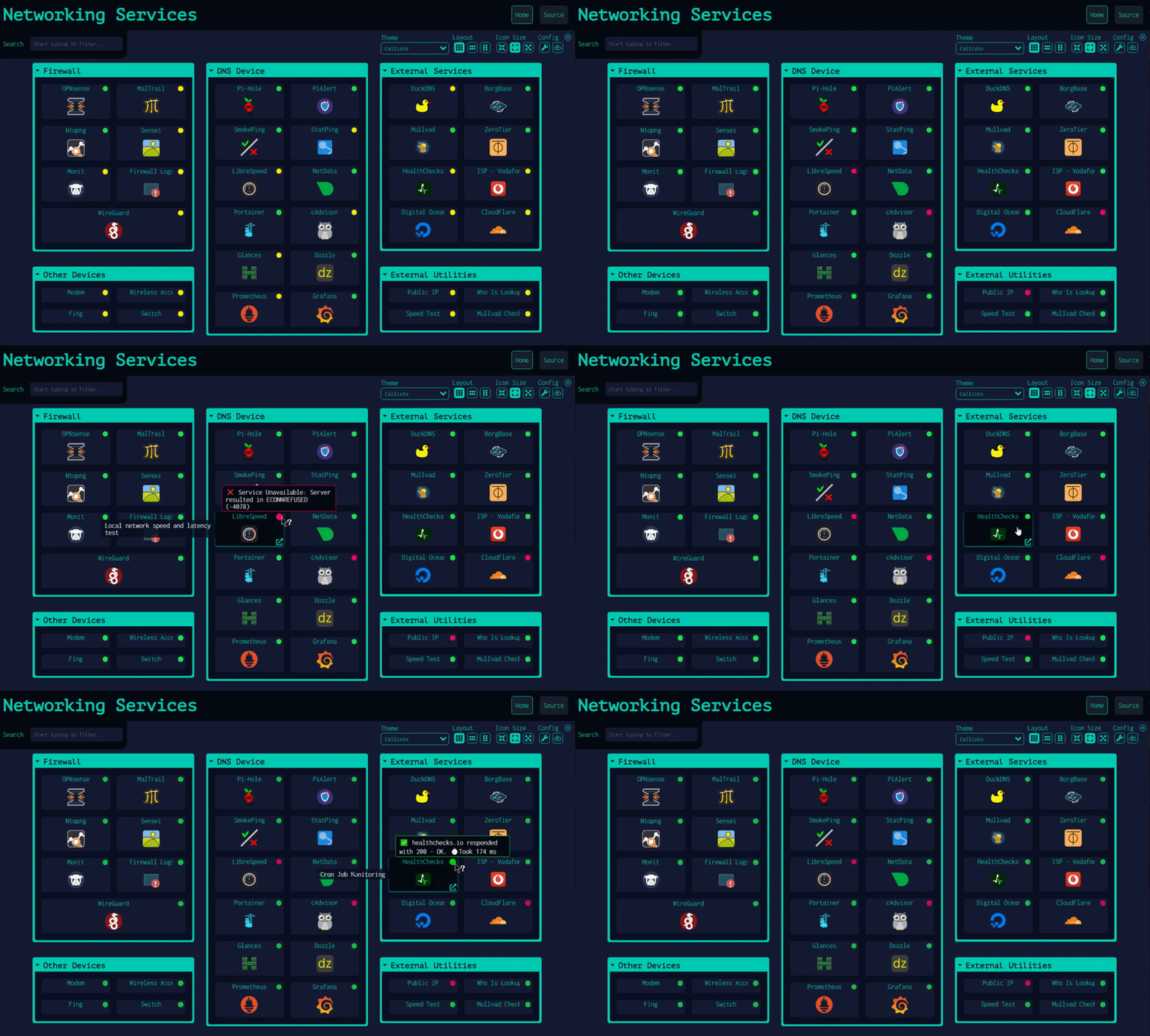
Dashy มีคุณสมบัติเสริมสองอย่างเพื่อตรวจสอบว่าแต่ละแอป/บริการหรือโฮสต์ทำงานและตอบสนองหรือไม่ จากนั้นจะแสดงไอคอนตัวบ่งชี้สถานะขนาดเล็ก การวางเมาส์เหนือไอคอนจะแสดงสถิติเพิ่มเติม เช่น เวลาตอบสนองและรหัสสถานะ
สถานะของแอป/บริการจะถูกตรวจสอบโดยการเรียก URL และวิเคราะห์รหัสตอบกลับ HTTP สถานะของโฮสต์จะถูกตรวจสอบโดยการส่งคำขอ ICMP ping จริงไปยังโฮสต์ การตรวจสอบทั้งสองสามารถทำได้พร้อมกันในรายการเดียวกัน ในกรณีนี้ ตัวบ่งชี้สถานะสองตัวจะปรากฏขึ้นและทำงานอย่างอิสระตามการตั้งค่าส่วนกลางและรายการสำหรับแต่ละคุณสมบัติ
ตัวบ่งชี้สถานะสามารถเปิดใช้งานได้ทั่วโลกโดยการตั้งค่า appConfig.statusCheck: true สำหรับแอป/บริการ และ appConfig.pingCheck: true สำหรับโฮสต์ หรือเปิด/ปิดใช้งานเป็นรายรายการ สถานะจะถูกตรวจสอบเมื่อโหลดหน้า แต่คุณสามารถอนุญาตให้มีการสำรวจอย่างต่อเนื่องโดยการระบุช่วงเวลาการตรวจสอบเป็นวินาทีภายใต้ appConfig.statusCheckInterval และ appConfig.pingCheckInterval คุณยังสามารถใช้ปลายทางที่แตกต่างกันสำหรับการตรวจสอบสถานะแอป/บริการด้วย statusCheckUrl และหากจำเป็น ให้ส่งส่วนหัวที่กำหนดเองภายใต้ statusCheckHeaders
วิดเจ็ต 📊
สำหรับเอกสารประกอบวิดเจ็ตฉบับเต็ม โปรดดูที่: Widgets
คุณสามารถแสดงเนื้อหาแบบไดนามิกจากบริการในรูปแบบของวิดเจ็ต มีวิดเจ็ตที่สร้างไว้ล่วงหน้าหลายรายการสำหรับแสดงข้อมูลที่เป็นประโยชน์ และการผสานรวมกับบริการที่โฮสต์เองทั่วไป แต่คุณยังสามารถสร้างวิดเจ็ตของคุณเองได้อย่างง่ายดายสำหรับแอปเกือบทุกชนิด

การยืนยันตัวตน 🔐
สำหรับเอกสารประกอบการยืนยันตัวตนฉบับเต็ม โปรดดูที่: Authentication
Dashy รองรับการลงชื่อเข้าใช้ครั้งเดียว (Single-Sign-On) ที่ปลอดภัยอย่างเต็มรูปแบบโดยใช้ Keycloak เพื่อการยืนยันตัวตนที่ปลอดภัยและง่ายดาย โปรดดู เอกสารการตั้งค่า สำหรับคู่มือการใช้งานฉบับเต็ม
นอกจากนี้ยังมีคุณสมบัติการยืนยันตัวตนแบบพื้นฐาน (basic auth) ซึ่งไม่จำเป็นต้องตั้งค่าเพิ่มเติม หากต้องการเปิดใช้งาน ให้เพิ่มแอตทริบิวต์ auth ภายใต้ appConfig ซึ่งประกอบด้วยอาร์เรย์ของ users โดยแต่ละผู้ใช้จะมีชื่อผู้ใช้ รหัสผ่านที่แฮชด้วย SHA-256 และประเภทผู้ใช้ที่เป็นทางเลือก Basic auth ยังรองรับคุณสมบัติการควบคุมการเข้าถึงหลายอย่าง รวมถึงการเข้าถึงแบบอ่านอย่างเดียวสำหรับผู้เยี่ยมชมและการควบคุมแบบละเอียด
appConfig:
  auth:
    users:
    - user: alicia
      hash: 4D1E58C90B3B94BCAD9848ECCACD6D2A8C9FBC5CA913304BBA5CDEAB36FEEFA3
      type: admin
ระบบควบคุมการเข้าถึงอื่นๆ ก็รองรับเช่นกัน โปรดดูเอกสาร Alternative Auth Methods
มุมมองทางเลือก 👓
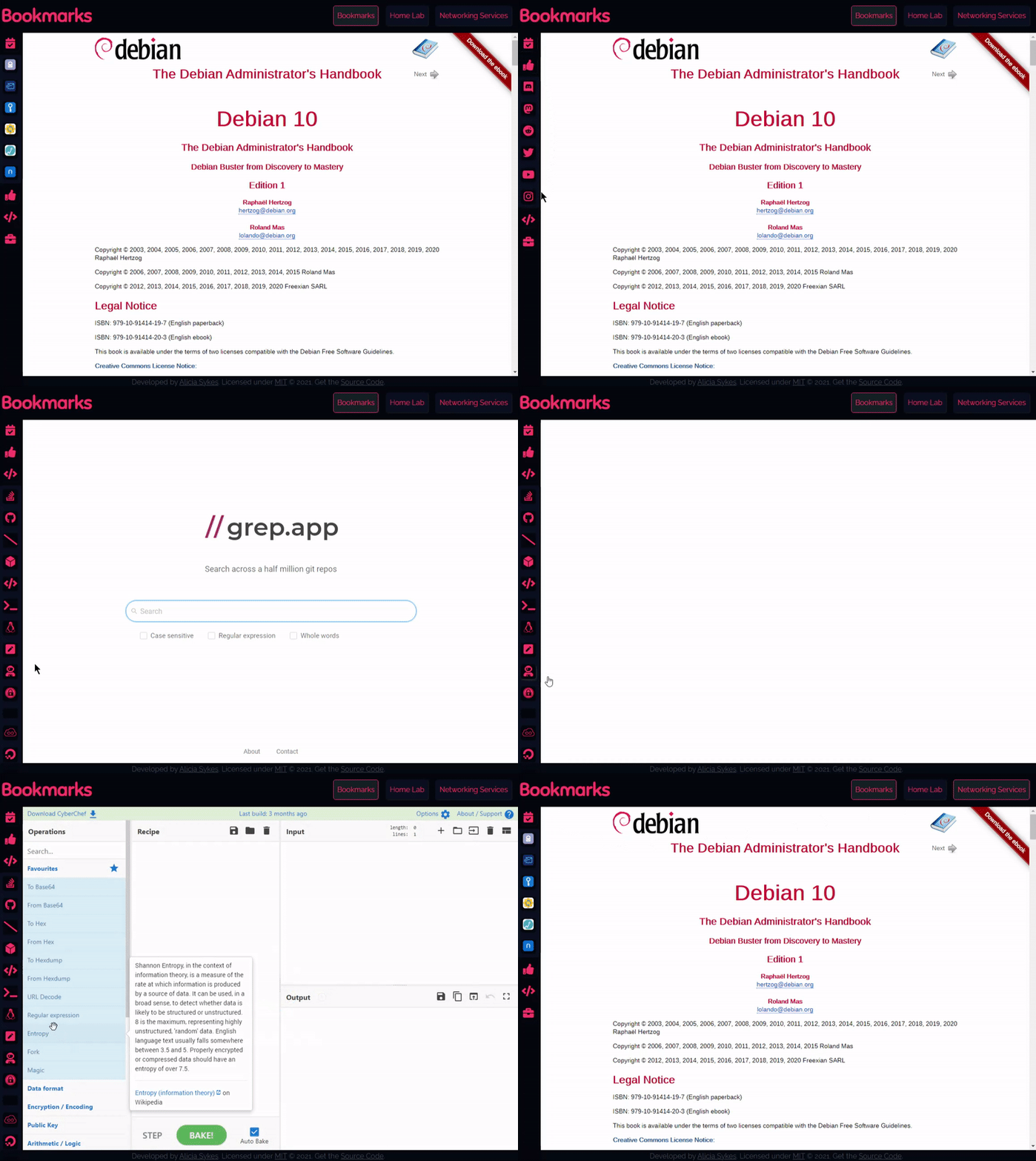
นอกเหนือจากหน้าแรกเริ่มต้นแล้ว ยังมี:
- มุมมองแบบมินิมอล เหมาะสำหรับใช้เป็นหน้าเริ่มต้นของเบราว์เซอร์
- มุมมองพื้นที่ทำงาน มีประโยชน์สำหรับการเยี่ยมชมแอปหลายแอปพร้อมกัน
คุณสามารถเปลี่ยนมุมมองได้จาก UI โดยใช้ไอคอนสวิตช์ที่มุมขวาบน หรือเลือกมุมมองเริ่มต้นในการกำหนดค่าภายใต้แอตทริบิวต์ appConfig.startingView
วิธีการเปิด 🖱️
สำหรับเอกสารประกอบฉบับเต็มเกี่ยวกับมุมมองและวิธีการเปิด โปรดดูที่: Alternate Views
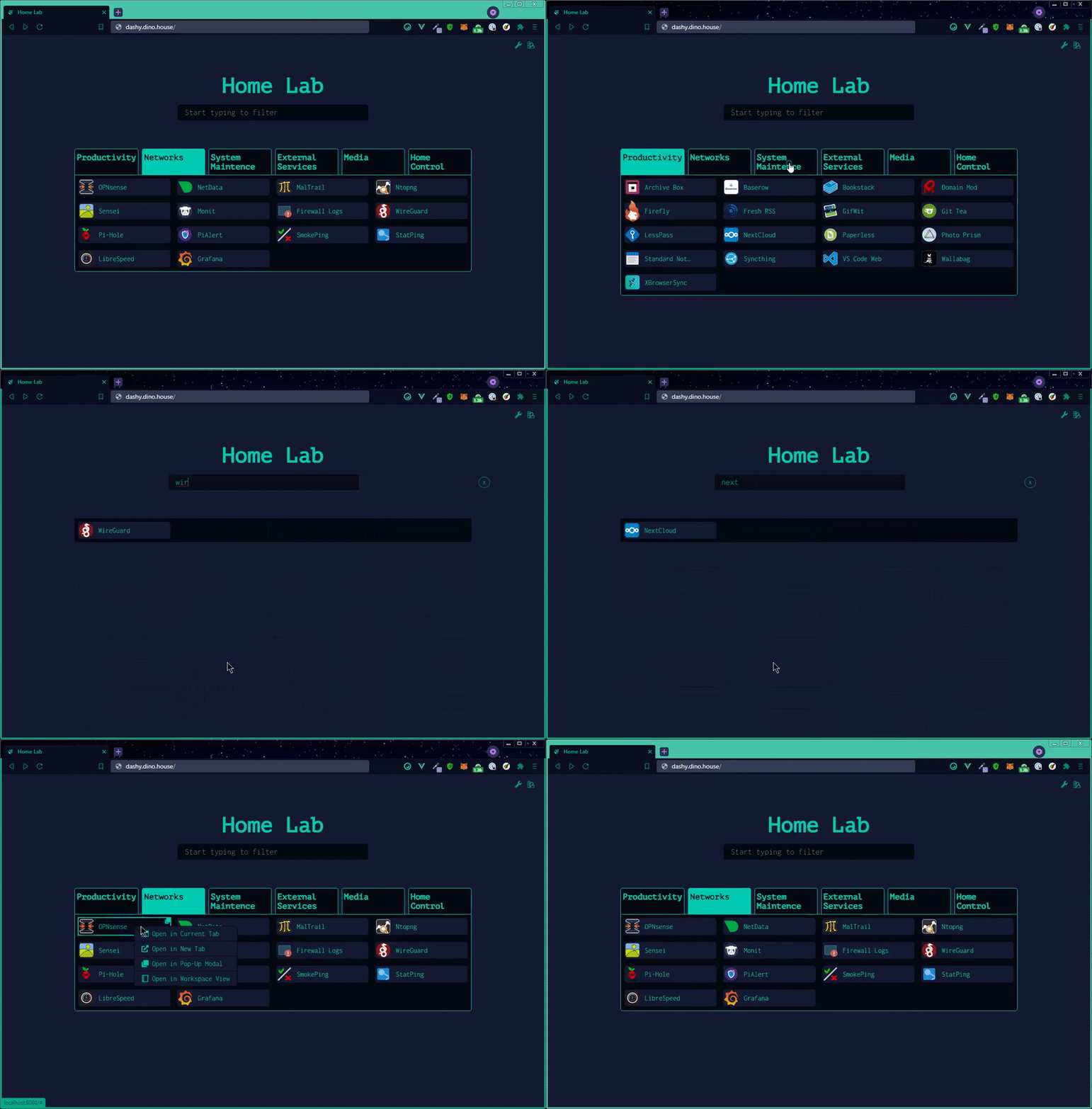
มีหลายวิธีที่คุณสามารถเปิดแอปได้ คุณสามารถระบุวิธีการเปิดเริ่มต้นสำหรับรายการใดๆ ภายใต้แอตทริบิวต์ target หรือตั้งค่าเริ่มต้นทั่วทั้งไซต์ภายใต้ appConfig.defaultOpeningMethod คลิกขวาที่รายการเพื่อดูตัวเลือกทั้งหมด ตัวเลือกต่อไปนี้รองรับ:
sametab- แอปจะเปิดในแท็บปัจจุบันnewtab- แอปจะเปิดในแท็บใหม่ (หรือใช้ Ctrl + คลิก)modal- เปิดแอปในหน้าต่างป๊อปอัปที่ปรับขนาด/ย้ายได้บนหน้าปัจจุบัน (หรือใช้ Alt + คลิก)workspace- เปลี่ยนเป็นมุมมอง Workspace และเปิดแอปclipboard- คัดลอก URL ของแอปไปยังคลิปบอร์ดของระบบของคุณtop- เปิดในบริบทการเรียกดูที่อยู่บนสุด มีประโยชน์หากคุณเข้าถึง Dashy ผ่าน iframe
การค้นหาและทางลัด 🔎
สำหรับเอกสารประกอบฉบับเต็มเกี่ยวกับการค้นหา โปรดดูที่: Searching & Shortcuts
การค้นหาและเปิดใช้งานแอปพลิเคชันอย่างรวดเร็วคือเป้าหมายหลักของ Dashy ด้วยเหตุนี้ การค้นหาแบบทันทีและทางลัดคีย์บอร์ดที่ปรับแต่งได้จึงถูกสร้างขึ้นมาในตัว
หากต้องการเริ่มกรอง ให้เริ่มพิมพ์—ไม่จำเป็นต้องเลือกแถบค้นหาหรือใช้ปุ่มพิเศษใดๆ จากนั้นใช้ปุ่ม Tab หรือปุ่มลูกศรเพื่อเลือกและย้ายระหว่างผลลัพธ์ และกด Enter เพื่อเปิดแอปพลิเคชันที่เลือกอยู่ในปัจจุบัน
สำหรับแอปที่คุณใช้เป็นประจำ คุณสามารถตั้งค่าคีย์ลัดที่กำหนดเองได้ ใช้พารามิเตอร์ hotkey ในรายการที่ต้องการเพื่อระบุคีย์ตัวเลขระหว่าง 0 - 9 จากนั้นคุณสามารถเปิดแอปนั้นได้โดยเพียงแค่กดปุ่มนั้น
คุณยังสามารถเพิ่มแท็กที่กำหนดเองให้กับรายการที่ต้องการเพื่อให้การค้นหาตามคำหลักง่ายขึ้น ตัวอย่างเช่น ในตัวอย่างต่อไปนี้ การค้นหา 'Movies' จะแสดง 'Plex'
  items:
  - title: Plex
    hotkey: 8
    icon: favicon
    description: Media library
    url: https://plex.lab.local
    tags: [ movies, videos, music ]
หากต้องการค้นหาเว็บโดยตรงผ่าน Dashy เพียงกด Enter หลังจากพิมพ์คำค้นหาของคุณ ตัวเลือกสำหรับการค้นหาเว็บถูกตั้งค่าภายใต้ appConfig.webSearch มีการรองรับในตัวสำหรับ เครื่องมือค้นหามากกว่า 10 รายการ หรือ ใช้ผู้ให้บริการที่กำหนดเองของคุณเอง หรืออินสแตนซ์ที่โฮสต์เอง ด้วยการค้นหาเว็บ คุณยังสามารถกำหนด bangs ของคุณเพื่อเปลี่ยนเส้นทางผลลัพธ์ไปยังแอป เว็บไซต์ หรือเครื่องมือค้นหาใดๆ เมื่อคำค้นหานำหน้าด้วยลำดับอักขระบางอย่าง (โดยปกติจะขึ้นต้นด้วย /, ! หรือ :)
webSearch:
  searchEngine: duckduckgo
  openingMethod: newtab
  searchBangs:
    /r: reddit
    /w: wikipedia
    /s: https://whoogle.local/search?q=
    ':wolf': wolframalpha
    ':so': stackoverflow
    ':git': github
กด Esc ได้ตลอดเวลาเพื่อปิดแอปที่เปิดอยู่ ล้างช่องค้นหา หรือซ่อนโมดอลใดๆ
ตัวแก้ไขการกำหนดค่า ⚙️
สำหรับเอกสารประกอบการกำหนดค่าฉบับเต็ม โปรดดูที่: Configuring
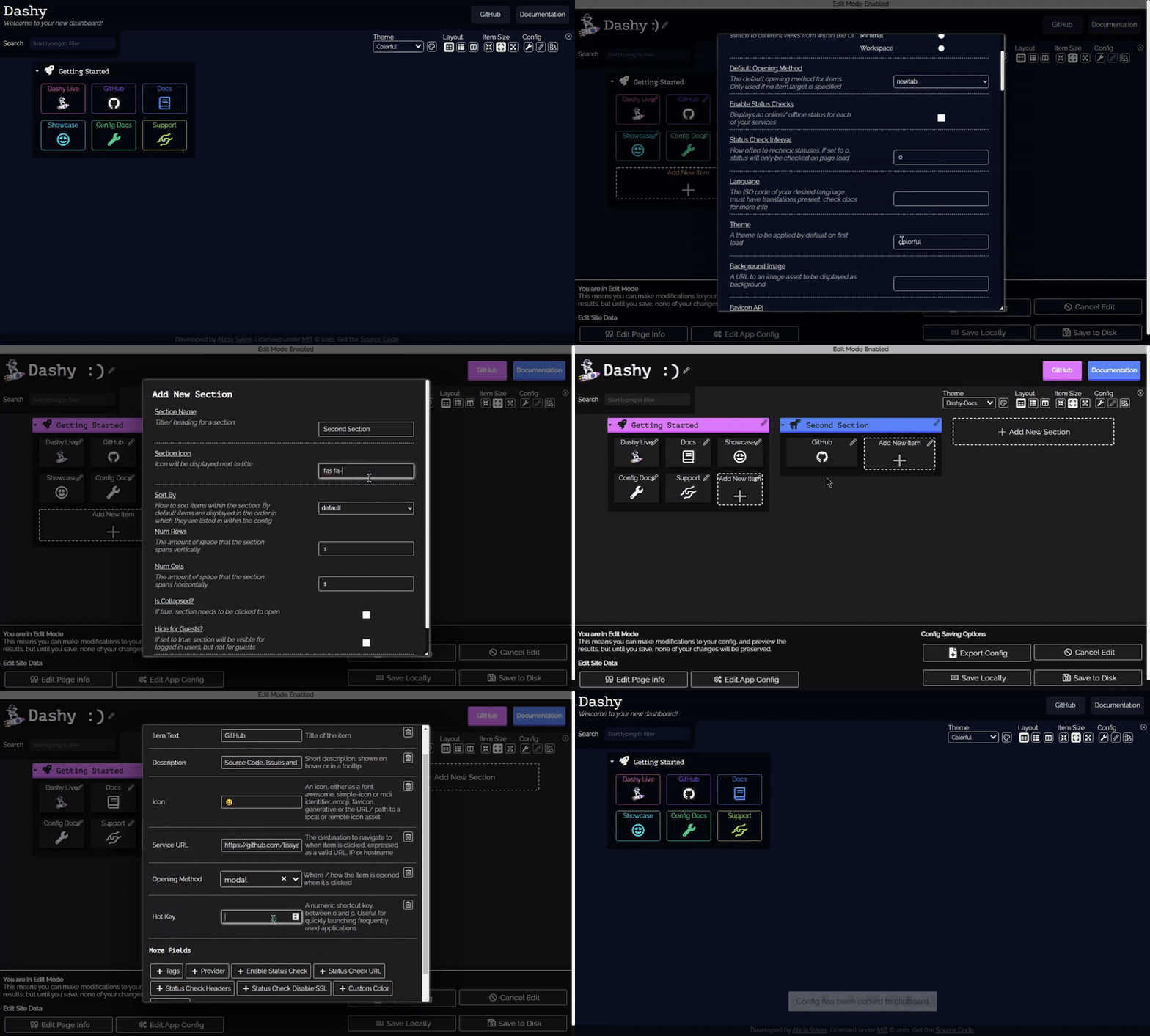
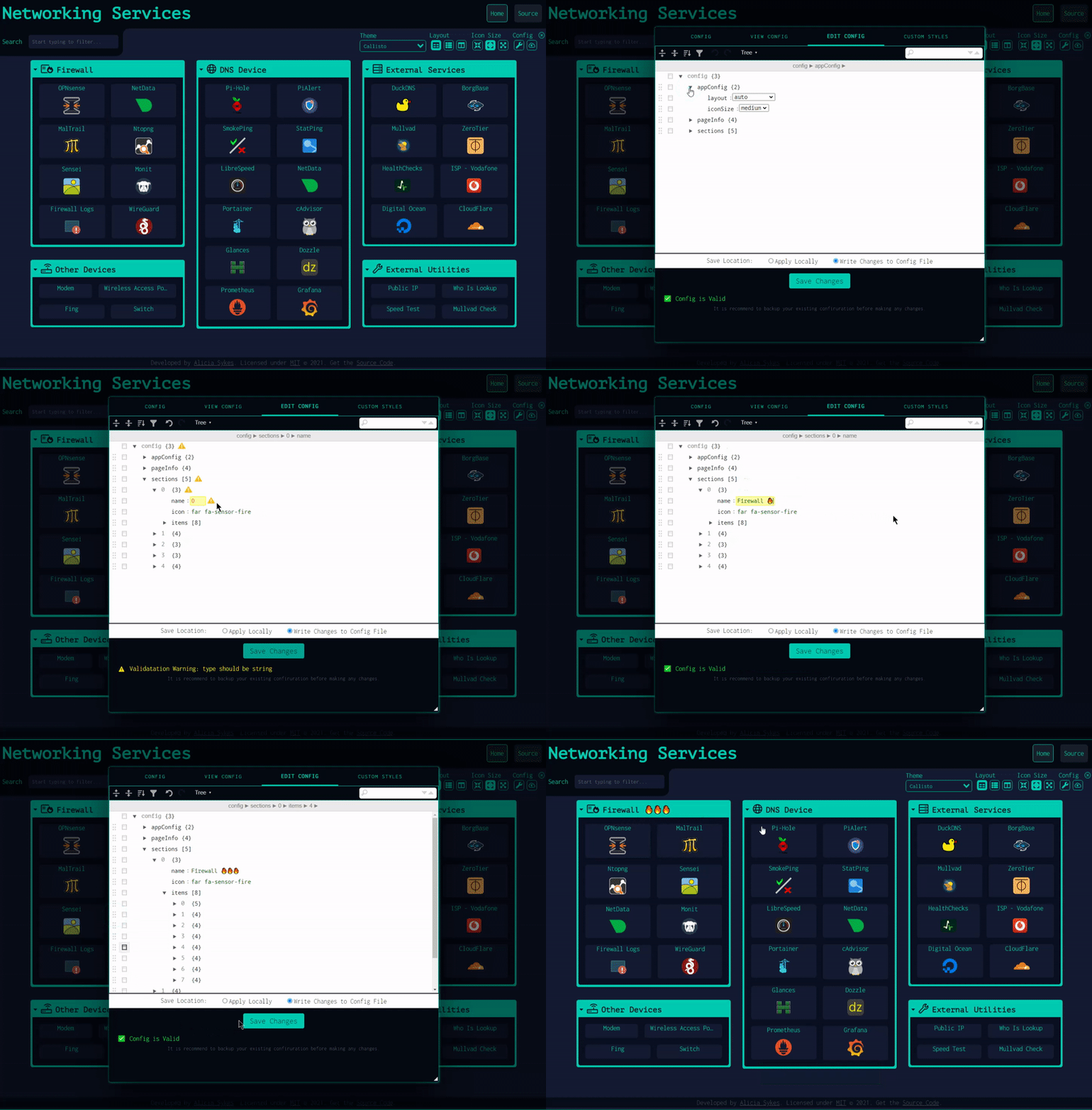
นอกจากจะส่งไฟล์คอนฟิก YAML แล้ว คุณยังสามารถตั้งค่าแอปได้โดยตรงผ่าน UI และดูตัวอย่างการเปลี่ยนแปลงได้แบบเรียลไทม์
หากต้องการแก้ไขส่วนหรือรายการใดๆ ให้คลิกขวาที่ส่วนนั้นแล้วเลือก "Edit" หรือเข้าสู่โหมดแก้ไข (โดยใช้ไอคอนรูปปากกาที่มุมขวาบน) จากนั้นคลิกส่วนใดก็ได้ของหน้าเพื่อแก้ไข การเปลี่ยนแปลงจะปรากฏให้เห็นทันที แต่จะยังไม่ถูกบันทึกจนกว่าจะคลิก "Save to Disk" หรือ "Save Locally"
ภายใต้เมนูคอนฟิก คุณสามารถส่งออก ดู สำรองข้อมูล หรือรีเซ็ตคอนฟิกของแอป และแก้ไขไฟล์คอนฟิกดิบในโปรแกรมแก้ไขข้อความพร้อมการตรวจสอบ Schema ในตัว ขอแนะนำให้สำรองข้อมูลคอนฟิกของคุณไว้
การสำรองข้อมูลและซิงค์บนคลาวด์ ☁
สำหรับเอกสารการสำรองข้อมูลฉบับเต็ม โปรดดูที่: Cloud Backup & Sync
Dashy มีคุณสมบัติในตัว เสริม สำหรับการสำรองข้อมูลคอนฟิกของคุณไปยังบริการคลาวด์ที่โฮสต์ไว้อย่างปลอดภัย และกู้คืนบนอินสแตนซ์อื่น สิ่งนี้มีประโยชน์ไม่เพียงแต่สำหรับการสำรองข้อมูลคอนฟิกของคุณนอกสถานที่เท่านั้น แต่ยังช่วยให้สามารถใช้ Dashy ได้โดยไม่ต้องเขียนไฟล์คอนฟิก YAML
ข้อมูลทั้งหมดจะถูกเข้ารหัสแบบ E2E อย่างสมบูรณ์ก่อนที่จะถูกส่งไปยังแบ็กเอนด์ (ดำเนินการใน CloudBackup.js โดยใช้วิธี AES ของ crypto.js) จากนั้นข้อมูลจะถูกส่งไปยัง Cloudflare worker และจัดเก็บไว้ใน KV data store
การสลับภาษา 🌎
สำหรับเอกสารการรองรับหลายภาษาฉบับเต็ม โปรดดูที่: Multi-Language Support
Dashy รองรับหลายภาษาและหลายท้องถิ่น เมื่อมีให้บริการ ภาษาของคุณควรถูกตรวจจับและนำไปใช้โดยอัตโนมัติเมื่อโหลด แต่คุณยังสามารถเลือกภาษาผ่าน UI (ภายใต้ config --> Switch Language) หรือตั้งค่า appConfig.language เป็นภาษาของคุณ (ระบุเป็นรหัส ISO 639-1 code 2 หลัก) ดังที่เห็นด้านล่าง เช่น language: de
ภาษาที่รองรับ
- 🇬🇧 อังกฤษ:
en- ค่าเริ่มต้น - 🇬🇧 อังกฤษ (บริติช):
en-GB - 🇦🇪 อาหรับ:
ar- สนับสนุนโดย @kayedspace - 🇧🇩 เบงกาลี:
bn- สนับสนุนโดย @soaibsafi - 🇧🇬 บัลแกเรีย:
bg- สนับสนุนโดย @asenov - 🇨🇳 จีน:
zh-CN- สนับสนุนโดย @FormatToday - 🇨🇿 เช็ก:
cs- สนับสนุนโดย @Tuzi555 - 🇩🇰 เดนมาร์ก:
da- สนับสนุนโดย @lordpansar - 🇳🇱 ดัตช์:
nl- สนับสนุนโดย @evroon - 🇫🇷 ฝรั่งเศส:
fr- สนับสนุนโดย @EVOTk - 🇩🇪 เยอรมัน:
de- สนับสนุนโดย @Niklashere - 🇬🇷 กรีก:
el- สนับสนุนโดย @aviolaris - 🇮🇳 ฮินดี:
hi- สร้างโดยอัตโนมัติ (ต้องการการตรวจสอบจากมนุษย์!) - 🇭🇺 ฮังการี:
hu- สนับสนุนโดย @apgyorfi - 🇮🇹 อิตาลี:
it- สนับสนุนโดย @alexdelprete - 🇯🇵 ญี่ปุ่น:
ja- สร้างโดยอัตโนมัติ (ต้องการการตรวจสอบจากมนุษย์!) - 🇰🇷 เกาหลี:
ko- สนับสนุนโดย @boggy-cs - 🇰🇬 คีร์กีซ:
ky- สนับสนุนโดย @noblepower1337 - 🇳🇴 นอร์เวย์ (บอคมอล):
nb- สนับสนุนโดย @rubjo - 🇵🇱 โปแลนด์:
pl- สนับสนุนโดย @skaarj1989 - 🇵🇹 โปรตุเกส:
pt- สนับสนุนโดย @LeoColman - 🇷🇴 โรมาเนีย:
ro- สนับสนุนโดย @z3r0l1nk - 🛰️ กาลิเซียน:
gl- สนับสนุนโดย @pvillaverde - 🇷🇺 รัสเซีย:
ru- สนับสนุนโดย @sasetz - 🇸🇰 สโลวัก:
sk- สนับสนุนโดย @Smexhy - 🇸🇮 สโลวีเนีย:
sl- สนับสนุนโดย @UrekD - 🇪🇸 สเปน:
es- สนับสนุนโดย @lu4t - 🇸🇪 สวีเดน:
sv- สนับสนุนโดย @BOZG - 🇹🇼 จีนดั้งเดิม:
zh-TW- สนับสนุนโดย @stanly0726 - 🇹🇷 ตุรกี:
tr- สนับสนุนโดย @imsakg - 🇺🇦 ยูเครน:
uk- สนับสนุนโดย @allozavrr - 🏴☠️ ไพเรท:
pirate- สนับสนุนโดย @Lissy93
เพิ่มภาษาของคุณ
ฉันอยากให้ Dashy พร้อมใช้งานสำหรับทุกคนโดยไม่มีภาษาเป็นอุปสรรค หากคุณมีเวลาว่างสักสองสามนาที ลองพิจารณาเพิ่มคำแปลสำหรับภาษาของคุณ เป็นงานที่รวดเร็ว และข้อความทั้งหมดอยู่ใน ไฟล์ JSON ไฟล์เดียว เนื่องจากข้อความที่ขาดหายไปจะกลับไปใช้ภาษาอังกฤษ คุณจึงไม่จำเป็นต้องแปลทั้งหมด
การรองรับหลายหน้า 📃
สำหรับเอกสารการรองรับหลายหน้าฉบับเต็ม โปรดดูที่: Pages & Sections
ภายในแดชบอร์ดของคุณ คุณสามารถมีหน้าย่อยได้มากเท่าที่คุณต้องการ หากต้องการโหลดหน้าเพิ่มเติม ให้ระบุชื่อและพาธไปยังไฟล์คอนฟิกภายใต้ pages ไฟล์คอนฟิกสามารถเป็นได้ทั้งแบบโลคัล (จัดเก็บใน /public) หรือแบบรีโมท (ตั้งอยู่ที่ใดก็ได้ที่สามารถเข้าถึงได้)
pages:
- name: Networking Services
  path: 'networking.yml'
- name: Work Stuff
  path: 'work.yml'
หรือ
pages:
- name: Getting Started
  path: 'https://snippet.host/tvcw/raw'
- name: Homelab
  path: 'https://snippet.host/tetp/raw'
- name: Browser Startpage
  path: 'https://snippet.host/zcom/raw'
ข้อกำหนดของระบบ 📊
หากรันบน bare metal, Dashy ต้องการ Node V 20.0.0 หรือใหม่กว่า, แนะนำ LTS (22.x)
หากรันใน Docker container, อิมเมจพื้นฐานที่แนะนำคือ Alpine (3.21)
ข้อกำหนดด้านฮาร์ดแวร์จะแตกต่างกันไปขึ้นอยู่กับตำแหน่งและวิธีการที่คุณรัน Dashy โดยทั่วไปแล้ว บนระบบ bare-metal หรือ Docker container, หน่วยความจำ 1GB ควรจะเพียงพอ และขึ้นอยู่กับว่าคุณใช้ asset ของคุณเองหรือไม่, พื้นที่ดิสก์ 1GB ก็ควรจะเพียงพอ
หากคุณใช้วิธีการปรับใช้บนคลาวด์แบบ 1-click, การให้บริการแอปผ่าน CDN หรือใช้ผู้ให้บริการโฮสติ้งแบบ static, ก็ไม่มีข้อกำหนดเฉพาะ เนื่องจากแอปที่สร้างขึ้นเป็นเพียงชุดไฟล์ JS แบบ static ซึ่งมีน้ำหนักเบามาก
Dashy ยังทำงานได้ดีบนคอมพิวเตอร์บอร์ดเดี่ยวที่ใช้ ARM พลังงานต่ำ เช่น Raspberry Pi (ทดสอบบน Pi 3)
การสนับสนุน 🙋♀️
หากคุณมีปัญหาในการติดตั้งและรัน Dashy หรือมีคำถามเกี่ยวกับการใช้งานหรือการตั้งค่า โปรดสอบถามได้เลย สถานที่ที่ดีที่สุดในการทำเช่นนี้คือผ่าน the Discussions
หากคุณพบสิ่งที่ไม่ทำงานตามที่ควรจะเป็น โปรดแจ้งข้อผิดพลาดโดย เปิดตั๋ว
ควรตรวจสอบ docs, previous issues และ troubleshooting guide ก่อน
การสนับสนุน Dashy 💖
สำหรับรายละเอียดทั้งหมดและวิธีอื่นๆ ที่คุณสามารถช่วยได้ โปรดดูที่: Contributing
หากคุณกำลังใช้ Dashy และต้องการช่วยสนับสนุนการพัฒนา ก็จะเป็นเรื่องที่ยอดเยี่ยมมาก! การสนับสนุนไม่ว่าจะประเภทใด ขนาดใด ก็ได้รับการชื่นชมอย่างยิ่งเสมอ และเราจะให้เครดิตคุณอย่างเหมาะสมสำหรับความพยายามของคุณ
ในขณะนี้ มีหลายส่วนที่เราต้องการความช่วยเหลือเล็กน้อย ได้แก่:
- การแปล - ช่วยให้ Dashy พร้อมใช้งานสำหรับผู้ที่ไม่ได้ใช้ภาษาอังกฤษเป็นภาษาแม่โดย เพิ่มภาษาของคุณ
- บริจาคเงินจำนวนเล็กน้อยโดย Sponsoring @Lissy93 บน GitHub และรับสิทธิพิเศษเพิ่มเติม!
- ทำ แบบสำรวจสั้นๆ เพื่อแสดงความคิดเห็นเกี่ยวกับคุณสมบัติในอนาคต
- แชร์แดชบอร์ดของคุณใน Showcase เพื่อสร้างแรงบันดาลใจให้ผู้อื่น
- บอกต่อโดยการแชร์ Dashy หรือภาพหน้าจอแดชบอร์ดของคุณเพื่อช่วยให้ผู้ใช้ใหม่ค้นพบ
- ส่ง PR เพื่อเพิ่มคุณสมบัติใหม่ แก้ไขข้อผิดพลาด อัปเดตเอกสาร เพิ่มธีม วิดเจ็ต หรือสิ่งอื่นใด
- กด Star Dashy บน GitHub/ DockerHub หรือให้คะแนน/รีวิวบน แพลตฟอร์มเหล่านี้

ผู้สนับสนุน 🏆
สำหรับรายชื่อผู้สนับสนุนทั้งหมด และการอ้างอิงถึงแพ็กเกจที่ใช้ใน Dashy โปรดดูที่: ผู้สนับสนุน
ขอขอบคุณทุกท่านที่ได้ช่วยเหลือ Dashy มาโดยตลอด ทุกการสนับสนุนมีค่าอย่างยิ่ง
ผู้สนับสนุน
ขอขอบคุณผู้สนับสนุนที่ช่วยสนับสนุนการพัฒนา Dashy!
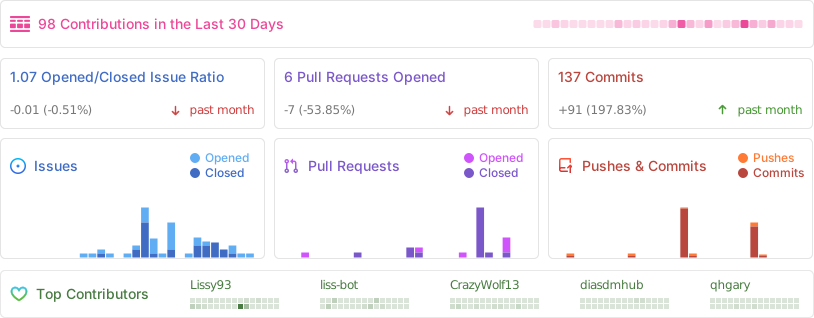
ผู้ร่วมให้ข้อมูล
สถิติ
การพัฒนา 🧱
สำหรับเอกสารการพัฒนาฉบับเต็ม โปรดดูที่: การพัฒนา



ก่อนเริ่มต้น คุณจะต้องติดตั้ง Git, Node และอาจจะ Yarn (รัน npm i -g yarn)
ในการตั้งค่าสภาพแวดล้อมการพัฒนา:
- 1รับโค้ด:
git clone https://github.com/Lissy93/dashy.gitและcd dashy - 2ติดตั้ง dependencies:
yarn - 3เริ่มต้น dev server:
yarn dev - 4เปิดเบราว์เซอร์:
http://localhost:8080
เมื่อคุณพร้อม คุณสามารถสร้างแอปเวอร์ชัน Production ด้วย yarn build แล้วรันด้วย yarn start
หากคุณยังใหม่กับการพัฒนาเว็บ ฉันได้รวบรวม รายการแหล่งข้อมูล สั้นๆ เพื่อช่วยให้ผู้เริ่มต้นสามารถเริ่มต้นได้
สถานะของ Repo:

เอกสารประกอบ 📘
สำหรับเอกสารฉบับเต็ม โปรดดูที่: สารบัญเอกสารประกอบ
การรัน Dashy
- 💨 เริ่มต้นอย่างรวดเร็ว - คู่มือย่อๆ ในการติดตั้งและรัน Dashy ภายใน 5 นาที
- 🚀 การปรับใช้ - คู่มือฉบับเต็มในการตั้งค่า Dashy บนสภาพแวดล้อมต่างๆ
- 🔧 การกำหนดค่า - รายการตัวเลือกทั้งหมดที่มีในไฟล์คอนฟิก
- 💻 การจัดการ - การจัดการแอปของคุณ, การอัปเดต, ความปลอดภัย, การกำหนดค่าเว็บเซิร์ฟเวอร์ ฯลฯ
- 🚒 การแก้ไขปัญหา - ข้อผิดพลาดและปัญหาทั่วไป พร้อมวิธีแก้ไข
เอกสารคุณสมบัติ
- 🛡️ การยืนยันตัวตน - คู่มือการตั้งค่าการยืนยันตัวตนเพื่อปกป้องแดชบอร์ดของคุณ
- 🌈 มุมมองทางเลือก - โครงร่างของหน้า/มุมมองที่มีอยู่และวิธีการเปิดรายการ
- 💾 การสำรองและกู้คืน - คู่มือการสำรองข้อมูลคอนฟิกด้วยคุณสมบัติ Cloud Sync ของ Dashy
- 🧸 ไอคอน - โครงร่างของประเภทไอคอนทั้งหมดที่มีสำหรับส่วนและรายการ พร้อมตัวอย่าง
- 🌐 การรองรับหลายภาษา - การเปลี่ยนภาษาและการเพิ่มภาษาใหม่
- 🚦 ตัวบ่งชี้สถานะ - การใช้ Dashy เพื่อตรวจสอบความพร้อมใช้งานและสถานะของแอป, บริการ และโฮสต์ของคุณ
- 🔍 การค้นหาและทางลัด - การค้นหา, วิธีการเปิดใช้งาน + ทางลัดคีย์บอร์ด
- 🎨 การปรับแต่งธีม - คู่มือฉบับสมบูรณ์เกี่ยวกับการใช้, การเขียน และการแก้ไขธีม + สไตล์
- 📊 วิดเจ็ต - รายการวิดเจ็ตเนื้อหาแบบไดนามิกทั้งหมด พร้อมคู่มือการใช้งานและตัวอย่าง
การพัฒนาและการมีส่วนร่วม
- 🧱 การพัฒนา - การรัน Dashy development server ในเครื่อง และขั้นตอนการทำงานทั่วไป
- 🛎️ คู่มือการพัฒนา - งานพัฒนาทั่วไป เพื่อช่วยผู้ร่วมให้ข้อมูลใหม่ๆ
- 💖 การมีส่วนร่วม - วิธีการมีส่วนร่วมกับ Dashy
- 🌟 การจัดแสดง - ดูว่าผู้อื่นใช้ Dashy อย่างไร และแบ่งปันแดชบอร์ดของคุณ
- 🏆 ผู้สนับสนุน - ขอขอบคุณผู้คนที่ยอดเยี่ยมที่ได้มีส่วนร่วมมาจนถึงตอนนี้
- 🗞️ ขั้นตอนการเผยแพร่ - ข้อมูลเกี่ยวกับการเผยแพร่, CI และงานอัตโนมัติ
อื่นๆ
- 🔐 ความเป็นส่วนตัว - รายการคำขอเครือข่ายและการจัดเก็บข้อมูลทั้งหมด
- 🛡️ ความปลอดภัย - คุณสมบัติความปลอดภัย, แบบจำลองภัยคุกคาม และแหล่งข้อมูลการเสริมความแข็งแกร่ง
- 📄 ใบอนุญาต - สำเนาใบอนุญาต MIT
- 📏 หลักปฏิบัติ - หลักปฏิบัติ Contributor Covenant
แผนงาน 🛣
เอกสารโปรเจกต์
อ่านเอกสารต้นฉบับ
README วิธีติดตั้ง วิธีใช้งาน และข้อกำหนดจาก repository ต้นฉบับ
- **Getting Started**- [🌈 Features](#features-) - [⚡ Demo](#demo-) - [🚀 Getting Started](#getting-started-) - [🔧 Configuring](#configuring-)
- **Feature Overview**- [🎨 Theming](#theming-) - [🧸 Icons](#icons-) - [🚦 Status Indicators](#status-indicators-) - [📊 Widgets](#widgets-) - [🔐 Authentication](#authentication-) - [👓 Alternate Views](#alternate-views-) - [🖱️ Opening Methods](#opening-methods-) - [🔎 Searching and Shortcuts](#searching-and-shortcuts-) - [⚙️ Config Editor](#config-editor-) - [☁ Cloud Backup & Sync](#cloud-backup--sync-) - [🌎 Language Switching](#language-switching-) - [📃 Multi-Page Support](#multi-page-support-)
- **Community**- [📊 System Requirements](#system-requirements-) - [🙋♀️ Support](#support-) - [💖 Supporting Dashy](#supporting-dashy-) - [🏆 Credits](#credits-) - [🧱 Developing](#developing-) - [📘 Documentation](#documentation-) - [🛣️ Roadmap](#roadmap-) - [🙌 Alternatives](#alternatives-) - [📜 License](#license-)
Features 🌈
- 📃 Support for multiple pages
- 🚦 Real-time status monitoring for each of your apps/links/hosts
- 📊 Use widgets to display info and dynamic content from self-hosted services
- 🔎 Instant search by name, domain, or tags + customizable hotkeys & keyboard shortcuts
- 🎨 Many built-in color themes, with UI color editor and support for custom CSS
- 🧸 Many icon options - Font-Awesome, homelab icons, auto-fetching Favicon, images, emojis, etc.
- 💂 Optional authentication with multi-user access, configurable privileges, and SSO support
- 🌎 Multi-language support, with 10+ human-translated languages, and more on the way
- ☁ Optional, encrypted, free off-site cloud backup and restore feature available
- 💼 A workspace view, for easily switching between multiple apps simultaneously
- 🛩️ A minimal view, for use as a fast-loading browser Startpage
- 🖱️ Choose app launch methods: new tab, same tab, clipboard, pop-up modal, or open in workspace view
- 📏 Customizable layout, sizes, text, component visibility, sort order, behavior, etc.
- 🖼️ Options for a full-screen background image, custom nav-bar links, HTML footer, title, etc.
- 🚀 Easy to setup with Docker, or on bare metal, or with 1-Click cloud deployment
- ⚙️ Easy single-file YAML-based configuration, and option to configure app through the UI
- ✨ Under active development with improvements and new features added regularly
- 🤏 Small bundle size, fully responsive UI, and PWA for basic offline access
- 🆓 100% free and open-source
- 🔐 Strong focus on privacy
- 🌈 And loads more...
Demo ⚡
Live Instances: Demo (Live Demo) ┆ Dev Preview (Dev Preview)
Screenshots: Checkout the Showcase, to see example dashboards from the community
Try it yourself: docker run -p 8080:8080 lissy93/dashy
Getting Started 🚀
For full setup instructions, see: Deployment
Deploying from Docker Hub 🐳
You will need Docker installed on your system
docker run -p 4000:8080 lissy93/dashyOr
docker run -d \
  -p 4000:8080 \
  -v /path/to/your/user-data:/app/user-data \
  --name my-dashboard \
  --restart=always \
  lissy93/dashy:latest
To use with compose, see our sample docker-compose.yml.
The mounted /app/user-data directory must contain at least a conf.yml.
It can also hold sub-config files, item icons, fonts, custom CSS, or anything else you want served from the web root.
Dashy is distributed both on DockerHub (lissy93/dashy) and GHCR (ghcr.io/lissy93/dashy).
You can either use :latest or pin to specific versions (like 4.0.0).
All images are multi-arch (works on amd64 and arm64).
Once you've got Dashy running, see the docs for configuration references and usage guides.
Deploying from Source 🔨
You'll need Node (20+) installed, as well as git and yarn enabled.
- Clone the Repo:
git clone https://github.com/Lissy93/dashy.gitandcd dashy - Configuration: Fill in your settings in
./user-data/conf.yml - Install dependencies:
yarn - Build:
yarn build - Run:
yarn start
See docs: Full list of Dashy's commands
Deploy to the Cloud ☁️
Dashy supports 1-Click deployments on several popular cloud platforms. To spin up a new instance, just click a link below:
- Deploy to Netlify
- Deploy to Vercel
- Deploy to Render
- Deploy to Railway
- Deploy to GCP
- Deploy to PWD
- Deploy to Easypanel
- Deploy to EdgeOne
For more 1-click cloud deployments, see Cloud Deployment
Configuring 🔧
For full configuration documentation, see: Configuring
Dashy is configured through a YAML file, located at ./user-data/conf.yml. In addition, you can find a complete list of available options in the Configuring Docs. The config can also be edited and saved directly through the UI.
Theming 🎨
For full theming documentation, see: Theming
Dashy comes pre-bundled with several built-in themes, which you can preview, apply and edit through the UI. With the theme configurator and support for custom CSS, everything is in place to quickly develop your own unique-looking dashboard.
Icons 🧸
For full iconography documentation, see: Icons
Both sections and items can have an icon associated with them, defined under the icon attribute. With several different icon packs supported, you'll be able to find the perfect thumbnail for any app or service.
The following icon types are supported:
- Favicon - Automatically fetch an apps icon from its Favicon or logo image
- Icon Packs - Use any icon from font-awesome, simple-icons, selfh.st/icons, or material icons
- Emoji - Any valid emoji can be used as an icon
- Generative - Unique, auto-generated images for easily identifying services
- URL - Pass the URL of any valid image in to have it fetched and rendered
- Local - Store custom images locally and reference by filename
- Homelab Icons - Using dashboard-icons for logos of commonly self-hosted services
Status Indicators 🚦
For full monitoring documentation, see: Status Indicators
Dashy has two optional features to check if each app/service or host is up and responding, then display a small status indicator icon. Hovering over it will show additional stats like response time and status code.
App/Service status is checked by calling an URL and analyzing its HTTP response code. Host status is checked by sending a real ping ICMP request to the host. Both checks can be done at the same time on the same item. In this case, two status indicators will show up and behave independently according to the global and item settings for each feature.
Status indicators can be globally enabled by setting appConfig.statusCheck: true for app/service and appConfig.pingCheck: true for hosts or enabled/disabled on a per-item basis. Statuses are checked on page load, but you can allow continuous polling by specifying a time interval between checks, in seconds under appConfig.statusCheckInterval and appConfig.pingCheckInterval. You can also use a different endpoint for app/service status checking, with statusCheckUrl, and if needed, pass in custom headers under statusCheckHeaders.
Widgets 📊
For full widget documentation, see: Widgets
You can display dynamic content from services in the form of widgets. There are several pre-built widgets available for showing useful info, and integrations with commonly self-hosted services, but you can also easily create your own for almost any app.
Authentication 🔐
For full authentication documentation, see: Authentication
Dashy has full support for secure single-sign-on using Keycloak for secure, easy authentication, see setup docs for a full usage guide.
There is also a basic auth feature, which doesn't require additional setup. To enable this, add an auth attribute under appConfig, containing an array of users, each with a username, SHA-256 hashed password and optional user type. Basic auth also supports several access control features, including read-only guest access and granular controls.
appConfig:
  auth:
    users:
    - user: alicia
      hash: 4D1E58C90B3B94BCAD9848ECCACD6D2A8C9FBC5CA913304BBA5CDEAB36FEEFA3
      type: admin
Other access control systems are also supported, see the Alternative Auth Methods docs.
Alternate Views 👓
As well as the default homepage, there is also:
- A minimal view, valid for use as a browser start page
- A workspace view, useful for visiting many apps simultaneously
You can change the view from the UI, using the switch icon in the top-right corner, or select a default view in the config under appConfig.startingView attribute.
Opening Methods 🖱️
For full documentation on views and opening methods, see: Alternate Views
There are several different ways you can launch apps. You can specify the default opening method for any given item under the target attribute or set a site-wide default under appConfig.defaultOpeningMethod. Right-click on an item for all options. The following options are supported:
sametab- The app will be launched in the current tabnewtab- The app will be launched in a new tab (or use Ctrl + Click)modal- Launch app in a resizable/ movable popup modal on the current page (or use Alt + Click)workspace- Changes to Workspace view and launches appclipboard- Copy the app's URL to your system clipboardtop- Opens in the top-most browsing context, useful if you're accessing Dashy through an iframe
Searching and Shortcuts 🔎
For full documentation on searching, see: Searching & Shortcuts
Quickly finding and launching applications is the primary aim of Dashy. To that end, instant search and customizable keyboard shortcuts are built-in.
To start filtering, start typing—no need to select the search bar or use any special key. Then use either the tab key or arrow keys to select and move between results, and hit enter to launch the currently selected application.
For apps that you use regularly, you can set a custom keybinding. Use the hotkey parameter on a certain item to specify a numeric key between 0 - 9. You can then launch that app by just pressing that key.
You can also add custom tags to a given item to make finding them based on keywords easier. For example, in the following example, searching for 'Movies' will show 'Plex'
  items:
  - title: Plex
    hotkey: 8
    icon: favicon
    description: Media library
    url: https://plex.lab.local
    tags: [ movies, videos, music ]
To search the web directly through Dashy, just press enter after typing your query. Options for web search are set under appConfig.webSearch. There is built-in support for 10+ search engines, or use your own custom provider or self-hosted instance. With the web search, you can also define your bangs to redirect results to any given app, website, or search engine, when the query is preceded with a certain character sequence (usually beginning in /, ! or :).
webSearch:
  searchEngine: duckduckgo
  openingMethod: newtab
  searchBangs:
    /r: reddit
    /w: wikipedia
    /s: https://whoogle.local/search?q=
    ':wolf': wolframalpha
    ':so': stackoverflow
    ':git': github
Hit Esc at any time to close any open apps, clear the search field, or hide any modals.
Config Editor ⚙️
For full config documentation, see: Configuring
As well as passing in a YAML config file, you can also configure the app directly through the UI and preview changes live.
To edit any section or item, right-click on it, and select "Edit", or enter the Edit Mode (using the Pen icon in the top-right), then click any part of the page to edit. Changes will be visible immediately but will not be saved until clicking "Save to Disk" or "Save Locally".
Under the config menu, you can export, view, backup, or reset app config and edit the raw config file in a text editor with built-in schema validation. It's recommended to keep a backup of your config.
Cloud Backup & Sync ☁
For full backup documentation, see: Cloud Backup & Sync
Dashy has an optional built-in feature for securely backing up your config to a hosted cloud service and then restoring it on another instance. This is useful not only for backing up your configuration off-site but also enables Dashy to be used without having to write a YAML config file.
All data is fully E2E encrypted before being sent to the backend (done in CloudBackup.js using crypto.js 's AES method). The data is then sent to a Cloudflare worker and stored in a KV data store.
Language Switching 🌎
For full internationalization documentation, see: Multi-Language Support
Dashy supports multiple languages and locales. When available, your language should be automatically detected and applied on load. But you can also select a language through the UI (under config --> Switch Language) or set appConfig.language to your language (specified as a 2-digit ISO 639-1 code), as seen below, e.g. language: de.
Supported Languages
- 🇬🇧 English:
en- Default - 🇬🇧 English (British):
en-GB - 🇦🇪 Arabic:
ar- Contributed by @kayedspace - 🇦🇿 Azerbaijani:
az- Contributed by @jamalkamaladdin - 🇧🇩 Bengali:
bn- Contributed by @soaibsafi - 🇧🇬 Bulgarian:
bg- Contributed by @asenov - 🇨🇳 Chinese:
zh-CN- Contributed by @FormatToday - 🇨🇿 Czech:
cs- Contributed by @Tuzi555 - 🇩🇰 Danish:
da- Contributed by @lordpansar - 🇳🇱 Dutch:
nl- Contributed by @evroon - 🇫🇷 French:
fr- Contributed by @EVOTk - 🇩🇪 German:
de- Contributed by @Niklashere - 🇬🇷 Greek:
el- Contributed by @aviolaris - 🇮🇳 Hindi:
hi- Auto-generated (needs human review!) - 🇭🇺 Hungarian:
hu- Contributed by @apgyorfi - 🇮🇹 Italian:
it- Contributed by @alexdelprete - 🇯🇵 Japanese:
ja- Auto-generated (needs human review!) - 🇰🇷 Korean:
ko- Contributed by @boggy-cs - 🇰🇬 Kyrgyz:
ky- Contributed by @noblepower1337 - 🇳🇴 Norwegian Bokmål:
nb- Contributed by @rubjo - 🇵🇱 Polish:
pl- Contributed by @skaarj1989 - 🇵🇹 Portuguese:
pt- Contributed by @LeoColman - 🇷🇴 Romanian:
ro- Contributed by @z3r0l1nk - 🛰️ Galician:
gl- Contributed by @pvillaverde - 🇷🇺 Russian:
ru- Contributed by @sasetz - 🇸🇰 Slovak:
sk- Contributed by @Smexhy - 🇸🇮 Slovenian:
sl- Contributed by @UrekD - 🇪🇸 Spanish:
es- Contributed by @lu4t - 🇸🇪 Swedish:
sv- Contributed by @BOZG - 🇹🇼 Traditional Chinese:
zh-TW- Contributed by @stanly0726 - 🇹🇷 Turkish:
tr- Contributed by @imsakg - 🇺🇦 Ukrainian:
uk- Contributed by @allozavrr - 🏴☠️ Pirate:
pirate- Contributed by @Lissy93
Add your Language
I would love Dashy to be available to everyone without language being a barrier to entry. If you've got a few minutes to spare, consider adding translations for your language. It's a quick task, and all text is in a single JSON file. Since any missing text will fall back to English, you don't need to translate it all.
Multi-Page Support 📃
For full multi-page documentation, see: Pages & Sections
Within your dashboard, you can have as many sub-pages as you require. To load additional pages, specify a name, and path to a config file under pages. The config file can be either local (stored in /public), or remote (located anywhere accessible).
pages:
- name: Networking Services
  path: 'networking.yml'
- name: Work Stuff
  path: 'work.yml'
Or
pages:
- name: Getting Started
  path: 'https://snippet.host/tvcw/raw'
- name: Homelab
  path: 'https://snippet.host/tetp/raw'
- name: Browser Startpage
  path: 'https://snippet.host/zcom/raw'
System Requirements 📊
If running on bare metal, Dashy requires Node V 20.0.0 or later, LTS (22.x) is recommended.
If running in Docker container, the recommended base image is Alpine (3.21)
The hardware requirements vary depending on where and how you are running Dashy. Generally speaking, on a bare-metal system or Docker container, 1GB of memory should be more than enough, and depending on whether you are using your own assets, then 1GB of disk space should be sufficient.
If you are using one of the 1-click cloud deployment methods, serving the app through a CDN or using a static hosting provider, then there are no specific requirements, as the built app is just a series of static JS files, and so is very light-weight.
Dashy also runs well on low-powered ARM-based single board computers, such as a Raspberry Pi (tested on Pi 3)
Support 🙋♀️
If you're having trouble getting Dashy up and running, or have a question about usage or configuration, feel free to ask. The best place to do this is via the Discussions.
If you've found something which isn't working as it should, please raise a bug by opening a ticket.
It's best to check the docs, previous issues and troubleshooting guide first.
Supporting Dashy 💖
For full details and other ways you can help out, see: Contributing
If you're using Dashy and would like to help support its development, then that would be awesome! Contributions of any type, any size, are always very much appreciated, and we will appropriately credit you for your effort.
Several areas that we need a bit of help with at the moment are:
- Translating - Help make Dashy available to non-native English speakers by adding your language
- Donate a small amount by Sponsoring @Lissy93 on GitHub and receive some extra perks!
- Complete a short survey to have your say about future features
- Share your dashboard in the Showcase, to inspire others
- Spread the word by sharing Dashy or a screenshot of your dashboard to help new users discover it
- Submit a PR to add a new feature, fix a bug, update the docs, add a theme, widget or something else
- Star Dashy on GitHub/ DockerHub or leave an upvote / review on these platforms
Credits 🏆
For a complete list of credits, and attributions to packages used within Dashy, see: Credits
Thank you so much to everyone who has helped with Dashy so far; every contribution is very much appreciated.
Sponsors
Huge thanks to the sponsors helping to support Dashy's development!
Contributors
Stats
Developing 🧱
For full development documentation, see: Developing
Before getting started, you'll need Git, Node and optionally Yarn (run npm i -g yarn) installed.
To set up the development environment:
- 1Get Code:
git clone https://github.com/Lissy93/dashy.gitandcd dashy - 2Install dependencies:
yarn - 3Start dev server:
yarn dev - 4Open the browser:
http://localhost:8080
When you're ready, you can build the production app with yarn build, and then run it with yarn start
If you're new to web development, I've put together a short list of resources to help beginners get started
Repo Status:
Documentation 📘
For full docs, see: Documentation Contents
Running Dashy
- 💨 Quick Start - TDLR guide on getting Dashy up and running in under 5 minutes
- 🚀 Deployment - Full guide on setting up Dashy on various different environments
- 🔧 Configuring - Complete list of all available options in the config file
- 💻 Management - Managing your app, updating, security, web server configuration, etc
- 🚒 Troubleshooting - Common errors and problems, and how to fix them
Feature Docs
- 🛡️ Authentication - Guide to setting up authentication to protect your dashboard
- 🌈 Alternate Views - Outline of available pages / views and item opening methods
- 💾 Backup & Restore - Guide to backing up config with Dashy's cloud sync feature
- 🧸 Icons - Outline of all available icon types for sections and items, with examples
- 🌐 Multi-Language Support - Switching languages, and adding a new locales
- 🚦 Status Indicators - Using Dashy to monitor uptime and status of your apps, services and hosts
- 🔍 Searching & Shortcuts - Searching, launching methods + keyboard shortcuts
- 🎨 Theming - Complete guide to applying, writing and modifying themes + styles
- 📊 Widgets - List of all dynamic content widgets, with usage guides and examples
Development and Contributing
- 🧱 Developing - Running Dashy development server locally, and general workflow
- 🛎️ Development Guides - Common development tasks, to help new contributors
- 💖 Contributing - How to contribute to Dashy
- 🌟 Showcase - See how others are using Dashy, and share your dashboard
- 🏆 Credits - Shout out to the amazing people who have contributed so far
- 🗞️ Release Workflow - Info about releases, CI and automated tasks
Misc
- 🔐 Privacy - List of all network requests and data storage
- 🛡️ Security - Security features, threat model, and hardening resources
- 📄 License - Copy of the MIT License
- 📏 Code of Conduct - Contributor Covenant Code of Conduct
Roadmap 🛣️
For upcoming features that will be released in the near future, see the Current Roadmap
For past updates, see the Releases Page
Alternatives 🙌
A few self-hosted web apps serve a similar purpose to Dashy. If you're looking for a dashboard, and Dashy doesn't meet your needs, I highly recommend you check these projects out!
- Flame by @pawelmalak (
MIT) - HomeDash2
- Homer (
Apache License 2.0) - Organizr (
GPL-3.0 License) - Heimdall (
MIT) - Smashing (
MIT) - See more 👉 Awesome Self-Hosted
License 📜
Dashy is Licensed under MIT X11
Copyright © Alicia Sykes <https://aliciasykes.com>

Permission is hereby granted, free of charge, to any person obtaining a copy of this
software and associated documentation files (the "Software"), to deal in the Software
without restriction, including without limitation the rights to use, copy, modify, merge,
publish, distribute, sublicense, and/or sell copies of the Software, and to permit
persons to whom the Software is furnished to do so, subject to the following conditions:

The above copyright notice and this permission notice shall be included in all copies or
substantial portions of the Software.

THE SOFTWARE IS PROVIDED "AS IS", WITHOUT WARRANTY OF ANY KIND, EXPRESS OR IMPLIED,
INCLUDING BUT NOT LIMITED TO THE WARRANTIES OF MERCHANTABILITY, FITNESS FOR A PARTICULAR
PURPOSE AND NONINFRINGEMENT. IN NO EVENT SHALL THE AUTHORS OR COPYRIGHT HOLDERS BE
LIABLE FOR ANY CLAIM, DAMAGES, OR OTHER LIABILITY, WHETHER IN AN ACTION OF CONTRACT,
TORT OR OTHERWISE, ARISING FROM, OUT OF, OR IN CONNECTION WITH THE SOFTWARE OR THE USE
OR OTHER DEALINGS IN THE SOFTWARE.

Except as contained in this notice, Dashy shall not be used in advertising or otherwise
to promote the sale, use, or other dealings in this Software without prior written
authorization from the repo owner.
TDLR; You can do whatever you like with Dashy: use it in private or commercial settings, redistribute and modify it. But you must display this license and credit the author. There is no warranty that this app will work as expected, and the author cannot be held liable for anything that goes wrong. For more info, see TLDR Legal's Explanation of MIT