
GetNotes Tools
koala73/worldmonitor
Tool นี้คืออะไร
World Monitor เป็นแดชบอร์ดข่าวกรองทั่วโลกแบบเรียลไทม์ที่ขับเคลื่อนด้วย AI ซึ่งรวบรวมข่าวสาร การติดตามสถานการณ์ภูมิรัฐศาสตร์ และโครงสร้างพื้นฐานไว้ในอินเทอร์เฟซเดียว เหมาะสำหรับนักพัฒนาที่ต้องการสร้างแอปพลิเคชันที่ให้ข้อมูลเชิงลึกระดับโลกแบบครบวงจร
ข้อมูลโปรเจกต์
ดาว
65.6K
Forks
10.2K
License
ไม่ระบุ
อัปเดต GitHub ล่าสุด
21 ก.ค. 2569
เพิ่มใน GetNotes
30 ก.ค. 2569
Repository
koala73/worldmonitor
รูปแบบ
เหมาะกับงาน
เหมาะกับอาชีพ
Ecosystem
TypeScript
แปลและเรียบเรียงโดย AI
เนื้อหาฉบับภาษาไทย
ใช้อ่านเพื่อทำความเข้าใจเบื้องต้น โปรดตรวจสอบรายละเอียดสำคัญกับเอกสารต้นฉบับด้านล่าง
World Monitor
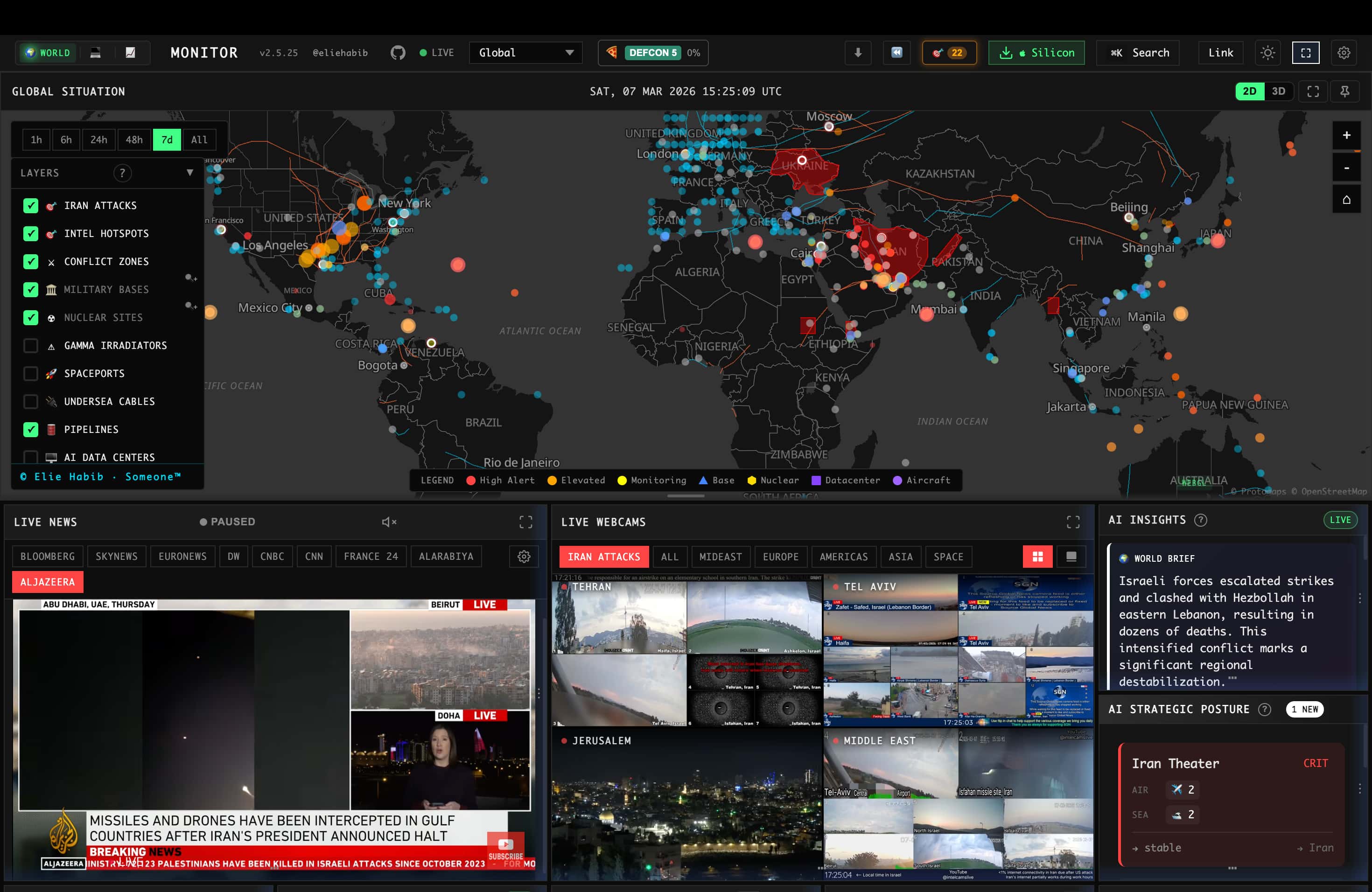
แดชบอร์ดข่าวกรองทั่วโลกแบบเรียลไทม์ — การรวบรวมข่าวสารที่ขับเคลื่อนด้วย AI การติดตามสถานการณ์ภูมิรัฐศาสตร์ และโครงสร้างพื้นฐานในอินเทอร์เฟซการรับรู้สถานการณ์แบบรวมศูนย์




















ทำอะไรได้บ้าง
- ฟีดข่าวที่คัดสรรแล้วกว่า 500 รายการ ใน 15 หมวดหมู่ สังเคราะห์เป็นบทสรุปด้วย AI
- เอนจินแผนที่คู่ — ลูกโลก 3 มิติ (globe.gl) และแผนที่แบน WebGL (deck.gl) พร้อมเลเยอร์แผนที่ 56 ประเภท
- การเชื่อมโยงข้อมูลข้ามสตรีม — การบรรจบกันของสัญญาณทางทหาร เศรษฐกิจ ภัยพิบัติ และการยกระดับความรุนแรง
- ดัชนีความไม่มั่นคงของประเทศ (CII) — การให้คะแนนความเครียด CII v8 ที่เชื่อถือได้จากเซิร์ฟเวอร์สำหรับ 31 ประเทศในกลุ่ม Tier-1
- เรดาร์การเงิน — ตลาดหลักทรัพย์ 29 แห่ง สินค้าโภคภัณฑ์ คริปโต และองค์ประกอบตลาด 7 สัญญาณ
- AI ในเครื่อง — รันทุกอย่างด้วย Ollama โดยไม่ต้องใช้ API keys
- 6 รูปแบบเว็บไซต์ จากโค้ดเบสเดียว (world, tech, finance, commodity, happy, energy)
- แอปพลิเคชันเดสก์ท็อปแบบเนทีฟ (Tauri 2) สำหรับ macOS, Windows และ Linux
- 25 ภาษา พร้อมฟีดภาษาท้องถิ่นและการรองรับ RTL
สำหรับรายการคุณสมบัติทั้งหมด สถาปัตยกรรม แหล่งข้อมูล และอัลกอริทึม โปรดดูที่ เอกสารประกอบ
สถานะการสนับสนุน
รูปแบบเว็บไซต์และไบนารีเดสก์ท็อปทั้งหมดถูกสร้างขึ้นจากโค้ดเบสเดียวและเผยแพร่จากกระบวนการเดียวกัน ตารางด้านล่างนี้จะชี้แจงสถานะการบำรุงรักษาเพื่อให้คุณทราบว่าส่วนใดที่ปลอดภัยในการใช้งาน
| ส่วนที่รองรับ | สถานะ | หมายเหตุ |
|---|---|---|
worldmonitor.app, tech., finance., commodity., happy., energy. | เสถียร | การปรับใช้สาธารณะที่สร้างจาก repo นี้ ได้รับการบำรุงรักษาอย่างต่อเนื่อง |
| ไบนารีเดสก์ท็อป (Windows / macOS Apple Silicon / macOS Intel / Linux AppImage) | เสถียร | ไบนารี Tauri ตัวเดียวที่สลับรูปแบบในแอป; เป้าหมายการเผยแพร่ CI ปัจจุบันคือ full และ tech |
ปัญหาที่ยื่นต่อส่วนใดส่วนหนึ่งข้างต้นจะถูกจัดลำดับความสำคัญจาก backlog เดียวกัน — ดูที่ บอร์ดปัญหา สำหรับงานที่เปิดอยู่
เริ่มต้นใช้งานอย่างรวดเร็ว
git clone https://github.com/koala73/worldmonitor.git
cd worldmonitor
npm install
npm run dev
เปิด localhost:3000 (สามารถกำหนดพอร์ตใหม่ได้ด้วย DEV_PORT ใน .env.local) แอปสามารถทำงานได้โดยไม่ต้องมี environment variables
แหล่งข้อมูลเฉพาะคุณสมบัติบางอย่างอาจต้องใช้ข้อมูลรับรอง โปรดดู .env.example สำหรับรายการทั้งหมด
สำหรับการพัฒนาเฉพาะรูปแบบ:
npm run dev:tech       # tech.worldmonitor.app
npm run dev:finance    # finance.worldmonitor.app
npm run dev:commodity  # commodity.worldmonitor.app
npm run dev:happy      # happy.worldmonitor.app
npm run dev:energy     # energy.worldmonitor.app
ดู คู่มือการโฮสต์ด้วยตนเอง สำหรับตัวเลือกการปรับใช้ (Vercel, Docker, static)
เทคโนโลยีที่ใช้
| หมวดหมู่ | เทคโนโลยี |
|---|---|
| ส่วนหน้า (Frontend) | Vanilla TypeScript, Vite, globe.gl + Three.js, deck.gl + MapLibre GL |
| เดสก์ท็อป | Tauri 2 (Rust) พร้อม Node.js sidecar |
| AI/ML | Ollama / Groq / OpenRouter, Transformers.js (ฝั่งเบราว์เซอร์) |
| สัญญา API | Protocol Buffers (290 protos, 35 services), sebuf HTTP annotations |
| การปรับใช้ | Vercel Edge Functions (60+), Railway relay, Tauri, PWA |
| การแคช | Redis (Upstash), แคช 3 ระดับ, CDN, service worker |
รายละเอียดสแต็กทั้งหมดอยู่ใน เอกสารสถาปัตยกรรม
การเข้าถึงแบบโปรแกรม
World Monitor ถูกสร้างขึ้นสำหรับเอเจนต์และสคริปต์ รวมถึงเบราว์เซอร์ด้วย:
- เซิร์ฟเวอร์ MCP —
https://worldmonitor.app/mcp(Streamable HTTP)tools/listแบบสาธารณะ;tools/callใช้การยืนยันตัวตนด้วยเฮดเดอร์X-WorldMonitor-Keyหรือ OAuth - REST API — ฐาน
https://api.worldmonitor.appอธิบายโดย OpenAPI spec - CLI — แพ็กเกจ npm อย่างเป็นทางการ
worldmonitor(ซอร์สโค้ดอยู่ในcli/):
sh
npx worldmonitor tools # รันแบบเฉพาะกิจ — แสดงรายการเครื่องมือ MCP ทั้งหมด (ไม่จำเป็นต้องใช้คีย์)
npm install -g worldmonitor # หรือติดตั้งคำสั่ง worldmonitor (ชื่อย่อ wm)
worldmonitor risk IR --api-key wm_xxx
- **SDKs** — ไลบรารีไคลเอนต์อย่างเป็นทางการที่ไม่มีการพึ่งพาใดๆ ซึ่งสะท้อน CLI: Python [`worldmonitor-sdk`](https://pypi.org/project/worldmonitor-sdk/) (ซอร์สโค้ดอยู่ใน [`sdk/python/`](https://github.com/koala73/worldmonitor/blob/main/sdk/python/)), Ruby [`worldmonitor`](https://rubygems.org/gems/worldmonitor) ([`sdk/ruby/`](https://github.com/koala73/worldmonitor/blob/main/sdk/ruby/)), Go [`github.com/koala73/worldmonitor/sdk/go`](https://pkg.go.dev/github.com/koala73/worldmonitor/sdk/go) ([`sdk/go/`](https://github.com/koala73/worldmonitor/blob/main/sdk/go/)). คู่มือ: [worldmonitor.app/docs/sdks](https://www.worldmonitor.app/docs/sdks).

ไฟล์ค้นหาเอเจนต์: [`llms.txt`](https://worldmonitor.app/llms.txt) · [agent-skills manifest](https://worldmonitor.app/.well-known/agent-skills/index.json) · [api-catalog](https://worldmonitor.app/.well-known/api-catalog). รับ API key ได้ที่ [worldmonitor.app/pro](https://www.worldmonitor.app/pro).

---

## ข้อมูลการบิน

ข้อมูลการบินได้รับความอนุเคราะห์จาก [Wingbits](https://wingbits.com?utm_source=worldmonitor&utm_medium=referral&utm_campaign=worldmonitor) ซึ่งเป็นโซลูชันข้อมูลการบิน ADS-B ที่ทันสมัยที่สุด

---

## แหล่งข้อมูล

WorldMonitor รวบรวมผู้ให้บริการภายนอกและ API กว่า 65 รายการ ครอบคลุมด้านภูมิรัฐศาสตร์, การเงิน, พลังงาน, สภาพภูมิอากาศ, การบิน, ไซเบอร์, การทหาร, โครงสร้างพื้นฐาน และข่าวกรอง — นำเสนอผ่านฟีดที่คัดสรรกว่า 500 รายการ และติดตามโดยเครื่องมือตรวจสอบความสดใหม่ที่ครอบคลุม 35 กลุ่มแหล่งที่มา ดู [แค็ตตาล็อกแหล่งข้อมูล](https://www.worldmonitor.app/docs/data-sources) ฉบับเต็มสำหรับผู้ให้บริการ, ระดับฟีด และวิธีการรวบรวม

---

## การมีส่วนร่วม

ยินดีรับการมีส่วนร่วม! ดู [CONTRIBUTING.md](https://github.com/koala73/worldmonitor/blob/main/CONTRIBUTING.md) สำหรับแนวทางปฏิบัติ

```bash
npm run typecheck        # ตรวจสอบประเภท
npm run build:full       # สร้างเวอร์ชันสำหรับใช้งานจริง
ใบอนุญาต
AGPL-3.0-only สำหรับซอร์สโค้ด การใช้งานเชิงพาณิชย์ได้รับอนุญาตภายใต้ AGPL เมื่อคุณปฏิบัติตามข้อกำหนด copyleft และการเปิดเผยซอร์สโค้ด
| กรณีการใช้งาน | อนุญาตหรือไม่ |
|---|---|
| ส่วนตัว / การวิจัย / การศึกษา | ใช่, ภายใต้ AGPL-3.0-only |
| อินสแตนซ์ที่โฮสต์เอง | ใช่, ภายใต้ AGPL-3.0-only |
| Fork และแก้ไข | ใช่, ต้องแชร์ซอร์สโค้ดภายใต้ AGPL-3.0-only เมื่อจำเป็น |
| การใช้งานเชิงพาณิชย์ / SaaS | ใช่, ภายใต้ AGPL-3.0-only เมื่อคุณปฏิบัติตามข้อผูกพันของ AGPL |
| การใช้งานที่เป็นกรรมสิทธิ์แบบซอร์สโค้ดส่วนตัว หรือสิทธิ์การสร้างแบรนด์อย่างเป็นทางการ | ต้องได้รับอนุญาตเชิงพาณิชย์หรือเครื่องหมายการค้าแยกต่างหาก |
ดู LICENSE สำหรับใบอนุญาตโค้ดฉบับเต็ม และ docs/license.mdx สำหรับสรุปภาษาที่เข้าใจง่าย การอนุญาตให้ใช้สิทธิ์เชิงพาณิชย์มีให้เป็นทางเลือกสำหรับทีมที่ต้องการเงื่อนไขที่ไม่ใช่ AGPL
ลิขสิทธิ์ (C) 2024-2026 Elie Habib. สงวนลิขสิทธิ์ทั้งหมด
ผู้เขียน
Elie Habib — GitHub
ผู้มีส่วนร่วม
การรับรองความปลอดภัย
เราขอขอบคุณนักวิจัยต่อไปนี้ที่เปิดเผยปัญหาด้านความปลอดภัยอย่างมีความรับผิดชอบ:
- Cody Richard — เปิดเผยข้อค้นพบด้านความปลอดภัยสามประการ ครอบคลุมการเปิดเผยคำสั่ง IPC, การวิเคราะห์ขอบเขตความน่าเชื่อถือของ renderer-to-sidecar และสถาปัตยกรรมการฉีดข้อมูลประจำตัวของ fetch patch (2026)
ดู นโยบายความปลอดภัย ของเราสำหรับแนวทางการเปิดเผยอย่างมีความรับผิดชอบ
ประวัติ Star
เอกสารโปรเจกต์
อ่านเอกสารต้นฉบับ
README วิธีติดตั้ง วิธีใช้งาน และข้อกำหนดจาก repository ต้นฉบับ
World Monitor
Real-time global intelligence dashboard — AI-powered news aggregation, geopolitical monitoring, and infrastructure tracking in a unified situational awareness interface.
The World Monitor name and wordmark identify the official site at www.worldmonitor.app, so please don't present a fork as the official site.

Ways to Use It
| Surface | Get it | Docs |
|---|---|---|
| Web app | worldmonitor.app and the tech, finance, commodity, happy and energy variants | Getting Started |
| Desktop app (Tauri) | Windows, macOS and Linux downloads above | Desktop App |
| Terminal dashboard | npx worldmonitor | Terminal Dashboard |
| CLI | npm install -g worldmonitor or brew install worldmonitor | Command-Line Client |
| SDKs | Python worldmonitor-sdk, Ruby worldmonitor, Go sdk/go | SDKs |
| MCP server | https://worldmonitor.app/mcp | MCP Overview |
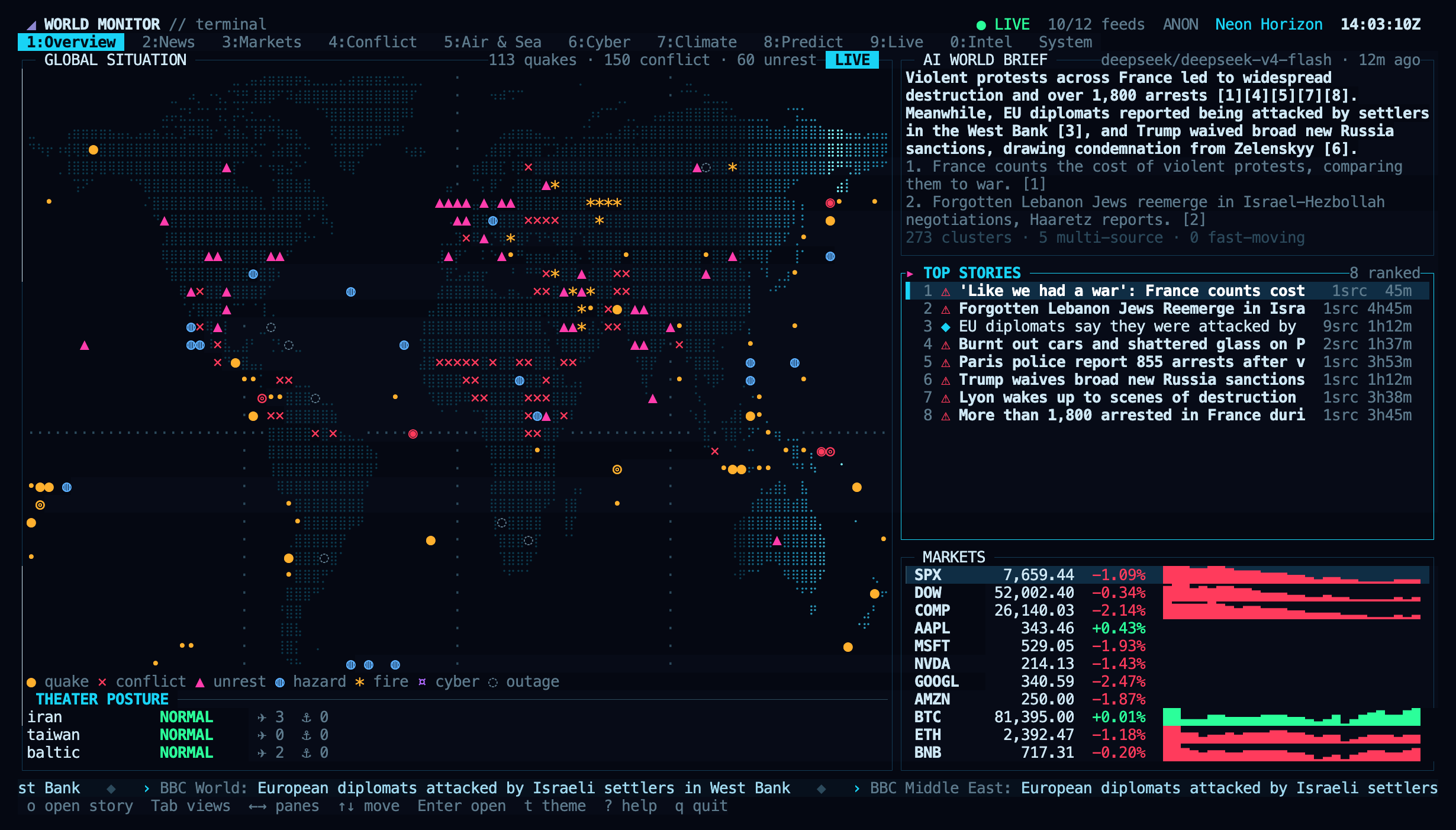
The terminal dashboard runs the same live data in your shell: world map, news, markets, conflict, military flights, cyber, climate, prediction markets and live TV, with mouse support and colour themes. No API key needed.
What It Does
- Curated news feeds across global and regional categories, AI-synthesized into briefs
- Dual map engine — 3D globe (globe.gl) and WebGL flat map (deck.gl) with a shared map-layer catalog
- Panel inventory — concrete panel implementations across specialized variants
- Cross-stream correlation — military, economic, disaster, and escalation signal convergence
- Country Instability Index (CII) — live CII v14 scores, bands, and approximate 24-hour movement for 31 Tier-1 countries
- Finance radar — stock exchanges, commodities, crypto, and a market composite
- Local AI — run everything with Ollama, no API keys required
- Site variants from a single codebase (world, tech, finance, commodity, happy, energy)
- Native desktop app (Tauri 2) for macOS, Windows, and Linux
- Multilingual UI with native-language feeds and RTL support
For the full feature list, architecture, data sources, and algorithms, see the documentation.
Support Status
All site variants and desktop binaries are built from a single codebase and ship from the same release process. The table below clarifies maintenance status so you know which surfaces are safe to depend on.
| Surface | Status | Notes |
|---|---|---|
worldmonitor.app, tech., finance., commodity., happy., energy. | Stable | Public deployments built from this repo, actively maintained |
| Desktop binaries (Windows / macOS Apple Silicon / macOS Intel / Linux AppImage x64 and ARM64) | Stable | One Tauri binary for every variant — install World Monitor and switch to tech, finance, commodity, energy, or happy in-app. There is deliberately no per-variant download |
worldmonitor npm package (terminal dashboard and CLI) | Stable | Published from cli/ on every cli-v* tag |
Issues filed against any of the above are triaged from the same backlog — see the issues board for currently-open work.
Quick Start
One-line install (self-host the full stack with Docker — dashboard, Redis, AIS relay, seeded public data):
curl -fsSL https://www.worldmonitor.app/install.sh | bashThis clones into ./worldmonitor (or reuses your checkout), generates the required secrets, starts the stack, and seeds data. Then open localhost:3000. Options: --dir, --port, --no-seed, --no-build, passed after bash -s -- (see scripts/install.sh --help). API keys are optional. Details, production notes, and uninstall: SELF_HOSTING.md.
Local development (hot-reload Vite server):
Requires Node.js 24, the version pinned in .nvmrc. Distribution packages are often older. Debian 12 and Raspberry Pi OS ship Node.js 18 with npm 9.2.0, where npm install stops with Invalid comparator: file:vendor/braces. Install Node.js 24 with nvm (nvm install inside the checkout reads .nvmrc) or from nodejs.org.
git clone https://github.com/koala73/worldmonitor.git
cd worldmonitor
npm install
npm run dev
Open localhost:3000 (override the port with DEV_PORT in .env.local). The app runs with no environment variables.
Feature-specific data sources may require credentials. See .env.example for the full list.
For variant-specific development:
npm run dev:tech       # tech.worldmonitor.app
npm run dev:finance    # finance.worldmonitor.app
npm run dev:commodity  # commodity.worldmonitor.app
npm run dev:happy      # happy.worldmonitor.app
npm run dev:energy     # energy.worldmonitor.app
See the self-hosting guide for deployment options (Vercel, Docker, static).
Tech Stack
| Category | Technologies |
|---|---|
| Frontend | Vanilla TypeScript, Vite, globe.gl + Three.js, deck.gl + MapLibre GL |
| Desktop | Tauri 2 (Rust) with Node.js sidecar |
| AI/ML | Ollama / OpenRouter, Transformers.js (browser-side) |
| API Contracts | Protocol Buffers and sebuf HTTP annotations |
| Deployment | Vercel Edge Functions, Railway relay, Tauri, PWA |
| Caching | Redis (Upstash), 3-tier cache, CDN, service worker |
Full stack details in the architecture docs.
Programmatic Access
World Monitor is built for agents and scripts as well as browsers:
- **MCP server** — `https://worldmonitor.app/mcp` (Streamable HTTP). Public `tools/list`; `tools/call` authenticates with a `X-WorldMonitor-Key` header or OAuth. The server also publishes its Agent Skills through the draft `io.modelcontextprotocol/skills` extension (`skills/list`, `skills/get`, and `skill://…` resource reads).
- **Google Antigravity and Gemini listing preparation** — install the bundled Antigravity plugin (`.antigravity-plugin/plugin.json` + `mcp_config.json`) with `agy plugin install ./worldmonitor`. Gemini custom apps and Connected Apps sign in through Google's OAuth callbacks. See [Gemini and Antigravity](https://www.worldmonitor.app/docs/gemini-antigravity).
- **REST API** — base `https://api.worldmonitor.app`, described by the [OpenAPI spec](https://worldmonitor.app/openapi.yaml).
- **CLI** — the official [`worldmonitor`](https://www.npmjs.com/package/worldmonitor) npm package (source in [`cli/`](https://github.com/koala73/worldmonitor/blob/main/cli/)). Run it with no arguments in a terminal for the [terminal dashboard](https://www.worldmonitor.app/docs/cli-dashboard): npx worldmonitor tools # run ad-hoc — list every MCP tool (no key needed) npm install -g worldmonitor # or install the `worldmonitor` (alias `wm`) command brew install worldmonitor # or install it with Homebrew worldmonitor risk IR --api-key wm_xxx
- **SDKs** — official zero-dependency client libraries mirroring the CLI: Python [`worldmonitor-sdk`](https://pypi.org/project/worldmonitor-sdk/) (source in [`sdk/python/`](https://github.com/koala73/worldmonitor/blob/main/sdk/python/)), Ruby [`worldmonitor`](https://rubygems.org/gems/worldmonitor) ([`sdk/ruby/`](https://github.com/koala73/worldmonitor/blob/main/sdk/ruby/)), Go [`github.com/koala73/worldmonitor/sdk/go`](https://pkg.go.dev/github.com/koala73/worldmonitor/sdk/go) ([`sdk/go/`](https://github.com/koala73/worldmonitor/blob/main/sdk/go/)). Guide: [worldmonitor.app/docs/sdks](https://www.worldmonitor.app/docs/sdks).
Agent discovery files: llms.txt · agent-skills manifest · api-catalog. Get an API key at worldmonitor.app/pro.
Flight Data
Flight data provided graciously by Wingbits, the most advanced ADS-B flight data solution.
Supported By
World Monitor's web app and API run on Vercel. Thank you to Vercel for their generous support of the project.
Data Sources
WorldMonitor aggregates attributed upstream sources across geopolitics, finance, energy, climate, aviation, cyber, military, infrastructure, and news intelligence. Curated feeds and freshness-tracked source groups are published in the full data sources catalog, with provider, feed-tier, license-posture, and collection-method details.
Contributing
Contributions welcome! See CONTRIBUTING.md for guidelines.
npm run typecheck        # Type checking
npm run build:full       # Production build
License
AGPL-3.0-only for the source code. Commercial use is permitted under the AGPL when you comply with its copyleft and source-availability terms.
| Use Case | Allowed? |
|---|---|
| Personal / research / educational | Yes, under AGPL-3.0-only |
| Self-hosted instance | Yes, under AGPL-3.0-only |
| Fork and modify | Yes, share source under AGPL-3.0-only when required |
| Commercial use / SaaS | Yes, under AGPL-3.0-only when you comply with AGPL obligations |
| Private-source proprietary use or official branding rights | Separate commercial or trademark permission needed |
See LICENSE for the full code license and docs/license.mdx for a plain-language summary. Commercial licensing is available as an alternative option for teams that need non-AGPL terms.
Copyright (C) 2026 Elie Habib. All rights reserved.
Author
Elie Habib — GitHub
Contributors
Security Acknowledgments
We thank the following researchers for responsibly disclosing security issues:
- Cody Richard — Disclosed three security findings covering IPC command exposure, renderer-to-sidecar trust boundary analysis, and fetch patch credential injection architecture (2026)
See our Security Policy for responsible disclosure guidelines.