
GetNotes Tools
jamiepine/voicebox
Tool นี้คืออะไร
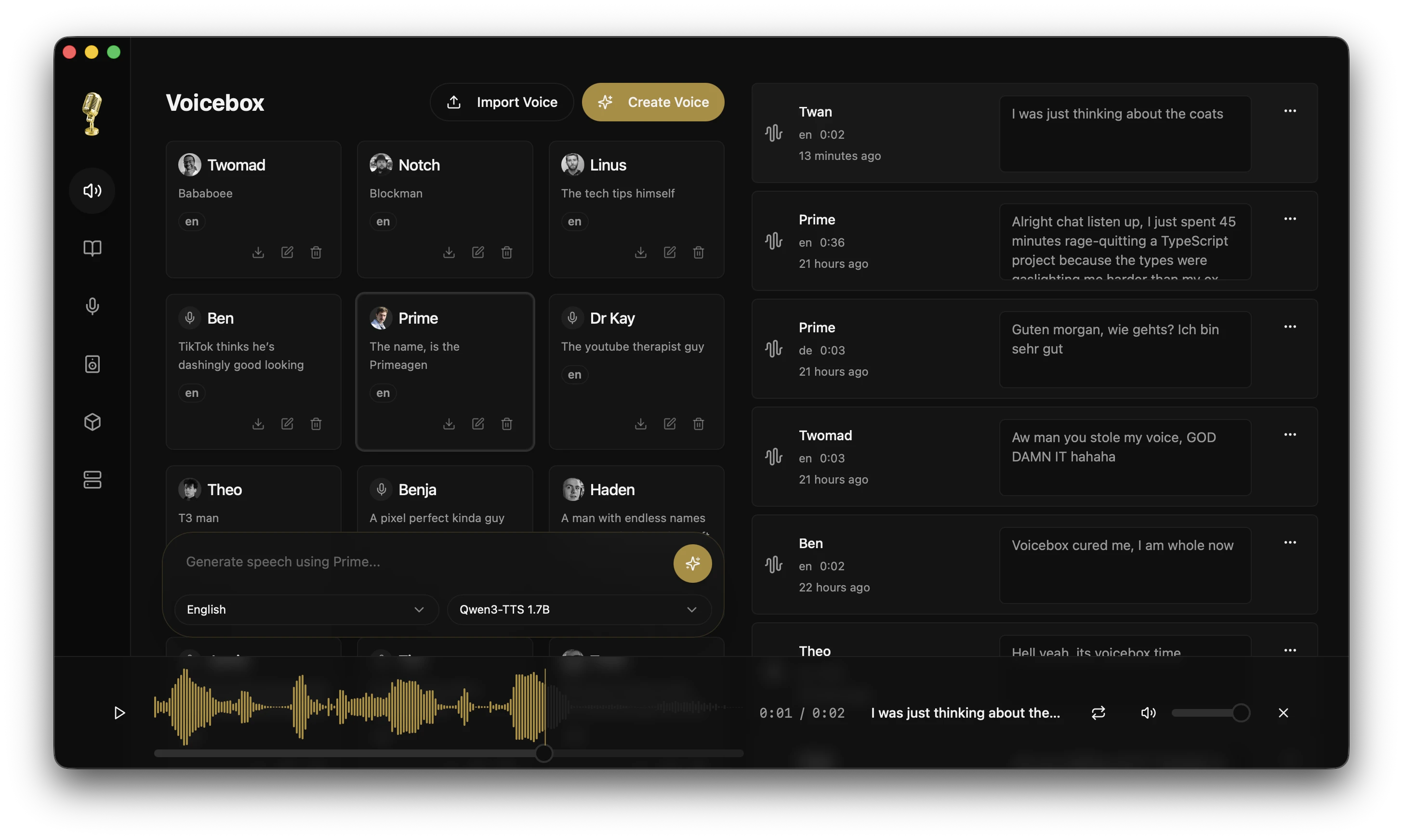
Voicebox คือสตูดิโอเสียง AI แบบโอเพนซอร์สที่ทำงานบนเครื่องของคุณ ช่วยให้คุณโคลนเสียง สร้างคำพูดในหลายภาษาและหลายเอนจิน รวมถึงใช้การป้อนเสียงและเอาต์พุตเสียงสำหรับแอปและเอเจนต์ AI ได้อย่างเป็นส่วนตัวและมีประสิทธิภาพ
ข้อมูลโปรเจกต์
ดาว
43.8K
Forks
5.3K
License
MIT
อัปเดต GitHub ล่าสุด
13 ก.ค. 2569
เพิ่มใน GetNotes
21 ก.ค. 2569
Repository
jamiepine/voicebox
เหมาะกับอาชีพ
Ecosystem
TypeScript
แปลและเรียบเรียงโดย AI
เนื้อหาฉบับภาษาไทย
ใช้อ่านเพื่อทำความเข้าใจเบื้องต้น โปรดตรวจสอบรายละเอียดสำคัญกับเอกสารต้นฉบับด้านล่าง


Voicebox คืออะไร?
Voicebox คือ สตูดิโอเสียง AI ที่ทำงานบนเครื่องของคุณเป็นหลัก — เป็นทางเลือกโอเพนซอร์สฟรีสำหรับ ElevenLabs และ WisprFlow ในแอปเดียว โคลนเสียงจากไฟล์เสียงเพียงไม่กี่วินาที สร้างคำพูดใน 23 ภาษาผ่านเอนจิน TTS 7 ตัว ป้อนข้อความลงในช่องข้อความใดก็ได้ด้วยปุ่มลัดสากล และให้เอเจนต์ AI ที่รองรับ MCP มีเสียงที่คุณเลือก
ผู้ให้บริการคลาวด์สองรายที่ครองตลาดอยู่ในปัจจุบันนั้นอยู่คนละฝั่งของวงจร Voice I/O — ElevenLabs อยู่ที่เอาต์พุต และ WisprFlow อยู่ที่อินพุต Voicebox ทำได้ทั้งสองอย่าง เชื่อมโยงเข้าด้วยกันด้วย LLM ในเครื่องที่มาพร้อมกับแอปสำหรับการปรับแต่งและบุคลิกเฉพาะโปรไฟล์ และรันทั้งหมดนี้บนเครื่องของคุณ
- ความเป็นส่วนตัวสมบูรณ์ — โมเดล ข้อมูลเสียง และการบันทึกจะไม่มีวันออกจากเครื่องของคุณ
- เอนจิน TTS 7 ตัว — Qwen3-TTS, Qwen CustomVoice, LuxTTS, Chatterbox Multilingual, Chatterbox Turbo, HumeAI TADA และ Kokoro
- การโคลนเสียงและเสียงที่ตั้งไว้ล่วงหน้า — การโคลนแบบ zero-shot จากตัวอย่างอ้างอิง หรือเสียงที่ตั้งไว้ล่วงหน้ากว่า 50 เสียงที่คัดสรรมาอย่างดีผ่าน Kokoro และ Qwen CustomVoice
- 23 ภาษา — ตั้งแต่ภาษาอังกฤษไปจนถึงภาษาอาหรับ ญี่ปุ่น ฮินดี สวาฮีลี และอื่นๆ
- เอฟเฟกต์หลังการประมวลผล — การปรับระดับเสียง (pitch shift), รีเวิร์บ (reverb), ดีเลย์ (delay), คอรัส (chorus), คอมเพรสชัน (compression) และฟิลเตอร์ (filters)
- การพูดที่แสดงอารมณ์ — แท็กทางภาษาศาสตร์ เช่น
[laugh],[sigh],[gasp]ผ่าน Chatterbox Turbo; การควบคุมการส่งเสียงด้วยภาษาธรรมชาติผ่าน Qwen CustomVoice - ความยาวไม่จำกัด — การแบ่งส่วนอัตโนมัติพร้อมการครอสเฟดสำหรับสคริปต์ บทความ และบทต่างๆ
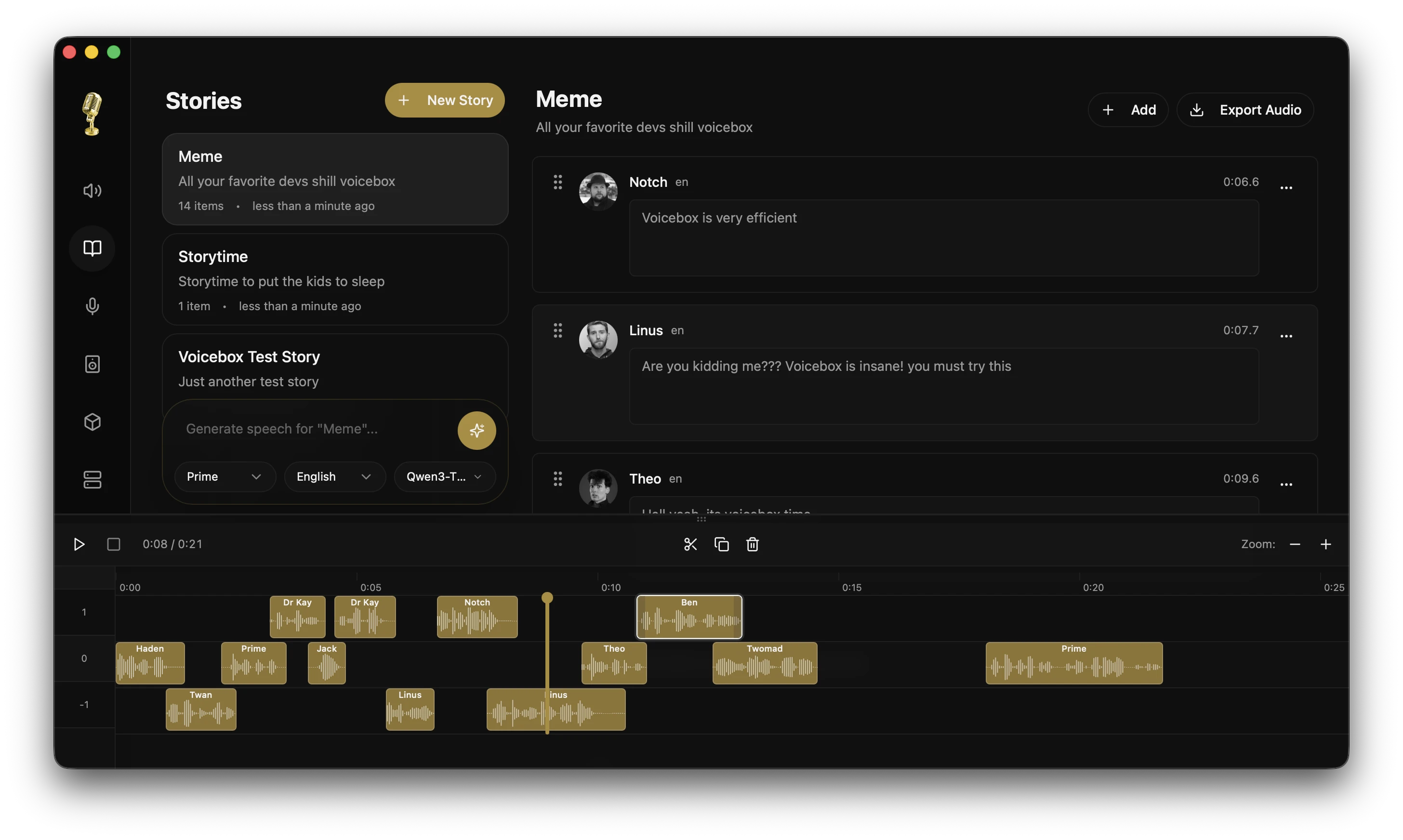
- โปรแกรมแก้ไขเรื่องราว — ไทม์ไลน์แบบหลายแทร็กสำหรับการสนทนา พอดแคสต์ และเรื่องเล่า
- การป้อนเสียง — ปุ่มลัดการป้อนข้อความสากลพร้อมโหมดกดเพื่อพูดและสลับ, การวางอัตโนมัติที่ได้รับการยืนยันการเข้าถึงบน macOS, ไมโครโฟนในแอปบนทุกช่องข้อความ, STT ที่ใช้ Whisper
- เอาต์พุตเสียงของเอเจนต์ — การเรียกใช้เครื่องมือเพียงครั้งเดียว (
voicebox.speak) และเอเจนต์ที่รองรับ MCP (Claude Code, Cursor, Cline) จะพูดกับคุณด้วยเสียงที่คุณโคลนไว้ - บุคลิกเสียง — แนบบุคลิกแบบอิสระเข้ากับโปรไฟล์เสียงใดก็ได้ จากนั้น Compose, Rewrite หรือ Respond ผ่าน LLM ในเครื่องที่มาพร้อมกับแอป — เอเจนต์สามารถเรียกใช้โหมดเดียวกันผ่าน MCP ได้
- API-first — REST API พร้อมเซิร์ฟเวอร์ MCP ในตัวสำหรับการรวม Voice I/O เข้ากับแอปและเอเจนต์ของคุณเอง
- ประสิทธิภาพแบบเนทีฟ — สร้างด้วย Tauri (Rust) ไม่ใช่ Electron
- ทำงานได้ทุกที่ — macOS (MLX/Metal), Windows (CUDA), Linux, AMD ROCm, Intel Arc, Docker
ดาวน์โหลด
| แพลตฟอร์ม | ดาวน์โหลด |
|---|---|
| macOS (Apple Silicon) | ดาวน์โหลด DMG |
| macOS (Intel) | ดาวน์โหลด DMG |
| Windows | ดาวน์โหลด MSI |
| Docker | docker compose up |
Linux — ไบนารีที่สร้างไว้ล่วงหน้ายังไม่พร้อมใช้งาน ดู voicebox.sh/linux-install สำหรับคำแนะนำในการสร้างจากซอร์สโค้ด
มีปัญหาใช่ไหม? ดู คู่มือการแก้ไขปัญหา สำหรับปัญหาการติดตั้ง การสร้าง โมเดลดาวน์โหลด และ GPU ที่พบบ่อย
คุณสมบัติ
การโคลนเสียงแบบหลายเอนจิน
เอนจิน TTS เจ็ดตัวที่มีจุดแข็งแตกต่างกัน สามารถสลับได้ต่อการสร้างแต่ละครั้ง:
| เอนจิน | ภาษา | จุดแข็ง |
|---|---|---|
| Qwen3-TTS (0.6B / 1.7B) | 10 | การโคลนหลายภาษาคุณภาพสูง, คำสั่งการส่งเสียง ("พูดช้าๆ", "กระซิบ") |
| Qwen CustomVoice | 10 | เสียงที่ตั้งไว้ล่วงหน้า 9 เสียงที่คัดสรรมาอย่างดีพร้อมการควบคุมการส่งเสียงด้วยภาษาธรรมชาติ — ไม่ต้องใช้ไฟล์เสียงอ้างอิง |
| LuxTTS | อังกฤษ | น้ำหนักเบา (~1GB VRAM), เอาต์พุต 48kHz, เร็วกว่าเรียลไทม์ 150 เท่าบน CPU |
| Chatterbox Multilingual | 23 | ครอบคลุมภาษาได้กว้างที่สุด — อาหรับ, เดนมาร์ก, ฟินแลนด์, กรีก, ฮิบรู, ฮินดี, มาเลย์, นอร์เวย์, โปแลนด์, สวาฮีลี, สวีเดน, ตุรกี และอื่นๆ |
| Chatterbox Turbo | อังกฤษ | โมเดล 350M ที่รวดเร็วพร้อมแท็กอารมณ์/เสียงทางภาษาศาสตร์ |
| TADA (1B / 3B) | 10 | โมเดลภาษาพูดของ HumeAI — เสียงที่สอดคล้องกันยาวนานกว่า 700 วินาที, การจัดเรียงข้อความ-เสียงแบบคู่ |
| Kokoro | 8 | เสียงที่ตั้งไว้ล่วงหน้า 50 เสียงที่คัดสรรมาอย่างดี, โมเดล 82M ขนาดเล็ก, การอนุมานบน CPU ที่รวดเร็ว |
อารมณ์และแท็กทางภาษาศาสตร์
เฉพาะ Chatterbox Turbo เท่านั้นที่ตีความแท็กทางภาษาศาสตร์ เช่น [laugh] และ
[sigh] Qwen3-TTS, LuxTTS, Chatterbox Multilingual และ HumeAI TADA จะอ่านแท็กเหล่านี้
ตามตัวอักษรเป็นข้อความ
เมื่อเลือก Chatterbox Turbo ให้พิมพ์ / ในช่องป้อนข้อความเพื่อเปิดตัวแทรกแท็ก
และเพิ่มแท็กที่แสดงอารมณ์ในบรรทัดเดียวกับคำพูด:
[laugh] [chuckle] [gasp] [cough] [sigh] [groan] [sniff] [shush] [clear throat]
เอฟเฟกต์หลังการประมวลผล
เอฟเฟกต์เสียง 8 แบบที่ขับเคลื่อนโดยไลบรารี pedalboard ของ Spotify ใช้หลังจากสร้างเสียง, ดูตัวอย่างแบบเรียลไทม์, สร้างพรีเซ็ตที่นำกลับมาใช้ใหม่ได้
| เอฟเฟกต์ | คำอธิบาย |
|---|---|
| Pitch Shift | ปรับขึ้นหรือลงได้สูงสุด 12 เซมิโทน |
| Reverb | ปรับขนาดห้อง, การหน่วง, อัตราส่วน wet/dry ได้ |
| Delay | เสียงสะท้อนพร้อมปรับเวลา, ฟีดแบ็ก และมิกซ์ได้ |
| Chorus / Flanger | ดีเลย์แบบโมดูเลตสำหรับเสียงโลหะหรือเสียงที่นุ่มนวล |
| Compressor | การบีบอัดช่วงไดนามิก |
| Gain | การปรับระดับเสียง (-40 ถึง +40 dB) |
| High-Pass Filter | ลบความถี่ต่ำ |
| Low-Pass Filter | ลบความถี่สูง |
มาพร้อมกับพรีเซ็ตในตัว 4 แบบ (Robotic, Radio, Echo Chamber, Deep Voice) และรองรับพรีเซ็ตที่กำหนดเอง เอฟเฟกต์สามารถกำหนดเป็นค่าเริ่มต้นต่อโปรไฟล์ได้
ความยาวการสร้างไม่จำกัด
ข้อความจะถูกแบ่งโดยอัตโนมัติที่ขอบเขตประโยค และแต่ละส่วนจะถูกสร้างขึ้นอย่างอิสระ จากนั้นจึงนำมาครอสเฟดเข้าด้วยกัน ใช้งานได้กับทุกเอนจิน
- กำหนดขีดจำกัดการแบ่งส่วนอัตโนมัติ (100–5,000 ตัวอักษร)
- แถบเลื่อน Crossfade (0–200ms) สำหรับการเปลี่ยนผ่านที่ราบรื่น
- ความยาวข้อความสูงสุด: 50,000 ตัวอักษร
- การแบ่งส่วนอัจฉริยะที่คำนึงถึงตัวย่อ, เครื่องหมายวรรคตอน CJK และ
[tags]
เวอร์ชันการสร้าง
การสร้างทุกครั้งรองรับหลายเวอร์ชันพร้อมการติดตามแหล่งที่มา:
- ต้นฉบับ (Original) — ผลลัพธ์ TTS ที่สะอาดตา เก็บรักษาไว้เสมอ
- เวอร์ชันเอฟเฟกต์ (Effects versions) — ใช้ชุดเอฟเฟกต์ที่แตกต่างกันจากเวอร์ชันแหล่งที่มาใดก็ได้
- เทค (Takes) — สร้างใหม่ด้วย seed ใหม่เพื่อความหลากหลาย
- การติดตามแหล่งที่มา (Source tracking) — แต่ละเวอร์ชันบันทึกสายเลือดของตน
- รายการโปรด (Favorites) — ติดดาวการสร้างเพื่อการเข้าถึงที่รวดเร็ว
คิวการสร้างแบบอะซิงโครนัส
การสร้างไม่บล็อก ส่งคำสั่งแล้วเริ่มพิมพ์รายการถัดไปได้ทันที
- คิวการทำงานแบบอนุกรมป้องกันการแย่งชิง GPU
- การสตรีมสถานะ SSE แบบเรียลไทม์
- การสร้างที่ล้มเหลวสามารถลองใหม่ได้
- การสร้างที่ค้างจากการขัดข้องจะกู้คืนอัตโนมัติเมื่อเริ่มต้น
การจัดการโปรไฟล์เสียง
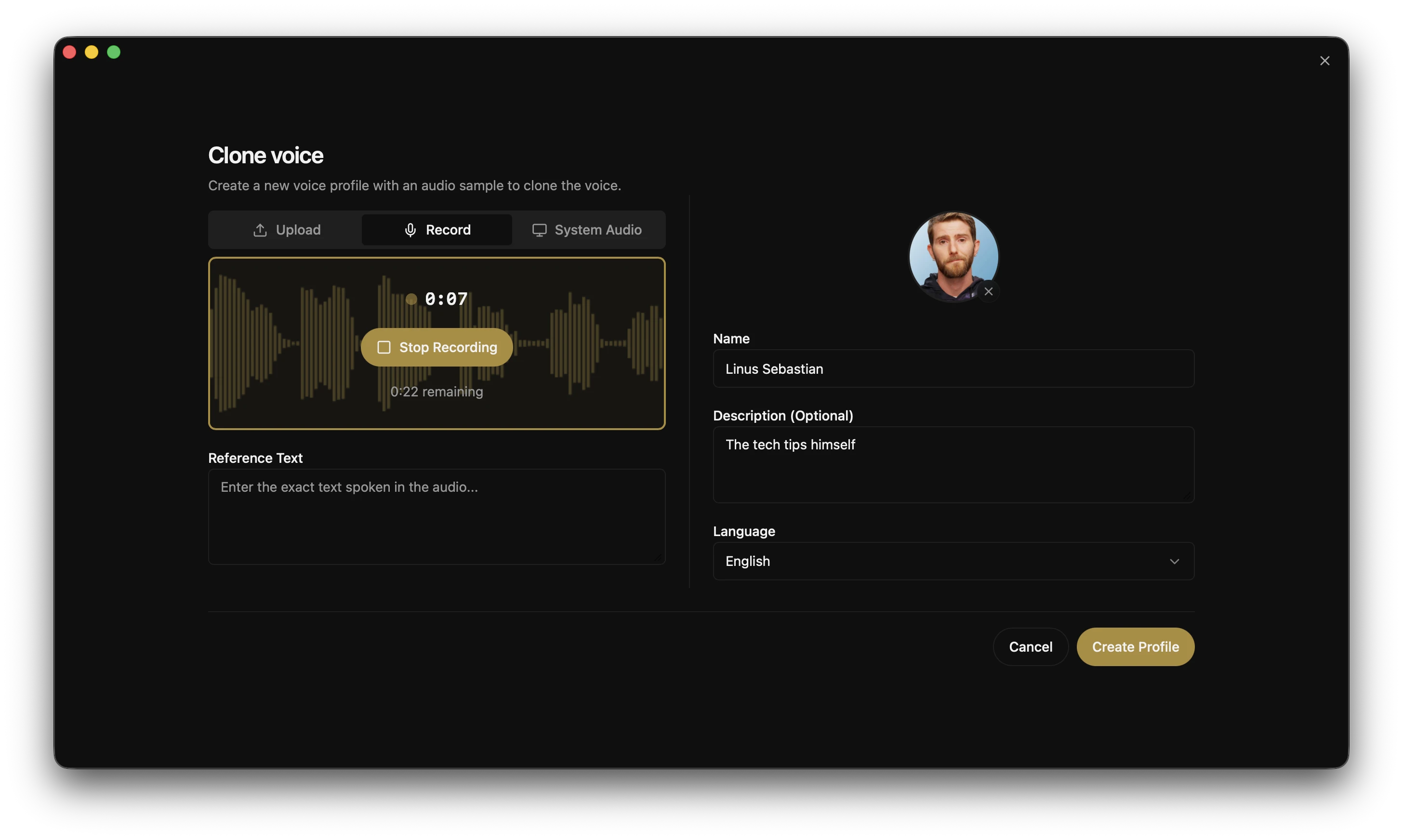
- สร้างโปรไฟล์จากไฟล์เสียงหรือบันทึกโดยตรงในแอป
- นำเข้า/ส่งออกโปรไฟล์เพื่อแชร์หรือสำรองข้อมูล
- รองรับหลายตัวอย่างเพื่อการโคลนคุณภาพสูงขึ้น
- ชุดเอฟเฟกต์เริ่มต้นต่อโปรไฟล์
- จัดระเบียบด้วยคำอธิบายและแท็กภาษา
โปรแกรมแก้ไขเรื่องราว (Stories Editor)
โปรแกรมแก้ไขไทม์ไลน์หลายเสียงสำหรับบทสนทนา พอดแคสต์ และเรื่องเล่า
- การจัดองค์ประกอบหลายแทร็กด้วยการลากและวาง
- การตัดและแบ่งเสียงแบบอินไลน์
- การเล่นอัตโนมัติพร้อม playhead ที่ซิงโครไนซ์
- การปักหมุดเวอร์ชันต่อคลิปแทร็ก
การป้อนตามคำบอกและการป้อนเสียงทั่วโลก
อีกครึ่งหนึ่งของวงจร I/O เสียง กดปุ่มลัดค้างไว้ที่ใดก็ได้ในระบบของคุณ พูด แล้วปล่อย — บน macOS ข้อความที่ถอดเสียงจะถูกวางลงในช่องข้อความที่โฟกัสโดยตรง หรือกดไมโครโฟนบนช่องป้อนข้อความ Voicebox ใดก็ได้แล้วป้อนตามคำบอกโดยตรงในแอป
- การผูกคอร์ดที่กำหนดค่าได้ (Configurable chord bindings) — คอร์ดกดค้างเพื่อพูดและแตะเพื่อสลับ ซึ่งแต่ละคอร์ดสามารถผูกใหม่ได้ในตัวเลือกคอร์ดในแอป การกดปุ่ม push-to-talk ค้างไว้แล้วแตะ
Spaceระหว่างที่กดค้างอยู่จะอัปเกรดเป็นการสลับเซสชันโดยไม่มีช่องว่างในเสียง - การวางที่รับรู้เป้าหมาย (macOS) (Target-aware paste (macOS)) — การแทรกที่ได้รับการยืนยันการเข้าถึงลงในช่องข้อความที่โฟกัส พร้อมการบันทึก/กู้คืนคลิปบอร์ดแบบอะตอมิก เพื่อไม่ให้คลิปบอร์ดของคุณถูกเขียนทับ
- UX การอนุญาตครั้งแรก (First-run permissions UX) — ประตูในแอปจะนำคุณผ่านการอนุญาต macOS Accessibility และ Input Monitoring พร้อมลิงก์โดยตรงไปยัง System Settings
- ปุ่มไมโครโฟนในแอป (In-app mic button) บนช่องข้อความ Voicebox ทุกช่อง — ฟอร์มการสร้าง, คำอธิบายโปรไฟล์, ชื่อเรื่องราว, ทุกที่ที่คุณจะพิมพ์
- การปรับปรุง LLM (LLM refinement) — การล้างคำว่า "อืม", การติดอ่าง และการเริ่มต้นผิดพลาดก่อนการวาง (ไม่บังคับ)
- ปุ่มบนหน้าจอ (On-screen pill) — โอเวอร์เลย์ลอยตัวที่แสดงสถานะ
recording,transcribing,refiningและspeakingปุ่มเดียวกันนี้ที่เอเจนต์ใช้เมื่อพูดกับคุณ ดังนั้นจึงมีโมเดลความคิดเดียวสำหรับทั้งสองทิศทางของวงจร
การแปลงเสียงเป็นข้อความ (Speech-to-Text)
Voicebox รัน OpenAI Whisper สำหรับการถอดเสียง — โมเดลเดียวกับที่รองรับการป้อนตามคำบอก, แท็บ Captures และ API /transcribe ทำงานบน MLX (Apple Silicon) หรือ PyTorch (CUDA / ROCm / DirectML / CPU) ขึ้นอยู่กับแพลตฟอร์มของคุณ
| ขนาด | หมายเหตุ |
|---|---|
| Base / Small / Medium / Large | ระดับคุณภาพ Whisper มาตรฐาน |
| Turbo | เร็วกว่า Whisper Large ประมาณ 8 เท่า, คุณภาพลดลงน้อยที่สุด |
มีแผนจะเพิ่มเอนจินอื่น ๆ (Parakeet v3, Qwen3-ASR) — ดู Roadmap
การบันทึก (Captures)
การป้อนตามคำบอกทุกครั้ง, การบันทึกในแอป และไฟล์เสียงที่อัปโหลดจะไปอยู่ในแท็บ Captures — เสียงต้นฉบับจับคู่กับข้อความที่ถอดเสียง เก็บรักษาไว้เสมอ
- เล่นซ้ำ, ถอดเสียงใหม่, ปรับปรุง (Replay, re-transcribe, refine) — รัน STT ใหม่ด้วยขนาด Whisper ใดก็ได้ หรือรันข้อความที่ถอดเสียงดิบผ่าน LLM ในเครื่องด้วยแฟล็กที่แตกต่างกัน (การล้างคำฟุ่มเฟือย, การลบการแก้ไขตัวเอง, การเก็บรักษาคำศัพท์ทางเทคนิค)
- แก้ไขแบบอินไลน์ (Edit inline) — ปรับแต่งข้อความที่ถอดเสียงและบันทึกเมื่อออกจากโฟกัส
- เล่นเป็นโปรไฟล์เสียง (Play as voice profile) — เปลี่ยนการบันทึกใด ๆ ให้เป็นเสียงด้วยเสียงที่โคลนมา เพียงคลิกเดียว
- เลื่อนขั้นเป็นตัวอย่างเสียง (Promote to voice sample) — ใช้เสียง + ข้อความที่ถอดเสียงจากการบันทึกเป็นตัวอย่างอ้างอิงในโปรไฟล์เสียงใดก็ได้
- การจัดเก็บการบันทึกในเครื่อง (Local capture storage) — เสียงต้นฉบับและข้อความที่ถอดเสียงจะอยู่ในไดเรกทอรีข้อมูล Voicebox ของคุณ พร้อมทางลัดโฟลเดอร์ใน Settings
เอาต์พุตเสียงของเอเจนต์
เอเจนต์ทุกตัวมีเสียงของตัวเอง การเรียกใช้เครื่องมือเพียงครั้งเดียวและเอเจนต์ที่รองรับ MCP ใด ๆ ก็สามารถพูดกับคุณด้วยเสียงที่คุณโคลนมาได้ — การทำงานที่เสร็จสมบูรณ์, คำถาม, การแจ้งเตือน ปุ่มเดียวกันที่ปรากฏขึ้นระหว่างการป้อนตามคำบอกจะปรากฏขึ้นระหว่างการพูดของเอเจนต์ ดังนั้นคุณจะเห็นเสมอว่ามีอะไรออกมาจากเครื่องของคุณ
// ในเอเจนต์ที่รองรับ MCP ใด ๆ:
await voicebox.speak({
  text: "Deploy complete.",
  profile: "Morgan",
});
ยังเปิดเผยเป็น POST /speak สำหรับสิ่งใดก็ตามที่ไม่พูด MCP — ACP, A2A, สคริปต์เชลล์, ฮาร์เนสแบบกำหนดเอง
- ปุ่มสองทิศทาง (Bidirectional pill) —
recording,transcribing,refiningและspeakingล้วนเป็นสถานะของโอเวอร์เลย์ระดับ OS เดียวกัน ดังนั้นการป้อนตามคำบอกและการพูดของเอเจนต์จึงใช้พื้นผิวเดียวกัน - การผูกเสียงต่อเอเจนต์ (Per-agent voice binding) — ใน Settings → MCP ปักหมุด Claude Code ให้ Morgan และ Cursor ให้ Scarlett เพื่อให้คุณสามารถบอกได้ว่าเอเจนต์ตัวไหนกำลังพูดโดยไม่ต้องมอง การประทับเวลา
last_seen_atของไคลเอนต์แต่ละรายยืนยันว่าการติดตั้งสำเร็จจริง - มองเห็นได้เสมอ (Always visible) — ไม่มี TTS พื้นหลังแบบเงียบ; การพูดที่เริ่มต้นโดยเอเจนต์ทุกครั้งจะแสดงปุ่มพร้อมชื่อโปรไฟล์เสียงตลอดระยะเวลา
- การขนส่ง HTTP + stdio (HTTP + stdio transports) — ติดตั้งเป็น URL ใน Claude Code / Cursor / Windsurf / VS Code MCP หรือชี้ไคลเอนต์ที่รองรับ stdio เท่านั้นไปยังไบนารี
voicebox-mcpที่มาพร้อมเครื่อง
บุคลิกเสียง (Voice Personalities)
แนบบุคลิกอิสระเข้ากับโปรไฟล์เสียงใดก็ได้ — ว่าเสียงนี้คือใคร, พูดอย่างไร, สนใจอะไร การกระทำสองอย่างจะปรากฏบนกล่องสร้างเมื่อมีการตั้งค่าบุคลิก ขับเคลื่อนโดย Qwen3 LLM ที่มาพร้อมเครื่องซึ่งทำงานในเครื่องทั้งหมด
- แต่ง (Compose) — ปุ่มสุ่มที่วางข้อความใหม่ที่ตรงกับบุคลิกในพื้นที่ข้อความ; แก้ไขและพูด หรือคลิกอีกครั้งเพื่อลองแบบอื่น
- พูดตามบุคลิก (Speak in character) — ปุ่มสลับที่ส่งข้อความที่คุณป้อนผ่าน LLM บุคลิกเพื่อเขียนใหม่ในเสียงของพวกเขา ก่อนที่จะแปลงเป็น TTS
เอเจนต์สามารถเข้าถึงเส้นทางการเขียนใหม่เดียวกันผ่าน MCP โดยส่ง personality: true ไปยัง voicebox.speak ซึ่งจะเปลี่ยนเครื่องมือให้เป็นไปป์ไลน์ text-in → personality-LLM → TTS LLM เดียวกันนี้รองรับขั้นตอนการปรับปรุงของการป้อนตามคำบอก — LLM หนึ่งตัวในแอป, แคชโมเดลหนึ่งตัว, รอยเท้าหน่วยความจำ GPU หนึ่งตัว
ตัวเลือก LLM ในเครื่อง: Qwen3 0.6B / 1.7B / 4B, ใช้รันไทม์ TTS ร่วมกัน (MLX บน Apple Silicon, PyTorch ที่อื่น)
กรณีการใช้งาน: วงจรการพัฒนาเอเจนต์ (ป้อนคำถาม, ฟังคำตอบด้วยเสียงที่โคลนมา), ตัวละครแบบโต้ตอบสำหรับเกมและเครื่องมือเล่าเรื่อง, การช่วยเหลือการพูดสำหรับผู้ที่ไม่สามารถพูดด้วยเสียงต้นฉบับของตนเองได้
การจัดการโมเดล
- การยกเลิกการโหลดต่อโมเดลเพื่อเพิ่มหน่วยความจำ GPU โดยไม่ต้องลบไฟล์ที่ดาวน์โหลด
- ไดเรกทอรีโมเดลแบบกำหนดเองผ่าน
VOICEBOX_MODELS_DIR - การย้ายโฟลเดอร์โมเดลพร้อมการติดตามความคืบหน้า
- UI สำหรับยกเลิก/ล้างการดาวน์โหลด
การรองรับ GPU
| แพลตฟอร์ม | แบ็กเอนด์ | หมายเหตุ |
|---|---|---|
| macOS (Apple Silicon) | MLX (Metal) | เร็วขึ้น 4-5 เท่าผ่าน Neural Engine |
| Windows / Linux (NVIDIA) | PyTorch (CUDA) | ดาวน์โหลดไบนารี CUDA อัตโนมัติจากภายในแอป |
| Linux (AMD) | PyTorch (ROCm) | กำหนดค่า HSA_OVERRIDE_GFX_VERSION อัตโนมัติ |
| Windows (GPU ใดก็ได้) | DirectML | รองรับ GPU Windows สากล |
| Intel Arc | IPEX/XPU | การเร่งความเร็ว GPU แยกของ Intel |
| ใด ๆ | CPU | ใช้งานได้ทุกที่ แต่ช้ากว่า |
API
Voicebox เปิดเผย REST API สำหรับการรวม I/O เสียงเข้ากับแอปและเอเจนต์ของคุณเอง
# สร้างเสียงพูด
curl -X POST http://127.0.0.1:17493/generate \
  -H "Content-Type: application/json" \
  -d '{"text": "Hello world", "profile_id": "abc123", "language": "en"}'

# เอาต์พุตเสียงของเอเจนต์ — แอปหรือสคริปต์ใด ๆ สามารถพูดด้วยเสียงที่โคลนมาได้
curl -X POST http://127.0.0.1:17493/speak \
  -H "Content-Type: application/json" \
  -H "X-Voicebox-Client-Id: my-script" \
  -d '{"text": "Deploy complete.", "profile": "Morgan"}'

# ถอดเสียงไฟล์เสียง
curl -X POST http://127.0.0.1:17493/transcribe \
  -F "audio=@recording.wav" \
  -F "model=whisper-turbo"

# แสดงรายการโปรไฟล์เสียง
curl http://127.0.0.1:17493/profiles
POST /speak ยอมรับ profile เป็นชื่อ (ไม่คำนึงถึงตัวพิมพ์เล็กใหญ่) หรือ ID และแก้ไขตามลำดับความสำคัญเดียวกับเครื่องมือ MCP: อาร์กิวเมนต์ที่ระบุ → การผูกต่อไคลเอนต์ → capture_settings.default_playback_voice_id
เซิร์ฟเวอร์ MCP
Voicebox มาพร้อมกับเซิร์ฟเวอร์ Model Context Protocol ในตัว เพื่อให้เอเจนต์ที่รองรับ MCP ใด ๆ (Claude Code, Cursor, Windsurf, Cline, ส่วนขยาย VS Code MCP) สามารถพูด, ถอดเสียง และเรียกดูการบันทึกและโปรไฟล์ได้
คำสั่งเดียวสำหรับ Claude Code:
claude mcp add voicebox \
  --transport http \
  --url http://127.0.0.1:17493/mcp \
  --header "X-Voicebox-Client-Id: claude-code"
ไคลเอนต์ HTTP MCP ใด ๆ (Cursor, Windsurf, VS Code, ฯลฯ):
{
  "mcpServers": {
    "voicebox": {
      "url": "http://127.0.0.1:17493/mcp",
      "headers": { "X-Voicebox-Client-Id": "cursor" }
    }
  }
}

**Stdio fallback** สำหรับไคลเอนต์ที่ไม่รองรับ HTTP MCP — ชี้ไปที่ไบนารี `voicebox-mcp` ที่มาพร้อมกับแอป:

```json
{
  "mcpServers": {
    "voicebox": {
      "command": "/Applications/Voicebox.app/Contents/MacOS/voicebox-mcp",
      "env": { "VOICEBOX_CLIENT_ID": "claude-desktop" }
    }
  }
}
มีเครื่องมือสี่อย่างที่มาพร้อมกับแอป: voicebox.speak, voicebox.transcribe, voicebox.list_captures, voicebox.list_profiles การผูกเสียงต่อไคลเอนต์จะถูกจัดการใน Voicebox → Settings → MCP ดู คู่มือ MCP ฉบับเต็ม สำหรับลายเซ็นเครื่องมือ, ลำดับความสำคัญในการแก้ไข, สัญญาการพูด, และข้อควรระวังด้านความปลอดภัย
// ในเอเจนต์ที่รองรับ MCP:
await voicebox.speak({
  text: "Tests passing. Ready to merge.",
  profile: "Morgan",      // ไม่บังคับ — จะใช้การผูกต่อไคลเอนต์เป็นค่าเริ่มต้น
  personality: true,      // ไม่บังคับ — จะเขียนข้อความใหม่ผ่าน LLM บุคลิกภาพของโปรไฟล์ก่อน
});
กรณีการใช้งาน: วงจรการพัฒนาเอเจนต์ (เสียงเข้า, เสียงออก), บทสนทนาในเกม, การผลิตพอดแคสต์, เครื่องมือช่วยการเข้าถึง, ผู้ช่วยเสียง, การทำงานอัตโนมัติของเนื้อหา
เอกสาร API ฉบับเต็มมีอยู่ที่ http://127.0.0.1:17493/docs
Tech Stack
| เลเยอร์ | เทคโนโลยี |
|---|---|
| แอปเดสก์ท็อป | Tauri (Rust) |
| ส่วนหน้า | React, TypeScript, Tailwind CSS |
| สถานะ | Zustand, React Query |
| ส่วนหลัง | FastAPI (Python) |
| เอนจิน TTS | Qwen3-TTS, Qwen CustomVoice, LuxTTS, Chatterbox, Chatterbox Turbo, TADA, Kokoro |
| STT | Whisper / Whisper Turbo (PyTorch or MLX) |
| LLM ในเครื่อง | Qwen3 (0.6B / 1.7B / 4B), รันไทม์ร่วมกับ TTS / STT |
| เซิร์ฟเวอร์ MCP | FastMCP ติดตั้งที่ /mcp (Streamable HTTP) + ไบนารี stdio shim ที่มาพร้อม |
| Native Shim | Rust (ภายใน Tauri) สำหรับ global hotkey, paste injection, focus introspection |
| เอฟเฟกต์ | Pedalboard (Spotify) |
| การอนุมาน | MLX (Apple Silicon) / PyTorch (CUDA/ROCm/XPU/CPU) |
| ฐานข้อมูล | SQLite |
| เสียง | WaveSurfer.js, librosa |
แผนงาน
| ฟีเจอร์ | คำอธิบาย |
|---|---|
| การวางอัตโนมัติบน Windows / Linux | ความเท่าเทียมในการวางคำบอก — SendInput บน Windows, uinput / AT-SPI บน Linux |
| การขยายเอนจิน STT | Parakeet v3 และ Qwen3-ASR เข้าร่วม Whisper — 50+ ภาษา, คุณภาพภาษาที่ไม่ใช่ภาษาอังกฤษดีขึ้น |
| การกำหนดเส้นทางไปป์ไลน์ | กำหนดค่าสายโซ่ source → transform → sink ได้พร้อม webhook + MCP sinks และตัวแก้ไขพรีเซ็ต |
| การถอดเสียงแบบสตรีมมิ่ง | WebSocket /transcribe/stream สำหรับการถอดเสียงบางส่วนขณะที่คุณพูด |
| LLM เสียงแบบ End-to-end | Moshi, GLM-4-Voice, Qwen2.5 Omni — เสียงเป็นเสียงจริง, ไม่มีข้อความคั่น |
| การออกแบบเสียง | สร้างเสียงใหม่จากคำอธิบายข้อความ |
| การบันทึกแบบยาว | เครื่องบันทึกสองสตรีม (ไมโครโฟน + เสียงระบบ) พร้อมการแปลง LLM สรุป |
| Platform sinks | Apple Notes, Obsidian และการผสานรวมอื่นๆ ที่เลือกใช้ได้ |
| สถาปัตยกรรมปลั๊กอิน | ขยายด้วยโมเดล, การแปลง และ sinks ที่กำหนดเอง |
| แอปคู่หูบนมือถือ | ควบคุม Voicebox จากโทรศัพท์ของคุณ |
สำหรับ สถานะทางวิศวกรรมฉบับเต็ม, การจัดลำดับความสำคัญของปัญหาที่เปิดอยู่, และคิวงานที่จัดลำดับความสำคัญแล้ว โปรดดูที่ docs/PROJECT_STATUS.md — เอกสารที่มีการอัปเดตอยู่เสมอที่ติดตามสิ่งที่ได้จัดส่งไปแล้ว, สิ่งที่กำลังดำเนินการอยู่, เอนจิน TTS ที่กำลังประเมิน, และเหตุผลที่เรายอมรับหรือเลื่อนการผสานรวมบางอย่างออกไป
การพัฒนา
ดู CONTRIBUTING.md สำหรับรายละเอียดการตั้งค่าและแนวทางการมีส่วนร่วม
เริ่มต้นอย่างรวดเร็ว
git clone https://github.com/jamiepine/voicebox.git
cd voicebox

just setup   # สร้าง Python venv, ติดตั้ง dependencies ทั้งหมด
just dev     # เริ่มต้น backend + แอปเดสก์ท็อป
ติดตั้ง just: brew install just หรือ cargo install just รัน just --list เพื่อดูคำสั่งทั้งหมด
ข้อกำหนดเบื้องต้น: Bun, Rust, Python 3.11+, Tauri Prerequisites และ Xcode บน macOS
repo นี้มาพร้อมกับไฟล์ .mcp.json ที่กำหนดค่าไว้ล่วงหน้าใน root — การรัน Claude Code ภายใน checkout นี้จะดึงเครื่องมือ Voicebox MCP ขึ้นมาโดยอัตโนมัติเมื่อแอป dev ทำงานอยู่
การสร้างในเครื่อง
just build          # สร้างไบนารีเซิร์ฟเวอร์ CPU + แอป Tauri
just build-local    # (Windows) สร้างไบนารีเซิร์ฟเวอร์ CPU + CUDA + แอป Tauri
การเพิ่มโมเดลเสียงใหม่
สถาปัตยกรรมแบบหลายเอนจินทำให้การเพิ่มเอนจิน TTS ใหม่เป็นเรื่องง่าย คู่มือทีละขั้นตอน ครอบคลุมกระบวนการทั้งหมด: การวิจัย dependencies, การนำโปรโตคอล backend ไปใช้, การเชื่อมต่อ frontend และการรวม PyInstaller
คู่มือนี้ได้รับการปรับให้เหมาะสมสำหรับ AI coding agents ทักษะเอเจนต์ สามารถรับชื่อโมเดลและจัดการการผสานรวมทั้งหมดได้โดยอัตโนมัติ — คุณเพียงแค่ทดสอบการสร้างในเครื่อง
โครงสร้างโปรเจกต์
voicebox/
├── app/              # ส่วนหน้า React ที่ใช้ร่วมกัน
├── tauri/            # แอปเดสก์ท็อป (Tauri + Rust)
├── web/              # การปรับใช้บนเว็บ
├── backend/          # เซิร์ฟเวอร์ Python FastAPI
├── landing/          # เว็บไซต์การตลาด
└── scripts/          # สคริปต์การสร้างและเผยแพร่
การมีส่วนร่วม
ยินดีรับการมีส่วนร่วม! ดู CONTRIBUTING.md สำหรับแนวทาง
- 1Fork repo
- 2สร้าง feature branch
- 3ทำการเปลี่ยนแปลงของคุณ
- 4ส่ง PR
ความปลอดภัย
พบช่องโหว่ด้านความปลอดภัยหรือไม่? โปรดรายงานอย่างรับผิดชอบ ดู SECURITY.md สำหรับรายละเอียด
ใบอนุญาต
MIT License — ดู LICENSE สำหรับรายละเอียด
เอกสารโปรเจกต์
อ่านเอกสารต้นฉบับ
README วิธีติดตั้ง วิธีใช้งาน และข้อกำหนดจาก repository ต้นฉบับ

What is Voicebox?
Voicebox is a local-first AI voice studio — a free and open-source alternative to ElevenLabs and WisprFlow in one app. Clone voices from a few seconds of audio, generate speech in 23 languages across 7 TTS engines, dictate into any text field with a global hotkey, and give any MCP-aware AI agent a voice of your choosing.
The two cloud incumbents sit on opposite halves of the voice I/O loop — ElevenLabs on output, WisprFlow on input. Voicebox does both, bridges them with a bundled local LLM for refinement and per-profile personas, and runs the whole thing on your machine.
- Complete privacy — models, voice data, and captures never leave your machine
- 7 TTS engines — Qwen3-TTS, Qwen CustomVoice, LuxTTS, Chatterbox Multilingual, Chatterbox Turbo, HumeAI TADA, and Kokoro
- Voice cloning and preset voices — zero-shot cloning from a reference sample, or 50+ curated preset voices via Kokoro and Qwen CustomVoice
- 23 languages — from English to Arabic, Japanese, Hindi, Swahili, and more
- Post-processing effects — pitch shift, reverb, delay, chorus, compression, and filters
- Expressive speech — paralinguistic tags like
[laugh],[sigh],[gasp]via Chatterbox Turbo; natural-language delivery control via Qwen CustomVoice - Unlimited length — auto-chunking with crossfade for scripts, articles, and chapters
- Stories editor — multi-track timeline for conversations, podcasts, and narratives
- Voice input — global dictation hotkey with push-to-talk and toggle modes, accessibility-verified auto-paste on macOS, in-app mic on every text field, Whisper-based STT
- Agent voice output — one tool call (
voicebox.speak) and any MCP-aware agent (Claude Code, Cursor, Cline) speaks to you in a voice you've cloned - Voice personalities — attach a free-form persona to any voice profile, then Compose, Rewrite, or Respond via a bundled local LLM — agents can invoke the same modes over MCP
- API-first — REST API plus a built-in MCP server for integrating voice I/O into your own apps and agents
- Native performance — built with Tauri (Rust), not Electron
- Runs everywhere — macOS (MLX/Metal), Windows (CUDA), Linux, AMD ROCm, Intel Arc, Docker
Download
| Platform | Download |
|---|---|
| macOS (Apple Silicon) | Download DMG |
| macOS (Intel) | Download DMG |
| Windows | Download MSI |
| Docker | docker compose up |
Linux — Pre-built binaries are not yet available. See voicebox.sh/linux-install for build-from-source instructions.
Having trouble? See the Troubleshooting Guide for common install, generation, model-download, and GPU issues.
Features
Multi-Engine Voice Cloning
Seven TTS engines with different strengths, switchable per-generation:
| Engine | Languages | Strengths |
|---|---|---|
| Qwen3-TTS (0.6B / 1.7B) | 10 | High-quality multilingual cloning, delivery instructions ("speak slowly", "whisper") |
| Qwen CustomVoice | 10 | 9 curated preset voices with natural-language delivery control — no reference audio required |
| LuxTTS | English | Lightweight (~1GB VRAM), 48kHz output, 150x realtime on CPU |
| Chatterbox Multilingual | 23 | Broadest language coverage — Arabic, Danish, Finnish, Greek, Hebrew, Hindi, Malay, Norwegian, Polish, Swahili, Swedish, Turkish and more |
| Chatterbox Turbo | English | Fast 350M model with paralinguistic emotion/sound tags |
| TADA (1B / 3B) | 10 | HumeAI speech-language model — 700s+ coherent audio, text-acoustic dual alignment |
| Kokoro | 8 | 50 curated preset voices, tiny 82M model, fast CPU inference |
Emotions & Paralinguistic Tags
Only Chatterbox Turbo interprets paralinguistic tags like [laugh] and
[sigh]. Qwen3-TTS, LuxTTS, Chatterbox Multilingual, and HumeAI TADA read them
literally as text.
With Chatterbox Turbo selected, type / in the text input to open the tag
inserter and add expressive tags inline with speech:
[laugh] [chuckle] [gasp] [cough] [sigh] [groan] [sniff] [shush] [clear throat]
Post-Processing Effects
8 audio effects powered by Spotify's pedalboard library. Apply after generation, preview in real time, build reusable presets.
| Effect | Description |
|---|---|
| Pitch Shift | Up or down by up to 12 semitones |
| Reverb | Configurable room size, damping, wet/dry mix |
| Delay | Echo with adjustable time, feedback, and mix |
| Chorus / Flanger | Modulated delay for metallic or lush textures |
| Compressor | Dynamic range compression |
| Gain | Volume adjustment (-40 to +40 dB) |
| High-Pass Filter | Remove low frequencies |
| Low-Pass Filter | Remove high frequencies |
Ships with 4 built-in presets (Robotic, Radio, Echo Chamber, Deep Voice) and supports custom presets. Effects can be assigned per-profile as defaults.
Unlimited Generation Length
Text is automatically split at sentence boundaries and each chunk is generated independently, then crossfaded together. Works with all engines.
- Configurable auto-chunking limit (100–5,000 chars)
- Crossfade slider (0–200ms) for smooth transitions
- Max text length: 50,000 characters
- Smart splitting respects abbreviations, CJK punctuation, and
[tags]
Generation Versions
Every generation supports multiple versions with provenance tracking:
- Original — clean TTS output, always preserved
- Effects versions — apply different effects chains from any source version
- Takes — regenerate with a new seed for variation
- Source tracking — each version records its lineage
- Favorites — star generations for quick access
Async Generation Queue
Generation is non-blocking. Submit and immediately start typing the next one.
- Serial execution queue prevents GPU contention
- Real-time SSE status streaming
- Failed generations can be retried
- Stale generations from crashes auto-recover on startup
Voice Profile Management
- Create profiles from audio files or record directly in-app
- Import/export profiles to share or back up
- Multi-sample support for higher quality cloning
- Per-profile default effects chains
- Organize with descriptions and language tags
Stories Editor
Multi-voice timeline editor for conversations, podcasts, and narratives.
- Multi-track composition with drag-and-drop
- Inline audio trimming and splitting
- Auto-playback with synchronized playhead
- Version pinning per track clip
Global Dictation & Voice Input
The other half of the voice I/O loop. Hold a hotkey anywhere on your system, speak, release — on macOS the transcript pastes straight into the focused text field. Or hit the mic on any Voicebox text input and dictate directly into the app.
- Configurable chord bindings — hold-to-speak and tap-to-toggle chords, each rebindable in the in-app chord picker. Holding push-to-talk and tapping
Spacemid-hold upgrades into a toggle session without a gap in audio - Target-aware paste (macOS) — accessibility-verified injection into the focused text field, with atomic clipboard save/restore so your clipboard isn't clobbered
- First-run permissions UX — in-app gates walk you through the macOS Accessibility and Input Monitoring grants with deep-links to System Settings
- In-app mic button on every Voicebox text field — generation form, profile descriptions, story titles, anywhere you'd type
- LLM refinement — optional cleanup of ums, stutters, and false starts before paste
- On-screen pill — floating overlay surfacing
recording,transcribing,refining, andspeakingstates. Same pill agents use when they speak to you, so there's one mental model for both directions of the loop
Speech-to-Text
Voicebox runs OpenAI Whisper for transcription — the same model that backs dictation, the Captures tab, and the /transcribe API. Running on MLX (Apple Silicon) or PyTorch (CUDA / ROCm / DirectML / CPU) depending on your platform.
| Size | Notes |
|---|---|
| Base / Small / Medium / Large | Standard Whisper quality ladder |
| Turbo | ~8x faster than Whisper Large, minimal quality loss |
More engines (Parakeet v3, Qwen3-ASR) are planned — see Roadmap.
Captures
Every dictation, in-app recording, and uploaded audio file lands in the Captures tab — original audio paired with transcript, always preserved.
- Replay, re-transcribe, refine — rerun STT with any Whisper size, or re-run the raw transcript through the local LLM with different flags (filler cleanup, self-correction removal, technical-term preservation)
- Edit inline — tweak the transcript and save on blur
- Play as voice profile — turn any capture into speech with a cloned voice, one click
- Promote to voice sample — use a capture's audio + transcript as a reference sample on any voice profile
- Local capture storage — original audio and transcript stay in your Voicebox data directory, with a folder shortcut in Settings
Agent Voice Output
Every agent gets a voice. One tool call and any MCP-aware agent can speak to you in a voice you've cloned — task completions, questions, notifications. The same pill that surfaces during dictation surfaces during agent speech, so you always see what's coming out of your machine.
// In any MCP-aware agent:
await voicebox.speak({
  text: "Deploy complete.",
  profile: "Morgan",
});
Also exposed as POST /speak for anything that doesn't speak MCP — ACP, A2A, shell scripts, custom harnesses.
- Bidirectional pill —
recording,transcribing,refining, andspeakingare all states of the same OS-level overlay, so dictation and agent speech share one surface - Per-agent voice binding — in Settings → MCP, pin Claude Code to Morgan and Cursor to Scarlett so you can tell which agent is talking without looking. Each client's
last_seen_attimestamp confirms the install actually took - Always visible — no silent background TTS; every agent-initiated speak surfaces the pill with the voice profile name for the full duration
- HTTP + stdio transports — install as a URL in Claude Code / Cursor / Windsurf / VS Code MCP, or point stdio-only clients at the bundled
voicebox-mcpbinary
Voice Personalities
Attach a free-form personality to any voice profile — who this voice is, how they speak, what they care about. Two actions appear on the generate box when a personality is set, powered by a bundled Qwen3 LLM running entirely locally.
- Compose — a shuffle button that drops a fresh in-character line into the textarea; edit and speak, or click again for a different take
- Speak in character — a toggle that routes your input text through the personality LLM to be rewritten in their voice before TTS
Agents can reach the same rewrite path over MCP by passing personality: true to voicebox.speak, turning the tool into a text-in → personality-LLM → TTS pipeline. The same LLM backs dictation's refinement step — one LLM in the app, one model cache, one GPU-memory footprint.
Local LLM options: Qwen3 0.6B / 1.7B / 4B, sharing the TTS runtime (MLX on Apple Silicon, PyTorch elsewhere).
Use cases: agent dev loops (dictate a question, hear the answer in a cloned voice), interactive characters for games and narrative tools, speech assistance for people who can't speak in their original voice.
Model Management
- Per-model unload to free GPU memory without deleting downloads
- Custom models directory via
VOICEBOX_MODELS_DIR - Model folder migration with progress tracking
- Download cancel/clear UI
GPU Support
| Platform | Backend | Notes |
|---|---|---|
| macOS (Apple Silicon) | MLX (Metal) | 4-5x faster via Neural Engine |
| Windows (NVIDIA) | PyTorch (CUDA) | Auto-downloads CUDA binary from within the app |
| Linux (NVIDIA) | PyTorch (CUDA) | Use a local/remote Python backend with CUDA PyTorch |
| Linux (AMD) | PyTorch (ROCm) | Auto-configures HSA_OVERRIDE_GFX_VERSION |
| Windows (any GPU) | DirectML | Universal Windows GPU support |
| Intel Arc | IPEX/XPU | Intel discrete GPU acceleration |
| Any | CPU | Works everywhere, just slower |
API
Voicebox exposes a REST API for integrating voice I/O into your own apps and agents.
# Generate speech
curl -X POST http://127.0.0.1:17493/generate \
  -H "Content-Type: application/json" \
  -d '{"text": "Hello world", "profile_id": "abc123", "language": "en"}'

# Agent voice output — any app or script can speak in a cloned voice
curl -X POST http://127.0.0.1:17493/speak \
  -H "Content-Type: application/json" \
  -H "X-Voicebox-Client-Id: my-script" \
  -d '{"text": "Deploy complete.", "profile": "Morgan"}'

# Transcribe an audio file
curl -X POST http://127.0.0.1:17493/transcribe \
  -F "audio=@recording.wav" \
  -F "model=whisper-turbo"

# List voice profiles
curl http://127.0.0.1:17493/profiles
POST /speak accepts profile as a name (case-insensitive) or id, and resolves via the same precedence as the MCP tool: explicit arg → per-client binding → capture_settings.default_playback_voice_id.
MCP server
Voicebox ships a built-in Model Context Protocol server so any MCP-aware agent (Claude Code, Cursor, Windsurf, Cline, VS Code MCP extensions) can speak, transcribe, and browse captures and profiles.
Claude Code one-liner:
claude mcp add voicebox \
  --transport http \
  --url http://127.0.0.1:17493/mcp \
  --header "X-Voicebox-Client-Id: claude-code"
Any HTTP MCP client (Cursor, Windsurf, VS Code, etc.):
{
  "mcpServers": {
    "voicebox": {
      "url": "http://127.0.0.1:17493/mcp",
      "headers": { "X-Voicebox-Client-Id": "cursor" }
    }
  }
}
Stdio fallback for clients that don't speak HTTP MCP — point at the bundled voicebox-mcp binary inside the app:
{
  "mcpServers": {
    "voicebox": {
      "command": "/Applications/Voicebox.app/Contents/MacOS/voicebox-mcp",
      "env": { "VOICEBOX_CLIENT_ID": "claude-desktop" }
    }
  }
}
Four tools ship: voicebox.speak, voicebox.transcribe, voicebox.list_captures, voicebox.list_profiles. Per-client voice bindings are managed in Voicebox → Settings → MCP. See the full MCP guide for tool signatures, resolution precedence, the speaking-pill contract, and security notes.
// In any MCP-aware agent:
await voicebox.speak({
  text: "Tests passing. Ready to merge.",
  profile: "Morgan",      // optional — falls back to the per-client binding
  personality: true,      // optional — rewrites text through the profile's personality LLM first
});
Use cases: agent dev loops (voice in, voice out), game dialogue, podcast production, accessibility tools, voice assistants, content automation.
Full API documentation available at http://127.0.0.1:17493/docs.
Tech Stack
| Layer | Technology |
|---|---|
| Desktop App | Tauri (Rust) |
| Frontend | React, TypeScript, Tailwind CSS |
| State | Zustand, React Query |
| Backend | FastAPI (Python) |
| TTS Engines | Qwen3-TTS, Qwen CustomVoice, LuxTTS, Chatterbox, Chatterbox Turbo, TADA, Kokoro |
| STT | Whisper / Whisper Turbo (PyTorch or MLX) |
| Local LLM | Qwen3 (0.6B / 1.7B / 4B), shared runtime with TTS / STT |
| MCP Server | FastMCP mounted at /mcp (Streamable HTTP) + bundled stdio shim binary |
| Native Shim | Rust (inside Tauri) for global hotkey, paste injection, focus introspection |
| Effects | Pedalboard (Spotify) |
| Inference | MLX (Apple Silicon) / PyTorch (CUDA/ROCm/XPU/CPU) |
| Database | SQLite |
| Audio | WaveSurfer.js, librosa |
Roadmap
| Feature | Description |
|---|---|
| Windows / Linux auto-paste | Dictation paste parity — SendInput on Windows, uinput / AT-SPI on Linux |
| STT engine expansion | Parakeet v3 and Qwen3-ASR joining Whisper — 50+ languages, better non-English quality |
| Pipeline routing | Configurable source → transform → sink chains with webhook + MCP sinks and a preset editor |
| Streaming transcription | WebSocket /transcribe/stream for partial transcripts as you speak |
| End-to-end speech LLMs | Moshi, GLM-4-Voice, Qwen2.5 Omni — real voice-to-voice, no text between |
| Voice Design | Create new voices from text descriptions |
| Long-form capture | Dual-stream recorder (mic + system audio) with summary LLM transform |
| Platform sinks | Apple Notes, Obsidian, and other opt-in integrations |
| Plugin architecture | Extend with custom models, transforms, and sinks |
| Mobile companion | Control Voicebox from your phone |
For the full engineering status, open-issue triage, and prioritized work queue, see docs/PROJECT_STATUS.md — a living document that tracks what's shipped, what's in-flight, candidate TTS engines under evaluation, and why we've accepted or backlogged specific integrations.
Development
See CONTRIBUTING.md for detailed setup and contribution guidelines.
Quick Start
git clone https://github.com/jamiepine/voicebox.git
cd voicebox

just setup   # creates Python venv, installs all deps
just dev     # starts backend + desktop app
Install just: brew install just or cargo install just. Run just --list to see all commands.
Prerequisites: Bun, Rust, Python 3.11+, Tauri Prerequisites, and Xcode on macOS.
The repo ships a pre-wired .mcp.json at the root — running Claude Code inside this checkout picks up the Voicebox MCP tools automatically once the dev app is running.
Building Locally
just build          # Build CPU server binary + Tauri app
just build-local    # (Windows) Build CPU + CUDA server binaries + Tauri app
Adding New Voice Models
The multi-engine architecture makes adding new TTS engines straightforward. A step-by-step guide covers the full process: dependency research, backend protocol implementation, frontend wiring, and PyInstaller bundling.
The guide is optimized for AI coding agents. An agent skill can pick up a model name and handle the entire integration autonomously — you just test the build locally.
Project Structure
voicebox/
├── app/              # Shared React frontend
├── tauri/            # Desktop app (Tauri + Rust)
├── web/              # Web deployment
├── backend/          # Python FastAPI server
├── landing/          # Marketing website
└── scripts/          # Build & release scripts
Contributing
Contributions welcome! See CONTRIBUTING.md for guidelines.
- 1Fork the repo
- 2Create a feature branch
- 3Make your changes
- 4Submit a PR
Security
Found a security vulnerability? Please report it responsibly. See SECURITY.md for details.
License
MIT License — see LICENSE for details.