
GetNotes Tools
ItzCrazyKns/Vane
Tool นี้คืออะไร
Vane คือเครื่องมือตอบคำถาม AI ที่เน้นความเป็นส่วนตัว ทำงานบนฮาร์ดแวร์ของคุณเอง รองรับ LLM ทั้งแบบโลคอลและคลาวด์ พร้อมให้คำตอบที่แม่นยำพร้อมแหล่งอ้างอิงและรักษาความเป็นส่วนตัวในการค้นหาของคุณ เหมาะสำหรับนักพัฒนาและผู้ใช้ที่ต้องการควบคุมข้อมูลของตนเอง
ข้อมูลโปรเจกต์
ดาว
35.7K
Forks
3.9K
License
MIT
อัปเดต GitHub ล่าสุด
11 เม.ย. 2569
เพิ่มใน GetNotes
15 ก.ค. 2569
Repository
ItzCrazyKns/Vane
รูปแบบ
เหมาะกับงาน
เหมาะกับอาชีพ
Ecosystem
TypeScript
แปลและเรียบเรียงโดย AI
เนื้อหาฉบับภาษาไทย
ใช้อ่านเพื่อทำความเข้าใจเบื้องต้น โปรดตรวจสอบรายละเอียดสำคัญกับเอกสารต้นฉบับด้านล่าง
Vane 🔍






Vane คือ เครื่องมือตอบคำถาม AI ที่เน้นความเป็นส่วนตัว ซึ่งทำงานบนฮาร์ดแวร์ของคุณเองทั้งหมด โดยรวมความรู้จากอินเทอร์เน็ตอันกว้างใหญ่เข้ากับการรองรับ LLM แบบโลคอล (Ollama) และผู้ให้บริการคลาวด์ (OpenAI, Claude, Groq) เพื่อให้คำตอบที่แม่นยำพร้อม แหล่งอ้างอิง ในขณะที่รักษาความเป็นส่วนตัวในการค้นหาของคุณอย่างสมบูรณ์
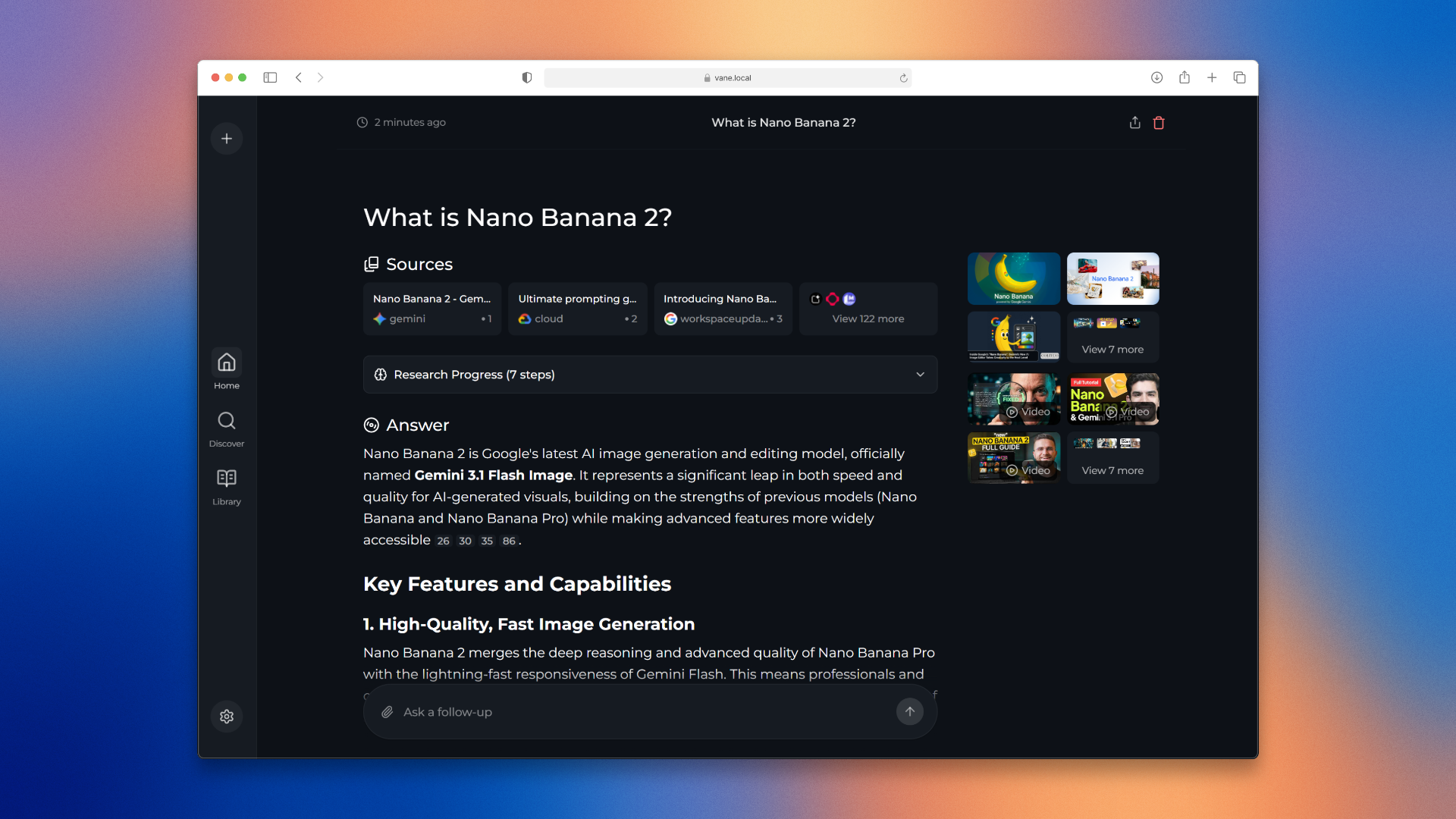
ต้องการทราบข้อมูลเพิ่มเติมเกี่ยวกับสถาปัตยกรรมและวิธีการทำงานหรือไม่ คุณสามารถอ่านได้ ที่นี่
✨ คุณสมบัติ
🤖 รองรับผู้ให้บริการ AI หลักทั้งหมด - ใช้ LLM แบบโลคอลผ่าน Ollama หรือเชื่อมต่อกับ OpenAI, Anthropic Claude, Google Gemini, Groq และอื่นๆ ผสมผสานและจับคู่โมเดลตามความต้องการของคุณ
⚡ โหมดการค้นหาอัจฉริยะ - เลือก Speed Mode เมื่อคุณต้องการคำตอบที่รวดเร็ว, Balanced Mode สำหรับการค้นหาในชีวิตประจำวัน หรือ Quality Mode สำหรับการวิจัยเชิงลึก
🧭 เลือกแหล่งข้อมูลของคุณ - ค้นหาเว็บ, กระดานสนทนา หรือเอกสารทางวิชาการ กำลังเพิ่มแหล่งข้อมูลและการผสานรวมเพิ่มเติม
🧩 วิดเจ็ต - การ์ด UI ที่เป็นประโยชน์ซึ่งจะปรากฏขึ้นเมื่อเกี่ยวข้อง เช่น สภาพอากาศ, การคำนวณ, ราคาหุ้น และการค้นหาด่วนอื่นๆ
🔍 การค้นหาเว็บที่ขับเคลื่อนโดย SearxNG - เข้าถึงเครื่องมือค้นหาหลายตัวพร้อมรักษาความเป็นส่วนตัวของคุณ กำลังจะรองรับ Tavily และ Exa ในเร็วๆ นี้ เพื่อผลลัพธ์ที่ดียิ่งขึ้น
📷 การค้นหารูปภาพและวิดีโอ - ค้นหาเนื้อหาภาพควบคู่ไปกับผลลัพธ์ที่เป็นข้อความ การค้นหาไม่ได้จำกัดอยู่แค่บทความอีกต่อไป
📄 การอัปโหลดไฟล์ - อัปโหลดเอกสารและถามคำถามเกี่ยวกับเอกสารเหล่านั้น ไม่ว่าจะเป็น PDF, ไฟล์ข้อความ, รูปภาพ - Vane เข้าใจได้ทั้งหมด
🌐 ค้นหาโดเมนเฉพาะ - จำกัดการค้นหาของคุณไปยังเว็บไซต์ที่เฉพาะเจาะจงเมื่อคุณรู้ว่าจะหาข้อมูลได้จากที่ไหน เหมาะสำหรับเอกสารทางเทคนิคหรืองานวิจัย
💡 คำแนะนำอัจฉริยะ - รับคำแนะนำการค้นหาอัจฉริยะขณะที่คุณพิมพ์ ช่วยให้คุณสร้างคำถามที่ดีขึ้น
📚 สำรวจ - เรียกดูบทความที่น่าสนใจและเนื้อหาที่กำลังเป็นที่นิยมตลอดทั้งวัน รับทราบข้อมูลโดยไม่ต้องค้นหา
🕒 ประวัติการค้นหา - ทุกการค้นหาจะถูกบันทึกไว้ในเครื่อง เพื่อให้คุณสามารถกลับมาดูสิ่งที่คุณค้นพบได้ตลอดเวลา งานวิจัยของคุณจะไม่มีวันหายไป
✨ คุณสมบัติเพิ่มเติมกำลังจะมาเร็วๆ นี้ - เรากำลังพัฒนาคุณสมบัติใหม่ๆ อย่างต่อเนื่องตามความคิดเห็นของชุมชน เข้าร่วม Discord ของเราเพื่อช่วยกำหนดอนาคตของ Vane!
ผู้สนับสนุน
การพัฒนา Vane ได้รับการสนับสนุนอย่างเอื้อเฟื้อจากผู้สนับสนุนของเรา การสนับสนุนของพวกเขาช่วยให้โปรเจกต์นี้ยังคงเป็นโอเพนซอร์ส ฟรี และเข้าถึงได้สำหรับทุกคน
✨ ลองใช้ Warp - เทอร์มินัลที่ขับเคลื่อนด้วย AI →
Warp กำลังปฏิวัติเวิร์กโฟลว์การพัฒนาด้วยคุณสมบัติที่ขับเคลื่อนด้วย AI, UX ที่ทันสมัย และประสิทธิภาพที่รวดเร็วปานสายฟ้าแลบ ถูกใช้โดยนักพัฒนาในบริษัทชั้นนำทั่วโลก
เราขอขอบคุณพันธมิตรต่อไปนี้สำหรับการสนับสนุนอันเอื้อเฟื้อของพวกเขา:
การติดตั้ง
มีวิธีการติดตั้ง Vane หลักๆ 2 วิธี คือ ด้วย Docker และไม่ใช้ Docker ขอแนะนำอย่างยิ่งให้ใช้ Docker
เริ่มต้นใช้งานด้วย Docker (แนะนำ)
Vane สามารถรันได้ง่ายๆ โดยใช้ Docker เพียงแค่รันคำสั่งต่อไปนี้:
docker run -d -p 3000:3000 -v vane-data:/home/vane/data --name vane itzcrazykns1337/vane:latestคำสั่งนี้จะดึงและเริ่มคอนเทนเนอร์ Vane พร้อมกับเครื่องมือค้นหา SearxNG ที่มาพร้อมกัน เมื่อรันแล้ว ให้เปิดเบราว์เซอร์ของคุณและไปที่ http://localhost:3000 จากนั้นคุณสามารถกำหนดค่าการตั้งค่าของคุณ (API keys, models ฯลฯ) ได้โดยตรงในหน้าจอตั้งค่า
หมายเหตุ: อิมเมจนี้รวมทั้ง Vane และ SearxNG ดังนั้นจึงไม่จำเป็นต้องตั้งค่าเพิ่มเติม แฟล็ก -v จะสร้างวอลุ่มถาวรสำหรับข้อมูลและไฟล์ที่คุณอัปโหลด
การใช้ Vane กับอินสแตนซ์ SearxNG ของคุณเอง
หากคุณมี SearxNG รันอยู่แล้ว คุณสามารถใช้ Vane เวอร์ชัน slim ได้:
docker run -d -p 3000:3000 -e SEARXNG_API_URL=http://your-searxng-url:8080 -v vane-data:/home/vane/data --name vane itzcrazykns1337/vane:slim-latestสำคัญ: ตรวจสอบให้แน่ใจว่าอินสแตนซ์ SearxNG ของคุณมี:
- เปิดใช้งานรูปแบบ JSON ในการตั้งค่า
- เปิดใช้งานเครื่องมือค้นหา Wolfram Alpha
แทนที่ http://your-searxng-url:8080 ด้วย URL SearxNG จริงของคุณ จากนั้นกำหนดค่าการตั้งค่าผู้ให้บริการ AI ของคุณในหน้าจอตั้งค่าที่ http://localhost:3000
การตั้งค่าขั้นสูง (สร้างจาก Source)
หากคุณต้องการสร้างจาก source หรือต้องการควบคุมเพิ่มเติม:
- 1ตรวจสอบให้แน่ใจว่า Docker ได้รับการติดตั้งและกำลังทำงานบนระบบของคุณ
- 2โคลน repository ของ Vane: git clone https://github.com/ItzCrazyKns/Vane.git
- 3หลังจากโคลนแล้ว ให้เข้าไปยังไดเรกทอรีที่มีไฟล์โปรเจกต์
- 4สร้างและรันโดยใช้ Docker: docker build -t vane . docker run -d -p 3000:3000 -v vane-data:/home/vane/data --name vane vane
- 5เข้าถึง Vane ที่ http://localhost:3000 และกำหนดค่าการตั้งค่าของคุณในหน้าจอตั้งค่า
หมายเหตุ: หลังจากสร้างคอนเทนเนอร์แล้ว คุณสามารถเริ่ม Vane ได้โดยตรงจาก Docker โดยไม่ต้องเปิดเทอร์มินัล
การติดตั้งแบบไม่ใช้ Docker
- 1ติดตั้ง SearXNG และอนุญาตให้ใช้รูปแบบ `JSON` ในการตั้งค่า SearXNG ตรวจสอบให้แน่ใจว่าได้เปิดใช้งานเครื่องมือค้นหา Wolfram Alpha ด้วย
- 2โคลน repository: git clone https://github.com/ItzCrazyKns/Vane.git cd Vane
- 3ติดตั้ง dependencies: npm i
- 4สร้างแอปพลิเคชัน: npm run build
- 5เริ่มแอปพลิเคชัน: npm run start
- 6เปิดเบราว์เซอร์ของคุณและไปที่ http://localhost:3000 เพื่อดำเนินการตั้งค่าให้เสร็จสมบูรณ์และกำหนดค่าการตั้งค่าของคุณ (คีย์ API, โมเดล, URL SearxNG ฯลฯ) ในหน้าจอตั้งค่า
หมายเหตุ: แนะนำให้ใช้ Docker เนื่องจากช่วยให้กระบวนการตั้งค่าง่ายขึ้น โดยเฉพาะอย่างยิ่งสำหรับการจัดการตัวแปรสภาพแวดล้อมและ dependencies
ดู เอกสารการติดตั้ง สำหรับข้อมูลเพิ่มเติม เช่น การอัปเดต เป็นต้น
การแก้ไขปัญหา
เซิร์ฟเวอร์ที่รองรับ OpenAI-API แบบโลคอล
หาก Vane แจ้งว่าคุณยังไม่ได้กำหนดค่าผู้ให้บริการโมเดลแชทใดๆ โปรดตรวจสอบให้แน่ใจว่า:
- 1เซิร์ฟเวอร์ของคุณกำลังทำงานบน
0.0.0.0(ไม่ใช่127.0.0.1) และบนพอร์ตเดียวกับที่คุณระบุใน API URL - 2คุณได้ระบุชื่อโมเดลที่ถูกต้องซึ่งโหลดโดยเซิร์ฟเวอร์ LLM โลคอลของคุณ
- 3คุณได้ระบุคีย์ API ที่ถูกต้อง หรือหากไม่ได้กำหนดไว้ คุณได้ใส่ บางสิ่ง ลงในช่องคีย์ API และไม่ได้ปล่อยว่างไว้
ข้อผิดพลาดในการเชื่อมต่อ Ollama
หากคุณพบข้อผิดพลาดในการเชื่อมต่อ Ollama มีแนวโน้มว่าเกิดจากแบ็กเอนด์ไม่สามารถเชื่อมต่อกับ API ของ Ollama ได้ หากต้องการแก้ไขปัญหานี้ คุณสามารถ:
- 1**ตรวจสอบ Ollama API URL ของคุณ:** ตรวจสอบให้แน่ใจว่า API URL ถูกตั้งค่าอย่างถูกต้องในเมนูการตั้งค่า
- 2**อัปเดต API URL ตามระบบปฏิบัติการ:** - **Windows:** ใช้ `http://host.docker.internal:11434` - **Mac:** ใช้ `http://host.docker.internal:11434` - **Linux:** ใช้ `http://<private_ip_of_host>:11434` ปรับหมายเลขพอร์ตหากคุณใช้พอร์ตอื่น
- 3**ผู้ใช้ Linux - เปิดเผย Ollama สู่เครือข่าย:** - ภายใน `/etc/systemd/system/ollama.service` คุณต้องเพิ่ม `Environment="OLLAMA_HOST=0.0.0.0:11434"` (เปลี่ยนหมายเลขพอร์ตหากคุณใช้พอร์ตอื่น) จากนั้นโหลดการกำหนดค่า systemd manager ใหม่ด้วย `systemctl daemon-reload` และรีสตาร์ท Ollama โดย `systemctl restart ollama` สำหรับข้อมูลเพิ่มเติม โปรดดู [เอกสาร Ollama](https://github.com/ollama/ollama/blob/main/docs/faq.md#setting-environment-variables-on-linux) - ตรวจสอบให้แน่ใจว่าพอร์ต (ค่าเริ่มต้นคือ 11434) ไม่ได้ถูกบล็อกโดยไฟร์วอลล์ของคุณ
ข้อผิดพลาดในการเชื่อมต่อ Lemonade
หากคุณพบข้อผิดพลาดในการเชื่อมต่อ Lemonade มีแนวโน้มว่าเกิดจากแบ็กเอนด์ไม่สามารถเชื่อมต่อกับ API ของ Lemonade ได้ หากต้องการแก้ไขปัญหานี้ คุณสามารถ:
- 1ตรวจสอบ Lemonade API URL ของคุณ: ตรวจสอบให้แน่ใจว่า API URL ถูกตั้งค่าอย่างถูกต้องในเมนูการตั้งค่า
- 2อัปเดต API URL ตามระบบปฏิบัติการ:
- **Windows:** ใช้ `http://host.docker.internal:8000` - **Mac:** ใช้ `http://host.docker.internal:8000` - **Linux:** ใช้ `http://<private_ip_of_host>:8000` ปรับหมายเลขพอร์ตหากคุณใช้พอร์ตอื่น
- 1**ตรวจสอบให้แน่ใจว่า Lemonade Server กำลังทำงาน:** - ตรวจสอบให้แน่ใจว่าเซิร์ฟเวอร์ Lemonade ของคุณกำลังทำงานและสามารถเข้าถึงได้บนพอร์ตที่กำหนดค่าไว้ (ค่าเริ่มต้นคือ 8000) - ตรวจสอบว่า Lemonade ได้รับการกำหนดค่าให้ยอมรับการเชื่อมต่อจากทุกอินเทอร์เฟซ (`0.0.0.0`) ไม่ใช่แค่ localhost (`127.0.0.1`) - ตรวจสอบให้แน่ใจว่าพอร์ต (ค่าเริ่มต้นคือ 8000) ไม่ได้ถูกบล็อกโดยไฟร์วอลล์ของคุณ
การใช้งานเป็นเครื่องมือค้นหา
หากคุณต้องการใช้ Vane เป็นทางเลือกแทนเครื่องมือค้นหาแบบดั้งเดิม เช่น Google หรือ Bing หรือหากคุณต้องการเพิ่มทางลัดสำหรับการเข้าถึงอย่างรวดเร็วจากแถบค้นหาของเบราว์เซอร์ ให้ทำตามขั้นตอนเหล่านี้:
- 1เปิดการตั้งค่าของเบราว์เซอร์ของคุณ
- 2ไปที่ส่วน 'Search Engines'
- 3เพิ่มการค้นหาเว็บไซต์ใหม่ด้วย URL ต่อไปนี้:
http://localhost:3000/?q=%sแทนที่localhostด้วยที่อยู่ IP หรือชื่อโดเมนของคุณ และ3000ด้วยหมายเลขพอร์ตหาก Vane ไม่ได้โฮสต์ในเครื่อง - 4คลิกปุ่มเพิ่ม ตอนนี้คุณสามารถใช้ Vane ได้โดยตรงจากแถบค้นหาของเบราว์เซอร์ของคุณ
การใช้งาน API ของ Vane
Vane ยังมี API สำหรับนักพัฒนาที่ต้องการรวมเครื่องมือค้นหาอันทรงพลังนี้เข้ากับแอปพลิเคชันของตนเอง คุณสามารถเรียกใช้การค้นหา ใช้โมเดลหลายตัว และรับคำตอบสำหรับคำถามของคุณได้
สำหรับรายละเอียดเพิ่มเติม โปรดดูเอกสารฉบับเต็ม ที่นี่
เปิดเผย Vane สู่เครือข่าย
Vane ทำงานบน Next.js และจัดการคำขอ API ทั้งหมด มันทำงานได้ทันทีบนเครือข่ายเดียวกันและยังคงเข้าถึงได้แม้จะมีการส่งต่อพอร์ต (port forwarding)
การติดตั้งในคลิกเดียว




คุณสมบัติที่จะมาถึง
- [ ] เพิ่มวิดเจ็ต การผสานรวม และแหล่งที่มาของการค้นหาเพิ่มเติม
- [ ] เพิ่มความสามารถในการสร้างเอเจนต์ที่กำหนดเอง (ชื่อยังไม่ระบุ)
- [ ] เพิ่มการยืนยันตัวตน
สนับสนุนเรา
หากคุณพบว่า Vane มีประโยชน์ โปรดพิจารณาให้ดาวแก่เราบน GitHub สิ่งนี้ช่วยให้ผู้คนจำนวนมากขึ้นค้นพบ Vane และสนับสนุนการพัฒนาคุณสมบัติใหม่ๆ การสนับสนุนของคุณเป็นที่ชื่นชมอย่างยิ่ง
การบริจาค
เรายังรับบริจาคเพื่อช่วยสนับสนุนโครงการของเรา หากคุณต้องการมีส่วนร่วม คุณสามารถใช้ตัวเลือกต่อไปนี้เพื่อบริจาค ขอขอบคุณสำหรับการสนับสนุนของคุณ!
| Ethereum |
|---|
ที่อยู่: 0xB025a84b2F269570Eb8D4b05DEdaA41D8525B6DD |
การมีส่วนร่วม
Vane สร้างขึ้นจากแนวคิดที่ว่า AI และโมเดลภาษาขนาดใหญ่ควรใช้งานง่ายสำหรับทุกคน หากคุณพบบั๊กหรือมีแนวคิด โปรดแบ่งปันผ่าน GitHub Issues สำหรับข้อมูลเพิ่มเติมเกี่ยวกับการมีส่วนร่วมกับ Vane คุณสามารถอ่านไฟล์ CONTRIBUTING.md เพื่อเรียนรู้เพิ่มเติมเกี่ยวกับ Vane และวิธีที่คุณสามารถมีส่วนร่วมได้
ความช่วยเหลือและการสนับสนุน
หากคุณมีคำถามหรือข้อเสนอแนะ โปรดติดต่อเราได้เลย คุณสามารถสร้าง Issue บน GitHub หรือเข้าร่วมเซิร์ฟเวอร์ Discord ของเรา ที่นั่นคุณสามารถเชื่อมต่อกับผู้ใช้คนอื่นๆ แบ่งปันประสบการณ์และรีวิวของคุณ และรับความช่วยเหลือที่เป็นส่วนตัวมากขึ้น คลิกที่นี่ เพื่อเข้าร่วมเซิร์ฟเวอร์ Discord หากต้องการพูดคุยเรื่องที่อยู่นอกเหนือการสนับสนุนทั่วไป โปรดติดต่อฉันบน Discord ที่ itzcrazykns
ขอขอบคุณที่สำรวจ Vane ซึ่งเป็นเครื่องมือค้นหาที่ขับเคลื่อนด้วย AI ที่ออกแบบมาเพื่อยกระดับประสบการณ์การค้นหาของคุณ เรากำลังทำงานอย่างต่อเนื่องเพื่อปรับปรุง Vane และขยายขีดความสามารถของมัน เราให้ความสำคัญกับข้อเสนอแนะและการมีส่วนร่วมของคุณ ซึ่งช่วยให้เราทำให้ Vane ดียิ่งขึ้นไปอีก อย่าลืมกลับมาตรวจสอบการอัปเดตและคุณสมบัติใหม่ๆ!
เอกสารโปรเจกต์
อ่านเอกสารต้นฉบับ
README วิธีติดตั้ง วิธีใช้งาน และข้อกำหนดจาก repository ต้นฉบับ
Vane 🔍
Vane is a privacy-focused AI answering engine that runs entirely on your own hardware. It combines knowledge from the vast internet with support for local LLMs (Ollama) and cloud providers (OpenAI, Claude, Groq), delivering accurate answers with cited sources while keeping your searches completely private.
Want to know more about its architecture and how it works? You can read it here.
✨ Features
🤖 Support for all major AI providers - Use local LLMs through Ollama or connect to OpenAI, Anthropic Claude, Google Gemini, Groq, and more. Mix and match models based on your needs.
⚡ Smart search modes - Choose Speed Mode when you need quick answers, Balanced Mode for everyday searches, or Quality Mode for deep research.
🧭 Pick your sources - Search the web, discussions, or academic papers. More sources and integrations are in progress.
🧩 Widgets - Helpful UI cards that show up when relevant, like weather, calculations, stock prices, and other quick lookups.
🔍 Web search powered by SearxNG - Access multiple search engines while keeping your identity private. Support for Tavily and Exa coming soon for even better results.
📷 Image and video search - Find visual content alongside text results. Search isn't limited to just articles anymore.
📄 File uploads - Upload documents and ask questions about them. PDFs, text files, images - Vane understands them all.
🌐 Search specific domains - Limit your search to specific websites when you know where to look. Perfect for technical documentation or research papers.
💡 Smart suggestions - Get intelligent search suggestions as you type, helping you formulate better queries.
📚 Discover - Browse interesting articles and trending content throughout the day. Stay informed without even searching.
🕒 Search history - Every search is saved locally so you can revisit your discoveries anytime. Your research is never lost.
✨ More coming soon - We're actively developing new features based on community feedback. Join our Discord to help shape Vane's future!
Sponsors
Vane's development is powered by the generous support of our sponsors. Their contributions help keep this project free, open-source, and accessible to everyone.
We'd like to thank the following partners for their generous support:

Installation
There are mainly 2 ways of installing Vane - With Docker, Without Docker. Using Docker is highly recommended.
Getting Started with Docker (Recommended)
Vane can be easily run using Docker. Simply run the following command:
docker run -d -p 3000:3000 -v vane-data:/home/vane/data --name vane itzcrazykns1337/vane:latestThis will pull and start the Vane container with the bundled SearxNG search engine. Once running, open your browser and navigate to http://localhost:3000. You can then configure your settings (API keys, models, etc.) directly in the setup screen.
Note: The image includes both Vane and SearxNG, so no additional setup is required. The -v flags create persistent volumes for your data and uploaded files.
Using Vane with Your Own SearxNG Instance
If you already have SearxNG running, you can use the slim version of Vane:
docker run -d -p 3000:3000 -e SEARXNG_API_URL=http://your-searxng-url:8080 -v vane-data:/home/vane/data --name vane itzcrazykns1337/vane:slim-latestImportant: Make sure your SearxNG instance has:
- JSON format enabled in the settings
- Wolfram Alpha search engine enabled
Replace http://your-searxng-url:8080 with your actual SearxNG URL. Then configure your AI provider settings in the setup screen at http://localhost:3000.
Advanced Setup (Building from Source)
If you prefer to build from source or need more control:
- 1Ensure Docker is installed and running on your system.
- 2Clone the Vane repository: git clone https://github.com/ItzCrazyKns/Vane.git
- 3After cloning, navigate to the directory containing the project files.
- 4Build and run using Docker: docker build -t vane . docker run -d -p 3000:3000 -v vane-data:/home/vane/data --name vane vane
- 5Access Vane at http://localhost:3000 and configure your settings in the setup screen.
Note: After the containers are built, you can start Vane directly from Docker without having to open a terminal.
Non-Docker Installation
- 1Install SearXNG and allow `JSON` format in the SearXNG settings. Make sure Wolfram Alpha search engine is also enabled.
- 2Clone the repository: git clone https://github.com/ItzCrazyKns/Vane.git cd Vane
- 3Install dependencies: npm i
- 4Build the application: npm run build
- 5Start the application: npm run start
- 6Open your browser and navigate to http://localhost:3000 to complete the setup and configure your settings (API keys, models, SearxNG URL, etc.) in the setup screen.
Note: Using Docker is recommended as it simplifies the setup process, especially for managing environment variables and dependencies.
See the installation documentation for more information like updating, etc.
Troubleshooting
Local OpenAI-API-Compliant Servers
If Vane tells you that you haven't configured any chat model providers, ensure that:
- 1Your server is running on
0.0.0.0(not127.0.0.1) and on the same port you put in the API URL. - 2You have specified the correct model name loaded by your local LLM server.
- 3You have specified the correct API key, or if one is not defined, you have put something in the API key field and not left it empty.
Ollama Connection Errors
If you're encountering an Ollama connection error, it is likely due to the backend being unable to connect to Ollama's API. To fix this issue you can:
- 1**Check your Ollama API URL:** Ensure that the API URL is correctly set in the settings menu.
- 2**Update API URL Based on OS:** - **Windows:** Use `http://host.docker.internal:11434` - **Mac:** Use `http://host.docker.internal:11434` - **Linux:** Use `http://<private_ip_of_host>:11434` Adjust the port number if you're using a different one.
- 3**Linux Users - Expose Ollama to Network:** - Inside `/etc/systemd/system/ollama.service`, you need to add `Environment="OLLAMA_HOST=0.0.0.0:11434"`. (Change the port number if you are using a different one.) Then reload the systemd manager configuration with `systemctl daemon-reload`, and restart Ollama by `systemctl restart ollama`. For more information see [Ollama docs](https://github.com/ollama/ollama/blob/main/docs/faq.md#setting-environment-variables-on-linux) - Ensure that the port (default is 11434) is not blocked by your firewall.
Lemonade Connection Errors
If you're encountering a Lemonade connection error, it is likely due to the backend being unable to connect to Lemonade's API. To fix this issue you can:
- 1**Check your Lemonade API URL:** Ensure that the API URL is correctly set in the settings menu.
- 2**Update API URL Based on OS:** - **Windows:** Use `http://host.docker.internal:8000` - **Mac:** Use `http://host.docker.internal:8000` - **Linux:** Use `http://<private_ip_of_host>:8000` Adjust the port number if you're using a different one.
- 3**Ensure Lemonade Server is Running:** - Make sure your Lemonade server is running and accessible on the configured port (default is 8000). - Verify that Lemonade is configured to accept connections from all interfaces (`0.0.0.0`), not just localhost (`127.0.0.1`). - Ensure that the port (default is 8000) is not blocked by your firewall.
Using as a Search Engine
If you wish to use Vane as an alternative to traditional search engines like Google or Bing, or if you want to add a shortcut for quick access from your browser's search bar, follow these steps:
- 1Open your browser's settings.
- 2Navigate to the 'Search Engines' section.
- 3Add a new site search with the following URL:
http://localhost:3000/?q=%s. Replacelocalhostwith your IP address or domain name, and3000with the port number if Vane is not hosted locally. - 4Click the add button. Now, you can use Vane directly from your browser's search bar.
Using Vane's API
Vane also provides an API for developers looking to integrate its powerful search engine into their own applications. You can run searches, use multiple models and get answers to your queries.
For more details, check out the full documentation here.
Expose Vane to network
Vane runs on Next.js and handles all API requests. It works right away on the same network and stays accessible even with port forwarding.
One-Click Deployment
Upcoming Features
- [ ] Adding more widgets, integrations, search sources
- [ ] Adding ability to create custom agents (name T.B.D.)
- [ ] Adding authentication
Support Us
If you find Vane useful, consider giving us a star on GitHub. This helps more people discover Vane and supports the development of new features. Your support is greatly appreciated.
Donations
We also accept donations to help sustain our project. If you would like to contribute, you can use the following options to donate. Thank you for your support!
| Ethereum |
|---|
Address: 0xB025a84b2F269570Eb8D4b05DEdaA41D8525B6DD |
Contribution
Vane is built on the idea that AI and large language models should be easy for everyone to use. If you find bugs or have ideas, please share them in via GitHub Issues. For more information on contributing to Vane you can read the CONTRIBUTING.md file to learn more about Vane and how you can contribute to it.
Help and Support
If you have any questions or feedback, please feel free to reach out to us. You can create an issue on GitHub or join our Discord server. There, you can connect with other users, share your experiences and reviews, and receive more personalized help. Click here to join the Discord server. To discuss matters outside of regular support, feel free to contact me on Discord at itzcrazykns.
Thank you for exploring Vane, the AI-powered search engine designed to enhance your search experience. We are constantly working to improve Vane and expand its capabilities. We value your feedback and contributions which help us make Vane even better. Don't forget to check back for updates and new features!