
GetNotes Tools
huangruiteng/loopx
Tool นี้คืออะไร
LoopX เป็นระนาบควบคุมแบบเปิดและไม่ขึ้นกับผู้ให้บริการสำหรับ AI Agent ที่ทำงานระยะยาว ช่วยให้ Agent จัดการงานที่ซับซ้อนและต่อเนื่องได้ด้วยการรักษาสถานะ, การตัดสินใจ, การกำกับดูแล และการทำงานร่วมกันระหว่างมนุษย์กับ Agent เหมาะสำหรับนักพัฒนาที่ต้องการสร้าง Agent ที่สามารถตรวจสอบ, เริ่มต้นใหม่ และส่งมอบงานระยะยาวได้อย่างมีประสิทธิภาพ
ข้อมูลโปรเจกต์
ดาว
3.6K
Forks
294
License
MIT
อัปเดต GitHub ล่าสุด
9 ส.ค. 2569
เพิ่มใน GetNotes
17 ส.ค. 2569
Repository
huangruiteng/loopx
เหมาะกับงาน
เหมาะกับอาชีพ
Ecosystem
Python
แปลและเรียบเรียงโดย AI
เนื้อหาฉบับภาษาไทย
ใช้อ่านเพื่อทำความเข้าใจเบื้องต้น โปรดตรวจสอบรายละเอียดสำคัญกับเอกสารต้นฉบับด้านล่าง
ระนาบควบคุมแบบเปิด, ไม่ขึ้นกับผู้ให้บริการ, มีสถานะ สำหรับเอเจนต์ที่ทำงานระยะยาว
ทำงานบน Agent harness ใดก็ได้ — Codex App, Claude Code, Cursor, dsh หรือของคุณเอง — โดยให้สถานะระยะยาว, การตัดสินใจเชิงความหมาย, การกำกับดูแล, การกู้คืน และการทำงานร่วมกันระหว่างมนุษย์กับเอเจนต์ วัตถุประสงค์, เกต, สิ่งที่ต้องทำ, หลักฐาน, โควต้า และการส่งมอบยังคงเสถียรในขณะที่ harness ดำเนินการในรอบที่จำกัด





เว็บไซต์สาธารณะ · เอกสาร · คู่มือนักพัฒนา · ลองใช้ LoopX · ดูลูปจริง · วิธีการทำงาน · คู่มือผู้ใช้ · 简体中文
เชื่อมต่อ Agent ที่ทำงานได้ ให้กลายเป็นพนักงานดิจิทัลที่จัดการได้, ตรวจสอบย้อนหลังได้ และปรับปรุงได้อย่างต่อเนื่อง
LoopX เป็นเคอร์เนลสถานะน้ำหนักเบาและระนาบควบคุมแบบ local-first สำหรับวิศวกรรมลูป ที่เป็นแบบเปิดและไม่ขึ้นกับผู้ให้บริการ มันทำงานบน Agent harness ที่แตกต่างกัน แทนที่จะเข้ามาแทนที่ โดยให้สถานะระยะยาว, การตัดสินใจเชิงความหมายเกี่ยวกับสิ่งที่เกิดขึ้นต่อไป, การกำกับดูแล, การกู้คืน และการทำงานร่วมกันระหว่างมนุษย์กับเอเจนต์ ซึ่งช่วยให้งานที่ดำเนินไปอย่างยาวนานสามารถตรวจสอบได้, เริ่มต้นใหม่ได้ และส่งมอบได้ง่ายขึ้นในแต่ละรอบ, เครื่องมือ และเอเจนต์
วิศวกรรมลูปสำหรับ AI Agent ที่ทำงานระยะยาวและทีม Agent แบบ Peer
ให้ลูปดำเนินต่อไป รักษาการตัดสินใจให้เป็นของมนุษย์
เรียนรู้ LoopX
- Developer Book - เส้นทางสองภาษาที่คัดสรรมาอย่างดี ตั้งแต่พื้นฐานระนาบควบคุมไปจนถึงการเริ่มต้นโปรเจกต์และการมีส่วนร่วมของนักพัฒนา 中文版 · English
- เริ่มต้นใช้งาน - ติดตั้ง, เชื่อมต่อโปรเจกต์ และรันลูปที่ถูกกำกับดูแลครั้งแรกของคุณ คู่มือ
- เอกสาร - เว็บไซต์อ้างอิงและการดำเนินงานฉบับสมบูรณ์ เอกสาร LoopX
ทำไมต้อง LoopX
เอเจนต์สามารถทำงานให้เสร็จได้ในหนึ่งเซสชัน แต่งานที่ดำเนินไปอย่างยาวนานนั้นยากกว่า: วัตถุประสงค์เปลี่ยนไป, การตัดสินใจของเจ้าของปรากฏขึ้น, หลักฐานล้าสมัย, เอเจนต์ส่งต่องานให้เพื่อนร่วมงาน และตัวกำหนดเวลาอาจยังคงใช้จ่ายต่อไปหลังจากไม่มีการเปลี่ยนผ่านที่เป็นประโยชน์เหลืออยู่ หน่วยความจำแชทและตัวจับเวลาไม่เพียงพอที่จะควบคุมสิ่งเหล่านั้นได้
LoopX เก็บสถานะการควบคุมที่คงทนไว้ในเลเยอร์เดียวที่กะทัดรัด:
objective / issue / project
   │
   ▼
LoopX state: objective + gates + todos + scope + evidence + quota
   │
   ├─ human judgment needed? ── yes ─▶ ask a concrete question and wait
   │
   ├─ safe fallback available? ──────▶ run one bounded agent slice
   │
   ▼
Codex / Claude Code / Cursor / shell agent executes one turn
   │
   ▼
write evidence + handoff + next todo ─▶ quota decides the next tick
รันไทม์ของเอเจนต์จะดำเนินการทำงาน LoopX ควบคุมสถานะที่ช่วยให้ลูปทางวิศวกรรม, การวิจัย, การค้นพบ และการดำเนินงานดำเนินต่อไปได้ในหลายๆ การรัน มันไม่ใช่เฟรมเวิร์กเอเจนต์อื่น หรือรันไทม์การจัดระเบียบเฉพาะผู้ให้บริการ
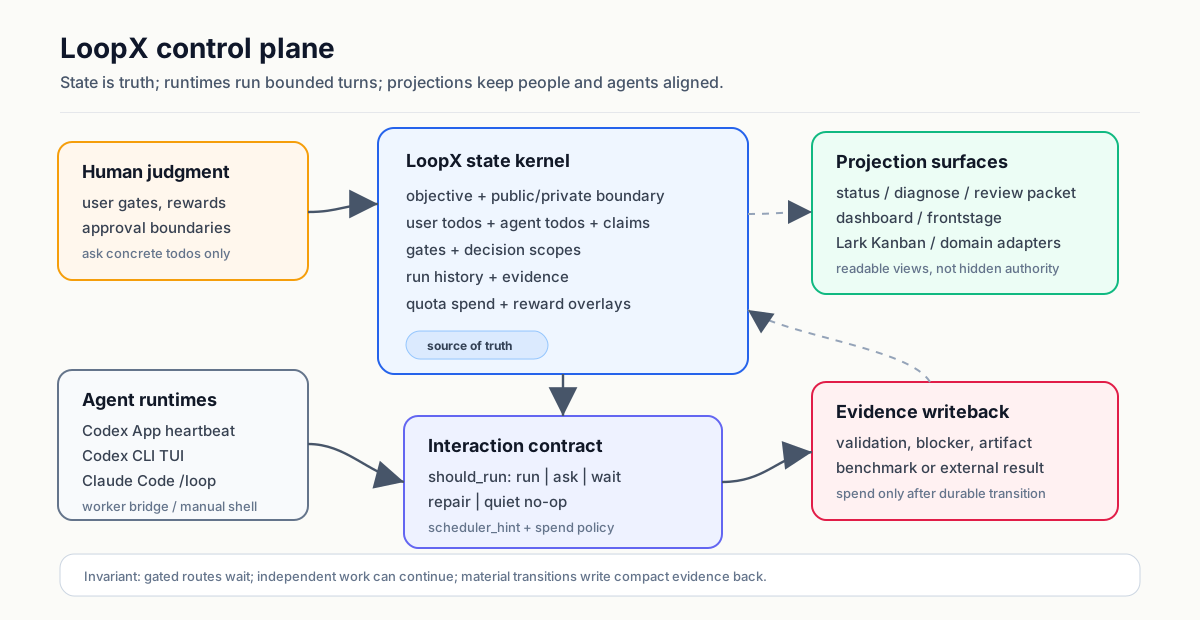
โมเดลทางความคิดที่เป็นประโยชน์คือ Kanban แบบ Agent-native สำหรับงานที่ดำเนินไปอย่างยาวนาน การ์ดจะบรรจุข้อมูลประจำตัว, อำนาจ, หลักฐาน และการดำเนินการต่อเนื่อง การเคลื่อนไหวคือโอเปอเรเตอร์ที่ได้รับการตรวจสอบ เช่น claim, gate, monitor และ writeback บอร์ดเป็นเพียงภาพฉาย; สถานะของ LoopX ยังคงเป็นแหล่งความจริง
เอเจนต์ที่ลงทะเบียนเป็นเพื่อนร่วมงาน การอ้างสิทธิ์, สัญญาเช่า, ขอบเขตงาน, ความสามารถ และการดำเนินการต่อเนื่องแบบมีประเภท จะเป็นตัวตัดสินว่าใครจะดำเนินการต่อไป; ไม่จำเป็นต้องมีตัวตนของผู้นำที่คงทน
LoopX มีประโยชน์เมื่อคุณดำเนินการ:
- วัตถุประสงค์ทางวิศวกรรม, การวิจัย, การวัดประสิทธิภาพ หรือการทดลองที่ใช้เวลาหลายวัน;
- ลูปของปัญหาและ PR ที่ต้องรักษาสโคป, หลักฐาน และสถานะการรีวิว;
- งานตรวจสอบหรือเฝ้าระวังที่เกิดขึ้นซ้ำๆ;
- โปรเจกต์ที่มีเกตสำหรับเจ้าของ, ความปลอดภัย, การเผยแพร่ หรือข้อมูลส่วนตัว;
- ทีม Agent แบบ Peer ที่การเป็นเจ้าของ, สัญญาเช่า และการส่งมอบมีความสำคัญ;
- เวิร์กโฟลว์ของนักสร้างสรรค์, การวิจัย หรือการดำเนินงานที่ความคืบหน้าต้องยังคงอ่านเข้าใจได้สำหรับผู้ปฏิบัติงานที่ไม่ใช่วิศวกร
LoopX ไม่ใช่ตัวควบคุมการผลิตแบบอัตโนมัติ สิทธิ์ที่เป็นอันตราย, การเผยแพร่, การเขียนข้อมูลการผลิต และการเป็นเจ้าของขั้นสุดท้ายยังคงอยู่กับมนุษย์
หลักฐาน
นี่ไม่ใช่การสาธิตแบบรอบเดียว ลำดับการมีส่วนร่วมของ OpenViking สาธารณะ และการสาธิต Auto ML ที่ถูกแก้ไขและดำเนินการโดยเจ้าของ แต่ละรายการครอบคลุม ระยะเวลาการทำงานของลูปที่ผ่านไปแล้วกว่า 200 ชั่วโมง ตลอดหลายรอบที่จำกัด, การตัดสินใจ และการอัปเดตหลักฐาน ระยะเวลาที่ผ่านไปคือเวลาโปรเจกต์ตามนาฬิกาจริง ไม่ใช่ 200 ชั่วโมงของการดำเนินการโมเดลอย่างต่อเนื่อง หรือการอ้างสิทธิ์ความเป็นอิสระในการผลิตแบบไร้คนดูแล เปิดภาพแต่ละภาพเพื่อตรวจสอบกราฟที่ปลอดภัยต่อสาธารณะ, สาขาหลักฐาน และการตัดสินใจที่ถูกเก็บรักษาไว้ในแต่ละรอบ
การแก้ไขปัญหาโอเพนซอร์ส
เส้นทางการมีส่วนร่วมสาธารณะกว่า 200 ชั่วโมง: การส่งมอบ PR และความรู้ในการแก้ไขที่นำกลับมาใช้ใหม่ได้พัฒนาไปพร้อมกัน
ผู้สร้าง LoopX ใช้เส้นทางนี้ในฐานะ ผู้มีส่วนร่วมของ OpenViking ลำดับการมีส่วนร่วมสาธารณะที่แสดงนี้ครอบคลุมระยะเวลาที่ผ่านไปแล้วกว่า 200 ชั่วโมง ตั้งแต่การสร้าง PR ครั้งแรกไปจนถึงการรีวิวหรือการอัปเดตล่าสุดที่แสดง ความสามารถในการแก้ไขปัญหา (Issue-Fix capability) จะเก็บบริบทของรีโพซิโทรีที่หมุนเวียน, ความรู้ในการแก้ไขที่ประทับตราการแก้ไข และการตั้งค่าที่ผู้รีวิวเห็นแยกจากกัน; PR ที่เชื่อมโยงกันพร้อมกับซอร์สโค้ดและชุดทดสอบที่เช็คเอาต์ปัจจุบันยังคงเป็นแหล่งข้อมูลที่เชื่อถือได้
การทดลอง Auto ML
การสาธิตที่ดำเนินการโดยเจ้าของที่ถูกแก้ไข: เส้นทางการทดลองกว่า 200 ชั่วโมงที่เก็บสมมติฐาน, หลักฐานที่ตรงกัน, สายการผลิตที่ไม่ถูกต้อง, การจำลองที่กำลังทำงาน และเกตการเลื่อนขั้น/หยุด ให้มองเห็นได้ในกราฟเดียว
กราฟที่ปลอดภัยต่อสาธารณะที่ถูกแก้ไขนี้รักษาลำดับการตัดสินใจตลอดช่วงเวลาที่ผ่านไปกว่า 200 ชั่วโมงนั้น มันเป็นการสาธิตที่ดำเนินการโดยเจ้าของ ไม่ใช่การอ้างสิทธิ์ในการประมวลผลอย่างต่อเนื่อง, การทำซ้ำอย่างอิสระ, ผลลัพธ์การผลิต หรือการรับรองจากบริษัทหรือนายจ้าง รูปภาพที่ถูกแก้ไขไม่เพียงพอที่จะทำซ้ำการทดลองพื้นฐานได้อย่างอิสระ
Auto Research
การสาธิต KNN สาธารณะที่ทำซ้ำได้: เอเจนต์ผู้เสนอ, ผู้ดำเนินการ และผู้ประเมิน/ผู้ส่งเสริม ทำงานซ้ำไปพร้อมกัน ในขณะที่สิ่งที่ต้องทำ, โควต้า, หลักฐาน และการปลุกเป้าหมายยังคงมองเห็นได้
ภาพหน้าจอนี้มาจากเดโม exact-KNN ที่มาพร้อมกับ LoopX งานสาธารณะ, ไฟล์ที่แก้ไขได้และได้รับการป้องกัน, ตัวประเมิน CPU แบบกำหนดได้ และคำสั่ง dev/held-out ทั้งหมดอยู่ในรีโพซิโทรีนี้ ทำตาม คำแนะนำการสาธิต หรือ เส้นทางคำสั่ง เพื่อทำซ้ำเวิร์กโฟลว์; นี่เป็นผลลัพธ์จากการสาธิต ไม่ใช่การอ้างสิทธิ์การวิจัยเพื่อการผลิต
ใช้ในโปรเจกต์จริง
- ผู้ใช้ทั่วไป · รัน C++ เพื่อความแม่นยำ
>13hผู้ใช้รายงานว่างานหลายขั้นตอนยังคงสอดคล้องกัน, กระตุ้นการวิจัยสาธารณะ, นำ [เครื่องมือหน่วยความ
นี่คือสามกรณีที่แข็งแกร่งที่สุดในปัจจุบัน ไม่ใช่รายการทั้งหมด ดู แค็ตตาล็อก Showcase ฉบับสมบูรณ์ สำหรับกรณีของผู้มีส่วนร่วม, การทดสอบภายในโดยผู้สร้าง, การสาธิตที่ทำซ้ำได้ และป้ายกำกับความแข็งแกร่งของหลักฐานที่ชัดเจน
พื้นผิวที่ตรวจสอบได้เพิ่มเติม:
- หน้าแรกสาธารณะ สำหรับเรื่องราวผลิตภัณฑ์, การเริ่มต้นใช้งานอย่างรวดเร็ว และหลักฐานที่ดำเนินมาอย่างยาวนาน
- แค็ตตาล็อก Showcase ฉบับสมบูรณ์ และ ดัชนีสองภาษาที่โฮสต์ไว้
- การสาธิตการตรวจสอบการใช้งานข้ามรันไทม์
- คู่มือผู้ใช้ สาธารณะ
ลองใช้ LoopX
ข้อกำหนด: Python 3.11+, curl, tar และเชลล์ macOS หรือ Linux จำเป็นต้องใช้ Git สำหรับเวิร์กโฟลว์การโคลน/canary ของผู้มีส่วนร่วมเท่านั้น แพ็กเกจ Python ไม่มีรันไทม์ที่ต้องพึ่งพาภายนอกไลบรารีมาตรฐาน
ติดตั้งโดยไม่ต้องโคลน:
curl -fsSL https://huangruiteng.github.io/loopx/install.sh | bash
export PATH="$HOME/.local/bin:$PATH"
loopx doctor
จากนั้นเชื่อมต่อจาก root ของโปรเจกต์ของคุณ:
cd /path/to/your-project
loopx connect
loopx status
หากโปรเจกต์ยังไม่ได้เริ่มต้น และ connect แจ้งว่าสถานะหายไป ให้ใช้เส้นทางแบบมีคำแนะนำ:
loopx start-goal --guided --project . --goal-text "Your long-running objective"LoopX ควรใช้สถานะที่มีอยู่ซ้ำแทนที่จะเขียนทับ เก็บ .loopx/, .codex/goals/ และ .local/ ไว้ในรายการที่ถูกละเว้น
เริ่มต้นจาก Agent ของคุณ
| โฮสต์ | การเริ่มต้นที่แนะนำ | Loop driver |
|---|---|---|
| Codex App | ขอให้ agent เชื่อมต่อโปรเจกต์นี้กับ LoopX, รัน loopx doctor, รักษาสถานะที่มีอยู่ และรายงาน gate ปัจจุบันและ todo ถัดไป จากนั้นใช้ $loopx <complex task> หรือเลือก loopx จาก /skills | การทำงานอัตโนมัติแบบ heartbeat ของ Codex App, รีเฟรชจาก quota should-run.scheduler_hint |
| Codex App over SSH | loopx agent-onboard --agent-type codex-app-ssh --project . | /goal <task_body> ที่มองเห็นได้ที่ส่งกลับมา |
| Codex CLI | เริ่ม codex ในโปรเจกต์, ขอให้เชื่อมต่อและวินิจฉัย LoopX, จากนั้นใช้ $loopx <complex task> หรือ /skills | /goal <task_body> ที่มองเห็นได้; ไม่มีการทำงานแบบ headless ที่ซ่อนอยู่โดยค่าเริ่มต้น |
| Claude Code | ติดตั้งอะแดปเตอร์แบบเลือกใช้ จากนั้นรัน /loopx <task> ตามด้วย /loop | /loop แบบเนทีฟของ Claude Code ที่ถูกควบคุมโดย LoopX |
| OpenCode | ติดตั้ง static command facade; เลือกใช้ --with-goal-bridge สำหรับเป้าหมายที่เกิดซ้ำ | OpenCode command facade และ explicit goal bridge |
| Pi | ติดตั้งส่วนขยายเป้าหมายแบบเลือกใช้ด้วย loopx slash-commands --install --surface pi จากนั้นใช้ /loopx <task> จากเซสชัน Pi ที่เชื่อถือได้ | ส่วนขยายเป้าหมาย Pi ที่มองเห็นได้ซึ่งถูกควบคุมโดยโควตา LoopX (loopx_goal_activate + agent_settled continuation) |
| Cursor, shell, หรือ custom runner | ใช้ตัวติดตั้งและ loopx doctor; เชื่อมต่อด้วยตนเองหรือเรียก LoopX จาก runner ของคุณ | เชลล์, scheduler หรือ runner ของคุณ |
ข้อความการตั้งค่าที่พร้อมใช้งานและเส้นทางการกู้คืนโฮสต์ที่แน่นอนอยู่ใน Getting Started การรวมโฮสต์สามารถตรวจสอบ Codex App host command registry contract, Codex CLI packaged install path หรือ Claude Code adapter
สำหรับ custom runner ให้เริ่มต้นด้วย ตัวอย่างรันไทม์แบบกำหนดเองขั้นต่ำ (python3 examples/custom-runtime-minimal-cli-turn-smoke.py) จากนั้นดูคู่มือ Embed LoopX in Your Agent Runner ฉบับเต็ม และ worker bridge install contract การทำงานหลักนั้นเล็กมากโดยเจตนา:
loopx quota should-run      # ควรให้ agent ที่ลงทะเบียนนี้ดำเนินการตอนนี้หรือไม่?
loopx todo claim            # ใครเป็นเจ้าของส่วนนี้?
loopx todo update           # มีอะไรเปลี่ยนแปลงไปบ้าง?
loopx refresh-state         # การทำงานครั้งถัดไปควรเห็นอะไร?
loopx quota spend-slot      # บันทึกส่วนที่เสร็จสมบูรณ์และได้รับการตรวจสอบแล้ว
ข้อเสนอแนะการรันครั้งแรก
หาก LoopX ใช้งานได้สำหรับคุณ การสร้าง public issue หนึ่งนาทีจะช่วยให้เราเรียนรู้ว่าการรันครั้งแรกที่แท้จริงเป็นอย่างไร เป็นทางเลือก ไม่มี telemetry และไม่ควรรวมถึงบันทึก, เส้นทาง, ข้อมูลรับรอง, ชื่อโปรเจกต์ภายใน หรือเนื้อหาเป้าหมาย:
loopx first-run-report จะพิมพ์ลิงก์ที่กรอกไว้ล่วงหน้าแบบเดียวกันในเครื่องโดยไม่มีการส่งข้อมูลใดๆ
การเชื่อมต่อที่สำเร็จจะมี:
loopx doctorผ่าน.loopx/registry.jsonและสถานะเป้าหมายที่คาดการณ์ไว้loopx statusแสดงวัตถุประสงค์ปัจจุบัน, user gate ที่เป็นรูปธรรม และ agent todo ถัดไป- loop driver ที่มองเห็นได้ หรือคำสั่งการเปิดใช้งานที่แน่นอน
- สถานะรันไทม์ในเครื่องที่ถูกละเว้นแทนที่จะถูกคอมมิต
การติดตั้งแบบโคลนมีไว้สำหรับผู้มีส่วนร่วมที่ต้องการ live canary wrapper เท่านั้น:
git clone https://github.com/huangruiteng/loopx ~/loopx
~/loopx/scripts/install-local.sh
loopx doctor
ความสามารถ
LoopX ทำให้สถาปัตยกรรมชัดเจน เพื่อให้ผลลัพธ์ที่ถูกควบคุมเดียวกันสามารถคงอยู่ได้แม้มีการเปลี่ยนแปลง agent harness หรือผู้ให้บริการภายนอก คำศัพท์เหล่านี้อธิบายถึงขอบเขตที่แตกต่างกัน ไม่ใช่ปลั๊กอินประเภทที่ใช้แทนกันได้:
| ขอบเขต | ความหมาย | เจาะลึก |
|---|---|---|
| Kernel | เป็นเจ้าของความจริงที่คงทนของเป้าหมาย, todo, gate, หลักฐาน, โควตา, การกู้คืน และการจัดตารางเวลา | สถาปัตยกรรม |
| Capability | กำหนดสัญญาที่เสถียรและไม่ขึ้นกับผู้ให้บริการสำหรับการสร้างผลลัพธ์ของผู้เรียกที่ถูกจำกัดและตรวจสอบได้จากสถานะ LoopX | แค็ตตาล็อกความสามารถ |
| Provider | เรียกใช้ระบบภายนอกหรือการใช้งานภายใน และส่งคืนการสังเกตที่ถูกจำกัด, ผลลัพธ์ของผลกระทบ และการอ่านกลับ | ความรับผิดชอบของผู้ให้บริการ |
| Extension | บรรจุและดำเนินการผู้ให้บริการเสริมผ่านวงจรชีวิตการติดตั้ง, ความพร้อม, การเปิดใช้งาน, การอัปเกรด, การปิดใช้งาน และการย้อนกลับที่ชัดเจน | วงจรชีวิตของส่วนขยาย |
การประกาศโฮสต์ เช่น --available-capability shell อธิบายถึงการสนับสนุนการดำเนินการที่สังเกตได้ สิ่งเหล่านี้คือความสามารถของรันไทม์ในแผนผังผลิตภัณฑ์นี้ ไม่ใช่ความสามารถของผลิตภัณฑ์และไม่ใช่การให้สิทธิ์ ความสามารถที่มีผลยังคงใช้การตรวจสอบนโยบายและอำนาจของตนเองก่อนที่จะเสนอการเปลี่ยนแปลง
คำมั่นสัญญาหลักของ Control-Plane
Kernel รวมกลไกของมันเข้ากับคำถามห้าข้อ แต่ละคำถามให้คำมั่นสัญญาผลิตภัณฑ์หนึ่งข้อเพิ่มเติมจาก agent harness ใดๆ: วัตถุประสงค์ → สถานะระยะยาว; ถัดไป → การตัดสินใจเชิงความหมาย; การตัดสินของมนุษย์ → การทำงานร่วมกันระหว่างมนุษย์กับ agent; หลักฐาน → การกู้คืน; การดำเนินการต่อ → การกำกับดูแล
| คำถาม | สิ่งที่ LoopX ทำให้มองเห็นได้ |
|---|---|
| วัตถุประสงค์คืออะไร? | เป้าหมายที่ใช้งานอยู่, ขอบเขตที่ชัดเจน และอำนาจปัจจุบัน |
| จะเกิดอะไรขึ้นต่อไป? | todo ของผู้ใช้และ agent ที่เรียงลำดับ, การเป็นเจ้าของ, การอ้างสิทธิ์ และการเช่า |
| อะไรที่ต้องการการตัดสินของมนุษย์? | user gate ที่เป็นรูปธรรม แทนที่จะเป็น "รอเจ้าของ" ที่คลุมเครือ |
| หลักฐานอะไรที่เปลี่ยนแปลงไป? | ประวัติการรันที่กระชับ, การตรวจสอบ, ตัวบล็อก และการเขียนกลับที่ยอมรับ |
| ลูปสามารถดำเนินต่อไปได้หรือไม่? | โควตา, ความสามารถ, การสำรองข้อมูลที่ปลอดภัย, คำแนะนำของ scheduler และเงื่อนไขการหยุด |
พื้นผิว Control-Plane
| พื้นผิว | สิ่งที่ทำ | เริ่มต้นด้วย |
|---|---|---|
| สถานะและสถานะเป้าหมาย | ติดตามสถานะที่ใช้งานอยู่, todos, การอ้างสิทธิ์, gates, หลักฐาน, ประวัติการรัน และความสนใจบนหน้าจอแรก | loopx status, loopx diagnose, loopx review-packet |
| โควตาและสัญญาการโต้ตอบ | ตัดสินใจว่าการทำงานควรส่งมอบ, ถาม, รอ, ซ่อมแซมตัวเอง หรือเงียบ | loopx quota should-run, การจัดสรรโควตา |
| Agent runtime bridges | ทำให้ Codex App, Codex CLI, Claude Code และ worker ทั่วไปสอดคล้องกับ guard เดียวกัน | loopx heartbeat-prompt, loopx codex-cli-bootstrap-message, loopx worker-bridge |
| พื้นผิว Operator | แสดงสถานะที่กระชับโดยไม่ทำให้เบราว์เซอร์เป็นผู้มีอำนาจสถานะ | loopx serve-status, แดชบอร์ด |
| การฉายภาพภายนอก | ฉายภาพ todos และ gates ไปยังพื้นผิวการทำงานร่วมกันในขณะที่ LoopX ยังคงเป็นผู้มีอำนาจ | loopx lark-kanban, อะแดปเตอร์ Lark Kanban control-plane |
| ความสามารถของโดเมน | บรรจุช่องทางการทำงานที่ทำซ้ำได้ เช่น การแก้ไขปัญหา, การดำเนินการเนื้อหา, การวางแผนตัวเชื่อมต่อคุณค่า, คำแนะนำการทดลอง ML, หลักฐานการเปรียบเทียบ และ Explore | loopx issue-fix, loopx content-ops, loopx value-connectors, loopx ml-experiment, loopx benchmark, Explore |
| การเรียนรู้บริบทเชิงทดลอง | ให้ agent ที่ลงทะเบียนที่มีชื่อทดลองใช้ Reward Memory ที่ไม่ขึ้นกับผู้ให้บริการผ่านการกำหนดค่าโปรเจกต์ที่ถูกละเว้นและปิดใช้งานโดยค่าเริ่มต้น OpenViking เป็นหนึ่งในตัวเลือกผู้ให้บริการ ไม่ใช่การพึ่งพาทั่วโลก | loopx reward-memory experiment-status, สถาปัตยกรรม Reward Memory |
| รูปแบบการกำกับดูแล | รวบรวมรูปแบบการกำหนดเส้นทาง, gate, หลักฐาน, การฉายภาพ และการวางแผนที่นำกลับมาใช้ใหม่ได้ | รูปแบบการโต้ตอบ, โมเดลสถานะการโต้ตอบ |
ส่วนประกอบพื้นฐานที่มาพร้อมกับระบบได้แก่ เป้าหมายตลอดอายุการใช้งาน, เกตผู้ใช้ที่ชัดเจน, กลไกสำรองที่ปลอดภัยซึ่งผ่านการตรวจสอบ, การเป็นเจ้าของรายการสิ่งที่ต้องทำร่วมกัน, โควตาและการควบคุม, ประวัติการรันที่กระชับ, การส่งมอบงานที่อ้างอิงหลักฐาน, อินเทอร์เฟซการจัดการที่เน้นการอ่านเป็นหลัก, สัญญาณคุณค่าระดับโปรเจกต์ และการตรวจสอบขอบเขตสาธารณะ/ส่วนตัว
เส้นทางความสามารถของผลิตภัณฑ์
ความสามารถ (Capabilities) จะเปลี่ยนส่วนประกอบพื้นฐานเหล่านั้นให้เป็นช่องทางการทำงานที่เน้นผลลัพธ์เป็นหลัก เริ่มต้นจากผลลัพธ์ จากนั้นตรวจสอบการใช้งานที่ลงทะเบียนไว้ในปัจจุบันและขอบเขตการเขียนของมัน:
| คุณต้อง... | ความสามารถ | เริ่มต้นด้วย |
|---|---|---|
| เปลี่ยนปัญหาสาธารณะให้เป็นการเปลี่ยนแปลงที่ตรวจสอบได้และมีหลักฐานรองรับ | Issue Fix | loopx capability show issue-fix --format json |
| ตรวจสอบความถูกต้องของ diff สุดท้ายที่แน่นอนก่อนส่งมอบ | Change Quality | loopx capability show change-quality-qualification --format json |
| รักษาสแต็กของ branch ที่ได้รับการตรวจสอบแล้วซึ่งมีการเปลี่ยนแปลงอยู่เสมอ | Integration Branch | loopx capability show integration-branch-reconcile --format json |
| สำรวจงานวิจัยที่ไม่แน่นอนโดยไม่สูญเสียสมมติฐานและสิ่งที่ค้นพบ | Explore | loopx capability show explore --format json |
| ปรับฐานการตัดสินใจตามหลักฐานปัจจุบันและผลลัพธ์ที่ได้รับการยืนยัน | Decision Context | loopx capability show decision-context --format json |
| สร้างรายงานตามกำหนดเวลาหรือเมื่อมีความคืบหน้า พร้อมใบเสร็จ | Periodic Report | loopx capability show periodic-report --format json |
รัน loopx capability list --format json เพื่อดูแค็ตตาล็อกที่เป็นทางการในเวอร์ชันที่ติดตั้ง รายละเอียดของความสามารถจะรายงานคุณค่าต่อผู้ใช้, ระดับความสมบูรณ์, ความพร้อมของผู้ให้บริการ, คำสั่งเริ่มต้น, ขอบเขตการเขียน, โปรโตคอล และการตรวจสอบความถูกต้องที่คงทน ถือกดู ดัชนีความสามารถที่อ่านง่าย เพื่อเลือกตามผลลัพธ์; ใช้ Extensions and Capabilities เมื่อติดตั้งหรือสร้างผู้ให้บริการ
ความรับผิดชอบของรันไทม์
| บทบาท | ความรับผิดชอบ |
|---|---|
| Agent | วางแผน, วิเคราะห์, ใช้เครื่องมือ และดำเนินการหนึ่งการกระทำที่มีขอบเขตผ่านโฮสต์/รันไทม์ |
| Provider | เรียกใช้ระบบภายนอกและส่งคืนข้อมูลสังเกตการณ์, ผลลัพธ์ของเอฟเฟกต์ และข้อมูลย้อนกลับ |
| Capability | กำหนดผลลัพธ์ของผู้เรียก, ทำให้เอาต์พุตของผู้ให้บริการเป็นมาตรฐาน, ตรวจสอบความถูกต้อง และเสนอการเปลี่ยนสถานะแบบมีประเภท |
| Kernel | เป็นเจ้าของรายการสิ่งที่ต้องทำที่คงทน, เกต, ตัวตรวจสอบ, การเขียนกลับที่ยอมรับ, โควตา, การกู้คืน และการจัดตารางเวลา |
เส้นทางการดำเนินการคือ Agent -> Capability -> Provider; เส้นทางการควบคุมจะส่งคืน Provider readback -> Capability transition -> Kernel ส่วนขยาย (extension) คือวิธีการบรรจุและจัดการผู้ให้บริการเสริม ไม่ใช่เจ้าของ control-plane อีกรายหนึ่ง ดู Architecture และ Extensions and Capabilities
เส้นทางขั้นสูง
ลูปแรกที่มีประโยชน์ไม่จำเป็นต้องมีทุกอินเทอร์เฟซเสริม เพิ่มสิ่งเหล่านี้เมื่อจำเป็นต่องานเท่านั้น
ตรวจสอบแค็ตตาล็อกความสามารถแบบอ่านอย่างเดียวของเป้าหมายปัจจุบันก่อนเปิดใช้งานเส้นทางขั้นสูง:
loopx configure-goal --goal-id <goal-id>หากไม่มี --execute คำสั่งนี้จะรายงานสถานะปัจจุบัน/เริ่มต้น, ความเหมาะสม, ขอบเขต และคำสั่งที่คัดลอกได้ โดยไม่เปลี่ยนแปลงสถานะของโปรเจกต์
พรีเซ็ตและการวิจัยอัตโนมัติ
พรีเซ็ตที่ปลอดภัยครอบคลุมการคัดแยกงานประจำวัน, การร่าง changelog และการติดตาม PR เส้นทางการวิจัยแบบคำสั่งเดียวจะประสานงานบทบาทของผู้เสนอ, ผู้ดำเนินการ และผู้ประเมิน/ผู้ส่งเสริม ในขณะที่ยังคงแสดงโควตาและหลักฐานให้เห็น ดู คู่มือพรีเซ็ตสำหรับผู้เริ่มต้น และ เส้นทางคำสั่ง Auto Research
loopx preset list
loopx preset show daily-triage
การตรวจสอบพรีเซ็ตเป็นแบบอ่านอย่างเดียว สำหรับเป้าหมายที่เกิดซ้ำที่เชื่อมต่ออยู่ loopx ready-score --goal-id <goal-id> --agent-id <agent-id> จะรายงานว่าลูปพร้อมที่จะรันซ้ำๆ หรือไม่
การดำเนินการที่ถูกควบคุม
LoopX สามารถสร้างการตัดสินใจแบบเทิร์นเดียวที่บริสุทธิ์และมีขอบเขต จากใบเสร็จที่ผ่านการตรวจสอบ, สถานะโควตาที่อัปเดต และงบประมาณที่ไม่ขึ้นกับผู้ให้บริการ คู่มือเริ่มต้นใช้งานด่วนของ Codex CLI และสัญญาการเปิดใช้งานปัจจุบันมีอยู่ใน LoopX Turn for Codex CLI
Explore Graph และ Harness
Explore ได้รับการสนับสนุน เป็นทางเลือก และปิดใช้งานโดยค่าเริ่มต้น มันทำงานได้ดีที่สุดเมื่องานมีเกณฑ์การประเมินแบบออฟไลน์ที่วัดผลได้, ค่าพื้นฐาน, การดำเนินการ และมาตรการป้องกัน; ไม่ใช่สิ่งทดแทนการอนุมัติการผลิต เริ่มต้นด้วย ความสามารถ Explore และ การแมปการนำเสนอ Lark ของมัน
ตรวจสอบงานของ Agent
ใช้ loopx review-packet เพื่อดูภาพรวมที่กระชับสำหรับเจ้าของเกี่ยวกับผลการตัดสินใจ, หลักฐาน, การตรวจสอบความถูกต้อง และเกตที่ยังไม่ได้รับการแก้ไข อินเทอร์เฟซการจัดการอัจฉริยะ อธิบายโมเดลผู้ปฏิบัติงาน; โมเดลรางวัลระดับโปรเจกต์ อธิบายสัญญาณคุณค่าแบบอนุรักษ์นิยมที่ครอบคลุมปริมาณเอาต์พุต, คุณภาพ, ค่าใช้จ่ายโทเค็น และค่าใช้จ่ายความสนใจของผู้ใช้
สำหรับเวิร์กโฟลว์ของเพื่อนร่วมงานที่เป็นรูปธรรม ดู การสาธิตการตรวจสอบการใช้งานข้ามรันไทม์: Claude ดำเนินการและ Codex ตรวจสอบ ในขณะที่ LoopX ยังคงรักษาความเป็นเจ้าของ, หลักฐาน, โควตา และการส่งมอบงานไว้อย่างชัดเจน
เส้นทางแอปและการฉายภาพ
- UI ที่เน้นการอ่านเป็นหลักในเครื่อง: คู่มือแดชบอร์ด
- ภาพรวมผลิตภัณฑ์สาธารณะ: หน้าแรกสาธารณะ
- พอร์ทัลเอกสาร: เอกสารที่โฮสต์
- การฉายภาพ Feishu/Lark: อะแดปเตอร์ Lark Kanban
- การรวมโฮสต์ทั่วไป: คู่มือการรวมระบบ
- ตัวรันหลายเอเจนต์แบบกำหนดเอง: ตัวอย่างรันไทม์แบบกำหนดเองขั้นต่ำ จากนั้น การรวมตัวรันแบบกำหนดเอง
การฉายภาพเสริมช่วยให้ตรวจสอบสถานะได้ง่ายขึ้น แต่ไม่ได้เป็นแหล่งที่มาของความจริง
การปฏิบัติงานและการกู้คืน
เริ่มต้นการตรวจสอบประจำวันด้วย:
loopx status
loopx history --goal-id your-project-goal
loopx quota should-run --goal-id your-project-goal
การดำเนินการอัตโนมัติจะต้องตรวจสอบโควตาก่อน และเพิ่มการใช้จ่ายหลังจากที่การเขียนกลับได้รับการตรวจสอบแล้วเท่านั้น การข้ามแบบเงียบ, ความล้มเหลวในการตรวจสอบก่อนเริ่ม และการดูตัวอย่างแบบ dry-run จะไม่นับเป็นการใช้จ่าย เมื่อเกตของผู้ใช้บล็อกช่องทางหนึ่ง กลไกสำรองที่ปลอดภัยซึ่งผ่านการตรวจสอบแยกต่างหากอาจดำเนินการต่อได้ แต่ต้องไม่ข้ามเกตนั้น
เอเจนต์เพื่อนร่วมงานใช้ `
อ่าน แผนที่ทิศทางทางเทคนิค ฉบับสมบูรณ์สำหรับขั้นตอน, เกณฑ์การเลื่อนขั้น, การตัดส่วนที่ปลอดภัยสำหรับผู้มีส่วนร่วม และขอบเขตความเป็นเจ้าของ ใช้ GitHub Discussion ที่ปักหมุดไว้สำหรับการสนทนาในชุมชน ความน่าเชื่อถือของ control-plane หลักยังคงเป็นรากฐานร่วมกันภายใต้โปรแกรมเหล่านี้
เอกสารขั้นสูง
เริ่มต้นด้วยเส้นทางที่ตรงกับงานปัจจุบันของคุณ ใช้ พอร์ทัลเอกสาร ที่โฮสต์ไว้สำหรับเว็บไซต์เอกสารที่เผยแพร่; ดัชนีเอกสาร ยังคงเป็นแผนที่แหล่งที่มาที่สมบูรณ์ รายการนี้ยังคงเป็นแบบคัดเลือก; ดัชนีแต่ละหมวดหมู่เป็นเจ้าของเอกสารเชิงลึกและโปรโตคอลเวอร์ชันของตนเอง
การใช้งานและการดำเนินการ
- เริ่มต้นใช้งาน: ติดตั้ง, เชื่อมต่อ, วินิจฉัย, เวิร์กโฟลว์ประจำวัน, heartbeats, แดชบอร์ด, การพัฒนา และคำสั่ง
- คู่มือผู้ใช้: การเริ่มต้นใช้งานสาธารณะ, แนวคิด, คำถามที่พบบ่อย และกรณีศึกษาที่เลือก
- การดำเนินการ: การดำเนินงานตามเป้าหมาย, สิ่งที่ต้องทำ, จังหวะ, ความสนใจ และเวิร์กโฟลว์อำนาจ
- การจัดสรรโควตา และ การแจ้งเตือนอัตโนมัติของ Heartbeat: คุณสมบัติของตัวจัดกำหนดการ, การใช้จ่าย และการดำเนินงานตามกำหนดเวลา
- แดชบอร์ด และ สัญญาข้อมูลสถานะ: สถานะที่ผู้ปฏิบัติงานเห็นและสัญญาการคาดการณ์
- ความพร้อมในการเผยแพร่: เส้นทางการติดตั้ง/อัปเดต, เกณฑ์ความเข้ากันได้, บันทึกการเผยแพร่ และพื้นผิวที่ปลอดภัยในการพึ่งพา
ทำความเข้าใจ Control Plane
- สถาปัตยกรรม: เป้าหมายตลอดอายุการใช้งานที่ไม่เปลี่ยนแปลงและเคอร์เนล
- โมเดลการโต้ตอบสถานะ: actors, stores, สัญญาการโต้ตอบ และ writeback
- แนวคิด: การกำหนดเส้นทางที่นำกลับมาใช้ใหม่ได้, gate, หลักฐาน, การคาดการณ์ และรูปแบบการวางแผน
- รากฐานผลิตภัณฑ์: หลักการ Loop Engineering, รางวัลระดับโปรเจกต์ และการวางแผนใหม่ในรูปแบบรางวัล
- วิสัยทัศน์ผลิตภัณฑ์: ทิศทาง Loop Agent ที่กว้างขึ้น
การรวมและขยาย
- คู่มือการรวมระบบ
- ตัวอย่างรันไทม์ที่กำหนดเองขั้นต่ำ
- การรวม Custom Agent Runner
- การรวมระบบ: รันไทม์, โฮสต์, การทำงานร่วมกัน และอะแดปเตอร์ระบบภายนอก รวมถึง worker bridge และ Lark
- ส่วนขยายและความสามารถ
การสร้างและตรวจสอบ LoopX
- คู่มือนักพัฒนา: เวิร์กโฟลว์ผู้มีส่วนร่วม, การพัฒนาเกณฑ์มาตรฐาน, โครงสร้างเอกสาร และเกณฑ์คุณภาพ
- การอ้างอิงและโปรโตคอล: สัญญาที่เสถียรและโปรโตคอลการใช้งานแบบมีเวอร์ชัน รวมถึงคำสั่งโฮสต์และสถาปัตยกรรมหน่วยความจำรางวัล
- หลักสูตรนักพัฒนา Control-Plane: การบรรยาย 9 ครั้งที่เน้นโค้ดเป็นภาษาจีน
- การทดสอบและคุณภาพ: เลเยอร์การตรวจสอบความถูกต้องและการตรวจสอบตามความเสี่ยง
- ขอบเขตสาธารณะ/ส่วนตัว: fixtures ที่ปลอดภัย, ตัวอย่าง, หลักฐาน และการเผยแพร่
การตรวจสอบผลลัพธ์
- แคตตาล็อก Showcase: กรณีศึกษาที่ปลอดภัยสำหรับสาธารณะและป้ายกำกับหลักฐาน
- การวิจัยและหลักฐาน: การตรวจสอบเกณฑ์มาตรฐานและผลการวิจัยที่อ้างอิงแหล่งที่มา
- บันทึกการอัปเดต: บันทึกความคืบหน้าที่ปลอดภัยสำหรับสาธารณะ
โปรเจกต์และชุมชน
- ทิศทางทางเทคนิคปัจจุบัน
- ธรรมาภิบาลโปรเจกต์
- การมีส่วนร่วม และ งานของผู้มีส่วนร่วม
- ผู้เขียนและผู้มีส่วนร่วม
- ประวัติโปรเจกต์
- ชื่อและเครื่องหมาย
- การนำไปใช้ใน Ecosystem - การรวมระบบ, การสุ่มตัวอย่าง และอนุพันธ์ที่เราสังเกตและติดตาม
โปรเจกต์พันธมิตร
LoopX ยินดีต้อนรับความร่วมมือกับโปรเจกต์โอเพนซอร์สอื่น ๆ เพื่อสร้าง ecosystem ของ agent ที่ทำงานได้ยาวนาน พันธมิตรที่ได้รับการยืนยันของเราประกอบด้วย:
- OpenViking - ฐานข้อมูลบริบทที่พัฒนาตัวเองได้สำหรับ AI agents
- NoKV - ระบบไฟล์แบบกระจายที่รองรับ AI โดยกำเนิด
ชุมชนและข้อเสนอแนะ
LoopX กำลังดำเนินการตามเป้าหมายของ agent ที่ทำงานได้ยาวนานจริง และอยู่ระหว่างการพัฒนาอย่างต่อเนื่อง ข้อเสนอแนะที่เป็นประโยชน์ที่สุดมาจากโปรเจกต์ agent ที่ทำงานได้ยาวนานจริง: wher
เอกสารโปรเจกต์
อ่านเอกสารต้นฉบับ
README วิธีติดตั้ง วิธีใช้งาน และข้อกำหนดจาก repository ต้นฉบับ
Give your agents a goal. Keep the work moving.
The open, local-first control plane for long-horizon agents and personal agent teams. Keep goals, decisions and evidence across sessions. Work with Codex, Claude Code, DeepSeek Harness and other supported runtimes.




Get started · Workspace · LHTB results · Docs · 简体中文
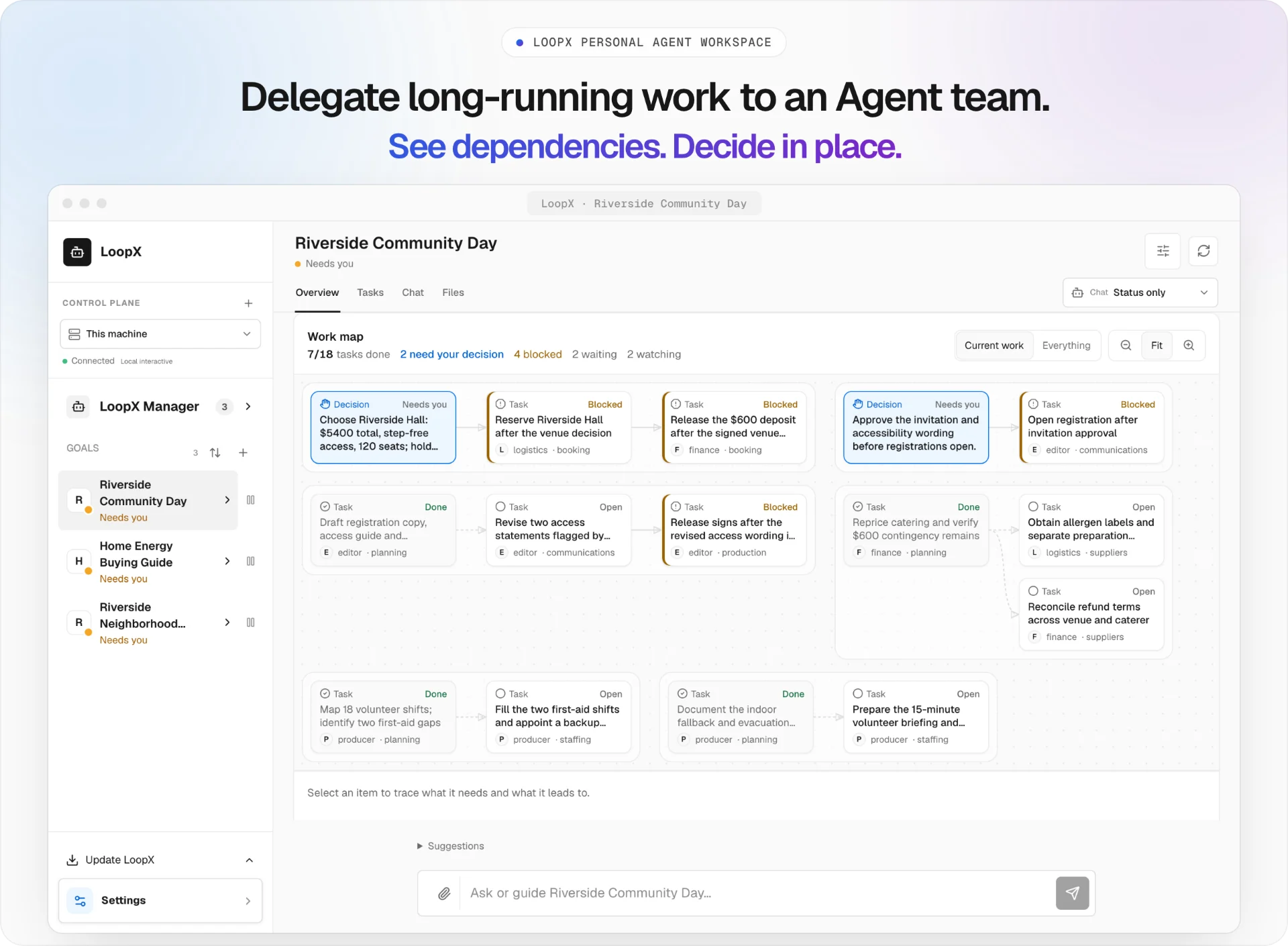 Source-built App on an authored Workspace stories replay; no live Agent execution · watch the 32-second walkthrough
Start in Codex App in two steps. Install once:
python3 -m pip install --upgrade loopx && loopx workflow-skills --installRestart Codex App, then type this in a thread opened on your project:
$loopx fix the open PR review feedback and keep the patch reviewableLoopX connects the project, plans the work as Todos and sets up the heartbeat that keeps it moving. Claude Code uses /loopx <complex task> · other Agent hosts
LHTB · 46 tasks · GPT-5.6 Sol: LoopX 1.0.3 Heartbeat reaches 0.4948 mean reward — +17.3% vs Plain Codex, +10.6% vs native Codex Goal. Results and pass rates ↓
More verified work. Less human attention. LoopX gives agents durable goals, bounded continuation, peer ownership and recoverable handoffs. Your runtime provides the model and tools; LoopX keeps track of what to do next, what is accepted, and when to ask you.
| What you want to do | Start here |
|---|---|
| Keep a coding or research agent working across sessions | Install and start |
| Manage personal projects, schedules and decisions in one place | Personal Agent Workspace |
| Let agents collaborate and deliver verifiable results | Agent collaboration guide |
Meet the Personal Agent Workspace
Keep long-horizon goals in one local-first workspace. Goals, attention, conversations, tasks, files, schedules, and recovery stay durable across days, restarts, and harnesses. Reopen a project, inspect the previous turn’s state and evidence, and continue the next permitted action.
LoopX 1.0 brings these long-horizon control states into the Personal Workspace. It gives you one place to:
- see what needs you, what is running, what is being watched, and what is scheduled or stopped;
- configure Goal capabilities, distinguish machine defaults from Goal overrides, and preview changes before applying them;
- steer a live turn, queue a message, or use the async inbox from a connected Lark conversation with explicit Goal/Agent/session routing;
- inspect deliverable files, periodic reports, and their supporting evidence;
- continue across Codex, Claude Code, direct-model, and other registered Agent sessions without losing Goal state or evidence;
- review protected changes through typed preview, explicit confirmation, and receipts while LoopX state—not the browser—remains authoritative.
For Manager group conversations, LoopX keeps message visibility separate from Turn authority; see the bilingual Lark Manager context and authority contract.
loopx dashboardloopx dashboard is the supported browser/PWA launch path. You can also download
native desktop previews from the 1.0 release;
they reuse the same loopback services and Goal state. Apple Silicon macOS supports
signed App updates that pair the shell with its bundled runtime, plus repair and
recovery. Python 3.11+ is required; the App is ad-hoc signed, not notarized.
Windows preview installers currently use manual updates and a separately installed CLI.
Desktop installation, updates, and source development.

From a source checkout, run python -m demo.workspace serve to explore a community
event, a home-energy comparison, and a neighborhood website release. Each has four
work roles, 18 tasks, two decisions, and two watches. The screenshot above comes
from this reproducible workspace. Scenarios and replay instructions.
Watch the full 32-second walkthrough · Read the workspace guide · Try the five-minute tour
Why LoopX
An agent can finish a task in one session. Long-running work is harder: objectives change, owner decisions appear, evidence goes stale, agents hand work to peers, and a scheduler can keep spending after no useful transition remains. Chat memory and a timer are not enough to govern that.
LoopX keeps the durable control state in one compact layer:
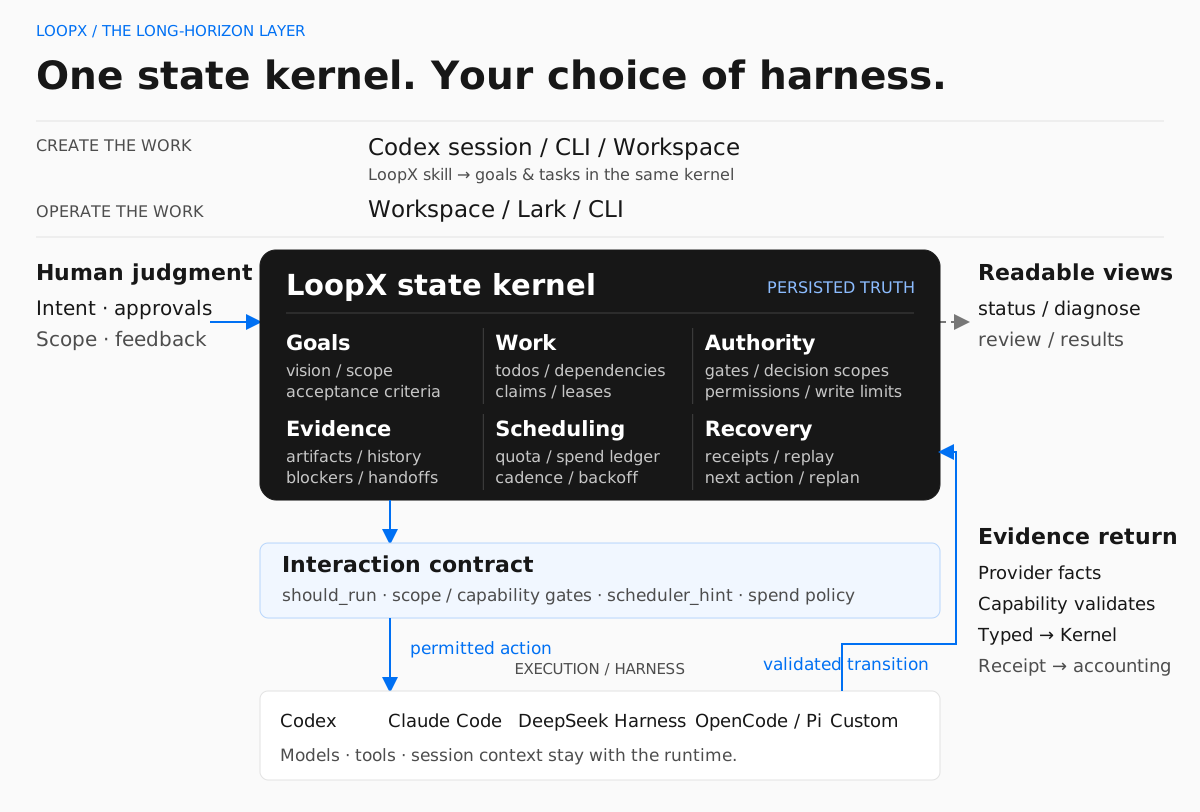
Agent runtimes execute the work. LoopX governs the state that lets engineering, research, discovery, and operations loops continue across runs. It is not another agent framework or a provider-specific orchestration runtime.
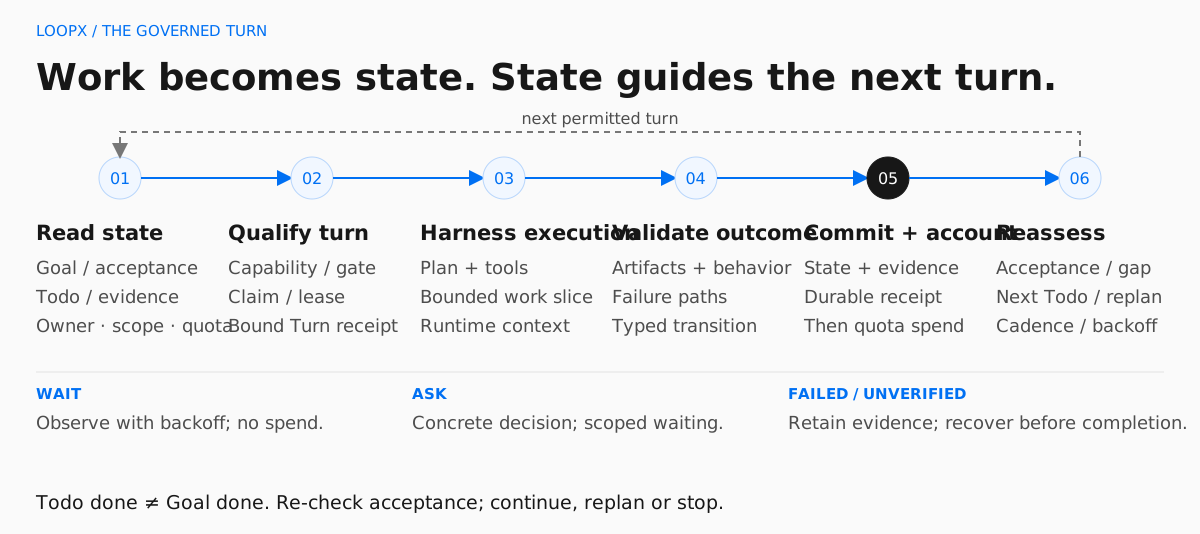
A useful mental model is an agent-native Kanban for long-running work. Cards carry identity, authority, evidence, and continuation. Moves are validated operators such as claim, gate, monitor, and writeback. The board is a projection; LoopX state remains the source of truth.
Registered agents are peers. Claims, leases, task boundaries, capabilities, and typed continuation decide who acts next; no durable leader identity is required.
LoopX is useful when you run:
- multi-day engineering, research, benchmark, or experiment objectives;
- issue and PR loops that must preserve scope, evidence, and review state;
- recurring heartbeat or monitor work;
- projects with owner, safety, publication, or private-data gates;
- peer-agent teams where ownership, leases, and handoff matter;
- creator, research, or operations workflows whose progress must remain legible to a non-engineering operator.
LoopX is not an autonomous production controller. Dangerous permissions, publishing, production writes, and final ownership stay with the human.
Personal Agents, Teams, and Self-Improving Workflows
Meta Muse and Grok Bot make persistent personal agents and delegated work a familiar product idea. LoopX approaches that space as an open, provider-neutral control plane for agents you already run—not as a hosted replacement for either product.
- Personal agent: use the shipped Workspace and connected Lark surfaces to inspect goals, steer work and resolve decisions. The persistent steward and semantic handoff RFC extends this toward one capable front door for a team; the complete journey remains under qualification.
- Agent team: share goals without erasing worker ownership. Claims, evidence and explicit returns keep implementation and review connected. See the three-agent collaboration demo for a bounded example, including corrections and two review rounds.
- Self-improving workflows: connect feedback to the next attempt through Reward Memory, and evaluate candidate changes through Explore. Both are optional. The link to recursive self-improvement (RSI) is the engineering loop—propose, test, review, retain—not a claim that LoopX has demonstrated autonomous model improvement or compounding capability gains.
A personal steward is an interaction role, not a second source of authority. Background execution still needs an available host and configured runtime. The overall roadmap separates shipped foundations from the next end-to-end acceptance milestones.
Evidence
LHTB: Higher Mean Reward With the Same Model
LoopX 1.0.3 Heartbeat reaches 0.4948 mean reward across 46 matched tasks: +17.3% over Plain Codex and +10.6% over native Codex Goal. All three use GPT-5.6 Sol, max reasoning effort, and disabled Web Search. Long-Horizon Terminal-Bench goes beyond coding: these tasks span research reproduction, scientific simulation, multimodal analysis, professional workflows, games, and systems work.
| Execution mode | Mean reward ↑ | Strict pass rate (≥0.95) | Pass rate (≥0.80) |
|---|---|---|---|
| Plain Codex | 0.4218 | 7/46 (15.2%) | 12/46 (26.1%) |
| Native Codex Goal | 0.4475 | 4/46 (8.7%) | 14/46 (30.4%) |
| LoopX 1.0.3 Heartbeat | 0.4948 | 7/46 (15.2%) | 15/46 (32.6%) |
The ≥0.80 threshold is a supplementary, post-hoc view; ≥0.95 remains the benchmark's strict solved threshold. No score in this study equals 0.80, so these counts also match the study brief's >0.80 view.
Against native Goal, task-level rewards improve on 23, tie on 13, and regress on 10 tasks. Strict solves match Plain Codex, so the mean gain is not a claim that every task improves or that more tasks are fully solved than Plain. Mean reward also credits partial progress.
One effective trial per task and mode; designated replacement trials and unequal runtime/budgets, including longer budgets for some Heartbeat replacements. These are observed system results, not an equal-budget efficiency result or an isolated causal estimate of LoopX's effect.
Interactive results, task comparisons and methodology · Five-arm study and limits · Public task-level scores
Beyond benchmarks, LoopX also has inspectable long-running project evidence. The public OpenViking contribution sequence and the redacted, owner-run Auto ML showcase each span 200+ hours of elapsed loop lifetime, preserving bounded turns, decisions, and evidence updates. This measures wall-clock project time, not continuous model execution or unattended production autonomy. Open each visual to inspect the public-safe task graph, evidence branches, and cross-turn decisions; each case states its source and reproducibility boundary.
Open-Source Issue Fix
200+ hour public contribution arc: PR delivery and reusable fix knowledge evolve together.
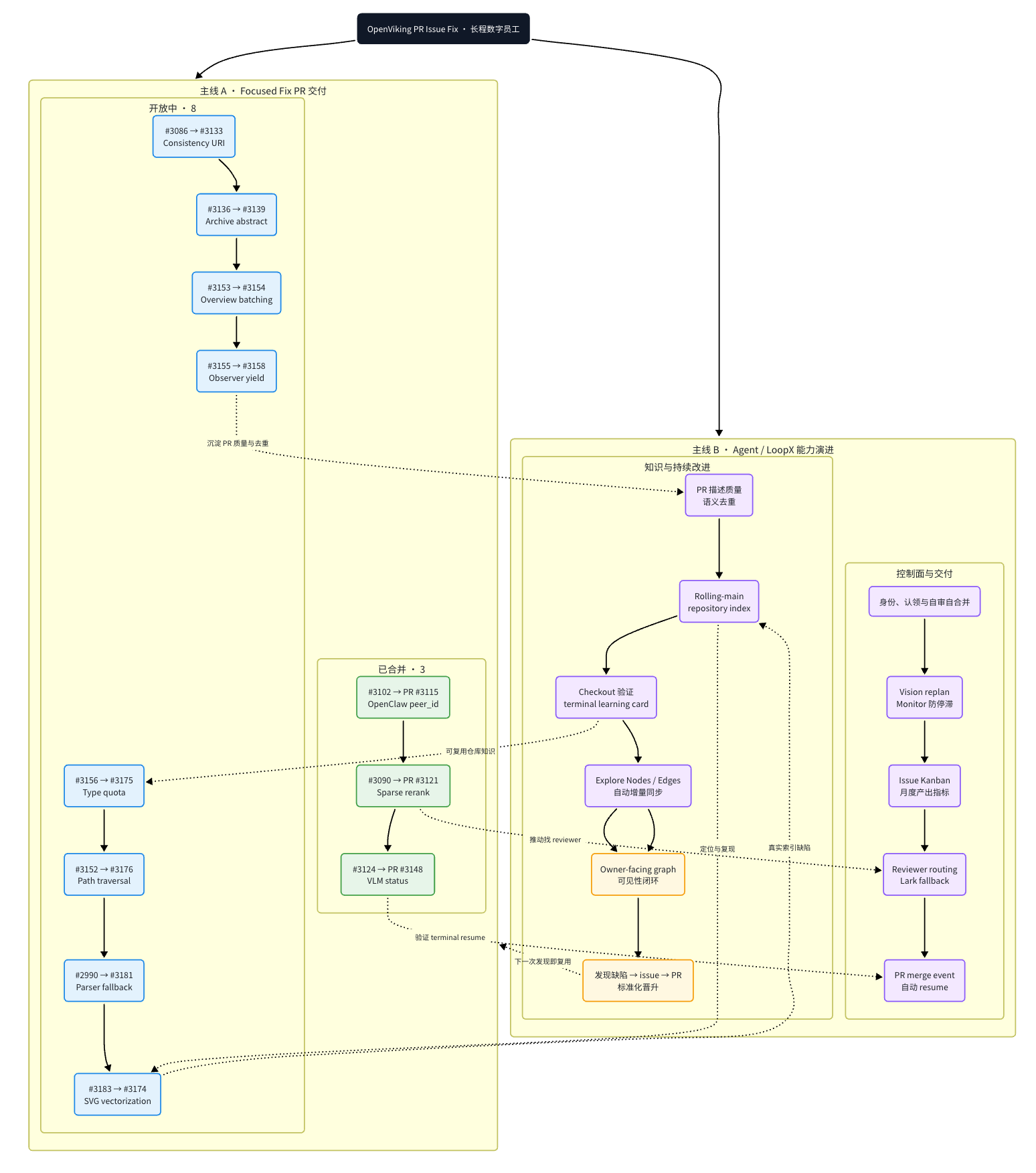
LoopX's creator uses this path as an OpenViking contributor. The represented public contribution sequence spans more than 200 elapsed hours from its first PR creation to the latest represented review or update. The Issue-Fix capability keeps rolling repository context, revision-stamped fix knowledge, and reviewer-facing preferences separate; linked PRs plus current checkout source and tests remain authoritative.
Auto ML Experiment
Redacted owner-run showcase: a 200+ hour experiment arc keeps hypotheses, matched evidence, invalid lineages, running replicates, and promote/stop gates visible in one graph.
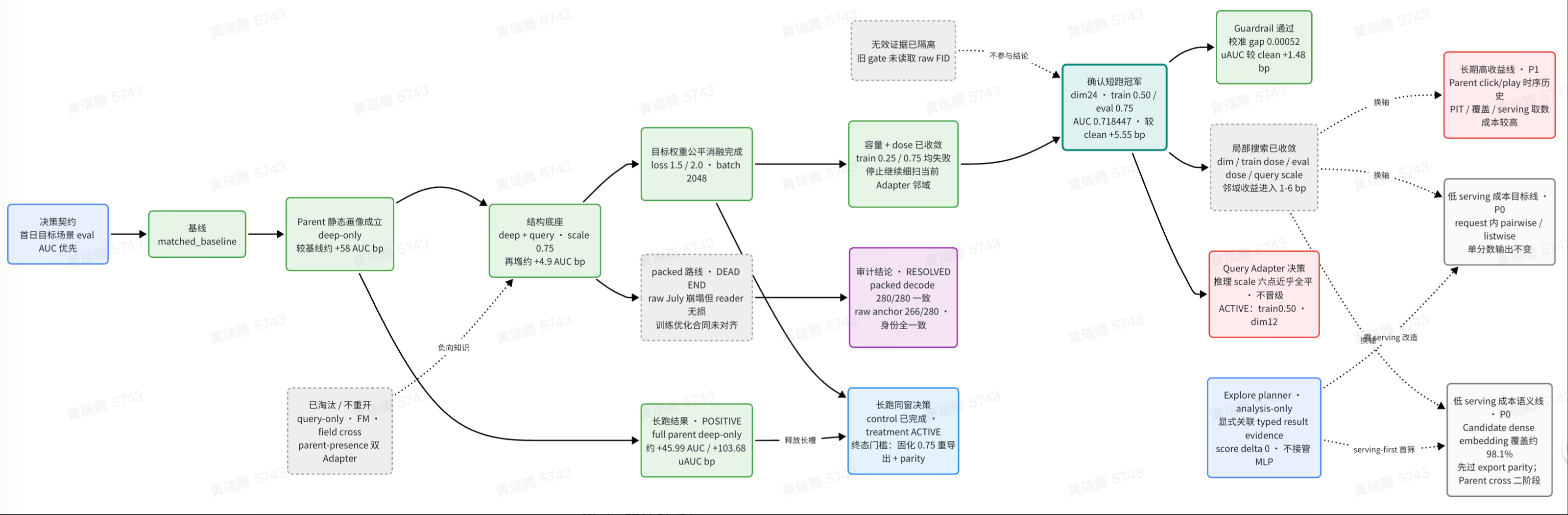
The redacted public-safe graph preserves decision lineage across that 200+ hour elapsed window. It is an owner-run showcase, not a claim of continuous compute, independent reproduction, or a production result.
Used In Real Projects
- Independent user ·
>13hC++ accuracy run. The user reported that a multi-stage task stayed aligned, triggered public research, adopted a public code-memory tool, and improved final precision. Read the evidence boundary. - Independent user ·
4dunattended run. The user reported four days without human intervention, useful ongoing work, and a periodic report surface. Read the redacted case. - Independent user ·
7merged PRs. A LoopX-attributed Engine refactor is visible in a public issue and seven merged PRs; attribution and the reported1B+token scale remain user reports. Inspect the case.
These are the three strongest current cases, not the full inventory. Browse the complete Showcase catalog for contributor cases, creator dogfooding, reproducible demos, and explicit evidence-strength labels.
Exploratory Benchmark Studies
- SWE-Marathon: Five execution modes on 15 matched tasks compare self-verification, scores, and cost. More self-verification did not consistently yield higher scores.
- LHTB × LoopX: The results above lead into five execution mechanisms, task-level comparisons, regressions, and exploratory task-type analysis.
- DeepSWE behavior analysis (Chinese): Selected cases examine how domain hints relate to requirement retention and verification choices, offering mechanism hypotheses for further testing.
SWE-Marathon and LHTB have one effective trial per task and mode; DeepSWE uses selected cases and post-hoc analysis.
More inspectable surfaces:
- the public homepage for the product narrative, quick start, and long-running evidence;
- the complete Showcase catalog and its bilingual hosted index;
- the Agent collaboration guide for dependent artifacts, independent review and returned results;
- the public user manual.
Try LoopX
Install once:
python3 -m pip install --upgrade loopx && loopx workflow-skills --installStart From Your Agent
Restart your Agent host, then start from a session opened on your project:
| Host | Type |
|---|---|
| Codex App, Codex CLI | $loopx <complex task> |
| Claude Code | /loopx <complex task> |
| DeepSeek Harness | Install the native DSH plugin, select the loopx skill, then describe the task |
LoopX reuses existing project state or connects the project, plans the work as
Todos and sets up the host's loop. loopx status shows the goal, any decision
waiting for you and the next Todo; loopx doctor diagnoses the install.
Requires Python 3.11+ and Node.js 22.22.3+ (24 LTS recommended).
Installing LoopX covers native Windows,
pipx, upgrades, rollback and uninstall.
| Host | Recommended start | Loop driver |
|---|---|---|
| Codex App | $loopx <complex task>, or choose loopx from /skills, in a thread opened on the project. | Codex App heartbeat automation, refreshed from quota should-run.scheduler_hint |
| Codex App over SSH | loopx agent-onboard --agent-type codex-app-ssh --project . | The returned visible /goal <task_body> |
| Codex CLI | Start codex in the project, then $loopx <complex task> or /skills. | Visible /goal <task_body>; no hidden headless execution by default |
| Claude Code | Install the opt-in adapter, then run /loopx <task> followed by /loop. | Native Claude Code /loop gated by LoopX |
| KunlunCode | Run loopx-kunluncode connect --project . --goal-id <goal-id> --agent-id <registered-agent-id>, add a bounded todo, then run loopx-kunluncode run --project .. | Native Goal Pro through app-server; LoopX writes completion and quota only after strict verification |
| OpenCode | Install the static command facade; opt in to --with-goal-bridge for recurring goals. | OpenCode command facade and explicit goal bridge |
| Pi | Install the opt-in goal extension with loopx slash-commands --install --surface pi, then use /loopx <task> from a trusted Pi session. | Visible Pi goal extension gated by LoopX quota (loopx_goal_activate + agent_settled continuation) |
| ZCode | Install the skill facade with loopx slash-commands --install --surface zcode, then invoke the $loopx skill (or /loopx <complex task>) from a ZCode session in the project. | The ZCode session's own turn loop; every continuation enters through quota should-run |
| Antigravity CLI (agy) | Install the skill facade with loopx slash-commands --install --surface agy, then invoke the loopx skill (or /loopx <complex task>) from an agy session in the project. | The session's native /goal loop (audited until <!-- GOAL_COMPLETE -->) with schedule self-wakes while the session lives; the facade instructs every turn/wake to re-enter through quota should-run — advisory pacing, not a host-enforced gate |
| Kiro CLI | Install the skill facade with loopx slash-commands --install --surface kiro-cli, then run /loopx <complex task> from a kiro-cli session in the project. | The session's native /goal --max <N> <task_body> Done when: <criteria> loop, with the acceptance criteria stated inside the goal statement because the host derives them from it, bounded by the host's own iteration budget (default 5) and settled through the built-in goal completion contract; the facade instructs every turn and iteration to re-enter through quota should-run — advisory pacing, not a host-enforced gate |
| DeepSeek Harness (dsh) | Install the native DSH plugin, select the loopx skill, and describe the task. The dsh goal-mode adapter remains available for headless turns. | Native same-session continuation and GoalBar, or headless dsh segments; both remain gated by LoopX authority |
| Cursor, shell, or custom runner | loopx start-goal --guided --project . --goal-text "<task>", or call LoopX from your runner. | Your shell, scheduler, or runner |
The exact, copy-ready setup messages and host recovery paths live in Getting Started. Host integrations can inspect the Codex App host command registry contract, the Codex CLI packaged install path, the Claude Code adapter, the KunlunCode native Goal adapter, the Kiro CLI goal-mode adapter, or the DeepSeek Harness turn adapter.
See the 60-second DSH × LoopX Replan recording and reproducible fixture for the native path: install the plugin, select one skill, change a material constraint, and inspect the preserved decision trail.
For custom runners, start with the
minimal custom runtime example
(python3 examples/custom-runtime-minimal-cli-turn-smoke.py), then the full
Embed LoopX in Your Agent Runner
guide and the worker bridge install contract.
The core tick is deliberately small:
loopx quota should-run      # should this registered agent act now?
loopx todo claim            # who owns this slice?
loopx todo update           # what changed?
loopx refresh-state         # what should the next turn see?
loopx quota spend-slot      # account for a completed, validated slice
Clone-based install is only for contributors who want the live canary wrapper:
git clone https://github.com/loopx-project/loopx ~/loopx
~/loopx/scripts/install-local.sh
loopx doctor
First-Run Feedback
If LoopX works for you, a one-minute public issue helps us learn what a real first run looks like. It is optional, contains no telemetry, and should not include logs, paths, credentials, internal project names, or goal contents:
loopx first-run-report prints the same prefilled link locally without
sending anything.
Basic usage statistics default on after first-use disclosure: a daily random-ID
heartbeat for platform support and continued use, plus separate ID-free CLI
counts. No content is collected. Disable both in Settings → Capability Center
or with loopx usage-ping disable / LOOPX_USAGE_PING=0; inspect payloads with
loopx usage-ping status. See Basic usage statistics.
Capabilities
LoopX keeps the architecture explicit so the same governed outcome can survive a change of agent harness or external provider. The terms describe different boundaries rather than interchangeable kinds of plugin:
| Boundary | Meaning | Go deeper |
|---|---|---|
| Kernel | Owns durable goal, todo, gate, evidence, quota, recovery, and scheduling truth. | Architecture |
| Capability | Defines a stable, provider-neutral contract for producing one bounded, verifiable caller outcome from LoopX state. | Capability catalog |
| Provider | Calls an external system or local implementation and returns bounded observations, effect results, and readback. | Provider responsibilities |
| Extension | Packages and operates an optional provider through explicit install, readiness, enable, upgrade, disable, and rollback lifecycle. | Extension lifecycle |
Host declarations such as --available-capability shell describe observed
execution support. They are runtime capacities in this product map, not product
capabilities and not permission grants. The effective capability still applies
its own policy and authority checks before proposing a transition.
Core Control-Plane Promises
The Kernel folds its mechanics into five questions. Each question delivers one product promise on top of any agent harness: objective → long-horizon state; next → semantic decisions; human judgment → human-agent collaboration; evidence → recovery; continuation → governance.
| Question | What LoopX keeps visible |
|---|---|
| What is the objective? | The active goal, explicit scope, and current authority. |
| What happens next? | Ordered user and agent todos, ownership, claims, and leases. |
| What needs human judgment? | Concrete user gates instead of a vague "waiting for owner." |
| What evidence changed? | Compact run history, validation, blockers, and accepted writeback. |
| May the loop continue? | Quota, capabilities, safe fallback, scheduler hints, and stop conditions. |
Control-Plane Surface
| Surface | What it does | Start with |
|---|---|---|
| Goal state and status | Tracks active state, todos, claims, gates, evidence, run history, and first-screen attention. | loopx status, loopx diagnose, loopx review-packet |
| Quota and interaction contract | Decides whether a turn should deliver, ask, wait, self-repair, or stay quiet. | loopx quota should-run, quota allocation |
| Agent runtime bridges | Keeps Codex App, Codex CLI, Claude Code, and generic workers aligned with the same guard. | loopx heartbeat-prompt, loopx codex-cli-bootstrap-message, loopx worker-bridge |
| Operator surfaces | Renders compact status without making the browser the state authority. | loopx serve-status, dashboard |
| Session dash | Starts a live single-page panel that tracks fleet progress: sessions, their goals, and each goal's status/todo progress, with result statistics; auto-refreshes in place. | loopx dash, session dash design |
| External projections | Projects todos and gates into collaboration surfaces while LoopX remains authoritative. | loopx lark-kanban, Lark Kanban adapter |
| Domain capabilities | Packages repeatable work lanes such as issue fixing, content operations, value connector planning, ML experiment advice, benchmark evidence, and Explore. | loopx issue-fix, loopx content-ops, loopx value-connectors, loopx ml-experiment, loopx benchmark, Explore |
| Experimental context learning | Lets named registered agents trial provider-neutral Reward Memory through ignored, default-off project configuration. OpenViking is one provider option, not a global dependency. | loopx reward-memory experiment-status, Reward Memory architecture |
| Governance patterns | Captures reusable routing, gate, evidence, projection, and planning shapes. | interaction patterns, state model |
The shipped primitives include lifetime goals, concrete user gates, audited safe fallbacks, peer todo ownership, quota and steering, compact run history, evidence-backed handoff, a read-first management surface, project-level value signals, and public/private boundary checks.
Product Capability Paths
Capabilities turn those generic primitives into outcome-owned work lanes. Start from the outcome, then inspect the current registered implementation and its write boundary:
| You need to... | Capability | Start with |
|---|---|---|
| Turn a public issue into a reviewable, evidence-backed change | Issue Fix | loopx capability show issue-fix --format json |
| Qualify the exact final diff before delivery | Change Quality | loopx capability show change-quality-qualification --format json |
| Notice busy-but-off-goal work rounds before the periodic review | Progress-Review Sentinel | loopx capability show progress-review-sentinel --format json |
| Preserve a changing stack of already reviewed branches | Integration Branch | loopx capability show integration-branch-reconcile --format json |
| Explore uncertain research without losing hypotheses and findings | Explore | loopx capability show explore --format json |
| Rebase decisions on current evidence and verified outcomes | Decision Context | loopx capability show decision-context --format json |
| Produce scheduled or progress-triggered reports with receipts | Periodic Report | loopx capability show periodic-report --format json |
Run loopx capability list --format json for the authoritative catalog in the
installed release. A capability detail reports its user value, maturity,
provider readiness, entry commands, write boundaries, protocols, and durable
validation. Browse the human-readable capability index
to choose by outcome; use Extensions and Capabilities
when installing or building a provider.
Runtime Responsibilities
| Role | Responsibility |
|---|---|
| Agent | Plans, analyzes, uses tools, and performs one bounded action through a host/runtime. |
| Provider | Calls external systems and returns observations, effect results, and readback. |
| Capability | Defines the caller outcome, normalizes provider output, validates it, and proposes a typed transition. |
| Kernel | Owns durable todos, gates, monitors, accepted writeback, quota, recovery, and scheduling. |
The execution path is Agent -> Capability -> Provider; the control path
returns Provider readback -> Capability transition -> Kernel. An extension is
how an optional provider is packaged and managed, not another control-plane
owner. See Architecture and
Extensions and Capabilities.
Advanced Paths
The first useful loop does not require every optional surface. Add these only when the work needs them.
Inspect the current goal's read-only capability catalog before enabling an advanced path:
loopx configure-goal --goal-id <goal-id>Without --execute, this reports current/default state, fit, boundaries, and
copyable commands without changing project state.
Recurring Work Presets
Safe presets cover daily triage, changelog drafts, and PR watching. Start with the beginner preset guide.
loopx preset list
loopx preset show daily-triage
Preset inspection is read-only. For a connected recurring goal,
loopx ready-score --goal-id <goal-id> --agent-id <agent-id> reports whether
the loop is ready to run repeatedly.
Governed Turns
LoopX can generate one pure, bounded turn decision from a validated receipt, fresh quota state, and a provider-neutral budget. The current Codex CLI quickstart and activation contract are documented in LoopX Turn for Codex CLI.
Explore Graph and Harness
Explore is supported, optional, and default-off. It works best when a task has a measurable offline evaluation, baseline, treatment, and guardrails; it is not a substitute for production approval. Start with the Explore capability and its Lark presentation mapping.
Review Agent Work
Use loopx review-packet for a compact owner-facing view of decisions,
evidence, validation, and unresolved gates. The
intelligent management surface
describes the operator model; the
project-level reward model
describes conservative value signals across output quantity, quality, token
cost, and user attention cost.
For a concrete peer workflow, start with the Agent collaboration guide: a builder consumes an analyst's artifact, obtains independent review, handles an owner correction and returns the checked result. The guide distinguishes the runnable same-host example from the earlier cross-runtime design sketch.
App and Projection Paths
- Local read-first UI: dashboard guide
- Public product overview: public homepage
- Documentation portal: hosted docs
- Feishu/Lark projection: Lark Kanban adapter
- Generic host integration: integration guide
- Custom multi-agent runner: minimal custom runtime example, then custom runner integration
Optional projections make state easier to inspect; they do not become the source of truth.
Operating and Recovery
Start daily inspection with:
loopx status
loopx history --goal-id your-project-goal
loopx quota should-run --goal-id your-project-goal
Automatic turns must check quota first and append spend only after validated writeback. Quiet skips, preflight failures, and dry-run previews do not spend. When a user gate blocks one lane, a separately audited safe fallback may continue, but it must not bypass the gate.
Peer agents use loopx todo claim before delivery and loopx todo update
after validation so ownership and evidence remain visible.
Scheduler cadence follows quota should-run.scheduler_hint; installed Codex
App automations acknowledge the current hint through the returned
ack_hint.cli_args. Collision recovery, monitor semantics, self-repair, and
the exact operator commands are maintained in
Getting Started,
Quota Allocation, and
Long-Task Cadence Policy.
Before publishing public docs or examples:
loopx check \
  --scan-path README.md \
  --scan-path docs/ \
  --scan-path examples/
Current Technical Directions
LoopX has three active strategic programs plus an architecture and research
incubator. These are direction signals, not delivery promises; main, released
artifacts, and stable reference contracts remain the source of shipped truth.
- Long-Horizon Benchmarks and Evidence: reproducible capability evidence and controlled mechanism research across complementary benchmark environments. Direction tracker
- Operator Surface and IM Integration: an operator workspace, session
records, and bounded collaboration surfaces. The Personal Workspace is
shipped; unified steward, execution, and recovery journeys remain under
qualification, with
@maxliux5as implementation lead. Direction tracker - Shared Goal Authority and Cross-host Coordination: provider-neutral coordination for explicitly shared goals, with NoKV as an unpromoted provider candidate rather than a new control-plane authority. Direction tracker
- Architecture and Research Incubator: Effect Program hardening, TypeScript parity migration, hierarchical stride, research exploration, human attention, artifact lifecycle, and memory utility work at explicitly different maturity levels. Direction tracker
Read the canonical Technical Directions map for stages, promotion gates, contributor-safe cuts, and ownership boundaries. Use the pinned GitHub Discussion for community discussion. Core control-plane reliability continues as the shared foundation beneath these programs.
Advanced Documentation
Product website · Blog · Developer Book
Start with the path that matches your current task. Use the hosted documentation portal for the published docs site; the documentation index remains the complete source map. This list stays selective; each category index owns its deeper documents and versioned protocols.
Use and Operate
- Getting Started: install, connect, diagnose, daily workflow, heartbeats, dashboard, development, and commands.
- User Manual: public onboarding, concepts, FAQ, and selected cases.
- Operations: goal continuation, todo, cadence, attention, and authority workflows.
- Quota Allocation and Heartbeat Automation Prompt: scheduler eligibility, spend, and scheduled continuation.
- Dashboard and Status Data Contract: operator-facing state and projection contracts.
- Release Readiness: install/update paths, compatibility gates, release notes, and safe-to-depend-on surfaces.
Understand the Control Plane
- Architecture: lifetime-goal invariant and kernel.
- State Interaction Model: actors, stores, interaction contract, and writeback.
- Concepts: reusable routing, gate, evidence, projection, and planning patterns.
- Product Foundations: Loop Engineering principles, project-level reward, and reward-style replanning.
- Product Vision: the broader Loop Agent direction.
Integrate and Extend
- Integration Guide
- Minimal Custom Runtime Example
- Custom Agent Runner Integration
- Integrations: runtime, host, collaboration, and external-system adapters, including worker bridge and Lark.
- Extensions and Capabilities
Build and Review LoopX
- Developer Guide: contributor workflows, benchmark development, documentation layout, and quality gates.
- Reference and Protocols: stable contracts and versioned implementation protocols, including host command and reward memory architecture.
- Control-Plane Developer Course: nine Chinese, code-led lectures.
- Testing and Quality: validation layers and risk-based checks.
- Public/Private Boundary: safe fixtures, examples, evidence, and publication.
Inspect Outcomes
- Showcase Catalog: public-safe cases and evidence labels.
- Research and Evidence: benchmark investigations and source-backed findings.
- Update Notes: public-safe progress notes.
Project and Community
- Current Technical Directions
- Project Governance
- Contributing and Contributor Tasks
- Authors and Contributors
- Project History
- Name and Marks
- Brand Guide for External Use: how projects and companies may reference LoopX, its integrations, and its artwork
- ADOPTERS: voluntary self-attested adoption directory
- Ecosystem Adoption - integrations, sampling, and derivatives we observe and track
Partner Projects
LoopX welcomes collaboration with other open-source projects to build the long-running agent ecosystem. Our confirmed partners include:
- OpenViking - Self-evolving context database for AI agents
- NoKV - AI native distributed file system
Community and Feedback
LoopX is already running real long-running agent goals and is under active development. The most useful feedback comes from real long-running agent projects: where the control plane helped, where it felt heavy, and which gates or handoffs disappeared from view.
- Use GitHub Issues for reproducible bugs, install problems, and feature requests.
- Open PRs for docs fixes, showcase writeups, and small public-safe examples.
- Join the Discord community, or use Lark or WeChat below.
See Support for channel routing, service boundaries, and official publication sources.


Contributing
External contributors should start with Contributor Tasks for public, claimable work and Contributing for setup, validation, and boundary rules. Project roles and public history are recorded in Governance, Authors and Contributors, and Project History.
LoopX keeps local active state separate from the public repository. Do not
commit .loopx/, legacy .codex/goals/, live ACTIVE_GOAL_STATE.md, raw benchmark
traces, credentials, private logs, or operator artifacts.
Current Status
LoopX 1.0 is a usable local control plane for long-running agent work and is entering broader adoption. It is not a full agent platform, an agent runtime, or an autonomous production controller.
Today LoopX ships a durable state kernel for goals, typed todos and decision scopes, peer claims and leases, evidence and writeback, quota-aware scheduling, and cross-turn continuation. Guided start, recurring heartbeat, isolated Codex CLI turns, evidence-backed Issue-Fix admission, optional Explore and auto research paths, public validation canaries, and the multi-project Personal Workspace all build on that shared control state.
Support levels remain explicit. The state and CLI contracts are the stable center; several host integrations and advanced paths are optional, default-off, or experimental. LoopX does not grant credentials, approve destructive or production actions, publish on a user's behalf without authorization, or turn an unverified run into evidence of success.
Current investment is organized through the Technical Directions map: long-horizon benchmark evidence, operator surface and IM integration, shared-goal cross-host coordination, and an explicitly staged architecture and research incubator.
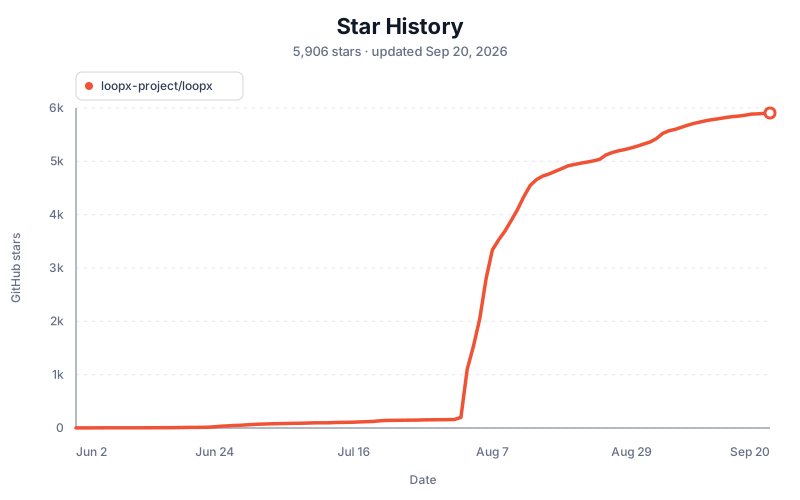
Star History
License
Apache License 2.0 beginning with v0.4.8. See LICENSE and
NOTICE. Releases through v0.4.7 remain under their original MIT
terms; the historical text and notice are preserved in
LICENSE-MIT. The licensing policy
explains the version, contribution, patent-grant, and open-core boundaries.