
GetNotes Tools
hoppscotch/hoppscotch
Tool นี้คืออะไร
Hoppscotch เป็นแพลตฟอร์ม Open Source สำหรับการพัฒนา API ที่ช่วยให้นักพัฒนาสามารถสร้าง ทดสอบ และจัดการคำขอ API ได้อย่างรวดเร็วและมีประสิทธิภาพ
ข้อมูลโปรเจกต์
ดาว
80.3K
Forks
6.1K
License
MIT
อัปเดต GitHub ล่าสุด
10 ก.ย. 2569
เพิ่มใน GetNotes
14 ก.ค. 2569
Repository
hoppscotch/hoppscotch
รูปแบบ
เหมาะกับงาน
เหมาะกับอาชีพ
Ecosystem
TypeScript · Vue
แปลและเรียบเรียงโดย AI
เนื้อหาฉบับภาษาไทย
ใช้อ่านเพื่อทำความเข้าใจเบื้องต้น โปรดตรวจสอบรายละเอียดสำคัญกับเอกสารต้นฉบับด้านล่าง





เราขอแนะนำอย่างยิ่งให้คุณดู เอกสารประกอบของ Hoppscotch เพื่อเรียนรู้เพิ่มเติมเกี่ยวกับแอป
การสนับสนุน



คุณสมบัติ
❤️ น้ำหนักเบา: ออกแบบด้วย UI ที่เรียบง่าย
⚡️ รวดเร็ว: ส่งคำขอและรับการตอบกลับได้แบบเรียลไทม์
🗄️ HTTP Methods: เมธอดคำขอจะกำหนดประเภทของการกระทำที่คุณต้องการให้ดำเนินการ
GET- คำขอเพื่อดึงข้อมูลทรัพยากรPOST- เซิร์ฟเวอร์สร้างรายการใหม่ในฐานข้อมูลPUT- อัปเดตทรัพยากรที่มีอยู่PATCH- คล้ายกับPUTมาก แต่เป็นการอัปเดตบางส่วนบนทรัพยากรDELETE- ลบทรัพยากรหรือส่วนประกอบที่เกี่ยวข้องHEAD- ดึงส่วนหัวการตอบกลับที่เหมือนกับคำขอ GET แต่ไม่มีเนื้อหาการตอบกลับCONNECT- สร้างอุโมงค์ไปยังเซิร์ฟเวอร์ที่ระบุโดยทรัพยากรเป้าหมายOPTIONS- อธิบายตัวเลือกการสื่อสารสำหรับทรัพยากรเป้าหมายTRACE- ทำการทดสอบการวนซ้ำข้อความตามเส้นทางไปยังทรัพยากรเป้าหมาย<custom>- API บางตัวใช้เมธอดคำขอแบบกำหนดเอง เช่นLISTพิมพ์เมธอดที่คุณกำหนดเอง
🌈 ธีม: การผสมผสานที่ปรับแต่งได้สำหรับสีพื้นหลัง สีพื้นหน้า และสีเน้น — ปรับแต่งตอนนี้
- เลือกธีม: การตั้งค่าระบบ, Light, Dark และ Black
- เลือกสีเน้น: Green, Teal, Blue, Indigo, Purple, Yellow, Orange, Red และ Pink
- โหมด Zen ที่ปราศจากสิ่งรบกวน
ธีมที่ปรับแต่งจะซิงค์กับเซสชันคลาวด์/โลคัลของคุณ
🔥 PWA: ติดตั้งเป็น Progressive Web App บนอุปกรณ์ของคุณ
- โหลดได้ทันทีด้วย Service Workers
- รองรับการทำงานแบบออฟไลน์
- ใช้ RAM/หน่วยความจำและ CPU ต่ำ
- เพิ่มไปยังหน้าจอหลัก
- Desktop PWA
🚀 Request: ดึงการตอบกลับจาก endpoint ได้ทันที
- 1เลือก
method - 2ป้อน
URL - 3ส่ง
- คัดลอก/แชร์ "Share URL" สาธารณะ
- สร้าง/คัดลอกโค้ดสนิปเพ็ตคำขอสำหรับ 10+ ภาษาและเฟรมเวิร์ก
- นำเข้า
cURL - ติดป้ายกำกับคำขอ
🔌 WebSocket: สร้างช่องทางการสื่อสารแบบ full-duplex ผ่านการเชื่อมต่อ TCP เดียว
📡 Server-Sent Events: รับสตรีมการอัปเดตจากเซิร์ฟเวอร์ผ่านการเชื่อมต่อ HTTP โดยไม่ต้องใช้การ polling
🌩 Socket.IO: ส่งและรับข้อมูลกับเซิร์ฟเวอร์ SocketIO
🦟 MQTT: Subscribe และ Publish ไปยังหัวข้อของ MQTT Broker
🔮 GraphQL: GraphQL เป็นภาษาคิวรีสำหรับ API และรันไทม์สำหรับการตอบสนองคิวรีเหล่านั้นด้วยข้อมูลที่มีอยู่ของคุณ
- ตั้งค่า endpoint และรับ schema
- เอกสารหลายคอลัมน์
- ตั้งค่าส่วนหัวคำขอแบบกำหนดเอง
- คิวรี schema
- รับการตอบกลับคิวรี
🔐 Authorization: อนุญาตให้ระบุผู้ใช้ปลายทาง
- None
- Basic
- Bearer Token
- OAuth 2.0
- OIDC Access Token/PKCE
📢 Headers: อธิบายรูปแบบที่เนื้อหาของคำขอของคุณถูกส่งไป
📫 Parameters: ใช้ request parameters เพื่อตั้งค่าส่วนต่างๆ ในคำขอจำลอง
📃 Request Body: ใช้สำหรับส่งและรับข้อมูลผ่าน REST API
- ตั้งค่า
Content Type - FormData, JSON และอื่นๆ อีกมากมาย
- สลับระหว่างรายการพารามิเตอร์แบบ key-value และ RAW input
📮 Response: ประกอบด้วย status line, headers และ message/response body
- คัดลอกการตอบกลับไปยังคลิปบอร์ด
- ดาวน์โหลดการตอบกลับเป็นไฟล์
- ดู response headers
- ดูการตอบกลับแบบ raw และ preview HTML, image, JSON และ XML
⏰ History: รายการคำขอจะซิงค์กับที่เก็บข้อมูลเซสชันคลาวด์/โลคัลของคุณ
📁 Collections: จัดระเบียบคำขอ API ของคุณด้วย collections และ folders นำกลับมาใช้ใหม่ได้ด้วยการคลิกเพียงครั้งเดียว
- collections, folders และ requests ไม่จำกัด
- โฟลเดอร์ซ้อนกัน
- ส่งออกและนำเข้าเป็นไฟล์หรือ GitHub gist
Collections จะซิงค์กับที่เก็บข้อมูลเซสชันคลาวด์/โลคัลของคุณ
📜 Pre-Request Scripts: สนิปเพ็ตโค้ดที่เกี่ยวข้องกับคำขอซึ่งจะถูกดำเนินการก่อนที่คำขอจะถูกส่ง
- ตั้งค่า environment variables
- รวม timestamp ใน request headers
- ส่งสตริงตัวอักษรและตัวเลขแบบสุ่มใน URL parameters
- ฟังก์ชัน JavaScript ใดๆ
👨👩👧👦 Teams: ช่วยให้คุณทำงานร่วมกันในทีมเพื่อออกแบบ พัฒนา และทดสอบ API ได้เร็วขึ้น
- สร้างทีมได้ไม่จำกัด
- สร้าง shared collections ได้ไม่จำกัด
- สร้างสมาชิกทีมได้ไม่จำกัด
- การควบคุมการเข้าถึงตามบทบาท
- Cloud sync
- หลายอุปกรณ์
👥 Workspaces: จัดระเบียบสภาพแวดล้อม collections ส่วนตัวและทีมของคุณให้เป็น workspaces สลับระหว่าง workspaces ได้อย่างง่ายดายเพื่อจัดการหลายโปรเจกต์
- สร้าง workspaces ได้ไม่จำกัด
- สลับระหว่าง personal และ team workspaces
⌨️ Keyboard Shortcuts: ปรับให้เหมาะสมเพื่อประสิทธิภาพ
🌐 Proxy: เปิดใช้งาน Proxy Mode จาก Settings เพื่อเข้าถึง API ที่ถูกบล็อก
- ซ่อนที่อยู่ IP ของคุณ
- แก้ไขปัญหา
CORS(Cross-Origin Resource Sharing) - เข้าถึง API ที่ให้บริการใน endpoint ที่ไม่ใช่ HTTPS (
http://) - ใช้ Proxy URL ของคุณ
เซิร์ฟเวอร์พร็อกซีอย่างเป็นทางการโฮสต์โดย Hoppscotch - GitHub - Privacy Policy.
🌎 i18n: สัมผัสประสบการณ์แอปในภาษาของคุณ
ช่วยเราแปล Hoppscotch โปรดอ่าน TRANSLATIONS สำหรับรายละเอียดเกี่ยวกับ CODE OF CONDUCT ของเราและกระบวนการสำหรับการส่ง pull requests มายังเรา
☁️ Auth + Sync: ลงชื่อเข้าใช้และซิงค์ข้อมูลของคุณแบบเรียลไทม์ในทุกอุปกรณ์ของคุณ
ลงชื่อเข้าใช้ด้วย:
- GitHub
- Microsoft
- SSO (Single Sign-On)[^EE]
🔄 ซิงโครไนซ์ข้อมูลของคุณ: Handoff เพื่อทำงานต่อบนอุปกรณ์อื่นๆ ของคุณ
- Workspaces
- History
- Collections
- Environments
- Settings
✅ Post-Request Tests: เขียนการทดสอบที่เกี่ยวข้องกับคำขอซึ่งจะถูกดำเนินการหลังจากได้รับการตอบกลับจากคำขอ
- ตรวจสอบ status code เป็นจำนวนเต็ม
- กรอง response headers
- แยกวิเคราะห์ response data
- ตั้งค่า environment variables
- เขียนโค้ด JavaScript
🌱 Environments: Environment variables ช่วยให้คุณสามารถจัดเก็บและนำค่ากลับมาใช้ใหม่ในคำขอและสคริปต์ของคุณ
- environments และ variables ไม่จำกัด
- เริ่มต้นผ่าน pre-request script
- ส่งออกเป็น / นำเข้าจาก GitHub gist
- โดยการจัดเก็บค่าในตัวแปร คุณสามารถอ้างอิงถึงมันได้ตลอดส่วนคำขอของคุณ
- หากคุณต้องการอัปเดตค่า คุณจะต้องเปลี่ยนมันเพียงที่เดียวเท่านั้น
- การใช้ตัวแปรช่วยเพิ่มความสามารถในการทำงานอย่างมีประสิทธิภาพและลดโอกาสเกิดข้อผิดพลาด
🚚 Bulk Edit: แก้ไข key-value pairs เป็นจำนวนมาก
- รายการจะถูกคั่นด้วย newline
- Keys และ values จะถูกคั่นด้วย
: - เพิ่ม
#ที่ด้านหน้าของแถวใดๆ ที่คุณต้องการเพิ่มแต่ให้ปิดใช้งานไว้
🎛️ Admin dashboard: จัดการทีมของคุณและเชิญสมาชิก
- Insights
- จัดการผู้ใช้
- จัดการทีม
📦 Add-ons: ส่วนเสริมอย่างเป็นทางการสำหรับ Hoppscotch
- Hoppscotch CLI - Command-line interface สำหรับ Hoppscotch
- Proxy - เซิร์ฟเวอร์พร็อกซีอย่างง่ายที่สร้างขึ้นสำหรับ Hoppscotch
- Browser Extensions - ส่วนขยายเบราว์เซอร์ที่ช่วยเพิ่มประสบการณ์ Hoppscotch ของคุณ
 Firefox
 Chrome
ส่วนขยายช่วยแก้ไขปัญหา CORS
ส่วนเสริมได้รับการพัฒนาและดูแลภายใต้ Hoppscotch Organization
สำหรับรายการคุณสมบัติทั้งหมด โปรดอ่านเอกสารประกอบของเรา
Demo
- เว็บ : hoppscotch.io
- Windows/Linux/macOS : แอปเดสก์ท็อป
การใช้งาน
- 1ระบุ API endpoint ของคุณในช่อง URL
- 2คลิก "Send" เพื่อจำลองคำขอ
- 3ดูการตอบกลับ
การพัฒนา
ทำตามเอกสารประกอบการโฮสต์ด้วยตนเองของเราเพื่อเริ่มต้นกับสภาพแวดล้อมการพัฒนา
การมีส่วนร่วม
โปรดมีส่วนร่วมโดยใช้ GitHub Flow สร้าง branch, เพิ่ม commits และเปิด pull request
โปรดอ่าน CONTRIBUTING สำหรับรายละเอียดเกี่ยวกับ CODE OF CONDUCT ของเรา และกระบวนการสำหรับการส่ง pull request มายังเรา
การผสานรวมอย่างต่อเนื่อง (Continuous Integration)
เราใช้ GitHub Actions สำหรับการผสานรวมอย่างต่อเนื่อง ตรวจสอบเวิร์กโฟลว์การสร้างของเรา
บันทึกการเปลี่ยนแปลง (Changelog)
ดูไฟล์ CHANGELOG สำหรับรายละเอียด
ผู้เขียน
โครงการนี้เกิดขึ้นได้จากความพยายามร่วมกันของผู้มีส่วนร่วมทุกคน — ร่วมเป็นส่วนหนึ่งได้เลย

ใบอนุญาต
โครงการนี้ได้รับอนุญาตภายใต้ MIT License — ดูไฟล์ LICENSE สำหรับรายละเอียด
[^EE]: คุณสมบัติของ Enterprise edition เรียนรู้เพิ่มเติม
เอกสารโปรเจกต์
อ่านเอกสารต้นฉบับ
README วิธีติดตั้ง วิธีใช้งาน และข้อกำหนดจาก repository ต้นฉบับ

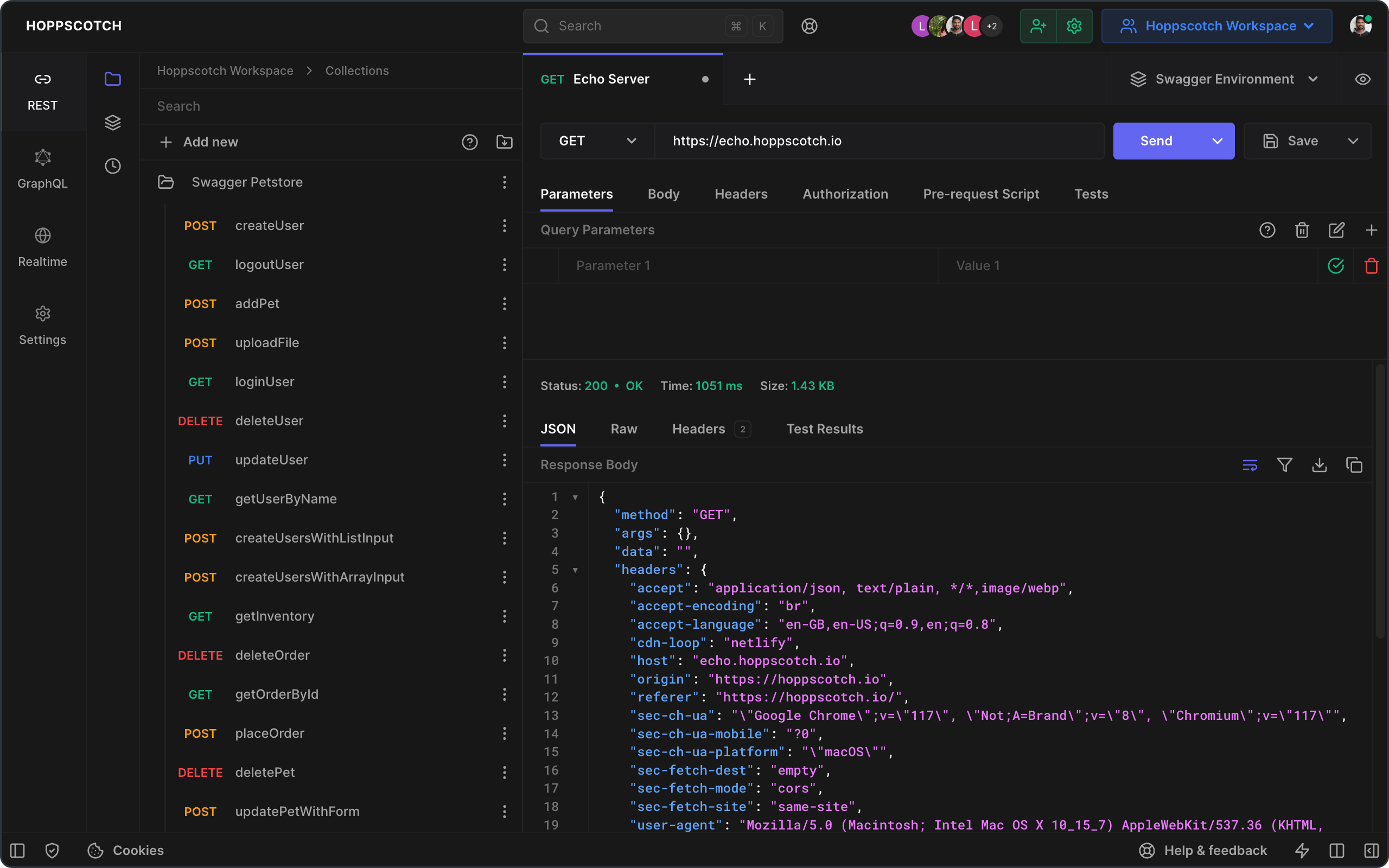
We highly recommend you take a look at the Hoppscotch Documentation to learn more about the app.
Support
Features
❤️ Lightweight: Crafted with minimalistic UI design.
⚡️ Fast: Send requests and get responses in real time.
🗄️ HTTP Methods: Request methods define the type of action you are requesting to be performed.
GET- Requests retrieve resource informationPOST- The server creates a new entry in a databasePUT- Updates an existing resourcePATCH- Very similar toPUTbut makes a partial update on a resourceDELETE- Deletes resource or related componentHEAD- Retrieve response headers identical to those of a GET request, but without the response body.CONNECT- Establishes a tunnel to the server identified by the target resourceOPTIONS- Describe the communication options for the target resourceTRACE- Performs a message loop-back test along the path to the target resource<custom>- Some APIs use custom request methods such asLIST. Type in your custom methods.
🌈 Theming: Customizable combinations for background, foreground, and accent colors — customize now.
- Choose a theme: System preference, Light, Dark, and Black
- Choose accent colors: Green, Teal, Blue, Indigo, Purple, Yellow, Orange, Red, and Pink
- Distraction-free Zen mode
Customized themes are synced with your cloud/local session.
🔥 PWA: Install as a Progressive Web App on your device.
- Instant loading with Service Workers
- Offline support
- Low RAM/memory and CPU usage
- Add to Home Screen
- Desktop PWA
🚀 Request: Retrieve response from endpoint instantly.
- 1Choose
method - 2Enter
URL - 3Send
- Copy/share public "Share URL"
- Generate/copy request code snippets for 10+ languages and frameworks
- Import
cURL - Label requests
🔌 WebSocket: Establish full-duplex communication channels over a single TCP connection.
📡 Server-Sent Events: Receive a stream of updates from a server over an HTTP connection without resorting to polling.
🌩 Socket.IO: Send and Receive data with the SocketIO server.
🦟 MQTT: Subscribe and Publish to topics of an MQTT Broker.
🔮 GraphQL: GraphQL is a query language for APIs and a runtime for fulfilling those queries with your existing data.
- Set endpoint and get schema
- Multi-column docs
- Set custom request headers
- Query schema
- Get query response
🔐 Authorization: Allows to identify the end-user.
- None
- Basic
- Bearer Token
- OAuth 2.0
- OIDC Access Token/PKCE
📢 Headers: Describes the format the body of your request is being sent in.
📫 Parameters: Use request parameters to set varying parts in simulated requests.
📃 Request Body: Used to send and receive data via the REST API.
- Set
Content Type - FormData, JSON, and many more
- Toggle between key-value and RAW input parameter list
📮 Response: Contains the status line, headers, and the message/response body.
- Copy the response to the clipboard
- Download the response as a file
- View response headers
- View raw and preview HTML, image, JSON, and XML responses
⏰ History: Request entries are synced with your cloud/local session storage.
📁 Collections: Keep your API requests organized with collections and folders. Reuse them with a single click.
- Unlimited collections, folders, and requests
- Nested folders
- Export and import as a file or GitHub gist
Collections are synced with your cloud/local session storage.
📜 Pre-Request Scripts: Snippets of code associated with a request that is executed before the request is sent.
- Set environment variables
- Include timestamp in the request headers
- Send a random alphanumeric string in the URL parameters
- Any JavaScript functions
👨👩👧👦 Teams: Helps you collaborate across your teams to design, develop, and test APIs faster.
- Create unlimited teams
- Create unlimited shared collections
- Create unlimited team members
- Role-based access control
- Cloud sync
- Multiple devices
👥 Workspaces: Organize your personal and team collections environments into workspaces. Easily switch between workspaces to manage multiple projects.
- Create unlimited workspaces
- Switch between personal and team workspaces
⌨️ Keyboard Shortcuts: Optimized for efficiency.
🌐 Proxy: Enable Proxy Mode from Settings to access blocked APIs.
- Hide your IP address
- Fixes
CORS(Cross-Origin Resource Sharing) issues - Access APIs served in non-HTTPS (
http://) endpoints - Use your Proxy URL
Official proxy server is hosted by Hoppscotch - GitHub - Privacy Policy.
🌎 i18n: Experience the app in your language.
Help us to translate Hoppscotch. Please read TRANSLATIONS for details on our CODE OF CONDUCT and the process for submitting pull requests to us.
☁️ Auth + Sync: Sign in and sync your data in real-time across all your devices.
Sign in with:
- GitHub
- Microsoft
- SSO (Single Sign-On)[^EE]
🔄 Synchronize your data: Handoff to continue tasks on your other devices.
- Workspaces
- History
- Collections
- Environments
- Settings
✅ Post-Request Tests: Write tests associated with a request that is executed after the request's response.
- Check the status code as an integer
- Filter response headers
- Parse the response data
- Set environment variables
- Write JavaScript code
🌱 Environments: Environment variables allow you to store and reuse values in your requests and scripts.
- Unlimited environments and variables
- Initialize through the pre-request script
- Export as / import from GitHub gist
- By storing a value in a variable, you can reference it throughout your request section
- If you need to update the value, you only have to change it in one place
- Using variables increases your ability to work efficiently and minimizes the likelihood of error
🚚 Bulk Edit: Edit key-value pairs in bulk.
- Entries are separated by newline
- Keys and values are separated by
: - Prepend
#to any row you want to add but keep disabled
🎛️ Admin dashboard: Manage your team and invite members.
- Insights
- Manage users
- Manage teams
📦 Add-ons: Official add-ons for hoppscotch.
- **[Hoppscotch CLI](https://github.com/hoppscotch/hoppscotch/tree/main/packages/hoppscotch-cli)** - Command-line interface for Hoppscotch.
- **[Proxy](https://github.com/hoppscotch/proxyscotch)** - A simple proxy server created for Hoppscotch.
- **[Browser Extensions](https://github.com/hoppscotch/hoppscotch-extension)** - Browser extensions that enhance your Hoppscotch experience. [ **Firefox**](https://addons.mozilla.org/en-US/firefox/addon/hoppscotch) | [ **Chrome**](https://chrome.google.com/webstore/detail/hoppscotch-extension-for-c/amknoiejhlmhancpahfcfcfhllgkpbld) **Extensions fix `CORS` issues.**
Add-ons are developed and maintained under Hoppscotch Organization.
For a complete list of features, please read our documentation.
Demo
- Web : hoppscotch.io
- Windows/Linux/macOS : Desktop Apps
Usage
- 1Provide your API endpoint in the URL field
- 2Click "Send" to simulate the request
- 3View the response
Developing
Follow our self-hosting documentation to get started with the development environment.
Contributing
Please contribute using GitHub Flow. Create a branch, add commits, and open a pull request.
Please read CONTRIBUTING for details on our CODE OF CONDUCT, and the process for submitting pull requests to us.
Continuous Integration
We use GitHub Actions for continuous integration. Check out our build workflows.
Changelog
See the CHANGELOG file for details.
Authors
This project owes its existence to the collective efforts of all those who contribute — contribute now.
License
This project is licensed under the MIT License — see the LICENSE file for details.
[^EE]: Enterprise edition feature. Learn more.