
GetNotes Tools
CC Switch
Tool นี้คืออะไร
CC Switch เป็นเครื่องมือจัดการแบบครบวงจรสำหรับ AI Agent และเครื่องมือพัฒนาโค้ดหลายตัว เช่น Claude Code, Codex และ Gemini CLI เหมาะสำหรับนักพัฒนาที่ต้องการจัดการและสลับการใช้งานเครื่องมือ AI เหล่านี้ได้อย่างง่ายดายบนแพลตฟอร์มต่างๆ
ข้อมูลโปรเจกต์
ดาว
132.4K
Forks
9.1K
License
MIT
อัปเดต GitHub ล่าสุด
11 ก.ย. 2569
เพิ่มใน GetNotes
13 ก.ค. 2569
Repository
farion1231/cc-switch
แปลและเรียบเรียงโดย AI
เนื้อหาฉบับภาษาไทย
ใช้อ่านเพื่อทำความเข้าใจเบื้องต้น โปรดตรวจสอบรายละเอียดสำคัญกับเอกสารต้นฉบับด้านล่าง
CC Switch
เครื่องมือจัดการแบบครบวงจรสำหรับ Claude Code, Claude Desktop, Codex, Gemini CLI, OpenCode, OpenClaw & Hermes Agent




🌐 เว็บไซต์ทางการเพียงแห่งเดียว: ccswitch.io
English | 中文 | 日本語 | Deutsch | บันทึกการเปลี่ยนแปลง
❤️ผู้สนับสนุน

Kimi K2.7 Code เป็นโมเดล Agentic แบบโอเพนซอร์สที่เน้นการเขียนโค้ด พัฒนาโดย Moonshot AI โดยมอบประสิทธิภาพการเขียนโค้ดและ Agent ที่แข็งแกร่งขึ้น พร้อมการปรับปรุงที่สำคัญในงานเขียนโค้ดระยะยาวในโลกจริง การปรับปรุงเหล่านี้ส่งผลให้มีอัตราความสำเร็จของงานแบบ end-to-end สูงขึ้นในเวิร์กโฟลว์วิศวกรรมซอฟต์แวร์ที่ซับซ้อน K2.7 Code ยังช่วยปรับปรุงประสิทธิภาพการให้เหตุผล ลดการใช้ thinking-token ลงประมาณ 30% เมื่อเทียบกับ K2.6 คลิกที่นี่เพื่อเริ่มใช้ Kimi
ทำงานเกี่ยวกับการเขียนโค้ดเป็นส่วนใหญ่ใช่ไหม? ลองใช้ Kimi For Coding plan — บริการสมัครสมาชิกที่สร้างขึ้นสำหรับการเขียนโค้ด!
ขอขอบคุณ SiliconFlow ที่สนับสนุนโปรเจกต์นี้! SiliconFlow คือแพลตฟอร์มโครงสร้างพื้นฐาน AI ประสิทธิภาพสูงและ API โมเดล ที่ให้บริการเข้าถึงโมเดลภาษา เสียง รูปภาพ และวิดีโอได้อย่างรวดเร็วและเชื่อถือได้ในที่เดียว ด้วยการเรียกเก็บเงินแบบจ่ายตามการใช้งาน (pay-as-you-go), การรองรับโมเดล multimodal ที่หลากหลาย, การอนุมานความเร็วสูง และความเสถียรระดับองค์กร SiliconFlow ช่วยให้นักพัฒนาและทีมงานสร้างและขยายแอปพลิเคชัน AI ได้อย่างมีประสิทธิภาพมากขึ้น ลงทะเบียนผ่าน ลิงก์นี้ และยืนยันตัวตนด้วยชื่อจริงเพื่อรับเครดิตโบนัส ¥16 ซึ่งสามารถใช้ได้กับโมเดลทั้งหมดบนแพลตฟอร์ม นอกจากนี้ SiliconFlow ยังเข้ากันได้กับ OpenClaw ทำให้ผู้ใช้สามารถเชื่อมต่อคีย์ API ของ SiliconFlow และเรียกใช้โมเดล AI หลัก ๆ ได้ฟรี
ขอขอบคุณ Cubence ที่สนับสนุนโปรเจกต์นี้! Cubence เป็นผู้ให้บริการ API relay ที่เชื่อถือได้และมีประสิทธิภาพ โดยให้บริการ relay สำหรับ Claude Code, Codex, Gemini และอื่น ๆ ด้วยตัวเลือกการเรียกเก็บเงินที่ยืดหยุ่น รวมถึงแผนแบบจ่ายตามการใช้งานและรายเดือน Cubence มอบส่วนลดพิเศษสำหรับผู้ใช้ CC Switch: ลงทะเบียนโดยใช้ ลิงก์นี้ และป้อนรหัสโปรโมชัน "CCSWITCH" ระหว่างการเติมเงินเพื่อรับส่วนลด 10% ทุกครั้งที่เติมเงิน!
ขอขอบคุณ DMXAPI ที่สนับสนุนโปรเจกต์นี้! DMXAPI ให้บริการ API โมเดลขนาดใหญ่ทั่วโลกแก่ผู้ใช้ระดับองค์กรกว่า 200 ราย ด้วย API key เดียวสำหรับโมเดลทั่วโลกทั้งหมด คุณสมบัติเด่น: การออกใบแจ้งหนี้ทันที, การประมวลผลพร้อมกันไม่จำกัด, เริ่มต้นเพียง $0.15, การสนับสนุนทางเทคนิคตลอด 24 ชั่วโมงทุกวัน GPT/Claude/Gemini ลด 32% ทุกรุ่น, โมเดลในประเทศลด 20-50%, โมเดลพิเศษ Claude Code ลด 66%! ลงทะเบียนที่นี่
ขอขอบคุณ Compshare ที่สนับสนุนโปรเจกต์นี้! Compshare คือแพลตฟอร์มคลาวด์ AI ของ UCloud ที่ให้บริการ API โมเดลทั้งในและต่างประเทศที่เสถียรและครอบคลุมด้วยคีย์เดียว โดดเด่นด้วยแพ็กเกจ Coding Plan สำหรับโมเดลในประเทศที่คุ้มค่าทั้งแบบรายเดือนและแบบจ่ายตามการใช้งาน ควบคู่ไปกับโมเดลต่างประเทศที่ส่งต่ออย่างเป็นทางการที่เสถียร รองรับ Claude Code, Codex และการเข้าถึง API การประมวลผลพร้อมกันสูงระดับองค์กร การสนับสนุนทางเทคนิคตลอด 24 ชั่วโมงทุกวัน และการออกใบแจ้งหนี้ด้วยตนเอง ผู้ใช้ที่ลงทะเบียนผ่าน ลิงก์นี้ จะได้รับเครดิตทดลองใช้แพลตฟอร์มฟรี 5 CNY!
ขอขอบคุณ Crazyrouter ที่สนับสนุนโปรเจกต์นี้! Crazyrouter คือแพลตฟอร์มรวม API AI ประสิทธิภาพสูง — API key เดียวสำหรับโมเดลกว่า 300+ รุ่น รวมถึง Claude Code, Codex, Gemini CLI และอื่น ๆ โมเดลทั้งหมดในราคา 55% ของราคาทางการ พร้อมการสลับใช้งานอัตโนมัติเมื่อเกิดข้อผิดพลาด (auto-failover), การกำหนดเส้นทางอัจฉริยะ และการประมวลผลพร้อมกันไม่จำกัด Crazyrouter เสนอข้อเสนอสุดพิเศษสำหรับผู้ใช้ CC Switch: ลงทะเบียนผ่าน ลิงก์นี้ และติดต่อฝ่ายสนับสนุนลูกค้าเพื่อรับ เครดิตฟรี $2 พร้อมป้อนรหัสโปรโมชัน CCSWITCH ในการเติมเงินครั้งแรกเพื่อรับ เครดิตโบนัสเพิ่ม 30%!
ขอขอบคุณ Right Code ที่สนับสนุนโปรเจกต์นี้! Right Code ให้บริการ routing ที่เชื่อถือได้สำหรับโมเดลต่าง ๆ เช่น Claude Code, Codex และ Gemini โดยมีทั้งตัวเลือกการเรียกเก็บเงินแบบจ่ายตามการใช้งานและแบบสมัครสมาชิกรายเดือน สามารถออกใบแจ้งหนี้ได้เมื่อเติมเงิน และผู้ใช้ระดับองค์กรและทีมสามารถรับการสนับสนุนแบบตัวต่อตัวโดยเฉพาะ Right Code ยังมอบส่วนลดพิเศษสำหรับผู้ใช้ CC Switch: ลงทะเบียนผ่าน ลิงก์นี้ และทุกครั้งที่เติมเงิน คุณจะได้รับเครดิตแบบจ่ายตามการใช้งานเทียบเท่า 5% ของจำนวนเงินที่ชำระ
ขอขอบคุณ SSSAiCode ที่สนับสนุนโปรเจกต์นี้! SSSAiCode คือบริการ API relay ที่เสถียรและเชื่อถือได้ มุ่งมั่นที่จะให้บริการโมเดล Claude และ Codex ที่เสถียร เชื่อถือได้ และราคาไม่แพง พร้อมการออกใบแจ้งหนี้ที่รวดเร็วภายในวันเดียว SSSAiCode เสนอข้อเสนอพิเศษสำหรับผู้ใช้ CC Switch: ลงทะเบียนผ่าน ลิงก์นี้ เพื่อรับเครดิตเพิ่ม $10 ทุกครั้งที่เติมเงิน!
ขอขอบคุณ Micu API ที่สนับสนุนโปรเจกต์นี้! Micu API เป็นผู้ให้บริการ LLM relay ทั่วโลกที่มุ่งมั่นที่จะมอบอัตราส่วนต้นทุนต่อประสิทธิภาพที่ดีที่สุดพร้อมความเสถียรสูง ได้รับการสนับสนุนจากองค์กรที่จดทะเบียนเพื่อการรับประกันหลัก ขจัดความเสี่ยงของการหยุดให้บริการ พร้อมรองรับการออกใบแจ้งหนี้อย่างเป็นทางการที่รวดเร็ว! เราสนับสนุน "การทดลองใช้โดยไม่มีค่าใช้จ่าย": เติมเงินเริ่มต้นเพียง ¥1 โดยไม่มีขั้นต่ำ และรับเงินคืนโดยไม่มีค่าธรรมเนียมได้ตลอดเวลา! Micu API เสนอข้อเสนอสุดพิเศษสำหรับผู้ใช้ CC Switch: ลงทะเบียนผ่าน ลิงก์นี้ และป้อนรหัสโปรโมชัน "ccswitch" เมื่อเติมเงินเพื่อรับ ส่วนลด 10%!
ขอขอบคุณ ETok.ai ที่สนับสนุนโปรเจกต์นี้! ETok.ai มุ่งมั่นที่จะสร้างแพลตฟอร์มบริการเครื่องมือการเขียนโปรแกรม AI แบบครบวงจร เรานำเสนอแพ็กเกจ Claude Code ระดับมืออาชีพและบริการชุมชนทางเทคนิค พร้อมรองรับ Google Gemini และ OpenAI Codex ด้วยแผนที่ออกแบบมาอย่างพิถีพิถันและชุมชนเทคโนโลยีระดับมืออาชีพ เรามอบการรับประกันบริการที่เชื่อถือได้และการสนับสนุนทางเทคนิคอย่างต่อเนื่องแก่นักพัฒนา ทำให้การเขียนโปรแกรมที่ใช้ AI ช่วยเป็นเครื่องมือเพิ่มประสิทธิภาพการทำงานที่แท้จริง คลิก ที่นี่ เพื่อลงทะเบียน!
โปรเจกต์นี้ได้รับการสนับสนุนโดย Claude API การเข้าถึง Claude API โดยตรง — เชื่อมต่อ Claude Code และแอป Agent ได้ภายใน 3 นาที ผู้ใช้ใหม่สามารถรับเครดิตทดลองใช้ฟรี ขับเคลื่อนโดยคีย์ Anthropic API อย่างเป็นทางการ + ช่องทาง AWS Bedrock อย่างเป็นทางการ ไม่มีการย้อนกลับทางวิศวกรรม ไม่มีการลดคุณภาพของโมเดล รองรับโมเดล Opus / Sonnet / Haiku อย่างเต็มรูปแบบ พร้อมความสามารถอย่างเป็นทางการที่คงไว้ รวมถึง Tool Use, 1M context window และอื่น ๆ สร้างขึ้นสำหรับผู้ใช้ Claude Code ระดับสูง, วิศวกร Agent และทีมวิศวกรรมระดับองค์กร มีบริการออกใบแจ้งหนี้และการสนับสนุนทีมงานโดยเฉพาะ คลิก ที่นี่ เพื่อลงทะเบียน!
ขอขอบคุณ code0.ai ที่สนับสนุนโปรเจกต์นี้! code0.ai คือแพลตฟอร์มบริการ AI coding ที่สร้างขึ้นสำหรับนักพัฒนา รองรับ Claude Code, Codex, Gemini และความสามารถ AI coding หลักอื่น ๆ ช่วยให้นักพัฒนาแต่ละคนและทีมใช้ AI Agents ได้อย่างเสถียรและมีประสิทธิภาพมากขึ้นสำหรับการเขียนโค้ด, การดีบัก, การปรับโครงสร้างโค้ด และเวิร์กโฟลว์อัตโนมัติ ผู้ใช้ ccswitch สามารถติดต่อฝ่ายสนับสนุนลูกค้าผ่าน เว็บไซต์ code0.ai เพื่อขอรับเครดิตทดสอบและสัมผัสประสบการณ์บริการ AI coding ที่เชื่อถือได้
ขอขอบคุณ ClaudeCN ที่สนับสนุนโปรเจกต์นี้! ClaudeCN คือแพลตฟอร์มเกตเวย์ AI ระดับองค์กรที่ดำเนินการโดยบริษัทที่จดทะเบียน ให้บริการเข้าถึง API เชิงพาณิชย์ที่มีความพร้อมใช้งานสูงสำหรับโมเดลยอดนิยม รวมถึง Claude, GPT และ DeepSeek และสร้างขึ้นตามขั้นตอนการจัดซื้อจัดจ้างขององค์กรอย่างเป็นทางการ — การโอนเงินผ่านธนาคารของบริษัท, สัญญาที่ลงนาม และการปฏิบัติตามข้อกำหนดอย่างเต็มรูปแบบ ลงทะเบียนผ่าน ลิงก์นี้!
ขอขอบคุณ RunAPI ที่สนับสนุนโปรเจกต์นี้! RunAPI คือเกตเวย์ API โมเดล AI ประสิทธิภาพสูงและเชื่อถือได้ — API key เดียวช่วยให้คุณเข้าถึงโมเดลหลักกว่า 150+ รุ่น รวมถึง OpenAI, Claude, Gemini, DeepSeek และ Grok ด้วยราคาที่ต่ำเพียง 10% ของอัตราทางการและมีความเสถียรยอดเยี่ยม ทำงานร่วมกับ Claude Code, OpenClaw และเครื่องมืออื่น ๆ ได้อย่างราบรื่น สิทธิประโยชน์พิเศษสำหรับผู้ใช้ CC Switch: ลงทะเบียนและติดต่อฝ่ายสนับสนุนลูกค้าเพื่อรับเครดิตฟรี ¥14 ลงทะเบียนผ่าน ลิงก์นี้!
ทำไมต้อง CC Switch?
การเขียนโค้ดที่ขับเคลื่อนด้วย AI สมัยใหม่ต้องพึ่งพาเครื่องมือต่างๆ เช่น Claude Code, Claude Desktop, Codex, Gemini CLI, OpenCode, OpenClaw และ Hermes — แต่ละเครื่องมือมีรูปแบบการกำหนดค่าของตัวเอง การเปลี่ยนผู้ให้บริการ API หมายถึงการแก้ไขไฟล์ JSON, TOML หรือ .env ด้วยตนเอง และไม่มีวิธีรวมศูนย์ในการจัดการ MCP และ Skills ในเครื่องมือหลายตัว
CC Switch มอบแอปพลิเคชันเดสก์ท็อปเดียวให้คุณจัดการเครื่องมือ AI ที่รองรับทั้งหมด แทนที่จะแก้ไขไฟล์การกำหนดค่าด้วยตนเอง คุณจะได้รับอินเทอร์เฟซแบบกราฟิกเพื่อนำเข้าผู้ให้บริการด้วยการคลิกเพียงครั้งเดียว สลับไปมาระหว่างผู้ให้บริการได้ทันที ด้วยค่าที่ตั้งไว้ล่วงหน้าของผู้ให้บริการกว่า 50+ รายการ การจัดการ MCP และ Skills แบบรวมศูนย์ และการสลับด่วนจากถาดระบบ — ทั้งหมดนี้ได้รับการสนับสนุนโดยฐานข้อมูล SQLite ที่เชื่อถือได้พร้อมการเขียนแบบ Atomic ที่ปกป้องการกำหนดค่าของคุณจากการเสียหาย
- หนึ่งแอป เจ็ดเครื่องมือ — จัดการ Claude Code, Claude Desktop, Codex, Gemini CLI, OpenCode, OpenClaw และ Hermes จากอินเทอร์เฟซเดียว
- ไม่ต้องแก้ไขด้วยตนเองอีกต่อไป — ค่าที่ตั้งไว้ล่วงหน้าของผู้ให้บริการกว่า 50+ รายการ รวมถึง AWS Bedrock, NVIDIA NIM และ community relays; เพียงแค่เลือกและสลับ
- การจัดการ MCP และ Skills แบบรวมศูนย์ — แผงเดียวสำหรับจัดการเซิร์ฟเวอร์ MCP และ Skills ทั่วทั้ง Claude, Codex, Gemini, OpenCode และ Hermes พร้อมการซิงค์แบบสองทิศทาง
- สลับด่วนจากถาดระบบ — สลับผู้ให้บริการได้ทันทีจากเมนูถาด ไม่จำเป็นต้องเปิดแอป
ภาพหน้าจอ
| หน้าจอหลัก | เพิ่มผู้ให้บริการ |
|---|---|
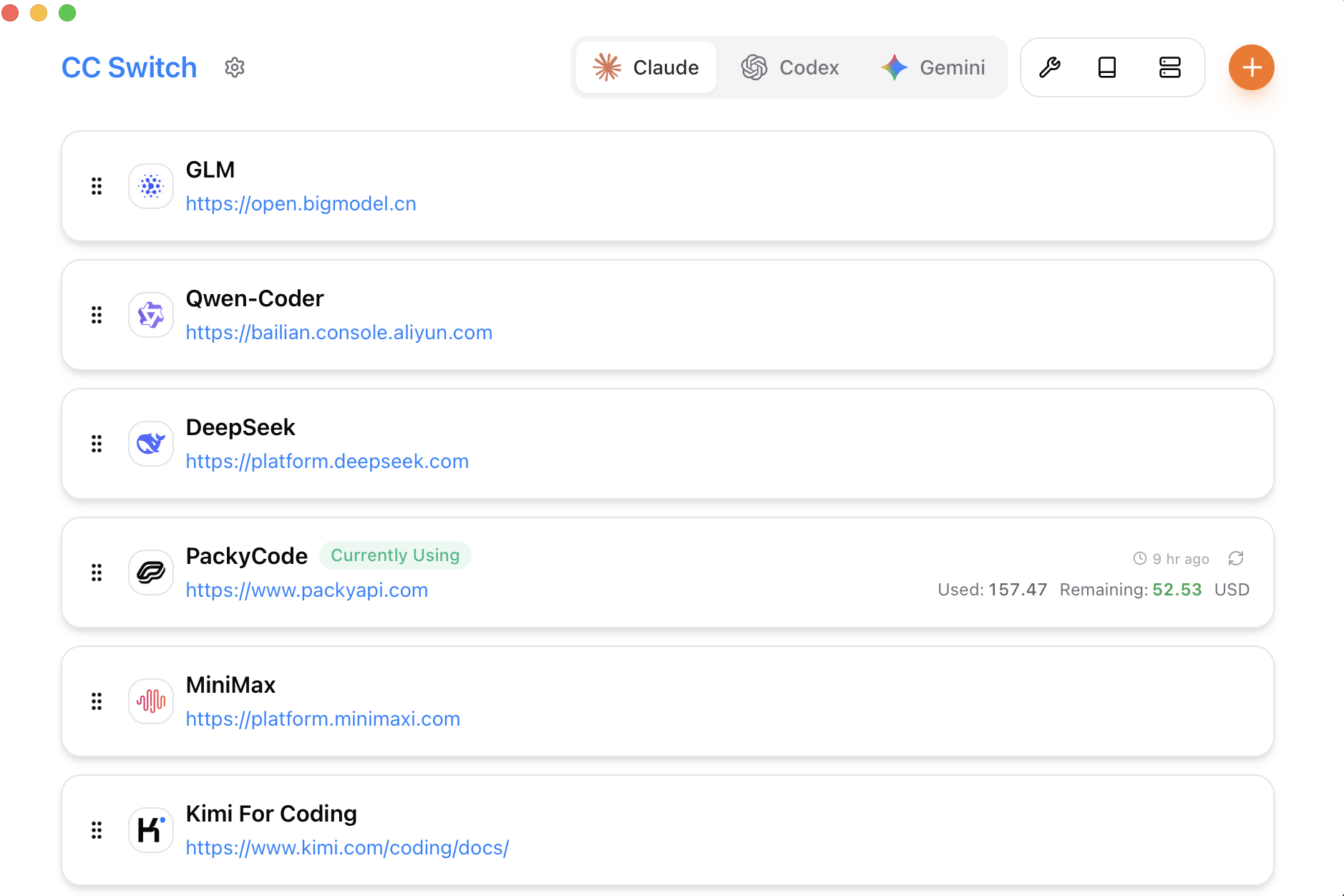 | 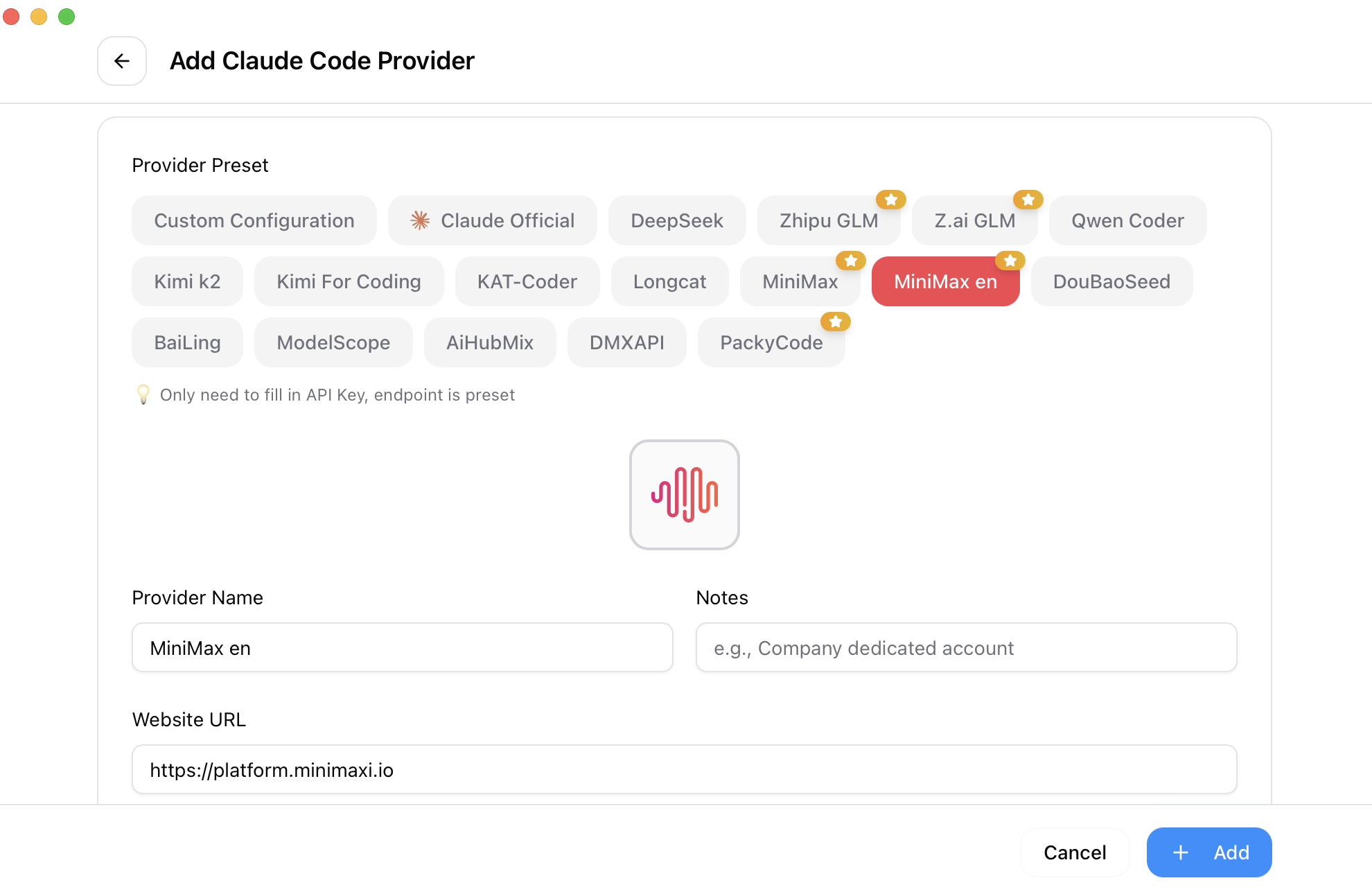 |
คุณสมบัติ
Full Changelog | Release Notes
การจัดการผู้ให้บริการ
- รองรับ 7 เครื่องมือ, 50+ พรีเซ็ต — Claude Code, Claude Desktop, Codex, Gemini CLI, OpenCode, OpenClaw, Hermes; คัดลอกคีย์ของคุณและนำเข้าได้ในคลิกเดียว
- ผู้ให้บริการแบบสากล — การตั้งค่าเดียวซิงค์กับ Claude Code, Codex และ Gemini CLI
- สลับได้ในคลิกเดียว, เข้าถึงด่วนจาก System Tray, จัดเรียงแบบลากและวาง, นำเข้า/ส่งออก
พร็อกซีและการสำรองข้อมูล
- พร็อกซีภายในเครื่องพร้อมการสลับแบบ Hot-switching — การแปลงรูปแบบ, การสำรองข้อมูลอัตโนมัติ, Circuit Breaker, การตรวจสอบสถานะผู้ให้บริการ และการแก้ไขคำขอ
- การควบคุมระดับแอป — พร็อกซี Claude, Codex หรือ Gemini ได้อย่างอิสระ ไปจนถึงผู้ให้บริการแต่ละราย
MCP, Prompts และ Skills
- แผง MCP แบบรวมศูนย์ — จัดการเซิร์ฟเวอร์ MCP ทั่วทั้ง Claude, Codex, Gemini, OpenCode และ Hermes ด้วยการซิงค์แบบสองทิศทางและการนำเข้า Deep Link
- Prompts — ตัวแก้ไข Markdown พร้อมการซิงค์ข้ามแอป (CLAUDE.md / AGENTS.md / GEMINI.md) และการป้องกันการเติมข้อมูลย้อนหลัง
- Skills — ติดตั้งได้ในคลิกเดียวจาก GitHub repos หรือไฟล์ ZIP, การจัดการ Repository แบบกำหนดเอง, พร้อมรองรับ symlink และการคัดลอกไฟล์
การติดตามการใช้งานและค่าใช้จ่าย
- แดชบอร์ดการใช้งาน — ติดตามค่าใช้จ่าย, คำขอ และโทเค็นด้วยแผนภูมิแนวโน้ม, บันทึกคำขอโดยละเอียด และการกำหนดราคาต่อโมเดลแบบกำหนดเอง
ตัวจัดการเซสชันและ Workspace
- เรียกดู, ค้นหา และกู้คืนประวัติการสนทนาจากแหล่งเซสชันที่รองรับ
- ตัวแก้ไข Workspace (OpenClaw) — แก้ไขไฟล์เอเจนต์ (AGENTS.md, SOUL.md, เป็นต้น) พร้อมพรีวิว Markdown
ระบบและแพลตฟอร์ม
- การซิงค์บนคลาวด์ — ไดเรกทอรีการตั้งค่าแบบกำหนดเอง (Dropbox, OneDrive, iCloud, NAS) และการซิงค์เซิร์ฟเวอร์ WebDAV
- Deep Link (
ccswitch://) — นำเข้าผู้ให้บริการ, เซิร์ฟเวอร์ MCP, prompts และ skills ผ่าน URL - ธีม Dark / Light / System, เปิดอัตโนมัติ, อัปเดตอัตโนมัติ, การเขียนแบบ Atomic, สำรองข้อมูลอัตโนมัติ, i18n (zh/zh-TW/en/ja)
คำถามที่พบบ่อย
CC Switch รองรับเครื่องมือเจ็ดชนิด: Claude Code, Claude Desktop, Codex, Gemini CLI, OpenCode, OpenClaw และ Hermes เครื่องมือแต่ละชนิดมีพรีเซ็ตผู้ให้บริการและการจัดการการตั้งค่าเฉพาะของตนเอง
สำหรับเครื่องมือส่วนใหญ่ ใช่ — คุณต้องรีสตาร์ทเทอร์มินัลหรือเครื่องมือ CLI เพื่อให้การเปลี่ยนแปลงมีผล ยกเว้น Claude Code ซึ่งปัจจุบันรองรับการสลับข้อมูลผู้ให้บริการแบบ Hot-switching โดยไม่ต้องรีสตาร์ท
CC Switch มีคุณสมบัติ "Shared Config Snippet" เพื่อส่งผ่านข้อมูลทั่วไป (นอกเหนือจาก API k
เอกสารโปรเจกต์
อ่านเอกสารต้นฉบับ
README วิธีติดตั้ง วิธีใช้งาน และข้อกำหนดจาก repository ต้นฉบับ
CC Switch
The All-in-One Manager for Claude Code, Claude Desktop, Codex, Gemini CLI, Grok Build, OpenCode, OpenClaw & Hermes Agent
🌐 The Only Official Website: ccswitch.io
English | 中文 | 日本語 | Deutsch | Changelog
❤️Sponsor

Kimi K3 is Moonshot AI's most capable model and the world's first open 3T-class model. With 2.8 trillion parameters, native vision, and a 1-million-token context window, K3 delivers frontier performance across long-horizon coding, knowledge work, and reasoning. CC Switch makes it easy to configure and switch to Kimi across agentic tools. Click here to start using Kimi
New user top-up bonus: register via this link and complete your first top-up to receive 10% of the amount as bonus API credit, up to CNY ¥1,000.
Doing mostly coding work? Try the Kimi Code subscription.





Why CC Switch?
Modern AI-powered coding relies on tools like Claude Code, Claude Desktop, Codex, Gemini CLI, Grok Build, OpenCode, OpenClaw, and Hermes — but each has its own configuration format. Switching API providers means manually editing JSON, TOML, or .env files, and there is no unified way to manage MCP and Skills across multiple tools.
CC Switch gives you a single desktop app to manage all supported AI tools. Instead of editing config files by hand, you get a visual interface to import providers with one click, switch between them instantly, with 50+ built-in provider presets, unified MCP and Skills management, and system tray quick switching — all backed by a reliable SQLite database with atomic writes that protect your configs from corruption.
- One App, Eight Tools — Manage Claude Code, Claude Desktop, Codex, Gemini CLI, Grok Build, OpenCode, OpenClaw, and Hermes from a single interface
- No More Manual Editing — 50+ provider presets including AWS Bedrock, NVIDIA NIM, and community relays; just pick and switch
- Unified MCP & Skills Management — One panel to manage MCP servers and Skills across Claude, Codex, Gemini, Grok Build, OpenCode, and Hermes with bidirectional sync
- System Tray Quick Switch — Switch providers instantly from the tray menu, no need to open the full app
- Cloud Sync — Sync provider data across devices via Dropbox, OneDrive, iCloud, or WebDAV servers
- Cross-Platform — Native desktop app for Windows, macOS, and Linux, built with Tauri 2
- Built-in Utilities — Includes various utilities for first-launch login confirmation, signature bypass, plugin extension sync, and more
Screenshots
| Main Interface | Add Provider |
|---|---|
| |
Features
Full Changelog | Release Notes
Provider Management
- 8 supported tools, 50+ presets — Claude Code, Claude Desktop, Codex, Gemini CLI, Grok Build, OpenCode, OpenClaw, Hermes; copy your key and import with one click
- Universal providers — One config syncs to Claude Code, Codex, and Gemini CLI
- One-click switching, system tray quick access, drag-and-drop sorting, import/export
Proxy & Failover
- Local proxy with hot-switching — Format conversion, auto-failover, circuit breaker, provider health monitoring, and request rectifier
- App-level takeover — Independently proxy Claude, Codex, Gemini, or Grok Build, down to individual providers
MCP, Prompts & Skills
- Unified MCP panel — Manage MCP servers across Claude, Codex, Gemini, Grok Build, OpenCode, and Hermes with bidirectional sync and Deep Link import
- Prompts — Markdown editor with cross-app sync (CLAUDE.md / AGENTS.md / GEMINI.md) and backfill protection
- Skills — One-click install from GitHub repos or ZIP files, custom repository management, with symlink and file copy support
Usage & Cost Tracking
- Usage dashboard — Track spending, requests, and tokens with trend charts, detailed request logs, and custom per-model pricing
Session Manager & Workspace
- Browse, search, and restore conversation history across supported session sources
- Workspace editor (OpenClaw) — Edit agent files (AGENTS.md, SOUL.md, etc.) with Markdown preview
System & Platform
- Cloud sync — Custom config directory (Dropbox, OneDrive, iCloud, NAS) and WebDAV server sync
- Deep Link (
ccswitch://) — Import providers, MCP servers, prompts, and skills via URL - Dark / Light / System theme, auto-launch, auto-updater, atomic writes, auto-backups, i18n (zh/zh-TW/en/ja)
FAQ
CC Switch supports eight tools: Claude Code, Claude Desktop, Codex, Gemini CLI, Grok Build, OpenCode, OpenClaw, and Hermes. Each tool has dedicated provider presets and configuration management.
For most tools, yes — restart your terminal or the CLI tool for changes to take effect. The exception is Claude Code, which currently supports hot-switching of provider data without a restart.
CC Switch provides a "Shared Config Snippet" feature to pass common data (beyond API keys and endpoints) between providers. Go to "Edit Provider" → "Shared Config Panel" → click "Extract from Current Provider" to save all common data. When creating a new provider, check "Write Shared Config" (enabled by default) to include plugin data in the new provider. All your configuration items are preserved in the default provider imported when you first launched the app.
CC Switch for macOS is code-signed and notarized by Apple. You can download and install it directly — no extra steps needed. We recommend using the .dmg installer.
CC Switch follows a "minimal intrusion" design principle — even if you uninstall the app, your CLI tools will continue to work normally. The system always keeps one active configuration, because deleting all configurations would make the corresponding CLI tool unusable. If you rarely use a specific CLI tool, you can hide it in Settings. To switch back to official login, see the next question.
Add an official provider from the preset list. After switching to it, run the Log out / Log in flow, and then you can freely switch between the official provider and third-party providers. Codex supports switching between different official providers, making it easy to switch between multiple Plus or Team accounts.
- Database:
~/.cc-switch/cc-switch.db(SQLite — providers, MCP, prompts, skills) - Local settings:
~/.cc-switch/settings.json(device-level UI preferences) - Backups:
~/.cc-switch/backups/(auto-rotated, keeps 10 most recent) - Skills:
~/.cc-switch/skills/(symlinked to corresponding apps by default) - Skill Backups:
~/.cc-switch/skill-backups/(created automatically before uninstall, keeps 20 most recent)
The AppImage forces GDK_BACKEND=x11 (XWayland) to avoid a historical native-Wayland crash. On newer Wayland + NVIDIA setups this can leave the web content area unclickable (the title-bar buttons still work) and black-screen on resize. Launch with the opt-in escape hatch to switch back to native Wayland:
CC_SWITCH_GDK_BACKEND=wayland ./CC-Switch-*.AppImageIf you launch from a desktop icon, add it to the .desktop Exec= line (e.g. env CC_SWITCH_GDK_BACKEND=wayland /path/to/AppImage) or set it in your session environment. The variable is generic: on tiling Wayland compositors (sway/Hyprland) where clicks don't register, try CC_SWITCH_GDK_BACKEND=x11 instead. Leaving it unset keeps the default behavior.
Documentation
For detailed guides on every feature, check out the User Manual — covering provider management, MCP/Prompts/Skills, proxy & failover, and more.
Quick Start
Basic Usage
- 1Add Provider: Click "Add Provider" → Choose a preset or create custom configuration
- 2Switch Provider:- Main UI: Select provider → Click "Enable" - System Tray: Click provider name directly (instant effect)
- 3Takes Effect: Restart your terminal or the corresponding CLI tool to apply changes (Claude Code does not require a restart)
- 4Back to Official: Add an "Official Login" preset, restart the CLI tool, then follow its login/OAuth flow
MCP, Prompts, Skills & Sessions
- MCP: Click the "MCP" button → Add servers via templates or custom config → Toggle per-app sync
- Prompts: Click "Prompts" → Create presets with Markdown editor → Activate to sync to live files
- Skills: Click "Skills" → Browse GitHub repos → One-click install to supported apps
- Sessions: Click "Sessions" → Browse, search, and restore conversation history across supported session sources
Note: On first launch, you can manually import existing CLI tool configs as the default provider.
Download & Installation
System Requirements
- Windows: Windows 10 and above
- macOS: macOS 12 (Monterey) and above
- Linux: Ubuntu 22.04+ / Debian 11+ / Fedora 34+ and other mainstream distributions
Windows Users
Download the latest CC-Switch-v{version}-Windows.msi installer or CC-Switch-v{version}-Windows-Portable.zip portable version from the Releases page.
macOS Users
Method 1: Install via Homebrew (Recommended)
brew install --cask cc-switchUpdate:
brew upgrade --cask cc-switchMethod 2: Manual Download
Download CC-Switch-v{version}-macOS.dmg (recommended) or .zip from the Releases page.
Note: CC Switch for macOS is code-signed and notarized by Apple. You can install and open it directly.
Arch Linux Users
Install via paru (Recommended)
paru -S cc-switch-binLinux Users
Download the latest Linux build from the Releases page:
CC-Switch-v{version}-Linux.deb(Debian/Ubuntu)CC-Switch-v{version}-Linux.rpm(Fedora/RHEL/openSUSE)CC-Switch-v{version}-Linux.AppImage(Universal)
Flatpak: Not included in official releases. You can build it yourself from the .deb — see flatpak/README.md for instructions.
Design Principles
┌─────────────────────────────────────────────────────────────┐
│                    Frontend (React + TS)                    │
│  ┌─────────────┐  ┌──────────────┐  ┌──────────────────┐    │
│  │ Components  │  │    Hooks     │  │  TanStack Query  │    │
│  │   (UI)      │──│ (Bus. Logic) │──│   (Cache/Sync)   │    │
│  └─────────────┘  └──────────────┘  └──────────────────┘    │
└────────────────────────┬────────────────────────────────────┘
                         │ Tauri IPC
┌────────────────────────▼────────────────────────────────────┐
│                  Backend (Tauri + Rust)                     │
│  ┌─────────────┐  ┌──────────────┐  ┌──────────────────┐    │
│  │  Commands   │  │   Services   │  │  Models/Config   │    │
│  │ (API Layer) │──│ (Bus. Layer) │──│     (Data)       │    │
│  └─────────────┘  └──────────────┘  └──────────────────┘    │
└─────────────────────────────────────────────────────────────┘
Core Design Patterns
- SSOT (Single Source of Truth): All data stored in
~/.cc-switch/cc-switch.db(SQLite) - Dual-layer Storage: SQLite for syncable data, JSON for device-level settings
- Dual-way Sync: Write to live files on switch, backfill from live when editing active provider
- Atomic Writes: Temp file + rename pattern prevents config corruption
- Concurrency Safe: Mutex-protected database connection avoids race conditions
- Layered Architecture: Clear separation (Commands → Services → DAO → Database)
Key Components
- ProviderService: Provider CRUD, switching, backfill, sorting
- McpService: MCP server management, import/export, live file sync
- ProxyService: Local proxy mode with hot-switching and format conversion
- SessionManager: Conversation history browsing across supported session sources
- ConfigService: Config import/export, backup rotation
- SpeedtestService: API endpoint latency measurement
Environment Requirements
- Node.js 18+
- pnpm 8+
- Rust 1.85+
- Tauri CLI 2.8+
Development Commands
# Install dependencies
pnpm install

# Dev mode (hot reload)
pnpm dev

# Type check
pnpm typecheck

# Format code
pnpm format

# Check code format
pnpm format:check

# Run frontend unit tests
pnpm test:unit

# Run tests in watch mode (recommended for development)
pnpm test:unit:watch

# Build application
pnpm build

# Build debug version
pnpm tauri build --debug
Rust Backend Development
cd src-tauri

# Format Rust code
cargo fmt

# Run clippy checks
cargo clippy

# Run backend tests
cargo test

# Run specific tests
cargo test test_name

# Run tests with test-hooks feature
cargo test --features test-hooks
Testing Guide
Frontend Testing:
- Uses vitest as test framework
- Uses MSW (Mock Service Worker) to mock Tauri API calls
- Uses @testing-library/react for component testing
Running Tests:
# Run all tests
pnpm test:unit

# Watch mode (auto re-run)
pnpm test:unit:watch

# With coverage report
pnpm test:unit --coverage
Tech Stack
Frontend: React 18 · TypeScript · Vite · TailwindCSS 3.4 · TanStack Query v5 · react-i18next · react-hook-form · zod · shadcn/ui · @dnd-kit
Backend: Tauri 2.8 · Rust · serde · tokio · thiserror · tauri-plugin-updater/process/dialog/store/log
Testing: vitest · MSW · @testing-library/react
├── src/                        # Frontend (React + TypeScript)
│   ├── components/
│   │   ├── providers/          # Provider management
│   │   ├── mcp/                # MCP panel
│   │   ├── prompts/            # Prompts management
│   │   ├── skills/             # Skills management
│   │   ├── sessions/           # Session Manager
│   │   ├── proxy/              # Proxy mode panel
│   │   ├── openclaw/           # OpenClaw config panels
│   │   ├── settings/           # Settings (Terminal/Backup/About)
│   │   ├── deeplink/           # Deep Link import
│   │   ├── env/                # Environment variable management
│   │   ├── universal/          # Cross-app configuration
│   │   ├── usage/              # Usage statistics
│   │   └── ui/                 # shadcn/ui component library
│   ├── hooks/                  # Custom hooks (business logic)
│   ├── lib/
│   │   ├── api/                # Tauri API wrapper (type-safe)
│   │   └── query/              # TanStack Query config
│   ├── i18n/                   # Internationalization
│   │   └── locales/            # Translations (zh/zh-TW/en/ja)
│   ├── config/                 # Presets (providers/mcp)
│   └── types/                  # TypeScript definitions
├── src-tauri/                  # Backend (Rust)
│   └── src/
│       ├── commands/           # Tauri command layer (by domain)
│       ├── services/           # Business logic layer
│       ├── database/           # SQLite DAO layer
│       ├── proxy/              # Proxy module
│       ├── session_manager/    # Session management
│       ├── deeplink/           # Deep Link handling
│       └── mcp/                # MCP sync module
├── tests/                      # Frontend tests
└── assets/                     # Screenshots & partner resources
Contributing
Issues and suggestions are welcome!
Before submitting PRs, please ensure:
- Pass type check:
pnpm typecheck - Pass format check:
pnpm format:check - Pass unit tests:
pnpm test:unit
For new features, please open an issue for discussion before submitting a PR. PRs for features that are not a good fit for the project may be closed.
Star History
License
MIT © Jason Young