GetNotes Tools
Excalidraw
Tool นี้คืออะไร
Excalidraw เป็นไวท์บอร์ดเสมือนจริงแบบโอเพนซอร์สที่ให้คุณสร้างไดอะแกรมและภาพวาดสไตล์ลายเส้นด้วยมือได้อย่างรวดเร็ว รองรับการทำงานร่วมกันแบบเรียลไทม์และการเข้ารหัสแบบ end-to-end เหมาะสำหรับนักพัฒนาและทีมที่ต้องการเครื่องมือวาดภาพที่ยืดหยุ่นและปรับแต่งได้
ข้อมูลโปรเจกต์
ดาว
136.1K
Forks
16.2K
License
MIT
อัปเดต GitHub ล่าสุด
21 พ.ย. 2569
เพิ่มใน GetNotes
13 ก.ค. 2569
Repository
excalidraw/excalidraw
แปลและเรียบเรียงโดย AI
เนื้อหาฉบับภาษาไทย
ใช้อ่านเพื่อทำความเข้าใจเบื้องต้น โปรดตรวจสอบรายละเอียดสำคัญกับเอกสารต้นฉบับด้านล่าง








คุณสมบัติ
Excalidraw editor (npm package) รองรับ:
- 💯 ฟรีและโอเพนซอร์ส
- 🎨 ไวท์บอร์ดแบบ Canvas ที่ไม่มีที่สิ้นสุด
- ✍️ สไตล์ลายเส้นด้วยมือ
- 🌓 โหมดมืด
- 🏗️ ปรับแต่งได้
- 📷 รองรับรูปภาพ
- 😀 รองรับไลบรารีรูปร่าง
- 🌐 รองรับการแปลภาษา (i18n)
- 🖼️ ส่งออกเป็น PNG, SVG และคัดลอกไปยังคลิปบอร์ด
- 💾 รูปแบบเปิด - ส่งออกภาพวาดเป็นไฟล์ JSON
.excalidraw - ⚒️ เครื่องมือหลากหลาย - สี่เหลี่ยม, วงกลม, เพชร, ลูกศร, เส้น, วาดอิสระ, ยางลบ...
- ➡️ การผูกลูกศรและลูกศรที่มีป้ายกำกับ
- 🔙 เลิกทำ / ทำซ้ำ
- 🔍 รองรับการซูมและการเลื่อน
Excalidraw.com
แอปที่โฮสต์อยู่ที่ excalidraw.com เป็นตัวอย่างเล็กๆ น้อยๆ ของสิ่งที่คุณสามารถสร้างได้ด้วย Excalidraw ซอร์สโค้ดของแอปนี้ก็เป็นส่วนหนึ่งของ repository นี้เช่นกัน และแอปมีคุณสมบัติดังนี้:
- 📡 รองรับ PWA (ทำงานแบบออฟไลน์ได้)
- 🤼 การทำงานร่วมกันแบบเรียลไทม์
- 🔒 การเข้ารหัสแบบ end-to-end
- 💾 รองรับ Local-first (บันทึกอัตโนมัติไปยังเบราว์เซอร์)
- 🔗 ลิงก์ที่แชร์ได้ (ส่งออกเป็นลิงก์แบบอ่านอย่างเดียวที่คุณสามารถแชร์กับผู้อื่นได้)
เราจะเพิ่มคุณสมบัติเหล่านี้เป็นปลั๊กอินแบบ drop-in สำหรับ npm package ในอนาคต
เริ่มต้นอย่างรวดเร็ว
หมายเหตุ: คำแนะนำต่อไปนี้สำหรับการติดตั้ง npm package ของ Excalidraw เมื่อคุณต้องการรวม Excalidraw เข้ากับแอปของคุณเอง หากต้องการรัน repository ในเครื่องสำหรับการพัฒนา โปรดดู คู่มือการพัฒนา ของเรา
ใช้ npm หรือ yarn เพื่อติดตั้งแพ็กเกจ
npm install react react-dom @excalidraw/excalidraw
# or
yarn add react react-dom @excalidraw/excalidraw
ดู เอกสารประกอบ ของเราสำหรับรายละเอียดเพิ่มเติม!
การมีส่วนร่วม
- ขาดอะไรไปหรือพบบั๊ก? รายงานที่นี่
- ต้องการมีส่วนร่วม? ดู คู่มือการมีส่วนร่วม ของเรา หรือแจ้งให้เราทราบทาง Discord
- ต้องการช่วยแปลภาษา? ดู คู่มือการแปล
การผสานรวม
ใครบ้างที่ผสานรวม Excalidraw
Google Cloud • Meta • CodeSandbox • Obsidian Excalidraw • Replit • Slite • Notion • HackerRank • และอื่นๆ อีกมากมาย
ผู้สนับสนุนและการสนับสนุน
หากคุณชอบโปรเจกต์นี้ คุณสามารถเป็นผู้สนับสนุนได้ที่ Open Collective หรือใช้ Excalidraw+
ขอขอบคุณที่สนับสนุน Excalidraw


สุดท้ายแต่ไม่ท้ายสุด เราขอขอบคุณบริษัทเหล่านี้ที่ให้บริการฟรี:


เอกสารโปรเจกต์
อ่านเอกสารต้นฉบับ
README วิธีติดตั้ง วิธีใช้งาน และข้อกำหนดจาก repository ต้นฉบับ
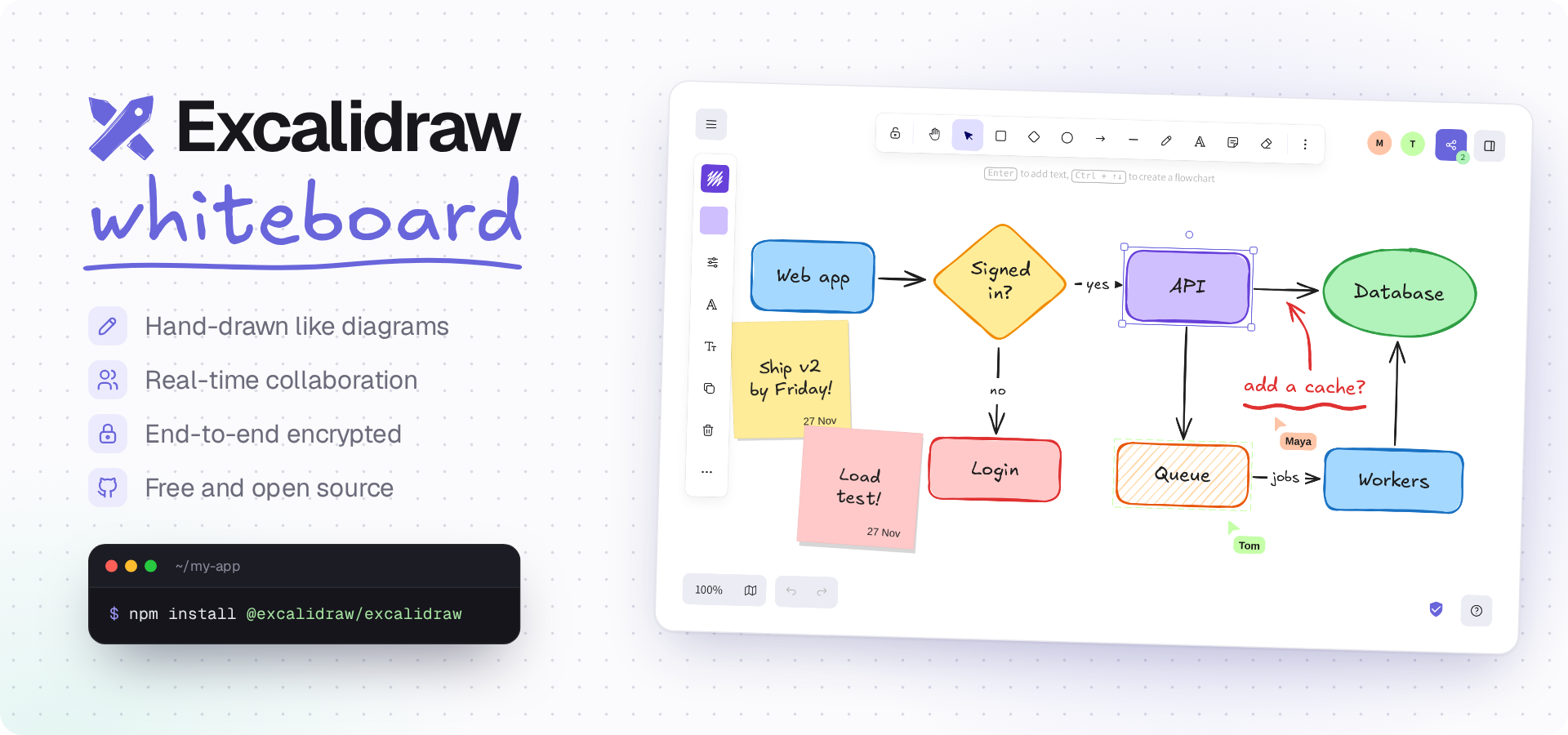
An open source virtual whiteboard with a hand-drawn style, collaborative and end-to-end encrypted. Sketch diagrams, wireframes or whatever you like at excalidraw.com, or embed the editor in your own app with the @excalidraw/excalidraw React component.
Features
The Excalidraw editor (npm package) supports:
- 💯 Free and open source: MIT licensed.
- 🎨 Infinite canvas: zoom and pan without running out of room, with a minimap to find your way around.
- ✍️ Hand-drawn style: shapes, arrows and text that look sketched, with a choice of fonts, in light or dark mode.
- ⚒️ Wide range of tools: rectangle, diamond, ellipse, arrow, line, free-draw, text, sticky notes, frames, web embeds, laser pointer, eraser and more.
- ➡️ Arrows that follow your shapes: arrow binding, labeled arrows and elbow arrows.
- 🔀 Flowcharts from the keyboard: Ctrl/Cmd+arrow keys add the next node, Alt+arrow keys move between nodes.
- 🧜 Mermaid diagrams: paste a Mermaid definition and get shapes you can keep editing, with Mermaid to Excalidraw.
- 📊 Charts: paste spreadsheet data and get a bar, line or radar chart.
- 📷 Images and shape libraries: drop in images and crop them, and reuse shapes from public libraries or your own.
- 🔍 Command palette and search: run any action, or find text in the scene, from the keyboard.
- 🖼️ Export to PNG, SVG and clipboard: or save the drawing as an
.excalidrawJSON file, an open format. - 🌐 Localization (i18n): translated by the community.
- 🏗️ Customizable: props, an imperative API and UI you can extend when you embed it.
Excalidraw.com
The app hosted at excalidraw.com is a minimal showcase of what you can build with Excalidraw. Its source code is part of this repository as well, and the app features:
- 📡 PWA support: works offline.
- 🤼 Real-time collaboration: draw together in the same scene.
- 🔒 End-to-end encryption: the server can't read what you draw.
- 💾 Local-first: autosaves to the browser.
- 🔗 Shareable links: export to a read-only link you can share with others.
- ✨ Generative AI: text to diagram and wireframe to code.
We'll be adding these features as drop-in plugins for the npm package in the future.
Quick start
Note: the following instructions are for installing the Excalidraw npm package when integrating Excalidraw into your own app. To run the repository locally for development, please refer to our Development Guide.
npm install react react-dom @excalidraw/excalidraw
# or
yarn add react react-dom @excalidraw/excalidraw
To try unreleased changes, use @excalidraw/excalidraw@next.
import { Excalidraw } from "@excalidraw/excalidraw";
import "@excalidraw/excalidraw/index.css";

export default function App() {
  return (
    <div style={{ height: "100vh" }}>
      <Excalidraw />
    </div>
  );
}
Excalidraw fills its parent, so the parent needs a height. See installation and integration for Next.js and other setups.
Excalidraw+
Excalidraw+ is the hosted workspace for teams, built on this editor. Using it also supports the open source project. On top of everything above, you get:
- ☁️ Unlimited scenes, saved to the cloud: organized in collections, with a dashboard to find them again.
- 👥 Team workspaces: access management, sharing with edit or view rights, read-only links and embeds.
- 💬 Comments, voice hangouts and screensharing: discuss a scene where you draw it.
- 🎞️ Presentations: turn frames into slides, present them live and export them to PDF or PPTX.
- ✨ More AI: 100 requests a day for text to diagram and wireframe to code, or bring your own key.
- 🤖 MCP server and REST API: let AI agents and scripts read and edit your scenes. See the MCP and API docs.
- 🔌 Integrations: bring your scenes into the tools your team already works in.
- 🏢 Enterprise ready: SSO (SAML or OIDC), admin controls for sharing and AI, and audit logs.
- 🔐 Security: two-factor authentication that admins can require of every member, encryption at rest and in transit, daily backups and SOC 2 Type 2. See security and compliance.
Try Excalidraw+ free for 14 days · Pricing
Excalidraw CLI
The Excalidraw CLI brings Excalidraw to your terminal, scripts and AI agents. It renders drawings and converts Mermaid diagrams on your computer, free and without an account:
npx @excalidraw/cli render drawing.excalidraw --out drawing.png
npx @excalidraw/cli mermaid flow.mmd --out flow.excalidraw
Log in to Excalidraw+ and it manages your workspace too: scenes, collections, share links and presentations. excalidraw mcp gives AI agents the Excalidraw+ drawing tools through the same login. See the CLI docs.
Documentation
📚 plus.excalidraw.com/docs/sdk
- Installation and integration
- API: props, methods and utilities
- Customizing styles
- FAQ
- Self-hosting the open source editor
- Development and the codebase
Contributing
- Missing something or found a bug? Report here.
- Want to contribute? Check out our contribution guide or let us know on Discord.
- Want to help with translations? See the translation guide.
Integrations
Who's integrating Excalidraw
Google Cloud • Meta • CodeSandbox • Obsidian Excalidraw • Replit • Slite • Notion • HackerRank • and many others
Sponsors & support
If you like the project, you can become a sponsor at Open Collective or use Excalidraw+.
Thank you for supporting Excalidraw
Last but not least, we're thankful to these companies for offering their services for free: