
GetNotes Tools
DietrichGebert/ponytail
Tool นี้คืออะไร
Ponytail เป็นปลั๊กอินสำหรับ AI Agent ที่ช่วยลดการเขียนโค้ดที่เกินความจำเป็น โดยเน้นการใช้ฟีเจอร์พื้นฐานหรือไลบรารีที่มีอยู่แล้ว เพื่อให้ได้โค้ดที่สั้นลง ทำงานเร็วขึ้น และประหยัดค่าใช้จ่าย โดยที่ยังคงความปลอดภัยและคุณภาพของโค้ดไว้ครบถ้วน
ข้อมูลโปรเจกต์
ดาว
135.9K
Forks
7.3K
License
MIT
อัปเดต GitHub ล่าสุด
7 ก.ย. 2569
เพิ่มใน GetNotes
13 ก.ค. 2569
Repository
DietrichGebert/ponytail
แปลและเรียบเรียงโดย AI
เนื้อหาฉบับภาษาไทย
ใช้อ่านเพื่อทำความเข้าใจเบื้องต้น โปรดตรวจสอบรายละเอียดสำคัญกับเอกสารต้นฉบับด้านล่าง




คุณรู้จักเขาดี คนที่มัดผมหางม้า ใส่แว่นทรงรี อยู่กับบริษัทมานานกว่าระบบ version control คุณส่งโค้ดให้เขาดูห้าสิบบรรทัด เขามองแวบเดียว ไม่พูดอะไร แล้วแทนที่มันด้วยบรรทัดเดียว
Ponytail นำความสามารถนั้นมาใส่ไว้ใน AI agent ของคุณ
ก่อน / หลัง
คุณขอให้สร้าง date picker; agent ของคุณติดตั้ง flatpickr, เขียน wrapper component, เพิ่ม stylesheet และเริ่มถกเถียงเรื่อง timezone
เมื่อใช้ ponytail:
<!-- ponytail: browser has one -->
<input type="date">
ดูตัวอย่างอื่นๆ เพิ่มเติมได้ที่ examples/
ตัวเลขสถิติ
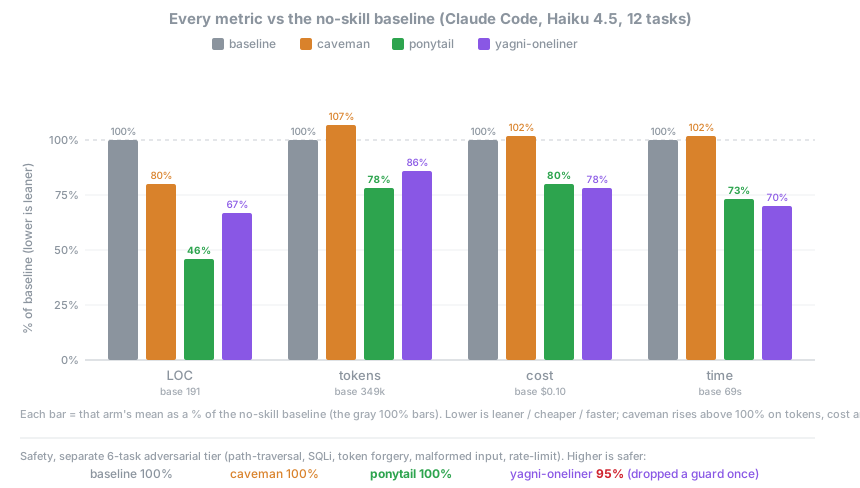
การวัดผลที่ซื่อสัตย์ที่สุดคือการให้ agent ทำงานจริง: ใช้ Claude Code session แบบ headless แก้ไข tiangolo's full-stack-fastapi-template (repo FastAPI + React ของจริง) โดยให้คะแนนจาก git diff ที่เกิดขึ้น จากตั๋วฟีเจอร์ 12 ใบ ใช้ agent ตัวเดียวกันทั้งแบบที่มีและไม่มี skill, n=4, Haiku 4.5
| เทียบกับ baseline (ไม่มี skill) | LOC | tokens | cost | time | safe |
|---|---|---|---|---|---|
| ponytail | -54% | -22% | -20% | -27% | 100% |
| caveman (terse-prose control) | -20% | +7% | +3% | +2% | 100% |
| "YAGNI + one-liners" prompt | -33% | -14% | -21% | -30% | 95% |
ponytail เป็นเพียงตัวเดียวที่ลดทุกตัวชี้วัด และเป็นตัวเดียวที่ยังคงความปลอดภัยได้อย่างสมบูรณ์ในขณะที่ทำเช่นนั้น การลดลงจะเห็นผลชัดที่สุดในจุดที่มีกับดักการเขียนโค้ดเกินความจำเป็น (เช่น date picker จาก 404 เหลือ 23 บรรทัด, color picker จาก 287 เหลือ 23 บรรทัด เพราะมันเลือกใช้ <input> พื้นฐานแทนการใช้ component) และแทบไม่ลดเลยในโค้ดที่สั้นที่สุดอยู่แล้ว ดูวิธีการทั้งหมด, ตารางรายงาน และข้อจำกัดได้ที่: benchmarks/results/2026-06-18-agentic.md
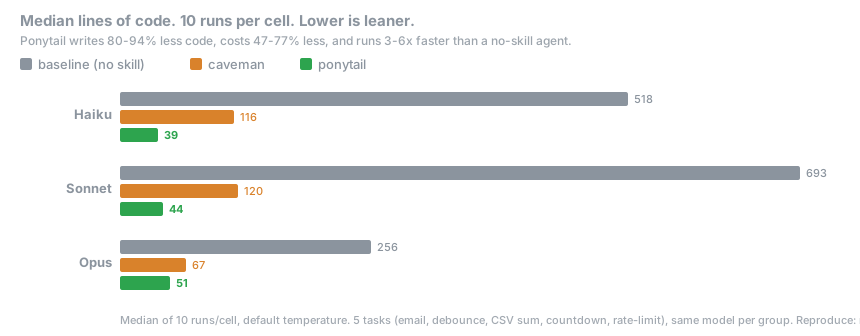
งานทั่วไป 5 งาน, 3 โมเดล, 3 รูปแบบ (ไม่มี skill, caveman, ponytail), รัน 10 ครั้ง รายงานค่ามัธยฐาน (median) โดยใช้ prompt เดียว, คำตอบเดียว และนับจำนวนบรรทัดของคำตอบ:
ผลลัพธ์แสดงให้เห็นว่า ลดโค้ดลง 80-94% ซึ่งใน #126 ได้ชี้ให้เห็นอย่างถูกต้องว่า baseline ของโมเดลเปล่าๆ มักจะเติมคำบรรยายและทางเลือกต่างๆ ลงในคำตอบ ดังนั้นช่องว่างนี้ส่วนหนึ่งจึงเป็นผลมาจากรูปแบบการสนทนา ตัวเลขแบบ agentic ด้านบนจึงเป็นเวอร์ชันที่ได้รับการแก้ไขและเชื่อถือได้มากกว่า คุณสามารถทำซ้ำการรันแบบ single-shot ได้ด้วย npx promptfoo eval -c benchmarks/promptfooconfig.yaml
กฎไม่ใช่ "การใช้ token ให้น้อยที่สุด" แต่คือ: เขียนเฉพาะสิ่งที่งานต้องการ และห้ามตัดการตรวจสอบ (validation), การจัดการข้อผิดพลาด (error handling), ความปลอดภัย (security) หรือการเข้าถึง (accessibility) โค้ดที่ได้จึงสั้นเพราะมันจำเป็น ไม่ใช่เพราะการทำ code golf ค่าใช้จ่ายและความหน่วง (latency) ที่ลดลงเป็นผลพลอยได้สำหรับโมเดลที่ทำตามขั้นตอน แต่สำหรับโมเดล reasoning ที่ใช้ thinking tokens ในการไตร่ตรองอาจให้ผลลัพธ์ที่ตรงกันข้าม (เช่นใน GPT-5.5)
หลักการทำงาน
ก่อนจะเขียนโค้ด agent จะหยุดพิจารณาตามลำดับขั้น (rung) แรกที่เข้าเงื่อนไข:
1. สิ่งนี้จำเป็นต้องมีหรือไม่?   → ถ้าไม่: ข้ามไป (YAGNI)
2. มีอยู่ใน codebase นี้แล้วหรือยัง?  → ถ้ามี: นำมาใช้ซ้ำ ไม่ต้องเขียนใหม่
3. Stdlib ทำได้หรือไม่?            → ถ้าได้: ใช้ Stdlib
4. เป็นฟีเจอร์พื้นฐานของ platform หรือไม่?   → ถ้าใช่: ใช้ฟีเจอร์นั้น
5. มี dependency ที่ติดตั้งไว้แล้วหรือไม่?      → ถ้ามี: ใช้สิ่งนั้น
6. เขียนบรรทัดเดียวได้หรือไม่?                  → ถ้าได้: เขียนบรรทัดเดียว
7. หากไม่เข้าเงื่อนไขข้างต้น: จึงเขียนโค้ดที่น้อยที่สุดที่ทำงานได้
ลำดับขั้นนี้จะทำงาน หลังจาก ที่ agent เข้าใจปัญหาแล้ว ไม่ใช่ใช้แทนการทำความเข้าใจ: มันจะอ่านโค้ดในส่วนที่เกี่ยวข้องและไล่สายการทำงาน (flow) จริงก่อนที่จะเลือกขั้นที่เหมาะสม "ขี้เกียจในเรื่องวิธีการแก้ปัญหา แต่ไม่เคยขี้เกียจในการอ่านโค้ด"
ขี้เกียจแต่ไม่ละเลย: การตรวจสอบขอบเขตความเชื่อถือ (trust-boundary validation), การจัดการข้อมูลสูญหาย, ความปลอดภัย และการเข้าถึง จะไม่ถูกตัดออกเด็ดขาด
การติดตั้ง
นี่คือความพยายามที่มากที่สุดที่ ponytail จะขอจากคุณ:
ปลั๊กอินสำหรับ Claude Code และ Codex จะรัน Node.js lifecycle hooks ขนาดเล็กสองตัว ดังนั้น node ต้องอยู่ใน PATH ของคุณ (สำหรับผู้ใช้ Nix/nvm: ต้องอยู่ใน PATH ของ non-interactive shell) หากไม่มี skill จะยังคงทำงานได้ แต่การเปิดใช้งานแบบ always-on จะเงียบไปแทนที่จะแจ้ง error ในทุก prompt
Claude Code
/plugin marketplace add DietrichGebert/ponytail/plugin install ponytail@ponytail(คุณต้องส่งสอง prompt แยกกันเพื่อให้การติดตั้งทำงาน)
ขั้นตอนเดียวกันในแท็บ Code ของแอป Claude Code Desktop: พิมพ์คำสั่ง /plugin สองคำสั่งด้านบนในช่อง prompt หรือคลิกปุ่ม + ข้างๆ เลือก Plugins → Add plugin เพื่อเรียกดู marketplace ที่ตั้งค่าไว้ และจัดการ marketplace ได้ที่ Customize ในแถบด้านข้าง
Codex
codex plugin marketplace add DietrichGebert/ponytail
codex plugin add ponytail@ponytail
รัน codex และเปิด /hooks ตรวจสอบและกดยอมรับ lifecycle hooks สองตัว แล้วเริ่ม thread ใหม่
การติดตั้งนี้ครอบคลุมถึงแอป Codex desktop ด้วย: ให้รีสตาร์ทแอปหลังติดตั้งเพื่อโหลดปลั๊กอิน
GitHub Copilot CLI
copilot plugin marketplace add DietrichGebert/ponytail
copilot plugin install ponytail@ponytail
ในเซสชัน Copilot CLI แบบ interactive ให้ใช้คำสั่ง slash:
/plugin marketplace add DietrichGebert/ponytail
/plugin install ponytail@ponytail
Copilot CLI จะแยก namespace ของคำสั่งปลั๊กอินตามชื่อปลั๊กอิน ตัวอย่างเช่น:
/ponytail:ponytail ultra
/ponytail:ponytail-review
Pi agent harness
pi install git:github.com/DietrichGebert/ponytailOpenCode
เพิ่มลงใน opencode.json:
{ "plugin": ["@dietrichgebert/ponytail"] }หรือรันจาก checkout แทน (ปลั๊กอินจะใช้ hooks/ และ skills/ ร่วมกัน):
{ "plugin": ["./.opencode/plugins/ponytail.mjs"] }ระบบจะฉีด ruleset เข้าไปในทุกรอบการทำงานในระดับที่ใช้งานอยู่ และเพิ่มคำสั่ง /ponytail (ดูที่ Commands) นอกจากนี้ OpenCode จะโหลด AGENTS.md ของ repo นี้โดยอัตโนมัติ ดังนั้นกฎจึงยังคงทำงานแม้ไม่มีปลั๊กอิน โดยปลั๊กอินจะเพิ่มระดับ lite/full/ultra/off เข้ามา
พาธ ./ จะอ้างอิงกับ opencode.json ของโปรเจกต์ หากต้องการแชร์ checkout เดียวกันข้ามโปรเจกต์ ให้ระบุเป็น absolute path ของ .mjs แทน (ซึ่งมันจะหา hooks/ และ skills/ สัมพัทธ์กับไฟล์ของมันเอง)
Gemini CLI
gemini extensions install https://github.com/DietrichGebert/ponytailจะโหลดชุดกฎเป็นบริบทที่เปิดใช้งานตลอดเวลาในทุกเซสชันและลงทะเบียนคำสั่ง /ponytail ส่วน skills/ ก็จะถูกส่งมาด้วย และจะถูกเปิดใช้งานเมื่อมีงานที่ต้องการ
อะแดปเตอร์ Gemini จงใจไม่ส่ง hooks/hooks.json รูทมาด้วย: Gemini จะโหลดพาธนั้นโดยอัตโนมัติ ในขณะที่ไลฟ์ไซเคิลฮุกของ Ponytail ใช้ชื่ออีเวนต์ของ Claude/Codex
Qoder
Qoder จะโหลด AGENTS.md จากรูทของรีโพซิโทรีโดยอัตโนมัติเป็นบริบทที่เปิดใช้งานตลอดเวลา ดังนั้นการรัน ponytail จากการเช็คเอาต์จึงทำงานได้โดยไม่ต้องตั้งค่าใดๆ สำหรับกฎเฉพาะโปรเจกต์ ให้คัดลอก .qoder/rules/ponytail.md ไปยัง .qoder/rules/ ในโปรเจกต์ของคุณ ทักษะ Ponytail ทั้งหก (/ponytail, /ponytail-review, /ponytail-audit, /ponytail-debt, /ponytail-gain, /ponytail-help) สามารถใช้งานได้ผ่านระบบ Skill ของ Qoder; ไฟล์ manifest ของปลั๊กอินที่ .qoder-plugin/plugin.json ชี้ไปยังไดเรกทอรี skills/
สำหรับการสนับสนุนระดับปลั๊กอินเต็มรูปแบบ (การเปิดใช้งานโหมดอัตโนมัติ + การแทรกชุดกฎในทุกพรอมต์) ให้เพิ่มฮุกจาก hooks/qoder-hooks.json ไปยัง .qoder/settings.json ของคุณ แทนที่ PONYTAIL_DIR ด้วยพาธไปยังการเช็คเอาต์ ponytail ของคุณ ฮุก UserPromptSubmit ของ Qoder จะเปิดใช้งานโหมดเริ่มต้นเมื่อพรอมต์แรกและแทรกชุดกฎในทุกเทิร์น; PreToolUse ที่มีตัวจับคู่ task|Task จะแทรกชุดกฎลงในซับเอเจนต์ การสลับระดับ (/ponytail lite|full|ultra|off) ทำงานโดยอัตโนมัติ
Antigravity CLI
Google กำลังเปลี่ยนชื่อ Gemini CLI เป็น Antigravity CLI (ไบนารี agy); การติดตั้งส่วนขยายเดียวกันนี้ใช้ได้ที่นั่น:
agy plugin install https://github.com/DietrichGebert/ponytailมันจะใช้ gemini-extension.json ของรีโพซิโทรีนี้ ความแตกต่างอย่างหนึ่ง: Antigravity จะแปลงคำสั่ง /ponytail ให้เป็นทักษะ ดังนั้นคุณจึงพิมพ์คำสั่งเหล่านั้นลงในการแชท (เช่น /ponytail-review เป็นข้อความ) แทนที่จะเลือกจากเมนูสแลช จนกว่าการย้ายข้อมูลจะเสร็จสมบูรณ์ (ประมาณ 18 มิถุนายน 2026) gemini extensions install ก็ยังคงใช้งานได้ หากต้องการรันเป็นกฎที่เปิดใช้งานตลอดเวลาแทน ให้วางชุดกฎลงใน .agents/rules/
Hermes Agent
hermes plugins install DietrichGebert/ponytail --enableรีสตาร์ท Hermes หลังจากติดตั้ง ปลั๊กอินจะแทรกโหมด Ponytail ที่ใช้งานอยู่ก่อนแต่ละเทิร์นของ LLM ลงทะเบียนทักษะที่มาพร้อมกับปลั๊กอินเป็น ponytail:<skill> และเพิ่ม /ponytail, /ponytail-review, /ponytail-audit, /ponytail-debt, /ponytail-gain และ /ponytail-help ในเกตเวย์ที่ใช้ร่วมกัน ให้จำกัด /ponytail เฉพาะผู้ใช้ที่เชื่อถือได้ซึ่งมีสิทธิ์เข้าถึงคำสั่งสแลชของ Hermes; โหมดรันไทม์เป็นแบบ process-local
CodeWhale
อ่าน AGENTS.md จากรูทของโปรเจกต์ ไม่ต้องตั้งค่าใดๆ คัดลอก AGENTS.md ไปยังโปรเจกต์ของคุณ หรือรัน codewhale จากการเช็คเอาต์ของรีโพซิโทรีนี้ แค่นั้นเอง
Swival
จัดเตรียมคอลเลกชันในไลบรารีของคุณก่อน จากนั้นเพิ่มทักษะที่คุณต้องการ:
swival skills add --global https://github.com/DietrichGebert/ponytail  # จัดเตรียมลงใน ~/.config/swival/library
swival skills add ponytail                                             # ติดตั้งคอลเลกชันลงในโปรเจกต์นี้
swival skills add --global ponytail                                    # หรือเปิดใช้งานในทุกโปรเจกต์
Swival ยังอ่าน AGENTS.md จากรูทของโปรเจกต์และ ~/.config/swival/AGENTS.md ทั่วโลก ซึ่งเป็นทางเลือกสำรองสำหรับคำสั่งเท่านั้น
บนบรรทัดคำสั่ง ให้ใช้คำนำหน้า $ เพื่อเปิดใช้งานทักษะอย่างชัดเจน ตัวอย่างเช่น: $ponytail-review
Devin CLI
devin plugins install DietrichGebert/ponytailติดตั้ง ponytail เป็นปลั๊กอินของ Devin; ทักษะต่างๆ สามารถใช้งานได้เป็น /ponytail:ponytail, /ponytail:ponytail-review และอื่นๆ
OpenClaw
clawhub install ponytailติดตั้ง ponytail เป็นทักษะ OpenClaw จาก ClawHub; ทักษะ review, audit, debt, gain และ help ติดตั้งในลักษณะเดียวกัน (clawhub install ponytail-review และอื่นๆ) OpenClaw จะนำไปใช้กับงานเขียนโค้ดและยังเปิดเผยเป็นคำสั่ง /ponytail หากไม่มี ClawHub ให้คัดลอก .openclaw/skills/ponytail ไปยัง ~/.openclaw/skills/
แค่นั้นเอง เขาคงภูมิใจ เขาจะไม่พูดมันออกมา
เปิดใช้งานทุกเซสชัน พร้อมด้วยคำสั่งจำนวนหนึ่ง (ดูที่ Commands) /ponytail ultra มีไว้สำหรับเมื่อโค้ดเบสทำผิดต่อคุณเป็นการส่วนตัว ข้อความเริ่มต้นและการเปลี่ยนโหมดจะแสดงโหมดปัจจุบัน
ตั้งค่าระดับสำหรับทุกเซสชันใหม่ด้วยตัวแปรสภาพแวดล้อม PONYTAIL_DEFAULT_MODE (lite/full/ultra/off) หรือฟิลด์ defaultMode ใน ~/.config/ponytail/config.json (%APPDATA%\ponytail\config.json บน Windows) ค่าเริ่มต้นคือ full
ในขณะที่เปิดใช้งาน ชุดกฎจะถูกแทรกเข้าไปในซับเอเจนต์ทุกตัวที่ถูกสร้างขึ้นผ่านเครื่องมือ Agent หากต้องการจำกัดขอบเขตเฉพาะประเภทเอเจนต์ที่เฉพาะเจาะจง (เช่น ปิดการใช้งานในเอเจนต์ค้นหาแบบอ่านอย่างเดียว) ให้ตั้งค่าตัวแปรสภาพแวดล้อม PONYTAIL_SUBAGENT_MATCHER เป็น regex ที่ทดสอบกับ agent_type ของซับเอเจนต์ มันไม่มีจุดยึดและไม่คำนึงถึงตัวพิมพ์เล็กใหญ่: explore|general จะจับคู่ได้ทั้งสองอย่าง, ^general$ คือการจับคู่ที่แน่นอน, และประเภทเอเจนต์ของปลั๊กอินจะมีลักษณะเหมือน plugin:name การไม่ตั้งค่าหมายถึงการแทรกเข้าไปในซับเอเจนต์ทุกตัว (ค่าเริ่มต้น); regex ที่ไม่ถูกต้อง หรือซับเอเจนต์ที่แพลตฟอร์มไม่รายงานประเภท ก็จะกลับไปใช้การแทรกเช่นกัน
Cursor, Windsurf, Cline, GitHub Copilot Chat (ส่วนขยายของ VS Code, JetBrains และ Visual Studio editor ไม่ใช่ Copilot CLI แบบสแตนด์อโลนที่ครอบคลุมภายใต้ Install), Aider, Kiro, Zed, CodeWhale, Swival, Qoder: คัดลอกไฟล์กฎที่ตรงกันจากรีโพซิโทรีนี้ (.cursor/rules/, .windsurf/rules/, .clinerules/, .github/copilot-instructions.md, AGENTS.md, .kiro/steering/, .qoder/rules/)
Kiro: คัดลอก .kiro/steering/ponytail.md ไปยัง ~/.kiro/steering/ (ทั่วโลก) หรือ .kiro/steering/ ในโปรเจกต์ของคุณ
GitHub Copilot CLI (โหมดคำสั่งเท่านั้น): มันอ่าน AGENTS.md และ .github/copilot-instructions.md ในโปรเจกต์ หรือคัดลอกกฎลงใน ~/.copilot/copilot-instructions.md เพื่อรัน ponytail ในทุกโปรเจกต์ พาธนี้จะเก็บคำแนะนำที่เปิดใช้งานตลอดเวลา แต่ไม่เพิ่มสวิตช์โหมดปลั๊กอินหรือฮุก
VS Code ที่มีส่วนขยาย Codex อ่าน AGENTS.md ซึ่งรีโพซิโทรีนี้มีให้ ดังนั้นจึงทำงานจากรูทของรีโพซิโทรีได้โดยไม่ต้องตั้งค่า (~/.codex/AGENTS.md ทำให้ Codex เป็นแบบทั่วโลก)
JetBrains Junie สามารถอ่าน AGENTS.md ได้เมื่อคุณชี้ไปที่นั่นในการตั้งค่า → Tools → Junie → Project Settings → Guidelines Path (ยังไม่เป็นอัตโนมัติ) รีโพซิโทรีนี้มี AGENTS.md; .junie/guidelines.md เป็นพาธเดิมของ Junie
Amp (Sourcegraph) อ่าน AGENTS.md จากไดเรกทอรีทำงานและไดเรกทอรีแม่ขึ้นไปจนถึง $HOME ซึ่งรีโพซิโทรีนี้มีให้ ดังนั้นจึงทำงานได้โดยไม่ต้องตั้งค่า (~/.config/amp/AGENTS.md ทำงานได้ทั่วโลก)
Jules (Google) อ่าน AGENTS.md จากรูทของรีโพซิโทรี ซึ่งรีโพซิโทรีนี้มีให้ ดังนั้นจึงรับชุดกฎได้โดยไม่ต้องตั้งค่า
ไฟล์ใดแมปกับเอเจนต์ใด: Agent portability
ถอนการติดตั้ง
| โฮสต์ | คำสั่ง |
|---|---|
| Claude Code | /plugin remove ponytail |
| Codex | codex plugin remove ponytail |
| Devin CLI | devin plugins remove ponytail |
| Pi agent | pi uninstall ponytail |
| Cursor / Windsurf / Cline / Qoder / ฯลฯ | ลบไฟล์กฎที่คัดลอกไป |
สิ่งเหล่านี้จะลบไฟล์ของปลั๊กอินเอง พวกมันจะทิ้งสถานะเล็กน้อยที่ ponytail เขียนไว้นอกโฟลเดอร์ปลั๊กอิน: แฟล็กโหมด, ~/.config/ponytail/config.json และ (หากคุณยอมรับการตั้งค่า) รายการ statusLine ใน ~/.claude/settings.json รัน node scripts/uninstall.js เพื่อล้างข้อมูลเหล่านั้นด้วย รันก่อนคำสั่งลบโฮสต์ด้านบน — สคริปต์นั้นเป็นไฟล์ปลั๊กอินเอง ดังนั้นการลบปลั๊กอินก่อนจะลบสคริปต์นั้น (หรือรันจากโคลนแยกต่างหากของรีโพซิโทรีนี้) มันจะลบรายการ statusLine เฉพาะเมื่อมันชี้ไปที่สคริปต์ของ ponytail เองเท่านั้น ดังนั้น statusline ที่คุณตั้งค่าเองจะยังคงอยู่
คำสั่ง
| คำสั่ง | สิ่งที่ทำ |
|---|---|
/ponytail [lite | full | ultra | off] | ตั้งค่าความเข้มข้น หรือปิด หากไม่มีอาร์กิวเมนต์ จะรายงานระดับปัจจุบัน |
/ponytail-review | ตรวจสอบ diff ปัจจุบันเพื่อหาการออกแบบที่ซับซ้อนเกินไป และส่งรายการที่ควรลบกลับมา |
/ponytail-audit | ตรวจสอบรีโพซิโทรีทั้งหมดเพื่อหาการออกแบบที่ซับซ้อนเกินไป ไม่ใช่แค่ diff |
/ponytail-debt | รวบรวมทางลัด ponytail: ที่คุณเลื่อนออกไปเป็นบัญชีแยกประเภท เพื่อไม่ให้ "ภายหลัง" กลายเป็น "ไม่เคย" |
/ponytail-gain | แสดงตารางคะแนนผลกระทบที่วัดได้ (โค้ดน้อยลง, ต้นทุนน้อยลง, ความเร็วมากขึ้น) จากการวัดประสิทธิภาพ |
/ponytail-help | อ้างอิงอย่างรวดเร็วสำหรับคำสั่งด้านบน |
คำสั่งต่าง ๆ ต้องการโฮสต์ที่รองรับทักษะ (Claude Code, Codex, Devin CLI, OpenCode, Gemini, pi, Swival, Hermes Agent, Qoder) ใน Codex สิ่งเหล่านี้คือทักษะ เรียกใช้ด้วย @ (@ponytail-review) อะแดปเตอร์ที่ใช้คำสั่งเท่านั้น (Cursor, Windsurf, Cline, Copilot, Kiro, Antigravity) จะโหลดชุดกฎที่ทำงานตลอดเวลาโดยไม่มีคำสั่ง
การพัฒนา
เมื่อเปลี่ยนแปลงข้อความกฎแบบกระชับ ให้รักษาสำเนาของเอเจนต์ให้สอดคล้องกัน:
node scripts/check-rule-copies.js
npm test
แพ็กเกจทักษะ OpenClaw (.openclaw/skills/) ถูกสร้างขึ้นจาก skills/; รัน node scripts/build-openclaw-skills.js หลังจากเปลี่ยนทักษะใด ๆ ชุดทดสอบจะล้มเหลวหากมันล้าสมัย หากต้องการเผยแพร่ทักษะไปยัง ClawHub ให้รัน clawhub login หนึ่งครั้ง จากนั้น node scripts/publish-openclaw-skills.js (มันจะเผยแพร่ทั้งหกทักษะตามเวอร์ชันใน package.json; ส่ง --dry-run เพื่อดูตัวอย่าง)
การวัดประสิทธิภาพความถูกต้องจะเรียกใช้ Python สำหรับการตรวจสอบอีเมลและ CSV; python3 จะถูกลองใช้ก่อน python การตรวจสอบ CSV ต้องการให้ติดตั้ง pandas ในเครื่อง
คำถามที่พบบ่อย
จำเป็นต้องมีไฟล์คอนฟิกหรือไม่?
ไม่จำเป็น ~/.config/ponytail/config.json หรือตัวแปรสภาพแวดล้อม PONYTAIL_DEFAULT_MODE สามารถตั้งค่าระดับเริ่มต้นได้ แต่ไม่จำเป็นต้องมีอะไรเลย
จะทำอย่างไรถ้าฉันต้องการคลาสแคช 120 บรรทัดจริง ๆ? คุณไม่ต้องการมัน แต่ถ้าคุณยืนกราน เขาก็จะสร้างมันให้ ช้า ๆ อย่างถูกต้อง พร้อมกับมองมาที่คุณ
มันปรับขนาดได้หรือไม่? โค้ดที่คุณไม่เคยเขียนสามารถปรับขนาดได้ไม่จำกัด ไม่มีบั๊ก ไม่มี CVEs ทำงานได้ 100% ตลอดไป
ทำไมถึงชื่อ "ponytail"? คุณรู้ดีว่าทำไม
ผู้สนับสนุน
ลิขสิทธิ์
MIT ใบอนุญาตที่สั้นที่สุดที่ใช้งานได้
ประวัติ Star
เอกสารโปรเจกต์
อ่านเอกสารต้นฉบับ
README วิธีติดตั้ง วิธีใช้งาน และข้อกำหนดจาก repository ต้นฉบับ

Already built with Ponytail
You know him. Long ponytail. Oval glasses. Has been at the company longer than the version control. You show him fifty lines; he looks at them, says nothing, and replaces them with one.
Ponytail puts him inside your AI agent.
Before / after
You ask for a date picker. Your agent installs flatpickr, writes a wrapper component, adds a stylesheet, and starts a discussion about timezones.
With ponytail:
<!-- ponytail: browser has one -->
<input type="date">
More survivors in examples/.
Numbers
The honest measurement is a real agent doing real work: a headless Claude Code session editing tiangolo's full-stack-fastapi-template (a real FastAPI + React repo), scored on the git diff it leaves behind. Twelve feature tickets, the same agent with and without the skill, n=4, Haiku 4.5.
| vs no-skill baseline | LOC | tokens | cost | time | safe |
|---|---|---|---|---|---|
| ponytail | -54% | -22% | -20% | -27% | 100% |
| caveman (terse-prose control) | -20% | +7% | +3% | +2% | 100% |
| "YAGNI + one-liners" prompt | -33% | -14% | -21% | -30% | 95% |
ponytail is the only arm that cuts every metric, and the only one that stays fully safe while doing it. The cut is biggest where there is a real over-build trap (date picker 404 to 23 lines, color picker 287 to 23, because it reaches for a native <input> instead of a component) and near zero on code that is already minimal. Full method, per-task tables, and limitations: benchmarks/results/2026-06-18-agentic.md.
Five everyday tasks, three models, three arms (no skill, caveman, ponytail), ten runs, median reported. One prompt, one completion, counting lines of the answer:
This showed 80-94% less code. #126 fairly pointed out that the bare-model baseline pads its answer with prose and options, so that gap is partly a conversational-baseline artifact. The agentic numbers above are the corrected, defensible version. Reproduce the single-shot run with npx promptfoo eval -c benchmarks/promptfooconfig.yaml.
The rule was never "fewest tokens." It is: write only what the task needs, and never cut validation, error handling, security, or accessibility. The code ends up small because it is necessary, not golfed. Lower cost and latency are a side effect on the models that follow the ladder; a terse reasoning model that spends thinking tokens deliberating the rungs can go the other way (on GPT-5.5 it does).
How it works
Before writing code, the agent stops at the first rung that holds:
1. Does this need to exist?   → no: skip it (YAGNI)
2. Already in this codebase?  → reuse it, don't rewrite
3. Stdlib does it?            → use it
4. Native platform feature?   → use it
5. Installed dependency?      → use it
6. One line?                  → one line
7. Only then: the minimum that works
The ladder runs after it understands the problem, not instead of it: it reads the code the change touches and traces the real flow before picking a rung. Lazy about the solution, never about reading.
Lazy, not negligent: trust-boundary validation, data-loss handling, security, and accessibility are never on the chopping block.
Install
The most effort ponytail will ever ask of you:
The Claude Code and Codex plugins run two tiny Node.js lifecycle hooks, so node needs to be on your PATH (note for Nix/nvm users: it must be on the non-interactive shell's PATH). If it isn't, the skills still work, the always-on activation just stays quiet instead of erroring on every prompt.
Claude Code
/plugin marketplace add DietrichGebert/ponytail/plugin install ponytail@ponytail(You have to send two separate prompts for the install to work)
Same steps in the Claude Code Desktop app's Code tab: type the two /plugin commands above into the prompt box, or click the + button next to it, choose Plugins → Add plugin to browse your configured marketplaces, and manage marketplaces from Customize in the sidebar.
Codex
codex plugin marketplace add DietrichGebert/ponytail
codex plugin add ponytail@ponytail
Run codex and open /hooks, review and trust its two lifecycle hooks, and start a new thread.
This same install also covers the Codex desktop app: restart the app after installing and it picks up the plugin.
GitHub Copilot CLI
copilot plugin marketplace add DietrichGebert/ponytail
copilot plugin install ponytail@ponytail
In an interactive Copilot CLI session, use the slash equivalents:
/plugin marketplace add DietrichGebert/ponytail
/plugin install ponytail@ponytail
Copilot CLI namespaces plugin commands by plugin name. For example:
/ponytail:ponytail ultra
/ponytail:ponytail-review
Pi agent harness
pi install git:github.com/DietrichGebert/ponytailOpenCode
Add to opencode.json:
{ "plugin": ["@dietrichgebert/ponytail"] }Run from a checkout instead (the plugin reuses hooks/ and skills/):
{ "plugin": ["./.opencode/plugins/ponytail.mjs"] }Injects the ruleset every turn at the active level; adds the /ponytail commands (see Commands). OpenCode also auto-loads this repo's AGENTS.md, so the rules hold even without the plugin. The plugin adds the lite/full/ultra/off levels.
The ./ path resolves against your project's opencode.json; to share one checkout across projects, point it at the absolute path of the .mjs instead (it finds its hooks/ and skills/ relative to its own file).
Gemini CLI
gemini extensions install https://github.com/DietrichGebert/ponytailLoads the ruleset as always-on context every session and registers the /ponytail commands; the skills/ ship too, activated when a task needs them.
The Gemini adapter intentionally does not ship a root hooks/hooks.json: Gemini auto-loads that path, while Ponytail's lifecycle hooks use Claude/Codex event names.
Qoder
Qoder auto-loads AGENTS.md from the repo root as always-on context, so running ponytail from a checkout works with zero setup. For per-project rules, copy .qoder/rules/ponytail.md into your project's .qoder/rules/. The six ponytail skills (/ponytail, /ponytail-review, /ponytail-audit, /ponytail-debt, /ponytail-gain, /ponytail-help) are available via Qoder's Skill system; the plugin manifest at .qoder-plugin/plugin.json points at the skills/ directory.
For full plugin-tier support (automatic mode activation + ruleset injection on every prompt), add the hooks from hooks/qoder-hooks.json to your .qoder/settings.json. Replace PONYTAIL_DIR with the path to your ponytail checkout. Qoder's UserPromptSubmit hook activates the default mode on first prompt and injects the ruleset every turn; PreToolUse with task|Task matcher injects the ruleset into subagents. Level switches (/ponytail lite|full|ultra|off) work automatically.
Antigravity CLI
Google is renaming Gemini CLI to Antigravity CLI (the agy binary); the same extension installs there:
agy plugin install https://github.com/DietrichGebert/ponytailIt reuses this repo's gemini-extension.json. One difference: Antigravity converts the /ponytail commands into skills, so you type them into the chat (e.g. /ponytail-review as a message) instead of picking them from a slash menu. Until the migration completes (around June 18, 2026), gemini extensions install still works too. To run it as an always-on rule instead, drop the ruleset into .agents/rules/.
Hermes Agent
hermes plugins install DietrichGebert/ponytail --enableRestart Hermes after installing. The plugin injects the active Ponytail mode before each LLM turn, registers the bundled skills as ponytail:<skill>, and adds /ponytail, /ponytail-review, /ponytail-audit, /ponytail-debt, /ponytail-gain, and /ponytail-help. In shared gateways, restrict /ponytail to trusted users with Hermes slash-command access controls; runtime mode is process-local.
CodeWhale
Reads AGENTS.md from the project root, zero setup. Copy AGENTS.md to your project, or run codewhale from a checkout of this repo. That's it.
Swival
Stage the collection in your library first, then add the skills you want:
swival skills add --global https://github.com/DietrichGebert/ponytail  # stage into ~/.config/swival/library
swival skills add ponytail                                             # install the collection into this project
swival skills add --global ponytail                                    # or activate it in every project
Swival also reads AGENTS.md from the project root and ~/.config/swival/AGENTS.md globally, the instruction-only fallback.
On the command line, use a $ prefix to explicitly activate a skill. For example: $ponytail-review.
Devin CLI
devin plugins install DietrichGebert/ponytailInstalls ponytail as a Devin plugin; skills are available as /ponytail:ponytail, /ponytail:ponytail-review, and so on.
OpenClaw
clawhub install ponytailInstalls ponytail as an OpenClaw skill from ClawHub; the review, audit, debt, gain, and help skills install the same way (clawhub install ponytail-review, and so on). OpenClaw applies it on coding tasks and also exposes it as a /ponytail command. Without ClawHub, copy .openclaw/skills/ponytail into ~/.openclaw/skills/.
Grok Build
grok plugin install DietrichGebert/ponytail --trustEnable the plugin (off by default): /plugins → Plugins → Space on ponytail, or in ~/.grok/config.toml:
[plugins]
enabled = ["ponytail"]
Start a new session (or reload plugins). Skills show as /ponytail, /ponytail-review, /ponytail-audit, /ponytail-debt, /ponytail-gain, /ponytail-help. Verify with grok inspect. Grok can auto-invoke ponytail for coding tasks from its skill description; use /ponytail (or /ponytail lite, /ponytail full, /ponytail ultra) when activation needs to be explicit. Grok lifecycle hooks are not used because their SessionStart output cannot inject instructions.
AGENTS.md still works instruction-only from a checkout without the plugin.
That was it. He'd be proud. He won't say it.
Active every session, with a handful of commands (see Commands). /ponytail ultra exists for when the codebase has wronged you personally. Startup and mode-change text shows the current mode.
Set the level for every new session with the PONYTAIL_DEFAULT_MODE env var (lite/full/ultra/off), or a defaultMode field in ~/.config/ponytail/config.json (%APPDATA%\ponytail\config.json on Windows). The default is full.
While active, the ruleset is also injected into every subagent spawned via the Agent tool. To scope that to specific agent types (say, keep it off read-only search agents), set the PONYTAIL_SUBAGENT_MATCHER env var to a regex tested against the subagent's agent_type. It is unanchored and case-insensitive: explore|general matches either, ^general$ is exact, and plugin agent types look like plugin:name. Unset means inject into every subagent (the default); an invalid regex, or a subagent whose type the platform doesn't report, also falls back to injecting.
Cursor, Windsurf, Cline, GitHub Copilot Chat (the VS Code, JetBrains, and Visual Studio editor extension, not the standalone Copilot CLI covered under Install), Aider, Kiro, Zed, CodeWhale, Swival, Qoder: copy the matching rules file from this repo (.cursor/rules/, .windsurf/rules/, .clinerules/, .github/copilot-instructions.md, AGENTS.md, .kiro/steering/, .qoder/rules/).
Kiro: copy .kiro/steering/ponytail.md to ~/.kiro/steering/ (global) or .kiro/steering/ in your project.
GitHub Copilot CLI fallback (instruction-only mode): it reads AGENTS.md and .github/copilot-instructions.md in a project, or copy the rules into ~/.copilot/copilot-instructions.md to run ponytail in every project. This path keeps always-on guidance, but does not add plugin mode switches or hooks.
VS Code with the Codex extension reads AGENTS.md, which this repo ships, so it works from the repo root with no setup (~/.codex/AGENTS.md makes Codex global).
JetBrains Junie can read AGENTS.md once you point it there in Settings → Tools → Junie → Project Settings → Guidelines Path (it is not automatic yet). This repo ships AGENTS.md; .junie/guidelines.md is Junie's legacy path.
Amp (Sourcegraph) reads AGENTS.md from the working directory and parent directories up to $HOME, which this repo ships, so it works with no setup (~/.config/amp/AGENTS.md works globally).
Jules (Google) reads AGENTS.md from the repository root, which this repo ships, so it picks up the ruleset with no setup.
Which files map to which agent: Agent portability.
Uninstall
| Host | Command |
|---|---|
| Claude Code | /plugin remove ponytail |
| Codex | codex plugin remove ponytail |
| Devin CLI | devin plugins remove ponytail |
| Grok Build | grok plugin uninstall ponytail |
| Pi agent | pi uninstall ponytail |
| Cursor / Windsurf / Cline / Qoder / etc. | Delete the copied rule file |
These remove the plugin's own files. They leave behind a small amount of state ponytail writes outside the plugin folder: the mode flag, ~/.config/ponytail/config.json, and (if you accepted the setup nudge) a statusLine entry in ~/.claude/settings.json. Run node scripts/uninstall.js to clean those up too. Run it before the host remove command above — the script is itself a plugin file, so removing the plugin first deletes it (or run it from a separate clone of this repo). It only removes the statusLine entry if it points at ponytail's own script, so a statusline you set up yourself is left untouched.
Commands
| Command | What it does |
|---|---|
/ponytail [lite | full | ultra | off] | Set the intensity, or turn it off. No argument reports the current level. |
/ponytail-review | Review the current diff for over-engineering, hands back a delete-list. |
/ponytail-audit | Audit the whole repo for over-engineering, not just the diff. |
/ponytail-debt | Harvest the ponytail: shortcuts you've deferred into a ledger, so "later" doesn't become "never". |
/ponytail-gain | Show the measured impact scoreboard (less code, less cost, more speed) from the benchmark. |
/ponytail-help | Quick reference for the commands above. |
Commands need a skill-capable host (Claude Code, Codex, Devin CLI, OpenCode, Gemini, pi, Swival, Hermes Agent, Qoder, Grok Build). In Codex they're skills, invoke with @ (@ponytail-review). The instruction-only adapters (Cursor, Windsurf, Cline, Copilot, Kiro, Antigravity) load the always-on ruleset without the commands.
Development
When changing the compact rule text, keep the agent copies aligned:
node scripts/check-rule-copies.js
npm test
The OpenClaw skill package (.openclaw/skills/) is generated from skills/; rerun node scripts/build-openclaw-skills.js after changing a skill, the test suite fails if it is stale. To publish the skills to ClawHub, run clawhub login once, then node scripts/publish-openclaw-skills.js (it publishes all six at the package.json version; pass --dry-run to preview).
The correctness benchmark spawns Python for email and CSV checks; python3 is tried before python. CSV checks need pandas installed locally.
FAQ
Can I use it with caveman? Yes, and you should. Caveman shrinks what the agent says; ponytail shrinks what it builds. Different halves, no overlap: caveman leaves code byte-for-byte exact, ponytail stays out of the prose. Terse talk about minimal code.
Does it need a config file?
No. An optional ~/.config/ponytail/config.json or PONYTAIL_DEFAULT_MODE env var can set the default level, but nothing is required.
What if I really need the 120-line cache class? You don't. Insist anyway and he'll build it. Slowly. Correctly. While looking at you.
Does it scale? The code you never wrote scales infinitely. Zero bugs, zero CVEs, 100% uptime since forever.
Why "ponytail"? You know exactly why.
Sponsors

License
MIT. The shortest license that works.