
GetNotes Tools
CoreBunch/Instatic
Tool นี้คืออะไร
Instatic เป็น CMS แบบ self-hosted ที่รวมเครื่องมือแก้ไขภาพ, เอนจินเนื้อหา และตัวเผยแพร่ไว้ใน Bun server เดียว เหมาะสำหรับนักพัฒนาที่ต้องการสร้างเว็บไซต์ที่สะอาด มีประสิทธิภาพ และควบคุมได้เต็มที่ โดยให้ผลลัพธ์เป็น HTML และ CSS ที่เรียบง่าย
ข้อมูลโปรเจกต์
ดาว
5.2K
Forks
487
License
MIT
อัปเดต GitHub ล่าสุด
25 ก.ค. 2569
เพิ่มใน GetNotes
30 ก.ค. 2569
Repository
CoreBunch/Instatic
รูปแบบ
เหมาะกับงาน
เหมาะกับอาชีพ
Ecosystem
TypeScript
แปลและเรียบเรียงโดย AI
เนื้อหาฉบับภาษาไทย
ใช้อ่านเพื่อทำความเข้าใจเบื้องต้น โปรดตรวจสอบรายละเอียดสำคัญกับเอกสารต้นฉบับด้านล่าง
Instatic
เป็นเจ้าของเว็บไซต์ของคุณ รักการสร้างมัน
CMS แบบ self-hosted ที่รวมเครื่องมือแก้ไขภาพ, เอนจินเนื้อหา และตัวเผยแพร่ทั้งหมดไว้ใน Bun server เดียว และหน้าเว็บที่สร้างขึ้นนั้นสะอาดพอที่จะอ่านได้ใน view-source



ติดตั้งในคลิกเดียว · เริ่มต้นอย่างรวดเร็ว · เอกสาร · ปลั๊กอิน · แผนงาน
ดูวิดีโอแนะนำ Instatic บน YouTube
เว็บไซต์สมัยใหม่มักหมายถึงการประกอบสแต็ก: headless CMS, เฟรมเวิร์ก, โฮสต์, บริการฟอร์ม, ผู้ให้บริการวิเคราะห์, CDN รูปภาพ — แต่ละอย่างมีค่าใช้จ่าย, แดชบอร์ด และการหยุดทำงานตอนตี 2 ของตัวเอง Instatic คือการเดิมพันที่ตรงกันข้าม Bun server เดียวรองรับทุกอย่าง — ตัวแก้ไข canvas, เอนจินเนื้อหา, สื่อ, การยืนยันตัวตน, ฟอร์ม, ปลั๊กอิน และตัวเผยแพร่ — และคุณสามารถรันได้ทุกที่ที่คุณต้องการ โดยมี SQLite หรือ Postgres เป็นฐานข้อมูล
สิ่งที่ออกมาอีกด้านหนึ่งคือส่วนที่ผู้สร้างส่วนใหญ่ประนีประนอมอย่างเงียบๆ: HTML เชิงความหมายธรรมดาและ CSS ที่กระชับ โดยไม่มีกลไกของตัวแก้ไขหลงเหลืออยู่ในหน้าเว็บ ไม่มีรันไทม์ของเฟรมเวิร์ก ไม่มีแอตทริบิวต์ของตัวสร้าง ไม่มี div soup เว็บไซต์โหลดเหมือนไฟล์สแตติก เพราะส่วนใหญ่แล้วมันก็คือไฟล์สแตติก
MIT. Self-hosted. ของคุณ.
ติดตั้งในคลิกเดียว
Railway เป็นวิธีที่เร็วที่สุดในการทำให้ Instatic ทำงานได้จริง เลือกเทมเพลต กดปุ่ม รอประมาณสองนาที แค่นั้นเอง มันจะสร้างคีย์ลับ, แนบพื้นที่เก็บข้อมูล และตั้งค่าการตรวจสอบสถานะด้วยตัวเอง คุณไม่จำเป็นต้องเปิดเทอร์มินัลเลย
หนึ่งนาทีก็พร้อมใช้งาน ไม่มีการตัดต่อ
| ผู้ให้บริการ | ฐานข้อมูล | เหมาะที่สุดสำหรับ | ติดตั้ง |
|---|---|---|---|
| Railway · แนะนำ | SQLite | เว็บไซต์เดียว — บล็อก, พอร์ตโฟลิโอ, ธุรกิจขนาดเล็ก | ติดตั้ง → |
| Railway | Postgres | ผู้เขียนหลายคน, การสำรองข้อมูลที่จัดการได้, มีพื้นที่สำหรับการเติบโต | ติดตั้ง → |
| Render | SQLite หรือ Postgres | ทีมที่ชอบบริการ, ดิสก์ และ Postgres ที่จัดการโดย Render | คู่มือ → |
| Docker / VPS | SQLite หรือ Postgres | เซิร์ฟเวอร์ของคุณเอง, Caddy TLS, นโยบายการสำรองข้อมูลที่กำหนดเอง | คู่มือ → |
SQLite เป็นค่าเริ่มต้นที่เหมาะสมสำหรับเว็บไซต์ส่วนใหญ่ เลือกใช้ Postgres เมื่อคุณมีทีมผู้เขียนหรือต้องการการสำรองข้อมูลฐานข้อมูลที่จัดการได้
การอัปเดตทำได้ง่ายๆ เพียงแค่ redeploy
เมื่อมี Instatic เวอร์ชันใหม่ คุณสามารถอัปเดตได้โดยการ redeploy อิมเมจล่าสุด ฐานข้อมูลและการอัปโหลดของคุณจะยังคงอยู่ในพื้นที่เก็บข้อมูลที่แนบมา ดังนั้นคอนเทนเนอร์แอปสามารถถูกแทนที่ได้โดยไม่ต้องสร้างเว็บไซต์ใหม่ตั้งแต่ต้น
ต้องการฮาร์ดแวร์ของคุณเองหรือไม่? Instatic เป็น Docker image เดียว:
INSTATIC_IMAGE=ghcr.io/corebunch/instatic:latest docker compose -f compose.prod.yml -f compose.sqlite.yml up -dคู่มือฉบับเต็มสำหรับการใช้งาน VPS, Postgres, HTTPS ด้วย Caddy, Render และการสำรองข้อมูลอยู่ใน docs/deployment
เครื่องมือเดียว ครอบคลุมตลอดอายุการใช้งานของเว็บไซต์
เครื่องมือส่วนใหญ่ทำงานเดียวแล้วส่งต่อให้คุณจัดการส่วนที่เหลือ คุณออกแบบในที่หนึ่ง สร้างในอีกที่หนึ่ง เก็บเนื้อหาที่อื่น แล้วติด analytics จากที่สี่ Instatic ทำทั้งหมดนี้ นี่คือสิ่งที่อยู่ในกล่องจริงๆ
🎨 ออกแบบ
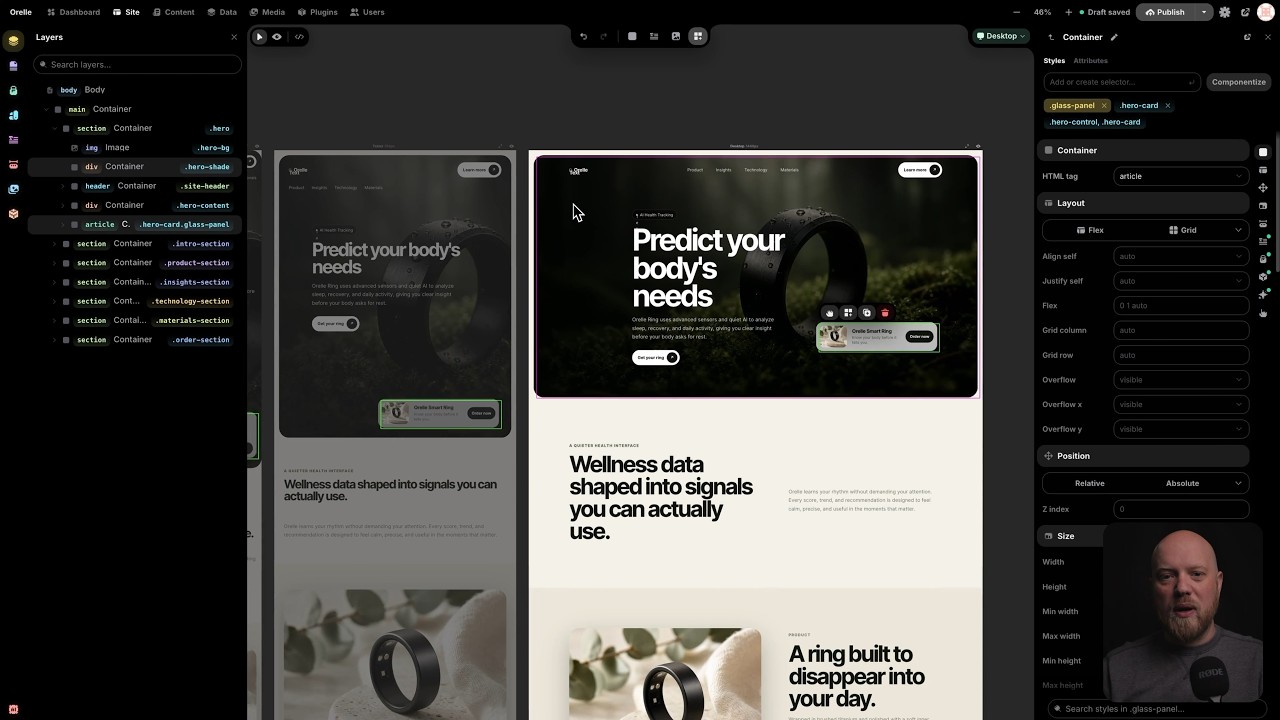
ตัวแก้ไขเป็น canvas จริง ไม่ใช่ฟอร์มที่มีช่องแสดงตัวอย่างติดอยู่ คุณสามารถวางเฟรม breakpoint หลายๆ เฟรมเคียงข้างกันและแก้ไขพร้อมกันได้ เปลี่ยนเดสก์ท็อปและเฟรมมือถือจะตอบสนองในมุมมองเดียวกัน เมื่อคุณต้องการทำงานกับของจริง ให้สลับไปที่โหมด live และแก้ไขหน้าเว็บขนาดเต็มหน้าเดียวในตำแหน่งนั้น
ส่วนที่ไม่มีใครมี: Core Framework ถูกสร้างมาในตัว มันคือเอนจิน design-token ที่ผู้เชี่ยวชาญ WordPress หลายพันคนใช้ทุกวันอยู่แล้ว และที่นี่มันเป็นระบบหลัก ไม่ใช่ปลั๊กอินที่คุณติดตั้งแล้วต้องภาวนา
- Color tokens ที่สร้าง scale เฉดสีของตัวเอง กำหนดสีแบรนด์เดียว คุณจะได้ชุดสีอ่อนและสีเข้มที่ปรับแต่งมาอย่างสมบูรณ์โดยอัตโนมัติ
- Type scales ที่ลื่นไหลและเป็นคณิตศาสตร์ แถบเดียวที่ปรับขนาดตาม viewport แทนที่จะเป็นขนาดฟอนต์ที่เลือกด้วยมือสี่สิบขนาดที่คุณต้องคอยซิงค์
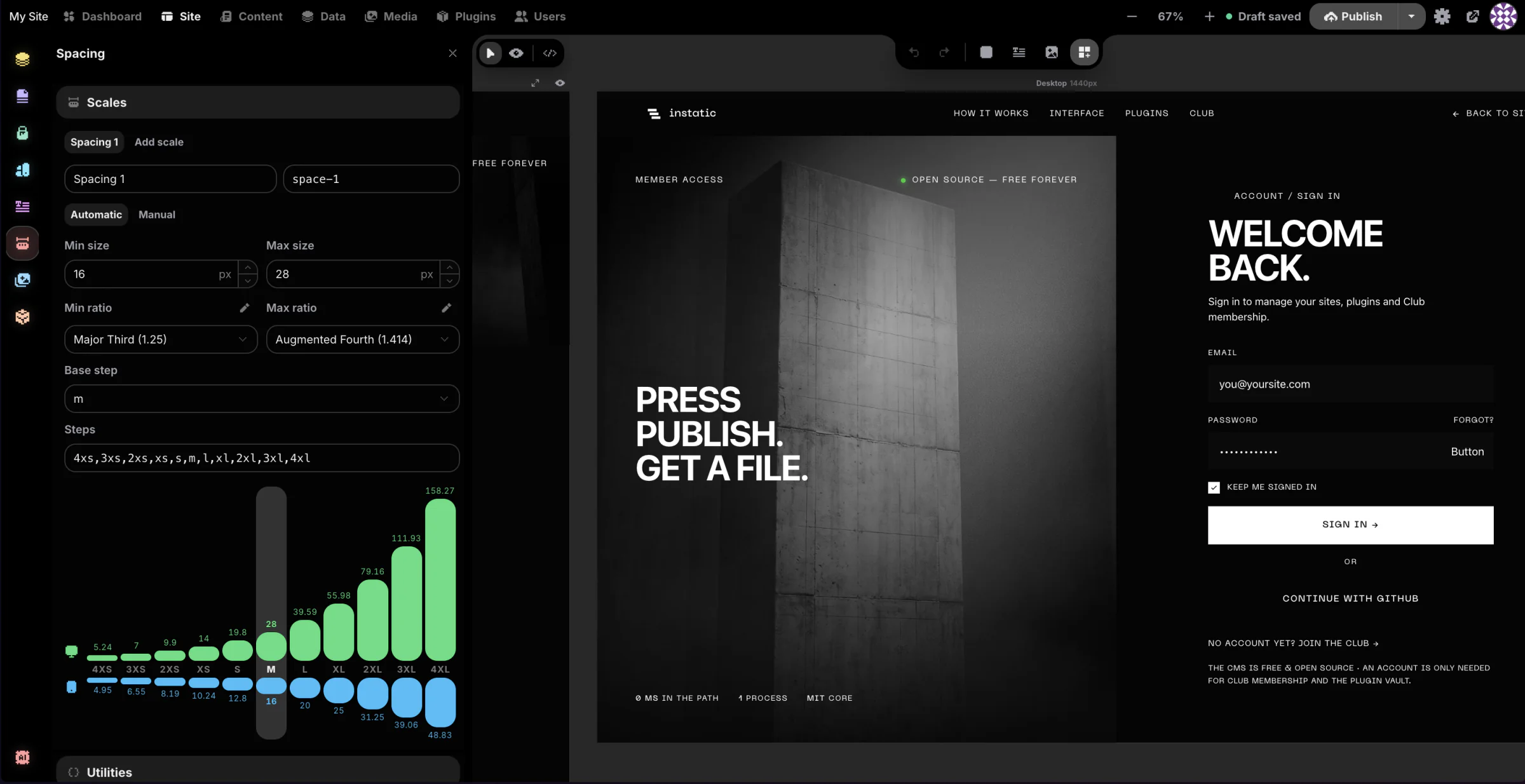
- Spacing scales เพื่อให้ทุกหน้าและทุก breakpoint รักษาจังหวะเดียวกัน
- ตัวสร้าง utility-class ที่ปล่อยคลาสที่ถูกล็อกและสร้างขึ้นลงใน
framework.cssขนาดเล็ก ไม่มี bloat ไม่มีกฎที่ซ้ำซ้อน ไม่มีอะไรที่คุณไม่ได้ร้องขอ - ระบบการออกแบบทั้งหมดของคุณอยู่ในรูปแบบข้อมูล เปลี่ยน token เดียว ทุกหน้าที่ใช้มันจะอัปเดต
🧱 สร้าง
- Modules คือส่วนประกอบพื้นฐาน: containers, text, images, buttons, video, lists, links, SVG, forms ลากพวกมันลงบน canvas และซ้อนกันได้ตามต้องการ
- Visual Components คือส่วนประกอบที่นำกลับมาใช้ใหม่ได้พร้อมพารามิเตอร์แบบมีชนิด (typed parameters) และช่องที่กำหนดชื่อ (named slots) พารามิเตอร์สามารถเป็น string, number, boolean, color, image, URL, rich text, enum หรือช่องเนื้อหาทั้งหมด แก้ไขคอมโพเนนต์ครั้งเดียวและทุกอินสแตนซ์บนเว็บไซต์จะอัปเดต คอมโพเนนต์ที่อ้างอิงตัวเองจะถูกบล็อกก่อนที่จะเกิดขึ้น ดังนั้นจึงไม่มีอะไรกินหางตัวเอง
- Templates จัดการส่วนประกอบที่ใช้ร่วมกัน (shared chrome) หนึ่งเลย์เอาต์สำหรับทั้งเว็บไซต์, เลย์เอาต์แยกต่างหากสำหรับแต่ละประเภทโพสต์ และหน้า 404 จริงที่คุณออกแบบเอง เนื้อหาจะไหลเข้าสู่ช่อง (outlet) ดังนั้นส่วนหัวและส่วนท้ายจะถูกเขียนครั้งเดียวและครอบคลุมทุกอย่าง
- Loops ทำซ้ำเลย์เอาต์เหนือคอลเลกชัน: โพสต์ของคุณ, หน้าของคุณ, สื่อของคุณ หรืออะไรก็ตามที่ปลั๊กอินเปิดเผยเป็นแหล่งข้อมูล กำหนดรูปแบบย่อย (variants) สองสามแบบให้กับ loop และมันจะสลับไปมาระหว่างรูปแบบเหล่านั้นเมื่อทำงาน เหมาะสำหรับรายการโพสต์, ตารางผลิตภัณฑ์, แกลเลอรี
- Forms ที่เป็นของ CMS ของคุณ สร้างฟอร์มจากฟิลด์เชิงความหมาย (semantic fields) และข้อมูลที่ส่งจะไปอยู่ในตารางข้อมูลของคุณเอง Instatic สามารถอ่านฟิลด์ที่คุณวางไว้และสร้างตารางที่ตรงกันให้คุณได้ ไม่ต้องใช้บริการฟอร์มภายนอก, ไม่ต้องฝังโค้ด, ไม่มีค่าธรรมเนียมรายเดือนสำหรับฟอร์มติดต่อ
- AI agent ที่แก้ไขหน้าเว็บได้จริง อธิบายสิ่งที่คุณต้องการและมันจะสร้างบน canvas เป็นโหนดที่แก้ไขได้จริง ไม่ใช่ภาพหน้าจอหรือกำแพงโค้ด มันเขียน HTML เชิงความหมายสำหรับโครงสร้างและ CSS สำหรับสไตล์ ผ่านไปป์ไลน์การนำเข้าเดียวกันกับที่คุณใช้เมื่อวางมาร์กอัป Site scope ที่มี 35 เครื่องมือสร้างหน้าเว็บ; Content scope ที่มี 15 เครื่องมือแก้ไขรายการ นำโมเดลของคุณเองมาใช้: Claude, OpenAI, OpenRouter หรือ Ollama ในเครื่อง คีย์ของคุณ, โมเดลของคุณ, ค่าใช้จ่ายของคุณ
- การนำเข้าที่เชื่อถือได้ วาง HTML ดิบและรับโหนดที่แก้ไขได้ หรือวางเว็บไซต์สแตติกทั้งหมด — HTML, CSS, รูปภาพ, ฟอนต์ — และ Super Import จะเปลี่ยนให้เป็นหน้าเว็บ, กฎสไตล์, design tokens และสื่อ ความขัดแย้งทุกอย่างจะแสดงให้คุณเห็นก่อนที่จะมีการเขียนอะไร และการนำเข้าทั้งหมดเป็นการยกเลิกครั้งเดียว
🗂 จัดการ
- โมเดลเนื้อหาเดียวภายใต้ทุกสิ่ง หน้า, โพสต์, คอมโพเนนต์, คอลเลกชันที่กำหนดเอง และตารางที่มีโครงสร้างใดๆ ที่คุณสร้างขึ้น ล้วนอยู่ในที่เก็บเดียวกัน:
data_tablesและdata_rowsไม่มีตาราง "pages" ที่ถูกจัดประเภทพิเศษซ่อนอยู่ในมุมใดมุมหนึ่ง Schemas, แถวข้อมูลดิบ, การนำเข้า, การส่งออก และการส่งฟอร์ม ล้วนอยู่ในที่เดียวกันอย่างสอดคล้องกัน - พื้นที่ทำงาน Data ที่คุณออกแบบคอลเลกชันของคุณเอง ที่
/admin/dataคุณสามารถสร้างประเภทโพสต์ที่กำหนดเองและตารางข้อมูลที่กำหนดเองพร้อมฟิลด์ของตัวเอง จากนั้นทำงานกับแถวข้อมูลในรูปแบบตารางสเปรดชีต: ค้นหา, จัดเรียง, กรอง, เผยแพร่จำนวนมาก, ส่งออกจำนวนมาก ประเภทโพสต์ที่กำหนดเองมาพร้อมกับเวิร์กโฟลว์การแก้ไขจริง — ฉบับร่าง, กำหนดเวลา, เผยแพร่ — และประวัติเวอร์ชันของสำเนาที่เผยแพร่ ตารางข้อมูลธรรมดาเป็นตารางง่ายๆ ที่คุณสามารถชี้ไปที่อะไรก็ได้: ข้อมูลที่ส่งจากฟอร์ม, แค็ตตาล็อกผลิตภัณฑ์, CRM ขนาดเล็ก, รายการคำรับรอง และทุกตารางที่คุณสร้างเป็นแหล่งเนื้อหาที่ loop สามารถเรนเดอร์ได้ กำหนดตาราง "Team" ครั้งเดียว, วนลูปไปที่หน้าเกี่ยวกับของคุณ, เสร็จสิ้น - พื้นที่ทำงานเนื้อหาสำหรับการเขียน พื้นผิวที่เน้นสำหรับโพสต์และคอลเลกชัน รวมถึงโหมด live เพื่อให้ผู้เขียนแก้ไขภายในดีไซน์จริงของเว็บไซต์แทนที่จะเป็นช่องข้อความสีเทา
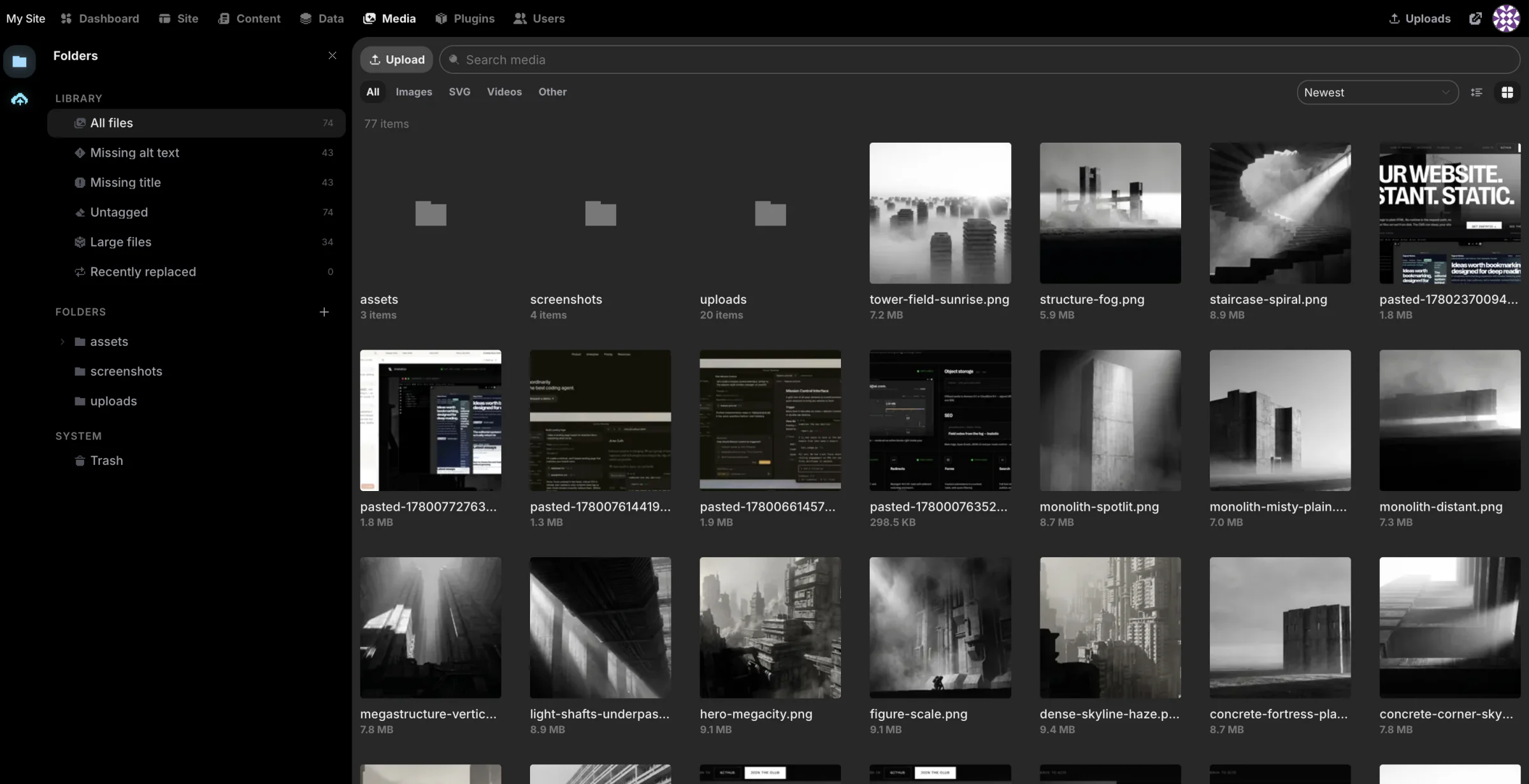
- พื้นที่ทำงานสื่อที่ทำงานเหมือนตัวจัดการไฟล์ โฟลเดอร์และโฟลเดอร์อัจฉริยะ, การดำเนินการจำนวนมาก, การติดตามการใช้งานเพื่อให้คุณรู้ว่าไฟล์ถูกใช้ที่ไหนจริง, เวิร์กโฟลว์การแทนที่ และอะแดปเตอร์จัดเก็บข้อมูลที่สามารถเสียบได้เมื่อคุณต้องการพื้นที่เก็บข้อมูลที่มากกว่าดิสก์ในเครื่อง
- การควบคุมการเข้าถึงที่เป็นจริง ไม่ใช่แค่การตกแต่ง บทบาทที่สร้างจาก 38 ความสามารถ, เซสชันที่ใช้โทเค็น, TOTP two-factor พร้อมรหัสลับที่เข้ารหัสเมื่อหยุดนิ่ง, การล็อกบัญชีพร้อมการหน่วงเวลาหลังจากความล้มเหลวซ้ำๆ และการแจ้งเตือนแบบ step-up ก่อนการดำเนินการที่อันตราย เช่น การลบผู้ใช้หรือการลงชื่อออกจากอุปกรณ์ทุกเครื่อง
- ⌘K สำหรับทุกสิ่ง แถบคำสั่งแบบ fuzzy ทั่วทั้งส่วนผู้ดูแลระบบ กระโดดไปที่ใดก็ได้ ทำอะไรก็ได้ โดยไม่ต้องแตะเมาส์
- ฉบับร่างยังคงเป็นฉบับร่าง การแก้ไขที่ยังไม่เผยแพร่จะไม่รั่วไหลไปยังผู้เยี่ยมชม สิ่งที่คุณไม่ได้เผยแพร่ พวกเขาจะไม่เห็น
📊 วิเคราะห์
- แดชบอร์ดที่คุณจัดเรียงเอง ตารางวิดเจ็ตแบบไทล์ขนาด 12 คอลัมน์ที่คุณสามารถลาก, ปรับขนาด และจัดเรียงใหม่ได้ เพิ่มวิดเจ็ตที่คุณสนใจในโหมดปรับแต่ง และเลย์เอาต์จะถูกบันทึกตามผู้ใช้ ปลั๊กอินสามารถส่งวิดเจ็ตของตัวเองเข้าสู่ตารางเดียวกันได้
- บันทึกการตรวจสอบที่ไม่ลืม ทุกการกระทำของผู้ดูแลระบบที่มีความหมายจะถูกบันทึกเป็นแถว: การเข้าสู่ระบบ, การเปลี่ยนแปลงเนื้อหา, การแก้ไขบทบาท, วงจรชีวิตของปลั๊กอิน เป็นแบบเพิ่มเท่านั้น ดังนั้นจึงเป็นบันทึกที่แท้จริงว่าใครทำอะไรเมื่อไหร่ ไม่ใช่สิ่งที่ใครจะสามารถเขียนใหม่ได้อย่างเงียบๆ
- ข้อมูลฟอร์มที่เป็นของคุณ การส่งข้อมูลจะอยู่ในตารางของคุณเอง คุณสามารถสอบถาม, ส่งออก, และสร้างต่อยอดจากข้อมูลเหล่านั้นได้ ไม่มีผู้ให้บริการอยู่ตรงกลาง
พื้นผิวการวิเคราะห์ในปัจจุบันมีวัตถุประสงค์เพื่อการดำเนินงานโดยเฉพาะ: สถานะแดชบอร์ด, ประวัติการตรวจสอบ, และข้อมูลฟอร์มที่เป็นเจ้าของ แทนที่จะเป็นการติดตามผู้เยี่ยมชมจากบุคคลที่สาม
🔌 ขยาย
CMS ทุกตัวมีปลั๊กอิน ความแตกต่างที่นี่คือโค้ดปลั๊กอินแบ็กเอนด์ทำงานที่ไหน
ปลั๊กอิน Instatic คือแพ็กเกจ zip ที่มี manifest จุดเริ่มต้นของเซิร์ฟเวอร์จะทำงานใน worker แยกตามปลั๊กอิน ซึ่งโฮสต์ QuickJS-WASM sandbox: ไม่มีระบบไฟล์, ไม่มีตัวแปรสภาพแวดล้อม, ไม่มีเครือข่ายเลย เว้นแต่เจ้าของเว็บไซต์จะอนุญาต, โฮสต์ได้ครั้งละหนึ่งโฮสต์ ส่วนขยายของ Editor และหน้าผู้ดูแลระบบประเภทแอปจะแตกต่างกัน: พวกมันทำงานในหน้าต่างผู้ดูแลระบบและต้องได้รับอนุญาต editor.code อย่างชัดเจนก่อนการติดตั้ง
ผ่าน SDK ปลั๊กอินสามารถเพิ่ม:
- เส้นทาง HTTP และหน้าผู้ดูแลระบบของตัวเอง
- พื้นที่เก็บข้อมูลและงานเบื้องหลังที่กำหนดเวลาไว้
- แหล่งข้อมูล Loop เพื่อให้ content loop ของคุณสามารถดึงข้อมูลจากที่ใดก็ได้
- โมดูล Canvas — บล็อกใหม่ที่ปรากฏใน editor
- อะแดปเตอร์จัดเก็บสื่อและ frontend assets
- Lifecycle hooks ตลอดการติดตั้ง, การเปิดใช้งาน และอื่นๆ
เริ่มต้นด้วย เอกสารระบบปลั๊กอิน และ ปลั๊กอินเทมเพลต
รวดเร็วเพราะแทบไม่มีอะไรให้โหลด
หน้า Instatic ที่เผยแพร่ส่วนใหญ่เป็นเพียงไฟล์ที่อยู่บนดิสก์ ไม่มีเฟรมเวิร์กให้บูต, ไม่มีขั้นตอน hydration, ไม่มี database round-trip ในเส้นทางทั่วไป เบราว์เซอร์ดึง HTML เชิงความหมายและ CSS bundles ที่กระชับ และก็เสร็จสิ้น แทบไม่มีอะไรอยู่ระหว่างผู้เยี่ยมชมกับเนื้อหา ดังนั้นหน้าเว็บจึงรู้สึกรวดเร็วทันใจ
ความเร็วนั้นไม่ใช่การตั้งค่าที่คุณปรับแต่ง มันเกิดจากวิธีการทำงานของการเผยแพร่ ในสามชั้นที่คุณไม่จำเป็นต้องคิดถึงเลย:
- หน้าเว็บแบบ Static ถูกสร้างลงดิสก์โดยตรงเมื่อคุณเผยแพร่ และถูกสลับเข้ามาอย่างเป็นอะตอม ผู้เยี่ยมชมจะได้รับไฟล์ ไม่ใช่การเรนเดอร์
- เส้นทางที่มีการเปลี่ยนแปลงอย่างแท้จริง จะเข้าสู่แคชในหน่วยความจำที่มีเวอร์ชัน การเผยแพร่จะเพิ่มเวอร์ชัน ดังนั้นรายการเก่าจะพลาดอย่างช้าๆ และไม่มีใครเห็นหน้าเว็บที่ล้าสมัย
- ส่วนที่เฉพาะผู้เยี่ยมชมจริงๆ เพียงไม่กี่ส่วน จะถูกตรวจจับโดยอัตโนมัติและโหลดแบบ lazy-loaded โดยรันไทม์ที่มีขนาดประมาณ 1.1 kB เล็กกว่าย่อหน้านี้เสียอีก
สิ่งที่ออกมาอีกด้านหนึ่งคือ HTML ธรรมดาและ CSS ที่กระชับ ทั้งหมดนี้ไม่มีอะไรจาก editor ติดมาด้วย: ไม่มี React บนหน้าสาธารณะของคุณ, ไม่มี editor runtime, ไม่มีเฟรมเวิร์กในมาร์กอัป และเนื่องจากเป็นเพียง HTML และ CSS ไม่มีอะไรที่จะยึดเว็บไซต์ของคุณไว้เป็นตัวประกัน — คุณสามารถอ่าน, โฮสต์ที่ใดก็ได้, หรือนำไปใช้แล้วจากไปได้ การออกแบบฉบับเต็ม: the publisher
เริ่มต้นอย่างรวดเร็ว
คุณต้องมี Bun เท่านั้น การตั้งค่าการพัฒนาเริ่มต้นทำงานบน SQLite ดังนั้นจึงไม่มีบริการเพิ่มเติมให้ต้องตั้งค่า
git clone https://github.com/corebunch/instatic.git
cd instatic
bun install
bun run dev
เปิด http://localhost:5173 การเข้าชมครั้งแรกจะนำคุณไปสู่การสร้างเว็บไซต์และบัญชีเจ้าของของคุณ
ต้องการดูว่ามันถูกจัดส่งอย่างไรจริงๆ? bun run start จะสร้าง admin และให้บริการจาก Bun server ที่ http://localhost:3001/admin
การสำรองข้อมูล, ในหนึ่งประโยค: สำรองฐานข้อมูล (Postgres dump หรือไฟล์ SQLite) และโฟลเดอร์ uploads และคุณได้สำรองเว็บไซต์ทั้งหมดแล้ว — รายละเอียด
ใครอยู่เบื้องหลังสิ่งนี้
เราคือทีมที่อยู่เบื้องหลัง Motion.page และ Core Framework — เครื่องมือที่ผู้คนนับพันใช้สร้างเว็บไซต์เพื่อหาเลี้ยงชีพ ส่วนใหญ่ในโลกของ WordPress
เราใช้เวลาหลายปีในการทำให้แพลตฟอร์มอื่นๆ น่าใช้งานมากขึ้น จนถึงจุดหนึ่งคำถามที่ชัดเจนก็ไม่หายไป: จะเกิดอะไรขึ้นถ้าสิ่งที่อยู่ข้างใต้ถูกต้องตั้งแต่แรก? ไม่มีมรดกให้ต้องแก้ไข, ไม่มีมาร์กอัปที่เราไม่ได้รับอนุญาตให้แตะต้อง, ไม่มีโมเดลธุรกิจที่ขึ้นอยู่กับการเก็บเว็บไซต์ของคุณไว้ในที่ที่เราสามารถมองเห็นได้
ดังนั้นเราจึงสร้าง Instatic และเราได้นำ Core Framework มาด้วย โดยเชื่อมต่อเป็นระบบหลัก เพื่อให้เฉดสี, สเกลตัวอักษร, ระยะห่าง, และคลาสยูทิลิตี้ที่ผู้ใช้ของเราพึ่งพาอยู่แล้วเป็นส่วนหนึ่งของผลิตภัณฑ์ — ไม่ใช่ส่วนเสริมที่คุณติดตั้งและหวังว่าจะดีที่สุด
ช่วงเริ่มต้น, โดยตั้งใจ
นี่คือส่วนที่ซื่อสัตย์: นี่คือเวอร์ชัน 0.0.x
ทุกสิ่งที่กล่าวมาข้างต้น — canvas, Core Framework, โมเดลเนื้อหาสากล, ปลั๊กอินแบบ sandboxed, AI agent, ฟอร์ม, loops, เทมเพลต, สื่อ, MFA, audit log, การปรับใช้ด้วยคลิกเดียว, publisher ที่สะอาด — คือจุดเริ่มต้น ไม่ใช่จุดสิ้นสุด สิ่งที่จะมาถึง:
- การวิเคราะห์จริง เป็นแบบ first-party และเคารพความเป็นส่วนตัว เพื่อเติมเต็มเสาหลัก Analyze
- ระบบนิเวศของโมดูลและปลั๊กอินที่ใหญ่ขึ้น บล็อก first-party เพิ่มเติม, พื้นผิว SDK ที่กว้างขึ้น, ตัวอย่างเพิ่มเติมให้คัดลอก
- AI agent ที่คมชัดขึ้น เครื่องมือเพิ่มเติม, ความเข้าใจที่ลึกซึ้งยิ่งขึ้นเกี่ยวกับเว็บไซต์จริงของคุณ
- ทุกอย่างกระชับขึ้น เราตั้งใจที่จะอยู่ก่อน 1.0 เพราะเป็นช่วงเวลาที่ถูกที่สุดในการทิ้งแนวคิดที่ไม่ดีและรักษาสถาปัตยกรรมให้สะอาด
API และเวิร์กโฟลว์ยังคงสามารถเปลี่ยนแปลงได้ก่อน 1.0 หากสิ่งนี้ทำให้คุณกังวล ให้รอเวอร์ชัน 1.0 — ไม่ต้องกังวลใจ หากคุณต้องการช่วยกำหนดทิศทางของความเป็นเจ้าของเว็บไซต์ในอีกยี่สิบปีข้างหน้า ตอนนี้เป็นที่นั่งที่ดี
สำหรับนักพัฒนา
Bun server หนึ่งตัว แอดมิน React ที่สร้างด้วย Vite Publisher ที่สร้างหน้าเว็บที่คุณยินดีที่จะเขียนเอง
| Runtime | Bun, สำหรับทั้งเซิร์ฟเวอร์และเครื่องมือ |
| Language | TypeScript ทุกที่ |
| Admin app | React 19 (React Compiler เปิด), Vite, Zustand + Mutative, CodeMirror, dnd-kit |
| Server | Bun.serve พร้อมเราเตอร์ที่เขียนด้วยมือ |
| Database | SQLite หรือ Postgres — อินเทอร์เฟซ DbClient เดียว, เลือกโดย DATABASE_URL |
| Validation | TypeBox ที่ทุกขอบเขตที่ไม่มีประเภท; schemas เป็นแหล่งความจริง |
| Plugins | QuickJS-WASM backend sandbox, สิทธิ์ที่เจ้าของอนุญาต, editor.code ชัดเจนสำหรับโค้ดในหน้าต่างแอดมิน |
| AI | ไดรเวอร์ที่ไม่ขึ้นกับผู้ให้บริการผ่าน HTTP/SSE ดิบ, ไม่มี SDK ของผู้ขาย |
| Output | Semantic HTML, CSS ที่กระชับ, ไฟล์ static ที่สร้างขึ้นพร้อมช่องว่างแบบไดนามิกที่ตรวจจับอัตโนมัติ |
โค้ดเบสมีความคิดเห็นที่ชัดเจน และความคิดเห็นเหล่านั้นถูกบังคับใช้ในโค้ด กฎทางสถาปัตยกรรมอยู่ใน src/__tests__/architecture/ เป็นการทดสอบจริง ดังนั้นโครงสร้างที่ทำให้ผลลัพธ์สะอาดจึงไม่สามารถเสื่อมสภาพไปอย่างเงียบๆ ได้
bun run build   # tsc -b && vite build
bun test
bun run lint
เจาะลึก: ดัชนีเอกสาร · สถาปัตยกรรม · editor · เซิร์ฟเวอร์ · publisher · ระบบปลั๊กอิน
ขอขอบคุณ
อินเทอร์เฟซของ Instatic ใช้ Pixelarticons โดย Gerrit Halfmann ขอขอบคุณ Gerrit สำหรับชุดไอคอนที่มีเอกลักษณ์อย่างแท้จริง และสำหรับการอนุญาตให้เราใช้งานในโปรเจกต์โอเพนซอร์สด้วยความกรุณา
ใบอนุญาต
MIT ดู LICENSE ไม่มีระดับชั้น, ไม่มีดอกจัน open-core, ไม่มี "ติดต่อฝ่ายขาย"
เอกสารโปรเจกต์
อ่านเอกสารต้นฉบับ
README วิธีติดตั้ง วิธีใช้งาน และข้อกำหนดจาก repository ต้นฉบับ
Instatic
Own your site. Love building it.
A self-hosted CMS where the visual editor, content engine, and publisher all live in one Bun server — and the pages it ships are clean enough to read in view-source.
One-Click Deploy · Quick Start · Docs · Plugins · Roadmap
Watch the introductory video about Instatic on YouTube.
A modern website usually means assembling a stack: a headless CMS, a framework, a host, a form service, an analytics vendor, an image CDN — each with its own bill, dashboard, and 2 a.m. outage. Instatic is the opposite bet. One Bun server holds the whole thing — the canvas editor, the content engine, media, auth, forms, plugins, and the publisher — and you run it wherever you like, backed by SQLite or Postgres.
What comes out the other end is the part most builders quietly compromise on: plain semantic HTML and compact CSS, with none of the editor's machinery left behind in the page. No framework runtime, no builder attributes, no div soup. The site loads like a static file because, most of the time, it is one.
MIT. Self-hosted. Yours.
Deploy in one click
Railway is the fastest way to get Instatic live. Pick a template, hit the button, wait about two minutes. That's it. It generates the secret keys, attaches the storage volume, and sets up the health checks on its own. You never open a terminal.
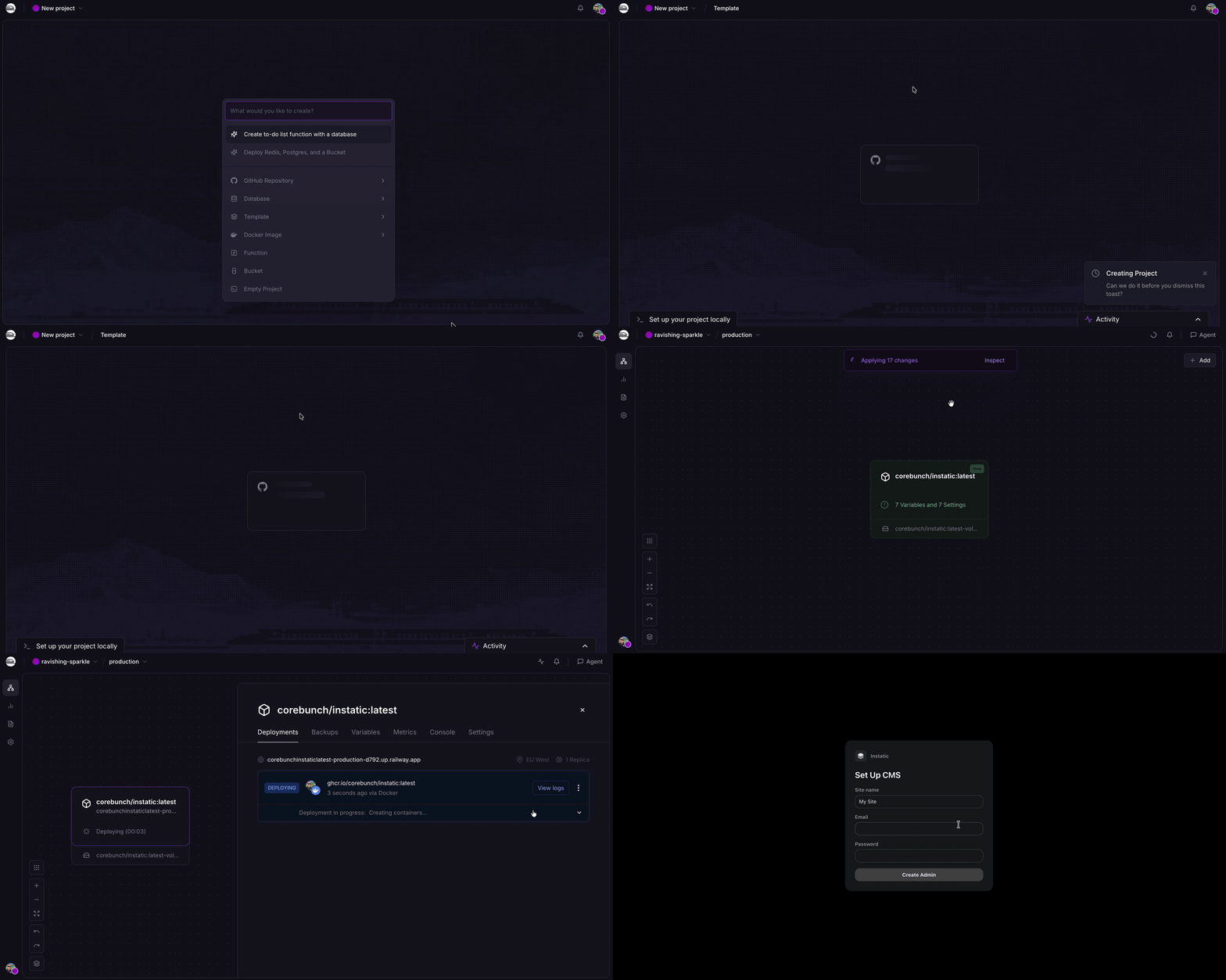
One minute to live. Unedited.
| Provider | Database | Best for | Deploy |
|---|---|---|---|
| Railway · Recommended | SQLite | A single site — blog, portfolio, small business | Deploy → |
| Railway | Postgres | Multiple authors, managed backups, room to grow | Deploy → |
| Render | SQLite or Postgres | Teams that prefer Render services, disks, and managed Postgres | Guide → |
| Docker / VPS | SQLite or Postgres | Bring-your-own server, Caddy TLS, custom backup policy | Guide → |
SQLite is the right default for most sites. Reach for Postgres when you've got a team of authors or want managed database backups.
Updating is just a redeploy
When a new Instatic version is available, update by redeploying the latest image. Your database and uploads stay on the attached storage, so the app container can be replaced without rebuilding the site from scratch.
Prefer your own hardware? Instatic is a single Docker image:
INSTATIC_IMAGE=ghcr.io/corebunch/instatic:latest docker compose -f compose.prod.yml -f compose.sqlite.yml up -dFull guides for VPS, Postgres, HTTPS with Caddy, Render, and backups are in docs/deployment.
One tool, the whole life of a site
Most tools do one job and hand you off for the rest. You design in one place, build in another, keep content somewhere else, then bolt analytics on from a fourth. Instatic does all of it. Here's what's actually in the box.
🎨 Design
The editor is a real canvas, not a form with a preview pane stapled to it. You put several breakpoint frames side by side and edit them together. Change the desktop and the mobile frame reacts in the same view. When you'd rather work on the real thing, flip to live mode and edit a single full-size page in place.
The part nobody else has: Core Framework is built in. It's the design-token engine thousands of WordPress pros already use every day, and here it's a core system, not a plugin you install and pray over.
- Color tokens that generate their own shade scale. Define one brand color, get the full set of tuned tints and shades automatically.
- Type scales that are fluid and mathematical. One ramp that scales with the viewport, instead of forty hand-picked font sizes you have to keep in sync.
- Spacing scales so every page and every breakpoint keeps the same rhythm.
- A utility-class generator that emits locked, generated classes into one small
framework.css. No bloat, no duplicate rules, nothing you didn't ask for.
Your whole design system lives as data. Change one token and every page that uses it updates.
🧱 Build
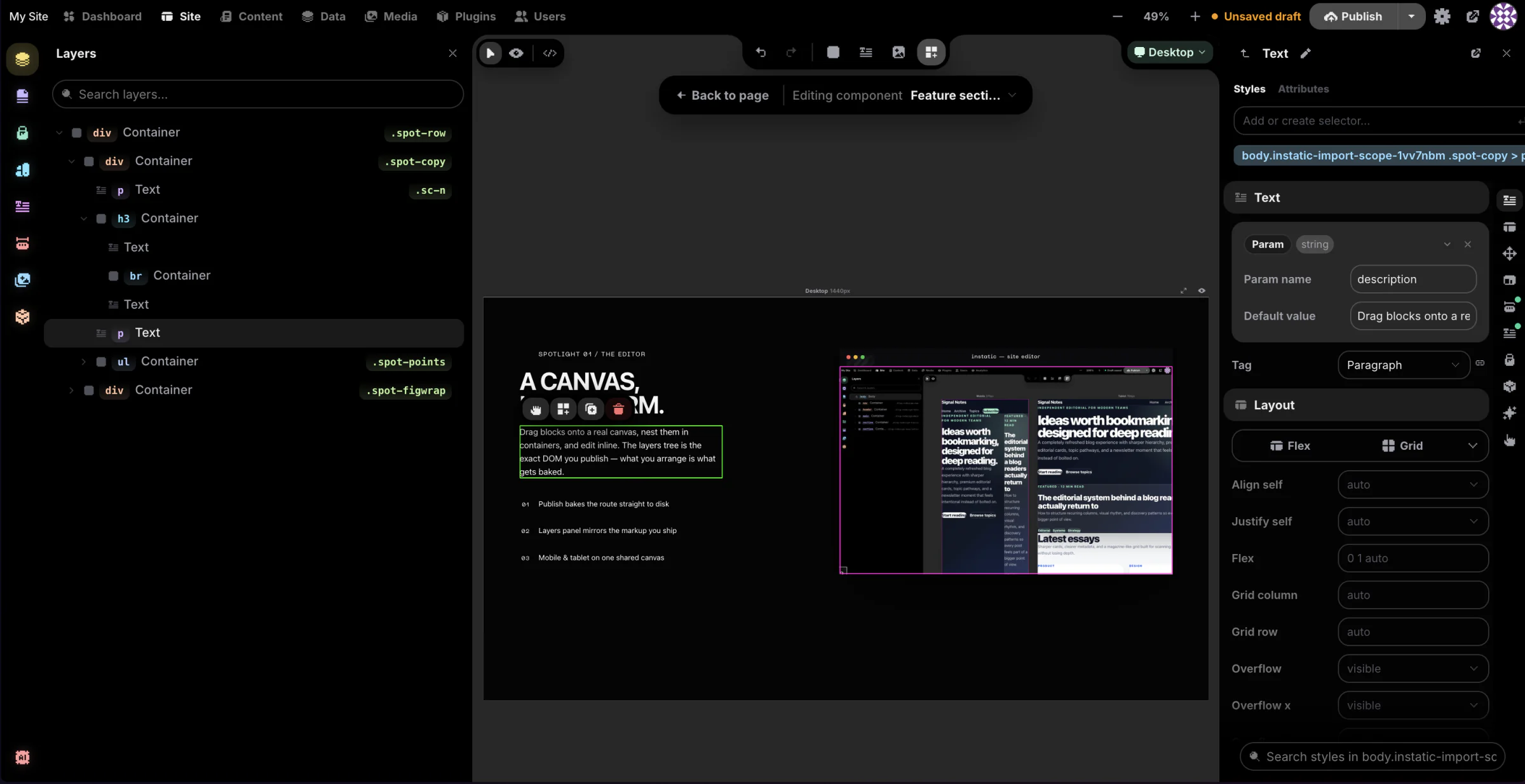
- Modules are the building blocks: containers, text, images, buttons, video, lists, links, SVG, forms. Drag them onto the canvas and nest them however you want.
- Visual Components are reusable pieces with typed parameters and named slots. A parameter can be a string, number, boolean, color, image, URL, rich text, an enum, or a whole slot of content. Edit the component once and every instance on the site updates. Components that would reference themselves are blocked before they happen, so nothing eats its own tail.
- Templates handle the shared chrome. One layout for the whole site, separate layouts per post type, and a real 404 page you design yourself. Content flows into an outlet, so a header and footer get written once and wrap everything.
- Loops repeat a layout over a collection: your posts, your pages, your media, or anything a plugin exposes as a source. Give a loop a couple of variants and it alternates between them as it goes. Good for post lists, product grids, galleries.
- Forms that belong to your CMS. Build a form out of semantic fields and the submissions land in your own data tables. Instatic can read the fields you placed and create the matching table for you. No third-party form service, no embed, no monthly fee for a contact form.
- An AI agent that actually edits the page. Describe what you want and it builds it on the canvas as real, editable nodes, not a screenshot or a wall of code. It writes semantic HTML for structure and CSS for style, through the same import pipeline you use when you paste markup. A 35-tool Site scope builds pages; a 15-tool Content scope edits entries. Bring your own model: Claude, OpenAI, OpenRouter, or local Ollama. Your key, your model, your bill.
- Imports that hold up. Paste raw HTML and get editable nodes. Or drop a whole static site — HTML, CSS, images, fonts — and Super Import turns it into pages, style rules, design tokens, and media. Every conflict is shown to you before anything is written, and the entire import is a single undo.
🗂 Manage
- One content model under everything. Pages, posts, components, custom collections, and any structured table you invent all live in the same store:
data_tablesanddata_rows. There's no special-cased "pages" table hiding in a corner. Schemas, raw rows, imports, exports, and form submissions all sit in one consistent place. - A Data workspace where you design your own collections. At
/admin/datayou create custom post types and custom data tables with their own fields, then work the rows in a spreadsheet-style grid: search, sort, filter, bulk publish, bulk export. Custom post types come with a real editorial workflow — draft, scheduled, published — and version history on the published copy. Plain data tables are simple grids you can point at anything: the submissions from a form, a product catalog, a lightweight CRM, a list of testimonials. And every table you build is a content source a loop can render. Define a "Team" table once, loop it onto your about page, done. - A content workspace for writing. A focused surface for posts and collections, plus live mode so authors edit inside the real design of the site instead of a gray textarea.
- A media workspace that works like a file manager. Folders and smart folders, bulk operations, usage tracking so you know where a file is actually used, replacement workflows, and pluggable storage adapters when you outgrow local disk.
- Access control that's real, not decorative. Roles built from 38 capabilities, token-based sessions, TOTP two-factor with secrets encrypted at rest, account lockout with backoff after repeated failures, and step-up prompts before the dangerous stuff like deleting a user or signing out every device.
- ⌘K for everything. A fuzzy command palette over the whole admin. Jump anywhere, do anything, without touching the mouse.
- Drafts stay drafts. Unpublished edits never leak to a visitor. What you didn't publish, they don't see.
📊 Analyze
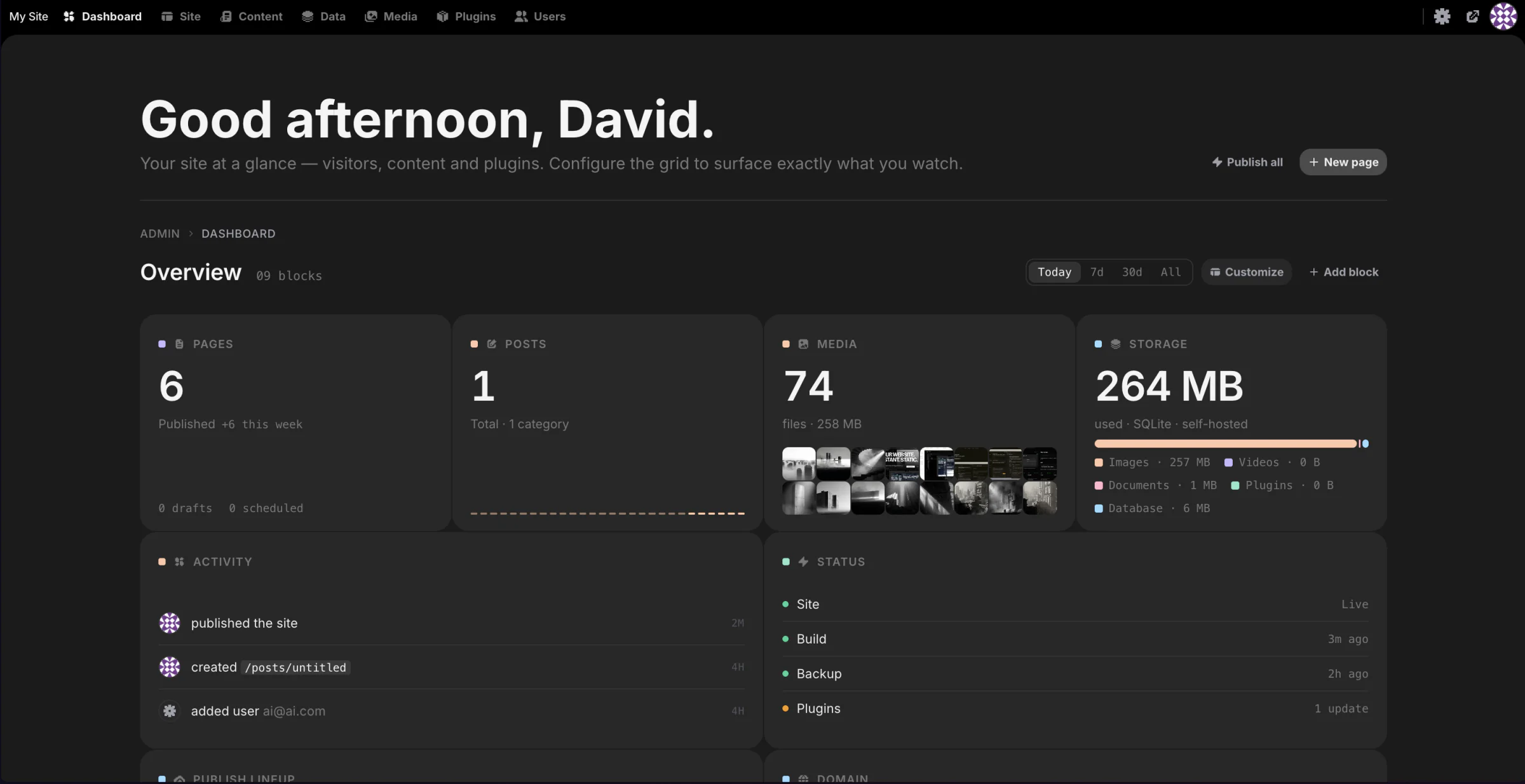
- A dashboard you arrange yourself. A 12-column grid of tile widgets you can drag, resize, and rearrange. Add the ones you care about in customize mode, and the layout saves per user. Plugins can ship their own widgets into the same grid.
- An audit log that doesn't forget. Every meaningful admin action writes a row: logins, content changes, role edits, plugin lifecycle. It's append-only, so it's a real record of who did what and when, not something anyone can quietly rewrite.
- Form data that's yours. Submissions sit in your own tables. Query them, export them, build on them. No vendor in the middle.
The analytics surface today is intentionally operational: dashboard status, audit history, and owned form data instead of third-party visitor tracking.
🔌 Extend
Every CMS has plugins. The difference here is where backend plugin code runs.
An Instatic plugin is a zip package with a manifest. Its server entrypoint runs in a per-plugin worker that hosts a QuickJS-WASM sandbox: no filesystem, no environment variables, no network at all unless the site owner grants it, one host at a time. Editor extensions and app-kind admin pages are different: they run in the admin window and require the explicit editor.code permission before install.
Through the SDK, a plugin can add:
- HTTP routes and its own admin pages
- Storage and scheduled background jobs
- Loop data sources, so your content loops can pull from anywhere
- Canvas modules — new blocks that show up in the editor
- Media storage adapters and frontend assets
- Lifecycle hooks across install, activation, and beyond
Start with the plugin system docs and the template plugin.
Fast because there's almost nothing to load
A published Instatic page is mostly just a file sitting on disk. No framework to boot, no hydration step, no database round-trip on the common path. The browser pulls down semantic HTML and compact CSS bundles, and it's done. There's barely anything between the visitor and the content, so the pages feel instant.
That speed isn't a setting you tune. It falls out of how publishing works, in three layers you never have to think about:
- Static pages are baked straight to disk when you publish and swapped in atomically. Visitors are served a file, not a render.
- Routes that genuinely change hit a versioned in-memory cache. Publishing bumps the version, so old entries miss lazily and nobody sees a stale page.
- The few truly per-visitor parts are detected automatically and lazy-loaded by a runtime that weighs about 1.1 kB. Smaller than this paragraph.
What comes out the other end is plain HTML and compact CSS, all the way down. Nothing from the editor rides along: no React on your public pages, no editor runtime, no framework in the markup. And because it's just HTML and CSS, nothing holds your site hostage — you can read it, host it anywhere, or take it and leave. Full design: the publisher.
Quick start
You need Bun 1.4.1 or newer (bun upgrade if yours is older; bun run dev refuses an older one because its Vite proxy needs that release to forward the editor's WebSocket). Nothing else. The default dev setup runs on SQLite, so there are no extra services to stand up.
git clone https://github.com/corebunch/instatic.git
cd instatic
bun install
bun run dev
Open http://localhost:5173. The first visit walks you through creating your site and your owner account.
Want to see it the way it actually ships? bun run start builds the admin and serves it from the Bun server at http://localhost:3001/admin.
Backups, in one sentence: back up the database (a Postgres dump or the SQLite file) and the uploads folder, and you've backed up the whole site — details.
Who's behind this
We're the team behind Motion.page and Core Framework — tools that thousands of people use to build websites for a living, mostly in the WordPress world.
We spent years making other platforms more bearable. At some point the obvious question wouldn't go away: what if the thing underneath was just right to begin with? No legacy to work around, no markup we're not allowed to touch, no business model that depends on keeping your site where we can see it.
So we built Instatic. And we brought Core Framework along, wired in as a core system, so the color shades, type scales, spacing, and utility classes our users already rely on are part of the product — not an add-on you install and hope for the best.
Early, on purpose
Here's the honest part: this is version 0.0.x.
Everything above — the canvas, Core Framework, the universal content model, the sandboxed plugins, the AI agent, forms, loops, templates, media, MFA, the audit log, one-click deploy, the clean publisher — is the starting line, not the finish. What's coming:
- Real analytics. First-party and privacy-respecting, to round out the Analyze pillar.
- A bigger module and plugin ecosystem. More first-party blocks, more SDK surface, more examples to copy from.
- A sharper AI agent. More tools, deeper awareness of your actual site.
- Everything tighter. We're pre-1.0 on purpose. It's the cheapest time to throw out bad ideas and keep the architecture clean.
APIs and workflows can still shift before 1.0. If that makes you nervous, wait for 1.0 — no hard feelings. If you'd rather help shape what site ownership looks like for the next twenty years, now's the good seat.
For developers
One Bun server. A React admin built with Vite. A publisher that emits pages you'd be happy to have written yourself.
| Runtime | Bun, for both server and tooling |
| Language | TypeScript everywhere |
| Admin app | React 19 (React Compiler on), Vite, Zustand + Mutative, CodeMirror, dnd-kit |
| Server | Bun.serve with a hand-written router |
| Database | SQLite or Postgres — one DbClient interface, picked by DATABASE_URL |
| Validation | TypeBox at every untyped boundary; schemas are the source of truth |
| Plugins | QuickJS-WASM backend sandbox, owner-granted permissions, explicit editor.code for admin-window code |
| AI | Provider-agnostic drivers over raw HTTP/SSE, no vendor SDKs |
| Output | Semantic HTML, compact CSS, baked static files plus auto-detected dynamic holes |
The codebase is opinionated, and the opinions are enforced in code. Architectural rules live in src/__tests__/architecture/ as actual tests, so the structure that keeps the output clean can't quietly rot.
bun run build   # tsc -b && vite build
bun test
bun run lint
Dig in: docs index · architecture · editor · server · publisher · plugin system
Thanks
Instatic's interface uses Pixelarticons by Gerrit Halfmann. Thanks to Gerrit for a genuinely distinctive icon set, and for kindly letting us use it in an open-source project.
License
MIT. See LICENSE. No tiers, no open-core asterisks, no "contact sales."