
GetNotes Tools
citrolabs/ego-lite
Tool นี้คืออะไร
ego lite เป็นเบราว์เซอร์ที่รวดเร็วสำหรับ AI agent ในการทำงานอัตโนมัติบนเบราว์เซอร์ โดยช่วยให้คุณและ agent ทำงานพร้อมกันในพื้นที่แยกต่างหาก ทำให้งานซับซ้อนเสร็จเร็วขึ้นและใช้โทเค็นน้อยลง เหมาะสำหรับนักพัฒนาที่ต้องการให้ AI agent ทำงานบนเว็บได้อย่างมีประสิทธิภาพโดยไม่รบกวนการใช้งานส่วนตัว
ข้อมูลโปรเจกต์
ดาว
3.7K
Forks
183
License
MIT
อัปเดต GitHub ล่าสุด
25 ก.ค. 2569
เพิ่มใน GetNotes
30 ก.ค. 2569
Repository
citrolabs/ego-lite
แปลและเรียบเรียงโดย AI
เนื้อหาฉบับภาษาไทย
ใช้อ่านเพื่อทำความเข้าใจเบื้องต้น โปรดตรวจสอบรายละเอียดสำคัญกับเอกสารต้นฉบับด้านล่าง
เบราว์เซอร์ที่เร็วที่สุดสำหรับ AI agent ในการทำงานอัตโนมัติบนเบราว์เซอร์






ego (lite) คือเบราว์เซอร์ที่คุณและ AI agent ของคุณทำงานพร้อมกันได้ Agent ของคุณจะรันงานเบราว์เซอร์หลายอย่างใน Space ของตัวเอง ในขณะที่แท็บของคุณยังคงเป็นของคุณ และงานจะเสร็จเร็วขึ้นโดยใช้โทเค็นน้อยลง
เครื่องมือที่มีอยู่เดิม เช่น browser-use และ agent-browser เป็นเฟรมเวิร์กการทำงานอัตโนมัติของเบราว์เซอร์: พวกมันต้องการเบราว์เซอร์แยกต่างหากในการขับเคลื่อน การเข้าสู่ระบบไม่เคยถูกส่งต่ออย่างราบรื่น และคุณกับ agent ก็ต้องแย่งแท็บเดียวกัน ego lite เป็นเบราว์เซอร์เดียวที่ออกแบบมาตั้งแต่ต้นเพื่อให้คุณทั้งสองคนใช้งานร่วมกันได้ ไม่ต้องตั้งค่าเพิ่มเติม และ agent สามารถเข้าถึงการเข้าสู่ระบบและแท็บจริงของคุณได้เสมอผ่าน ego-browser
ตัวอย่างการใช้งาน
https://github.com/user-attachments/assets/ffe7954b-58ee-411e-b35d-ec30c58a08bc
เริ่มต้นใช้งานอย่างรวดเร็ว
ego lite ทำงานบน macOS ในปัจจุบัน ส่วน Windows และ Linux อยู่ใน แผนงาน
1. ติดตั้ง
เลือกวิธีที่เหมาะกับคุณ
1.1 ดาวน์โหลดแอป macOS


คลิกเพื่อดาวน์โหลด จากนั้นเปิดเพื่อติดตั้ง ไม่ว่าจะด้วยวิธีใด ego lite จะเพิ่ม skill ego-browser ไปยังไดเรกทอรี skills ของ agent ทุกตัวบนเครื่องของคุณ
1.2 เพิ่ม skill ด้วย npx
ติดตั้งเฉพาะ skill ego-browser:
npx skills add citrolabs/ego-liteครั้งแรกที่ agent ของคุณรันงานเบราว์เซอร์ มันจะแนะนำคุณตลอดขั้นตอนการติดตั้งแอป ego lite
1.3 ให้ agent ของคุณตั้งค่าให้
วางสิ่งนี้ลงใน agent ของคุณ:
Set up ego lite for me: https://github.com/citrolabs/ego-lite

Read `skills/ego-browser/references/install.md` and follow the steps to install ego lite.
เมื่อเปิดใช้งานครั้งแรก ego lite จะถามคำถามหนึ่งข้อว่าต้องการย้ายข้อมูล Chrome ของคุณหรือไม่ ตอบว่าใช่ แล้ว agent ของคุณจะได้รับข้อมูลการเข้าสู่ระบบ คุกกี้ ส่วนขยาย และบุ๊กมาร์กที่มีอยู่ของคุณ
2. รันงานแรกของคุณ
ใน agent CLI ของคุณ พิมพ์ /ego-browser ตามด้วยช่องว่าง จากนั้นอธิบายสิ่งที่คุณต้องการด้วยภาษาธรรมดา:
ego-browser follow @ego_agent on x.com for meAgent จะรับ skill ego-browser เปิดหน้าใน Space ของตัวเอง อ่าน Snapshot ดำเนินการบนหน้า และรายงานกลับมา ทั้งหมดนี้ในขณะที่แท็บของคุณยังคงไม่ถูกแตะต้อง
ข้อมูลการท่องเว็บของคุณจะยังคงอยู่ในอุปกรณ์ของคุณ ego lite จะบันทึกเฉพาะว่าคุณเลือกที่จะย้ายข้อมูล Chrome ระหว่างการตั้งค่าหรือไม่
จุดเด่นของ ego lite
| คุณสมบัติ | สิ่งที่ทำ |
|---|---|
| ใช้โค้ดเบส ไม่ใช่ CLI เบส เพื่อการรันที่เร็วขึ้นด้วยโทเค็นที่น้อยลงสำหรับงานที่ซับซ้อน | ความสามารถที่ ego lite เปิดเผยต่อ agent ถูกห่อหุ้มเป็นฟังก์ชัน JavaScript ที่ agent เรียกใช้โดยตรง Agent สามารถทำในสิ่งที่ถนัดที่สุด: เขียนโค้ด โดยรวมงานหลายขั้นตอนเข้าเป็นเอาต์พุตเดียว แทนที่จะติดอยู่ในวงจร "เรียกสองคำสั่ง ดูผลลัพธ์ เรียกอีกสองคำสั่ง" เมื่อเทียบกับวิธีการ CLI ทั่วไป เวิร์กโฟลว์ที่ซับซ้อนจะเสร็จเร็วขึ้นถึง 2.5 เท่า ด้วยอัตราความสำเร็จของงานที่สูงขึ้นและจำนวนการเรียกใช้เครื่องมือต่อภารกิจที่น้อยลงมาก |
| Space เฉพาะสำหรับ agent ทุกตัว | ego lite ให้ Space ที่แยกจากกันอย่างสมบูรณ์สำหรับ agent แต่ละตัว คุณท่องเว็บอยู่ด้านหน้า agent ของคุณทำงานอยู่เบื้องหลัง และพวกมันจะไม่รบกวนกัน คุณสามารถดูได้ว่า Space ใดมี agent กำลังทำงานอยู่ และเข้าควบคุมหรือหยุดมันได้ทุกเมื่อที่คุณต้องการ |
| Agent ของคุณทำงานหลายอย่างพร้อมกันใน Spaces ซึ่งเป็นพื้นที่ทำงานคู่ขนานภายในเบราว์เซอร์เดียวกัน | แต่ละ Space จะมี AI agent ของตัวเองหรืองานของตัวเอง ทั้งหมดทำงานพร้อมกัน Claude Code เพิ่มข้อมูลนำ 10 รายการใน 10 Spaces คู่ขนาน Codex ขูดข้อมูลเว็บไซต์คู่แข่ง 5 แห่งในอีก 5 Spaces พวกมันไม่ชนกันหรือขโมยแท็บของคุณ เมาส์ของคุณยังคงอยู่ที่เดิม |
| Snapshot หน้าเว็บที่แข็งแกร่งที่สุดในตลาด | ด้วยการปรับแต่งระดับเคอร์เนล ego lite สร้าง Snapshot หน้าเว็บคุณภาพสูงสุด ซึ่งเป็นมุมมองที่โมเดลข้อความใช้ในการ "มองเห็น" และดำเนินการบนหน้าเว็บ มันจัดการกรณีที่ยากลำบากได้อย่างน่าเชื่อถือ เช่น iframes ที่ซ้อนกันลึก ซึ่งเป็นจุดที่วิธีการอื่น ๆ มักจะล้มเหลวอย่างสม่ำเสมอ |
Agent ใด ๆ ก็สามารถขับเคลื่อนได้ผ่าน ego-browser | ego-browser คือเลเยอร์การเชื่อมต่อระหว่าง agent CLI ใด ๆ (Claude Code, Codex, Cursor หรือแบบกำหนดเอง) และ ego lite มันเปิดเผยเบราว์เซอร์เป็นชุดเครื่องมือ JavaScript ในหน้า: snapshot, fill, click, wait, navigate, capture Agent เขียนโค้ด JavaScript ที่เรียกใช้เครื่องมือเหล่านั้น และ ego-browser จะรันมันบนหน้าในครั้งเดียว |
| การสะสมประสบการณ์ที่ทำให้ agent ของคุณเร็วขึ้นเมื่อคุณใช้งานมากขึ้น (เร็วๆ นี้) | เวลาส่วนใหญ่ของ agent ในงานเบราว์เซอร์หมดไปกับการลองผิดลองถูก Skill อย่างเป็นทางการของ ego lite จะกลั่นกรองการกระทำที่ประสบความสำเร็จทุกครั้งให้เป็นเครื่องมือและเวิร์กโฟลว์ที่นำกลับมาใช้ใหม่ได้ ดังนั้นงานที่คล้ายกันในอนาคตจะรันเร็วขึ้นถึง 5 เท่า |
ego lite เทียบกับผลิตภัณฑ์ที่มีอยู่
เครื่องมือส่วนใหญ่สามารถทำงานอัตโนมัติบนเบราว์เซอร์ได้ คำถามที่แท้จริงคือ agent ได้เบราว์เซอร์แบบไหน คุณสามารถทำงานต่อไปได้พร้อมกันหรือไม่ และเครื่องมือนั้นสร้างขึ้นสำหรับ agent ที่คุณใช้อยู่แล้วหรือ agent ที่มาพร้อมเครื่อง
| ความสามารถ | ego lite | Browser-Use | agent-browser (Vercel) | ChatGPT Atlas | Perplexity Comet |
|---|---|---|---|---|---|
| ทำงานหลายอย่างพร้อมกัน | ✓ | — | — | — | — |
| Skill ที่นำกลับมาใช้ใหม่ได้ | ✓ | — | — | — | — |
| สืบทอดข้อมูล Chrome | ✓ | — | — | ✓ | ✓ |
| เบราว์เซอร์เดียวกัน พื้นที่ทำงานแยกกัน | ✓ | — | — | — | — |
| อินพุตเชิงความหมายแบบบีบอัด | ✓ | — | ✓ | — | — |
| ควบคุมได้โดย agent ภายนอก | ✓ | ✓ | ✓ | — | — |
| ข้อมูลจัดเก็บในเครื่อง | ✓ | ✓ | ✓ | — | — |
| ไม่มีปัญหาการเข้าสู่ระบบ | ✓ | — | — | ✓ | ✓ |
| เบราว์เซอร์ที่ใช้งานประจำวัน | ✓ | — | — | ✓ | ✓ |
| ฟรี | ✓ | ✓ | ✓ | — | — |
อีกสองประเภทพยายามแก้ปัญหาเดียวกัน เฟรมเวิร์กการทำงานอัตโนมัติของเบราว์เซอร์ เช่น Browser-Use และ agent-browser ของ Vercel เป็นไลบรารีที่ agent เรียกใช้ พวกมันไม่มีเบราว์เซอร์ของตัวเอง ดังนั้นจึงต้องการเบราว์เซอร์แยกต่างหากในการขับเคลื่อน และข้อมูลการเข้าสู่ระบบของคุณไม่ค่อยถูกส่งต่ออย่างราบรื่น เบราว์เซอร์ AI เช่น ChatGPT Atlas และ Perplexity Comet มาพร้อมกับ agent ในตัว และมีเพียง agent นั้นเท่านั้นที่สามารถขับเคลื่อนเบราว์เซอร์ได้ ego lite เป็นเบราว์เซอร์เดียวที่ออกแบบมาตั้งแต่ต้นเพื่อให้คุณและ agent ใด ๆ ที่คุณนำมาใช้งานร่วมกันได้
การวัดประสิทธิภาพ
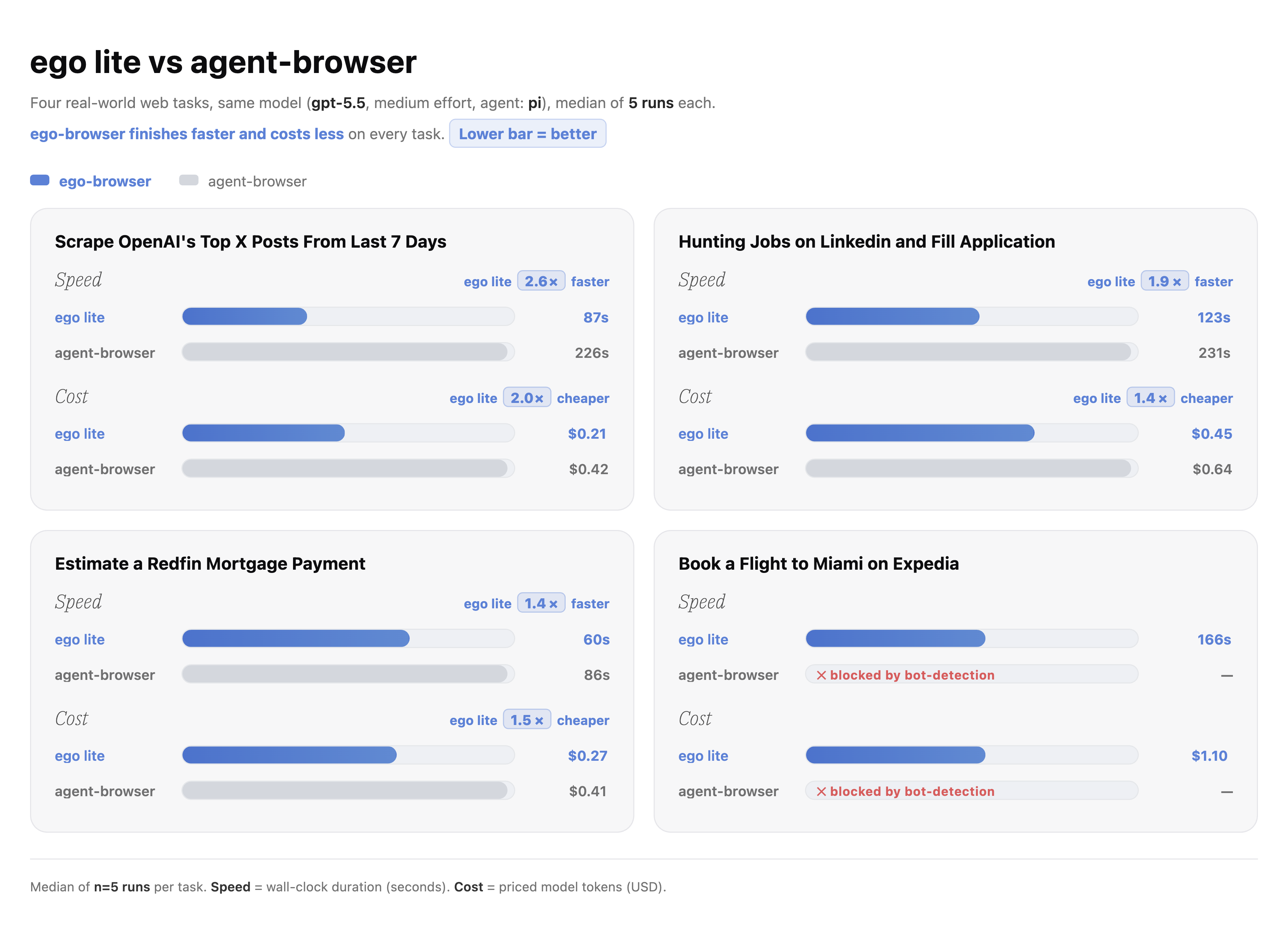
เราได้วัดประสิทธิภาพของ ego lite เทียบกับ agent-browser ของ Vercel ในงานการทำงานอัตโนมัติบนเบราว์เซอร์ที่ซับซ้อนสี่งาน ego lite ทำแต่ละงานเสร็จเร็วขึ้นถึง 2.5 เท่า โดยใช้โทเค็นน้อยลงอย่างมาก ยิ่งงานยากขึ้น ช่องว่างก็ยิ่งมากขึ้น ตรวจสอบการเปรียบเทียบ
เอกสารประกอบ
บทช่วยสอน ข้อมูลอ้างอิงเครื่องมือฉบับเต็ม และคู่มือการรวมระบบอยู่ที่ lite.ego.app/document/
ชุมชน
- Discord สำหรับคำถาม ความช่วยเหลือในการตั้งค่า และการแบ่งปัน skill
- GitHub Discussions สำหรับแนวคิดและหัวข้อสนทนาที่ยาวขึ้น
- X/Twitter สำหรับการอัปเดตและข่าวสารการเปิดตัว
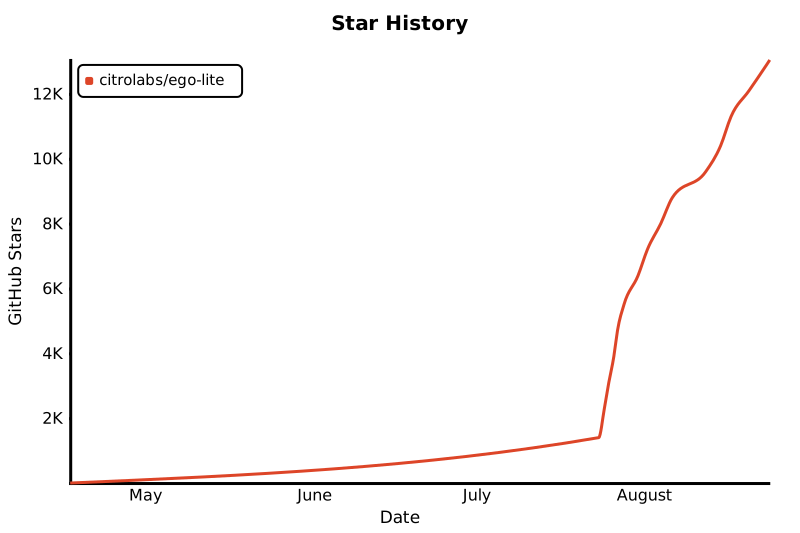
ประวัติ Star
ใบอนุญาต
เนื้อหาใน repository นี้เผยแพร่ภายใต้ MIT License ego lite browser เป็นซอฟต์แวร์ที่ดาวน์โหลดได้ฟรีและแยกต่างหาก
เอกสารโปรเจกต์
อ่านเอกสารต้นฉบับ
README วิธีติดตั้ง วิธีใช้งาน และข้อกำหนดจาก repository ต้นฉบับ
The fastest browser for AI agents to run browser automation
ego (lite) is a browser where you and your AI agents work in parallel. Your agents run multiple browser tasks in their own Spaces while your tabs stay yours, and tasks complete faster on fewer tokens.
Existing tools like browser-use and agent-browser are browser automation frameworks: they need a separate browser to drive, logins never carry cleanly, and you and the agent end up fighting for the same tabs. ego lite is one browser designed from the start for the two of you to share. No extra setup, and the agent can always reach your real logins and tabs through ego-browser.
Demo
https://github.com/user-attachments/assets/ffe7954b-58ee-411e-b35d-ec30c58a08bc
Quick Start
ego lite runs on macOS today. Windows and Linux are on the roadmap.
1. Install
Pick whichever fits your flow.
1.1 Download the macOS app
Click to download, then open it to install. Either way, ego lite adds the ego-browser skill to every agent's skills directory on your machine.
1.2 Add the skill with npx
Install just the ego-browser skill:
npx skills add citrolabs/ego-liteThe first time your agent runs a browser task, it walks you through installing the ego lite app.
1.3 Let your agent set it up
Paste this into your agent:
Set up ego lite for me: https://github.com/citrolabs/ego-lite

Read `skills/ego-browser/references/install.md` and follow the steps to install ego lite.
On first launch, ego lite asks one question, whether to migrate your Chrome data. Say yes and your agent inherits your existing logins, cookies, extensions, and bookmarks.
2. Run your first task
In your agent CLI, type /ego-browser followed by a space, then describe what you want in plain language:
ego-browser follow @ego_agent on x.com for meThe agent picks up the ego-browser skill, opens the page in its own Space, reads a Snapshot, acts on the page, and reports back, all while your own tabs stay untouched.
Your browsing data stays on your device. ego lite only records whether you opted into Chrome migration during setup.
Highlight of ego lite
| Feature | What it does |
|---|---|
| Code base, not CLI base, for faster runs with fewer tokens on complex tasks | The capabilities ego lite exposes to the agent are wrapped as JavaScript functions the agent calls directly. The agent gets to do what it does best: write code, composing a multi-step task into a single output instead of getting stuck in a "call two commands, look at the result, call two more commands" loop. Compared to the conventional CLI approach, complex workflows finish up to 2.5× faster with higher task success rates and far fewer tool calls per task. |
| A dedicated Space for every agent | ego lite gives each agent its own fully isolated Space. You browse up front, your agent works in the background, and they don't get in each other's way. You can see which Space has an agent running at any moment, and take it over or stop it whenever you want. |
| Your agents multitask in Spaces, parallel workspaces inside the same browser | Each Space gets its own AI agent or its own task, all running at the same time. Claude Code enriching 10 leads in 10 parallel Spaces. Codex scraping 5 competitor sites in 5 more. They don't collide or steal your tabs. Your mouse stays where you left it. |
| The strongest page Snapshot on the market | Thanks to kernel-level customization, ego lite produces the highest-quality page snapshots, the view text models rely on to "see" and act on a webpage. It reliably handles tough cases like deeply nested iframes, exactly where other approaches consistently break down. |
Any agent can drive it through ego-browser | ego-browser is the connection layer between any agent CLI (Claude Code, Codex, Cursor, or a custom one) and ego lite. It exposes the browser as a set of in-page JavaScript tools: snapshot, fill, click, wait, navigate, capture. The agent writes a JavaScript snippet calling those tools, and ego-browser runs it on the page in one pass. |
| Experience accumulation that makes your agent faster the more you use it (coming soon) | Most of an agent's time on browser tasks goes to trial and error. ego lite's official Skill distills every successful action into reusable tools and workflows, so similar tasks down the line run up to 5x faster. |
ego lite vs existing products
Most tools can automate a browser. The real questions are what browser the agent gets, whether you can keep working at the same time, and whether the tool is built for the agent you already use or a built-in one.
| Capability | ego lite | Browser-Use | agent-browser (Vercel) | ChatGPT Atlas | Perplexity Comet |
|---|---|---|---|---|---|
| Multitask in parallel | ✓ | — | — | — | — |
| Reusable skills | ✓ | — | — | — | — |
| Inherits Chrome's data | ✓ | — | — | ✓ | ✓ |
| Same browser, separate workspace | ✓ | — | — | — | — |
| Compressed semantic input | ✓ | — | ✓ | — | — |
| Controllable by external agents | ✓ | ✓ | ✓ | — | — |
| Data stored locally | ✓ | ✓ | ✓ | — | — |
| No login friction | ✓ | — | — | ✓ | ✓ |
| Daily-use browser | ✓ | — | — | ✓ | ✓ |
| Free | ✓ | ✓ | ✓ | — | — |
Two other categories try to solve the same problem. Browser automation frameworks like Browser-Use and Vercel's agent-browser are libraries the agent calls; they ship no browser of their own, so they need a separate one to drive and your logins rarely carry cleanly. AI browsers like ChatGPT Atlas and Perplexity Comet ship a built-in agent, and only that agent can drive the browser. ego lite is one browser, designed from the start for you and any agent you bring to share.
Benchmarks
We benchmarked ego lite against Vercel's agent-browser on four complex browser automation tasks. ego lite finished each task up to 2.5× faster, with substantially fewer tokens. The harder the task, the bigger the gap. Check the comparison.
Docs
Tutorials, the full tool reference, and integration guides live at lite.ego.app/document/.
Community
- Discord, questions, setup help, and skill sharing
- GitHub Discussions, ideas and longer threads
- X/Twitter, updates and releases
Star History
License
The contents of this repository are released under the MIT License. The ego lite browser is a separate, free download.