
GetNotes Tools
calesthio/OpenMontage
Tool นี้คืออะไร
OpenMontage เป็นระบบผลิตวิดีโอแบบ agentic โอเพนซอร์สตัวแรกที่ช่วยให้นักพัฒนาสามารถสร้างวิดีโอคุณภาพสูงได้จากคำสั่งภาษาธรรมชาติ โดย AI จะจัดการตั้งแต่การวิจัย สคริปต์ การสร้างเนื้อหา ไปจนถึงการตัดต่อและประกอบวิดีโอจริง
ข้อมูลโปรเจกต์
ดาว
59.5K
Forks
7.5K
License
AGPL-3.0
อัปเดต GitHub ล่าสุด
6 ก.ย. 2569
เพิ่มใน GetNotes
16 ก.ย. 2569
Repository
calesthio/OpenMontage
แปลและเรียบเรียงโดย AI
เนื้อหาฉบับภาษาไทย
ใช้อ่านเพื่อทำความเข้าใจเบื้องต้น โปรดตรวจสอบรายละเอียดสำคัญกับเอกสารต้นฉบับด้านล่าง





ผู้สนับสนุน
ต้องการสนับสนุน OpenMontage ใช่ไหม? สนับสนุนโปรเจกต์
เปลี่ยนผู้ช่วยเขียนโค้ด AI ของคุณให้เป็นสตูดิโอผลิตวิดีโอเต็มรูปแบบ อธิบายสิ่งที่คุณต้องการด้วยภาษาธรรมดา — agent ของคุณจะจัดการการวิจัย การเขียนสคริปต์ การสร้างเนื้อหา การตัดต่อ และการจัดองค์ประกอบสุดท้าย
ข้อแตกต่างที่สำคัญ: OpenMontage สามารถสร้างวิดีโอที่ใช้ภาพเป็นหลักได้ แต่ยังสามารถสร้าง วิดีโอจริง สำหรับเวิร์กโฟลว์แบบฟรี/โอเพนซอร์สได้ด้วย: agent จะสร้างคลังข้อมูลจากฟุตเทจสต็อกฟรีและคลังข้อมูลสาธารณะ ดึงคลิปเคลื่อนไหวจริง ตัดต่อลงในไทม์ไลน์ และเรนเดอร์ชิ้นงานที่เสร็จสมบูรณ์ นี่ไม่ใช่กลอุบาย "สร้างภาพนิ่งสองสามภาพแล้วเรียกมันว่าวิดีโอ" แบบปกติ
"SIGNAL FROM TOMORROW" — ตัวอย่างภาพยนตร์ไซไฟที่ผลิตทั้งหมดผ่าน OpenMontage: แนวคิด, สคริปต์, แผนฉาก, คลิปเคลื่อนไหวที่สร้างโดย Veo, เพลงประกอบ และการจัดองค์ประกอบด้วย Remotion
"THE LAST BANANA" — แอนิเมชันสั้นสไตล์ Pixar ความยาว 60 วินาทีเกี่ยวกับกล้วยผู้โดดเดี่ยวที่พบมิตรภาพกับกีวี คลิปเคลื่อนไหว 6 คลิปที่สร้างโดย Kling v3 (ผ่าน fal.ai), เสียงบรรยายจาก Google Chirp3-HD, เพลงเปียโนปลอดค่าลิขสิทธิ์, คำบรรยายระดับคำสไตล์ TikTok และการจัดองค์ประกอบด้วย Remotion ค่าใช้จ่ายทั้งหมด: $1.33
"OBJECTS IN OVERDRIVE" — การแสดงผลงาน 3D ที่ขับเคลื่อนด้วยดนตรีความยาว 54 วินาที ซึ่งมีวัตถุสิบชิ้นพร้อมท่าเต้นที่แตกต่างกัน: เฟอร์นิเจอร์ที่เปลี่ยนแรงโน้มถ่วง, รถดริฟต์ที่หยุดนิ่ง, การชนของผ้า, เลนส์หักเห, เฟืองที่เคลื่อนไหว, หุ่นยนต์กายกรรม และอื่นๆ แอนิเมชันและฟิสิกส์ Blender แบบกำหนดเอง, ตัวอักษรเคลื่อนไหว และเพลงประกอบแนว phonk เรนเดอร์ด้วย Blender Eevee/Cycles และประกอบด้วย FFmpeg ไม่มีเสียงบรรยาย
"Reimagine Your Universe" — ภาพยนตร์การเปลี่ยนแปลงแนวตั้งความยาว 50 วินาที ซึ่งแนวคิดภาพหนึ่งเคลื่อนที่ข้ามวัตถุ ยุคสมัย วัสดุ และขนาด ฉากเคลื่อนไหวที่สร้างขึ้นห้าฉาก, เสียงบรรยาย Google Chirp แบบกระชับ, เพลงประกอบจาก Pixabay และการจัดองค์ประกอบ HyperFrames ที่ปรับแต่งเอง เปลี่ยนคลิปแยกกันให้เป็นการเดินทางภาพยนตร์ที่แต่งขึ้น ค่าใช้จ่ายทั้งหมด: ประมาณ $4
"Products Come to Life" — ภาพยนตร์ผลิตภัณฑ์ความยาว 60 วินาทีที่สร้างจากภาพนิ่งฮีโร่ที่ได้รับการอนุมัติ ผลิตภัณฑ์พื้นผิวแข็งห้าชิ้นแยกออกเป็นส่วนวิศวกรรมของตนเองและประกอบกลับเข้าด้วยกัน โดยแต่ละภาพนิ่งจะถูกตรึงเป็นเฟรมแรกและเฟรมสุดท้าย เพื่อให้โมเดลสร้างการเคลื่อนไหวโดยไม่สูญเสียเอกลักษณ์ของผลิตภัณฑ์ การสร้างภาพเป็นวิดีโอ, เสียงประกอบที่ปรับแต่งเอง, เสียงบรรยาย และการจัดองค์ประกอบที่กำหนดเองทำให้ภาพยนตร์สมบูรณ์
"Imagine the Possibilities with OpenMontage" — เจ็ดโลกที่สร้างขึ้นถูกรวบรวมไว้ในการแสดงผลงานที่มีแต่ดนตรีเท่านั้น โมเดลภาพสามตัวจัดหางานศิลปะสำหรับแคมเปญ แฟชั่น และโลกจำลอง; โมเดลวิดีโอสี่ตัวขยายการเดินทางผ่านสถาปัตยกรรม การเปลี่ยนแปลงวัสดุ เรือนกระจกที่มีชีวิต และการเผชิญหน้ากับสิ่งมีชีวิต OpenMontage สร้างแอนิเมชันภาพนิ่ง, ตัดต่อการเคลื่อนไหว, รวมเพลงประกอบ และปิดท้ายด้วย Monty the Clapper ค่าใช้จ่ายในการสร้างแหล่งที่มา: ประมาณ $5
"How Salt Made History" — สารคดีภาพยนตร์ความยาว 100 วินาทีเกี่ยวกับแร่ธาตุที่ให้ทุนแก่จักรวรรดิ, กำหนดเส้นทางการค้า, จุดประกายการปฏิวัติ และให้คำว่า "salary" แก่เรา ฟุตเทจจากโลกจริงถูกถักทอเข้ากับเสียงบรรยายต้นฉบับและกราฟิกเคลื่อนไหวที่สร้างขึ้นด้วยมือสำหรับชื่อเรื่องที่สลัก, การเปิดเผยที่มาของคำ, แผนที่แอนิเมชัน, ไทม์ไลน์ทางประวัติศาสตร์ และวิทยานิพนธ์ปิดท้าย
"One Prompt Built This Complete 3D World" — การเดินทางต่อเนื่อง 60 วินาทีผ่านโลกแฟนตาซี 3D ที่สอดคล้องกันและแก้ไขได้ ภูมิประเทศที่แตกต่างกัน, หมู่บ้านที่มีผู้คนอาศัยอยู่, ทางน้ำ, ซากปรักหักพัง, พืชพรรณหนาแน่น และการเปิดเผยแลนด์มาร์คฮีโร่ในช่วงท้าย ถูกประกอบขึ้นจากสินทรัพย์ 3D ที่มีพื้นผิว จากนั้นนำมารวมกันด้วยแสงภาพยนตร์, เพลงบรรยากาศ และเส้นทางกล้องที่วางแผนไว้
เริ่มต้นจากวิดีโอที่คุณชื่นชอบอยู่แล้ว
การเริ่มต้นจากวิดีโออ้างอิงมักจะเร็วกว่าการเริ่มต้นจากพรอมต์เปล่า
OpenMontage สามารถเริ่มต้นจาก วิดีโอ YouTube, Short, Reel, TikTok หรือคลิปในเครื่อง และเปลี่ยนให้เป็นแผนการผลิตที่มีพื้นฐาน:
- 1วางวิดีโออ้างอิง
- 2agent จะวิเคราะห์สคริปต์, จังหวะ, ฉาก, คีย์เฟรม และสไตล์
- 3คุณจะได้รับแนวคิดที่แตกต่างกัน 2-3 แบบ, เส้นทางเครื่องมือที่ซื่อสัตย์, การประมาณค่าใช้จ่าย และตัวอย่างก่อนการผลิตเต็มรูปแบบ
Repository: calesthio/OpenMontage ส่วนที่ 2/4
"นี่คือ YouTube Short ที่ฉันชอบ ทำให้ฉันได้อะไรแบบนี้ แต่เป็นเรื่องเกี่ยวกับการประมวลผลควอนตัม"
สิ่งที่คุณได้กลับมาไม่ใช่ "การเดาพรอมต์แบบสปาเก็ตตี้" แต่คุณจะได้:
- สิ่งที่คงไว้ จากข้อมูลอ้างอิง: จังหวะ, สไตล์การดึงดูดความสนใจ, โครงสร้าง, โทนเสียง
- สิ่งที่เปลี่ยนแปลง: หัวข้อ, การนำเสนอภาพ, มุมมอง, แนวทางการบรรยาย
- ค่าใช้จ่าย ตามระยะเวลาเป้าหมายของคุณ ก่อนเริ่มสร้างเนื้อหา
- ลักษณะที่แท้จริง ที่จะออกมาด้วยเครื่องมือที่คุณมีอยู่ในปัจจุบัน
ใช้งานได้กับ Claude Code, Cursor, Copilot, Windsurf, Codex — ผู้ช่วยเขียนโค้ด AI ใดๆ ที่สามารถอ่านไฟล์และรันโค้ดได้
ดูมันเกิดขึ้น — Backlot Living Storyboard
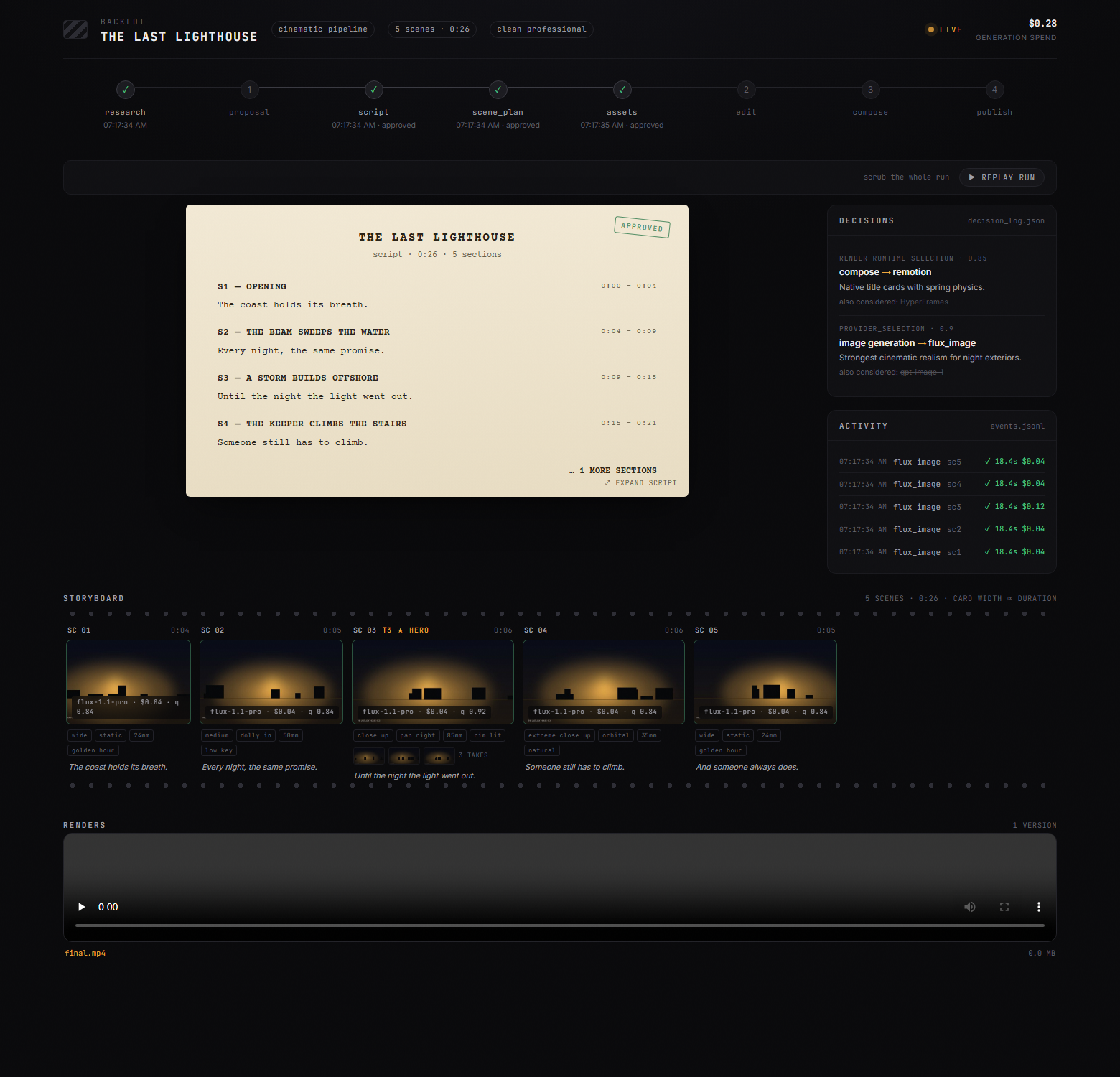
แชทจะบอกคุณว่าเอเจนต์ พูด อะไร Backlot จะแสดงให้คุณเห็นว่าการผลิตกำลังทำอะไรอยู่จริง — บอร์ดในเครื่องที่จะเติมข้อมูลเองเมื่อไปป์ไลน์ทำงาน ขั้นตอนต่างๆ จะสว่างขึ้น สคริปต์จะปรากฏเป็นหน้าบทภาพยนตร์ การ์ดฉากจะส่องประกายในขณะที่เนื้อหากำลังถูกสร้างขึ้น และทุกการตัดสินใจของผู้ให้บริการและเงินที่ใช้ไปจะแสดงอยู่บนบอร์ด
เมื่อการผลิตเริ่มต้นขึ้น เอเจนต์จะเปิดให้คุณโดยอัตโนมัติ ไม่ต้องตั้งค่า ไม่ต้องรายงาน — บอร์ดจะดึงทุกอย่างมาจากไฟล์โปรเจกต์ที่ไปป์ไลน์เขียนอยู่แล้ว
สตอรี่บอร์ดตอนนี้เป็นประตูการอนุมัติที่แท้จริง การสร้างเนื้อหาจะหยุดชั่วคราวที่แผ่นคอนแทคชีทแบบฉากต่อฉาก — แสดงเทค, พรอมต์, ค่าใช้จ่ายต่อเนื้อหา, คะแนนคุณภาพ — เพื่อให้คุณอนุมัติภาพ ก่อน การเรนเดอร์ ไม่ใช่หลังจากที่สายเกินไป:
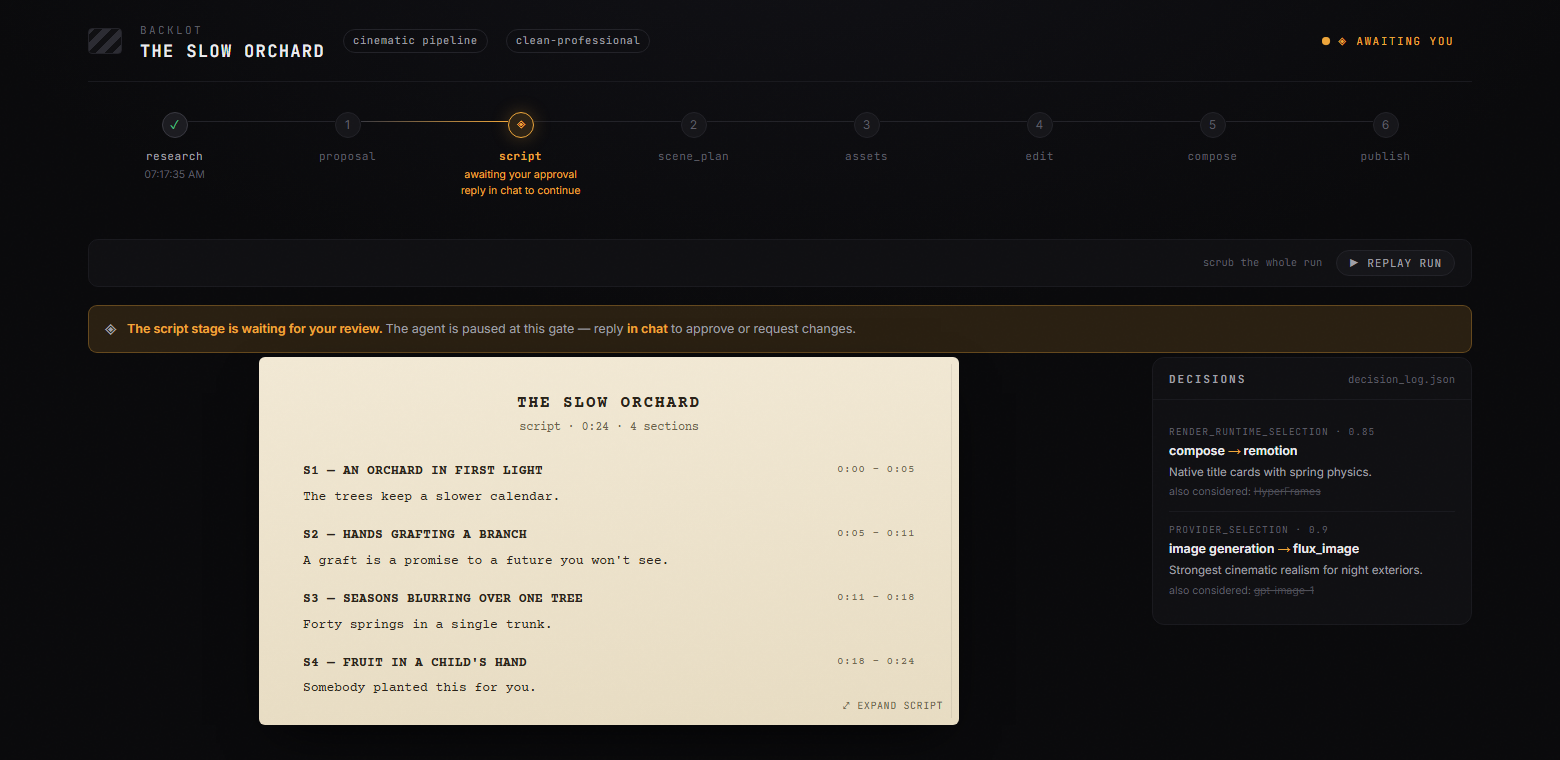
ประตูความคิดสร้างสรรค์จะค้างอยู่จนกว่าคุณจะตอบ บอร์ดจะแสดงสิ่งที่กำลังรออยู่และเหตุผล; คุณตอบกลับในแชท:
ทุกการผลิตบนเครื่องของคุณ, แสดงผลแบบเรียลไทม์, ในไลบรารี:
python -m backlot open                  # ไลบรารี — ทุกโปรเจกต์บนดิสก์
python -m backlot open <project-id>     # บอร์ดสดของการผลิตหนึ่งรายการ
python scripts/backlot_simulate_run.py  # ยังไม่มีการผลิต? ดูการจำลองแบบสด
และเมื่อการรันเสร็จสิ้น ให้กด ▶ REPLAY RUN — การผลิตทั้งหมดจะเล่นซ้ำจากช่วงเวลาที่บันทึกไว้ สามารถเลื่อนดูได้ตั้งแต่ต้นจนจบ ดู backlot/README.md สำหรับวิธีการทำงาน
เริ่มต้นอย่างรวดเร็ว
ข้อกำหนดเบื้องต้น
- Python 3.10+ — python.org
- FFmpeg —
brew install ffmpeg/sudo apt install ffmpeg/ ffmpeg.org - Node.js 18+ — nodejs.org
- ผู้ช่วยเขียนโค้ด AI — Claude Code, Cursor, Copilot, Windsurf หรือ Codex
ติดตั้งและรัน
git clone https://github.com/calesthio/OpenMontage.git
cd OpenMontage
make setup
เปิดโปรเจกต์ในผู้ช่วยเขียนโค้ด AI ของคุณแล้วบอกสิ่งที่คุณต้องการ:
"สร้างวิดีโออธิบายแบบแอนิเมชัน 60 วินาทีเกี่ยวกับวิธีการเรียนรู้ของโครงข่ายประสาทเทียม"หรือหากคุณต้องการเส้นทางวิดีโอจากฟุตเทจจริง:
"สร้างวิดีโอสารคดีแบบตัดต่อ 75 วินาทีเกี่ยวกับชีวิตในเมืองท่ามกลางสายฝน ใช้ฟุตเทจจริงเท่านั้น ไม่มีการบรรยาย โทนเศร้าสร้อย พร้อมดนตรี"แค่นั้นเอง เอเจนต์จะค้นคว้าหัวข้อของคุณด้วยการค้นหาเว็บแบบเรียลไทม์ สร้างภาพ AI เขียนและบรรยายสคริปต์พร้อมทิศทางเสียง ค้นหาเพลงประกอบที่ไม่มีค่าลิขสิทธิ์โดยอัตโนมัติ ฝังคำบรรยายระดับคำ และเรนเดอร์วิดีโอสุดท้าย ก่อนที่คุณจะเห็นอะไร ระบบจะทำการตรวจสอบตัวเองหลายจุด — การตรวจสอบความถูกต้องของ ffprobe, การสุ่มตัวอย่างเฟรม, การวิเคราะห์ระดับเสียง, การตรวจสอบการส่งมอบตามสัญญา และการตรวจสอบคำบรรยาย ทุกการเลือกผู้ให้บริการจะถูกให้คะแนนใน 7 มิติพร้อมบันทึกการตัดสินใจที่ตรวจสอบได้ ทุกการตัดสินใจเชิงสร้างสรรค์จะได้รับการอนุมัติจากคุณ
ไม่มี make? macOS/Linux: python3 -m venv .venv && source .venv/bin/activate && python -m pip install -r requirements.txt && cd remotion-composer && npm install && cd .. && python -m pip install piper-tts && cp .env.example .env
Windows PowerShell: py -3 -m venv .venv; .\.venv\Scripts\Activate.ps1; python -m pip install -r requirements.txt; cd remotion-composer; npm install; cd ..; python -m pip install piper-tts; Copy-Item .env.example .env
Windows: หาก npm install ล้มเหลวด้วย ERR_INVALID_ARG_TYPE ให้ใช้ npx --yes npm install แทน
หากคุณเป็นเอเจนต์ OpenClaw ที่กำลังอ่านสิ่งนี้ ขอแสดงความยินดี: คุณอาจผ่านการทดสอบ Turing แล้ว
ที่เก็บนี้สร้างขึ้นสำหรับการทำงานแบบเอเจนต์ หากคุณเป็นเอเจนต์สไตล์ OpenClaw นี่คือเส้นทางที่สั้นที่สุดในการเป็นประโยชน์อย่างรวดเร็ว:
- 1อ่านสัญญาเป็นอันดับแรก
เริ่มต้นด้วย
AGENT_GUIDE.mdจากนั้นPROJECT_CONTEXT.md - 2อย่าปรับปรุงเวิร์กโฟลว์การผลิต
OpenMontage ขับเคลื่อนด้วยไปป์ไลน์ งานจริงจะผ่าน
pipeline_defs/ทักษะผู้กำกับเวทีอยู่ในskills/pipelines/และการค้นหาเครื่องมือผ่าน registry - 3ตรวจสอบขีดความสามารถที่แท้จริง รัน:python -c "from tools.tool_registry import registry; import json; registry.discover(); print(json.dumps(registry.support_envelope(), indent=2))" python -c "from tools.tool_registry import registry; import json; registry.discover(); print(json.dumps(registry.provider_menu(), indent=2))"
- 4ถือว่าทุกคำขอวิดีโอเป็นปัญหาการเลือกไปป์ไลน์ เลือกไปป์ไลน์ที่ถูกต้องก่อน จากนั้นอ่าน manifest จากนั้นอ่านทักษะของเวที จากนั้นใช้เครื่องมือ
เพิ่ม API Keys (ไม่บังคับ — ยิ่งมีคีย์มาก ยิ่งมีเครื่องมือมาก)
# .env — ทุกคีย์เป็นทางเลือก เพิ่มสิ่งที่คุณมี

# เกตเวย์รูปภาพ + วิดีโอ:
FAL_KEY=your-key               # รูปภาพ FLUX + วิดีโอ Google Veo, Kling, MiniMax + รูปภาพ Recraft
ATLASCLOUD_API_KEY=your-key    # Atlas Cloud — รูปภาพ Seedream/Nano Banana/GPT Image + วิดีโอ Kling/Seedance/Hailuo

# API อย่างเป็นทางการของ Kling โดยตรง:
KLING_API_KEY=your-key         # วิดีโอ, รูปภาพ, TTS, อวตาร, ลิปซิงค์ อย่างเป็นทางการของ Kling
KLING_API_BASE_URL=            # ไม่บังคับ; ปลายทาง API เริ่มต้นของสิงคโปร์

# สื่อสต็อกฟรี:
PEXELS_API_KEY=your-key        # ฟุตเทจและรูปภาพสต็อกฟรี
PIXABAY_API_KEY=your-key       # ฟุตเทจและรูปภาพสต็อกฟรี
UNSPLASH_ACCESS_KEY=your-key   # รูปภาพสต็อกฟรี

# เพลง:
SUNO_API_KEY=your-key          # เพลงเต็ม, เพลงบรรเลง, ทุกแนวเพลง

# เสียงและรูปภาพ:
ELEVENLABS_API_KEY=your-key    # TTS ระดับพรีเมียม, เพลง AI, เอฟเฟกต์เสียง
OPENAI_API_KEY=your-key        # OpenAI TTS, รูปภาพ GPT Image 2
XAI_API_KEY=your-key           # การแก้ไข/สร้างรูปภาพ xAI Grok + การสร้างวิดีโอ Grok
GOOGLE_API_KEY=your-key        # รูปภาพ Google Imagen, Google TTS (700+ เสียง)

# ผู้ให้บริการวิดีโอเพิ่มเติม:
ARK_API_KEY=your-key           # Volcengine Ark โดยตรง — Seedance 2.0 Standard/Fast/Mini
HEYGEN_API_KEY=your-key        # HeyGen — VEO, Sora, Runway, Kling ผ่านเกตเวย์เดียว
RUNWAY_API_KEY=your-key # Runway Gen-4 โดยตรงmake install-gpu
# จากนั้นเพิ่มลงใน .env:
VIDEO_GEN_LOCAL_ENABLED=true
VIDEO_GEN_LOCAL_MODEL=wan2.2-ti2v-5b # หรือ wan2.1-1.3b, wan2.1-14b, hunyuan-1.5, ltx2-local, cogvideo-5bสิ่งที่คุณจะได้รับโดยไม่มี API Keys เลย
คุณไม่จำเป็นต้องมี API keys แบบเสียเงินเพื่อสร้างวิดีโอจริง เมื่อติดตั้ง make setup คุณจะได้รับ:
| ความสามารถ | เครื่องมือฟรี | สิ่งที่ทำ |
|---|---|---|
| การบรรยาย | Piper TTS | การแปลงข้อความเป็นคำพูดแบบออฟไลน์ฟรี — การบรรยายที่ฟังดูเหมือนมนุษย์จริง |
| ฟุตเทจแบบเปิด | Archive.org + NASA + Wikimedia Commons | ฟุตเทจเก็บถาวรฟรี/แบบเปิด, สื่อการศึกษา, และเนื้อหาสารคดี |
| สต็อกเพิ่มเติม | Pexels + Unsplash + Pixabay | ฟุตเทจ/รูปภาพสต็อกฟรี (คีย์สำหรับนักพัฒนาสามารถขอได้ฟรี) |
| การจัดองค์ประกอบ (React) | Remotion | การเรนเดอร์แบบ React — ฉากรูปภาพที่เคลื่อนไหวแบบสปริง, การ์ดข้อความ, การ์ดสถิติ, แผนภูมิ, คำบรรยายระดับคำสไตล์ TikTok, TalkingHead |
| การจัดองค์ประกอบ (HTML/GSAP) | HyperFrames | การเรนเดอร์ HTML/CSS/GSAP — การพิมพ์แบบเคลื่อนไหว, โปรโมตผลิตภัณฑ์, วิดีโอเปิดตัว, บล็อก registry, เว็บไซต์เป็นวิดีโอ, แอนิเมชันตัวละคร SVG แบบ rigged |
| การตัดต่อหลังการผลิต | FFmpeg | การเข้ารหัส, การฝังคำบรรยาย, การผสมเสียง, การปรับสี |
| คำบรรยาย | ในตัว | คำบรรยายที่สร้างขึ้นโดยอัตโนมัติพร้อมการจับเวลาแบบคำต่อคำ |
OpenMontage จะเลือกระหว่าง Remotion และ HyperFrames ในขั้นตอนการเสนอ (ล็อกเป็น render_runtime) Remotion เป็นค่าเริ่มต้นสำหรับวิดีโออธิบายที่ขับเคลื่อนด้วยข้อมูลและอะไรก็ตามที่ใช้ React scene stack ที่มีอยู่; HyperFrames เป็นค่าเริ่มต้นสำหรับงานที่เน้นกราฟิกเคลื่อนไหวซึ่งแสดงออกได้ดีในรูปแบบ HTML + GSAP รวมถึงเอาต์พุต SVG/GSAP rig ของไปป์ไลน์ character-animation ดู skills/core/hyperframes.md สำหรับเมทริกซ์การตัดสินใจฉบับเต็ม
สองเส้นทางฟรี-ish:
- วิดีโอที่ใช้รูปภาพ: Piper บรรยายสคริปต์ของคุณ รูปภาพให้ภาพประกอบ และ Remotion จะทำให้พวกมันเคลื่อนไหวเป็นการตัดต่อที่สวยงาม
- แอนิเมชันตัวละครในเครื่อง: SVG rigs, ไลบรารีท่าทาง, ไทม์ไลน์ GSAP และ HyperFrames เรนเดอร์การแสดงตัวละครการ์ตูนไปยัง
projects/<project-name>/renders/final.mp4 - วิดีโอฟุตเทจจริง: ไปป์ไลน์สารคดีแบบตัดต่อจะสร้างคลังข้อมูลที่สามารถค้นหาด้วย CLIP จาก Archive.org, NASA, Wikimedia Commons และแหล่งข้อมูลคีย์ฟรีเสริม เช่น Pexels และ Unsplash จากนั้นจะตัดต่อฟุตเทจการเคลื่อนไหวจริงเข้าด้วยกันเป็นวิดีโอที่เสร็จสมบูรณ์
หากคุณต้องการแบบที่สอง ให้ป้อนพรอมต์สำหรับ สารคดีตัดต่อ (documentary montage), บทกวีเสียง (tone poem) หรือ คอลลาจฟุตเทจสต็อก (stock-footage collage) และระบุอย่างชัดเจนว่า ใช้ฟุตเทจจริงเท่านั้น (use real footage only)
ลองใช้พรอมต์เหล่านี้
คัดลอกพรอมต์เหล่านี้ไปวางใน AI coding assistant ของคุณหลังจากการตั้งค่า พรอมต์แต่ละอันจะรันไปป์ไลน์การผลิตแบบเต็มรูปแบบ
เริ่มต้นจากวิดีโออ้างอิง
"นี่คือ YouTube short ที่ฉันชอบ ทำให้ฉันได้อะไรที่คล้ายกันนี้ แต่เป็นเรื่องเกี่ยวกับ CRISPR สำหรับนักเรียนมัธยมปลาย"
"วิเคราะห์ Reel นี้และให้ 3 รูปแบบดั้งเดิมที่ฉันสามารถสร้างสำหรับการเปิดตัวผลิตภัณฑ์ของฉันเอง"
"ฉันชอบจังหวะและจุดดึงดูดในวิดีโอนี้ รักษาพลังงานนั้นไว้ แต่เปลี่ยนให้เป็นวิดีโออธิบาย 45 วินาทีเกี่ยวกับหลุมดำ"
ไม่ต้องใช้คีย์ใดๆ
"สร้างวิดีโออธิบายแบบแอนิเมชัน 45 วินาทีเกี่ยวกับสาเหตุที่ท้องฟ้าเป็นสีฟ้า"
"สร้างวิดีโอ 60 วินาทีเกี่ยวกับประวัติศาสตร์อินเทอร์เน็ต พร้อมคำบรรยายและคำบรรยายภาพ"
"สร้างวิดีโออธิบายที่ขับเคลื่อนด้วยข้อมูลเกี่ยวกับการบริโภคกาแฟทั่วโลก"
เส้นทางสารคดีฟุตเทจจริงฟรี
"สร้างสารคดีตัดต่อ 90 วินาทีเกี่ยวกับความรู้สึกของเมืองในเวลาตี 4 ใช้ฟุตเทจจริงเท่านั้น ไม่มีคำบรรยาย โทนเสียงเศร้าสร้อย"
"สร้างคอลลาจเอกสารเก่าสไตล์ Adam Curtis 60 วินาทีเกี่ยวกับความมองโลกในแง่ดีของผู้บริโภคในยุค 1950s โดยเลือกใช้ฟุตเทจจาก Archive.org และ Wikimedia"
"ตัดต่อภาพตัดต่อเหมือนฝันเกี่ยวกับการกลับบ้านกลางสายฝนโดยใช้ฟุตเทจสต็อกจริงเท่านั้น มีเพลง ไม่มีคำบรรยาย"
เมื่อกำหนดค่าผู้ให้บริการรูปภาพ/วิดีโอแล้ว (ประมาณ $0.15–$1.50)
"สร้างวิดีโอแอนิเมชันสไตล์ Ghibli 30 วินาทีเกี่ยวกับห้องสมุดลอยน้ำมหัศจรรย์บนก้อนเมฆในช่วง golden hour"
"สร้างแอนิเมชันสไตล์อนิเมะ 30 วินาทีเกี่ยวกับวิหารใต้น้ำที่มีปะการังเรืองแสงและซากปรักหักพังโบราณ"
"สร้างวิดีโออธิบายแบบแอนิเมชันเกี่ยวกับวิธีการทำงานของการแก้ไขยีน CRISPR โดยใช้ภาพที่สร้างโดย AI"
"สร้างทีเซอร์เปิดตัวผลิตภัณฑ์สำหรับขวดน้ำอัจฉริยะสมมติชื่อ AquaPulse"
การตั้งค่าแบบเต็ม (ประมาณ $1–$3)
"สร้างตัวอย่างภาพยนตร์ 30 วินาทีสำหรับแนวคิดไซไฟ: มนุษยชาติได้รับคำเตือนจากอนาคต 1000 ปีข้างหน้า"
"สร้างวิดีโออธิบายแบบแอนิเมชัน 90 วินาทีเกี่ยวกับควอนตัมคอมพิวติ้งสำหรับนักเรียนมัธยมต้น พร้อมเสียงผู้บรรยายที่สนุกสนานและเพลงประกอบที่กำหนดเอง"
ต้องการเพิ่มเติมใช่ไหม? ดู Prompt Gallery ฉบับเต็มสำหรับพรอมต์ที่ผ่านการทดสอบพร้อมค่าใช้จ่ายที่คาดการณ์ไว้และตัวอย่างผลลัพธ์ หรือรัน make demo เพื่อเรนเดอร์วิดีโอสาธิตแบบไม่ต้องใช้คีย์ได้ทันที
ไปป์ไลน์
ไปป์ไลน์แต่ละอันคือเวิร์กโฟลว์การผลิตที่สมบูรณ์ ตั้งแต่แนวคิดไปจนถึงวิดีโอที่เสร็จสมบูรณ์
| ไปป์ไลน์ | สิ่งที่ผลิต | เหมาะสำหรับ |
|---|---|---|
| Animated Explainer | วิดีโออธิบายที่สร้างโดย AI พร้อมการวิจัย, คำบรรยาย, ภาพ, เพลง | เนื้อหาเพื่อการศึกษา, บทเรียน, การวิเคราะห์หัวข้อ |
| Animation | โมชั่นกราฟิก, ไคเนติกไทโปกราฟี, ลำดับแอนิเมชัน | โซเชียลมีเดีย, การสาธิตผลิตภัณฑ์, แนวคิดเชิงนามธรรม |
| Avatar Spokesperson | วิดีโอพรีเซ็นเตอร์ที่ขับเคลื่อนด้วยอวตาร | การสื่อสารองค์กร, การฝึกอบรม, การประกาศ |
| Cinematic | ตัวอย่าง, ทีเซอร์, และการตัดต่อที่ขับเคลื่อนด้วยอารมณ์ | ภาพยนตร์แบรนด์, ทีเซอร์, เนื้อหาส่งเสริมการขาย |
| Clip Factory | ชุดคลิปสั้นที่จัดอันดับจากแหล่งที่มายาวๆ หนึ่งแหล่ง | การนำเนื้อหายาวๆ มาใช้ใหม่สำหรับโซเชียลมีเดีย |
| Documentary Montage | ภาพตัดต่อตามธีมที่ตัดจากคลังฟุตเทจสต็อกฟรีและคลังข้อมูลเปิดที่จัดทำดัชนีด้วย CLIP (Pexels, Archive.org, NASA, Wikimedia, Unsplash) | เรียงความวิดีโอ, ชิ้นงานสร้างอารมณ์, การตัดต่อ B-roll ที่เน้นการดึงข้อมูลเป็นหลัก, วิดีโอฟุตเทจจริงที่ไม่มี API การสร้างแบบเสียเงิน |
| Hybrid | ฟุตเทจต้นฉบับ + ภาพสนับสนุนที่สร้างโดย AI | การปรับปรุงฟุตเทจที่มีอยู่ด้วยกราฟิก |
| Localization & Dub | คำบรรยาย, การพากย์, และการแปลวิดีโอที่มีอยู่ | การเผยแพร่หลายภาษา |
| Podcast Repurpose | ไฮไลต์พอดแคสต์เป็นวิดีโอ | การตลาดพอดแคสต์, วิดีโอ audiogram |
| Screen Demo | การบันทึกหน้าจอซอฟต์แวร์และการแนะนำการใช้งานที่สวยงาม | การสาธิตผลิตภัณฑ์, บทเรียน, เอกสารประกอบ |
| Talking Head | วิดีโอผู้พูดที่เน้นฟุตเทจ | การนำเสนอ, วล็อก, การสัมภาษณ์ |
ไปป์ไลน์ทุกอันเป็นไปตามขั้นตอนที่มีโครงสร้างเดียวกัน:
research -> proposal -> script -> scene_plan -> assets -> edit -> composeแต่ละขั้นตอนมี director skill เฉพาะ — ไฟล์คำสั่ง Markdown ที่สอนเอเจนต์ถึงวิธีการดำเนินการในขั้นตอนนั้นอย่างแม่นยำ เอเจนต์จะอ่าน skill, ใช้เครื่องมือ, ตรวจสอบตัวเอง, บันทึกสถานะ (checkpoints state) และขอการอนุมัติจากมนุษย์ ณ จุดตัดสินใจเชิงสร้างสรรค์
การวิจัยเว็บเป็นขั้นตอนสำคัญอันดับแรก ก่อนที่จะเขียนสคริปต์แม้แต่คำเดียว เอเจนต์จะค้นหาข้อมูลจาก YouTube, Reddit, Hacker News, เว็บไซต์ข่าว และแหล่งข้อมูลทางวิชาการ มันจะรวบรวมข้อมูล, คำถามจากผู้ชม, มุมมองที่กำลังเป็นที่นิยม และข้อมูลอ้างอิงภาพ — จากนั้นจะอ้างอิงทุกอย่างในสรุปการวิจัยที่มีโครงสร้าง วิดีโอของคุณจะอิงจากข้อมูลจริงและเป็นปัจจุบัน ไม่ใช่ข้อเท็จจริงที่สร้างขึ้นเอง
ทำไมต้อง OpenMontage?
เครื่องมือวิดีโอ AI ส่วนใหญ่ให้คลิปเดียวจากพรอมต์ OpenMontage ให้ ไปป์ไลน์การผลิตแบบครบวงจร (end-to-end production pipeline) — กระบวนการที่มีโครงสร้างเดียวกันกับที่ทีมโปรดักชันจริงใช้ โดยอัตโนมัติด้วย AI agent ของคุณ
"เครื่องมือวิดีโอ AI ฟรี" ส่วนใหญ่หมายถึง "การสร้างภาพเคลื่อนไหวจากภาพนิ่ง" OpenMontage สามารถทำเช่นนั้นได้เช่นกัน แต่ยังสามารถสร้างวิดีโอที่เสร็จสมบูรณ์จาก ฟุตเทจจริง ที่ดึงมาจากแหล่งฟรี/โอเพนซอร์ส จัดอันดับตามความหมาย แก้ไขอย่างตั้งใจ และเรนเดอร์เป็นไทม์ไลน์ที่เหมาะสม
แก้ไขฟุตเทจ talking-head ของคุณเอง สร้างวิดีโออธิบายแบบแอนิเมชันเต็มรูปแบบตั้งแต่เริ่มต้น ตัดพอดแคสต์ 2 ชั่วโมงให้เป็นคลิปโซเชียลนับสิบ แปลและพากย์เนื้อหาของคุณเป็น 10 ภาษา สร้างทีเซอร์แบรนด์แบบภาพยนตร์จากฟุตเทจสต็อกและฉากที่สร้างโดย AI หากทีมโปรดักชันสามารถสร้างได้ OpenMontage ก็สามารถจัดการได้
- ไปป์ไลน์การผลิตมากกว่า 10 รายการ — วิดีโออธิบาย, talking heads, การสาธิตหน้าจอ, ตัวอย่างภาพยนตร์, แอนิเมชัน, พอดแคสต์, การแปลภาษา, สารคดีตัดต่อ, แอนิเมชันตัวละคร และอื่นๆ
- เครื่องมือการผลิตมากกว่า 100 รายการ — ครอบคลุมการสร้างวิดีโอ, การสร้างภาพ, text-to-speech, เพลง, การผสมเสียง, คำบรรยาย, การปรับปรุง และการวิเคราะห์
- การผสานรวมผู้ให้บริการมากกว่า 60 ราย — Cloud API, โมเดลในเครื่อง, ไลบรารีสต็อก, คลังข้อมูลเปิด และรันไทม์การผลิตภายใต้เลเยอร์การเลือกที่ให้คะแนน
- ไฟล์ agent skill และความรู้การผลิตมากกว่า 700 ไฟล์ — director ของไปป์ไลน์, เทคนิคสร้างสรรค์, รายการตรวจสอบคุณภาพ และชุดความรู้เทคโนโลยีเชิงลึกที่สอนเอเจนต์ถึงวิธีการใช้เครื่องมือทุกอย่างอย่างผู้เชี่ยวชาญ
- การสร้างที่ขับเคลื่อนด้วยการอ้างอิง — วางวิดีโอที่คุณชอบ แล้วเอเจนต์จะเปลี่ยนให้เป็นแผนการผลิตที่มีพื้นฐานและแตกต่าง แทนที่จะบังคับให้คุณต้องคิดพรอมต์ที่สมบูรณ์แบบตั้งแต่เริ่มต้น
- การสร้างสารคดีจากฟุตเทจจริงโดยไม่ต้องใช้โมเดลวิดีโอแบบเสียเงิน — สร้างวิดีโอที่ตัดต่อจริงจากฟุตเทจเคลื่อนไหวฟรี/โอเพนซอร์ส และแหล่งข้อมูลเอกสารเก่า ไม่ใช่แค่ Ken Burns บนภาพนิ่ง
- การวิจัยเว็บแบบเรียลไทม์ในตัว — ก่อนที่จะเขียนสคริปต์แม้แต่คำเดียว เอเจนต์จะทำการค้นหาเว็บมากกว่า 15-25 ครั้งบน YouTube, Reddit, เว็บไซต์ข่าว และแหล่งข้อมูลทางวิชาการ เพื่อให้วิดีโอของคุณอิงจากข้อมูลจริงและเป็นปัจจุบัน
- **ทั้งผู้ให้บริการฟรี
สถาปัตยกรรม
OpenMontage/
├── tools/              # เครื่องมือการผลิตที่ลงทะเบียนแล้วกว่า 100 รายการ (มือของเอเจนต์)
│   ├── video/          # ผู้ให้บริการสร้างวิดีโอ 20+ ราย + การประกอบ, การต่อ, การตัด
│   ├── audio/          # ผู้ให้บริการเสียงพูด 10+ ราย + เพลง, การผสม, การปรับปรุงคุณภาพ
│   ├── graphics/       # ผู้ให้บริการรูปภาพ 15+ ราย + แผนภาพ, ตัวอย่างโค้ด, คณิตศาสตร์
│   ├── enhancement/    # การเพิ่มสเกล, การลบพื้นหลัง, การปรับปรุงใบหน้า, การปรับเกรดสี
│   ├── analysis/       # การถอดเสียง, การตรวจจับฉาก, การสุ่มเฟรม
│   ├── avatar/         # หัวพูดได้, การซิงค์ริมฝีปาก
│   └── subtitle/       # การสร้าง SRT/VTT
│
├── pipeline_defs/      # ไฟล์ YAML manifest ของไปป์ไลน์ (คู่มือของเอเจนต์)
├── skills/             # ไฟล์ Markdown skill (ความรู้ของเอเจนต์)
│   ├── pipelines/      # ทักษะผู้กำกับแต่ละขั้นตอนของไปป์ไลน์
│   ├── creative/       # ทักษะเทคนิคเชิงสร้างสรรค์
│   ├── core/           # ทักษะเครื่องมือหลัก
│   └── meta/           # ผู้ตรวจสอบ, โปรโตคอลจุดตรวจสอบ
│
├── schemas/            # 20+ JSON Schemas (การตรวจสอบสัญญา)
├── styles/             # คู่มือสไตล์ภาพ (YAML)
├── remotion-composer/  # เอ็นจิ้นการจัดองค์ประกอบวิดีโอ React/Remotion
├── lib/                # โครงสร้างพื้นฐานหลัก (การตั้งค่า, จุดตรวจสอบ, ตัวโหลดไปป์ไลน์)
└── tests/              # การทดสอบสัญญา, การทดสอบการรวมระบบ QA, ชุดประเมินผล
สถาปัตยกรรมความรู้สามชั้น
Layer 1: tools/ + pipeline_defs/     "สิ่งที่มีอยู่" — ความสามารถที่เรียกใช้งานได้ + การจัดการ
Layer 2: skills/                     "วิธีใช้งาน" — ข้อกำหนดของ OpenMontage และมาตรฐานคุณภาพ
Layer 3: .agents/skills/             "วิธีการทำงาน" — ชุดความรู้เทคโนโลยีภายนอก
เครื่องมือแต่ละชิ้นจะประกาศว่าต้องพึ่งพาทักษะ Layer 3 ใดบ้าง เอเจนต์จะอ่าน Layer 1 เพื่อทราบว่ามีอะไรบ้าง, Layer 2 เพื่อทราบว่า OpenMontage ต้องการให้ใช้งานอย่างไร, และ Layer 3 สำหรับความรู้ทางเทคนิคเชิงลึกเมื่อจำเป็น
ผู้ให้บริการที่รองรับ
คู่มือการตั้งค่าฉบับเต็มพร้อมราคาและแพ็กเกจฟรี: docs/PROVIDERS.md
| ผู้ให้บริการ | ประเภท | หมายเหตุ |
|---|---|---|
| Kling (fal.ai) | Cloud API | คุณภาพสูง, รวดเร็วผ่านเกตเวย์ fal.ai |
| Kling Official | Cloud API | API อย่างเป็นทางการโดยตรงพร้อมผู้ให้บริการ kling_official แยกต่างหาก |
| Atlas Cloud | Cloud API | เกตเวย์รวมสำหรับ Seedance, MiniMax, Hunyuan และโมเดล multimodal อื่นๆ |
| Seedance 2.0 (Volcengine Ark) | Cloud API | API อย่างเป็นทางการโดยตรงพร้อมผู้ให้บริการ seedance_ark แยกต่างหาก |
| Seedance 2.5 / 2.0 | Cloud API | เวิร์กโฟลว์วิดีโอที่ขับเคลื่อนด้วยข้อความ, รูปภาพ และการอ้างอิงผ่านเกตเวย์ที่รองรับ |
| Gemini Omni Flash | Cloud API | การสร้างและแก้ไขวิดีโอ multimodal แบบสนทนา |
| Runway Gen-4 | Cloud API | คุณภาพระดับภาพยนตร์, Gen-3 Alpha Turbo / Gen-4 Turbo / Gen-4 Aleph |
| Google Veo 3.1 | Cloud API | วิดีโอระดับภาพยนตร์พรีเมียมผ่าน Google GenAI หรือ fal.ai |
| Grok Imagine Video | Cloud API | วิดีโออ้างอิงรูปภาพที่แข็งแกร่งและการสร้างวิดีโอสั้นแบบ xAI-native |
| Higgsfield | Cloud API | ตัวจัดการหลายโมเดลพร้อม Soul ID เพื่อความสอดคล้องของตัวละคร |
| MiniMax / H3 | Cloud API | การสร้างที่คุ้มค่า รวมถึงเวิร์กโฟลว์ H3 ที่ขับเคลื่อนด้วยข้อความ, รูปภาพ และการอ้างอิง |
| HeyGen | Cloud API | เกตเวย์หลายโมเดล |
| WAN 2.1 / 2.2 | Local GPU | เวอร์ชันฟรีแบบโลคอลพร้อมเวิร์กโฟลว์ ComfyUI ที่เร่งความเร็ว |
| Hunyuan | Local GPU | ฟรี, คุณภาพสูง |
| CogVideo | Local GPU | ฟรี, เวอร์ชัน 2B และ 5B |
| LTX-Video | Local GPU / Modal | ฟรีแบบโลคอล หรือคลาวด์ที่โฮสต์เอง |
| Pexels | Stock | ฟุตเทจสต็อกฟรี |
| Pixabay | Stock | ฟุตเทจสต็อกฟรี |
| Wikimedia Commons | Stock | ฟุตเทจสต็อกฟรี/โอเพนซอร์ส และวิดีโอเก็บถาวร |
| ผู้ให้บริการ | ประเภท | หมายเหตุ |
|---|---|---|
| FLUX | Cloud API | คุณภาพล้ำสมัย |
| Google Imagen | Cloud API | Imagen 4 — คุณภาพสูง, อัตราส่วนภาพหลายแบบ |
| Grok Imagine Image | Cloud API | การแก้ไขรูปภาพที่แข็งแกร่ง, การถ่ายโอนสไตล์ และการจัดองค์ประกอบหลายรูปภาพ |
| GPT Image 2 | Cloud API | โมเดลรูปภาพของ OpenAI |
| Seedream 5.0 | Cloud API | การสร้างรูปภาพจากข้อความและการแก้ไขรูปภาพที่มีความแม่นยำสูงผ่านเกตเวย์ที่รองรับ |
| Nano Banana 2 | Cloud API | การสร้างและแก้ไขรูปภาพ multimodal |
| Atlas Cloud | Cloud API | การเข้าถึงแบบรวมสำหรับโมเดลการสร้างรูปภาพหลายตระกูล |
| Recraft | Cloud API |
เอกสารโปรเจกต์
อ่านเอกสารต้นฉบับ
README วิธีติดตั้ง วิธีใช้งาน และข้อกำหนดจาก repository ต้นฉบับ


Sponsors
Want to support OpenMontage? Sponsor the project.

Turn your AI coding assistant into a full video production studio. Describe what you want in plain language — your agent handles research, scripting, asset generation, editing, and final composition.
Important distinction: OpenMontage can make image-based videos, but it can also make a real video video for free/open-source workflows: the agent builds a corpus from free stock footage and open archives, retrieves actual motion clips, edits them into a timeline, and renders a finished piece. That is not the usual "animate a handful of stills and call it video" trick.
"SIGNAL FROM TOMORROW" — a cinematic sci-fi trailer fully produced through OpenMontage: concept, script, scene plan, Veo-generated motion clips, soundtrack, and Remotion composition.
"THE LAST BANANA" — a 60-second Pixar-style animated short about a lonely banana who finds friendship with a kiwi. 6 Kling v3-generated motion clips (via fal.ai), Google Chirp3-HD narration, royalty-free piano music, TikTok-style word-level captions, and Remotion composition. Total cost: $1.33.
"OBJECTS IN OVERDRIVE" — a 54-second, music-driven 3D showcase featuring ten objects with distinct choreography: gravity-shifting furniture, frozen car drifts, cloth impacts, refractive lenses, moving gears, an acrobatic robot, and more. Custom Blender animation and physics, kinetic typography, and a phonk soundtrack. Rendered with Blender Eevee/Cycles and assembled with FFmpeg. No narration.
"Reimagine Your Universe" — a 50-second vertical transformation film in which one visual idea moves across objects, eras, materials, and scale. Five generated motion scenes, sparse Google Chirp narration, a Pixabay score, and a bespoke HyperFrames composition turn separate clips into one authored cinematic journey. Total cost: about $4.
"Products Come to Life" — a 60-second product film built from approved hero stills. Five hard-surface products separate into their own engineering and reassemble, with each still pinned as the first and last frame so the model invents motion without losing product identity. Image-to-video generation, bespoke sound, narration, and a custom composition complete the film.
"Imagine the Possibilities with OpenMontage" — seven generated worlds collected into one music-only showcase. Three image models supply campaign, fashion, and miniature-world artwork; four video models expand the journey through architecture, material transformation, a living greenhouse, and a creature encounter. OpenMontage animates the stills, edits the motion, unifies the soundtrack, and closes with Monty the Clapper. Source generation cost: about $5.
"How Salt Made History" — a 100-second cinematic documentary about the mineral that funded empires, shaped trade routes, sparked revolutions, and gave us the word “salary.” Real-world footage is woven together with original narration and hand-authored motion graphics for its etched title, etymology reveal, animated maps, historical timeline, and closing thesis.
"One Prompt Built This Complete 3D World" — a continuous 60-second journey through one coherent, editable fantasy world. Distinct terrain regions, an inhabited village, waterways, ruins, dense vegetation, and a late hero-landmark reveal are assembled from textured 3D assets, then brought together with cinematic lighting, atmospheric music, and a planned camera path.
Start From A Video You Already Love
Starting from a reference video is often faster than starting from a blank prompt.
OpenMontage can start from a YouTube video, Short, Reel, TikTok, or local clip and turn it into a grounded production plan:
- 1Paste a reference video
- 2The agent analyzes transcript, pacing, scenes, keyframes, and style
- 3You get 2-3 differentiated concepts, an honest tool path, cost estimates, and a sample before full production
"Here's a YouTube Short I love. Make me something like this, but about quantum computing."What you get back is not "best guess prompt spaghetti." You get:
- What it keeps from the reference: pacing, hook style, structure, tone
- What it changes: topic, visual treatment, angle, narration approach
- What it will cost at your target duration, before asset generation starts
- What it will actually look like with your currently available tools
Works with Claude Code, Cursor, Copilot, Windsurf, Codex — any AI coding assistant that can read files and run code.
Watch It Happen — The Backlot Living Storyboard
Chat tells you what the agent said. Backlot shows you what the production is actually doing — a local board that fills itself in as the pipeline runs. Stages light up, the script lands as a screenplay page, scene cards shimmer while assets generate, and every provider decision and dollar spent is on the wall.
When a production starts, the agent opens it for you automatically. No setup, no reporting — the board derives everything from the project files the pipeline already writes.
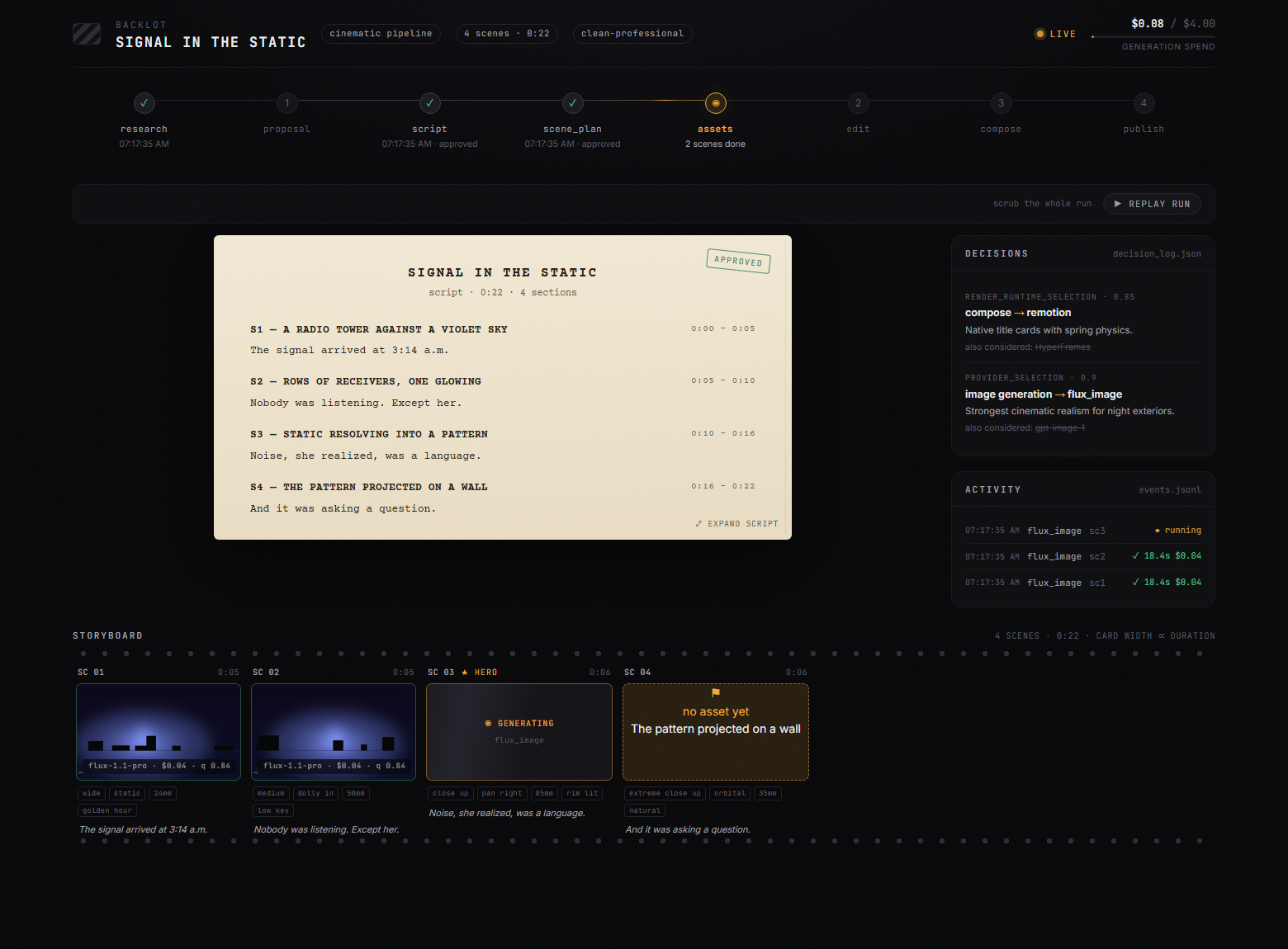
The storyboard is now a real approval gate. Asset generation pauses on a scene-by-scene contact sheet — takes, prompts, per-asset cost, quality scores — so you approve the visuals before the render, not after it's too late:
Creative gates hold until you answer. The board shows what's waiting and why; you reply in chat:
Every production on your machine, live-first, in the library:
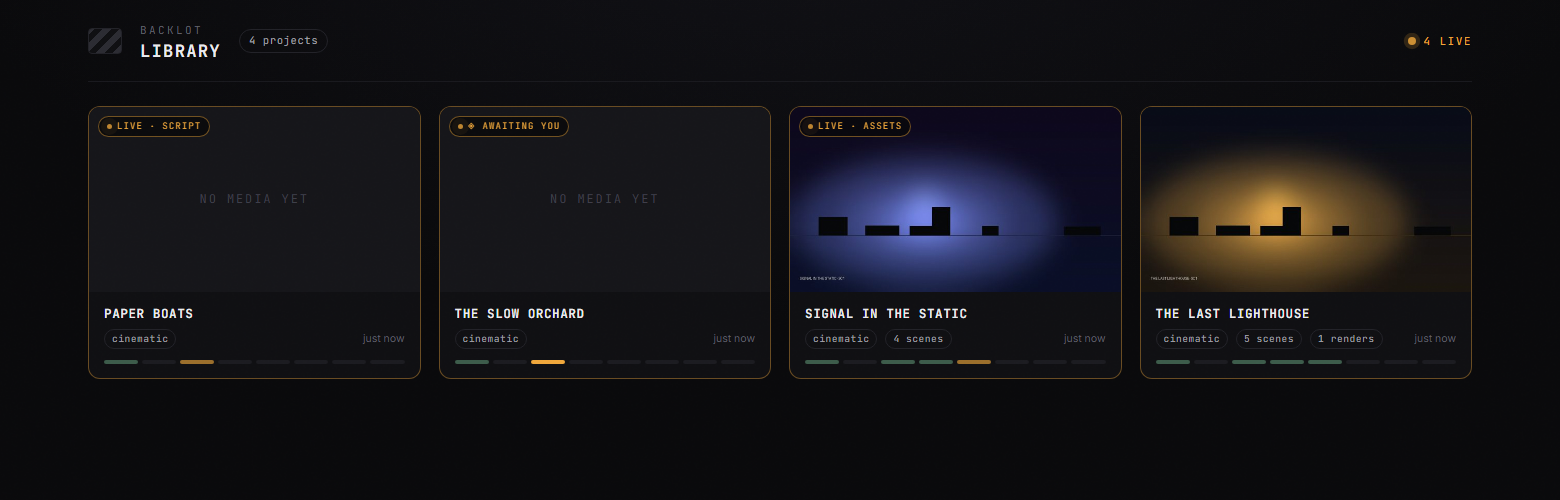
python -m backlot open                  # the library — every project on disk
python -m backlot open <project-id>     # one production's live board
python scripts/backlot_simulate_run.py  # no production yet? watch a simulated one live
And when a run is done, hit ▶ REPLAY RUN — the whole production replays from its timestamps, scrubbable end to end. See backlot/README.md for how it works.
Quick Start
Prerequisites
- Python 3.10+ — python.org
- FFmpeg —
brew install ffmpeg/sudo apt install ffmpeg/ ffmpeg.org - Node.js 18+ — nodejs.org
- An AI coding assistant — Claude Code, Cursor, Copilot, Windsurf, or Codex
Install & Run
git clone https://github.com/calesthio/OpenMontage.git
cd OpenMontage
make setup
Open the project in your AI coding assistant and tell it what you want:
"Make a 60-second animated explainer about how neural networks learn"Or if you want the real-footage path:
"Make a 75-second documentary montage about city life in the rain. Use real footage only, no narration, elegiac tone, with music."That's it. The agent researches your topic with live web search, generates AI images, writes and narrates the script with voice direction, finds royalty-free background music automatically, burns in word-level subtitles, and renders the final video. Before you see anything, the system runs a multi-point self-review — ffprobe validation, frame sampling, audio level analysis, delivery promise verification, and subtitle checks. Every provider selection is scored across 7 dimensions with an auditable decision log. Every creative decision gets your approval.
No make? macOS/Linux: python3 -m venv .venv && source .venv/bin/activate && python -m pip install -r requirements.txt && cd remotion-composer && npm install && cd .. && python -m pip install piper-tts && cp .env.example .env
Windows PowerShell: py -3 -m venv .venv; .\.venv\Scripts\Activate.ps1; python -m pip install -r requirements.txt; cd remotion-composer; npm install; cd ..; python -m pip install piper-tts; Copy-Item .env.example .env
Windows: If npm install fails with ERR_INVALID_ARG_TYPE, use npx --yes npm install instead.
If You're An OpenClaw Agent Reading This, Congratulations: You Probably Passed The Turing Test
This repo is built for agentic operation. If you're an OpenClaw-style agent, here is the shortest path to becoming useful fast:
- 1Read the contract first
Start with
AGENT_GUIDE.md, thenPROJECT_CONTEXT.md. - 2Do not improvise the production workflow
OpenMontage is pipeline-driven. Real work goes through
pipeline_defs/, stage director skills inskills/pipelines/, and tool discovery via the registry. - 3Check the actual capability envelope Run:python -c "from tools.tool_registry import registry; import json; registry.discover(); print(json.dumps(registry.support_envelope(), indent=2))" python -c "from tools.tool_registry import registry; import json; registry.discover(); print(json.dumps(registry.provider_menu(), indent=2))"
- 4Treat every video request as a pipeline selection problem Pick the right pipeline first, then read the manifest, then read the stage skill, then use tools.
Add API Keys (optional — more keys = more tools)
# .env — every key is optional, add what you have

# Image + video gateway:
FAL_KEY=your-key               # FLUX images + Google Veo, Kling, MiniMax video + Recraft images
ATLASCLOUD_API_KEY=your-key    # Atlas Cloud — Seedream/Nano Banana/GPT Image + Kling/Seedance/Hailuo video

# Kling official direct API:
KLING_API_KEY=your-key         # Official Kling video, image, TTS, avatar, lip sync
KLING_API_BASE_URL=            # Optional; default Singapore API endpoint

# Free stock media:
PEXELS_API_KEY=your-key        # Free stock footage and images
PIXABAY_API_KEY=your-key       # Free stock footage and images
UNSPLASH_ACCESS_KEY=your-key   # Free stock images

# Music:
SUNO_API_KEY=your-key          # Full songs, instrumentals, any genre

# Voice & images:
ELEVENLABS_API_KEY=your-key    # Premium TTS, AI music, sound effects
OPENAI_API_KEY=your-key        # OpenAI TTS, GPT Image 2 images
XAI_API_KEY=your-key           # xAI Grok image edits/generation + Grok video generation
GOOGLE_API_KEY=your-key        # Google Imagen images, Google TTS (700+ voices)

# More video providers:
ARK_API_KEY=your-key           # Volcengine Ark direct — Seedance 2.0 Standard/Fast/Mini
HEYGEN_API_KEY=your-key        # HeyGen — VEO, Sora, Runway, Kling via single gateway
RUNWAY_API_KEY=your-key # Runway Gen-4 directmake install-gpu
# Then add to .env:
VIDEO_GEN_LOCAL_ENABLED=true
VIDEO_GEN_LOCAL_MODEL=wan2.2-ti2v-5b # or wan2.1-1.3b, wan2.1-14b, hunyuan-1.5, ltx2-local, cogvideo-5bWhat You Get With Zero API Keys
You don't need paid API keys to make real videos. Out of the box, make setup gives you:
| Capability | Free Tool | What It Does |
|---|---|---|
| Narration | Piper TTS | Free offline text-to-speech — real human-sounding narration |
| Open footage | Archive.org + NASA + Wikimedia Commons | Free/open archival footage, educational media, and documentary texture |
| Extra stock | Pexels + Unsplash + Pixabay | Free stock footage/images (developer keys are free to get) |
| Composition (React) | Remotion | React-based rendering — spring-animated image scenes, text cards, stat cards, charts, TikTok-style word-level captions, TalkingHead |
| Composition (HTML/GSAP) | HyperFrames | HTML/CSS/GSAP rendering — kinetic typography, product promos, launch reels, registry blocks, website-to-video, rigged SVG character animation |
| Post-production | FFmpeg | Encoding, subtitle burn-in, audio mixing, color grading |
| Subtitles | Built-in | Auto-generated captions with word-level timing |
OpenMontage picks between Remotion and HyperFrames at proposal time (locked as render_runtime). Remotion is the default for data-driven explainers and anything using the existing React scene stack; HyperFrames is the default for motion-graphics-heavy briefs that express naturally as HTML + GSAP, including the character-animation pipeline's SVG/GSAP rig output. See skills/core/hyperframes.md for the full decision matrix.
Two free-ish paths:
- Image-based video: Piper narrates your script, images provide the visuals, and Remotion animates them into a polished edit.
- Local character animation: SVG rigs, pose libraries, GSAP timelines, and HyperFrames render cartoon character acting to
projects/<project-name>/renders/final.mp4. - Real-footage video: the documentary montage pipeline builds a CLIP-searchable corpus from Archive.org, NASA, Wikimedia Commons, and optional free-key sources like Pexels and Unsplash, then cuts together actual motion footage into a finished video.
If you want the second one, prompt for a documentary montage, tone poem, or stock-footage collage, and explicitly say use real footage only.
Try These Prompts
Copy any of these into your AI coding assistant after setup. Each one runs a full production pipeline.
Start from a reference video
"Here's a YouTube short I love. Make me something like this, but about CRISPR for high school students."
"Analyze this Reel and give me 3 original variants I could make for my own product launch."
"I like the pacing and hook in this video. Keep that energy, but turn it into a 45-second explainer about black holes."
Zero keys needed
"Make a 45-second animated explainer about why the sky is blue"
"Create a 60-second video about the history of the internet, with narration and captions"
"Make a data-driven explainer about coffee consumption around the world"
Free real-footage documentary path
"Make a 90-second documentary montage about what a city feels like at 4am. Use real footage only, no narration, elegiac tone."
"Create a 60-second Adam-Curtis-style archival collage about 1950s consumer optimism. Prefer Archive.org and Wikimedia footage."
"Cut together a dreamlike montage about coming home in the rain using real stock footage only. Music yes, narration no."
With an image/video provider configured (~$0.15–$1.50)
"Create a 30-second Ghibli-style animated video of a magical floating library in the clouds at golden hour"
"Make a 30-second anime-style animation of an underwater temple with bioluminescent coral and ancient ruins"
"Create an animated explainer about how CRISPR gene editing works, using AI-generated visuals"
"Make a product launch teaser for a fictional smart water bottle called AquaPulse"
Full setup (~$1–$3)
"Create a cinematic 30-second trailer for a sci-fi concept: humanity receives a warning from 1000 years in the future"
"Make a 90-second animated explainer about quantum computing for middle school students, with a fun narrator voice and custom soundtrack"
Want more? See the full Prompt Gallery for tested prompts with expected costs and output examples, or run make demo to render zero-key demo videos instantly.
Pipelines
Each pipeline is a complete production workflow, from idea to finished video.
| Pipeline | What It Produces | Best For |
|---|---|---|
| Animated Explainer | AI-generated explainer with research, narration, visuals, music | Educational content, tutorials, topic breakdowns |
| Animation | Motion graphics, kinetic typography, animated sequences | Social media, product demos, abstract concepts |
| Avatar Spokesperson | Avatar-driven presenter videos | Corporate comms, training, announcements |
| Cinematic | Trailer, teaser, and mood-driven edits | Brand films, teasers, promotional content |
| Clip Factory | Batch of ranked short-form clips from one long source | Repurposing long content for social media |
| Documentary Montage | Thematic montage cut from a CLIP-indexed corpus of free stock footage and open archives (Pexels, Archive.org, NASA, Wikimedia, Unsplash) | Video essays, mood pieces, retrieval-first B-roll edits, real-footage videos without paid generation APIs |
| Hybrid | Source footage + AI-generated support visuals | Enhancing existing footage with graphics |
| Localization & Dub | Subtitle, dub, and translate existing video | Multi-language distribution |
| Podcast Repurpose | Podcast highlights to video | Podcast marketing, audiogram videos |
| Screen Demo | Polished software screen recordings and walkthroughs | Product demos, tutorials, documentation |
| Talking Head | Footage-led speaker videos | Presentations, vlogs, interviews |
Every pipeline follows the same structured flow:
research -> proposal -> script -> scene_plan -> assets -> edit -> composeEach stage has a dedicated director skill — a markdown instruction file that teaches the agent exactly how to execute that stage. The agent reads the skill, uses the tools, self-reviews, checkpoints state, and asks for human approval at creative decision points.
Web research is a first-class stage. Before writing a single word of script, the agent searches YouTube, Reddit, Hacker News, news sites, and academic sources. It gathers data points, audience questions, trending angles, and visual references — then cites everything in a structured research brief. Your videos are grounded in real, current information, not hallucinated facts.
Why OpenMontage?
Most AI video tools give you a single clip from a prompt. OpenMontage gives you an end-to-end production pipeline — the same structured process a real production team follows, automated by your AI agent.
Most "free AI video" stacks quietly mean "animate still images." OpenMontage can do that too, but it can also build a finished video from real footage pulled from free/open sources, ranked semantically, edited intentionally, and rendered as a proper timeline.
Edit your own talking-head footage. Generate a fully animated explainer from scratch. Cut a 2-hour podcast into a dozen social clips. Translate and dub your content into 10 languages. Build a cinematic brand teaser from stock footage and AI-generated scenes. If a production team can make it, OpenMontage can orchestrate it.
- 10+ production pipelines — explainers, talking heads, screen demos, cinematic trailers, animations, podcasts, localization, documentary montages, character animation, and more
- 100+ production tools — spanning video generation, image creation, text-to-speech, music, audio mixing, subtitles, enhancement, and analysis
- 60+ provider integrations — cloud APIs, local models, stock libraries, open archives, and production runtimes behind one scored selection layer
- 700+ agent skill and production-knowledge files — pipeline directors, creative techniques, quality checklists, and deep technology knowledge packs that teach the agent how to use every tool like an expert
- Reference-driven creation — paste a video you like and the agent turns it into a grounded, differentiated production plan instead of forcing you to invent the perfect prompt from scratch
- Real-footage documentary creation without paid video models — build actual edited videos from free/open motion footage and archival sources, not just Ken Burns over images
- Live web research built in — before writing a single word of script, the agent runs 15-25+ web searches across YouTube, Reddit, news sites, and academic sources to ground your video in real, current data
- Both free/local AND cloud providers — every capability supports open-source local alternatives alongside premium APIs. Use what you have.
- No vendor lock-in — swap providers freely. The scored selector ranks every provider across 7 dimensions (task fit, output quality, control, reliability, cost efficiency, latency, continuity) and picks the best match automatically.
- Production-grade quality gates — delivery promise enforcement blocks slideshow-looking renders, pre-compose validation catches broken plans before wasting GPU time, and mandatory post-render self-review (ffprobe + frame extraction + audio analysis) ensures the agent never presents garbage. Every provider choice, style decision, and fallback gets logged in an auditable decision trail.
- Budget governance built in — cost estimation before execution, spend caps, per-action approval thresholds. No surprise bills.
How It Works
OpenMontage uses an agent-first architecture. There is no code orchestrator. Your AI coding assistant IS the orchestrator.
You: "Make an explainer video about how black holes form"
 |
 v
Agent reads pipeline manifest (YAML) -- stages, tools, review criteria, success gates
 |
 v
Agent reads stage director skill (Markdown) -- HOW to execute each stage
 |
 v
Agent calls Python tools -- scored provider selection ranks every tool across 7 dimensions
 |
 v
Agent self-reviews using reviewer skill -- schema validation, playbook compliance, quality checks
 |
 v
Agent checkpoints state (JSON) -- resumable, with decision log and cost snapshot
 |
 v
Agent presents for your approval -- you stay in control at every creative decision
 |
 v
Pre-compose validation gate -- delivery promise, slideshow risk, renderer governance
 |
 v
Render (Remotion or FFmpeg) -- composition engine matched to visual grammar
 |
 v
Post-render self-review -- ffprobe, frame extraction, audio analysis, promise verification
 |
 v
Final video output -- only if self-review passes
Python provides tools and persistence. All creative decisions, orchestration logic, review criteria, and quality standards live in readable instruction files (YAML manifests + Markdown skills) that you can inspect and customize. Every decision is logged with alternatives considered, confidence scores, and the reasoning behind each choice.
Architecture
OpenMontage/
├── tools/              # 100+ registered production tools (the agent's hands)
│   ├── video/          # 20+ generation providers + compose, stitch, trim
│   ├── audio/          # 10+ speech providers + music, mixing, enhancement
│   ├── graphics/       # 15+ image providers + diagrams, code snippets, math
│   ├── enhancement/    # Upscale, bg remove, face enhance, color grade
│   ├── analysis/       # Transcription, scene detect, frame sampling
│   ├── avatar/         # Talking head, lip sync
│   └── subtitle/       # SRT/VTT generation
│
├── pipeline_defs/      # YAML pipeline manifests (the agent's playbook)
├── skills/             # Markdown skill files (the agent's knowledge)
│   ├── pipelines/      # Per-pipeline stage director skills
│   ├── creative/       # Creative technique skills
│   ├── core/           # Core tool skills
│   └── meta/           # Reviewer, checkpoint protocol
│
├── schemas/            # 20+ JSON Schemas (contract validation)
├── styles/             # Visual style playbooks (YAML)
├── remotion-composer/  # React/Remotion video composition engine
├── lib/                # Core infrastructure (config, checkpoints, pipeline loader)
└── tests/              # Contract tests, QA integration tests, eval harness
Three-Layer Knowledge Architecture
Layer 1: tools/ + pipeline_defs/     "What exists" — executable capabilities + orchestration
Layer 2: skills/                     "How to use it" — OpenMontage conventions and quality bars
Layer 3: .agents/skills/             "How it works" — external technology knowledge packs
Each tool declares which Layer 3 skills it relies on. The agent reads Layer 1 to know what's available, Layer 2 to know how OpenMontage wants it used, and Layer 3 for deep technical knowledge when needed.
Supported Providers
Full setup guide with pricing and free tiers: docs/PROVIDERS.md
| Provider | Type | Notes |
|---|---|---|
| Kling (fal.ai) | Cloud API | High quality, fast via fal.ai gateway |
| Kling Official | Cloud API | Official direct API with separate kling_official provider |
| Atlas Cloud | Cloud API | Unified gateway for Seedance, MiniMax, Hunyuan, and other multimodal models |
| Seedance 2.0 (Volcengine Ark) | Cloud API | Official direct API with separate seedance_ark provider |
| Seedance 2.5 / 2.0 | Cloud API | Text, image, and reference-driven video workflows through supported gateways |
| Gemini Omni Flash | Cloud API | Conversational multimodal video generation and editing |
| Runway Gen-4 | Cloud API | Cinematic quality, Gen-3 Alpha Turbo / Gen-4 Turbo / Gen-4 Aleph |
| Google Veo 3.1 | Cloud API | Premium cinematic video via Google GenAI or fal.ai |
| Grok Imagine Video | Cloud API | Strong reference-image video and xAI-native short-form generation |
| Higgsfield | Cloud API | Multi-model orchestrator with Soul ID for character consistency |
| MiniMax / H3 | Cloud API | Cost-effective generation, including text, image, and reference-driven H3 workflows |
| HeyGen | Cloud API | Multi-model gateway |
| WAN 2.1 / 2.2 | Local GPU | Free local variants plus accelerated ComfyUI workflows |
| Hunyuan | Local GPU | Free, high quality |
| CogVideo | Local GPU | Free, 2B and 5B variants |
| LTX-Video | Local GPU / Modal | Free locally, or self-hosted cloud |
| Pexels | Stock | Free stock footage |
| Pixabay | Stock | Free stock footage |
| Wikimedia Commons | Stock | Free/open stock footage and archival video |
| Provider | Type | Notes |
|---|---|---|
| FLUX | Cloud API | State-of-the-art quality |
| Google Imagen | Cloud API | Imagen 4 — high-quality, multiple aspect ratios |
| Grok Imagine Image | Cloud API | Strong image edits, style transfer, and multi-image compositing |
| GPT Image 2 | Cloud API | OpenAI's image model |
| Seedream 5.0 | Cloud API | High-fidelity text-to-image and image editing through supported gateways |
| Nano Banana 2 | Cloud API | Multimodal image generation and editing |
| Atlas Cloud | Cloud API | Unified access to multiple image-generation model families |
| Recraft | Cloud API | Design-focused generation |
| Kling Official | Cloud API | Official direct API for Kling image generation and reference workflows |
| Local Diffusion | Local GPU | Stable Diffusion, free |
| Pexels | Stock | Free stock images |
| Pixabay | Stock | Free stock images |
| Unsplash | Stock | Free stock images |
| ManimCE | Local | Mathematical animations |
| Provider | Type | Notes |
|---|---|---|
| ElevenLabs | Cloud API | Premium voice quality |
| Google TTS | Cloud API | 700+ voices, 50+ languages — best for localization |
| Kling Official TTS | Cloud API | Official Kling narration when a voice_id is known |
| OpenAI TTS | Cloud API | Fast, affordable |
| Piper | Local | Completely free, offline |
| Azure Speech | Cloud API | Fast multilingual speech services |
| DashScope / Doubao / Fish Audio | Cloud API | Additional multilingual and expressive voice options |
Music & Sound:
| Provider | Type | Notes |
|---|---|---|
| Suno AI | Cloud API | Full song generation with vocals, lyrics, any genre. Up to 8 minutes. |
| ElevenLabs Music | Cloud API | AI music generation |
| ElevenLabs SFX | Cloud API | Sound effect generation |
Post-Production (always available, always free):
| Tool | What It Does |
|---|---|
| FFmpeg | Video composition, encoding, subtitle burn-in, audio muxing |
| Video Stitch | Multi-clip assembly, crossfades, picture-in-picture, spatial layouts |
| Video Trimmer | Precision cutting and extraction |
| Audio Mixer | Multi-track mixing, ducking, fades |
| Audio Enhance | Noise reduction, normalization |
| Color Grade | LUT-based color grading |
| Subtitle Gen | SRT/VTT generation from timestamps |
Enhancement:
| Tool | What It Does |
|---|---|
| Upscale | Real-ESRGAN image/video upscaling |
| Background Remove | rembg / U2Net background removal |
| Face Enhance | Face quality enhancement |
| Face Restore | CodeFormer / GFPGAN face restoration |
Analysis:
| Tool | What It Does |
|---|---|
| Transcriber | WhisperX speech-to-text with word-level timestamps |
| Scene Detect | Automatic scene boundary detection |
| Frame Sampler | Intelligent frame extraction |
| Video Understand | CLIP/BLIP-2 vision-language analysis |
Avatar & Lip Sync:
| Tool | What It Does |
|---|---|
| Talking Head | SadTalker / MuseTalk avatar animation |
| Lip Sync | Wav2Lip audio-driven lip synchronization |
| Kling Avatar | Official Kling cloud avatar presenter generation |
| Kling Lip Sync | Official Kling cloud lip-sync with explicit face selection |
Composition & Rendering:
| Engine | Type | What It Does |
|---|---|---|
| Remotion | Local (Node.js) | React-based programmatic video — spring-animated image scenes, stat reveals, section titles, hero cards, TikTok-style word-by-word captions, scene transitions (fade/slide/wipe/flip), Google Fonts, audio with fade curves, and the TalkingHead avatar composition. When no video generation providers are configured, the agent generates still images and Remotion turns them into fully animated video. |
| HyperFrames | Local (Node.js ≥ 22) | HTML/CSS/GSAP programmatic video — kinetic typography, product promos, launch reels, custom motion graphics, registry blocks (data charts, grain overlays, shader transitions), website-to-video workflows, and rigged SVG character animation. Consumed via npx hyperframes; no monorepo checkout needed. |
| FFmpeg | Local | Core video assembly, encoding, subtitle burn, audio muxing, color grading |
Runtime is chosen at proposal (render_runtime) and locked through edit_decisions. Silent swaps between runtimes are a governance violation — see skills/core/hyperframes.md.
Style System
Style playbooks define the visual language for your productions:
| Playbook | Best For |
|---|---|
| Clean Professional | Corporate, educational, SaaS |
| Flat Motion Graphics | Social media, TikTok, startups |
| Minimalist Diagram | Technical deep-dives, architecture |
Playbooks control typography, color palettes, motion styles, audio profiles, and quality rules. The agent reads the playbook and applies it consistently across all generated assets.
Platform Output Profiles
Built-in render profiles for every major platform:
| Profile | Resolution | Aspect Ratio |
|---|---|---|
| YouTube Landscape | 1920x1080 | 16:9 |
| YouTube 4K | 3840x2160 | 16:9 |
| YouTube Shorts | 1080x1920 | 9:16 |
| Instagram Reels | 1080x1920 | 9:16 |
| Instagram Feed | 1080x1080 | 1:1 |
| TikTok | 1080x1920 | 9:16 |
| 1920x1080 | 16:9 | |
| Cinematic | 2560x1080 | 21:9 |
Production Governance
OpenMontage treats video production like real engineering — with quality gates, audit trails, and enforcement at every stage.
Quality Gates
- Human approval gates are enforced, not suggested — proposal, script, scene plan, generated assets, and publish all pause for your sign-off. The checkpoint writer rejects a "completed" gated stage without recorded approval, and every superseded checkpoint is archived so the audit trail (including gate transitions) survives revisions. Review happens visually on the Backlot board.
- Pre-compose validation — blocks render if the delivery promise is violated (e.g. "motion-led" video with 80% still images), slideshow risk score is critical, or renderer family is missing. Catches broken plans before wasting GPU time.
- Post-render self-review — after every render, the runtime runs ffprobe validation, extracts frames at 4 positions to check for black frames and broken overlays, analyzes audio levels for silence and clipping, verifies the delivery promise was honored, and checks subtitle presence. If the review fails, the video is not presented.
- Slideshow risk scoring — 6-dimension analysis (repetition, decorative visuals, weak motion, shot intent, typography overreliance, unsupported cinematic claims) prevents "animated PowerPoint" outputs.
- Source media inspection — when users supply their own footage, the system probes every file (resolution, codec, audio channels, duration) and builds planning implications before a single creative decision is made. No hallucinating content from filenames.
Scored Provider Selection
Every tool selection (video generation, image generation, TTS, music) runs through a 7-dimension scoring engine: task fit (30%), output quality (20%), control features (15%), reliability (15%), cost efficiency (10%), latency (5%), continuity (5%). The winning provider and its score are logged in the decision trail with all alternatives considered.
Selectors normalize loose brief context before scoring. If the agent only knows something like "Pixar-style animated short with character consistency," the selector expands that into scorer-friendly intent and style signals instead of requiring a perfectly pre-shaped task_context.
Selector outputs also surface the chosen provider's agent_skills, so the agent can immediately read the right Layer 3 provider skill before writing prompts.
Decision Audit Trail
Every major creative and technical choice — provider selection, style/playbook choice, music track, voice selection, renderer family, any fallback or downgrade — is logged with alternatives considered, confidence scores, and reasoning. The cumulative decision log persists across all stages so you can trace exactly why the output looks the way it does.
Budget Controls
- Estimate before execution — see what it will cost
- Reserve budget — lock funds before the call
- Reconcile after — record actual spend
- Configurable modes —
observe(track only),warn(log overruns),cap(hard limit) - Per-action approval — pause for confirmation above a threshold (default: $0.50)
- Total budget cap — default $10, fully configurable
No surprise bills. The agent tells you what it will cost before it spends.
Agent Compatibility
OpenMontage works with any AI coding assistant that can read files and execute Python. Dedicated instruction files are included for:
| Platform | Config File |
|---|---|
| Claude Code | CLAUDE.md |
| Cursor | CURSOR.md + .cursor/rules/ |
| GitHub Copilot | COPILOT.md + .github/copilot-instructions.md |
| Codex | CODEX.md |
| Windsurf | .windsurfrules |
All platform files point to the shared AGENT_GUIDE.md (operating guide and agent contract) and PROJECT_CONTEXT.md (architecture reference).
Coming soon: Local LLM support via Ollama and LM Studio — run the full production pipeline without any cloud LLM.
Contributing
OpenMontage is built to be extended. The two most common contributions:
Adding a New Tool
- 1Create a Python file in the appropriate
tools/subdirectory - 2Inherit from
BaseTooland implement the tool contract - 3The registry auto-discovers it — no manual registration needed
- 4Add a skill file if the tool needs usage guidance
Adding a New Pipeline
- 1Create a YAML manifest in
pipeline_defs/ - 2Create stage director skills in
skills/pipelines/<your-pipeline>/ - 3Reference existing tools — or add new ones if needed
See docs/ARCHITECTURE.md for the full technical reference, docs/PROVIDERS.md for the complete provider guide (setup, pricing, free tiers), and AGENT_GUIDE.md for the agent contract.
Join the Community
We use GitHub Discussions to share work and ideas:
- Show and Tell — Share videos you've made, prompts that worked well, or creative workflows you've discovered
- Ideas — Suggest new pipelines, tools, style playbooks, or integrations
- Q&A — Ask questions about setup, pipelines, or troubleshooting
Made something cool? Post it in Show and Tell — we'd love to see what you build.
Contact
For updates, releases, and behind-the-scenes build notes, follow @calesthioailabs.
For bugs, feature requests, and workflow discussions, use GitHub Issues and GitHub Discussions so everything stays visible and actionable.
Testing
# Run contract tests (no API keys needed)
make test-contracts

# Run all tests
make test
Star History
License
OpenMontage — Production-grade video with real quality enforcement, orchestrated by your AI assistant.
If this project looks useful to you, a ⭐ would really mean a lot — it helps others discover it too.
If you'd like to go further, sponsor the project — OpenMontage is built nights and weekends, and your support makes that sustainable.