
GetNotes Tools
cactus-compute/needle
Tool นี้คืออะไร
Needle 2 เป็นโมเดลขนาด 45M พารามิเตอร์แบบโอเพนซอร์สที่ออกแบบมาสำหรับการเรียกใช้เครื่องมือ การใช้งานบนอุปกรณ์ และการดึงข้อมูลแบบมีโครงสร้าง เหมาะสำหรับนักพัฒนาที่ต้องการโซลูชัน AI ขนาดเล็ก ประสิทธิภาพสูง และใช้หน่วยความจำน้อย เพื่อผสานรวมความสามารถด้าน AI เข้ากับแอปพลิเคชันหรืออุปกรณ์ต่างๆ ได้อย่างง่ายดาย
ข้อมูลโปรเจกต์
ดาว
5.1K
Forks
334
License
MIT
อัปเดต GitHub ล่าสุด
13 ส.ค. 2569
เพิ่มใน GetNotes
17 ส.ค. 2569
Repository
cactus-compute/needle
เหมาะกับงาน
Ecosystem
Python
แปลและเรียบเรียงโดย AI
เนื้อหาฉบับภาษาไทย
ใช้อ่านเพื่อทำความเข้าใจเบื้องต้น โปรดตรวจสอบรายละเอียดสำคัญกับเอกสารต้นฉบับด้านล่าง

Needle 2
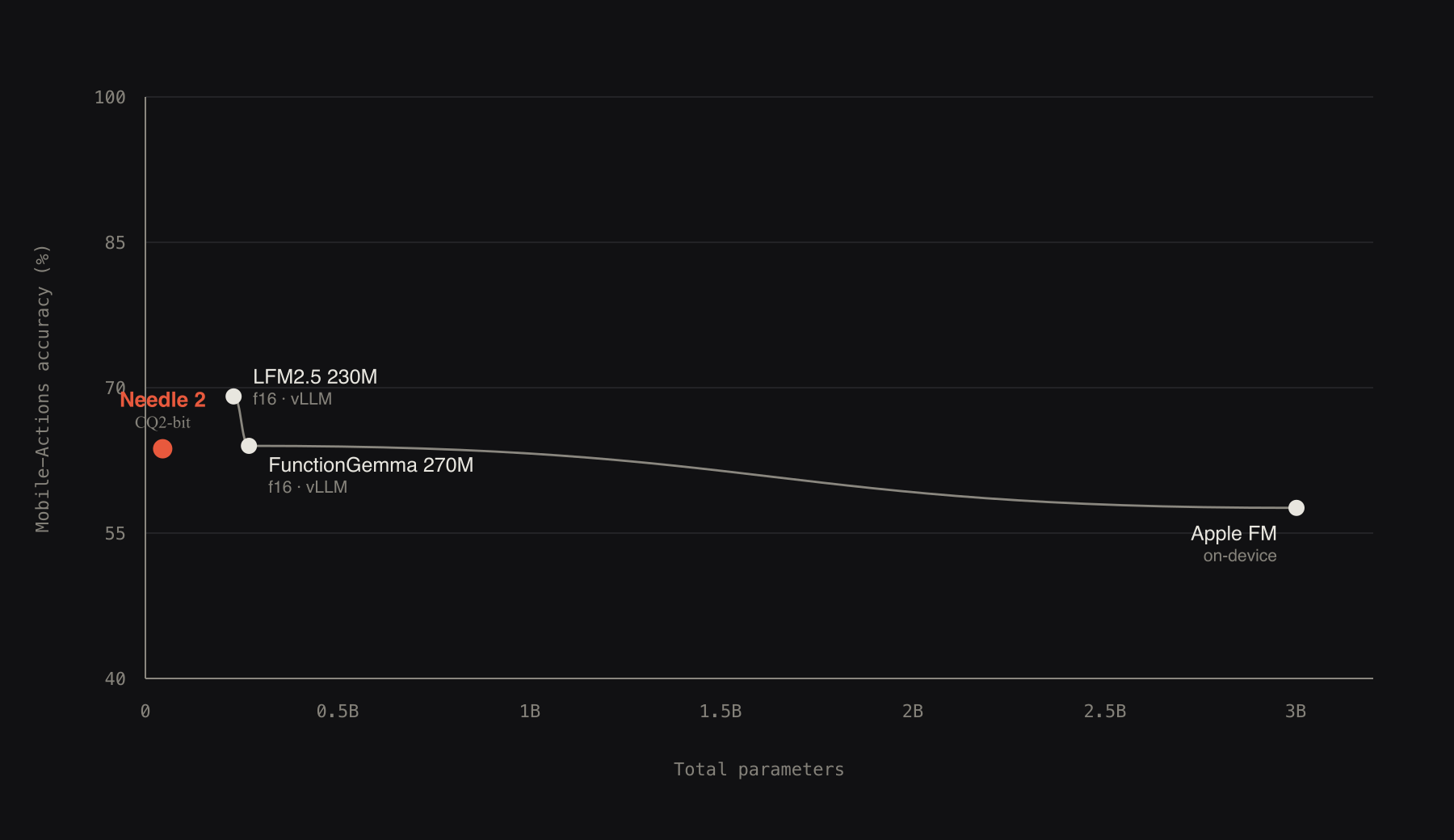
Needle 2 เป็นโมเดลแบบเปิดขนาด 45M พารามิเตอร์สำหรับการเรียกใช้เครื่องมือ การใช้งานบนอุปกรณ์ และการดึงข้อมูลแบบมีโครงสร้าง โมเดลทั้งหมดเป็นไบนารีขนาด 14MB เพียงไฟล์เดียวที่สามารถรันเซสชันเต็มรูปแบบโดยใช้ RAM ประมาณ 28MB สร้างขึ้นจากผลการวิจัย Simple Attention Network ของเรา บีบอัดเป็น CQ2-bit ด้วย Cactus Quants และฝังอยู่ในเอนจินของตัวเอง จากการทดสอบประสิทธิภาพด้านล่าง Needle 2 มีผลลัพธ์ที่สามารถแข่งขันกับโมเดลขนาดเล็กอื่นๆ เช่น FunctionGemma 270M, LFM2.5 230M และ Apple FM โดยมีขนาดเล็กกว่า 5 ถึง 70 เท่า และใช้ 2 บิตเทียบกับ f16 ของโมเดลเหล่านั้น
repository นี้คือแพ็กเกจ Python: สำหรับการอนุมาน (inference), การปรับแต่ง LoRA (LoRA fine-tuning) และการส่งออก (export) เพียงแค่ pip install cactus-needle อธิบายเครื่องมือของคุณ แล้วเรียกใช้จาก Python เอนจินสำหรับการอนุมานจะถูกดึงมาครั้งเดียวจาก Hugging Face และแคชไว้ ไม่จำเป็นต้องสร้างอะไรเพิ่มเติม และการตั้งค่าแบบออฟไลน์สำหรับอุปกรณ์ที่ไม่มีการเชื่อมต่อเครือข่ายก็มีระบุไว้ใน doc/apis.md
- ครบวงจรในตัวเอง: น้ำหนักโมเดลถูกฝังอยู่ในเอนจินขนาด 14MB เพียงไฟล์เดียว ไม่ต้องจัดการไฟล์โมเดลแยกต่างหาก และการอนุมานไม่จำเป็นต้องใช้เครือข่าย
- สัญญาที่เรียบง่าย: การเรียกใช้เครื่องมือจะส่งกลับมาเป็นข้อมูลที่มีโครงสร้าง โดยรับข้อความเข้าและส่งออกเป็น JSON; ไวยากรณ์ระดับไบต์ที่คอมไพล์จาก schema ของคุณจะจำกัดทุกโทเค็น
- มีเกณฑ์ความเชื่อมั่น: ทุกการตอบสนองมีคะแนนความเชื่อมั่นที่ปรับเทียบแล้วจาก learned head; คุณสามารถกำหนดเกณฑ์ ทำงานเมื่อคะแนนสูงกว่า และส่งต่อเมื่อคะแนนต่ำกว่า
- การดึงเครื่องมือ: ประกาศแค็ตตาล็อกขนาดใหญ่ และ retrieval head ในตัวจะแสดงเฉพาะเครื่องมือห้าอันดับแรกต่อรอบ โดยไวยากรณ์จะถูกจำกัดเฉพาะชุดย่อยนั้น
- หน่วยความจำที่จำกัด: หน้าต่างเลื่อนขนาด 256 โทเค็นพร้อมเครื่องมือที่ถูกตรึงไว้เป็น KV sinks ทำให้หน่วยความจำรวมยังคงอยู่ใกล้ 28MB ไม่ว่าการสนทนาจะดำเนินไปนานแค่ไหน
น้ำหนักโมเดล: huggingface.co/Cactus-Compute/needle2 · ซอร์สโค้ด: github.com/cactus-compute/needle
Simple Attention Network
Needle 2 เป็น Simple Attention Network ซึ่งเป็นสูตรโมเดลขนาดเล็กแบบหนาแน่นของเรา: ใช้ Hadamard MLP แทน FFN, GQA attention, engram key-value memory และ multi-lane hyper-connections ดูเอกสารวิจัยสำหรับการออกแบบและการทดลองตัดส่วนประกอบ (ablations): arXiv:2607.18363
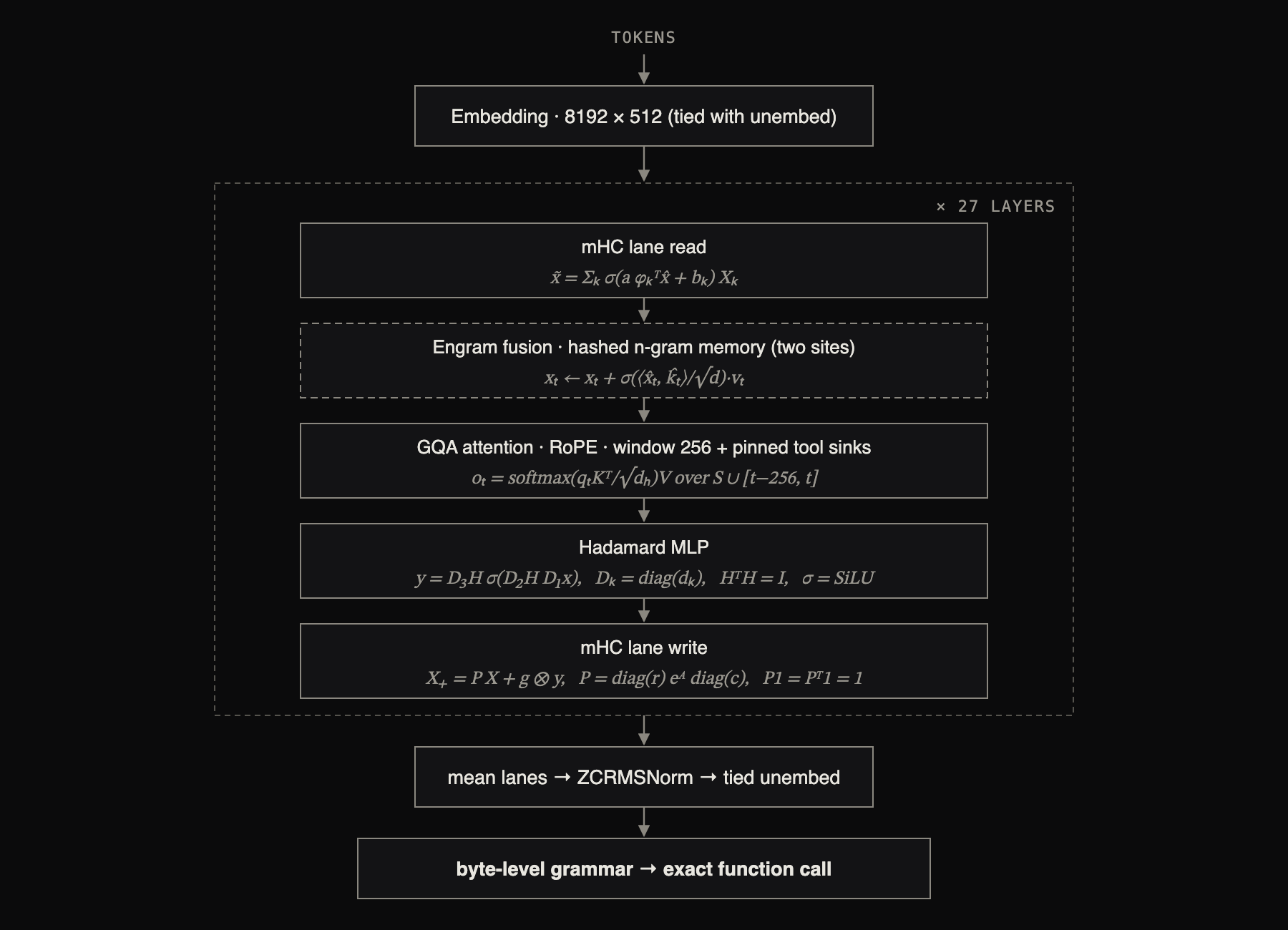
แต่ละบล็อกมีกฎการอัปเดตของตัวเอง โดยที่ x̂ คือการปรับให้เป็น RMS-normalised ของสี่ residual streams, H คือการแปลง Walsh-Hadamard แบบ orthonormal (เมทริกซ์คงที่ที่ใช้ในเวลา n log n โดยไม่มีน้ำหนักให้อ่าน), (kₜ, vₜ) คือแถวที่รวบรวมจากตาราง n-gram ที่ถูกแฮช, และ P คือการปรับให้เป็น doubly-stochastic normalisation ของ routing logits A ซึ่งคำนวณโดย Sinkhorn iteration; a, b, g และ σ-gates ทั้งหมดถูกเรียนรู้และขึ้นอยู่กับอินพุต ทั้ง attention และ MLP residuals ถูก sandwich-normed และ gated, engram sites ทำงานที่สองเลเยอร์ และการถอดรหัสถูกจำกัดด้วยไวยากรณ์ระดับไบต์ที่คอมไพล์จาก schemas ที่ประกาศไว้
Quickstart
pip install cactus-needleNeedle อ่านคำอธิบายเครื่องมือของคุณเพื่อตัดสินใจว่าจะเรียกใช้อะไรและจะเติมอาร์กิวเมนต์อย่างไร ดังนั้นการอธิบายเครื่องมือให้ดีจึงเป็นสิ่งสำคัญที่สุด
แบบง่าย: ตกแต่งฟังก์ชันด้วย decorator ซิกเนเจอร์ของฟังก์ชันจะระบุประเภทอาร์กิวเมนต์ ส่วน docstring คือคำอธิบายเครื่องมือ และ run() จะทำให้ลูปสมบูรณ์: โมเดลเลือกการเรียกใช้, Needle รันฟังก์ชันของคุณ, ป้อนผลลัพธ์กลับไป, และส่งคืนการตอบสนองสุดท้ายพร้อมผลลัพธ์ของเครื่องมือที่รันแล้วแนบมาใน results
import needle

@needle.tool
def get_weather(city: str):
    "Get the current weather for a city."
    return {"city": city, "temp_c": 27, "sky": "clear"}

agent = needle.Needle(tools=[get_weather])
print(agent.run("what's it like in Lagos right now?")["results"])
# [{'city': 'Lagos', 'temp_c': 27, 'sky': 'clear'}]การดึงข้อมูล: หากต้องการดึงข้อมูลที่มีโครงสร้างออกจากข้อความ ให้ประกาศรูปร่างของข้อมูลและเรียกใช้ extract() ส่ง Pydantic model เข้าไป แล้วคุณจะได้อ็อบเจกต์ที่มีประเภทกลับมา
from pydantic import BaseModel

class Invoice(BaseModel):
    vendor: str
    total: float
    due_date: str

invoice = needle.extract("Invoice from Acme Corp, $1,200.00, due 2026-09-01", Invoice)
print(invoice.vendor, invoice.total)   # -> Acme Corp 1200.0
คำอธิบายและตัวเลือกต่ออาร์กิวเมนต์, ข้อจำกัดค่าที่คอมไพล์ลงในไวยากรณ์การถอดรหัส, JSON schemas ดิบ, การขับเคลื่อนลูปด้วย complete(), สัญญาการตอบสนอง, ข้อเท็จจริงของระบบ, การดึงเครื่องมือ และ confidence gating ทั้งหมดนี้ครอบคลุมอยู่ใน doc/apis.md
Playground
ลองใช้โมเดลใดก็ได้ในเบราว์เซอร์: เลือก preset, แก้ไขเครื่องมือหรือ prompt แล้วกด Run การสอบถามติดตามผลจะดำเนินต่อไปในการสนทนาเดียวกัน
needle playground                      # base model, http://127.0.0.1:7860
needle playground --weights my.cact    # a tuned model
เซิร์ฟเวอร์จะดาวน์โหลดและเริ่มต้นโมเดลก่อนที่จะให้บริการ ดังนั้นการสอบถามครั้งแรกจะใช้เวลาสักครู่ ปุ่ม Finetune on these tools จะรันไปป์ไลน์การปรับแต่งด้านล่างจาก UI และส่งคืนไฟล์ .cact ที่สามารถดาวน์โหลดได้
การปรับแต่ง (Fine-tuning)
Needle ปรับแต่งด้วย LoRA บนฐานโมเดลที่ถูกตรึง (frozen base) และรวมอะแดปเตอร์เข้าด้วยกันเมื่อส่งออก ดังนั้นการรันจึงมีค่าใช้จ่ายต่ำ และโมเดลที่ปรับแต่งแล้วยังคงเป็นไฟล์ .cact ไฟล์เดียวที่รันบนเอนจินเดียวกัน ขั้นตอนการทำงานคือ: (ทางเลือก) สังเคราะห์ข้อมูล, ปรับแต่ง LoRA, จากนั้นสร้างไฟล์ .cact ที่ปรับแต่งแล้ว ดู doc/finetuning.md สำหรับขนาดชุดข้อมูล, การอ่านกราฟ loss และการแก้ไขปัญหา
รูปแบบข้อมูล ไฟล์ JSONL โดยมีหนึ่งตัวอย่างต่อบรรทัด reasoning เป็นทางเลือก; ตัวอย่างที่ไม่อยู่ในหัวข้อจะมี answers: []
{"query": "dim the kitchen to 10", "tools": [{"name": "set_lights", "parameters": {"type": "object", "properties": {"room": {"type": "string"}, "brightness": {"type": "integer"}}, "required": ["room"]}}], "answers": [{"name": "set_lights", "arguments": {"room": "kitchen", "brightness": 10}}], "reasoning": "'kitchen' -> room; 'dim to 10' -> brightness 10"}1. สังเคราะห์ข้อมูล (ไม่บังคับ) ต้องใช้ OPENROUTER_API_KEY เริ่มต้นจากไฟล์ tool schema หรือขยายชุดข้อมูลที่มีอยู่:
export OPENROUTER_API_KEY=sk-or-...
needle generate-data --tools my_tools.json --num-samples 500 --output data.jsonl
needle generate-data --augment data.jsonl --num-samples 500      # expand an existing JSONL
ตั้งค่า OPENROUTER_URL เพื่อใช้เกตเวย์ที่เข้ากันได้กับ OpenAI แทน endpoint ของ OpenRouter เริ่มต้น
2. ปรับแต่ง LoRA checkpoint ฐานจะดาวน์โหลดอัตโนมัติจาก Hugging Face หากคุณไม่ได้ส่ง --checkpoint --generate N จะสังเคราะห์ตัวอย่างเพิ่มเติม N ตัวอย่างจากเครื่องมือในข้อมูลของคุณก่อน (ยังต้องใช้ OPENROUTER_API_KEY)
needle finetune data.jsonl --epochs 10
needle finetune data.jsonl --epochs 10 --generate 300 --lora-rank 16 --lora-alpha 32
ตัวเลือกสำคัญ: --epochs (ค่าเริ่มต้น 3), --lora-rank (16), --lora-alpha (32), --lr (1e-4), --batch-size (16), --max-len (1024), --val-split (0.1), --checkpoint <base.pkl>, --out <adapter.pkl> อะแดปเตอร์จะถูกเขียนไปยัง checkpoints/needle_lora.pkl ค่า validation loss จะถูกพิมพ์ออกมาในแต่ละ epoch จากส่วนที่ถูกกันไว้
การฝึกอบรมเป็น JAX ธรรมดาและรันบน accelerator ใดๆ ที่ JAX รองรับ บนเครื่อง NVIDIA ให้ติดตั้ง CUDA build และคำสั่งเดียวกันนี้จะฝึกอบรมบน GPU:
pip install "cactus-needle[gpu]"บน Apple Silicon ส่วนเสริม metal จะฝึกอบรมบน GPU:
pip install "cactus-needle[metal]"3. สร้างไฟล์ .cact ที่ปรับแต่งแล้ว รวมอะแดปเตอร์เข้ากับฐานโมเดลและควอนไทซ์ ฐานโมเดลจะดาวน์โหลดอัตโนมัติหากไม่มีอยู่
needle build checkpoints/needle2.pkl --lora checkpoints/needle_lora.pkl --out my_needle.cactเพิ่ม --bits 2 สำหรับโมเดลที่เล็กลง (โดยค่าเริ่มต้น การส่งออกจะตามแผนที่บิตต่อเลเยอร์ที่ประกาศไว้ใน checkpoint โดยจะกลับไปใช้ 4 บิตหาก checkpoint ไม่ได้ประกาศไว้) หรือตั้งค่า NEEDLE_HF_REPO=<you>/<model> และส่ง --upload เพื่อเผยแพร่ไฟล์ .cact คำสั่ง needle download <you>/<model>/my_needle.cact ที่ตรงกันจะดึงไฟล์เก็บถาวรที่เผยแพร่แล้วบนเครื่องใดก็ได้
4. รันโมเดล เอนจินไม่ขึ้นกับน้ำหนักโมเดล ดังนั้นไฟล์ .cact ที่ปรับแต่งแล้วสามารถรันบนเอนจินได้โดยตรง - ไม่ต้องคอมไพล์ใหม่:
import needle
agent = needle.Needle(weights="my_needle.cact", tools=[...])
agent.run("...")
การอ้างอิง
Needle 2 สร้างโดยทีม Cactus Compute หากคุณใช้ในงานของคุณ โปรดอ้างอิง:
@misc{needle2_2026,
  title        = {Needle 2: A 45M-Parameter Foundation Tool-Calling Model for Tiny Devices},
  author       = {Ndubuaku, Henry and Mosoyan, Karen and Mroz, Jakub and Cylich, Noah and
                  Kumar, Satyajit and Sandhu, Parkirat and Shemet, Roman and Lee, Justin H.},
  year         = {2026},
  organization = {Cactus Compute, Inc.},
  howpublished = {\url{https://github.com/cactus-compute/needle}}
}
ติดต่อ founders@cactuscompute.com สำหรับการเป็นพันธมิตร ความร่วมมือ การทำงานร่วมกัน และการนำ Needle2 ไปใช้ในผลิตภัณฑ์ของคุณ
เอกสารโปรเจกต์
อ่านเอกสารต้นฉบับ
README วิธีติดตั้ง วิธีใช้งาน และข้อกำหนดจาก repository ต้นฉบับ
A foundation model for mobiles, wearables, robots, smart home, automotive and microcontrollers. The whole model is a single 8-29 MB binary built on our Simple Attention Network, and we trade general chat capacity to beat models 10x its size on mobile tool calls and match 2-3x bigger models on extraction.
- Tool calls: given the functions your app exposes, Needle picks the right ones and fills every argument from what the user said. Ask for two things and you get two calls in order; ask for something no tool covers and you get an empty list, not a guess.
- Structured extraction: declare a shape, hand over messy text, get typed fields back: an invoice, a booking, a notification, a form. The decode grammar guarantees the output parses, and extraction generalises to classification.
- Text embedding: the same model returns a vector for a sentence, so an app can search, match and route locally.
- Speech: Whistle, our speech-to-text model, shares Needle's container and engine. One build gives Needle audio input: the clip goes in, the tool calls come out.
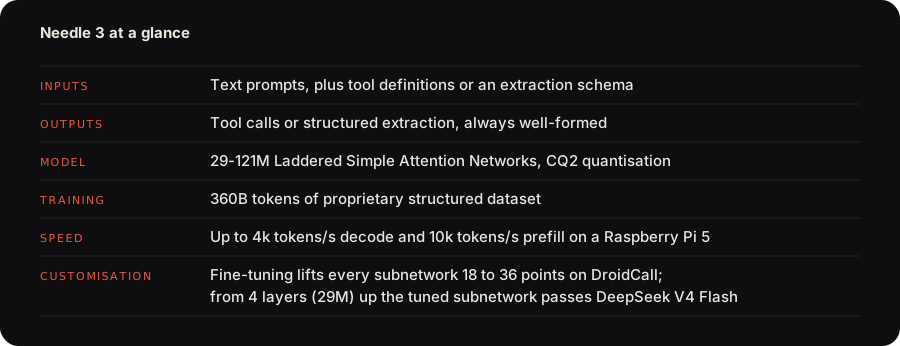
Needle 3 is a Laddered Simple Attention Network: a Monarch Hadamard MLP in place of the FFN, GQA attention with causal conv taps, engram n-gram memory read by gather, and multi-lane hyper-connections, trained so that every depth from 2 to 20 layers is a deployable model. Most of its parameters sit in the engram, so the 121M model does the arithmetic of a 50M one. A byte-level grammar compiled from your schemas constrains every token, and every response carries a calibrated confidence score from a learned head. The architecture diagram is on the release page.
Benchmarks
Tool calling is exact-match accuracy on the full test splits, extraction is field micro-F1 on the full test splits.
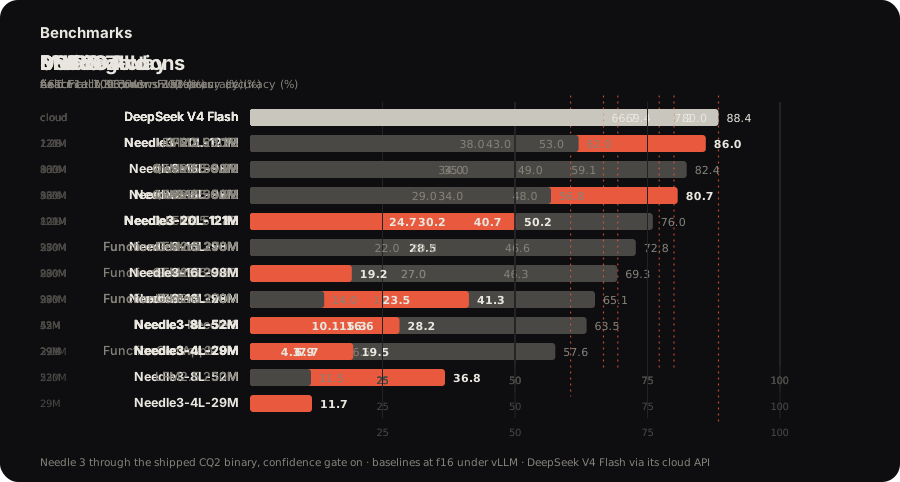
The interactive frontier plot, the architecture and the fine-tuning results are at cactuscompute.com/needle.
Get started
pip install cactus-needleTry it in the browser at cactuscompute.com/needle; the weights and every platform engine are on Hugging Face.
Decorate a function: the signature gives the argument types, the docstring is the tool description, and run() completes the loop, executing your function and returning its results.
import needle

@needle.tool
def get_weather(city: str):
    "Get the current weather for a city."
    return {"city": city, "temp_c": 27, "sky": "clear"}

agent = needle.Needle(tools=[get_weather])
print(agent.run("what's it like in Lagos right now?")["results"])
# [{'city': 'Lagos', 'temp_c': 27, 'sky': 'clear'}]
Every turn returns one JSON object with function_calls, the model's reasoning and a calibrated confidence; an off-topic request returns an empty list rather than a guess. needle.Needle(tools=[...], generation=2) keeps running Needle 2 for existing deployments.
Whistle
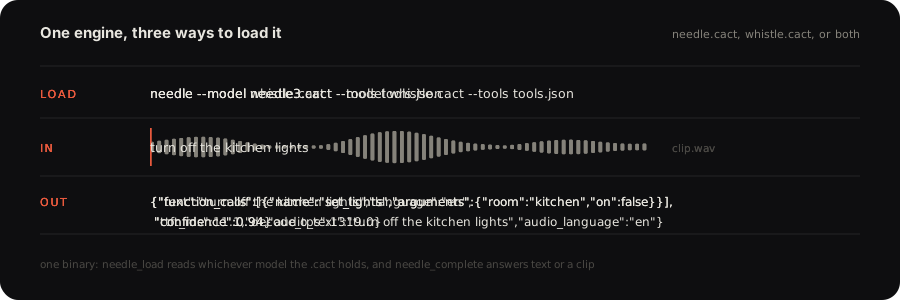
Whistle is our speech-to-text model, one 16.9 MB file on the CPU: 16 kHz mono audio, up to 30 seconds in one pass, in English, German, French, Spanish, Italian, Dutch and Polish. It shares Needle's .cact container, its quantisation and its C++ engine, so the two are one runtime, and its decoder is laddered the same way, with --audio-depth N running the N-layer rung of the same weights.
import needle

print(needle.transcribe("clip.wav")["text"])
# turn off the kitchen lights
Every call returns the text, the language, the milliseconds to the first token and the decoder's tokens per second after it. word_timestamps=True adds each word with its start, end and probability, keywords=[...] favours the names and product words your users say, and language="de" forces the language instead of detecting it. needle.Whistle() is the same model as an object, for embed(audio) or to hold one tuned .cact. Silence and steady noise return an empty transcript rather than an invented sentence. needle whistle playground transcribes from the microphone, and needle whistle compare puts Whistle next to Whisper and Moonshine on the same clip.
At 16.9 MB Whistle is 8.6x smaller than Whisper base and 6.6x quicker to the first token. It is ahead on LibriSpeech test-clean and test-other, on SPGISpeech, on Earnings-22 and on the FLEURS average. Whisper base is ahead on TED-LIUM, on AMI and on the MLS average.
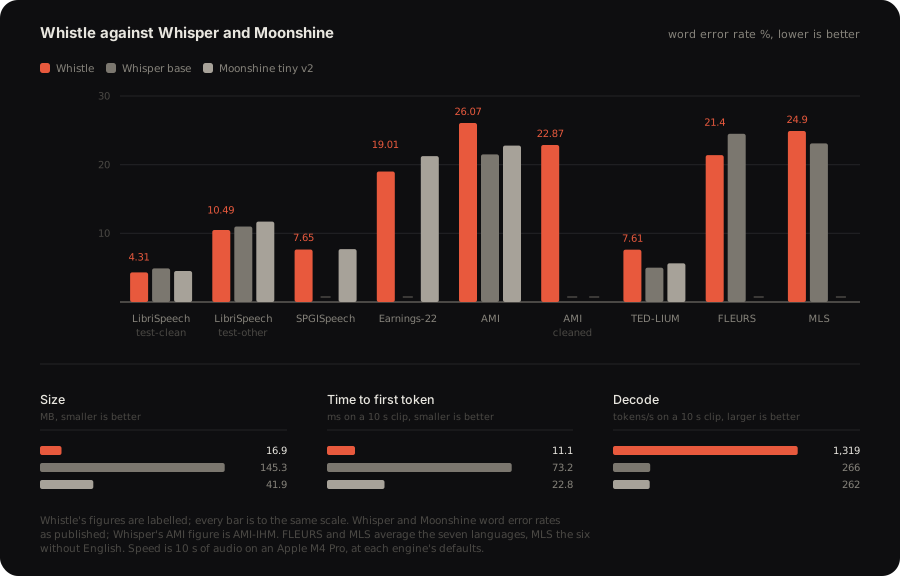
Word error rate on the full test splits, scored with the Whisper normalizers. Whisper and Moonshine figures are the ones their authors published. Latency and decode are 10 s of audio on an Apple M4 Pro, at each engine's defaults. The per-benchmark caveats are on Hugging Face.
needle --model needle3.cact --model whistle.cact --tools tools.json --audio clip.wavOne engine holds both models: needle_load reads whichever one a .cact carries, and needle_complete takes a clip wherever it takes text. It transcribes, answers the transcript against your tools, and returns one JSON object with the tool calls and the speech fields, the speech ones prefixed audio_. The transcription stays inside the engine, so audio in and tool calls out is one call.
The benchmarks against Whisper and Moonshine, the architecture and the interactive demo are at cactuscompute.com/whistle; the weights and every platform engine are on Hugging Face.
Guides
- How to design tools for Needle 3: one tool per action, names users would say, formats in descriptions, constraints in the grammar, triggers.
- Leveraging Needle's confidence: what the score measures, what the engine withholds, and routing on act, confirm or refuse.
- Structured JSON extraction with Needle: the record as the only tool, typed results, classification with enums.
- Fine-tuning Needle: the data format, the commands, reading the loss, sizing the dataset.
- Needle Python docs: the API, the response shape, the behaviour contract, system facts, tool retrieval, offline devices, environments, the CLI.
- What devices are supported on Needle: every platform folder, the CLI runner, the C API, the browser, WASI, air-gapped setup.
- The .cact format: the file the engine maps and reads in place, Cactus Quants at 2.125 bits per weight, and how to parse it yourself.
- Porting Needle 3: notes for writing your own runtime, the oracle to test against, the tensor order the container promises, the prompt on the wire, the ladder rule, retrieval with
needle_embed.
llms.txt in this repo carries the same reference for AI coding assistants.
Customisation
Needle was designed to be customised. Its capacity is a ladder, and a subnetwork as small as 2 layers, fine-tuned on one product's tools, runs optimally on devices far smaller than the full model needs. Fine-tuning on DroidCall lifts every subnetwork by 18 to 36 points, and from 4 layers up the tuned subnetwork passes DeepSeek V4 Flash, starting at 29M parameters.
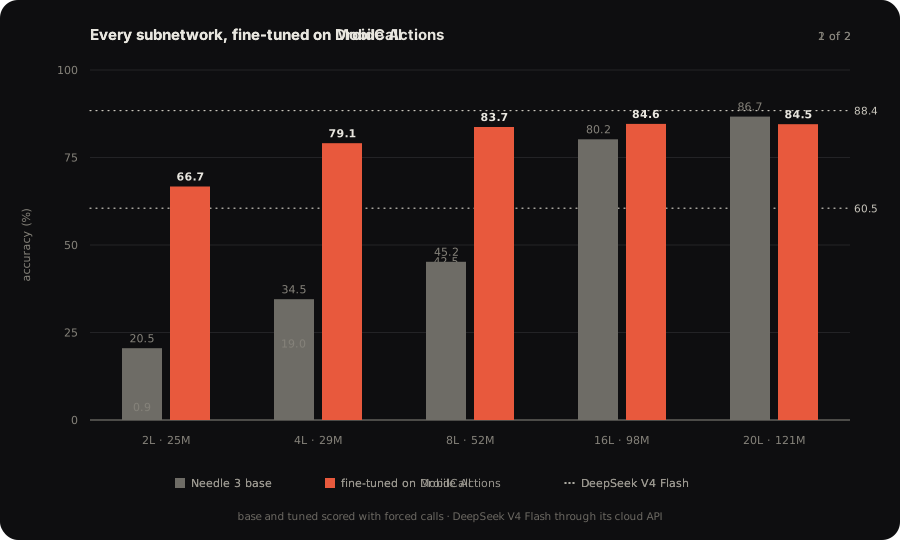
Two ways to fine-tune, from the same package:
Local, needle finetune | Platform, needle platform finetune | |
|---|---|---|
| What trains | LoRA adapters on the attention projections, base frozen, merged at export | The full model, every depth from 2 layers up |
| What it keeps | Your data only | Your data reinforced with Needle's original dataset, so nothing already learned is unlearned |
| Confidence | Head untouched; confidence is None | Head fine-tuned with the model, calibrated on your tools |
| Precision | 4-bit | 2-bit, the same post-training as the shipped model |
| Data | Your JSONL, query/answers or chat format | Yours, or generated from your tool definitions, 100 to 10,000 examples per run |
| Scores | Validation loss | Validation and test accuracy for every depth |
| Compute | Your machine, JAX on CPU, CUDA or Metal | Cactus GPUs |
| Runs from | The CLI | The CLI, Python, the dashboard, or a coding agent holding your key |
Local:
pip install "cactus-needle[train]"
needle finetune data.jsonl --epochs 10 --out adapter.safetensors
needle build --lora adapter.safetensors --layers 8 --out tuned.cact
Platform, with a key from the console in NEEDLE_API_KEY. One command uploads the files, trains and scores every size, and downloads the .cact files; once a job is submitted it can also be followed on the dashboard:
export NEEDLE_API_KEY=needle_ft_...
needle platform generate --tools tools.json --examples 1000 --out ./data
needle platform finetune data/train.jsonl data/validation.jsonl data/test.jsonl --suffix smart-home --out ./modelsfrom needle.platform import Platform
client = Platform()
job = client.wait(client.finetune(["train.jsonl"], ["validation.jsonl"], ["test.jsonl"], suffix="smart-home"))
paths = client.download(job["fine_tuned_model"], "models", depth=8)Or hand the key to Claude Code or Codex with cactuscompute.com/llms.txt and let the agent run the loop. needle platform jobs | models | files | billing list what the account holds, needle download model-<id> fetches a model by id, and the fine-tuning guide covers the data format and how to read the scores.
Deploy
Every deployment target ships a prebuilt engine that loads the needle3.cact weights at start. needle build --platform <folder> [--layers N] fetches that engine and puts the weights beside it.
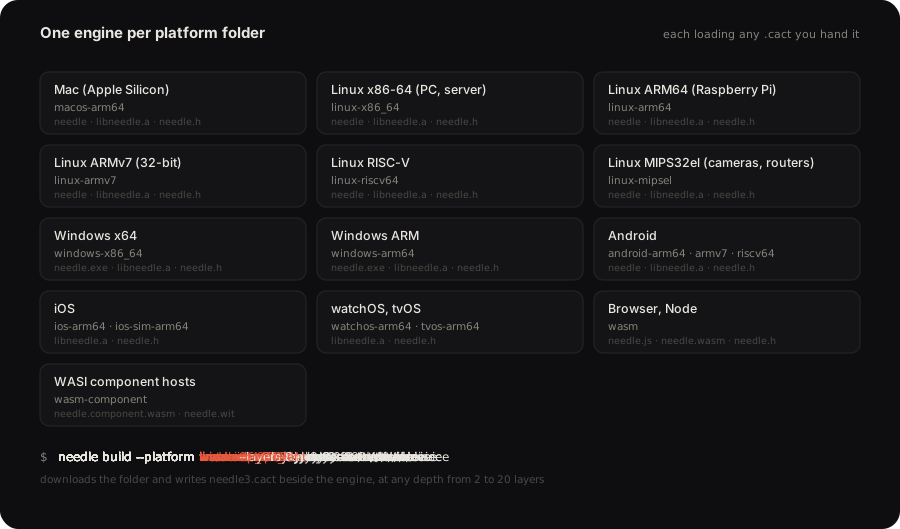
needle build --platform macos-arm64
needle build --platform linux-arm64 --layers 8 --out ./pi
./macos-arm64/needle --model needle3.cact --tools tools.json --serve
The devices guide lists every folder and what ships in it.
By default, telemetry is turned on in the binary. To turn it off, set environment variables NEEDLE_TELEMETRY=0 and DO_NOT_TRACK=1.
Citation
Needle is built by the Cactus Compute team. If you use it in your work, please cite:
@misc{needle3_2026,
  title        = {Needle: Automation Foundation Model for Tiny Devices},
  author       = {Ndubuaku, Henry and Mosoyan, Karen and Mroz, Jakub and Cylich, Noah and
                  Kumar, Satyajit and Sandhu, Parkirat and Shemet, Roman and Lee, Justin H.},
  year         = {2026},
  organization = {Cactus Compute, Inc.},
  howpublished = {\url{https://github.com/cactus-compute/needle}}
}