
GetNotes Tools
agegr/pi-web
Tool นี้คืออะไร
Pi Web เป็นเว็บ UI สำหรับ pi coding agent ที่ช่วยให้คุณจัดการเซสชัน pi ในเครื่อง, แชทแบบเรียลไทม์, กำหนดค่าโมเดล, จัดการทักษะ และดูตัวอย่างไฟล์โปรเจกต์ผ่านเบราว์เซอร์ ทำให้การทำงานกับ pi agent สะดวกและมีประสิทธิภาพยิ่งขึ้น
ข้อมูลโปรเจกต์
ดาว
2.4K
Forks
334
License
MIT
อัปเดต GitHub ล่าสุด
23 ก.ค. 2569
เพิ่มใน GetNotes
30 ก.ค. 2569
Repository
agegr/pi-web
แปลและเรียบเรียงโดย AI
เนื้อหาฉบับภาษาไทย
ใช้อ่านเพื่อทำความเข้าใจเบื้องต้น โปรดตรวจสอบรายละเอียดสำคัญกับเอกสารต้นฉบับด้านล่าง
Pi Web
เว็บ UI ในเครื่องสำหรับ pi coding agent Pi Web อ่านไฟล์เซสชัน pi ในเครื่องของคุณ และมอบพื้นที่ทำงานในเบราว์เซอร์สำหรับการเรียกดูเซสชัน, แชทแบบเรียลไทม์, การกำหนดค่าโมเดล, การจัดการทักษะ และการดูตัวอย่างไฟล์โปรเจกต์
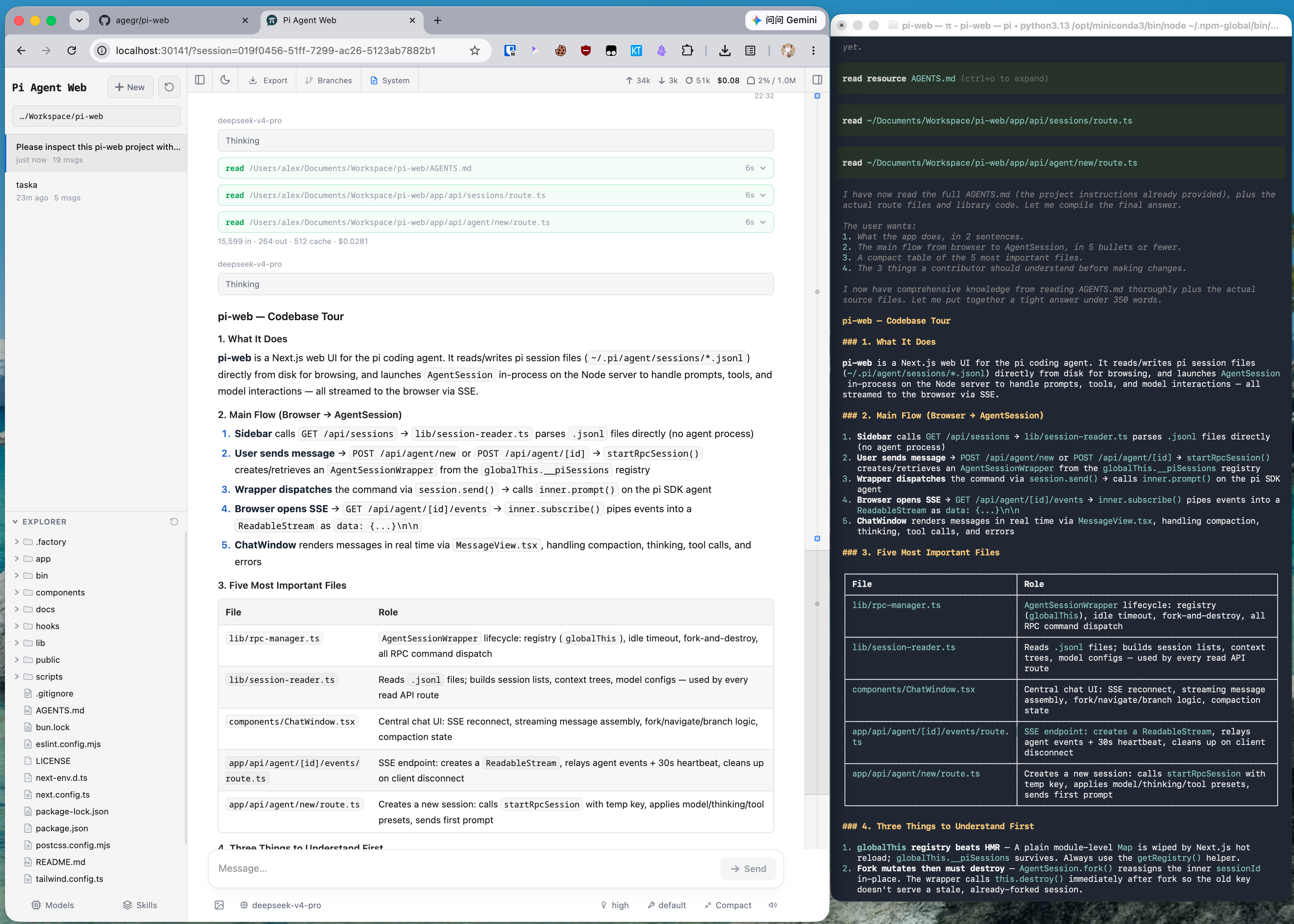
เซสชัน pi เดียวกันใน CLI และ Pi Web: การเรียกใช้เครื่องมือที่มีโครงสร้าง, Markdown ที่อ่านง่าย, การเรียกดูเซสชัน และผลลัพธ์ที่สะอาดตาขึ้น
เริ่มต้นใช้งานอย่างรวดเร็ว
Pi Web ต้องใช้ Node.js 22.19.0 หรือใหม่กว่า ตรวจสอบเวอร์ชันของคุณด้วย node --version
รันโดยไม่ต้องติดตั้ง:
npx @agegr/pi-web@latestหรือติดตั้งทั่วโลก:
npm install -g @agegr/pi-web
pi-web
จากนั้นเปิด http://127.0.0.1:30141 CLI จะพยายามเปิดเบราว์เซอร์โดยอัตโนมัติหลังจากเซิร์ฟเวอร์พร้อม Pi Web จะรับฟังที่ 127.0.0.1 โดยค่าเริ่มต้น
ตัวเลือก:
pi-web --port 8080              # custom port
pi-web --hostname 0.0.0.0       # expose on a trusted network
pi-web -p 8080 -H 0.0.0.0       # combine options
pi-web --no-open                # do not open the browser automatically

PORT=8080 pi-web                # environment variable is also supported
PI_WEB_HOSTNAME=0.0.0.0 pi-web  # explicit network exposure
PI_WEB_ALLOWED_HOSTS=pi-web.internal pi-web  # allow an exact proxy/custom hostname
PI_WEB_NO_OPEN=1 pi-web         # useful when running as a background service
Pi Web ไม่มีการยืนยันตัวตนระดับแอปพลิเคชันและสามารถเรียกใช้เอเจนต์ที่มีสิทธิ์สูงได้ ห้ามเปิดเผยสู่สาธารณะทางอินเทอร์เน็ต; ให้ใช้การผูกที่ไม่ใช่ loopback บนเครือข่ายที่เชื่อถือได้เท่านั้น
คำขอ API ยอมรับชื่อ loopback, IP literals, ชื่อโฮสต์ที่ผูกไว้ที่เลือก และชื่อที่คั่นด้วยเครื่องหมายจุลภาคที่ระบุใน PI_WEB_ALLOWED_HOSTS กำหนดค่าตัวแปรนั้นเมื่อ reverse proxy ที่เชื่อถือได้ใช้ชื่อโฮสต์ภายนอกที่แตกต่างกัน
พร็อกซี HTTP
Pi Web อ่านตัวแปรสภาพแวดล้อมมาตรฐาน HTTP_PROXY, HTTPS_PROXY และ NO_PROXY สำหรับคำขอโมเดลและ API ฝั่งเซิร์ฟเวอร์
บน macOS หรือ Linux:
HTTP_PROXY=http://127.0.0.1:7890 \
HTTPS_PROXY=http://127.0.0.1:7890 \
NO_PROXY=localhost,127.0.0.1 \
npx @agegr/pi-web@latest
บน Windows PowerShell:
$env:HTTP_PROXY = "http://127.0.0.1:7890"
$env:HTTPS_PROXY = "http://127.0.0.1:7890"
$env:NO_PROXY = "localhost,127.0.0.1"
npx @agegr/pi-web@latest
คุณสมบัติ
- กลับมาทำงานต่อ: เรียกดูการสนทนา pi ครั้งก่อนตามโปรเจกต์โดยไม่ต้องค้นหาประวัติเทอร์มินัลหรือพาธเซสชัน
- ลองทิศทางที่แตกต่างกันได้อย่างปลอดภัย: ดำเนินการต่อจากข้อความก่อนหน้าหรือแยกเซสชันออกเป็นเส้นทางที่แยกต่างหาก
- ทำงานข้ามสาขา: สลับ Git worktrees จากแถบด้านข้าง เพื่อให้เซสชันใหม่และ Explorer เป็นไปตามการเช็คเอาต์ที่คุณเลือก
- แชทข้างโปรเจกต์: เรียกดูไฟล์ทางซ้ายและดูตัวอย่างซอร์สโค้ด, เอกสาร, รูปภาพ, เสียง และ PDF ทางขวาในขณะที่เอเจนต์ทำงาน
- เห็นสถานะเซสชันอย่างชัดเจน: การใช้บริบท, ค่าใช้จ่าย, สถานะการบีบอัด และรายละเอียดพรอมต์ระบบจะแสดงให้เห็นจากแถบด้านบน
- กำหนดค่าน้อยลงจากเทอร์มินัล: จัดการโมเดล, การเข้าสู่ระบบ/คีย์ API, การทดสอบโมเดล และการสลับทักษะจากเว็บ UI
- ใช้ส่วนต่อประสานในภาษาของคุณ: สลับระหว่างภาษา UI ที่รองรับจากแถบด้านบน
ข้อควรทราบ
- ไดเรกทอรีข้อมูล: Pi Web อ่าน
~/.pi/agent/sessionsโดยค่าเริ่มต้น ตั้งค่าPI_CODING_AGENT_DIRเพื่อชี้ไปยังไดเรกทอรี pi agent อื่น - ไฟล์เซสชัน: ไฟล์จะถูกจัดเก็บเป็น
~/.pi/agent/sessions/<encoded-cwd>/<timestamp>_<uuid>.jsonl - การกำหนดค่าโมเดล: แผง Models อ่านและเขียน
models.jsonในไดเรกทอรี pi agent รายการโมเดลและค่าเริ่มต้นมาจาก config ของ pi - การเข้าถึงไฟล์: การเรียกดูและดูตัวอย่างไฟล์ถูกจำกัดขอบเขตไว้ที่ไดเรกทอรีโปรเจกต์ที่เลือกและไดเรกทอรีการทำงานที่ปรากฏในเซสชัน
- Git worktrees: ดู Worktrees in Pi Web สำหรับเมื่อตัวสลับปรากฏ, วิธีการสร้าง worktrees ใหม่ และการลบทำอะไร
- Forks เทียบกับ in-session branches: Fork สร้างไฟล์
.jsonlใหม่ "Edit from here" สร้าง branch อื่นภายในไฟล์เซสชันเดียวกัน - การทำให้เป็นสากล: ดู Internationalization สำหรับการใช้การแปลและการเพิ่มภาษาหรือข้อความ UI
การพัฒนา
npm install
npm run dev
เซิร์ฟเวอร์ dev ในเครื่องทำงานที่ http://127.0.0.1:30141
การตรวจสอบทั่วไป:
node_modules/.bin/tsc --noEmit
npm run lint
หลีกเลี่ยงการรัน next build / npm run build ระหว่างการพัฒนาในเครื่อง เนื่องจากจะเขียนไปยัง .next/ และอาจรบกวนเซิร์ฟเวอร์ dev; ให้เก็บการ build ไว้สำหรับงาน release
โครงสร้างโปรเจกต์
app/
  api/
    agent/          # สร้าง/ขับเคลื่อน AgentSession และเปิดเผยเหตุการณ์ SSE
    auth/           # การจัดการ OAuth และคีย์ API
    cwd/browse/     # รายการไดเรกทอรีเซิร์ฟเวอร์ที่เรียกดูได้
    cwd/validate/   # การตรวจสอบไดเรกทอรีการทำงานที่กำหนดเอง
    default-cwd/    # การค้นหาไดเรกทอรีการทำงานเริ่มต้นของ pi
    files/          # การแสดงรายการไฟล์, การอ่าน, การดูตัวอย่าง และการเฝ้าดู
    home/           # ไดเรกทอรีโฮมของผู้ใช้ปัจจุบัน
    models/         # โมเดลที่มีอยู่, โมเดลเริ่มต้น, ระดับการคิด
    models-config/  # อ่าน/เขียน models.json และทดสอบโมเดล
    sessions/       # การอ่านเซสชัน, การเปลี่ยนชื่อ, การลบ, บริบท, การส่งออก HTML
    skills/         # การแสดงรายการทักษะ, การค้นหา, การติดตั้ง, การเปิด/ปิดใช้งาน
components/
  AppShell.tsx        # เค้าโครงหลัก, สถานะ URL, แผงด้านบน, แถบไฟล์
  SessionSidebar.tsx  # ตัวเลือกโปรเจกต์, ผังเซสชัน, Explorer
  DirectoryPicker.tsx # ตัวเลือกไดเรกทอรีการทำงานที่เรียกดูและแก้ไขได้
  ChatWindow.tsx      # ข้อความ, SSE, การลาก/วางรูปภาพ, minimap
  ChatInput.tsx       # แถบอินพุต, การควบคุมโมเดล/เครื่องมือ/การคิด/การบีบอัด/เครื่องหมายทับ
  MessageView.tsx     # การแสดงผลข้อความ, การคิด, การเรียกใช้เครื่องมือ/ผลลัพธ์
  ModelsConfig.tsx    # แผงการกำหนดค่าโมเดลและการยืนยันตัวตน
  SkillsConfig.tsx    # แผงการจัดการทักษะ
  FileExplorer.tsx    # ผังไฟล์
  FileViewer.tsx      # การดูตัวอย่างซอร์สโค้ด, diff, รูปภาพ, เสียง, PDF, DOCX
lib/
  directory-browser.ts # ตัวช่วยในการทำให้ไดเรกทอรีเป็นมาตรฐานและการแสดงรายการที่ปลอดภัย
  http-dispatcher.ts  # การตั้งค่าพร็อกซี HTTP(S) สำหรับการดึงข้อมูลฝั่งเซิร์ฟเวอร์
  rpc-manager.ts      # วงจรชีวิตของ AgentSessionWrapper และรีจิสทรีทั่วโลก
  session-reader.ts   # แยกวิเคราะห์ไฟล์เซสชัน .jsonl และบริบทสาขา
  normalize.ts        # ทำให้ชื่อฟิลด์ toolCall เป็นมาตรฐาน
  file-access.ts      # ขอบเขตความปลอดภัยในการอ่านไฟล์
  file-paths.ts       # การเข้ารหัสพาธและตัวช่วยพาธสัมพัทธ์
  markdown.ts         # การกำหนดค่าปลั๊กอิน Markdown/Mermaid/KaTeX
  pi-types.ts         # ประเภทที่เกี่ยวข้องกับ pi
hooks/
  useAgentSession.ts  # การโหลดเซสชัน, การส่งคำสั่ง, เครื่องสถานะ SSE
  useAudio.ts         # เสียงแจ้งเตือนการเสร็จสิ้น
  useDragDrop.ts      # การลาก/วางรูปภาพ
  useTheme.ts         # การสลับธีม
bin/
  pi-web.js           # จุดเข้า CLI ของ npm
instrumentation.ts    # เริ่มต้นตัวจัดส่ง HTTP ของเซิร์ฟเวอร์
เอกสารโปรเจกต์
อ่านเอกสารต้นฉบับ
README วิธีติดตั้ง วิธีใช้งาน และข้อกำหนดจาก repository ต้นฉบับ
Pi Web
Local browser UI for the pi coding agent. Pi Web uses the same local configuration and session files as pi, so you can browse and resume conversations, run agent turns, configure models and resources, and inspect project files from a browser.
Features
- Session workspace: browse, resume, rename, export, and delete conversations grouped by project, with running state, context usage, cost, and compaction details.
- Two ways to branch: New session creates an independent session file from an earlier message; Edit from here creates a branch inside the current session.
- Project file tools: browse and upload files, inspect Git diffs, and preview source, Markdown, images, audio, PDFs, and DOCX files with automatic refresh.
- Git worktrees: switch checkouts from the sidebar while keeping sessions from the same repository grouped together.
- Web-based configuration: manage provider login and API keys, models, model tests, plugin packages, and skills without leaving Pi Web.
- English, Simplified Chinese, and Traditional Chinese UI: Pi Web follows the browser language initially and provides a language switcher in the top bar.
Quick Start
Pi Web requires Node.js 22.19.0 or newer. Check your version with node --version, then run:
npx @agegr/pi-web@latestThe CLI opens a browser after the server is ready. If it does not, open http://127.0.0.1:30141. Pi Web listens only on 127.0.0.1 by default.
If no model provider is configured yet, open the Models panel to sign in or add an API key.
To install the pi-web command globally:
npm install -g @agegr/pi-web@latest
pi-web
To update, stop the running process with Ctrl+C and run the same install command again. To uninstall, run npm uninstall -g @agegr/pi-web.
Configuration
For port and hostname, command-line options override the corresponding environment variables. Either --no-open or PI_WEB_NO_OPEN=1 disables automatic browser opening. Run pi-web --help (or -h) to print startup options and exit without starting the server. Unknown options exit with an error.
| Option or environment variable | Purpose | Default |
|---|---|---|
--help, -h | Print startup options and exit | — |
--port <port>, -p <port>, or PORT | Server port | 30141 |
--hostname <host>, -H <host>, or PI_WEB_HOSTNAME | Bind hostname | 127.0.0.1 |
--no-open or PI_WEB_NO_OPEN=1 | Do not open a browser automatically | Browser opens |
PI_WEB_SKIP_VERSION_CHECK=1 | Disable Pi Web update checks | Unset |
PI_WEB_ALLOWED_HOSTS | Additional exact proxy or custom hostnames, comma-separated | Unset |
PI_WEB_PASSWORD | Enable browser password login; API clients may use Basic Auth with username pi | Authentication disabled |
PI_WEB_IDLE_TIMEOUT_MS | Session idle timeout in milliseconds, up to 2147483647; 0 disables idle shutdown; invalid or out-of-range values use the default | 600000 (10 min) |
For example:
pi-web --help
pi-web -p 8080 -H 0.0.0.0 --no-open
Remote Access
Binding to a non-loopback address exposes an agent that can execute high-privilege actions. On a trusted LAN, require a long random password:
PI_WEB_PASSWORD='a-long-random-password' pi-web --hostname 0.0.0.0Password authentication does not encrypt the connection. Do not expose Pi Web over plain HTTP to the internet; use HTTPS through a trusted reverse proxy or a trusted VPN. If a reverse proxy sends an external hostname, add that exact name to PI_WEB_ALLOWED_HOSTS. This allow-list does not change the address Pi Web binds to.
HTTP Proxy
Server-side model and API requests honor the standard HTTP_PROXY, HTTPS_PROXY, and NO_PROXY environment variables.
On macOS or Linux:
HTTP_PROXY=http://127.0.0.1:7890 \
HTTPS_PROXY=http://127.0.0.1:7890 \
NO_PROXY=localhost,127.0.0.1 \
npx @agegr/pi-web@latest
On Windows PowerShell:
$env:HTTP_PROXY = "http://127.0.0.1:7890"
$env:HTTPS_PROXY = "http://127.0.0.1:7890"
$env:NO_PROXY = "localhost,127.0.0.1"
npx @agegr/pi-web@latest
Notes
- Agent data: Pi Web reads pi data from
~/.pi/agentby default, including session files undersessions/<encoded-cwd>/<timestamp>_<uuid>.jsonl. SetPI_CODING_AGENT_DIRto use another pi agent directory. - Filesystem access: Pi Web must be able to read the agent data directory and the working directories recorded by its sessions. Run Pi Web in the same filesystem environment as pi when sharing existing sessions.
- Shared configuration: the Models panel uses pi's model, settings, and credential storage, so changes are visible to both interfaces.
- File access boundary: the file browser is limited to working directories selected in Pi Web and project or session roots it already knows about; it is not a general filesystem browser.
- Git worktrees: see Worktrees in Pi Web for switcher visibility, worktree creation, and removal behavior.
Downstream Session Context Menu
Electron wrappers and other downstream integrations can provide a session-row
context menu without patching SessionSidebar. Listen for the cancelable
pi-web:session-row-contextmenu browser event and call preventDefault()
synchronously when the integration will handle it:
window.addEventListener("pi-web:session-row-contextmenu", (event) => {
  event.preventDefault();
  const { id, path, cwd, name, clientX, clientY, refresh } = event.detail;

  void openSessionMenu({ id, path, cwd, name, clientX, clientY }).then((changed) => {
    if (changed) refresh();
  });
});
The detail object contains id, path, cwd, optional name, pointer
coordinates, and a refresh() callback for actions that change the session
list. If no listener cancels the extension event, Pi Web preserves the
browser's native context menu. This hook is browser-side and independent of
Pi agent extensions.
Extension Session Liveness
Server-side Pi extensions with detached work can prevent automatic idle session eviction through the versioned global registry:
const liveness = globalThis[Symbol.for("@agegr/pi-web/session-liveness/v1")];
const release = liveness?.version === 1
  ? liveness.register({
      name: "my-extension",
      sessionId,
      sessionFile: sessionFile || undefined,
      isActive: () => detachedJobs.size > 0,
    })
  : () => {};
Register once per active extension session and call the returned idempotent
release function on session shutdown, replacement, or reload. isActive
must be synchronous, cheap, and scoped to the supplied exact session id or
file. Provider errors fail safe by preserving that session. This lease only
affects automatic idle eviction; explicit shutdown and Stop fallback cleanup
still take precedence.
Development
npm install
npm run dev
The development server runs at http://127.0.0.1:30141. Run the common checks with:
npm test
node_modules/.bin/tsc --noEmit
npm run lint
Do not run next build or npm run build during normal development. It writes to .next/ and can interfere with the development server; leave builds for release work.
Contributor guides: Internationalization and Release process.
Repository Layout
app/             Next.js UI and API routes
components/      React UI components
hooks/           Client state and interaction hooks
lib/             Session, agent, model, file, Git, and security logic
public/          Static assets and PWA files
bin/             npm CLI entrypoint and launch option parsing
docs/            Focused user and contributor guides
See AGENTS.md for the architecture notes and detailed file map.